
Contract List
The Contract List is the main area for quick overviews and powerful filtering. You can customize which tracking fields appear as columns. To help you find relevant contracts faster, we've added a new filter category called "Contract Tracking."
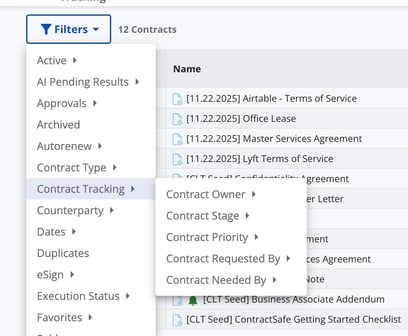
Use it to filter the list by:
-
Contract Owner
-
Contract Stage
-
Contract Priority
-
Contract Requested By
-
Contract Needed By
New Calculated Time Tracking Fields
Building on the new contract lifecycle system fields, we've also introduced a set of powerful calculated time-tracking columns. These are visible only on the Contract List and are designed to automatically measure the duration a contract spent in specific processing stages. This functionality provides valuable insight into the efficiency of your workflow.
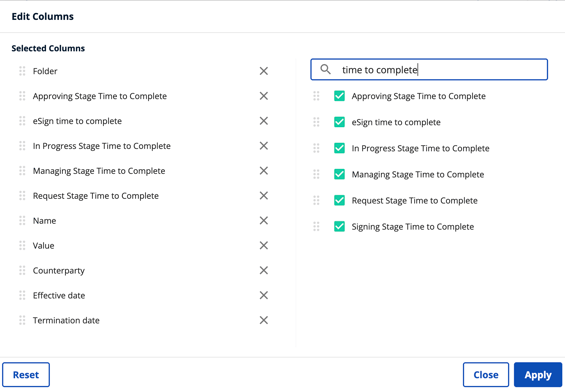
These columns work by calculating the total time (duration) from the precise moment a contract enters a specific stage until the moment it successfully leaves that stage (i.e., is completed). Look for these fields, such as "In Progress Stage Time to Complete," to measure time spent in the Contract Received, In Progress, Approving, Signing, and Managing stages.
- Contract Received Stage Time to Complete
- In Progress Stage Time to Complete
- Approving Stage Time to Complete
- Signing Stage Time to Complete
- Managing Stage Time to Complete
Note: These calculated fields are strictly for viewing on the Contract List and cannot be added to forms or templates.
Contract Tracking Workspace
The Contract Tracking Workspace provides detailed analytics for a single contract. It’s an ideal view for the requester of the contract, showing its current status and how long it's spent in each stage.
When you access the workspace, the tiles at the top will offer key performance insights. You'll either see the total amount of time that has elapsed since the contract was received, or the total amount of time it took to fully execute the agreement.
Similar to the calculated columns on the Contract List, the workspace also breaks down how long the contract spent in a particular stage. However, please note that the Managing and Terminated stages do not display here. If a contract transitioned between two stages multiple times (for example, moving back and forth from "In Progress" to "Approving"), the value shown in the stage tile is an aggregate calculation, summing up all the time spent in that stage across those transitions.
For the most granular detail, a detailed activity log is available, showing exactly how long the contract spent in each individual contract stage transition.
Pipeline View (For the Legal Team)
The Pipeline View is specifically crafted to help the legal team efficiently process and prioritize contracts. It acts as your primary queue for all agreements moving through the process. You can easily access this powerful tool by clicking the tracking link in the top navigation bar.
What You See in the Pipeline
This view concentrates only on contracts before the Managing stage. By focusing on the critical processing phases, it helps your team keep track of what needs immediate attention. The view includes contracts in the following active stages: Contract Received, In Progress, Approving, and Signing.
When you first load the Pipeline View, the system automatically filters the list to display your contracts, ensuring you see your personal workload immediately. However, you are always just a click away from seeing the full team workload—simply use the Contract Owner drop-down to view all contracts.
For security and relevance, the list adheres strictly to your permissions; only contracts you have access to will be displayed. If you need to dive deeper into any item, clicking on the contract name will take you directly to the detailed Contract Page.
Note: Anyone except "Intake and Templates Only" users can access the Pipeline View. They will see information tailored to their permissions such as folders access and access by tags.
Analytics View Strategic Insights for Leadership
This view provides a high-level, comprehensive look at data across all contracts. This is essential for Admins or Owners to identify bottlenecks, track volume, and make data-driven business decisions.
This view is specifically designed to provide strategic value to organizational leadership. For Admins or Owners, this powerful dashboard is instrumental in helping them quickly achieve three key objectives:
-
Identify Bottlenecks: Pinpoint exactly where processes are slowing down.
-
Show Volume: Track the workload and capacity over time.
-
Drive Decisions: Make more data-driven business decisions based on overall efficiency and throughput.
Access Requirement: For security and control, this vital view can only be accessed by Admins.
Metrics Glossary
For detailed information on the precise formulas and logic used to calculate the time for each of these columns, please refer to the dedicated Contract Lifecycle Tracking Metrics Glossary.
For further inquiries, please reach out to support@contractsafe.com