
This feature is on Maximize only. We strongly recommend meeting with your Customer Success Manager before turning on this feature.
Turn it on
To start, go to Settings > AI and Workflow Options and toggle on Contract Lifecycle Tracking.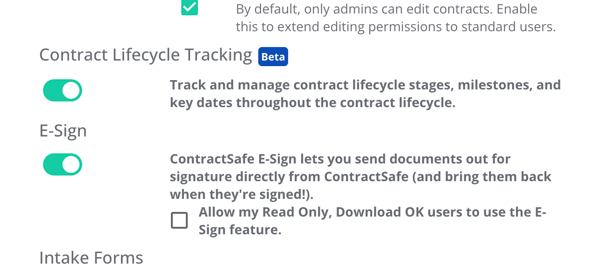
With that done, you'll find:
- Workspace view on the contract page: View analytics for a single contract. See what stage the contract is in and how long it’s been in each stage. This is a great view for the requester of the contract.
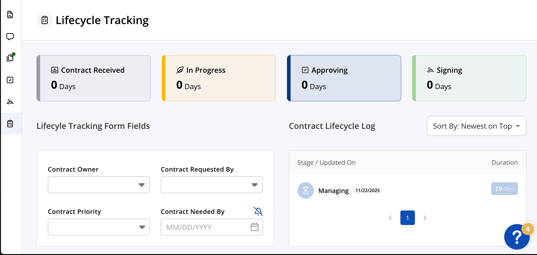
- Tracking page in the header: Clicking the new link will show 2 options.
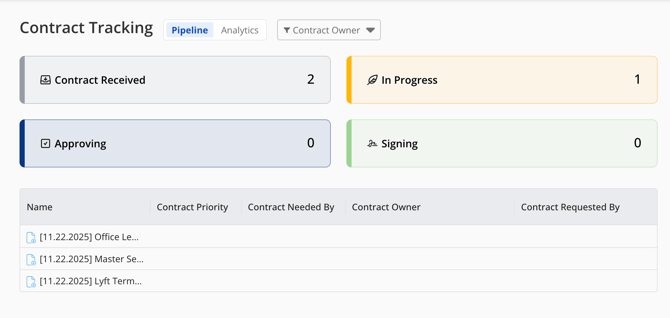
- Pipeline view: For the legal team processing contracts, the pipeline view shows all active contracts before the manage stage. This helps them quickly view what contracts need to be prioritized and which ones they are the owners of.
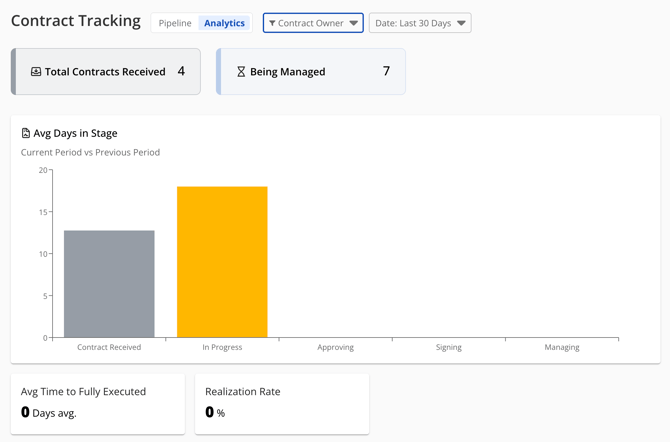
- Analytics view: This gives you a high level view of data across all contracts. For admins or owners, this will help identify bottlenecks, show volume, and help them make more data driven business decisions.
- Pipeline view: For the legal team processing contracts, the pipeline view shows all active contracts before the manage stage. This helps them quickly view what contracts need to be prioritized and which ones they are the owners of.
For a closer look, see this in-depth webinar for Admins on setting up this feature and how to use it here.
You can also check out the following articles:
For further inquiries, please reach out to support@contractsafe.com