
You may recognize one of these guides from an email we sent; we send them to all new users. As noted in the guides, the first thing you’ll want to do is set up your password and log into your ContractSafe account.
You received an email invitation from us to create a user account. Click on the link in this email to set your password. For security reasons, invitation emails expire after 24 hours. If your invitation expired, please ask your account administrator to re-send you the invitation. If you are an admin, email Support to have the invite be re-sent.
- Quick Start Guide for Admin users
- Quick Start Guide for new users
- Quick Start Guide for read-only users
Live Training Webinars
Account Setup for Administrative Users Only
This is a live and interactive (30 - 35 min) session. This is a presentation and review of the key features and areas of your account needed for a successful setup. This session is meant for users with Account Owner, Administrator and Department Admin roles.
Outline:
- Introduction
- Support
- Organization Information
- Filename
- Download All
- Folders & Tags
- Users
- Security & Integrations
- Custom Fields & Forms
- AI & Workflow Options
- Closing
If you prefer to watch a previously recorded training session at your own convenience, please click here.
ContractSafe 101 for All Users
This is a live and interactive (35-40 min) session. We will present the functionality, features and areas of your ContractSafe account, along with some best practices and tips and tricks. This sessions is meant for all level users.
Outline:
- Introduction
- Quick Hitters
- Searching
- Uploading
- Support
- Dashboard
- Folders Dropdown
- Key Dates
- Recent Activity
- Views
- Approval Shortcut
- Contracts List
- Views
- Filtering
- Reporting
- Bulk Action
- Contract Page
- AI
- Annotations
- Forms
- Reminders
- Autorenewal
- Related Documents
- Tagging
- Approvals
- E-Sign
- Sending Documents
- Other
- Closing
Every Wednesday at 10:00 a.m. Pacific Time (12:oo p.m. CST/1:00 p.m. EST) Register here
If you prefer to watch a previously recorded training session at your own convenience, please click here.One-on-One Sessions
Your subscription is partnered with a Customer Success Manager to help you get the most value out of your account. Your CSM can provide you with consulting and focused training. To book time with your designated Customer Success Manager, use the links below.
If you are not sure who your designated customer success manager is, you may log in to your account, click on the blue question mark icon and see your CSM under "Contact your CSM"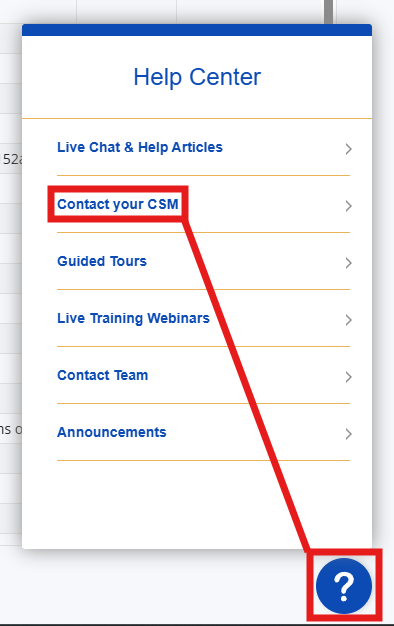
You may also reach out to support@contractsafe.com and a member of our support team will happily connect you with your CSM.