
ContractSafe provides live webinars, recorded sessions, role-based quick-start guides, training videos, and one-on-one Customer Success Manager support. Use this guide to choose the right starting point for administrative setup, everyday contract management, advanced features, or read-only access.
Table of contents
Choose a training path
Use the option that best matches what you need to accomplish:
- You are setting up an account or administering configuration: attend Account Setup for Administrative Users.
- You are a new or existing user learning everyday workflows: attend ContractSafe 101 for All Users or start with the New User Quick Start Guide.
- You want advanced feature guidance: attend ContractSafe Advanced Features Training or book focused time with your Customer Success Manager.
- You only need to view contracts: use the Quick Start Guide for Read-Only Users.
All subscriptions include ContractSafe support. You can also review the available plans on the ContractSafe pricing page.
Tip: Write down your top three questions before a live session. Training is most useful when you connect each feature to a workflow your team performs every week.
Live training webinars
Live webinars are interactive sessions with a presenter and time for questions. Registration pages are the source of truth for the current schedule, availability, and joining instructions.
Account Setup for Administrative Users
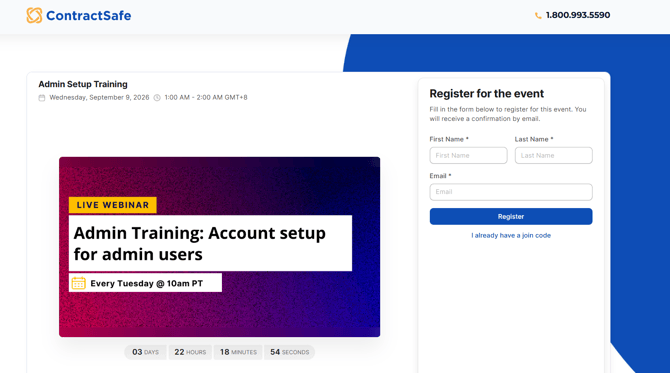
This live, interactive session lasts approximately 30–35 minutes and is designed for Account Owners, Administrators, and Department Admins who are setting up or maintaining an account.
The session covers:
- Introduction and Support
- Organization Information
- Email In address
- File naming
- AI & Workflow Options, including where features are enabled
- Security & Integrations
- Users
- Folders & Tags
- Custom Fields & Forms
- Closing and next steps
The session is listed for Tuesdays at 10:00 a.m. Pacific Time, which is 12:00 p.m. Central Time and 1:00 p.m. Eastern Time. Register for Account Setup for Administrative Users or watch the recorded session if the live time does not work for you.
An Account Owner attends this session before inviting users, creating Folders, enabling AI and workflow options, and configuring Custom Fields & Forms.
ContractSafe 101 for All Users
This live, interactive session lasts approximately 35–40 minutes and is intended for users at all experience levels. It introduces the main workflows and includes practical tips.
The session covers:
- Support, searching, and uploading
- Dashboard: Folders, Key Dates, Recent Activity, Views, and the approval shortcut
- Contracts List: Views, filtering, reporting, and bulk actions
- Contract Page: AI, annotations, forms, reminders, autorenewal, related documents, tagging, approvals, e-signatures, sending documents, and more
The session is listed for Wednesdays at 10:00 a.m. Pacific Time, which is 12:00 p.m. Central Time and 1:00 p.m. Eastern Time. Register for ContractSafe 101 or watch the recorded session.
A new contract reviewer attends ContractSafe 101 to learn how to search, use Views and Filters, review AI suggestions, add reminders, and send documents for approval or signature.
ContractSafe Advanced Features Training
This approximately 40-minute session focuses on advanced capabilities, including Contract Lifecycle Tracking and AI Contract Review. Other topics may include Approvals, Contract Editing, E-Sign, Intake Forms, and Templates. You can register for the next session via this link.
Alternatively, you can watch the recorded Advanced Features Training at any time.
If you or someone from your team were able to register, but failed to attend the session, a recording of the call will be automatically available to you. Simply visit the meeting link sent via your email and it will show the recorded call.
User Guides and recorded resources
Use self-service resources when you want to learn at your own pace or share a specific guide with a teammate:
One-on-one Customer Success Manager sessions
Your subscription is partnered with a Customer Success Manager who can provide consulting and focused training. Use your CSM session for account-specific questions, workflow design, rollout planning, or advanced feature adoption.
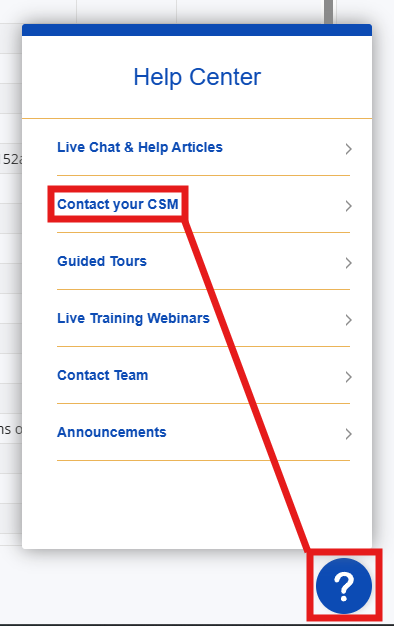
To identify your designated CSM, sign in to ContractSafe, select the blue question-mark icon, and look under Contact your CSM. You can also contact Support and ask to be connected with your CSM.
Current CSM scheduling links listed in the Help Center include:
Important: CSM assignments and booking links may change. If a listed link does not match your account, use the in-app Contact your CSM option or email Support.
Note: If you are not sure who your designated customer success manager is, you may log in to your account, click on the blue question mark icon and see your CSM under "Contact your CSM"
How to get the most from training
- Choose a role-appropriate session before inviting your whole team.
- Bring a sample contract and a short list of workflows you want to improve.
- Ask the presenter to demonstrate the feature using your terminology, such as your Folder names, contract types, or approval steps.
- After training, assign one owner to document the team’s agreed process.
- Use the relevant Help Center article as a follow-up resource and share it with users who missed the session.
Frequently asked questions
Which training should administrative users take?
Start with Account Setup for Administrative Users. It covers the account areas needed for a successful setup, including Users, Folders & Tags, Security & Integrations, AI & Workflow Options, and Custom Fields & Forms.
Which training should standard users take?
ContractSafe 101 for All Users is the best starting point. It covers searching, uploading, the Dashboard, the Contracts List, the Contract Page, approvals, reminders, e-signatures, and related workflows.
Is there training for read-only users?
Yes. Use the Quick Start Guide for read-only users. It focuses on the workflows available to users who primarily view contracts.
Can I watch the webinars later?
Yes. Recorded sessions are linked from the live webinar sections of this article.
How do I find my Customer Success Manager?
Sign in to ContractSafe, select the blue question-mark icon, and open Contact your CSM. You can also email Support for help connecting with your CSM.
Are webinar dates and times permanent?
No. The registration pages are the source of truth for the current schedule, availability, and joining instructions.
Can my CSM provide training tailored to our account?
Yes. Your CSM can provide consulting and focused training based on your workflows, account configuration, and rollout goals.
You may also reach out to [email protected] and a member of our support team will happily connect you with your CSM.