
For example, this convention:
[Contract Type] WITH [Counterparty] EXPIRING [Termination Date]
creates contract names such as:
Non Disclosure Agreement WITH Acme Corporation EXPIRING 12/31/2026
No more guessing how a contract was named, searching for inconsistent titles, or renaming uploaded files by hand!
Where to find Automatic Contract Naming
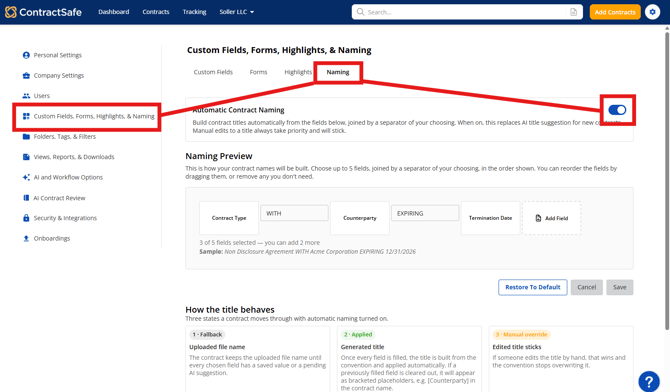
- Go to Settings → Custom Fields, Forms, Highlights, and Naming.
- Open the Naming tab.
- Turn on the Automatic Contract Naming toggle.
Note: Only admins can configure Automatic Contract Naming. The naming convention applies to your entire account.
Set up your naming convention
1. Turn on Automatic Contract Naming
When you turn on the toggle, ContractSafe asks whether you want to apply the naming convention to: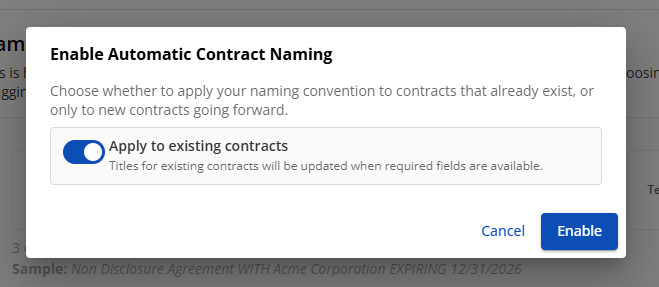
- New contracts only: Existing contracts keep their current names. Contracts added in the future are named automatically.
- All contracts: Existing contracts are renamed to match the new convention as well.
Note: ContractSafe remembers the previous name of each contract, so you can restore those names if you turn Automatic Contract Naming off.
While Automatic Contract Naming is enabled, ContractSafe’s AI title suggestion is not used for new contracts. Your naming convention becomes the source of truth for automatically generated names.
2. Choose the fields to include
You can include up to five fields in your naming convention. Both standard ContractSafe fields and custom fields are available.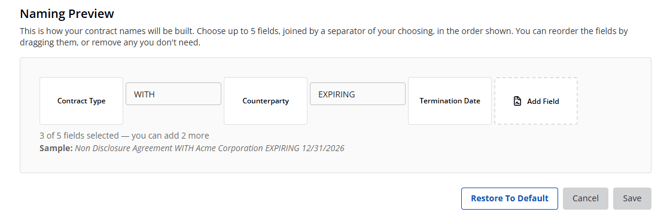
To add and organize fields:
- Click Add Field.
- Search for a field or browse the available fields.
- Select the field you want to add.
- Drag the field cards to change their order.
- Hover over a field card and click ✕ to remove it.
The order of the field cards determines the order of the values in the contract name.
Your naming convention starts with Contract Type, Counterparty, and Termination Date. You can change this configuration at any time.
Note: Ledger fields cannot be used in contract names.
3. Set your separators
A separator is the text that appears between two field values in a contract name.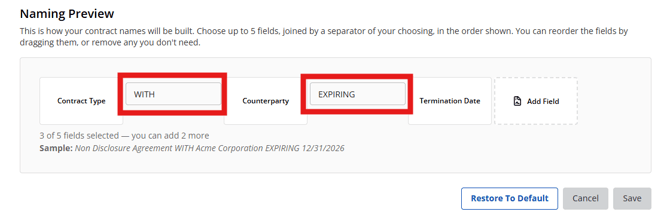
Each separator can be edited independently. You can use:
- A dash, such as
- - A word, such as
WITHorEXPIRING - Any other text up to 20 characters
- A space
Every separator must contain a value. You cannot save a naming convention with an empty separator.
4. Preview and save
As you add, remove, reorder, and edit fields, the Sample line updates to show what your contract names will look like.
For example:
Sample: Non Disclosure Agreement WITH Acme Corporation EXPIRING 12/31/2026
When your convention looks the way you want it to, click Save.
To return to the starting configuration, click Restore To Default.
FAQs and Important Notes
1. New contracts use the uploaded file name until all fields have values
A new contract keeps its uploaded file name until every field included in the naming convention has a value.
Once all required fields have a value, ContractSafe applies the automatic name.
2. Pending AI suggestions can be used in a contract name
Pending AI-suggested values count as field values for Automatic Contract Naming.
This means a contract can receive its automatic name as soon as ContractSafe’s AI suggests values for all fields included in the convention even if those suggestions have not yet been accepted or manually entered.
If a suggested value is later accepted, edited, or cleared, (manually or automatically), the contract name updates automatically.
3. Cleared fields appear as placeholders
If a field used in a contract name is later cleared, ContractSafe displays the field name in brackets as a placeholder.
For example:
Non Disclosure Agreement WITH [Counterparty] EXPIRING 12/31/2026
When the field is filled in again, the contract name updates automatically.
4. Adding fields can create placeholders
If you add a new field to your naming convention, contracts that are already using automatic naming will update to include that field.
If the new field does not have a value on a contract, ContractSafe displays a bracketed placeholder. For example:
Non Disclosure Agreement WITH Acme Corporation EXPIRING 12/31/2026 - [Total Contract Value]
5. Contract names stay in sync with field values
When a field used in a contract name changes, the contract name updates automatically.
6. Can I still rename a contract manually?
Yes. If you manually edit a contract’s name, your manual name takes priority.
Automatic naming stops updating that contract, even if the values of its naming fields change later.
7. What happens if I change my naming convention?
Changes apply to all contracts that are still using automatic naming.
For example, if you add a fourth field to your convention, automatically named contracts update to include that field. A bracketed placeholder appears wherever the new field does not yet have a value.
Contracts that you manually renamed are not affected.
8. What happens if I turn off Automatic Contract Naming?
Contracts that are still using automatic naming return to the names they had before automatic naming was applied.
ContractSafe stores each contract’s previous name. If you had manually named a contract before enabling Automatic Contract Naming, that name is restored. Contracts that were manually renamed after automatic naming was enabled keep their manual names.
9. Does Automatic Contract Naming rename my actual files?
No. Automatic Contract Naming only changes the contract’s name in ContractSafe. Your uploaded documents and file names remain unchanged.
10. Which fields can I use?
You can use any standard or custom field in your account, up to five fields per naming convention.
Ledger fields cannot be used in contract names.
11. I updated a field, but the contract name did not change. Why?
The new name is applied immediately and appears in your contract list.
On the contract page, you may need to refresh the page before the updated name appears in the header.
12. Can two contracts have the same name?
Yes. If two contracts have the same field values, they can receive the same automatic name.
ContractSafe does not add a number to automatically generated names to make them unique. If you want names to remain unique, include fields that distinguish your contracts, such as Counterparty, Effective Date, or Termination Date.
13. Does Automatic Contract Naming affect AI title suggestions?
Yes. While Automatic Contract Naming is enabled, AI title suggestions are turned off for new contracts because your naming convention determines the contract name.
If you turn Automatic Contract Naming off, AI title suggestions resume working as they did before.
AI-suggested field values can still be used in an automatic contract name, including while those suggestions are pending.
14. Do AI-suggested values need to be accepted before they can be used in a name?
No. A pending AI-suggested value can be used in a contract name as soon as ContractSafe’s AI suggests it.
The contract receives an automatic name once every field in the convention has a value, whether that value is pending AI, accepted AI, or entered manually.
If the suggestion is later accepted, edited, or cleared, the contract name updates to match.
15. Can different contracts use different separators or naming conventions?
Not currently.
Your naming convention, including its fields and separators, is configured once for the entire account and applies to every contract using automatic naming.
Please reach out to support@contractsafe.com for further inquiries.