
Use one of our sample playbooks as your starting point, or build your own from scratch. For the fastest setup, see How to create a playbook from a contract in ContractSafe [LINK].
Before you start
- Role: Only Admins can create and edit playbooks.
- Plan: AI Contract Review is available on the Maximize plan.
- Turn it on: Go to Settings > AI Contract Review and switch the toggle to Enabled.
Create a playbook from a sample
Watch the tutorial: Create a playbook from a sample
- In Settings > AI Contract Review, find the Create From Existing option and click Playbook.
- On the Samples tab, select a sample playbook and click Next. To copy one your team already has, use the Your Library tab instead.
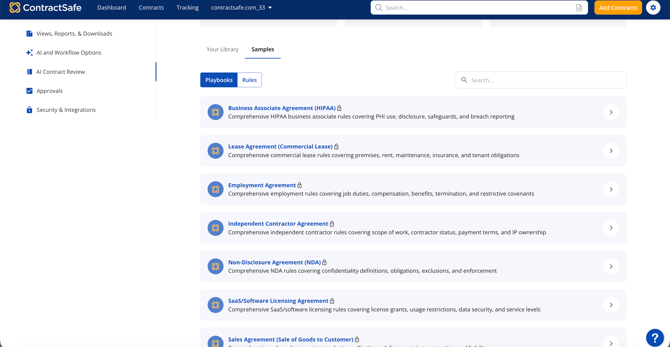
- A copy of the sample is added to Your Library. Open it and click the pencil icon to edit.
- Give the playbook a new name. You can also choose a Contract Type so it’s suggested automatically for those contracts.
- Look through the rules and remove any you don’t need by clicking the X next to them.
- Click Save Playbook.
Create a playbook from scratch
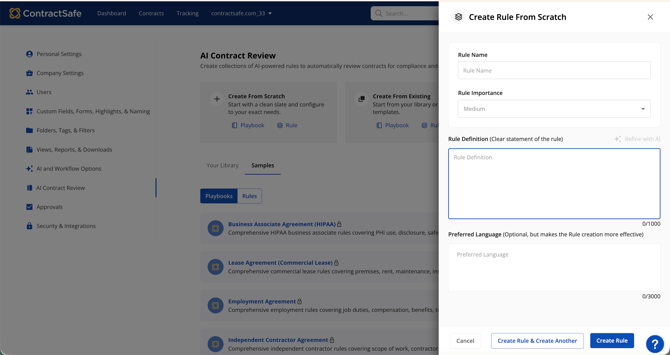
- In Settings > AI Contract Review, find the Create From Scratch option and click Playbook.
- Manually build rules or select individual rules from your Rule Library.
- Give your playbook a name, and choose a Contract Type (optional) so it’s suggested automatically for those contracts.
- Click [CONFIRM: save button label].
You’re set. Your playbook is ready to use on every contract of that type. Next, see How to run an AI Contract Review playbook in ContractSafe.
Notes for creating a playbook
Only Admins can create and edit playbooks.
Copied rules are named “Copy 1 of [rule name].” You can rename them to keep your library tidy.
There is no limit on the number of playbooks you can create.