
You can use the bulk edit feature in ContractSafe to change the My Company or Counterparty name on many contracts at once. Filter the contracts list by the name you want to fix, select those contracts, then choose Edit from the bulk action options and enter the correct name.
Change a My Company or Counterparty name on multiple contracts
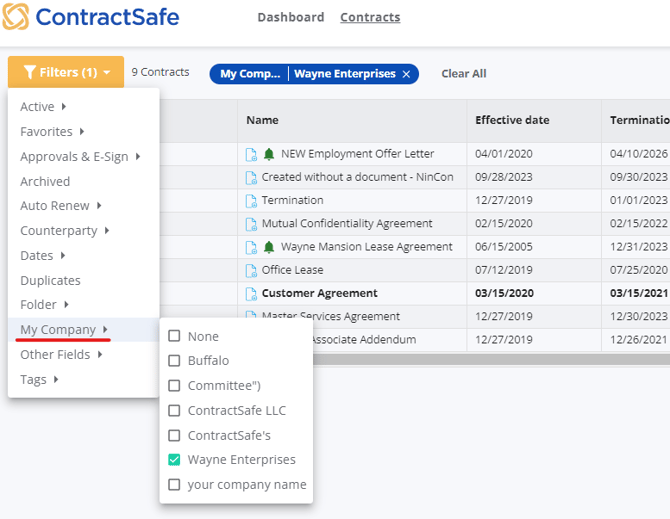
- Filter the contracts list by the incorrect name, or the name you want to remove or change.
- Select the checkbox to the left of each of those documents. In the screenshot below, we're going to change the My Company field.
- Use the bulk action options that appear at the top of the contracts list and select Edit.
- Update the My Company or Counterparty name.
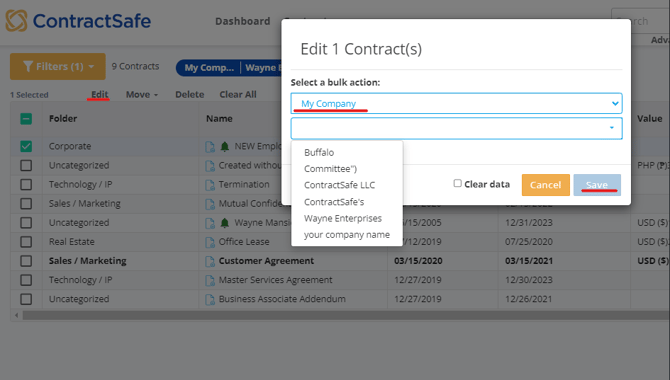
Once you've changed or deleted the incorrect, misspelled or wrong name on all documents, that name deletes itself from your dropdown list.
Related articles
- How to make bulk edits to other contract fields
- How to correct or merge existing My Company and Counterparty names
- How to use Advanced Filters to find the contracts you want to update
If you need further assistance, please reach out to support@contractsafe.com.