
Smart Search lets you find contracts in ContractSafe by typing plain language, like "Show me contracts expiring next month," and AI applies the right filters for you. Keyword searches still work exactly as they always have. Turn it on in Settings > AI and Workflow Options; Smart Search is included on every ContractSafe plan.
While searching for contracts is easy enough, knowing what to search for isn't always so clear. That's why we created Smart Search.
Table of contents
- Smart Search video walkthrough
- Turn on Smart Search
- Search for a contract with Smart Search
- Frequently asked questions about Smart Search
Smart Search video walkthrough
Turn on Smart Search
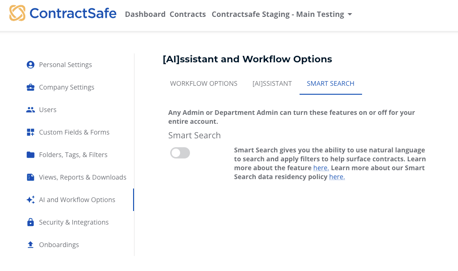
- Go to Settings > AI and Workflow Options.
- Turn on the Smart Search toggle.
Search for a contract with Smart Search
How AI search differs from keyword search
With Smart Search turned on, your search bar now has 3 things it can do:
- Keyword search: If you search a keyword (NDA, counterparty name, etc.), search will work exactly as it always has. You won't see a difference in the results.
- AI search: If you type in a phrase ("Show me contracts expiring next month"), AI will apply filters to find that contract.
- Advanced search: Works the same. Used if you know exactly what you're looking for and what filters you need to apply to get the results.
Run an AI search
To use AI, simply type in a phrase like the ones suggested: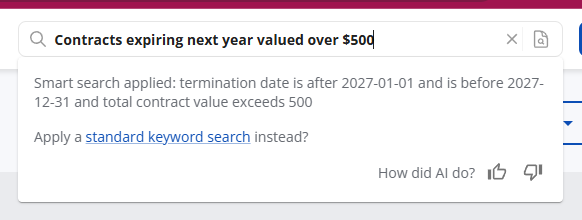
Once your results appear, you'll notice the filters that have been applied as well as what Smart Search ran to apply those filters.

You also have the option to apply a standard keyword search as well.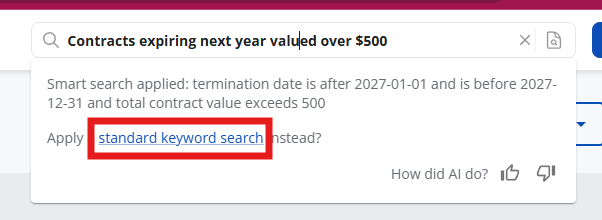
AI-powered search is good at pulling up multiple search parameters at once. Try searching things like:
- "Contracts I signed last year" will find contracts with an Effective Date in the previous calendar year
- "Contracts with counterparty A expiring next year with a deadline to nonrenew date"
Refine your search
Refine your search even further by typing additional information. This time when you search, you can:
- Search all contracts: Start the search over completely with new filters
- Search current filtered contracts: Add on to the filters already applied with additional filters.
Frequently asked questions about Smart Search
How specific do I need to be with my search?
Smart Search will do a good job of taking whatever you include to select the right filters. Of course, the more specific you can be the better.
Do I need to have contract data fields completed to get results?
It definitely helps! Smart Search supports text search, but having your standard and custom contract fields completed will make for better results. [AI]ssistant can extract much of this data for you.
Can I ask questions about the number of contracts containing something?
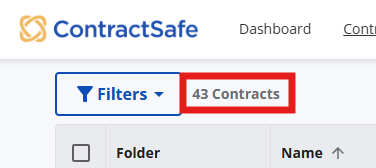
You won't be able to ask directly for "how many" but you can ask for those contracts and look at the contract count at the top of the page.
Can I search by date reminders using natural language search?
Not yet. Since the natural language search relies on translating your prompt into the right filters and there isn't yet a "date reminders" filter, using this new natural language search won't help you filter down your contract list by date reminders. We do plan to add some filter support for date reminders soon and would then support that through the natural language search feature.
Can I ask it to give me a list of all agreements that have the Tag "Assignment"?
Yes, you can! You'll even be able to say something like "Show me all contracts with the "Assignment" tag that are in the Vendor folder", and other such combinations. Learn more about how Tags work.
Do we use customer data to train the AI models?
No. Your confidential contract data is never used to train AI models. For more information about OpenAI's policy, see OpenAI's enterprise privacy statement, or read our ContractSafe AI FAQs.
Learn more about ContractSafe contract search.
For further inquiries, please reach out to support@contractsafe.com.