


A contract approval workflow is the routed path a contract follows from intake through review, approval, signature handoff, and storage, with each stop assigned to a specific person based on rules like dollar value, contract type, and whether the terms are standard.
Done well, it swaps out the email chain nobody can reconstruct later for an ordered sequence you can actually inspect. The teams who live with these workflows every day, in legal, finance, procurement, and operations, rarely need extra configuration that does not improve routing, evidence, or ownership.
What they need is one that finds the right contract, tells them the truth about what’s in it, and points them at the next thing to do. That’s the bar any approval workflow has to clear before it’s worth paying for.
Picture the pass in a busy restaurant kitchen. Tickets come in off the floor, and one person, the expediter, decides where each one goes. The simple orders fly straight to a station. The complicated ones get a second look before anything leaves.
Nothing goes out the door until it clears the pass, and anyone can glance at the rail and see what’s cooking and who’s holding it up.
That’s what a contract approval workflow is supposed to be. Your intake is the ticket, your approvers are the stations, and your routing rules are the expediter deciding who touches what.
When it works, a deal moves without anyone shouting across the room. When it doesn’t, contracts cool on the rail and someone eventually plates the wrong order.
Here’s the thing though: most approvals don’t die in legal review. They die when a request gets dropped somewhere between the person who needs a sign-off and the person who can grant it.
So before you buy or configure an approval workflow, make sure it can route, escalate, and close every request instead of letting them stall in someone’s inbox. ContractSafe's automated contract approvals are built to that standard, starting from structured contract request forms so nothing arrives half-filled.
Key Takeaways
- A contract approval workflow only earns its keep when requests reach the right reviewers and leave a traceable approval history. During a demo, ask the vendor to prove any threshold, exception, or rerouting behavior your process requires instead of assuming those advanced controls are included.
- Map your approval rules before you shop, because software can’t route on logic you haven’t written down.
- Set thresholds by scenario, not by a magic universal number, so a routine renewal and a first-time vendor never take the same path.
- Test the workflow with your own messy contracts during the demo, not the vendor’s tidy sample.
- Your audit trail should answer who approved what version, when, and why, without anyone opening a sent folder.
Choose your next step:
Building the rules from scratch? Start with the approval rules to map.
Comparing vendors this quarter? Jump to the demo tests to run.
Just need something to copy? Grab the workflow template near the end.
What the numbers are really warning you about
Two industry benchmarks are worth keeping in front of you while you shop, because each one maps to a specific decision your approval workflow either makes well or fumbles.
Value leakage is the money that quietly slips out of contracts you already signed. The WorldCC contract value leakage benchmark estimates that poor contract management can erode about 9% of annual revenue or value.
Missed dates and unowned deadlines are buyer tests, not the benchmark’s sole causal finding. That makes the operating gap something you can shop for. Bring a contract that auto-renewed on you, or one where a discount lapsed, and ask the vendor to show the exact moment the workflow would have caught it. If the tool can only surface the loss after the money is already gone, keep looking.
The WorldCC legal and finance research finds 69% of organizations report a gap between the legal protection written into a contract and the financial value they actually capture. That gap opens at the handoffs: legal signs off on the terms, finance never hears the payment schedule changed, and no single person is on the hook for the number. Ask a vendor to show you the moment a signed contract passes to a named owner with its dollar value and key dates attached. If that handoff is a manual email, the gap is baked in.
The practical takeaway is four things to test with one of your own contracts: does the workflow name the approver, capture why they approved, escalate a request that stalls, and hand the signed contract to a named owner. If the software can’t prove all four with one messy real agreement, it will demo clean and still leak in daily use.
A good approval workflow also needs to make the next action obvious. The requester should know whether the contract is waiting on legal, finance, security, or a business owner. The approver should see the facts that matter without opening three systems.
And the final owner should inherit the signed agreement with the key dates and obligations already visible. That’s the difference between an approval path and a prettier inbox.
1. What Is a Contract Approval Workflow?
A contract approval workflow is the ordered path a contract travels from the moment it enters your world to the moment it’s signed, stored, and set to remind you before it renews. Those stages are intake, review, approval, signature handoff, storage, and reminders.
Each step has an owner, and each handoff fires because a rule said so, not because someone happened to remember to forward an email.
It helps to put this inside the bigger picture. Approval is one stretch of the longer contract lifecycle, the run from a first request through negotiation, signature, and years of renewals. The part you are actually buying is the one that decides who says yes and in what order. So weigh a tool on how well it moves a real contract to the right yes, not on how many lifecycle stages it can name on a slide.
Get that yes wrong and everything downstream, renewal reminders included, inherits the mess.
Now notice what the workflow isn’t doing. It doesn’t do the review itself. What it cares about is making sure the review actually happens, by the right person, before the contract goes out. That distinction is the whole game.
A tool that helps people write better redlines is useful, but the tool that guarantees a redline reaches the right reviewer is the one that keeps a deal from quietly going sideways.
2. The Approval Rules to Map Before You Buy
Here’s the part people skip and then regret. Before you shortlist a single tool, write down the facts that decide where a contract goes.
Software can’t route on rules you haven’t named, and a demo will look magical right up until it meets your real approval logic.
Sequence matters here. Implementing a contract management system, per Thomson Reuters, starts with assessing your current process, naming its shortcomings, pulling in users outside legal such as sales, IT, and finance, and documenting requirements.
Do that first and the routing almost writes itself.
The facts that usually drive the route:
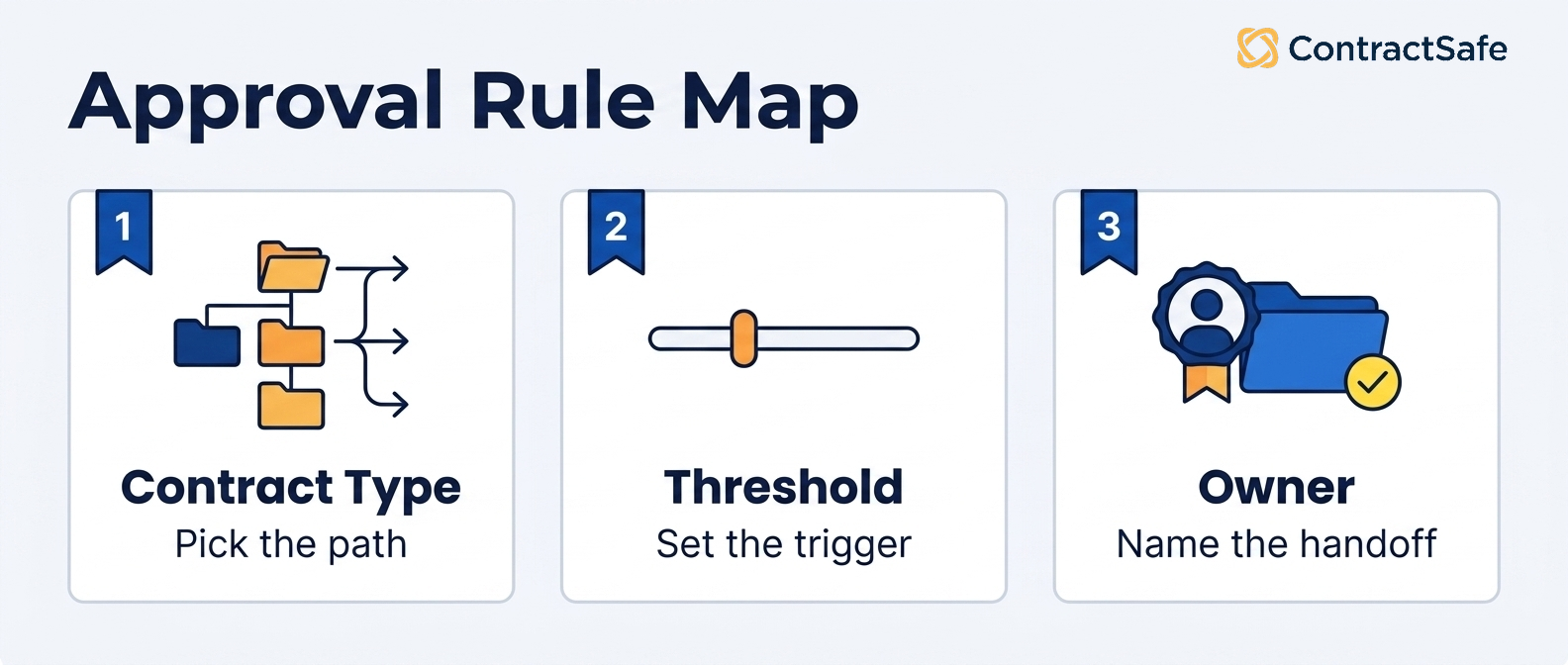
Contract type (NDA, vendor, customer, employment)
Department or business unit
Dollar amount or total contract value
Template status (standard, lightly edited, heavily redlined)
Nonstandard terms (liability, indemnity, auto-renewal)
Data or security review triggers (PII, system access)
Finance or procurement review
The final owner who signs
Write these as if-then sentences. If it’s a standard NDA under no dollar threshold, it goes here. If it’s a vendor deal above your escalation line with edited liability terms, it goes there.
Once those sentences exist on paper, you can hand them to a contract management requirements checklist and test any tool against your reality instead of against a sales pitch.
Decision Check
Run through these before you go any further:
Can you name, right now, who approves a mid-size vendor deal with edited terms? If not, map your rules first.
Does your current process live mostly in email? Assume it relapses there unless the tool makes routing easier than forwarding.
Can anyone reconstruct who approved the last contract you signed? If that took more than a minute, your audit trail is the priority.
Are exceptions handled by one person’s memory? That person is your single point of failure.
3. How Routing Thresholds Should Work
A routing threshold is the rule that says: given these facts about the contract, here’s the door it goes through, and here’s who’s waiting behind it.
The facts pick the path so a tired person doesn’t have to squint at every agreement and decide by feel.
Dollar value is the threshold everyone reaches for first, and it’s the one people get lazy about. A routine, low-cost software renewal and a high-value master services agreement shouldn’t drop into the same inbox with the same urgency.
Set the bands so small spend clears quickly and large spend has to climb a few floors. Just don’t let dollars become the only dial you turn, because plenty of cheap contracts carry expensive risk.
So layer the other triggers on top. Contract type is a threshold; an NDA routes differently than a data processing agreement. Renewal impact is a threshold, since a contract that auto-extends for years deserves a harder look than a short trial.
Risk is a threshold too, covering indemnity caps or anything touching customer data.
And whether someone edited the standard template at all is maybe the most useful trigger of the bunch, because a redlined clause is the whole reason legal exists in the routing.
Vendor or customer type can flip the route as well; a brand-new supplier isn’t the same animal as one you’ve paid for years.
Most of the contract value that leaks away isn’t lost to dramatic failure. It’s lost to small routing decisions made badly a thousand times: the renewal nobody flagged, the auto-extension that snuck through because no threshold caught it.
Thresholds exist so those small decisions get made the same way every time, whether or not the person who usually catches them is at their desk.
When you evaluate contract management software, make the vendor build a real threshold in front of you and then change it. Ask the vendor whether an authorized operations lead can adjust a dollar band or clause rule and what support that change requires.
If every rule change requires the vendor’s professional services team, you don’t have automation. You have a very expensive suggestion box. Good contract workflow automation puts the dials where the people who live in the process can reach them.
4. What the Audit Trail Needs to Show
An audit trail needs to show who requested each contract, who reviewed it, what they decided, which version they saw, when each step happened, and where the signed copy now lives.
A thin trail is worse than none, because it hands you false confidence.
Think about why you trust a package’s tracking number. It isn’t that the box moves. It’s that every scan is recorded, so when something goes sideways you can see exactly where it sat and who touched it.
An audit trail is the tracking history of your approval.
A trail worth the name captures who requested the contract and who reviewed it. It records whether each stop ended in approval or rejection, and when the route itself changed, because a redirected approval is often where accountability quietly evaporates.
It pins down which version was reviewed, since approving an earlier draft and signing a later one is how bad terms wander into signed agreements.
And it stamps the time on all of it, with review comments and any exception notes kept next to the decision they explain, not buried in someone’s inbox.
Then it has to tell you where the signed contract actually lives. This is the step people forget, and it’s the one that matters at renewal.
An audit trail that ends at “approved” and shrugs about storage just hands you one more of those places to lose the document.
It should hand off cleanly into a searchable contract repository where the final PDF and its whole approval history sit together, so the record and the document never drift apart.
None of this is a nice-to-have.
Thomson Reuters lists control and clear oversight of workflows, approvals, documents, and activity reporting among its core contract management best practices for law departments, and being able to see the whole trail is the part that carries the weight.
You aren’t keeping the trail to admire it. You’re keeping it so that long after the deal closes, when someone asks why this vendor got approved above the usual limit, the answer takes a quick search instead of a Friday afternoon.
5. How to Handle Exceptions Without Losing the Thread
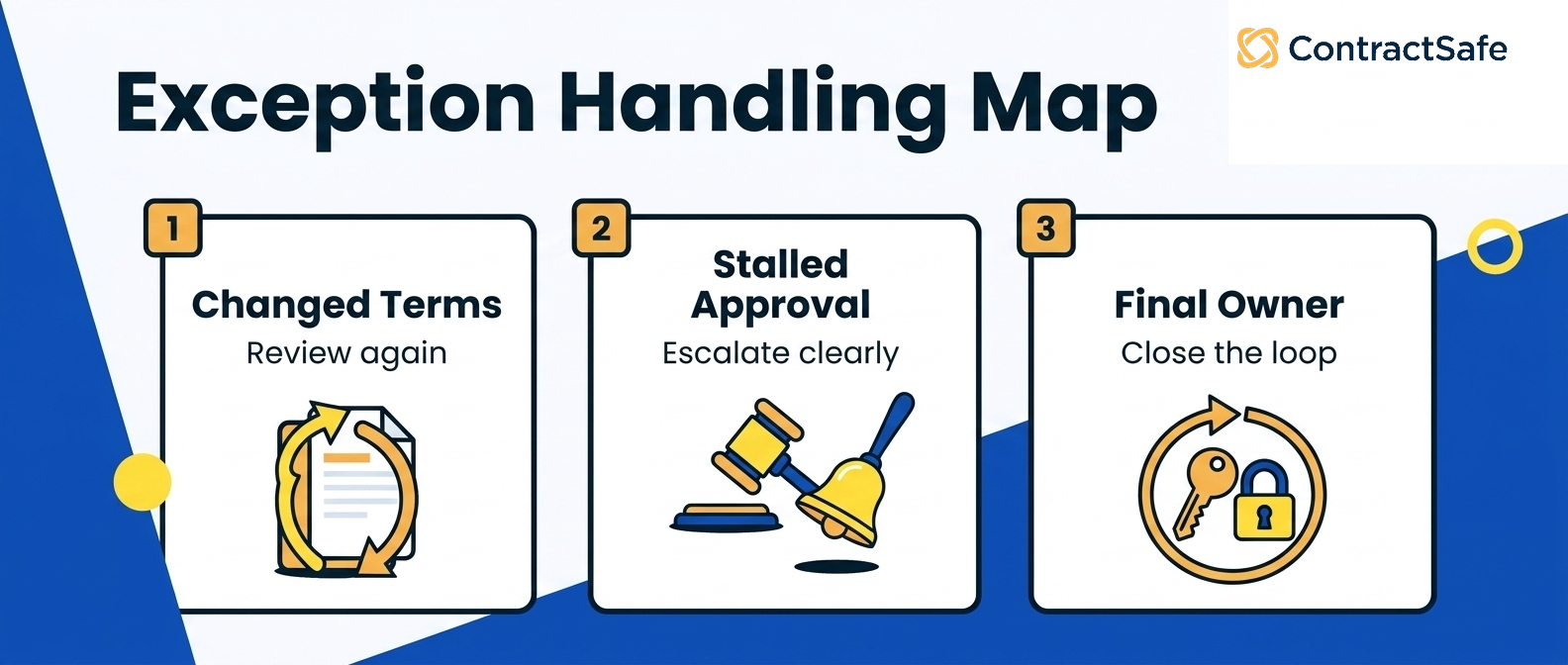
Handle exceptions without losing the thread by re-reviewing any contract that changes after approval, escalating a stalled request to a named backup, and assigning a final owner at every handoff. Every routing system gets judged by how it handles the pile off to the side, the edge cases, not the clean ones that were never the problem.
Your contract approval workflow will look great until the first contract does something weird, and then you find out whether you built a process or just a happy path.
Handle the three exceptions that break workflows most often, in this order:
Re-review after changes. If a contract gets edited after it was approved, the approval resets to the point where the change happened instead of sailing through on yesterday’s yes. Skipping that’s how a renegotiated price or a widened indemnity slips past the very people the routing was built to protect. The rule is boring and it doesn’t bend: a material change means the relevant approver looks again.
Escalation on stalls. Approvals don’t fail loudly, they fail by sitting. The workflow needs a clock, a nudge, and a next name. If an approver goes quiet for a defined window, the request should escalate to a backup instead of dying in a vacation auto-reply. And when a genuinely urgent deal has to jump the normal route, that exception gets logged as an exception, with a reason, not smuggled through as if it were routine.
A named owner at handoff. Whoever requested the contract is rarely the person who owns it after signature, and the moment of transfer is where things fall through. Name the final owner in the workflow itself so the exception ends with a person, not a question mark.
6. The Software Demo Tests to Run Before You Choose
Run seven tests, and run them with your own contracts, not the vendor’s clean sample: route a standard NDA, route a high-value vendor deal into finance and security, change a threshold live, send a contract back as an exception, pull a full approval history, show the storage handoff, and set a renewal reminder.
Vendors demo with a clean sample and a happy path. You should demo with your messiest agreement and a few rules from the list above. Bring real documents. If they only let you watch, that’s information too.
Tools have improved through 2026, but “it can do that” and “show me it doing that with my contract” are different sentences.
Seven tests worth running in any contract management software demo:
Route a standard NDA and watch it move without manual forwarding.
Route a high-value vendor agreement and confirm it pulls in finance and security.
Change a routing threshold live and see whether the path updates.
Send a contract back as an exception and watch where it lands.
Pull up the full approval history for one contract.
Show the handoff into the contract repository once it’s signed.
Set a renewal reminder and generate a simple report.
Watch for specific pass signals, not head nods. On the NDA, the contract should land in the right place with zero manual forwarding. On the high-value deal, the real test is why finance and security appear. If the salesperson has to type their names, the routing is a manual habit dressed up as automation. What you want is a rule you wrote pulling them in, so change that rule in front of the vendor and watch a different team join the route.
When you change a threshold, ask the vendor to demonstrate how an in-flight contract is handled and whether support is required. The exception should land somewhere visible with a logged reason attached. The approval history should read as one record: who, what version, when, and where the signed copy sits now. And the renewal reminder should fire against a date the tool pulled off the contract itself, not one you keyed in by hand.
If any of those needs a services engagement or a “we’ll follow up,” treat it as a maybe, not a yes. You can pressure-test all seven in a single ContractSafe demo using a contract you actually recognize.
7. Who Owns the Workflow Once It Goes Live
Decide who owns your contract approval workflow before you buy or sign anything, because a workflow with nobody’s name on it slides back to email within a quarter. Give one person, usually in legal operations, ownership of threshold and clause-rule changes, then document when vendor support is required. Give a backup the same access so one vacation can’t freeze every change.
Then decide the rollout order, because switching every contract type over at once is how a launch stalls. Start with your highest-volume, lowest-risk type, usually the mutual NDA, and prove the routing holds for two weeks before you move up to vendor agreements and the high-value deals that carry real risk. That order lets the team learn the tool on contracts where a wrong turn costs almost nothing.
Put a couple of short reviews on the calendar for the first few months after launch. At each one, pull the report of what stalled, who it stalled on, and which exceptions got logged. If the same approver keeps holding things up, that is a staffing or backup problem, not a software one. If the same contract type keeps tripping exceptions, your threshold for that type is probably set wrong, so move the band and watch it again.
The buyer’s move here is simple. Before the first contract renews on you, get it in writing who holds the rules, who backs them up, and how a threshold gets changed. If the answer is open a ticket with us, you are renting a workflow you can’t steer, and the first urgent deal will route straight around it.
8. A Practical Contract Approval Workflow Template
A practical contract approval workflow template is a single table that maps each contract type to its threshold, its owner, who must sign off, the escalation rule, the evidence required, and the final approver.
You don’t need a long policy document; you need something you can fill in and hand to whoever configures the tool.
| Contract type | Threshold | Owner | Legal review | Finance/Procurement review | Security/Privacy review | Escalation rule | Required evidence | Final approval owner |
|---|---|---|---|---|---|---|---|---|
| Mutual NDA | Any value, standard template | Deal owner | Auto-approve if unedited | Not required | Not required | No response, ping team lead | Signed template, counterparty name | Deal owner |
| SaaS vendor, mid-size | Up to a set annual figure | Procurement | Required if nonstandard terms | Procurement sign-off | Data review if PII involved | Stalled, route to procurement lead | Order form, security questionnaire | Procurement lead |
| Vendor agreement, high value | Above your escalation line | Legal ops | Full read required | Finance approval | Security review required | Any block, escalate to GC and CFO | Redlines, risk memo, budget approval | General counsel |
Notice the thresholds are written as scenarios, not universal numbers. Your escalation line is yours to set. The point is simple: a routine renewal and a first-time vendor with system access should never take the same path through the pass.
Related Reading
Contract workflow guide, for a wider look at how intake, review, and signature connect once approvals are running.
Contract management requirements checklist, for a scoring list to hold vendors against before you commit.
ContractSafe pricing, when you’re ready to see how the approval features map to a plan.
How ContractSafe Helps With Contract Approval Workflows
Use a ContractSafe demo to confirm the approval, threshold, exception, extraction, and change-management behaviors your process requires.
ContractSafe helps your team find any clause in a searchable repository; set permissions, reminders, and practical approval workflows; and keep clear reporting and activity records, with AI-assisted extraction your people confirm.
The failure mode this whole article is fighting is the slow collapse back into email.
A team buys a tool, routes a few contracts, and then one urgent deal jumps the process, then another, and within a quarter the “workflow” is a group thread with three people cc’d and nobody sure who has the ball.
ContractSafe is built to make the routed path the easy path, so the exception stays an exception instead of quietly becoming the norm.
ContractSafe anchors all of this in a searchable contract repository where every signed agreement and its approval history sit in one place you can actually search.
So when someone asks where a contract landed or who approved it above the usual threshold, you’re reading the activity record instead of reconstructing the story from inboxes.
Permissions and reminders keep the routing honest between the big moments.
ContractSafe shows each approver the agreements they’re responsible for and not the ones they aren’t, and its renewal reminders fire before an auto-extension does, so the threshold you set actually gets a chance to work.
AI-assisted extraction can present the dollar value, term, and renewal date for human confirmation. Buyers should separately verify which confirmed fields can drive approval rules.
Reporting turns that same data into the month’s short list of what needs a decision, so nothing waits on someone remembering to look.
ContractSafe’s approval workflow keeps the requester, the approvers, and the final owner attached to a single record, so the handoff we just talked about ends with a name instead of a question mark.
If you want to watch it route a real agreement, the fastest path is a ContractSafe demo with one of your own contracts in hand.








.svg)







.svg)




