html

ContractSafe Beats Docusign CLM in Every Category That Matters

Easier to use. Faster to implement. A fraction of the cost. See why teams prefer ContractSafe.

ContractSafe 179 reviews
Docusign CLM 126 reviews
Overall
4.8
4.5
Ease of Use
4.9
4.5
Support
4.9
4.4
Value
4.8
4.3
Functionality
4.6
4.5
Likelihood to Recommend
9.5
7.9
Source: Capterra.com; April 25, 2026
throughline-grey

Higher-Rated than Docusign CLM. Easier to Use. Easier to Afford

Docusign CLM reviewers consistently flag three issues: a steep learning curve, pricing that climbs with every user and a UI that feels dated. ContractSafe solves all three: intuitive onboarding in hours, affordable pricing with unlimited users on every plan, and a modern, clean interface customers rate 4.9/5 on Capterra.

Many reviewers expect Docusign CLM to work like the eSignature tool they already know. It doesn't. The two systems aren't even connected. You’re expected to manually upload signed contracts from eSignature to CLM. If you’re evaluating Docusign CLM, here’s how ContractSafe compares once the brand name fades.

ContractSafe starting price

The Real Cost Behind the Brand Name

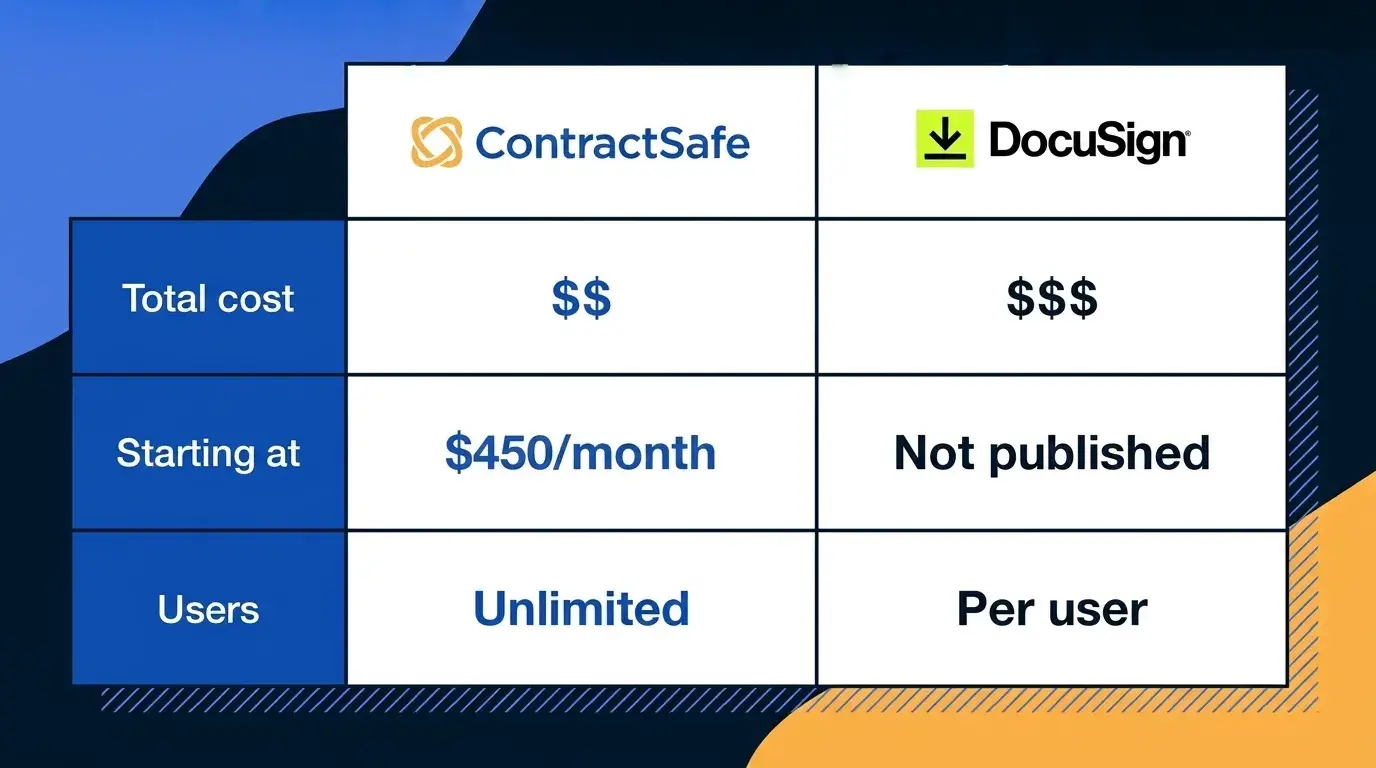
ContractSafe costs a fraction of Docusign CLM. Plans start at $450/month with a dedicated Customer Success Manager and free onboarding included. All plans include unlimited users, so adding teammates never inflates your bill. And every price is published on our site. No sales call required.

Docusign CLM doesn't publish pricing, but Capterra reports SMB buyers average around $150 per user, per month. Every new hire adds to the bill, and the Value for Money gap on Capterra (4.8 vs 4.3) tells you how reviewers feel about what they're paying.

What ContractSafe users say

"I chose ContractSafe because it offered the best balance of simplicity, functionality, and value".

esignhowto-gif

E-Signatures, Built In

ContractSafe e-signatures are truly unlimited - no envelope caps, no overage fees, no counting how many you've sent. You get the full signing toolkit too: automated reminders to chase down stragglers, signing order controls, and status tracking so you know where a contract stands. Already on Docusign? Our eSignature integrations lets your team keep signing where they sign today.

Docusign CLM comes from the company synonymous with e-signatures, but reviewers flag two recurring frustrations. Pricing scales with envelope volume, so the more you send, the more you pay. And there are no automated reminders, which means chasing down signers becomes manual work.

What ContractSafe users say

ContractSafe has been a wonderful system to use on a daily basis. The platform is intuitive and easy to navigate, making the entire process smooth and stress-free. Uploading, reviewing, and signing documents is seamless and every contract is organized and accessible

AI Contract Answers Without Enterprise CLM Weight

Docusign CLM has advanced AI through Iris and a broad agreement-management platform. ContractSafe wins for teams that want contract answers without that enterprise layer. Ask AI what a contract says, use Smart Search to find documents by plain-English questions, and review extracted key terms before accepting them. You can still use Docusign for signatures while ContractSafe handles the repository.

ContractSafe AI field extraction with confidence scores and review controls
What real users are saying
favicon-blue
ContractSafe

The OCR recognition coupled with full text search is a top feature. The AI module continues to learn and becomes more and more accurate over time, which saves time with initial load and setup of documents,

docusign-clm-favicon
Docusign CLM

We were promised certain features in Docusign CLM that were ultimately not delivered. For example, the ability to tag contracts and search contracts by those tags. This essentially makes Docusign CLM useless as we cannot search our document repository in any meaningful way.

contract-upload-1259x768px

Implementation: Hours vs Months

ContractSafe is built to be self-service from the first login. Import your contracts, organize them into folders, set your custom fields and alerts and your repository is live. There is no implementation project, no coding requirement, and no dependency on a third-party partner. A dedicated Customer Success Manager is included on every plan.

Docusign CLM implementations typically run three to six months for enterprise deployments. The platform requires technical configuration, and G2's review themes include "steep learning curve", "complex setup", and "time-consuming"


What real users are saying
favicon-blue
ContractSafe

Getting up and running happened in days, not weeks or months like some systems.

docusign-clm-favicon
DocusignCLM

Implementation was difficult for us. The system needs to have a technical product expert / coding expert in place to develop. Our reliance upon DocuSign's team based our of Ireland, who are good but not cheap.

Track Deadlines Before They Become Emergencies

ContractSafe delivers renewal and expiration alerts by email, not buried inside a dashboard you have to remember to check. Set alerts for any date field at any interval, route them to any stakeholder and they recur automatically.

DocuSign CLM offers obligation management and renewal tracking, but the eSignature/CLM disconnect creates a blind spot. Contracts signed in DocuSign eSignature have to be manually uploaded to the CLM before they can be tracked for renewals. Any contract that falls through the cracks during that handoff never gets a renewal alert. And even for contracts that are in the system, reviewers note that reporting capabilities are limited.

date reminder screen shots
What real users are saying
favicon-blue
ContractSafe

The reminders for expiration & renewal are particularly valuable for risk management. We can edit contracts or tie our addendums to the contract folder for future reference. Customer support is responsive, friendly and very helpful.

docusign-clm-favicon
DocuSign CLM

[Deployment and user onboarding has gone smoothly], however, reporting capabilities are limited.

What Happens When You Need a Person, Not a Portal

ContractSafe includes a dedicated Customer Success Manager on every plan at no extra cost. Not a premium tier, not a paid add-on, not a knowledge base article. A named person who knows your account and picks up when you call. Capterra reviewers rate the support experience 4.9 out of 5.

What ContractSafe users say: “ContractSafe developers were highly skilled, responsive, and reliable throughout our startup process.”
Capterra Verified Review

DocuSign CLM operates at enterprise scale, which means enterprise support structures: tiered plans, knowledge bases, implementation partners. For mid-market teams that need a quick answer from someone who knows their account, that model can feel like it’s built for a different customer. And reviewers have discovered that the DocuSign brand doesn’t guarantee the systems work together.

What DocuSign CLM users say: “DocuSign CLM support team was not helpful. And for those of you thinking that DocuSign CLM will be a natural extension of DocuSign eSignature, unfortunately no, the two systems are not connected at all.”
Software Advice Verified Review

Quote Block_3 Quotes on Support

  • gold star gold star gold star gold star gold star
    "I've explored other solutions and found them to be expensive and cumbersome. We were so happy when we found ContractSafe."
    Elizabeth Kruis
    Associate General Counsel, Corporate, California Pizza Kitchen
  • gold star gold star gold star gold star gold star
    "We did demos with several different companies before deciding to go with ContractSafe. For the functionality that is provided, the price is great. Plus, you get unlimited users, while most of the other platforms charge per user...They've been great to work with."
    Trent M., General Counsel

ContractSafe vs Docusign CLM: Feature Comparison

Features ContractSafe DocuSign CLM
How pricing scales Plans start at $450/month with unlimited users on every tier Capterra reports SMB buyers average ~$150 per user per month; every hire raises the bill
eSignature and CLM connection Native e-signatures built into the same platform; no manual handoff eSignature and CLM are separate systems; signed contracts must be manually uploaded into the CLM
Chasing signatures Automated reminders nudge signers; status tracking shows where things stand No automated reminders; teams chase outstanding signers manually
Implementation timeline Up and running in under an hour, no IT project required Three to six months typical; reviewers cite need for technical product or coding expertise
Renewal notifications Email alerts on any date field, customizable interval, sent to anyone you choose Limited reporting and obligation tracking; signed contracts that never make it to CLM never trigger renewal alerts
Customer support model Named CSM on every plan, picks up when you call Reviewers describe support as enterprise-tiered; quick answers can be hard to come by
AI assistance AI chat inside contracts, Smart Search, reviewable field and key-term extraction, no customer-data LLM training, and AI included in every plan Advanced Iris AI inside a larger enterprise agreement-management platform
icon_line_dots person_testimonial

“I couldn't believe we were already up and running in just 30 mins

icon_yellow_quotes
  • sirius-xm-logo
  • Dollar-Shave-Club-logo
  • TED-logo
  • United-Express-logo
  • The-University-of-Arizona-logo
  • j2Global-logo
  • payscale-logo
  • Living-Spaces-logo
  • Jam-City-logo
  • McClatchy-logo
  • SFMOMA-logo
  • Sacred-Heart-logo
  • california-pizza-kitchen-logo
icon-line-dots

Contract relief is waiting.

Gain control of your contracts today. Take the first steps in just a few minutes.

Request a Demo