



html

ContractSafe vs. Gatekeeper

ContractSafe is the CLM that is Easier to use and a Better Value

ContractSafe 179 reviews
Gatekeeper 80 reviews
Overall
4.8
4.7
Ease of Use
4.9
4.6
Support
4.9
4.8
Value
4.8
4.6
Functionality
4.6
4.4
Likelihood to Recommend
9.5
8.5
Source: Capterra.com; May 14, 2026
throughline-grey

Contract management is secondary to vendor management in Gatekeeper’s DNA. Drafting and negotiation aren’t native. Data extraction and reporting require manual work.

Additional modules for spend management and compliance are expensive add-ons, and custom development requests go through a community Ideas Forum where they need votes to be prioritized, which means they may never ship.

Here’s how ContractSafe compares for teams whose primary job is managing contracts.

Pricing - ContractSafe vs Gatekeeper

Transparent Pricing vs. Module Math

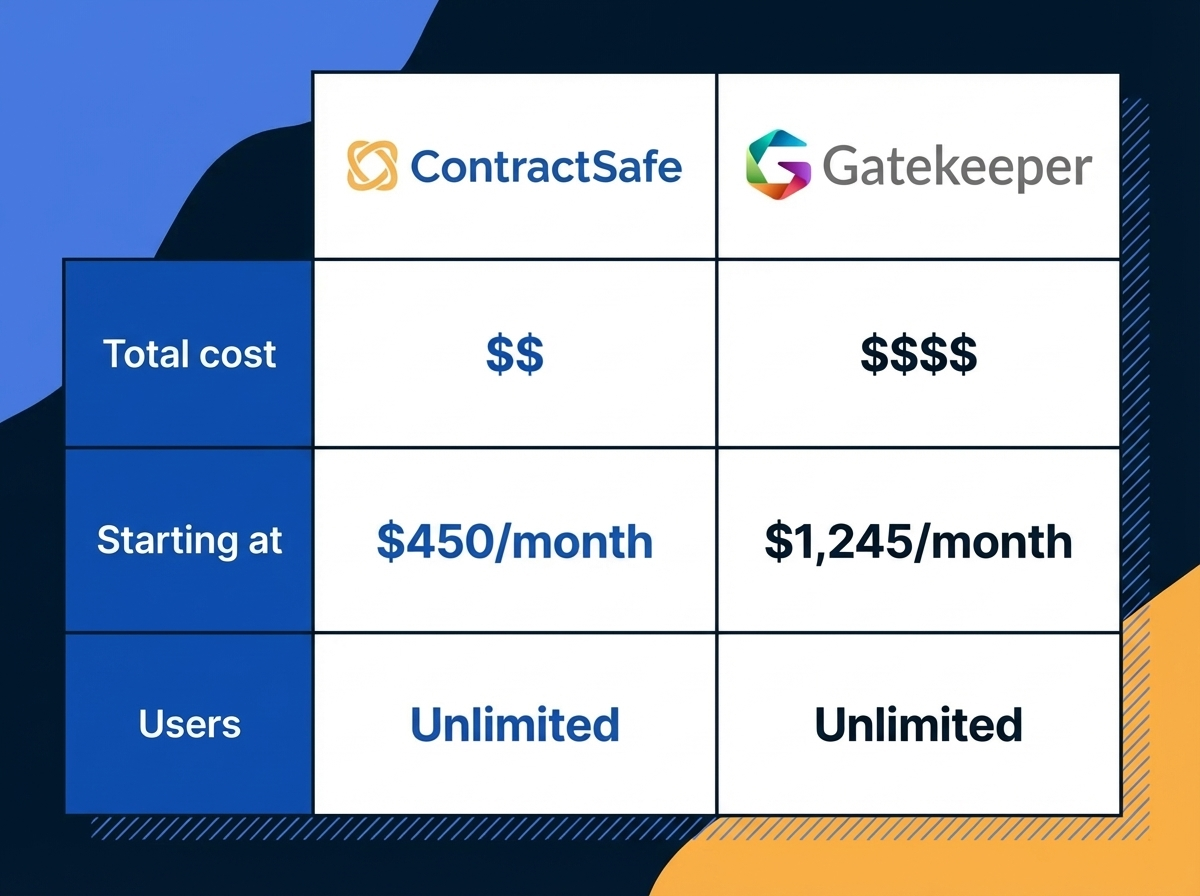
ContractSafe charges by contract volume, not by the user or the module. Plans start at $450/month with unlimited users included. You see every tier on the website without a sales call, and there are no add-on fees for e-signatures, compliance tracking, or reporting.

What ContractSafe users say: “I like the charge metric model. I’m not licensed based on users or logins, but rather the number of contracts under storage.”
G2 Verified Review

Gatekeeper does not publish pricing. Third-party estimates suggest per-user costs of $50–$100/month, scaling with user count and modules. The base platform covers vendor and contract management, but additional modules for spend management and compliance add to the bill. G2 reviewers flag “High Fees” and “Expensive” as recurring negative themes.

What Gatekeeper users say: “The additional modules are quite expensive. Some custom developments cannot be made unless voted for in the Ideas Forum, which means they may never be available.”
G2 Verified Review

One Platform From Request to Signature

ContractSafe handles the full contract lifecycle without requiring you to leave the platform. Intake forms capture the request, templates populate the terms, approval workflows route the review, and contracts get signed with built-in e-signatures or through the two-way DocuSign integration. No switching to Word for redlining. No toggling between systems to get a signature.

What ContractSafe users say: “What stands out most about ContractSafe is its exceptional ease of use and intuitive document management interface. We needed a solution that could be seamlessly implemented across our organization and easily adopted by all users. ContractSafe delivered exactly that.”
Capterra Verified Review

Gatekeeper offers contract templates and a clause library, but drafting and negotiation aren’t native. The platform relies on Microsoft Word for redlining and editing, which means users move between systems to get a contract from draft to signature. Reviewers have noted that even simple workflow changes require touching multiple sections of the system.

What Gatekeeper users say: “Lots of fiddly changes spread out throughout the system. Adding a group to a workflow requires actions in lots of different sections.”
Software Advice Verified Review

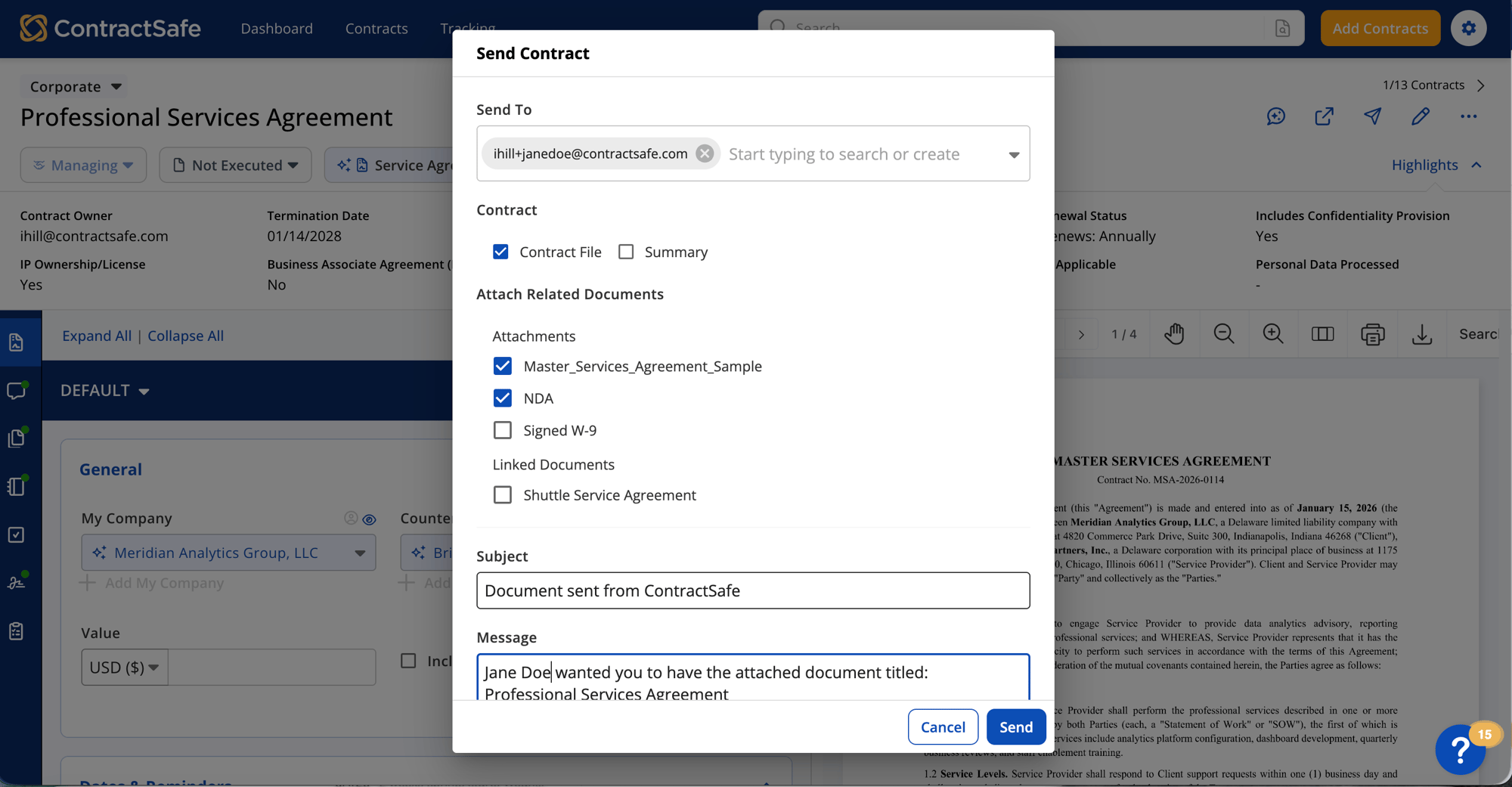
Document View
ContractSafe AI field extraction with confidence scores and review controls

Contract AI Without Vendor-Risk Sprawl

Gatekeeper's AI is tied to a larger vendor, risk, compliance, and spend management platform. ContractSafe keeps AI centered on the contract itself. Ask questions in plain English, extract key fields and terms, and search every uploaded document without first adopting a third-party risk operating model.

Operational in Days, Not Weeks

ContractSafe is designed so that most teams are managing contracts the same week they sign up. Import your contracts, set up your folders and custom fields, configure your alerts, and your repository is live. No technical configuration, no workflow designer learning curve.

What ContractSafe users say: “My experience with ContractSafe has been very positive. I’ve had productive meetings with my account representative, uploaded and organized my contracts, and am now finishing the setup process.”
Capterra Verified Review

Gatekeeper’s implementation is more involved. G2’s review summary notes that initial setup can be complex, requiring additional support. Reviewers describe a customization process with a steep learning curve that demands significant time investment from the customer’s side.

What Gatekeeper users say: “The customization’s dark side is that it can take some time and commitment to learning how to create workflows and manage the custom data.”
Software Advice Verified Review

Signature Certificate
Deadline tracking

Renewal Visibility Without a Workaround

ContractSafe sends automated email alerts for any date you track: expiration, renewal, notice deadline, payment milestone. Alerts go to whichever stakeholders you choose, at whatever intervals make sense, and they persist through renewals without requiring manual resets. Reporting on upcoming dates is built in, not an add-on.

What ContractSafe users say: “Before using ContractSafe, I would miss contract expiration dates and get trapped into another contract through auto renewal.”
Software Advice Verified Review

Gatekeeper offers renewal alerts and contract tracking. But reviewers consistently flag the reporting module as too basic to give teams a clear picture of what’s coming due. If you need to pull specific data about upcoming renewals, expirations, or spend commitments, you may find yourself integrating a separate tool to get the visibility Gatekeeper doesn’t provide on its own.

What Gatekeeper users say: “Reporting feature is very basic. We will have to integrate with another tool to pull data from Gatekeeper.”
G2 Verified Review

When You Need a Feature, Not a Vote

ContractSafe assigns a dedicated Customer Success Manager to every account on every plan. Capterra reviewers rate the support experience 4.9 out of 5. Product enhancements ship continuously, and your CSM proactively reaches out to make sure your team is getting value from the platform.

What ContractSafe users say: “Our Customer Success Manager consistently does an excellent job checking in to ensure everything is running smoothly and to address any questions or concerns we may have.”
Capterra Verified Review

Gatekeeper’s support team scores 4.8 on Capterra, close to ContractSafe. But when your team needs a feature the platform doesn’t have, the path forward is the community Ideas Forum, where feature requests need votes to be prioritized. Popular requests still take time; unpopular ones may never ship. For teams whose needs don’t align with the majority, that’s a roadblock with no workaround.

What Gatekeeper users say: “[It] did not connect to our ERP so it was then difficult to connect contract to actual spend. We would have continued with the tooling were it not for our new ERP having contract functionalities.”
Gartner Peer Insights Review

Quote Block_3 Quotes on Support

  • gold star gold star gold star gold star gold star
    "I've explored other solutions and found them to be expensive and cumbersome. We were so happy when we found ContractSafe."
    Elizabeth Kruis
    Associate General Counsel, Corporate, California Pizza Kitchen
  • gold star gold star gold star gold star gold star
    "We did demos with several different companies before deciding to go with ContractSafe. For the functionality that is provided, the price is great. Plus, you get unlimited users, while most of the other platforms charge per user...They've been great to work with."
    Trent M., General Counsel

ContractSafe vs Gatekeeper: Feature Comparison

Features ContractSafe Gatekeeper
Pricing model Charged by contract volume; unlimited users on every plan; every tier published Per-user model in the $50 to $100 range per third-party estimates; G2 reviewers flag “High Fees” and “Expensive” as recurring negative themes
Drafting & negotiation Built into the platform: intake forms, templates, approvals, and e-signatures end to end Drafting and negotiation aren’t native; reviewers describe relying on Microsoft Word and toggling between systems to get to signature
Workflow configuration One place to add a user, set a workflow, or adjust a permission Reviewers describe fiddly changes spread across the system; adding a group to a workflow touches multiple sections
Reporting visibility Custom reports on any tracked field, scheduled and shared Reviewers describe reporting as basic; teams integrate a separate tool to pull data out in a useful format
Path to new features Continuous platform updates from a dedicated CSM Custom development goes through a community Ideas Forum where requests need votes; unpopular ones may never ship
Capterra score 4.8 Overall, 4.9 Ease of Use, 4.9 Support, 4.8 Value, 4.6 Functionality 4.7 Overall, 4.6 Ease of Use, 4.8 Support, 4.6 Value, 4.4 Functionality
AI assistance AI chat inside contracts, Smart Search, reviewable field and key-term extraction, no customer-data LLM training, and AI included in every plan AI extraction and agents connected to vendor, compliance, and spend workflows
icon_line_dots person_testimonial

“I couldn't believe we were already up and running in just 30 mins

icon_yellow_quotes
  • sirius-xm-logo
  • Dollar-Shave-Club-logo
  • TED-logo
  • United-Express-logo
  • The-University-of-Arizona-logo
  • j2Global-logo
  • payscale-logo
  • Living-Spaces-logo
  • Jam-City-logo
  • McClatchy-logo
  • SFMOMA-logo
  • Sacred-Heart-logo
  • california-pizza-kitchen-logo
icon-line-dots

Contract relief is waiting.

Gain control of your contracts today. Take the first steps in just a few minutes.

Request a Demo