



throughline-grey

Cobblestone is an enterprise CLM with deep configurability and a long feature list. The question is whether your team needs all of it — or whether you'll spend more time configuring the platform than managing your contracts.

If you've been evaluating Cobblestone (or you're stuck mid-implementation wondering when the "easy" part starts), here's how ContractSafe compares on the things that actually matter: getting set up, finding what you need, and not blowing your budget.

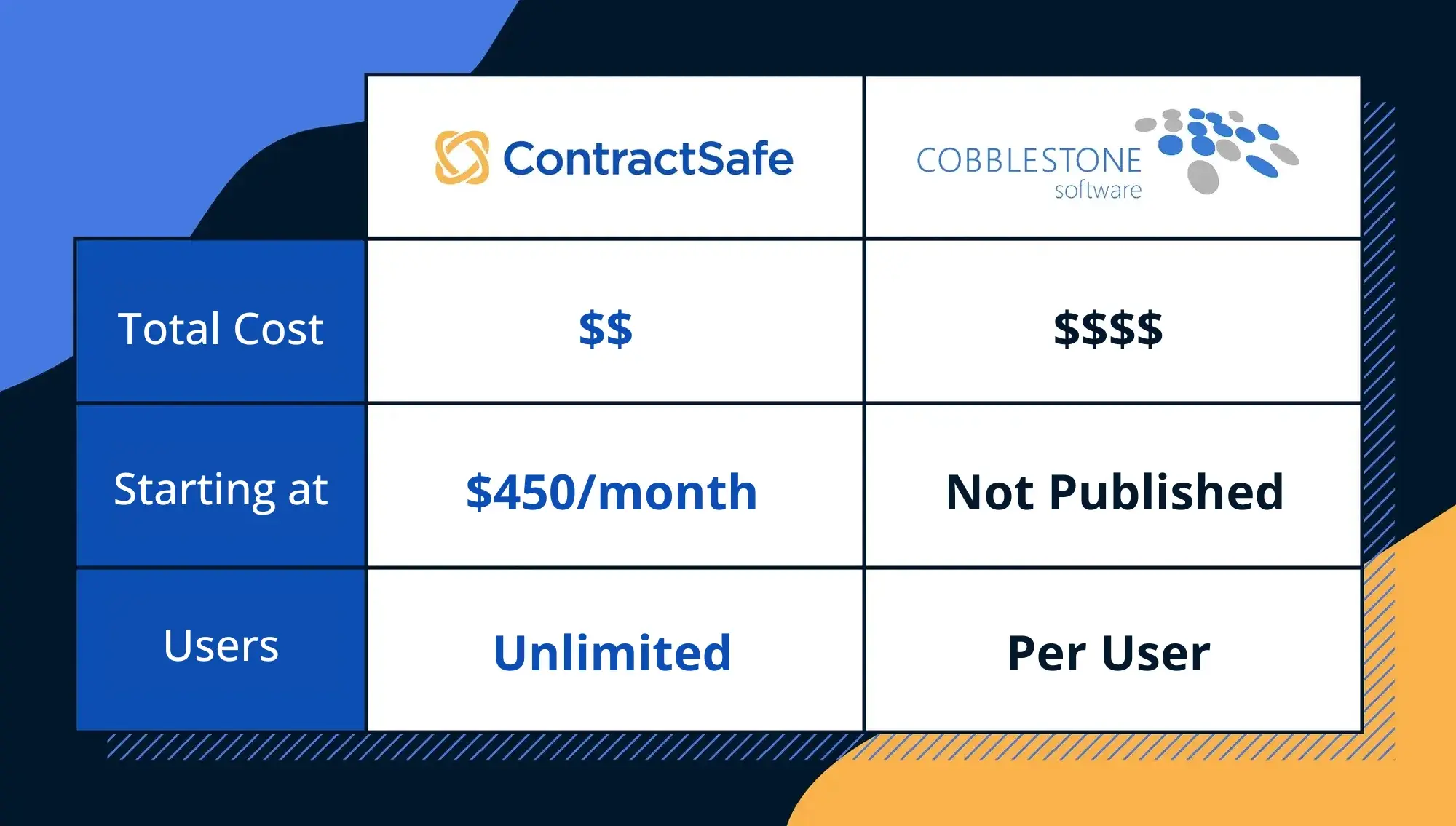
Cobblestone 2026 Compare Page Cost-Users Image

Transparent Pricing vs. “Call Us for a Quote”


ContractSafe
takes the straightforward approach: transparent, tiered pricing based on contract volume. Every plan includes unlimited users (no per-seat fees), free onboarding, and a dedicated Customer Success Manager.

What ContractSafe users say: “Price, unlimited users, and core functionality were the key highlights for ContractSafe.”
Capterra Verified Review

Cobblestone doesn’t publish its pricing. You’ll need to request a custom quote, and the final number depends on which modules you need, how many users you want, and what implementation support is included.

What Cobblestone users say: “One of the main difficulties is the interface, which can be difficult to use. The learning curve for new users can be steep. Additionally, the software can be slow to load, especially when working with larger contract databases, which can hurt productivity.”
Capterra Verified Review

From Signup to Go-Live in Minutes, Not Weeks

ContractSafe customers are typically operational in under an hour. Upload your contracts, let the AI extract key data, and start managing that afternoon. Capterra reviewers rate ContractSafe 4.9 for Ease of Use vs. Cobblestone’s 4.7—and that gap reflects what happens every day after go-live.

What ContractSafe users say: “What I like best about ContractSafe is how easy it was to implement the system and set it up to capture the data we identified to be most important. ContractSafe is user-friendly and offers a number of great features.”
G2 Review via ContractSafe Blog

Cobblestone is built to be deeply configurable, which sounds great on a feature checklist. In practice, that configurability creates a long runway before teams see value. Someone on your team needs to become the Cobblestone expert — and that’s a role that doesn’t go away after implementation.

What Cobblestone users say: “The downside to Cobblestone Contract software is that there are so many configuration options that implementation can be overwhelming if end users are not clear as to what they want as an end result.”
G2 Verified Review

Signature Certificate
UI

A Contract Repository That Works Like Google Drive


ContractSafe’s
AI-powered OCR scans every document you upload and makes the full text instantly searchable. Need to find every contract with a specific clause, a particular vendor, or an auto-renewal date buried on page 12 of an amendment? Type it in the search bar the way you’d search Google.

What ContractSafe users say: “I thought I would really dislike not having a folder structure to organize my contracts, but this tool has Optical Character Recognition just like Google, which means I can search any word or phrase and the contracts pop right up.”
Capterra Verified Review

Cobblestone offers search too, but users report that getting to specific documents can involve more friction than expected.

What Cobblestone users say: “Some of the search functions aren’t as user-friendly as I was expecting. Sometimes, it’s a little trial and error to get good search results.”
Gartner Peer Insights Review

From Draft to Signature... and Beyond

ContractSafe covers the full contract lifecycle: intake forms, templates, approval workflows, Word-based editing with version history, and built-in e-signatures, plus deadline tracking and contract analytics. It's all easy to use, right from day one.

What ContractSafe users say: “We were able to configure approvals, forms, intake, signatures, and reports very easily. ContractSafe is a robust CLM solution and supports key integrations for only a fraction of the price that other vendors charge.”
Capterra Verified Review

Cobblestone offers extensive pre-signature capabilities too, but the depth of configuration required means your team invests significant time before those workflows are production-ready.

What Cobblestone users say: “Seems a bit rigid. Not very user friendly. Contract entry is cumbersome; it can take up to 10 minutes to enter one contract.”
Software Advice Verified Review

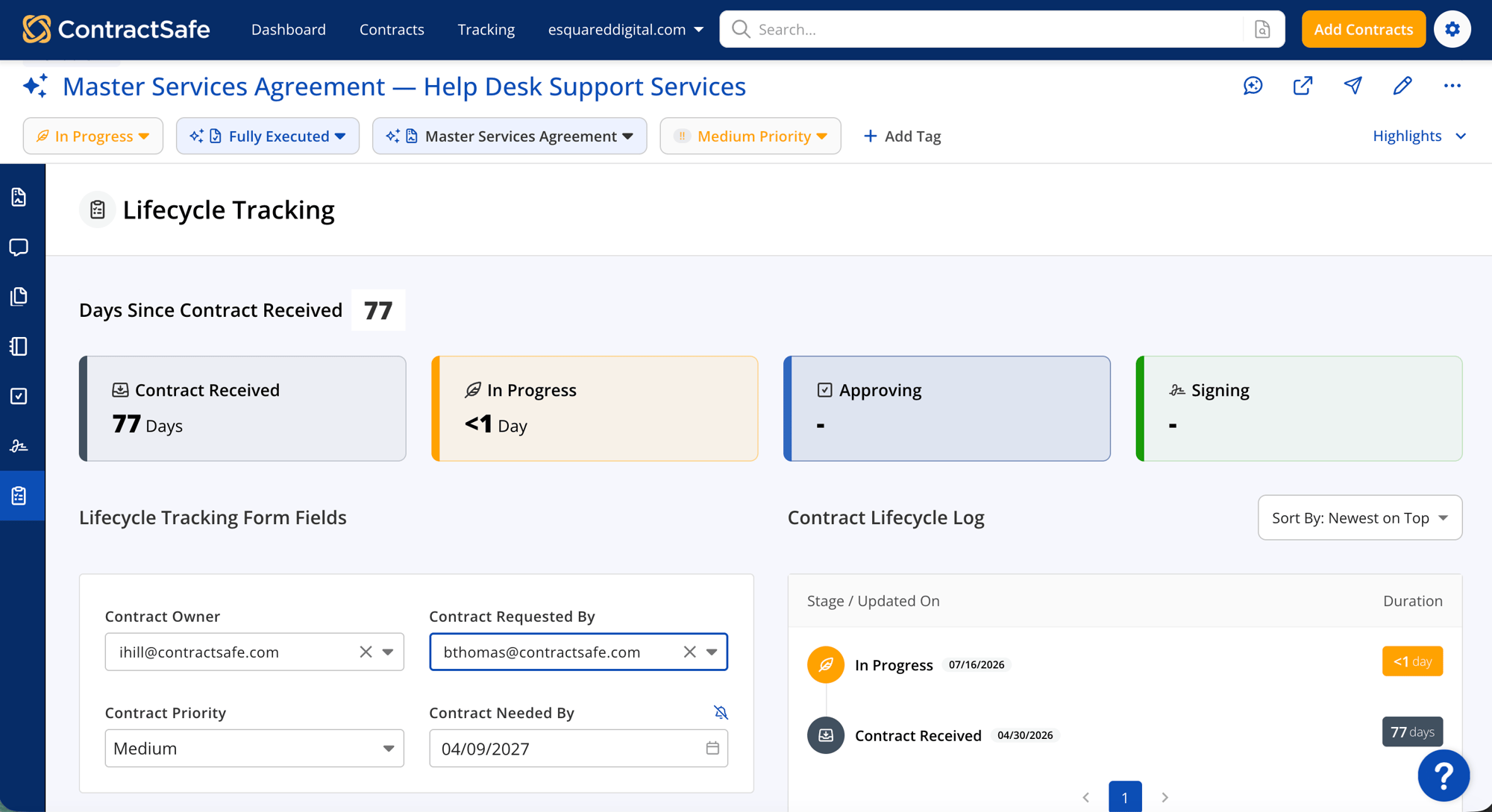
Lifecycle Tracking
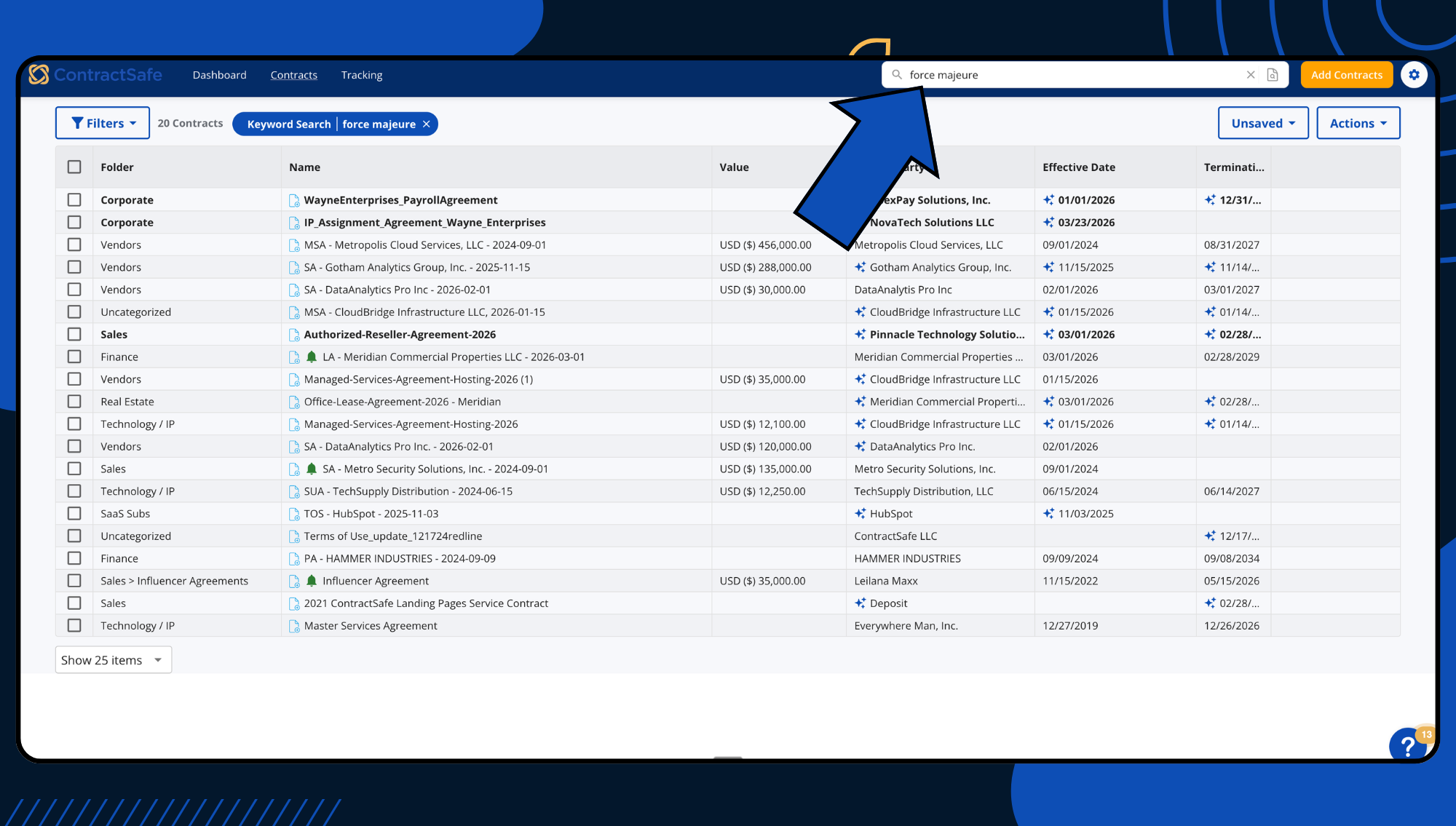
Search results

Find Any Contract In Seconds With OCR Search


Finding a contract shouldn’t require a treasure map. ContractSafe’s AI-powered OCR scans every document you upload and makes the full text instantly searchable. Type it in the search bar, and it’s there.

What ContractSafe users say: “I thought I would really dislike not having a folder structure to organize my contracts, but this tool has Optical Character Recognition (OCR) — just like Google — which means I can search any word or phrase and the contract(s) pop right up. WOW.”
Capterra Verified Review

Cobblestone offers search too, but users report that getting to specific documents can involve more friction than expected.

What Cobblestone users say: “Some of the search functions aren’t as user-friendly as I was expecting. Sometimes, it’s a little trial and error to get good search results.”
Gartner Peer Insights Review

Never Miss a Deadline Again


ContractSafe handles renewal tracking with automated alerts that can be set at any interval, for any date you track, and sent to any stakeholder. Expiration, renewal, deadline-to-nonrenew, payment milestones: you define the triggers and ContractSafe does the rest. 

What ContractSafe users say: “ContractSafe is easy to use, has robust features, and has excellent customer support. Its feature for automated reminders is key for our company, as this helps our Customer Success team every month.”
Capterra Verified Review

Cobblestone offers automated reminders and alerts. But the reporting tools that surface renewal data have room to improve. Reviewers note that deriving useful insights from the data is difficult, and that the analytics features could use improvement.

What Cobblestone users say: “The software can be slow to load, especially when working with larger contract databases, which can hurt productivity. The reporting and analytics features could also use some improvement.”
Capterra Verified Review

Deadline tracking
Quote Block_3 Quotes on Support

Support That Comes Standard

Every ContractSafe customer gets a dedicated Customer Success Manager for the life of their subscription. Not as a paid add-on. Not as a premium perk. Standard. ContractSafe customers routinely mention their CSMs by name in reviews.

What ContractSafe users say: “Being able to speak with a real person, with no tickets or hidden support fees is a HUGE bonus compared to others.”
G2 Verified Review

Cobblestone’s support team gets good marks from reviewers, but the depth of configuration means you’ll need more hand-holding than you’d expect — and the learning investment extends well past initial setup.

What Cobblestone users say: “The initial import of legacy contracts and the setup of custom templates can require more in-depth technical support.”
Capterra Verified Review

  • gold star gold star gold star gold star gold star
    “ContractSafe is an easy-to-use tool that enables you to access all your contracts in a single place. Its reminders feature is very useful when managing a large number of contracts. I highly recommend it for organizations who are moving away from a manual process and are looking for an automated solution for their contract management that is quick and easy to implement and move on.”
    Jeffrey P.
    Director of Logistics Operations

Feature Comparison

Features ContractSafe Cobblestone
Price Transparent, scalable pricing with no surprises Complex pricing structure, potential added costs for larger teams
Ease of Use User-centric design ensures easy navigation and functionality Feature-rich but can be overwhelming, leading to a steeper learning curve
Implementation Quick setup with AI tools and a personal coach for seamless transition More intricate setup with time-consuming manual data entry
Contract Repository Efficient, organized repository with advanced OCR and smart tagging Traditional approach; required more navigation for document retrieval
Customer Support Dedicated support ensuring consistent, inclusive assistance for everyone Premium concierge-style service; additional costs during implementation
icon_line_dots person_testimonial

“I couldn't believe we were already up and running in just 30 mins

icon_yellow_quotes
  • sirius-xm-logo
  • Dollar-Shave-Club-logo
  • TED-logo
  • United-Express-logo
  • The-University-of-Arizona-logo
  • j2Global-logo
  • payscale-logo
  • Living-Spaces-logo
  • Jam-City-logo
  • McClatchy-logo
  • SFMOMA-logo
  • Sacred-Heart-logo
  • california-pizza-kitchen-logo
icon-line-dots

Contract relief is waiting.

Gain control of your contracts today. Take the first steps in just a few minutes.

Request a Demo