


A CLM business case is the evidence-backed argument you bring to finance and legal to justify buying contract lifecycle management software.
This guide builds it piece by piece, using ContractSafe, contract management software that keeps agreements searchable, owned, and on schedule, as the working example.
A strong case names the contract problem costing you today, models first-year and renewal cost, quantifies risk and capacity with your own numbers, and lists the proof questions a vendor must answer before anyone signs off.
Think of it as a legal brief argued before a skeptical panel. That room wants exhibits, not adjectives about saving time. Show what breaks now, what it costs, and what changes after the purchase.
You will leave this guide with a one-page packet you can hand to leadership.
Quick answer: A CLM business case wins approval by proving five things: a contract problem costing money now, a cost model spanning year one and renewal, named risks from your contracts, capacity your team regains, and vendor questions answered with your documents.
Key Takeaways
- A CLM business case wins on evidence, not enthusiasm: current pain, a real cost model, named risks, capacity gains, and vendor proof questions.
- Model both year one and the renewal year, since the second invoice is where “affordable” quietly turns into “why is this so expensive.”
- Quantify risk with your own contract examples like missed renewals, ownerless agreements, and slow answers, not borrowed ROI percentages.
- Turn every vendor claim into a “show me with our contracts” test before approval, not after.
- Walk into the decision meeting with a one-page packet leadership can audit line by line.
Choose your next step:
Need the money math first? Jump to the first-year and renewal cost model.
Tired of glossy demos? Skip to the vendor proof questions.
Just want the deliverable? Go straight to the leadership packet.
What Is A CLM Business Case?
A CLM business case is a short, evidence-backed document that justifies buying contract lifecycle management software. It connects a current contract problem to a defensible cost, named risks, and the capacity your team gains back.
Contract lifecycle management software stores, tracks, and surfaces your agreements across their full life, from signature through renewal, so nothing lapses in a shared folder or an inbox. That full life runs through six recognizable stages, and the business case is stronger when it names which ones are broken.
The business case isn’t a wish list or a demo recap. It’s the argument you make when leadership asks, “Why this, why now, and why pay for it?” A good one answers all three with your contracts as evidence.
Most buying decisions stall not because the software is bad, but because the champion walks in with enthusiasm instead of exhibits. A CLM business case turns “this would help us” into a line-by-line case finance and legal can check.
For example, a missed renewal deadline often traces back to no clear owner watching the contract folder.
What A CLM Business Case Needs To Prove
A CLM business case must prove five things before leadership approves it: a contract problem costing you now, what the software costs across a full cycle, which risks justify acting, what routine work gets lighter, and what evidence backs each claim.
Here’s the shape of the argument you’re building:
| What to prove | What leadership wants to see |
|---|---|
| Current pain | Three to five concrete failures that cost time, money, or control today |
| Cost model | Year-one and renewal numbers, each sourced or labeled as an assumption |
| Risk | Named contract risks tied to your own examples, not benchmarks |
| Capacity | Routine questions the tool takes off legal’s and finance’s plates |
| Proof packet | The evidence you will hand over, auditable line by line |
Start with pain, because that’s your opening exhibit. Skip the abstract “we lack a system” framing and write down what actually went wrong lately. A few show up in almost every messy contract process:
“Where is the signed XYZ agreement?” asked for the third time this week
A renewal that auto-renewed because nobody watched the date
A contract nobody owns, so nobody is accountable when it lapses
A sensitive agreement in a shared folder the wrong people can open
A “how many contracts renew in Q4” question that eats a day of digging
Put a rough cost next to each one using your own rates. If someone bills at a certain hourly figure and loses two hours a week hunting for documents, that’s a number your CFO understands.
Do the same for near-misses. A renewal you almost let lapse is a real dollar figure once you name the contract and the amount at stake.
Don’t reach for an industry stat you can’t defend. Your own examples carry more weight in that room than any survey, and a vendor can’t argue with them.
Start With The Approval Decision
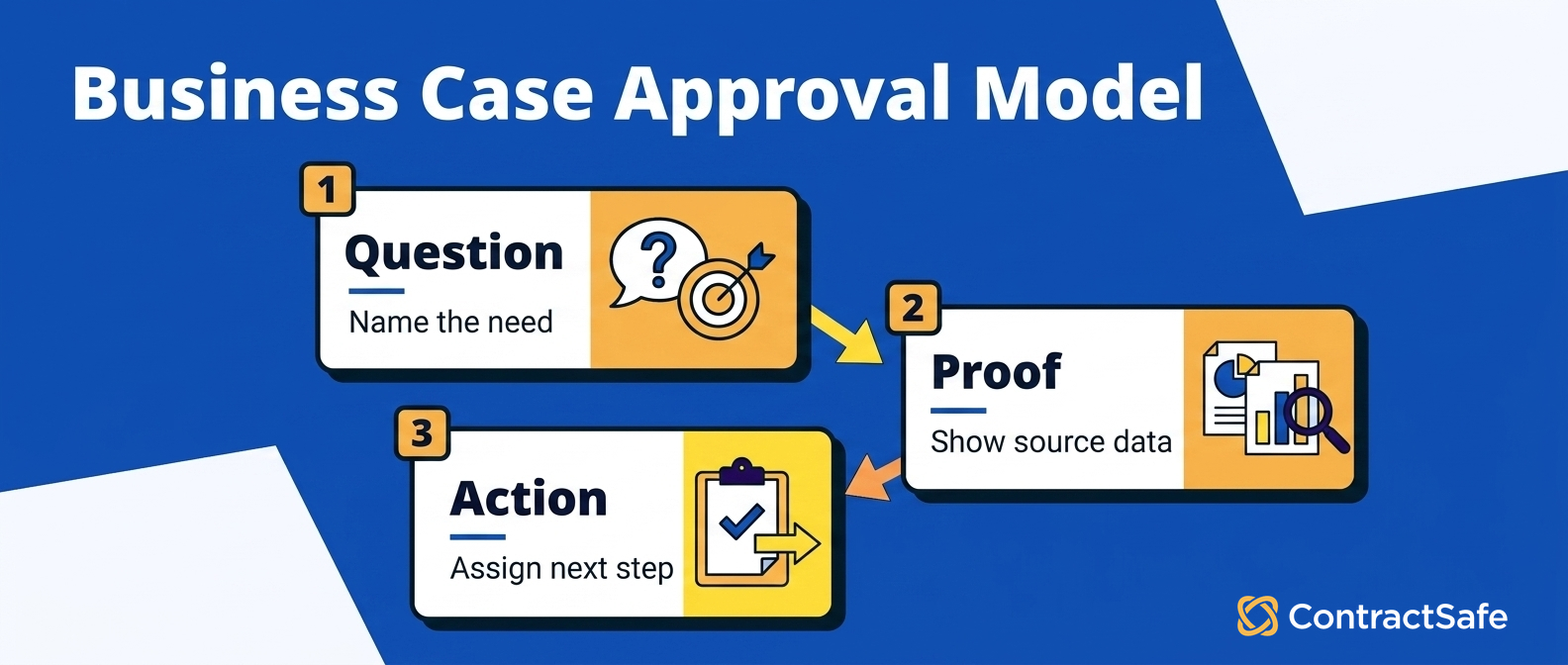
The approval decision is the single yes-or-no question your CLM business case exists to answer. Naming it out loud keeps the whole document aimed at one target.
Before you model a dollar, figure out who signs, what they weigh your ask against, and what a “no” quietly protects.
Write the decision in plain language at the top. Something like: “Do we spend X this year to replace the shared drive and the renewal spreadsheet with contract lifecycle management software, or keep the current setup another year?”
That framing puts a real alternative on the table, and the alternative is almost always the status quo rather than a fancier tool.
It also tells you who the approver is. The person who owns that budget line is who you’re writing for, so use the terms they already use.
Settle these decision units before you draft a single page:
Name the decision. One sentence, at the top, phrased as spend-or-keep so nobody reads it as a vague wish list.
Name the alternative. A “no” isn’t neutral. It votes to keep paying in missed renewals, slow reviews, and the Tuesday scramble to find a signed MSA.
Find the automatic yes. If the approver’s is “show me we stop missing renewals,” you now know which risk to lead with.
Find the automatic no. If it’s “we can’t spare anyone to run it,” that’s your cue to address setup and support head-on.
Contract management isn’t paperwork hygiene. It shapes revenue you keep and money you spend, which is exactly why groups like World Commerce & Contracting treat it as a business discipline rather than a filing chore.
For legal leaders, that matters because CLM helps reduce contract risk, support compliance, and keep the contract process organized, as Thomson Reuters notes in its CLM overview.
Build The First-Year And Renewal Cost Model
The cost model is the full budget behind your request. That means the platform price plus every wrapper cost in year one, with the renewal year on its own line.
Finance wants both, because the second invoice hides seats, overages, and price bumps that turn a clean case awkward.
Build it in four moves. Pull the real platform price, add the wrapper costs, model renewal separately, then mark every line as sourced or an assumption.
Lay it out so leadership can see each line and challenge it:
Start with the live platform price for your contract volume and feature needs.
Add wrapper costs for access, setup, migration, support, modules, integrations, and internal admin.
Model the renewal year separately, including likely increases, added users, and overages.
Mark every line as either sourced or an assumption before finance sees it.
Give the model a real anchor. ContractSafe lists its published pricing up front, so check that page for current plans before you lock the number.
Treat anything a salesperson says but doesn’t put in writing as an assumption.
A case that admits “we estimate migration at X and will confirm in the demo” reads as more trustworthy than one that pretends every cost is nailed down.
When finance wants the full budget model, hand them the contract management software cost guide and walk through it together.
Quantify Risk Without Inventing ROI
Quantifying risk means putting an honest, defensible number on what your current contract chaos costs. No dressing up a guess as a guarantee.
Price the exposure you can point to, then let the reader do the multiplying. The case should read like arithmetic, not a sales pitch.
Here’s where business cases faceplant. Someone finds a splashy “companies lose X percent of revenue to bad contracts” line and multiplies it against total revenue. A sharp CFO smells the borrowed number in seconds.
Do the opposite. Build the risk figure from things sitting in your own files. Pull a few concrete examples and price each one:
The missed auto-renewal. Nobody flagged the notice window, so you paid twelve extra months for a tool you had already decided to drop.
The expired discount. The countersigned copy was buried in an inbox, and the vendor’s price break lapsed before anyone found it.
The recovery hours. Count the time spent reconstructing what a contract said because the current version was nowhere obvious.
Each has a dollar figure or an hourly cost you can source, and each already happened. That isn’t a projection. That’s a receipt.
You confirm each detail in a central, searchable system, because the examples only carry weight when you can pull the actual contract and the date behind them.
See how that lookup works on the contract repository feature page.
Present it as a range with the math showing. Say a missed renewal window costs between one and three months of an average contract’s value, and it happened twice in the last eighteen months. Write that out.
Show the low end, show the high end, and let the reader see every assumption you plugged in.
A range you can walk through beats a single confident number you can’t. When someone tweaks an assumption and the case still holds, they have half-sold themselves.
Resist claiming the software eliminates all of it. It won’t. Good contract lifecycle management software shrinks the odds these things happen and cuts the time to recover when they do.
Frame the reduction as “fewer of these, caught earlier,” not “zero, forever.” Underclaiming a little is how you get believed on everything else.
Show Capacity And Adoption Impact
Capacity impact is the story of what your team gets back when the busywork disappears. Adoption impact is your honest answer to whether people will actually use the thing.
Both belong in the business case, because saved hours mean nothing if the tool sits in a drawer.
Start with capacity, and keep it concrete. Don’t say the software “frees up the team.” Say what it frees them from.
Count the hours somebody spends each week hunting for documents, re-keying dates into a tracking sheet, chasing signatures over email, and answering “where is the current version” for the fifth time.
Total them and translate them into “roughly a day a week back for the contract admin.” Now a soft benefit is something a manager can picture on a calendar.
Then be careful what that capacity buys. Two honest framings exist, and you have to pick the true one:
Headcount you avoid. Saved hours mean you don’t hire the next coordinator. Fair, if it’s really true.
Work you finally do. The same people review risky terms instead of playing librarian. Often the honest version.
A reader who has managed people knows the difference between “we cut a role” and “we stop drowning.” Pretending the second is the first costs you credibility.
Now the part most cases skip and most projects die on. Adoption. A tool nobody opens generates zero of the savings you just modeled, so treat it as a line item.
Your approver remembers the last piece of software that landed with a thud and got worked around within a month. Beat that ghost with specifics:
Name the rollout owner. A person, not a department, accountable for getting contracts loaded.
Define “in use.” Every active contract loaded and every renewal date set within the first sixty days.
Attack friction, not features. Show the daily path is shorter than the shared drive and search takes seconds.
Legal usually owns this, so map the tool to their daily work with a page like legal contract management software and confirm it fits before you commit.
Unlimited seats help more than they sound like they should. When everyone who touches a contract has a login, nobody emails a PDF to the one coworker with access, and the workaround that kills adoption never gets a foothold.
Tie capacity and adoption together and your case answers the two questions that decide it. What do we gain, and will it stick.
Implementation Checklist for the CLM Business Case
A CLM business case implementation checklist is the rollout plan that follows your numbers, showing approvers what happens after the software purchase clears.
It names owners, migration steps, and adoption milestones, so the people who have watched a tool stall can see the buy will actually land.
Give them a checklist that turns the promise into work with owners and finish lines. Keep it to five workstreams, each with a question somebody answers and a clear signal it’s done.
| Workstream | Owner question | Done when |
|---|---|---|
| Inventory | Where do contracts live today? | Every source folder, inbox, and system has an owner |
| Metadata | Which fields are required for action? | Dates, parties, owners, values, renewal terms, and status are defined |
| Permissions | Who can see each record or field? | Sensitive documents are restricted before rollout |
| Alerts and reports | Which decisions should the system support? | Renewal, expiration, and obligation reports are usable |
| Governance | Who keeps the system clean? | Monthly cleanup and quarterly access reviews are assigned |
The table isn’t there to look thorough. It forces a decision on each row before the project starts, because every gap you leave here becomes a stalled rollout later.
Use a shared checklist that lists every owner and due date so nothing slips before the next audit.
Sequence The Work So Nothing Blocks Rollout
These workstreams don’t run at once, and pretending they do is how launch dates slip. Inventory comes first, because you can’t load what you can’t find.
For example, assign each renewal step to one owner with a hard deadline before the compliance audit begins.
Metadata comes next, since the fields you require decide what your reports can answer. Skip it and you get a searchable pile instead of a system that tells you what renews in thirty days.
Permissions has to land before rollout, not after. The moment people see contracts they shouldn’t, you have a problem that’s harder to walk back than to prevent.
Alerts, reports, and governance come online together once the data is in and locked down. That’s the payoff phase, and it should be the shortest if the first three rows were done honestly.
Name Owners, Not Departments
The fastest way to kill this checklist is to write “Legal” in the owner column and move on. Departments don’t do work. People do.
Every row needs a name and a date. “Someone will handle inventory” means nobody will, and the project quietly reverts to the shared drive it was supposed to replace.
For example, name a backup owner so every renewal alert reaches someone even when the primary contact is away.
Governance is the row teams skip, and it decides whether the system still works a year out. Assign the monthly cleanup to a person and put the quarterly access review on a real calendar.
A repository nobody tends fills with duplicates and stale permissions until people stop trusting it. A tool people don’t trust is a tool people work around.
Decision Check
Before leadership approves the request, confirm three things: the rollout owner has a name, the first useful report is defined, and the vendor can show setup, migration, support, and pricing with your contracts.
Turn Vendor Promises Into Proof Questions
Vendor promises are marketing until you make them prove it with your contracts. Every glossy claim, whether fast setup, powerful search, tight security, or painless migration, should become a question the vendor answers live.
That’s how you keep a demo from turning into a magic show with staged sample data. Rewrite the big claims into tests:
“Powerful search” becomes: find a specific clause in one of our scanned PDFs by typing, not scrolling.
“Easy tracking” becomes: pull up a contract and show the renewal date and named owner on one screen.
“Enterprise security” becomes: give one person access to a confidential agreement and keep everyone else out.
“Simple onboarding” becomes: walk us through who cleans up and imports our messy legacy files, and how long it takes.
“Great support” becomes: tell us in writing what is included after go-live versus what costs extra.
Run The Five-Contract Proof Test
Bring five of your own contracts to any demo and see if the vendor can, right there:
Find a specific term by searching, not by clicking through folders.
Show the renewal date and the accountable owner together.
Restrict a sensitive agreement to the right people and prove the block holds.
Pull a renewal or expiration report you would actually hand your boss.
Put year-one and renewal pricing in writing before you leave.
If a vendor dodges any of these or asks to “follow up offline,” that’s your answer, and it belongs in your packet as a noted gap.
A central searchable repository, status tracking, and file attachments are reasonable things to expect. Make the vendor demonstrate them rather than describe them.
Compare Contract Management Software Options Worth Testing
A contract management software comparison should narrow the field to two or three products you’ll test with real demos, chosen for how well they fit your job rather than how long their feature list runs.
Build it in three steps:
Name your actual job first, then favor tools that make dates, owners, and search obvious.
Start from a credible roundup like best contract management software, then cut it to the tools that fit your contract volume and budget.
Lock the list at two or three names, and score each against the same proof test so your packet compares them apples to apples.
Before you name vendors, show leadership the three real options on the table:
| Option | What you’re really buying | Watch for |
|---|---|---|
| Status quo (shared drive plus spreadsheet) | No new spend, and the missed renewals and slow reviews you already pay for | The cost stays invisible until a renewal slips or an audit lands |
| ContractSafe | A searchable repository, tracked dates and owners, and unlimited users at published pricing | Confirm migration and modules in the demo, not the brochure |
| Enterprise CLM suite | Deep workflow, drafting, and approval automation across many teams | Longer setup, per-seat pricing, and features you may never switch on |
Score every shortlisted tool against one checklist and the comparison in your packet stays grounded in evidence, not guesswork.
Leadership-Ready Business Case Packet
A leadership-ready business case packet is one short document your CFO or general counsel can read fast and audit line by line.
It pulls the pain, the cost model, and the proof into one place so finance and legal reach the same conclusion you did.
Keep it tight, and make every number either sourced or flagged as an assumption. A packet like this earns a clear decision instead of forcing approvers to untangle a pitch. Here’s what belongs.
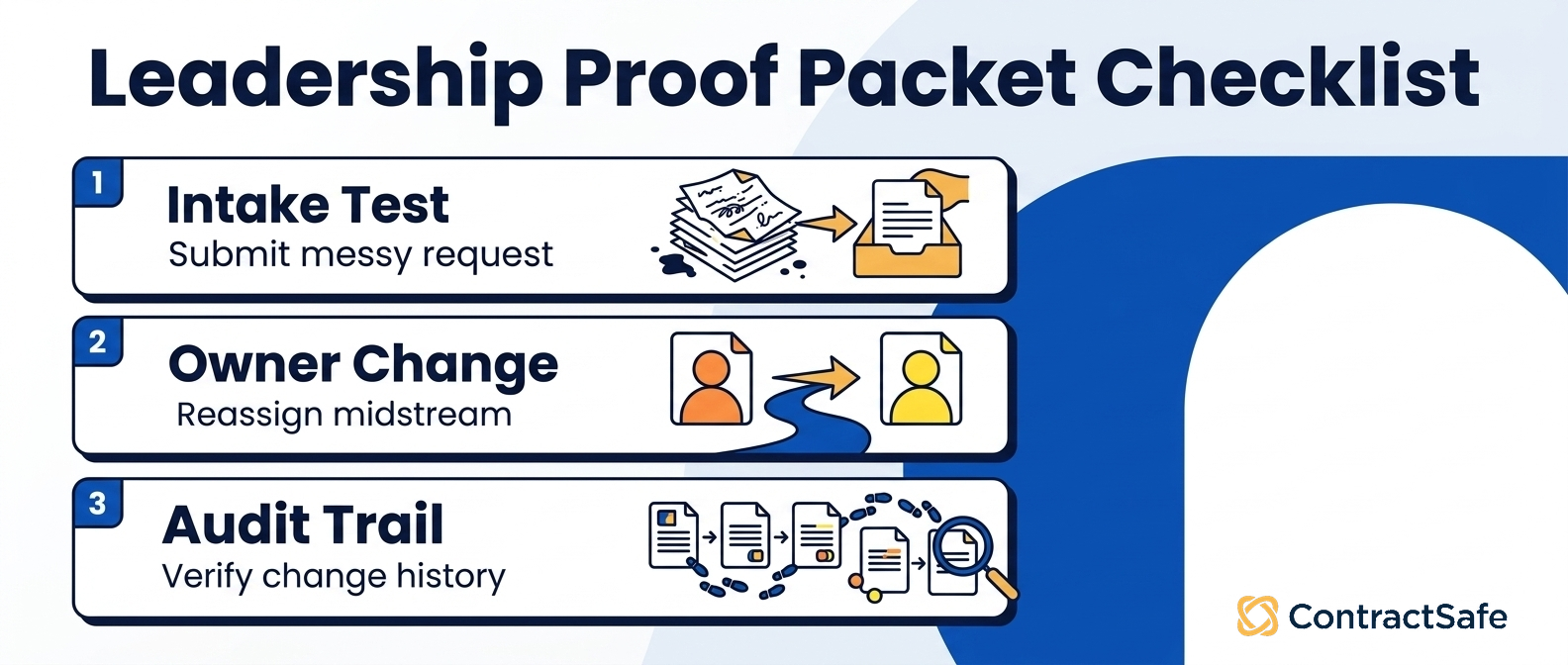
Current pain: a few concrete examples with your own rough costs attached.
Cost model: launch-year and renewal figures, each sourced or marked as an assumption.
Risk examples: the specific contracts and dates you can’t afford to miss.
Capacity impact: the recurring questions the tool answers so legal stops fielding them.
Rollout owner: who cleans files, sets fields, and maintains alerts, on a phased plan.
Vendor proof: demo results in writing, including anything a vendor couldn’t show.
The next decision: exactly what you’re asking leadership to approve, and by when.
Notice what’s missing: invented savings percentages and vague talk about becoming strategic. Approvers discount anything they can’t check.
A packet that names the pain, the honest cost, what you verified, and the one thing you need decided is harder to pick apart than a wall of benefits.
Schedule a demo: If your case rests on finding contracts faster, cutting renewal risk, and giving legal cleaner answers, test it.
Bring real contracts to a ContractSafe product demo and check the assumptions yourself.
Related Reading
Software cost guide for the budget breakdown when finance wants numbers behind your request.
Published ContractSafe pricing plans when you’re ready to drop a real figure into your cost model.
How central contract repository storage works for the operational case: central storage, searchable documents, status tracking, and attachments.
Legal team guide when legal owns the rollout and needs the tool to fit their work.
Software shortlist guide for narrowing to the two or three tools you’ll proof-test.
How ContractSafe Helps You Prove The CLM Business Case
ContractSafe helps you defend the two numbers approvers press hardest, cost and adoption.
It lists flat, published pricing and gives every plan unlimited users, so your cost model and rollout plan rest on real figures instead of a quote you have to chase.
ContractSafe keeps every contract and amendment in one searchable place. That maps onto the operational pain you priced, because rebuilding an agreement’s history for an audit stops meaning two weeks of digging through inboxes and shared drives.
ContractSafe provides a way to prove the claim before you buy. Load a few of your own contracts, search for a clause by typing, and drop the published price into your cost model as a defensible line.
Unlimited users matters for adoption. Per-seat pricing pushes teams to buy fewer logins, which sends people back to emailing PDFs to whoever has access. Give everyone a login and the shared-drive workaround loses its reason to exist.
Treat the rest as proof questions. Ask any vendor to show in writing what setup and migration involve, what support is included after go-live, and how features are priced.
Before you lock the budget line, confirm current plan and price details on the ContractSafe pricing page so your number matches what leadership approves.









.svg)







.svg)




