


An AI contract review playbook is a plan for how your team uses software to read agreements, flag risky language, and surface the terms you have to act on. It sets what the tool checks, what it hands back, and where a lawyer still makes the call.
Picture a lawyer on your team staring down a pile of vendor agreements that all landed at once. Every one is worded a little differently, and buried in one of them is a liability cap that got quietly cut. Reading each line by hand, she gets tired, and tired reading is exactly where the miss happens. AI review reads the whole pile first, points to the clauses that don’t match your standard, and lets her spend real attention on the handful of calls that actually need a human.
This playbook is for legal teams who want that speed without giving up judgment. We’ll walk through what solid AI review actually does, where it earns its keep, and where it can burn you if you trust it blindly. You’ll come away knowing what to ask a vendor, how to fold the tool into work your team already trusts, and where to keep a human firmly in the loop.
Key Takeaways
- AI contract review catches missing clauses and risky terms fast, but the final call belongs to a lawyer, not the model. ContractSafe's AI-driven review software is designed for that division of labor.
- Don’t take any vendor’s word for it: the September 2025 Legal AI Benchmarking study ran 13 AI tools and a human-lawyer baseline through the same in-house contract-drafting tasks and found performance varied materially from one tool and task to the next, so the only test that counts is how a tool handles your own contracts and workflows.
- The benchmark is a starting point, not product proof. The 2025 contract drafting benchmark did not test every live review workflow, and these tools change quickly. Use it to set a skeptical baseline, then grade the current product on your own contract types, clauses, and review rules.
- A 2025 review of legal LLM research looked at how these tools have been tested since GPT-4 and still found hallucinations, bias, and reasoning you can’t see into, and it cautioned that a lot of those tests don’t match how professionals actually use the tools day to day. The review didn’t look at contract-review software specifically, but the lesson carries over: don’t take any AI output on faith. Check each answer against the actual contract in front of you before you act on it.
Choose Your Next Step
Review the AI controls or prepare a secure demo test before you build the shortlist.
-
Want the payoff in plain terms? The September 2025 Legal AI Benchmarking study found that results varied by tool and task. Use that finding to justify a controlled bake-off on your own review work rather than a guaranteed savings claim.
Drafting a first pass and reviewing incoming paper are different jobs. Test the exact job your team needs, record the misses, and let that evidence decide.
-
Need an evaluation method? Use the 2025 Legal AI Benchmarking study as a model for testing the same task across tools, then record accuracy, source traceability, correction effort, and reviewer confidence on your own agreements.
-
Ready to test it yourself? Pull your messiest contracts, run them through a trial, and see what it flags before you commit.
What Is AI Contract Review?
AI contract review is the use of software to read an agreement, extract key terms, compare clauses against a standard, and flag language that deserves human attention. It accelerates the first pass, but it does not make the legal judgment or decide which risk the business should accept.
A trustworthy review system works from the current contract and its amendments, points each answer back to the source language, respects record-level access controls, and lets a reviewer accept, correct, or reject the output. Those controls turn fast reading into review evidence instead of an unsupported summary.
What AI Contract Review Should Actually Do
Good AI contract review earns its place by doing the tedious parts well: finding what matters, explaining why it flagged something, and getting out of the way when a lawyer disagrees. If a tool can’t do all of that, it’s a demo, not a working part of your team.
Start with extraction. The tool should pull the key terms out of every agreement and line them up where you can compare them: renewal windows, liability caps, governing law, termination rights, payment terms. No digging through a shared drive, no copy-paste into a spreadsheet that’s stale the moment someone signs a new deal. When the terms sit in one place, patterns you’d otherwise miss start to jump out. The point isn’t to replace a careful read. It is to make sure that read starts from the right place instead of a cold open.
Next, the tool should explain every flag. A good tool doesn’t just highlight text; it tells you why. "This indemnity clause is broader than your standard" is something a lawyer can use. A yellow highlight with no reasoning behind it isn’t. Your team should be able to see the logic, agree with it, or overrule it when a particular deal calls for something different. Trust builds when a tool shows its work, and it erodes fast when the tool hides behind a color.
Finally, the tool should be honest about its limits. Legal AI can hand you a confident answer that’s flatly wrong, so don’t take its word for anything. The tool should point you straight to the source contract and show you the exact clause it’s leaning on, so checking the answer takes seconds. Make it easy to inspect, and have a real person confirm the output before you act on it. That way you get the speed without quietly inheriting the risk.
Where AI Contract Review Goes Wrong
AI contract review goes wrong when the tool sounds confident about things it can’t actually see. It flags clauses that aren’t there, skips the ones that are, and summarizes a dense MSA by predicting what a contract usually says instead of reading yours. The model is fluent. That’s the trap.
Fluency reads like accuracy, and it isn’t. When someone pastes an indemnification section into a general-purpose chatbot and asks "is this standard?", they get a clean, well-structured answer fast. It feels authoritative. But the tool has no idea which version of the document you’re holding, whether the amendment in another folder changed that exact clause, or that your legal team already carved out an exception in a side letter. It answers the question you typed, not the contract you own.
The second failure is invented detail. Ask an ungrounded model for the auto-renewal date and it may hand you one, confidently, specifically, wrong. It’s not lying on purpose. It’s filling a gap the way it fills every gap: with the most likely-looking words. On a marketing draft, a plausible guess is annoying. On a renewal you’re about to miss, it’s expensive.
The third is the one nobody notices until an audit: no trail. If the tool can’t show you the sentence it pulled a conclusion from, you can’t check its work, and neither can anyone reviewing after you. A summary you can’t trace back to the source text isn’t review. It’s a rumor with good grammar.
None of this means AI has no place near your contracts. It means the review is only as trustworthy as the plumbing behind it: what document the AI is actually looking at, whether it can point to the exact clause, and who’s allowed to see the answer. Get that plumbing right and AI becomes a genuinely fast first pass. Skip it, and you’ve automated a confident guess.
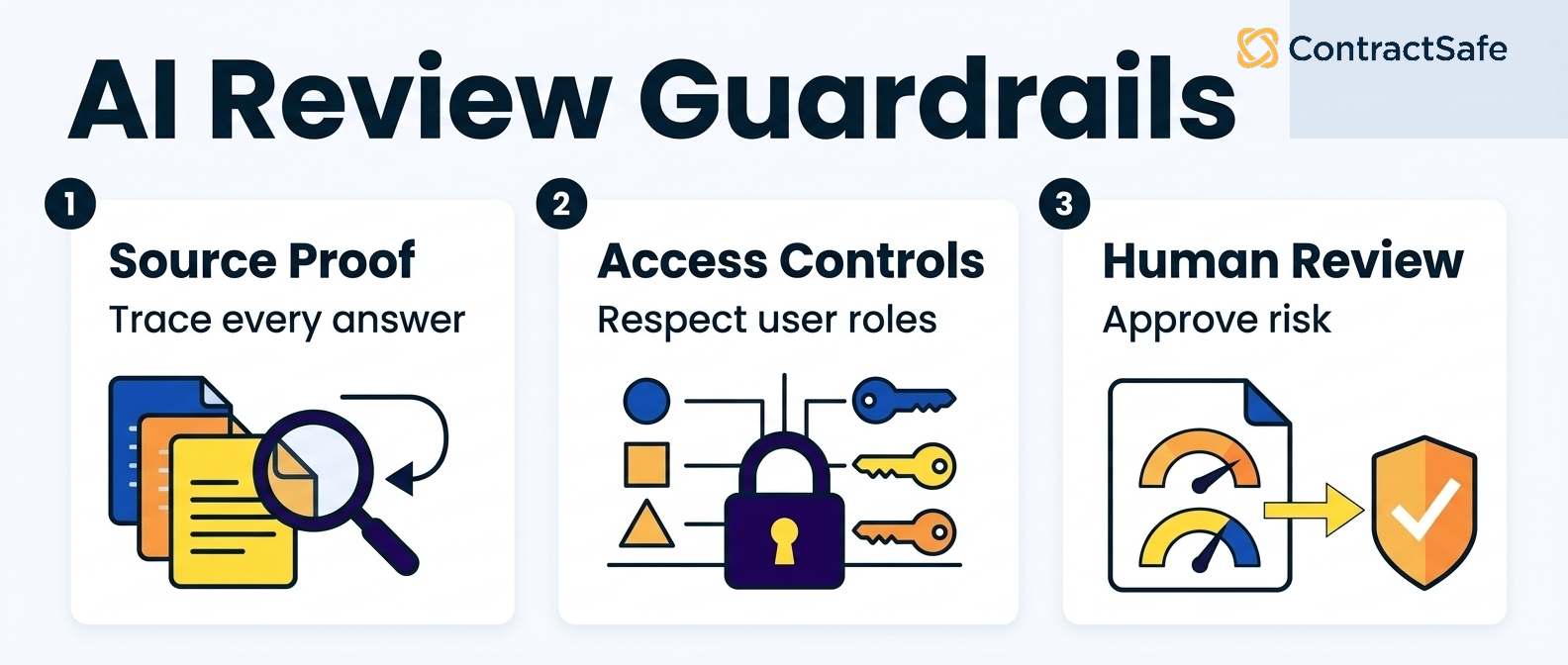
The fix isn’t a smarter model. It’s grounding. When AI reads the specific executed version stored in your system and cites the clause it’s quoting, you can verify at a glance instead of re-reading the whole agreement. That’s the difference between a tool that helps you review and one that asks you to trust it. ContractSafe’s AI works against your actual documents and OCR’d text, so an answer about a termination window comes with the language it’s based on, not a statistical average of every contract on the internet.
Access matters just as much as accuracy. A review tool that surfaces the right clause to the wrong person creates a problem you didn’t have before. Sensitive terms like pricing, exclusivity, and personal data shouldn’t be one careless prompt away from someone who was never supposed to see them. Good role-based permissions decide who can pull up which contracts before AI ever enters the picture, so the summary lands only where it belongs.
And the human stays in the chair. Well-designed human-in-the-loop AI isn’t there to slow you down. It puts the machine where it’s strong, reading fast and spotting patterns, and keeps the person where they’re irreplaceable, using judgment and saying no. NIST makes the same point about generative AI generally, noting it can warrant additional human review and oversight. AI narrows a long contract to the clauses worth arguing about. You decide what to do with them.
Decision Check Before You Trust AI Review
Run through these questions before you act on anything an AI tells you about a contract. If a point fails, treat the output as a starting draft, not an answer, and go read the source yourself.
-
Is it reading the right document? Confirm the tool is pointed at the current, fully executed version, not an old draft or a near-identical template. If you can’t tell which file it read, stop there.
-
Can it show its work? Every conclusion should trace back to a specific clause or sentence you can click and verify. No citation, no trust. "The contract says X" isn’t enough. You want where it says X.
-
Did it account for amendments and side letters? A base agreement plus its amendments is one deal, not a stack of separate documents. Make sure the review covers all of them, not just the first PDF it opened.
-
Does the answer match your dates and dollars? Spot-check one hard fact, a renewal date, a cap, a payment term, against the source. If the specifics are off, assume the summary is too.
-
Who can see this? Check that the contract and its AI summary are only reachable by people with the right permissions. A great answer in front of the wrong reader is a leak.
-
Would you sign based on this alone? If the honest answer is no, you’ve already confirmed the AI did its job: it did the first pass. You do the last one.
Use the checklist until it’s a reflex. AI review earns trust one verified clause at a time, and the fastest way to lose that trust is to skip these questions because the output sounded right.
Twelve Tests for AI Contract Review Software
Test AI contract review software the way you’d test a new hire: give it real work. Upload a bad scan, search for a renewal date, set a reminder, and route an approval. If the tool handles your messiest contracts and shows its sources, it’s worth a closer look.
| Test | What to Ask | Good Answer |
|---|---|---|
| 1. OCR on poor scans | Can it read a faxed or photographed contract? | Auto OCR on upload, flags unreadable pages, text you can fix by hand |
| 2. Renewal search | Can it find every renewal next quarter? | A clean dated list that catches "evergreen" language too |
| 3. Reminder setup | Who gets warned, and how often? | Multiple reminders, named backups, email and calendar |
| 4. Approval routing | Can routing branch by type or amount? | Conditional steps and a clear record of who approved what |
| 5. Access controls | Can I restrict one folder without the rest? | Role-based, per-folder rules, and an audit trail |
| 6. AI source citation | Does the AI link back to the clause? | It cites the document and page on every answer |
| 7. Money report | Report contract value and trace each figure to its source. | |
| 8. Extracted field review | Confirm or correct an extracted field before it drives action. | |
| 9. Amendments | Show which amendment controls the answer. | |
| 10. Export | Export documents and reviewed data in usable formats. | |
| 11. Reporting by department | Save legal, finance, and procurement views. | |
| 12. Support and onboarding | Prove the launch and post-sale support path. | |
1. OCR on poor scans
Old contracts often live as faded photocopies or crooked phone snapshots, and optical character recognition can stumble on them. When the text is blurry or the scan is skewed, the software may misread dates, dollar amounts, or party names. That creates real risk, because a search could miss the exact agreement you need as a renewal deadline approaches. For example, a smudged digit can flip your reported end date.
Before you trust any tool with your worst documents, test it against them. Ask the vendor to run a batch of your ugliest scans and show you the raw results, not a polished demo. Good AI contract management features handle messy input gracefully and present extracted fields beside their source for human review so a human can double-check. That way you catch problems early instead of discovering them mid-audit.
2. Renewal search
Renewals hide in odd places, buried in a term section or a side letter. Test whether you can find them fast. Ask the vendor to search your uploaded set for every contract renewing next quarter, then for auto-renewal clauses specifically. Good software returns a clean list with dates, not a pile of keyword matches you have to read through. For example, a strong tool lets you filter by renewal type, expiration window, and notice period at once. If search only matches exact words and misses "evergreen" or "automatically extends," that’s a real gap for a legal team.
3. Reminder setup
Finding a renewal date means nothing if nobody gets warned. Set up a deadline reminders test: create an alert for a notice deadline and route it to two people. Check whether reminders repeat, escalate, and land in both email and calendar. Ask the vendor what happens when the owner leaves the company. Good software lets you set several reminders per date, assign backups, and see a full calendar of upcoming contract deadlines at a glance. If reminders only fire once, or only reach a single inbox, you’ll miss dates the same way spreadsheets let you miss them.
4. Approval routing
Contracts stall when nobody knows whose turn it is. Test the approval flow with a real example: send a vendor agreement through legal review, then finance sign-off, then signature. Ask the vendor whether routing can branch by contract type or dollar amount. A good answer shows conditional steps, reminders for whoever’s holding things up, and a clear record of who approved what and when. For example, an NDA might skip finance while a large services deal needs two approvers. If the tool only supports one straight-line path for every contract, it won’t match how your team actually works.
5. Access controls
Not everyone should see every contract. Salaries, settlements, and board documents need to stay locked down. Test whether you can give someone access to one folder without opening the rest. Ask the vendor about permission levels, and whether you can restrict viewing, editing, and downloading separately. A good answer covers role-based access, per-folder rules, and an audit trail showing who opened what. For example, an outside contractor might view a single project’s contracts and nothing else. If access is all-or-nothing, or the vendor waves you off with "everyone on your team is trusted," treat that as a warning sign.
6. AI source citation
This is the one people forget. When the AI answers a question about your contract, it has to show its work. Ask the vendor to pull the termination terms from an agreement, then check whether the answer links back to the exact clause and page.
Good software cites the source every time so you can verify it instead of taking the model’s word. For example, a trustworthy tool highlights the sentence it drew from and names the document. Compare that against the AI contract management features you’re weighing. If AI answers float free with no source, don’t trust them near a real contract.
7. Money report
Ask the vendor to build a report that totals contract value across your whole portfolio, then filter it by renewal date. You want to see committed spend by quarter without exporting anything to a spreadsheet first. A good answer shows the numbers updating live as you add a filter, and it lets you group by vendor or category. The best systems let you forecast contract data so you can predict next year’s obligations. Watch for tools that only show one contract at a time.
That means you’ll be adding figures by hand every quarter, which defeats the point of buying software.
8. Extracted field review
Load a messy scanned contract and ask the system to pull key dates, parties, and dollar amounts on its own. Then check the results against the source page. What you’re testing is whether the AI contract management features save real work or just create cleanup. A good answer puts each extracted field next to the original text so you can confirm it in seconds, and it presents the extracted value and source so a reviewer can confirm or correct it.
For example, if an auto-renewal clause sits three pages deep, the tool should surface it rather than make you hunt for it yourself.
9. Amendments and side letters
Ask how the system ties an amendment back to its original agreement. Upload a master services agreement, then add two amendments and a side letter that changes payment terms. A good answer keeps all of them linked under one record, shows the current effective terms, and never buries the side letter as a loose file somewhere. You want to open the parent contract and see its full history in order. Ask the vendor what happens when an amendment changes a renewal date.
The right tool lets a reviewer update the alert after confirming the amendment instead of quietly tracking the old date.
10. Export
Test whether you can get your data out cleanly, because someday you might switch tools or hand records to an auditor. Ask for a full export of contracts and metadata, then actually open the file. A good answer gives you a standard format like CSV or PDF with the documents attached, not a locked proprietary dump. For example, an auditor should be able to read the export without your login. Ask the vendor how long an export takes and whether it costs extra.
If getting your own data out is hard, that’s a warning sign about the whole relationship.
11. Reporting by department
Ask each team to define what they need to see, then test whether the tool can slice reports that way. Finance cares about spend and renewals, legal cares about risk clauses and expirations, and procurement cares about vendor terms. A good answer lets you save a separate view for each group so nobody wades through fields they don’t use. You want role-based access too, so the sales team sees its own contracts and not HR agreements.
Ask the vendor to set up two department views during the demo and watch how long it actually takes.
12. Support and onboarding
Ask who loads your existing contracts and how long it takes. Migrating hundreds of legacy files is where a lot of rollouts stall, so you want a clear plan, not a vague promise. A good answer includes hands-on help with the initial upload, named support contacts, and training for your team rather than a link to a help center. For example, ask whether they’ll tag and organize your first batch or leave that work to you. Ask about response times when something breaks.
Fast, human answers matter more than a long feature list.
Run these tests before you sign anything. The demo is your one real chance to watch the tool handle your own contracts, so bring your messiest files and your hardest questions. A system that passes all twelve will save your team hours every month. One that stumbles on export or extraction will cost you later, so make it prove itself now.
How to Roll Out AI Contract Review Without Creating Another Review Queue
Roll it out in stages. Pick one contract type, let AI pull the key terms and dates, and give a real person ownership of what it finds. Done right, AI review shrinks the pile you read by hand. It doesn’t stack a second pile next to it that nobody has time to clear.
The trap is treating AI output like a fresh inbox nobody checks. The tool flags a wall of renewal dates at once, no one owns the list, and soon that queue is worse than the spreadsheet you replaced. Fix it before you turn anything on. Name the person who reads the results on a set cadence, decide what a flagged date actually triggers, and pick which contracts run first, such as the auto-renewals closest to renewal. Automation does not assign the work. You do.
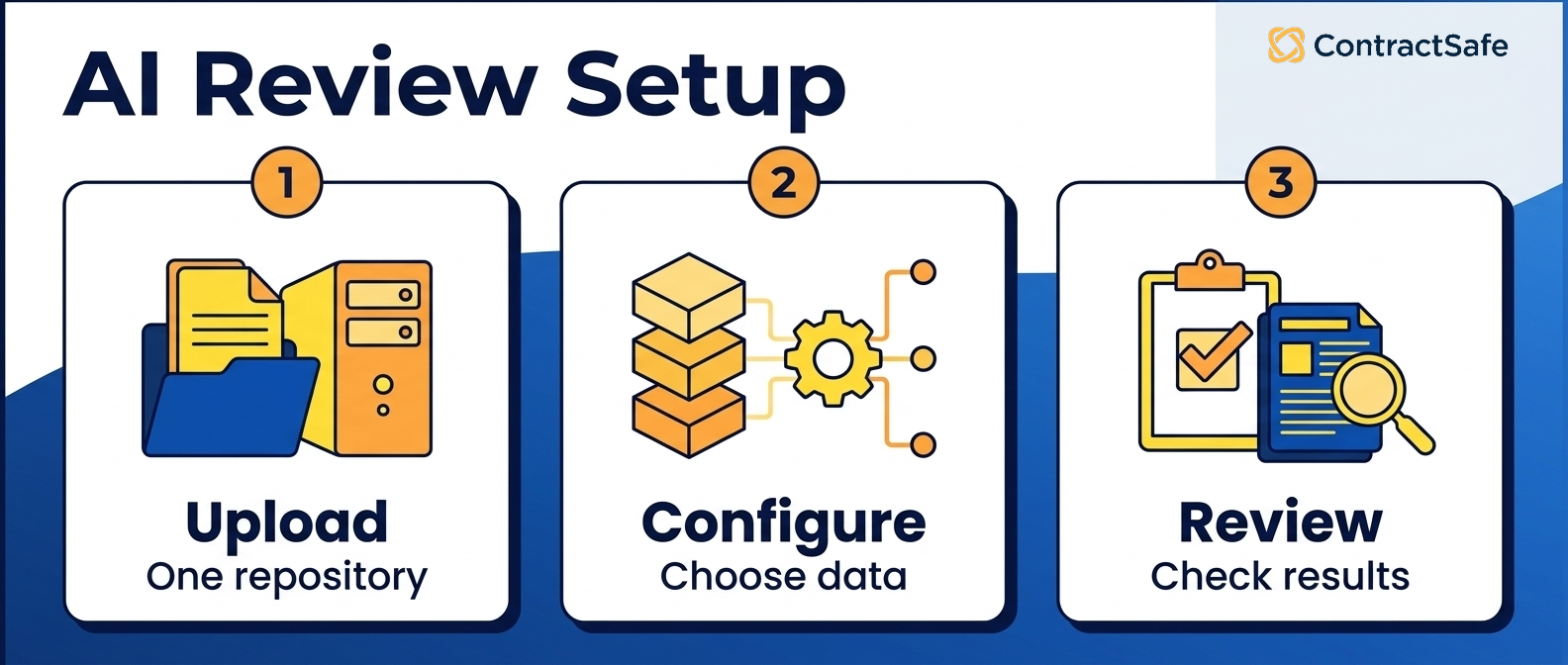
Here’s the sequence that keeps a rollout from turning into busywork, and keeps your team using the tool instead of routing around it. None of it takes a big project plan. It takes deciding a few things before you turn AI review loose on your contracts.
Start with one contract type, not your whole library
Don’t dump years of paper into the system at the start. Pick the contract type that causes the most pain, usually vendor agreements or NDAs, and load those first. Put them in your central repository, run AI extraction on that set, and check the fields it pulls against what you already know is true. When the extraction holds up for one type, add the next. You’ll also build a template you can reuse, so the second contract type takes an afternoon instead of a week.
A narrow start means you catch configuration mistakes on a handful of contracts instead of your whole library, and your team sees a clean result before they ever see a mess.
Give every result an owner before you scale
AI can read a contract in seconds, but it can’t decide whether to renew, renegotiate, or walk away. That’s still a person’s call. Before you expand, name the owner for each contract category. Legal owns the fallback clauses, procurement owns the pricing terms, and whoever runs the relationship owns the renewal decision. If a flagged item doesn’t have a name attached, it isn’t a task. It’s a notification nobody reads.
Ownership is what turns extracted data into action, and it’s the one thing most teams skip when they’re in a hurry to go live.
Wire alerts to the dates that already matter
The whole point of extraction is to stop dates from sneaking up on you. Once AI pulls renewal windows, notice periods, and expiration dates, connect them to deadline reminders so the right person hears about a deadline weeks ahead, not the morning it lands. Match the lead time to the work: a long notice period needs a long runway, not a last-minute ping. Assign the alert to the owner you named, not a shared inbox, so it lands with someone accountable.
Send them too early or too often and people tune them out, which puts you right back where you started.
Scope permissions so people see their contracts, not everyone’s
A rollout stalls the moment the sales team can read HR agreements or a contractor can browse the full vendor list. Use role-based permissions to give each group access to the contracts they own and nothing more. Because ContractSafe doesn’t charge per user, you don’t have to ration logins to control access. Everyone who touches contracts can have a login, scoped to exactly what they need. And when someone changes roles or leaves, you adjust their access in one place instead of chasing down shared files.
That keeps the review queue focused: people only see what’s theirs to act on.
Earn adoption by removing work, not adding steps
The rollout works when people reach for the tool because it saves them time, not because you told them to. Show each team the one thing AI review does that they’ll feel right away: no more digging through email for a signed copy, no more missed renewals, no more re-reading a long agreement to find a single clause. Keep the first version simple and add features once the habit sticks.
Track one number that proves it worked, like renewals caught early or hours saved on lookups, and share it, because nothing drives adoption like a result your team can see. If someone’s first experience is a wall of settings, adoption dies before it starts.
A staged rollout takes a little longer than flipping every switch at once, but it’s the difference between a tool your team relies on and one that becomes another thing they work around. Start narrow, name owners, tie alerts to real deadlines, scope access to what people own, and prove the time savings before you widen the circle. Do that, and AI review does what it’s supposed to do: clear the pile instead of growing it.
How to Build an AI Contract Review Tool Shortlist
Build your shortlist around the work you actually do. Rank each tool on how it handles your contract types, how clearly it flags risky clauses, whether it connects to where you store agreements, and what the real price looks like once your whole team needs access. Then test the finalists on your own contracts, not the vendor’s demo file.
Price is where a lot of buyers get surprised. Some tools charge per seat, some meter by document or by AI query, and a few hide the real number behind a sales call. Look for transparent pricing you can read without booking a meeting, and do the math on what happens when legal, sales, and procurement all need access. A tool that looks cheap for a small team can get expensive fast.
Accuracy matters more than feature lists. Any tool can claim it "reads" a contract. The real question is whether it catches the auto-renewal buried deep in the fine print, spots a missing indemnity, and tells you where it found each answer so you can check its work. Speed only helps if you trust the output. Run a few of your messiest agreements through a trial and grade the results yourself. If you can’t tell why the tool flagged something, that’s a problem.
Watch how the AI fits the rest of your process, too. Reviewing a contract is one step. You still need to store it, route it for approval, and remember the deadline that lands months from now. A standalone review tool that doesn’t talk to your central repository leaves you copying results by hand. Look for AI contract review software that lives where your contracts already live.
Finally, check who can see what. Role-based permissions let you give the sales team access to their deals without opening the whole cabinet. Ask each vendor how access controls work, whether you can export your data, how onboarding goes, and what support looks like after the sale. The demo is easy. The real test comes later, when you’ve got a live question and a deadline, and that’s the day that counts.
Related Reading
How ContractSafe Helps With AI Contract Review
ContractSafe puts AI review inside a full contract management platform, so a flagged clause doesn’t just sit in a report. It’s attached to the agreement, searchable, and tied to the alerts and approvals you already run. You review, store, and track in one place instead of stitching separate tools together.
The AI contract management features read your uploads and answer plain questions about them: what’s the term, when does it renew, is there a cap on liability. OCR and search mean even a scanned PDF becomes text you can find later, so a long master agreement isn’t a dead end when you need one clause in a hurry.
Because review happens in the same system that holds everything else, the follow-through is built in. Alerts warn you before a renewal or notice window closes, so you can stay ahead of contract deadlines instead of scrambling. Approvals and workflows route each agreement to the right people. Reporting lets you pull the numbers and even forecast contract data across your whole portfolio.
Role-based permissions and access controls decide who sees which contracts, and every plan includes unlimited users, so you’re not rationing seats to keep the bill down. The AI does the heavy lifting on the first read, but your team still makes the call. Want to see it on your own contracts? You can request a demo and bring a messy one.






.svg)







.svg)




