


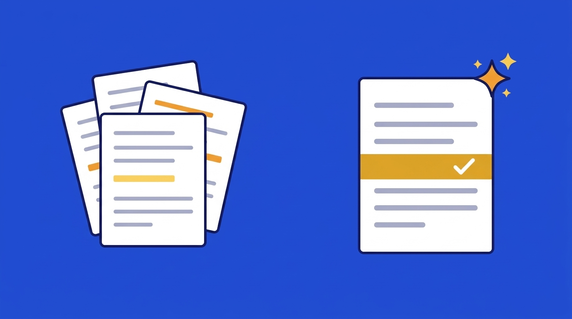
Quick answer: AI contract review, also called automated contract review, is software that reads a contract and checks every clause against the rules your team sets. For each rule you get a pass or fail, the clause behind the result and suggested fix language, so your hours of manual review go to the clauses that fail instead of the whole document. It replaces the first manual read, not the signing decision. Uncapped liability, unusual indemnities and jurisdiction-specific terms still go to counsel.
Here's what that looks like on a Thursday evening. A vendor sends over a master services agreement, you run it against your review playbook, and two results come back red: the liability cap is higher than your standard, and the termination notice clause is missing. Your reading time goes to those two findings, not to the other thirty-odd pages that already match what you'd have written yourself.
That's the practical side of how AI is changing contract review. Before you trust that first read on a real deal, though, you'll want to know how it actually runs, which kind of tool fits the way your team works, how much time it really gives back, why pasting the draft into a chatbot isn't the same thing, and which clauses still need a lawyer's eyes. The sections below take those in turn.
Choose your next step:
- If you're comparing tools, see how ContractSafe's AI contract review runs your playbook against each draft.
- If you're writing your rules first, start with our guide to writing a contract review playbook.
- If you're holding a draft in your inbox right now, bring it to a free demo and we'll run a starter playbook against it.
Key Takeaways
- AI contract review takes the first read (scanning, extracting, flagging) so your team spends its time on the calls that need legal judgment.
- Review asks whether you can sign one contract as written. AI contract analysis can also answer questions across every agreement you've signed.
- Results come from the playbook rules your team writes, and ContractSafe doesn't use your data to train AI models.
- Uncapped liability, unusual indemnities, IP assignment and non-standard governing law go to counsel, whatever the AI says.
- ContractSafe builds AI directly into the platform (Ask AI, AI Search, AI Contract Review playbooks and audit trails) so it works the way you already do.
- A vendor-associated 2026 Deloitte survey puts legal teams' average time saving across agreement work at 37%. Treat that as the upper end, because your own pilot number matters more.
What Is AI Contract Review?
At its simplest, AI contract review is software that evaluates a contract against your rules. You give it a draft or a signed agreement (scanned PDFs work once OCR has made them searchable), and it shows which rules pass, which fail, the clause behind each result, and suggested wording where something falls short.
Instead of manually sifting through pages of legal jargon, you let your rules do the first read. One rule might say liability is capped at 12 months of fees, another that either party can terminate on 30 days' notice, a third that Delaware law governs. ContractSafe's AI contract review reads and evaluates the contract without editing it, and your team decides whether to keep the language, change it, or copy the suggested wording.
That first read happens at a particular point. Review sits between drafting and signature in the stages of contract management, and it's the step where most contract risk gets caught or slips through. The AI finds clauses by what they mean rather than the words they use, so it spots a force majeure clause even when the words "force majeure" never appear.
Reading by meaning makes the AI faster and more consistent than a tired person, but it isn't perfect. A person confirms every fail before anyone acts on it, and the five-step review process further down shows where that check happens. Before that, it helps to separate the two jobs people mean when they say "analysis."
AI Contract Analysis for One Contract vs. Your Whole Portfolio
AI contract analysis covers two different jobs. Reviewing one contract asks whether you can sign this draft as written. Portfolio analysis asks questions across every agreement you've already signed. Each job needs a different feature, and most legal and operations teams end up needing both.
Single-contract work starts with a playbook run on an incoming draft. After that, you often have follow-up questions about that one agreement: what's the termination notice period, or can we assign this if we're acquired? ContractSafe's Ask AI answers questions like these in plain language, with the answer drawn from the agreement itself.
Portfolio analysis looks across the repository instead. Typical questions: which vendor contracts auto-renew in the next 90 days, which MSAs are governed by New York law, where did we accept uncapped liability, or which contracts expire next quarter with a value over $50,000? ContractSafe's AI Search handles those portfolio questions, returns only contracts the person searching is allowed to see, and lets you export the results to Excel.
| Job | Question it answers | ContractSafe feature | Plan |
|---|---|---|---|
| Review one draft | Can we sign this as written? | AI Contract Review playbooks | Maximize |
| Analyze one contract | What does this agreement say about notice or assignment? | Ask AI (chat-based Q&A) | Every plan |
| Analyze the portfolio | Which contracts share a term, a date or a risk? | AI Search | Every plan |
Portfolio analysis only works if the data has been pulled out of each contract first. ContractSafe's AI extraction pulls dates, parties and other key terms out of each agreement, and users can accept, correct or skip each suggested value before it's saved, so the data you search is data someone checked.
Once that data is in place, the payoff shows up fast because people can ask those questions themselves. Rebecca Dockum, Trade Contract Manager, described it this way: "People’s minds were blown the first time I showed them they could search every contract at once. That moment alone has saved me from being the answer key every time someone has a question about an agreement."
Not every tool does both jobs, and that's usually what decides which kind you buy.
Which Kind of AI Contract Review Tool Do You Need?
The right tool depends on where your contracts live and who reviews them. A lawyer redlining one complex deal at a time in Word is well served by a drafting assistant. A team managing hundreds of contracts needs review, deadlines and search in one system that non-lawyers can use too.
Drafting assistants have gotten good at first drafts. In its September 2025 Phase 2 drafting benchmark, LegalBenchmarks.ai tested 13 AI tools on 30 real drafting tasks. The best tools reached about 73% first-draft reliability, compared with 70% for the best individual lawyer, though lawyers still scored higher on usefulness when the drafting called for judgment. That study measured drafting, so it tells you about redlining assistants and says little about review across a repository.
Repository-based review inside a contract management platform suits a different team. When the playbook, the renewal alert, the approval step and the search box all sit next to the signed contract, a procurement lead can check a vendor's paper without opening Word or waiting for legal. That matters when contracts come in from sales, procurement and HR too.
A third route is building your own review agent on a general AI platform. You'd write your playbook as prompts, decide where the contracts are stored, wire up your own renewal alerts and build an audit trail that shows who approved which clause, then keep all of it working when the underlying model changes. That's reasonable if you have developers to spare. For most legal teams it turns contract review into a second software project.
The fourth route skips software altogether and buys review as a service. AI-driven law firms such as Arceus Legal price a standard contract review at $500, with licensed attorneys approving every piece of work, according to SiliconANGLE's October 2026 report on the firm. That works for a team with a handful of contracts, but it doesn't give non-lawyers self-serve review or a way to search what you've already signed.
Three questions usually settle which of the four fits:
- Where do your contracts live today? If they're spread across inboxes, shared drives and someone's desktop, a drafting add-in won't help you find what you've already signed. Start with a repository.
- Who has to review them? If only lawyers touch contracts, an in-Word assistant may be enough. If sales, procurement or operations people review too, pick a tool they can use without a law degree, where legal still sets the rules.
- How many contracts come in each month? A handful of complex deals points to a drafting assistant or a review service. A steady flow of vendor and sales paper points to a repository with playbooks.
Whichever route you pick, the review itself runs the same way underneath.
How Does AI Contract Review Work?
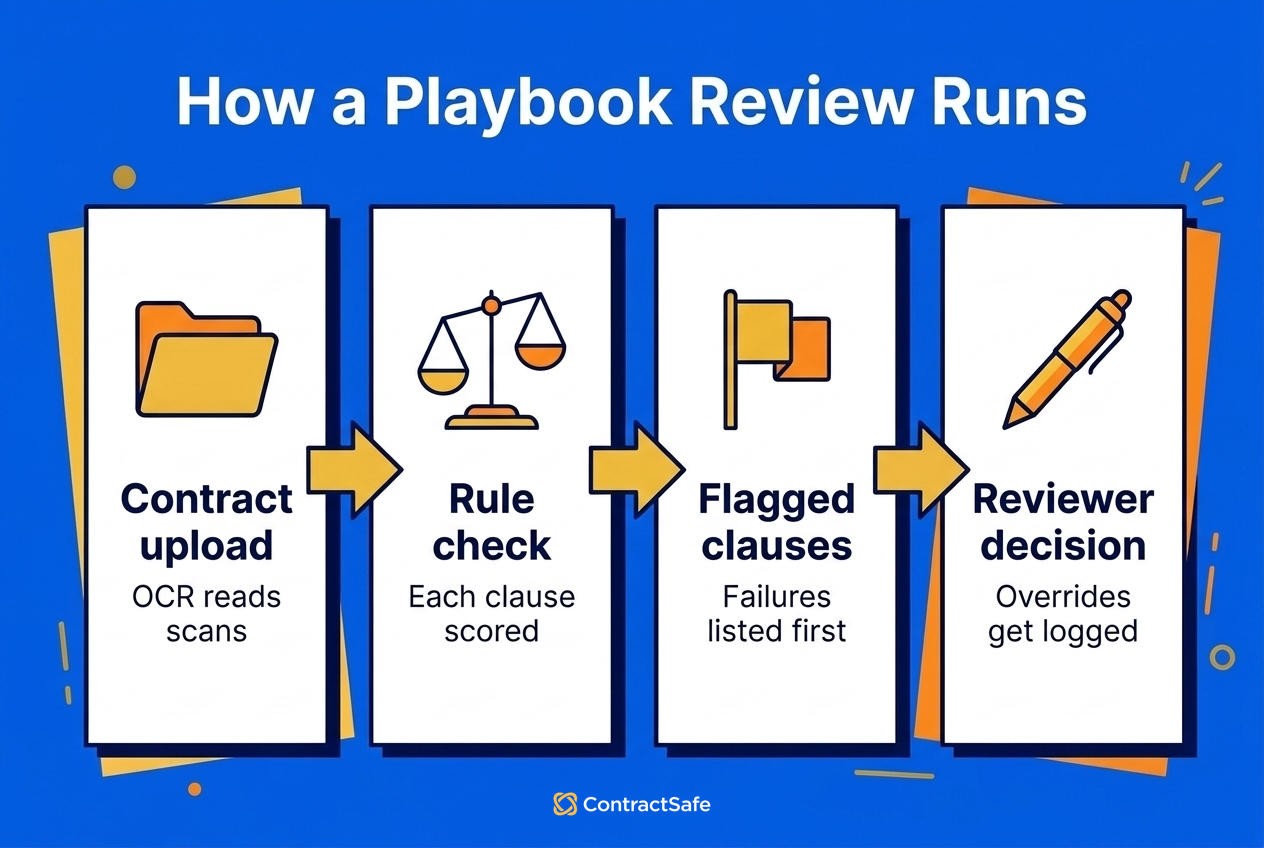
AI contract review works by running a contract against a playbook, which is a set of rules describing your standard positions. The software checks every rule at once and shows a pass or fail for each. A reviewer then decides what to do about every fail.
Automated contract review and AI contract review mean the same thing in practice. Whatever the product, the automated part follows the same five steps:
- Ingest the contract. The tool reads the draft or signed agreement, running OCR first on scanned pages so the text can be read.
- Compare each clause to your rules. It matches clauses to your playbook rules or templates by meaning, not exact wording.
- Flag deviations and missing clauses. Anything that departs from your standard, or isn't there at all, gets marked.
- Suggest fallback language. For each problem, it proposes wording that would bring the clause back to your position.
- Show failures first to a reviewer. A person works through the fails and decides what to accept, change or escalate, and a person still decides what gets signed.
The software handles those steps, but the rules are the part you write. A playbook outlines your preferred terms, fallback positions, escalation points and negotiation boundaries, so write each one down as a rule your lawyers and contract managers already apply in their heads. That means the shortest termination notice you'll accept, the fallback you'll agree to and the point where a clause goes to counsel.
With those rules written, here's how a review runs in ContractSafe, following the steps in our playbook setup guide:
- Build a playbook. Start from a sample template, from a fully negotiated contract (AI suggests rules, and the guide recommends 10 to 25 of them), or from scratch using the Rule Library. A person reviews and accepts any rule the AI creates.
- Run it. Open the contract, choose the playbook and click Run Playbook. The analysis typically takes seconds.
- Read the results. Every rule shows Pass or Fail, linked to the relevant clause. For a pass, the eyeball icon shows the text that satisfied the rule.
- Fix what failed. Each fail explains what's off, and you can copy the suggested language into your redline.
- Override when judgment says so. A reviewer can manually toggle a Fail to Pass, and a note records the manual change.
A Worked Example: One Liability Clause
Take the liability cap from that Thursday MSA. Say your playbook has a rule that liability is capped at 12 months of fees, and the vendor's draft caps it at 24 months. The rule fails, and the result points to the clause and explains the gap. Suggested fallback language puts the cap back at 12 months. Counsel looks at the deal and decides 18 months is acceptable this time, so the reviewer toggles the rule to Pass and the manual change is noted. Six months from now, anyone can see who accepted the higher cap.
That override only means something if the right people control the rules, so a few guardrails come with it. Only admins can create or edit playbooks, and read-only users can't run them. AI Contract Review is part of the Maximize plan.
Around the review itself, the same extraction sets up each new contract by pulling out dates, parties and key clauses, and those values feed the contract reminders that protect the value of a contract and help you avoid a breach of contract. Which raises the question every buyer asks next: how much time does all this actually give back?
What Does AI Contract Review Actually Save?
Vendor-associated research from 2026 puts the saving at roughly a third of legal teams' agreement time. Your own pilot number matters more, because that figure comes from surveys of other companies, not from your contracts.
The figure comes from a Deloitte survey of more than 1,100 senior leaders, commissioned by Docusign and published in April 2026. Legal teams in it reported an average 37% time saving across their agreement work. Docusign sells agreement software, and that 37% covers all agreement work, not only the first read of a contract.
To turn a percentage into hours, you need a per-contract baseline. LegalOn's survey of 452 in-house legal professionals, run with In-House Connect in December 2025 and published in January 2026, found teams spend an average of 3.1 hours reviewing a single contract. LegalOn sells contract review software too, so read its figures with that in mind.
Put the two together and you get the upper end: 3.1 hours × 37% is about 1.1 hours saved per contract, or roughly 115 hours across 100 contracts. If your reviewers overturn a lot of flags, the real saving will be smaller, because every overturned flag is time spent checking the AI's work. Swap in your own pilot percentage and your own monthly volume, and you've got a figure you can put in front of a CFO.
Most teams never get that figure. The Thomson Reuters Institute's 2026 State of the Corporate Law Department Report found that almost half of corporate legal departments now have an enterprise-wide generative AI tool, but very few collect success metrics on their AI rollouts. That's the reason to run your own pilot rather than lean on anyone's survey.
That measurement gap persists even as adoption climbs. In the same LegalOn survey, 52% of in-house teams said they're using or evaluating AI for contract review, and 78% said they're comfortable handing first-pass review to an AI agent. None of that tells you how often your own reviewers would overturn a flag on your own paper, though. That's why the 10-vs-10 pilot in the accuracy section below is worth running before you buy anything, and why the cheapest tool of all deserves a look first.
Can't You Just Paste a Contract Into ChatGPT?
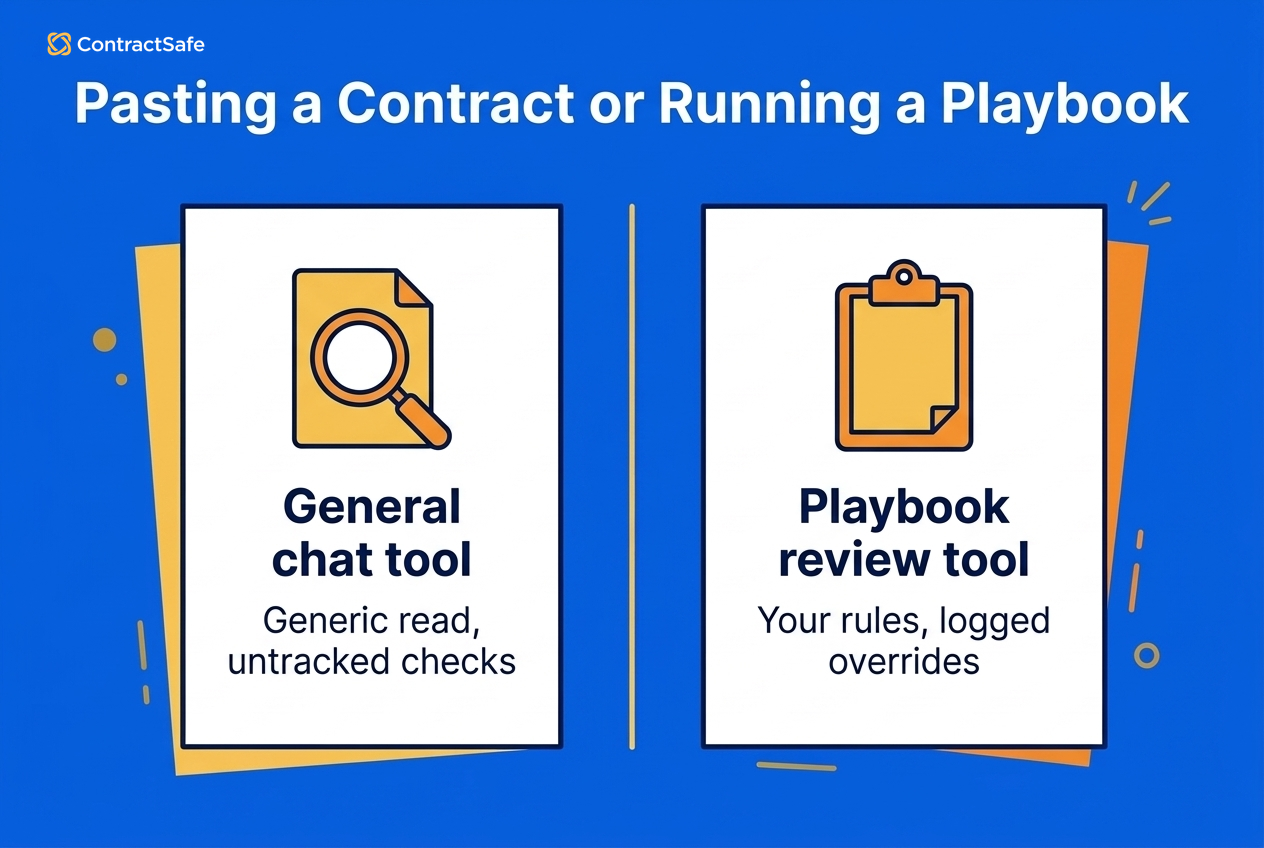
You can for a quick read of one low-stakes agreement, like a mutual NDA you'd sign anyway. It breaks down for anything you'll sign at volume, and there are four reasons why.
First, a general chatbot doesn't know your standards. Ask whether a liability cap is acceptable and it'll measure the clause against a general idea of "market," not your 12-month rule. Second, general models confidently miss things. In ContractScrub, a benchmark of final contract review submitted in August 2026, the best frontier model caught 75% of the errors lawyers had planted, with precision of 0.58, so roughly four in ten of its flags weren't real errors. Models can also report a clause as missing when it's sitting right there.
Third, nobody can see afterward who checked what, or why a risky term got through. And fourth, you may be pasting confidential terms into a tool whose data policy you haven't read.
A review tool works the other way around. It runs your written rules, points to the clause behind each result and logs every override, which is the playbook-based review described at the top. Even then, the accuracy question doesn't go away.
How Accurate Is AI Contract Review, and How Can You Measure It Yourself?
AI contract review is good enough for a first pass and needs a person to confirm its flags. The most reliable accuracy number is the one you measure on your own contracts, because published benchmarks show even the best models still miss errors.
ContractScrub, the benchmark from the ChatGPT question, is the newest evidence. Its authors built 3,014 review tasks across 44 contracts from the CUAD dataset and tested 10 models. Every model's F1 score, which balances the errors caught against the false alarms raised, stayed below 0.65, and only one model reached 0.75 recall. An earlier benchmark, ContractEval (August 2025), saw open-source models answer "no related clause" when the relevant clause was actually there. That's why a person should confirm every Fail, and especially every missing-clause flag, before anyone acts on it.
None of that is a reason to stick with manual review, though, because doing nothing has a cost of its own: World Commerce & Contracting's August 2025 whitepaper puts the value lost to poor contracting at almost 9% of annual revenue on average, and often 15% or more in complex industries.
The way through is to test a tool on your own paper with a small pilot:
- Pick one contract type. NDAs work well because they're short and follow predictable patterns.
- Time the first pass. Review 10 NDAs the usual way, then run 10 through a review playbook and time both.
- Count overturned fails. If reviewers keep overriding the same rule, that rule needs rewriting.
- Count misses. Note anything a reviewer caught that the AI didn't flag.
- Work out cost per review. Divide what the tool costs for the pilot period by the contracts it reviewed, and set that next to the per-review price of the lawyer-approved service in SiliconANGLE's report on Arceus Legal, covered in the tool-type section above.
- Count what still goes to outside counsel. If the number of contracts you send out doesn't drop, the tool isn't taking work off your plate.
- Check auditability. Activity logs record who viewed, downloaded or changed a contract. When a regulator asks "who reviewed this and when," you have the answer.
Once you have those numbers, put the vendor through the evaluation checklist further down. And expect some of the time you get back to show up around the review rather than inside it, in renewals and reporting. Carrie McClain, Procurement Specialist at Vitality Living, said: "ContractSafe helps us stay ahead of renewals and saves me at least a few hours every week. Instead of rebuilding information from SharePoint, I can pull the contract report I need and keep the process moving."
Best Practices for AI-Powered Contract Review
AI-powered contract review works best when your playbook keeps improving after the pilot and a person keeps the final say on every result. The pilot tells you which rules are weak, and these five habits fix them:
- Rewrite rules that keep getting overridden. When reviewers keep flipping the same rule, rewrite its Rule Definition or fallback language. Review quality improves because your rules get sharper, since ContractSafe doesn't train models on your contracts.
- Re-audit playbooks when the law or your policy changes. Laws, regulations and company policies all move. Check the AI's results and your playbooks periodically so they match current legal standards and your current positions.
- Write rules for your industry. Every industry has its own contractual requirements, so write rules for yours, like a healthcare team adding a rule for business associate terms.
- Get the vendor's data-use policy in writing. Back up your data, check the platform's security controls, and ask in writing how the vendor's AI uses your contracts.
- Connect review to the tools people already use. Adoption goes better when review runs inside the contract management platform and collaboration tools your team already opens every day.
Those habits keep a tool useful once it's in. Picking the tool in the first place deserves the same care.
How to Evaluate AI Contract Review Tools
Judge an AI contract review tool on your own contracts. Run a proof of value with real documents, then check whether you can see why each result was given, whether you can override it, and whether the vendor answers data-use and cost questions in writing.
Not all AI contract review tools are created equal, and the demos always look great. Here's what to actually dig into before committing:
- Accuracy and recall. Ask for benchmarks on your specific contract types. Better yet, run a proof-of-value using your own documents.
- Transparency. Can you see the exact text behind every pass and fail? Why was this flagged? What language does the tool suggest instead?
- Human-in-the-loop design. Easy validation, redlining, and audit trails before approvals. If AI makes a recommendation and there's no simple way for a human to review and override it, that's a problem.
- Security and privacy. Encryption, role-based access, SOC 2 or ISO 27001 certification, and data residency options. Ask in writing whether the vendor trains models on your data, which model providers it uses, and where your data is stored.
- Deployment speed. How fast can you actually be up and running? ContractSafe's implementation process is fast, with no implementation fee and onboarding support on every plan, but not every platform's is. Ask about onboarding effort and prebuilt playbook availability.
- Integrations. E-signature, SSO, email intake, cloud drives, ERP/CRM connectors. If it doesn't connect to what you already use, it creates more work instead of less.
- Workflow automation. Can you configure routing rules by contract value, region, clause variance, and deadlines? Or is the workflow one-size-fits-all?
- Cost model. Is AI review in the base tier or only on a higher plan? Pricing by users, volume, or features? Get clarity on what AI contract review will really cost before you're surprised by the invoice.
- Vendor viability. Roadmap transparency, support SLAs, and references from organizations like yours. You're trusting this vendor with your contracts, so make sure they'll be around next year.
Even a tool that passes every one of those checks fits some contracts better than others.
Who Benefits From AI Contract Review, and When Not To Use AI Alone
AI contract review pays off most for teams handling a steady flow of predictable contracts. It should never have the last word on clauses where a mistake is expensive or the law is unsettled. Those go to counsel every time.
AI contract review is best for:
- High-volume reviews of NDAs, MSAs, SOWs, vendor and sales agreements, the contracts that follow predictable patterns.
- Due diligence across hundreds of target contracts, where you need the same answers from every agreement before a deal closes.
- Real estate work, such as finding every lease with an assignment restriction before a sale.
- Procurement teams checking vendor paper against your standards without waiting on legal.
- Teams that need faster triage, consistent standards enforcement, and reliable reminders for renewals and obligations.
- Organizations standardizing on playbooks and templates across multiple business units or offices.
For bulk work like diligence, pick a tool that pulls the same fields from every contract into a sortable table, so you can sort a few hundred agreements by term or governing law instead of reading each one. The other side of the line matters just as much.
Always send these to a lawyer, whatever the AI says:
- Uncapped liability, or carve-outs from the liability cap
- Unusual indemnities
- IP assignment or licensing grants
- Non-standard governing law or cross-border jurisdiction
- Regulated-data terms, such as HIPAA business associate agreements
- Any clause your playbook doesn't have a rule for yet
Treat a "missing clause" flag on a high-value deal the same way. The ContractEval researchers observed models reporting no related clause when one existed, so a person should confirm the gap before you negotiate terms around it. If most of your contracts sit in the first list rather than the second, the checklist below is how to get going.
Quick-Start Checklist
Start with one contract type and a short playbook. Get your contracts into one searchable place, write down the rules you already apply in your head, and pilot before you expand to everything else.
- Centralize contracts and enable OCR so every document is searchable from day one.
- Import 20 to 50 representative contracts and check what AI extraction pulls out, so you have a baseline.
- Document a simple review playbook: preferred terms, fallback positions, and deal-breakers.
- Configure alerts for renewals, auto-renewals, and key obligations.
- Pilot with one contract type (NDAs are a great starting point), measure time saved and overridden fails, then expand.
- Integrate e-signature and set approval paths based on contract value and type.
- Review audit logs monthly and refine your playbooks using real outcomes.
Related Reading
- Let's Be Real About Legal AI
- How Legal Teams Should Evaluate AI Contract Management Software in 2026
- How to Evaluate AI Contract Management Software in a Vendor Demo
How ContractSafe Helps With AI Contract Review
ContractSafe puts AI review, search and deadline tracking in the same repository where your signed contracts live. The AI suggests, your team decides, and each contract's activity is logged so you can see who did what.
On the Maximize plan, AI Contract Review runs your playbooks against each draft, reports a pass or fail for every rule, links each result to its clause and suggests wording, and a person decides what changes. Every plan includes Ask AI for questions about one contract, AI Search across the portfolio (limited to contracts each user is allowed to see) and AI extraction, where users accept, correct or skip each suggested value before it's saved. AI-powered OCR makes scanned PDFs searchable, and you can choose to use some AI features or none at all.
All of that runs on contracts you need to keep private. ContractSafe holds SOC 2 Type II and ISO 27001 certification, encrypts data with AES-256 at rest and in transit, and offers data residency in the US, EU, Canada and Australia. ContractSafe doesn't use customer data to train AI models, our model providers are OpenAI, Google and Amazon, and roles and permissions control who sees what.
ContractSafe pricing starts at $450/month (Organize plan, billed annually; $540 month-to-month), with unlimited users on every plan. AI extraction and contract Q&A come with every plan, and AI Contract Review playbooks are on Maximize.






.svg)







.svg)




