Quick answer: Contract management for a small business means keeping every signed contract in one searchable place, pulling out the dates, giving each contract an owner, getting a reminder before each notice window closes, and letting anyone on the team look a contract up without asking. Two questions decide whether and what to buy: has your current folder or shared drive already cost you a renewal or a lost signed copy, and does the tool charge per seat or by contract volume?
The pricing question is the one comparison charts hide. For a small business, call it 2 to 10 people and a few hundred contracts, the tools look identical on paper and end up in completely different places a year later because of how they charge. What to buy depends on the work, too: pick contract management software that tracks dates and sends reminders now, and adds templates and redlining once you draft and negotiate all day.
None of that matters until the first question gets a yes. A well-named shared drive can carry a small team for a while, and the sign it's stopped working is usually a miss you can name.
Choose your next step:
If you're not sure you need software yet, start with the trigger test and the small business contract management software page.
If you're comparing prices, read ContractSafe pricing: it charges by plan and contract volume, not by seat.
If you're already using software, skip to the five practices under how to use the software effectively, or book a demo with your own contracts.
Key Takeaways
- A well-named folder holds until the first miss: a renewal nobody meant, a signed copy nobody can find, or the one person who tracked it all leaving.
- Around two hundred contracts, the folder stops answering where the copy is, when it renews and who owns it.
- Per-seat pricing rations logins, so the people who need answers end up asking one person.
- Price any tool against next year's headcount, not today's.
- Centralize first and set alerts next; then route approvals, add templates if you send out your own paper, and read the reports every month.
Do You Even Need This Yet?
A well-named shared drive works when you have twenty contracts. It breaks down around two hundred, and the first miss tells you: a signed copy nobody can find, an auto-renewal that fires because the notice window closed, or the person who tracked it all leaving. That's the buying trigger, and one unwanted renewal can cost more than a year of software. If none of those has happened to you, don't buy anything; name the folder properly and revisit in six months. Five questions tell you whether the folder is still holding:
Has an agreement renewed in the last year that nobody meant to renew?
Does more than one person need to find contracts, and does only one person know where they are?
Are you past roughly two hundred active agreements, or heading there this year?
Has anyone asked you for a contract during a funding round, an audit or a claim?
Have you had to guess which version of a key agreement is the latest?
One "yes" is worth a demo. A yes to the first question means the folder has already cost you money, and the four reasons below show what software fixes.
Why Small Businesses Need Contract Management Software
Small businesses need contract management software for four reasons: the whole team has to be able to look a contract up without a seat debate, regulators expect their rules followed and counterparties expect their deadlines met, clients and vendors notice how you handle paper, and the contracts you sign arrive in every format. The pricing model decides whether the first of those ever happens, so check it before search, alerts or anything else.

Per-Seat Pricing Caps Adoption
Per-seat plans put a price on every person who touches a contract. The moment a sales rep or an office manager needs to look up a renewal date, the bill starts climbing. So you ration logins. You give seats to the two or three people who obviously need them, and everyone else emails Jim in marketing when they need something. Jim quietly becomes the whole system, and managing contracts turns into a queue behind one person's inbox.
That's not a training problem or a discipline problem. It's what the pricing model was always going to produce. Software only lightens the load if the people carrying it can get in. That's the test to run on anything in our best contract management software roundup.
Features like contract automation, templates and data extraction are worth having, but they only pay off across the whole team, not for the handful of people you could afford to license.
Price It Against Next Year's Headcount
Price a tool against next year's headcount, not today's; the person you hire next year is the one who tells you whether the model works. As you take on new types of contracts and more people need to see them, a plan with no seat charge doesn't grow with your headcount. It's also the only model under which the answer to "where's the signed copy?" is "go look." Nobody has to ask for a login, and nobody has to justify a seat.
Two Kinds of Compliance, One System
Software covers two kinds of compliance: the rules you owe regulators, such as keeping customer data where only the right people can see it, and the promises you owe counterparties, such as renewal windows, deliverables and payment terms. For the first, a contract repository keeps every document in one place, permissions decide who can open each file, and the audit trail shows who did, which is what a privacy or security questionnaire asks for. For the second, the software sends timely alerts when a date or a renewal approaches, and search and reporting show you what's going well and what needs a closer look.
Counterparties Notice How You Handle Contracts
Approval workflows keep a contract moving, so the counterparty isn't waiting on a signature nobody can find, and shared access means the account owner can answer their own questions instead of guessing. Clients and vendors notice both.
Contract Formats Are All Over the Place
As the smaller party in many relationships, small businesses usually sign contracts drafted by other organizations, so each contract in your files is likely to look different from the next, which makes pulling out the important data difficult. AI finds and extracts the details you need, so you can organize and tag your documents and retrieve them quickly no matter how differently each contract is worded or structured.
How Small Businesses Can Use Contract Management Software Effectively
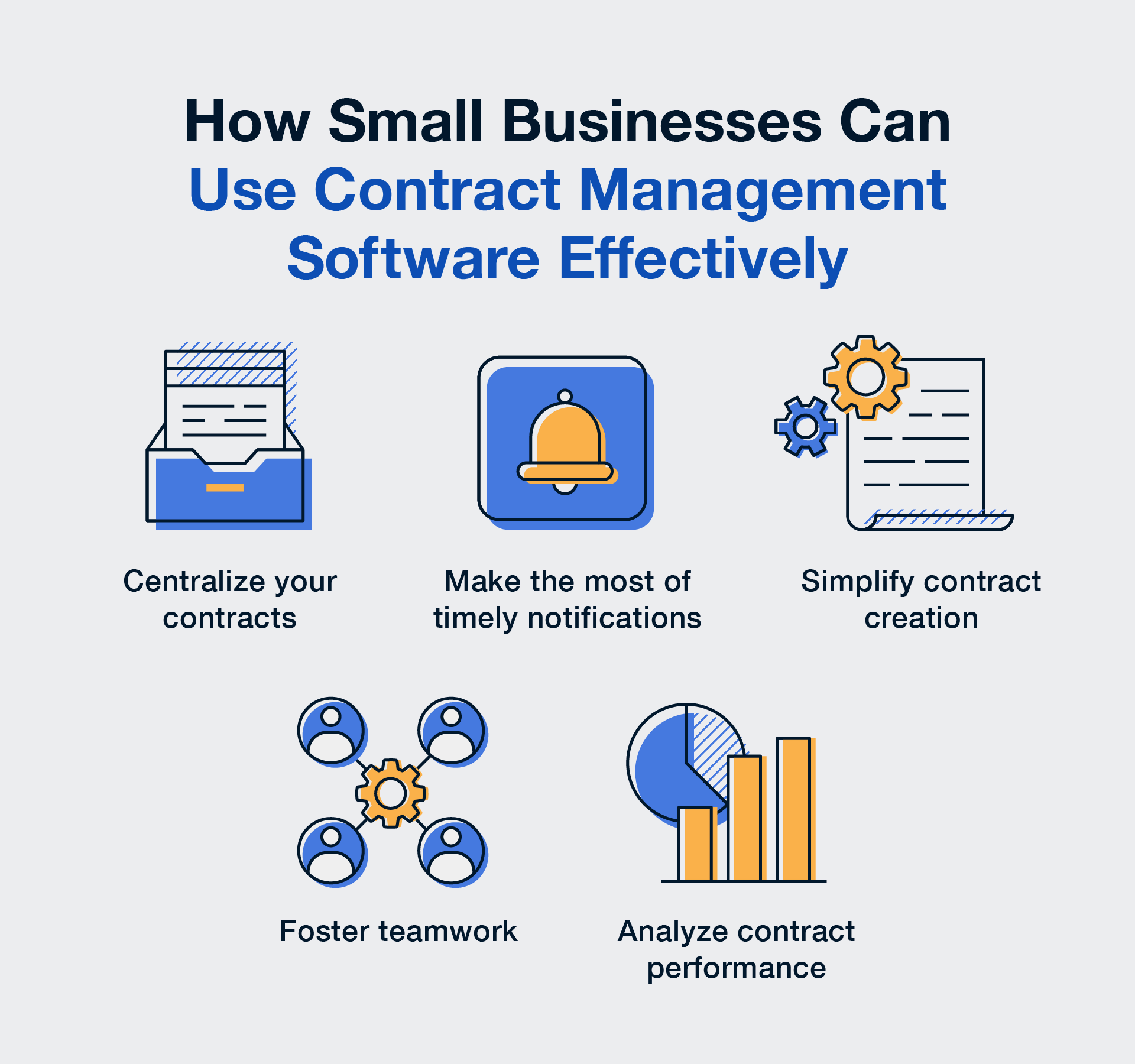
Five practices get the most out of the software: centralize every contract, use the notifications, simplify creation, work as a team, and read the reports. Centralizing and alerts pay for themselves in found agreements and caught renewals, templates and shared workflows cut drafting and approval time, and the reports show where the value of your contracts sits.
Centralize Your Contracts
Put every signed contract, amendment and attachment in one searchable place first; nothing else in this list works until that's done. Move everything, whether it's tucked away in filing cabinets or saved in email threads, then categorize, tag and back it up. This is about retrieval, not storage: the next time you need that supplier contract from three years ago, it's a search away.
Make the Most of Timely Notifications
Set a reminder on every date that costs money if you miss it: renewal, notice deadline, delivery, price step-up. Make sure your software can do alerts the way you need them; some tools only show notifications on a dashboard, while others, like ContractSafe, send email reminders. A few habits make them work:
Set reminders immediately: as soon as you know you need to do something on a specific date, schedule the reminder, whether it's a week, a month or a year out.
Send reminders to the right people: double-check where the reminder is going so an internal approval reminder doesn't land in the vendor's inbox.
Let AI set them: AI can automate alerts by extracting key dates from contracts. Let it do its thing, and double-check its work.
Simplify Contract Creation
Turn the agreements you send out over and over into templates, so the next one starts from the version you've already had checked. Take a look at your contracts and notice the overlap: maybe you've written some variation of the same contract several times, or forgotten an important clause in a couple. Build templates around that. If there's a clause you keep forgetting, add it to the template, and use that version every time. With standardized templates and native e-signatures, you can make sure your agreements include everything you need, cut the drafting time, and let other team members step in even if they're not experienced.
Work as a Team
Once everything's in one place, let everyone who needs a contract open the same copy instead of emailing versions around. The software also lets people leave notes, so marketing can chime in with an important clause or finance can clarify payment terms. With that in place, set up workflows: when a contract is ready for approval, who needs to see it, when is it due, and is a signature required? Two quick tips for a working workflow:
Give every approval a due date so a stalled contract shows up on a report.
Integrate e-signatures into the workflow so contracts can be signed quickly.
And be deliberate when setting user roles and permissions: give everyone a login, and use ContractSafe's roles and user groups to keep sensitive agreements with the people who handle them.
Read the Reports
Run three reports once a month: what expires next quarter, which contracts have no owner, and total committed spend by vendor. Those three tell you where the next missed renewal would come from and which agreements are quietly costing the most, and the software's customizable reports can spot the trends from there.
Related Reading
How ContractSafe Helps Small Businesses Manage Contracts
ContractSafe is a full-lifecycle CLM. On every plan, AI pulls the dates and terms out of each PDF for a person to confirm, OCR makes every contract searchable, and reminders go to each contract's owner before the notice window closes. Approval workflows, redlining and e-signature come with the Finalize plan, and intake forms, templates and AI Contract Review with Maximize. Nobody needs a seat, so the person who signs the occasional vendor agreement can look things up, and onboarding and migration are part of the subscription rather than a separate engagement.
Pricing starts at $450/month (Organize plan, billed annually; $540 month-to-month), with unlimited users on every plan. Before you sign with any vendor, get two numbers: days to your first filed-and-found contract, and the total three-year cost with onboarding included. For ContractSafe, contracts are filed and findable the day you load them, and the three-year cost is three years of the published price for your plan and contract volume, with onboarding already in it.