


Secure AI contract management means using AI to search, summarize, and extract data from your contracts while protecting contract records, permissions, exports, and audit history your legal team relies on after signature. It's a contract system with smart search added on, plus the guardrails to keep that power from leaking.
Picture a procurement lead typing "which vendor contracts renew next quarter, and what are the notice deadlines?" and getting a clean answer in seconds. That's genuinely useful. But the same front door that lets the right person find that answer fast can hand it to the wrong person just as fast, so the speed cuts both ways.
So before the demo gets exciting, legal needs to know exactly what to look for. The questions below help you tell a system that actually protects your contracts from one that just moves faster.
Key Takeaways
- Secure AI contract management software has to protect documents, metadata, summaries, reports, exports, and AI answers, not only the signed PDF.
- Legal should test permissions with real user roles during the demo: legal admin, finance, procurement, sales, executive, and restricted user. ContractSafe's role-based contract permissions and platform security controls are built for exactly that test.
- AI answers should show sources, review status, correction history, and audit history before they affect deadlines, dollars, obligations, or access.
- The strongest vendors can explain training, retention, deletion, encryption, support access, integrations, and export controls in plain language.
- ContractSafe helps legal teams use AI inside a controlled contract repository where permissions, alerts, reports, and audit history already matter.
Choose Your Next Step
Use this secure AI contract management guide based on the decision your team needs to make next.
-
If you need the buyer frame first, start with what secure AI contract management means.
-
If you're preparing for a demo, jump to the ten questions to ask vendors.
-
If you need a scorecard, use the demo scorecard.
What Security in AI Contract Management Means
Secure AI contract management means AI works inside the same controls that govern the contract repository. That sounds simple, but it's where a lot of AI demos get vague.
Legal teams don't only store contracts. They store renewal dates, notice windows, pricing, customer terms, vendor obligations, internal notes, owner fields, restricted agreements, audit history, and reports.
If AI can search that information, summarize it, extract it, export it, or answer questions from it, then AI is part of the security model. It can't sit off to the side as a shiny feature.
| Where AI is used | What legal has to protect | Security test |
|---|---|---|
| AI search | Contract text, fields, summaries, notes, attachments | Ask the same question as different user roles |
| AI extraction | Dates, values, owners, obligations, restricted flags | Require review status before reports or alerts use the field |
| AI summaries | Confidential terms, pricing, obligations, exceptions | Make the system show source links and access rules |
| AI reports | Portfolio data, renewal risk, vendor spend, exports | Confirm reports and exports respect permissions |
The NIST AI Risk Management Framework is useful background because it keeps AI risk tied to governance, measurement, and control.
For legal teams, that control has to show up in ordinary contract work: who can see the answer, where the answer came from, who reviewed it, and what happened next.
Secure AI Contract Management Software vs. Generic AI
Secure AI contract management is different from a regular AI feature claim because the answer has to survive a permission, source, review, and audit test.
A vendor can say the product has AI search. That doesn't tell legal whether the search respects restricted contracts.
A vendor can say the product extracts obligations. That doesn't tell legal whether the extracted obligation is reviewed before it appears in a report.
A vendor can say the product creates summaries. That doesn't tell legal whether users can see summaries for contracts they can't open.
| Vendor claim | Weak version | Secure version |
|---|---|---|
| AI answers | A chat response with no source | A source-linked answer the user is allowed to see |
| AI extraction | Fields appear with no review status | Fields show source, confidence, review, and correction history |
| AI reporting | Portfolio summary with no record links | Report rows that link back to reviewed contract records |
| AI automation | AI takes action without a clear approval rule | AI suggests work; legal defines what requires approval |
The difference is practical. Secure AI doesn't ask legal to trust a black box, it gives legal a way to check the answer and control what happens next.
Best-Fit Shortlist: Secure AI Contract Management Tools
The most secure AI contract management tools deserve attention when they connect AI to the contract record, not when they simply add a chat window.
Shortlist tools by the work they can prove in a demo.
-
If your biggest risk is sensitive access, prioritize role-based permissions, restricted records, and permission-safe AI answers.
-
If your biggest risk is unreliable contract data, prioritize source-linked AI extraction, review status, correction history, alerts, and reports.
-
If your biggest risk is auditability, prioritize logs for prompts, answers, field changes, exports, permission changes, and approvals.
-
If your biggest risk is adoption, prioritize business-user access that is safe enough for finance, procurement, sales, and executives.
ContractSafe belongs on the shortlist for legal teams that want AI tied to a controlled contract repository, not a separate place where answers float away from the contract record.
Its AI contract management features are designed to help teams find contract information while keeping contract work connected to search, key terms, alerts, reports, and permissions.
Quick Gut Check: Proof to Ask For Before the Demo
Ask for three things in writing before the demo starts: proof the AI respects user permissions, proof every answer links back to a source contract or field, and proof that a correction flows through reports, alerts, and audit history. Make the vendor show all three live, not just describe them.
-
Proof of access control: Have the vendor ask the same AI question as two different user roles. If everyone gets the same answer, the demo just exposed your first risk.
-
Proof of source control: For any answer that touches a deadline, obligation, value, or risk call, make them show the contract, clause, amendment, or reviewed field it came from.
-
Proof of workflow control: Have legal correct an AI-suggested field, then watch what happens next. Reports, alerts, and audit history should all reflect the fix.
Legal teams don't buy AI in isolation. They buy a system that still has to support contract decisions long after the demo ends. If the proof isn't visible on screen, treat the claim as unproven.
Requirements for Secure AI Contract Management
Secure AI contract management requirements should define the scope, criteria, controls, and proof needed before AI touches contract data.
Start by writing down the scope of the AI feature. Does it read signed agreements only, or does it also use attachments, amendments, metadata, notes, comments, imported emails, historical versions, and deleted records?
Then define what a safe answer looks like. A safe answer respects permissions, shows a source, supports review, preserves correction history, and updates downstream work only after legal approves the field.
| Requirement area | Minimum criterion | Proof to ask for |
|---|---|---|
| Scope | Vendor lists every data source AI can use | Written data map for documents, fields, prompts, outputs, and providers |
| Permissions | AI answers follow the user's contract access | Role-by-role demo using restricted records |
| Review | Important fields can be approved, corrected, or rejected | Correction changes a report and leaves history |
| Audit | Access, answers, exports, and corrections are logged | Sample audit trail from the demo workflow |
This kind of checklist keeps the buying team from scoring a feature just because it sounds impressive. The vendor has to show how it actually behaves inside the contract system.
Questions Legal Teams Should Ask About Security in AI Contract Management
The best way for legal team to test security in an AI contract tool is to make the vendor demonstrate each control during the demo instead of simply describing it.
Bring a small demo packet with real examples: one standard vendor agreement, one amended agreement, one restricted contract, one scanned contract, one contract with a wrong metadata field, and one contract where finance needs a limited answer. Then ask the vendor to use that packet live.
1. Who can see each AI answer?
Start with access because every other security question depends on it.
For example, ask the same question as a legal admin, finance user, procurement user, sales user, executive, and restricted user: "Which vendor agreements renew next quarter, and what are the notice deadlines?"
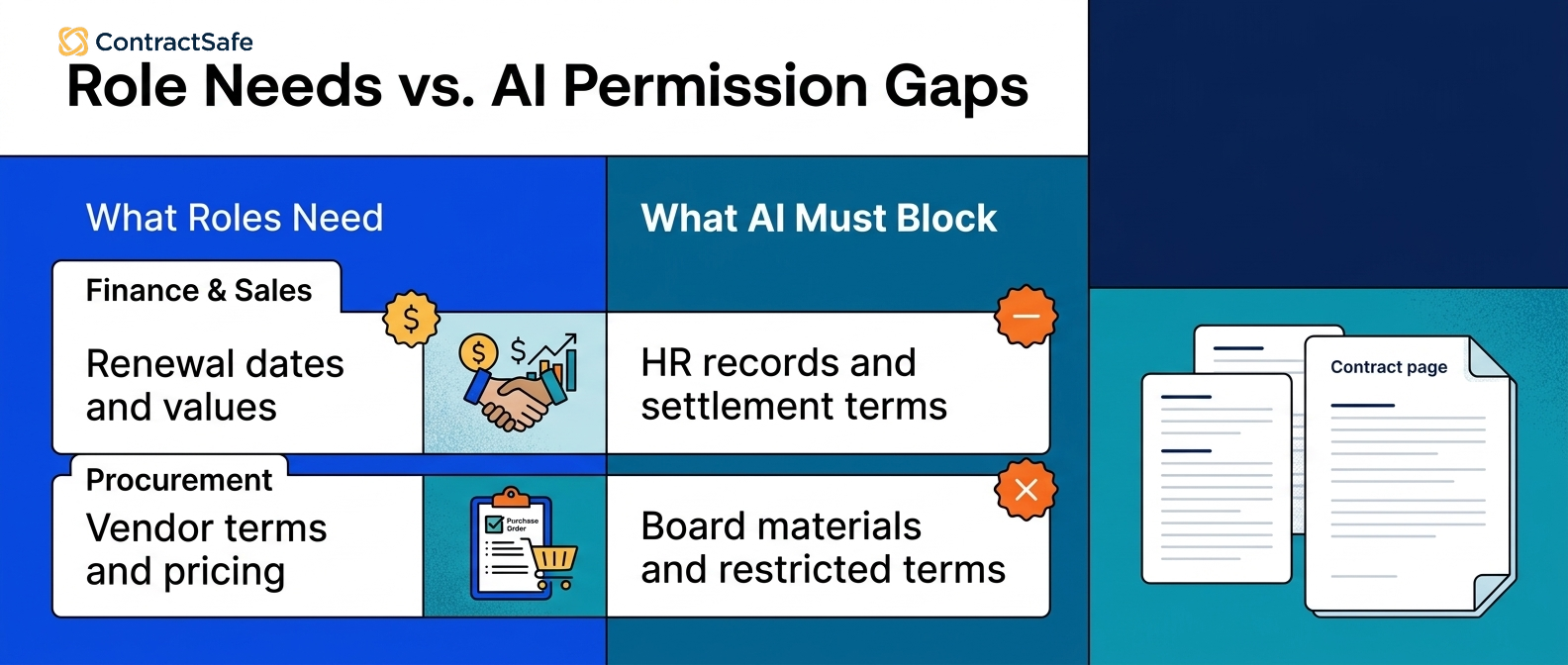
The answer should change based on role. A finance user may need renewal dates and values, while a restricted user shouldn't see privileged notes, HR agreements, settlement terms, or contract text outside their role.
Ask the vendor to show how sharing and roles work across contract records, summaries, reports, exports, and AI answers.
If the vendor only demonstrates the admin view, the control hasn't been shown.
2. What contract data can the AI use?
AI security depends on the data the AI can reach.
For example, ask whether the AI can use signed PDFs, attachments, amendments, metadata fields, internal notes, user comments, email imports, deleted records, historical versions, and restricted folders.
Then ask whether the answer changes when a user loses access to one of those sources.
This matters because legal systems often hold a lot more than the executed contract. They also carry renewal strategy, pricing, negotiation context, support obligations, customer exceptions, vendor risk notes, and regulated information.
The vendor should be able to explain the source boundary in writing. If they can't describe what the AI can reach, legal can't decide whether the answer is safe. That source-boundary explanation should identify the inference engine or other processing layer, what contract data it can reach, and where it runs.
3. Can every important answer show its source?
AI answers about deadlines, obligations, or dollar amounts should point to the contract language behind them. An answer nobody can trace isn't a time-saver, it's a security gap wearing a confident voice.
For example, ask AI to identify a termination notice deadline, a renewal date, a data-processing obligation, and an indemnity carveout.
The answer should point to the contract, amendment, clause, page, extracted field, or reviewed record, because no source means legal has to redo the work.
Source links also reduce the risk that a confident answer becomes a business record before anyone checks it.
The FTC guidance on protecting personal information is a useful reminder that access and verification still matter when information becomes easier to find.
Ask the vendor to treat unsupported answers as a failed demo item.
4. How does human review work before AI output drives alerts or reports?
AI-suggested data shouldn't immediately drive legal operations.
For example, if AI extracts renewal dates from 100 vendor agreements, legal should be able to review, approve, correct, or reject those dates before they feed alerts or reports.
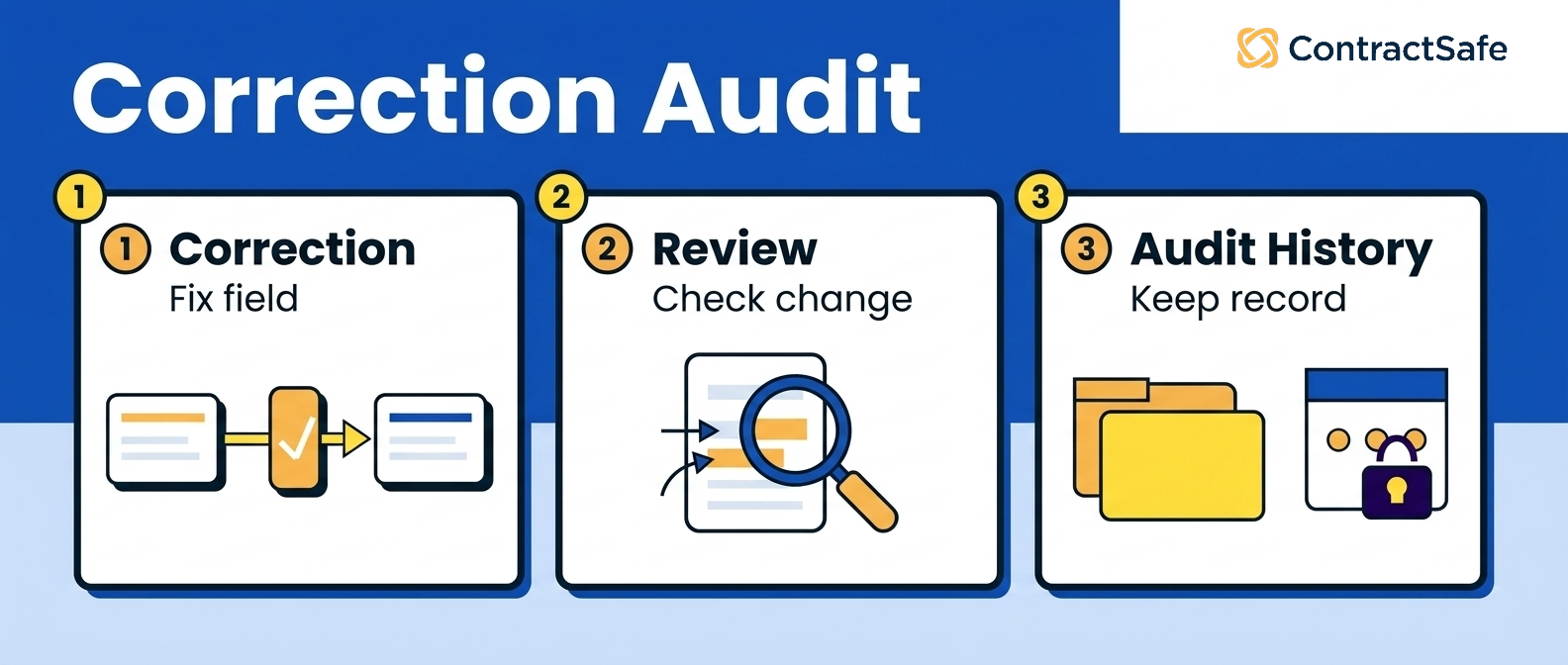
Ask what the system shows after correction. Does the field carry a reviewed status? Does the report update? Does the alert update? Can users see who changed the value and when?
That review workflow is the difference between AI helping legal and AI creating a cleaner-looking mess.
ContractSafe's alerts are useful only when the dates behind them are trustworthy, which means AI extraction and human review need to work together.
5. What gets logged?
Audit history matters because contract data becomes evidence later.
For example, ask what the system logs when a user asks an AI question, views an AI answer, corrects an extracted field, exports a report, changes permissions, approves metadata, or shares a contract summary.
Then ask who can see that history.
A useful log should answer ordinary legal operations questions: Who saw the answer? Who changed the field? Who approved the renewal date? Who exported restricted data? Which source did the answer use?
If the system can't answer those questions, legal will have a hard time defending the workflow later.
Ask for a sample audit trail during the demo.
6. Can reports and exports leak restricted information?
Reports are where permission problems often hide.
For example, a user might not be able to open a restricted employment agreement, but can they see a report that exposes its value, counterparty, renewal date, summary, or obligation?
Ask vendors to demonstrate permission behavior in search results, extracted fields, AI summaries, dashboards, renewal reports, alerts, and exported spreadsheets.
Also ask whether email notifications can reveal restricted data in a subject line or preview.
Don't accept "the permissions carry through" as the whole answer.
Make the vendor show the report and export behavior with a restricted user.
7. Is contract data used to train any shared model?
Legal should get a written answer on model training before contracts enter the system.
For example, ask whether your contract data, prompts, outputs, extracted fields, corrections, or user feedback can train any shared model or third-party model.
Then ask what is excluded by default, what requires opt-in, and what can be deleted.
You're not trying to turn the sales call into a full security audit. You're trying to learn whether the vendor has a clear policy before your contracts are in the system.
If the answer is vague, mark the item as not proven and move it to security review.
8. How are retention and deletion handled?
AI can create new data that needs its own retention and deletion rules.
For example, a prompt may include sensitive contract language. An AI answer may summarize restricted pricing. An extracted field may remain in a report after the underlying contract is deleted or permissioned differently.
Ask how long prompts, outputs, source snippets, extracted fields, corrections, and logs are retained.
Then ask what happens when a contract is deleted, archived, moved, or restricted.
The answer should cover production data, backups, indexes, exports, integrations, and third-party AI providers.
If the vendor can't explain deletion in plain language, legal shouldn't assume the control exists.
9. How do integrations change the risk?
Integrations can move AI output into systems with different permissions.
For example, ask the vendor to extract a renewal value from the sample vendor agreement and show whether that value can move into CRM, ERP, e-signature, Slack, email, a ticketing tool, or a reporting warehouse.
Ask which fields can sync, which users can trigger the sync, which logs capture the transfer, and which downstream systems can expose the data.
ContractSafe's integrations are useful because contract work often has to connect with the rest of the business.
But integration convenience should not erase legal's permission model.
If AI output can leave the repository, the team needs rules for what can leave, who can send it, and where it appears.
10. What happens when the AI is wrong?
Every useful AI system needs a wrong-answer process.
For example, ask the vendor to intentionally correct a wrong renewal date, wrong owner, wrong obligation, or wrong restricted-access flag, then watch what happens.
Can the user correct it? Does the correction update reports and alerts? Is the old answer preserved in history? Can the team see who corrected it? Does the AI avoid repeating the same mistake?
This question matters because secure AI isn't only about preventing unauthorized access. It's also about preventing bad data from becoming operational truth.
Ask the vendor to show the correction path before you trust the answer path.
Secure AI Demo Scorecard
A secure AI demo scorecard gives legal a simple way to mark each security claim as shown, not shown, or blocked.
Give full credit only when the vendor shows the control with your sample packet or a close equivalent.
| Question | Pass | Fail |
|---|---|---|
| Can AI answers respect user roles? | Vendor shows different answers by role | Vendor only shows admin access |
| Can legal verify important answers? | Answer links to source contract, clause, or reviewed field | Answer is confident but unsupported |
| Can fields be reviewed and corrected? | Review status and correction history are visible | Raw AI output feeds reports |
| Can reports and exports stay permission-safe? | Restricted data stays restricted in reports and exports | Reports expose values, summaries, or obligations the user can't open |
| Can the vendor explain AI data handling? | Training, retention, deletion, support access, and providers are documented | Answers stay vague or require follow-up after the call |
Use a simple rule: shown beats stated.
If a vendor says the control exists but can't show it, write "not shown" in the scorecard.
How to Roll Out AI Contract Management Software Securely
A secure AI contract management rollout should start with one controlled workflow before AI access expands across the company.
Use these steps after vendor selection.
Step 1. Pick one sensitive workflow.
Start with a workflow where the answer matters and the source can be checked.
Renewal review, restricted-access search, or obligation reporting are good first tests because they combine source documents, fields, owners, permissions, alerts, and reports.
Step 2. Define the user roles.
Write down who needs access before enabling broad AI search.
Finance may need dates and values. Procurement may need vendor terms. Sales may need customer status. Legal may need everything. That doesn't mean every user needs the same answer.
Step 3. Review AI-suggested fields before they drive work.
Don't let AI-suggested dates, owners, values, or obligations feed alerts and reports until legal has a review path.
The review path should let a user approve, correct, reject, and audit the field.
Step 4. Log the actions that matter.
Track prompts, answers, views, corrections, exports, permission changes, and approvals when they affect contract work.
You don't need noise. You need evidence for the decisions legal may have to defend later.
Step 5. Expand only after the first workflow passes.
When the first workflow shows source links, role-safe answers, reviewed fields, clean reports, and audit history, expand to the next workflow.
If it doesn't, fix the repository, permissions, review steps, or reporting before adding more users.
What Legal Should Do This Week
Legal teams can make secure AI contract management concrete this week without running a full procurement process.
-
Choose six contracts for a demo packet: standard, amended, restricted, scanned, wrong-field, and limited-access.
-
Write five known-answer questions about dates, owners, obligations, values, and restricted terms.
-
Define the user roles that should and should not see each answer.
-
Ask every vendor to show source links, review status, correction history, reports, exports, and audit logs.
-
Score only what the vendor shows live or documents clearly.
That gives legal a practical way to evaluate AI security without getting trapped in abstract feature language.
It also gives your security team a better starting point if the vendor moves into formal review.
Related Reading
-
AI Contract Management Software: A Practical Evaluation Framework
-
AI contract data accuracy
- Before scaling AI, confirm AI contract management system requirements.
How ContractSafe Helps Legal Teams Use AI Securely
ContractSafe helps legal teams use secure AI contract management by keeping AI connected to the contract repository, user roles, key terms, alerts, reports, and audit history.
That matters because legal teams don't need a separate AI toy.
They need contract answers that stay tied to the signed agreement, the user's permissions, the reviewed field, and the next action.
ContractSafe's AI contract management features help teams ask contract questions and find key information inside the same system that stores the agreements.
The repository gives AI a controlled source record. Sharing and roles help teams manage access. Alerts and reports help turn reviewed contract data into work someone owns.
The FAQ below covers the questions legal teams usually ask before they trust AI with contract data.
If your team wants to test AI against real agreements and real access rules, request a ContractSafe demo and bring the workflow you want to secure first.






.svg)







.svg)




