


An AI contract management system is contract management software that puts AI to work inside real contract workflows: search, extraction, metadata, permissions, alerts, reports, review status, and audit history.
Think of scaling AI like adding lanes to a road. If the signs are wrong, more lanes don't fix traffic, they just let more confusion move faster. That's the mistake legal teams need to avoid with AI contract management.
Before more users, more contracts, and more AI answers enter the system, the contract record needs enough structure to keep up. Otherwise AI just turns a messy repository into a faster messy repository. The goal isn't more AI output, it's contract work legal can trust at scale.
Key Takeaways
- An AI contract management system needs clean source records, required metadata, permissions, review status, reports, and audit history before it scales.
- Legal should scale AI in stages: search, extraction, reviewed fields, alerts, reports, owner queues, and business self-service.
- Unreviewed AI output shouldn't drive deadlines, dollars, obligations, exports, or access decisions.
- The best scaling test is whether AI output can become reviewed contract data that creates a next action.
- ContractSafe helps lean legal teams scale practical AI inside the contract repository instead of creating a disconnected answer layer.
Choose Your Next Step
Use this AI contract management system guide based on the decision your legal team needs to make next.
-
If you need the foundation first, start with what the system needs before scaling.
-
If you're preparing for implementation, jump to the ten scale requirements.
-
If you need a practical check, use the readiness scorecard.
What to Have in Place Before You Scale AI
An AI contract management system needs a reliable contract record before it can support more users, more answers, and more workflows.
That record is more than the signed PDF. It includes amendments, required fields, owner data, effective dates, expiration dates, notice windows, contract status, access rules, alerts, reports, exports, and audit history.
If those pieces are missing, AI can still produce answers, but legal can't tell whether those answers are current, reviewed, permission-safe, or tied to work someone owns.
| System layer | What legal needs | Scaling risk if missing |
|---|---|---|
| Source record | Signed agreement, amendments, attachments, OCR, search | AI answers from incomplete records |
| Metadata | Counterparty, owner, dates, status, value, type | Bad fields spread through reports |
| Permissions | Access for records, reports, exports, answers | Business users see restricted terms |
| Workflow | Alerts, reports, queues, owners, review status | AI output doesn't become action |
The NIST AI Risk Management Framework is useful background because it keeps AI tied to governance, measurement, and controls.
For contract management, that means legal should be able to check the source, review the field, restrict the answer, and act on the result.
How an AI Contract Management System Differs From a Loose AI Tool
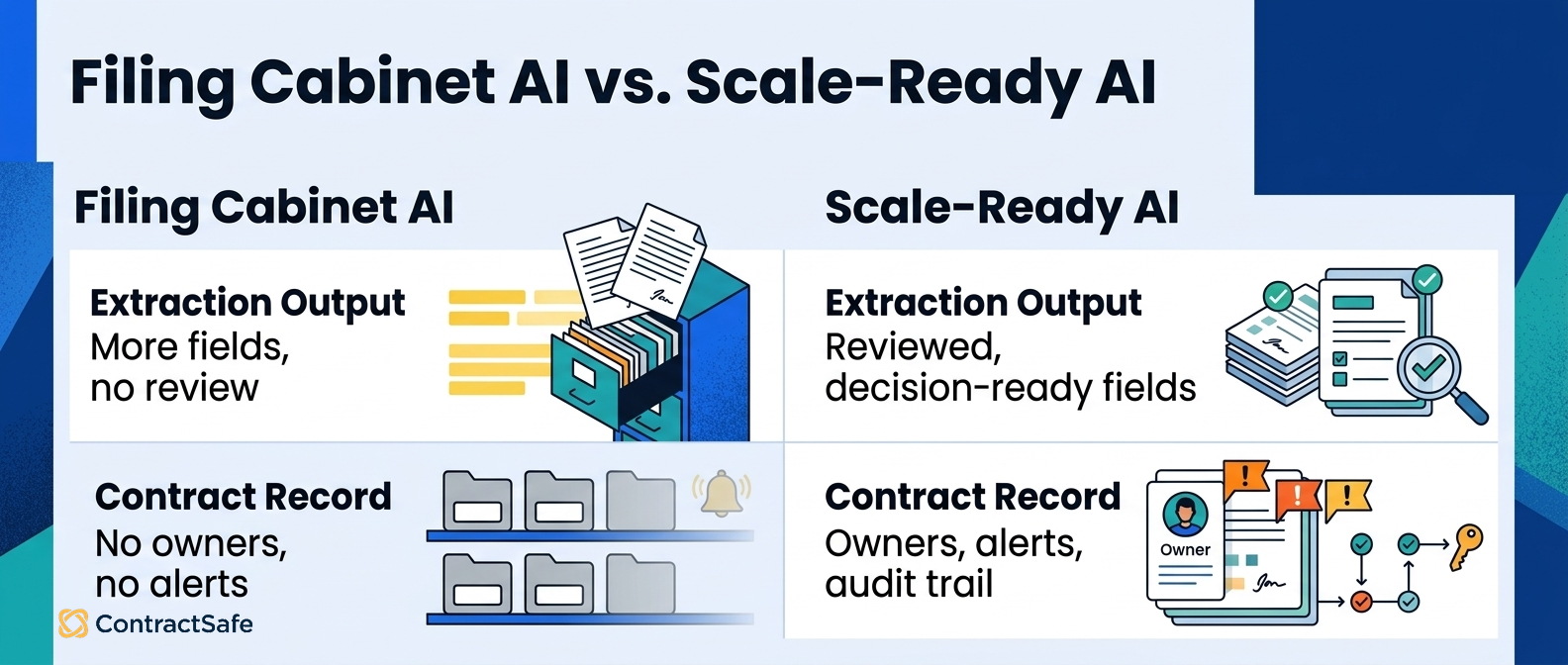
An AI contract management system is different from a loose AI tool because it connects answers to records, permissions, reports, and work.
A loose AI tool can summarize a contract, and that's genuinely useful for a one-off review. But a chat-window summary doesn't move the renewal date onto the record, doesn't check whether the person asking is cleared to see the settlement terms, and doesn't put the notice deadline in front of the owner who has to act on it. A scale-ready system shows the source clause behind each answer, keeps the repository's existing permissions, turns extractions into reviewed fields, updates the alert and report those fields drive, and leaves a record of what changed.
| Buyer question | Loose AI tool | AI contract management system |
|---|---|---|
| Where did the answer come from? | May require manual checking | Links to source contract, clause, or reviewed field |
| Who can see it? | Depends on separate tool access | Follows repository permissions and roles |
| Can legal correct it? | Correction may stay outside the system | Correction updates fields, reports, and history |
| Does it create work? | Often ends with a summary | Can feed alerts, reports, owners, and queues |
The difference matters when legal moves from a pilot to daily use, because at scale answers need to become controlled contract data.
Best-Fit Shortlist: Which AI Contract Management Systems Deserve Attention
The best AI contract management systems deserve attention when they help legal scale contract work without losing control.
Shortlist systems by the scaling problem they can prove.
-
If contracts are hard to find, prioritize repository search, OCR, source links, naming, and required metadata.
-
If renewal work is unreliable, prioritize reviewed dates, notice windows, owners, alerts, and renewal reports.
-
If business users need answers, prioritize role-safe AI search and permission-aware reports.
-
If legal needs proof, prioritize review status, correction history, audit logs, and source-linked fields.
ContractSafe belongs on the shortlist for teams that want practical AI tied to the signed contract repository, not a separate answer layer.
Its AI contract management features work inside a system built around the contract record, key terms, alerts, reports, and permissions.
The Architecture to Look For in AI Contract Management Tools
The best AI contract management tools use an architecture that connects AI answers to source records, permissions, reviewed fields, reports, and next actions.
That architecture matters more than the feature label. A top tool can have AI search, AI extraction, AI summaries, and AI reporting and still fail legal if those features live in separate places.
Before scaling, ask how the tool moves from source document to reviewed field to business action.
| Tool layer | What to look for | Why it matters before scaling |
|---|---|---|
| Repository layer | Signed agreements, amendments, OCR, naming, search | AI needs a trustworthy source record |
| Data layer | Required metadata, review status, correction history | Reports shouldn't rely on unreviewed fields |
| Access layer | Roles for records, answers, exports, and reports | Self-service shouldn't leak restricted terms |
| Workflow layer | Alerts, reports, queues, owner tasks, audit history | Answers need to become work someone owns |
This is the difference between a tool that demos well and a system legal can run every week, so use the architecture as a shortlist filter before comparing smaller feature differences.
Quick Gut Check Before You Scale AI
Your AI contract management system ran a clean pilot, the demos landed, and somebody says the words "let's roll this out to everyone." Before you nod, run three checks. They're the same questions you'd ask about any new hire: where did you get that, who are you allowed to tell, and what happens next?
Can we trust the source? When the AI gives you a renewal date, an auto-renew clause, or a liability cap, it should point at the exact signed agreement, amendment, or reviewed field it pulled from. Click through from the answer to the actual contract page, and you can trust it in front of a CFO. If the answer floats there with nothing underneath it, you've got a confident intern making things up, and that is the one thing you cannot scale. A clean repository earns its keep, because the AI is only as honest as the records behind it.
Can we trust the user access? The same question should get different answers depending on who's asking. Legal, finance, procurement, sales, HR, executives, and your restricted outside counsel shouldn't all see the same fields. If the system hands everyone the identical view, you're not scaling a tool, you're scaling a leak. Confirm that permissions hold before more people log in, not after.
Can we trust the next action? An AI answer that just sits on a screen is trivia. A useful one turns into something with a home: a reviewed field, an alert, a report row, an item in an owner's queue, or a correction task somebody actually gets assigned. Output that goes nowhere is output nobody's accountable for.
Here's the honest part. If any one of those three comes back "no," the workflow isn't ready for more contracts or more users yet, and that's fine. Go fix the one thing, the messy record, the loose permission, the field nobody reviewed, or the answer with no next step, before the rollout gets bigger and the same crack gets ten times wider. One clean fix now beats one loud fire later.
What the Right Architecture Looks Like
AI contract management system requirements should define scope, criteria, controls, and proof before legal expands AI access.
Start with scope: which contracts, fields, notes, attachments, reports, prompts, outputs, and integrations can AI use?
Then define the criteria for a scale-ready workflow.
The answer should show the source, respect permissions, support review, preserve correction history, update reports, and create a next action.
| Requirement | Minimum criterion | Proof to ask for |
|---|---|---|
| Source integrity | AI uses the right contract record and amendment set | Known-answer test with amended and scanned contracts |
| Metadata review | AI fields can be reviewed, corrected, and audited | Correction updates an alert and report |
| Permission model | Answers, summaries, reports, and exports follow user roles | Same prompt tested as multiple user types |
| Workflow handoff | AI output creates work someone owns | Owner queue with source, field status, and due date |
That architecture keeps things practical, and it gives legal a way to say no to more scale until the system can prove the next control.
What Legal Teams Need From an AI Contract Management System
Legal teams need ten things before scaling an AI contract management system across more contracts, users, and workflows.
1. A clean source record for every active agreement.
AI needs the right document set before it can help legal at scale.
For example, a vendor agreement may have a signed contract, one amendment, a renewal letter, and an old order form. If AI reads only the original contract, the answer may be stale.
Start by confirming that active records include signed agreements, amendments, attachments, OCR, status, and superseded-record handling.
ContractSafe's repository gives legal a place to keep that source record under control.
2. Required metadata that is boring enough to trust.
Reliable metadata beats fancy metadata when legal is about to scale AI.
For example, require counterparty, contract type, status, owner, effective date, expiration date, notice deadline, value, department, and access level before AI fields feed reports.
Those fields aren't housekeeping. They're the data layer AI needs before it can help with renewal tracking, owner cleanup, contract search, and portfolio reporting.
Use the contract metadata guide to decide which fields deserve required status.
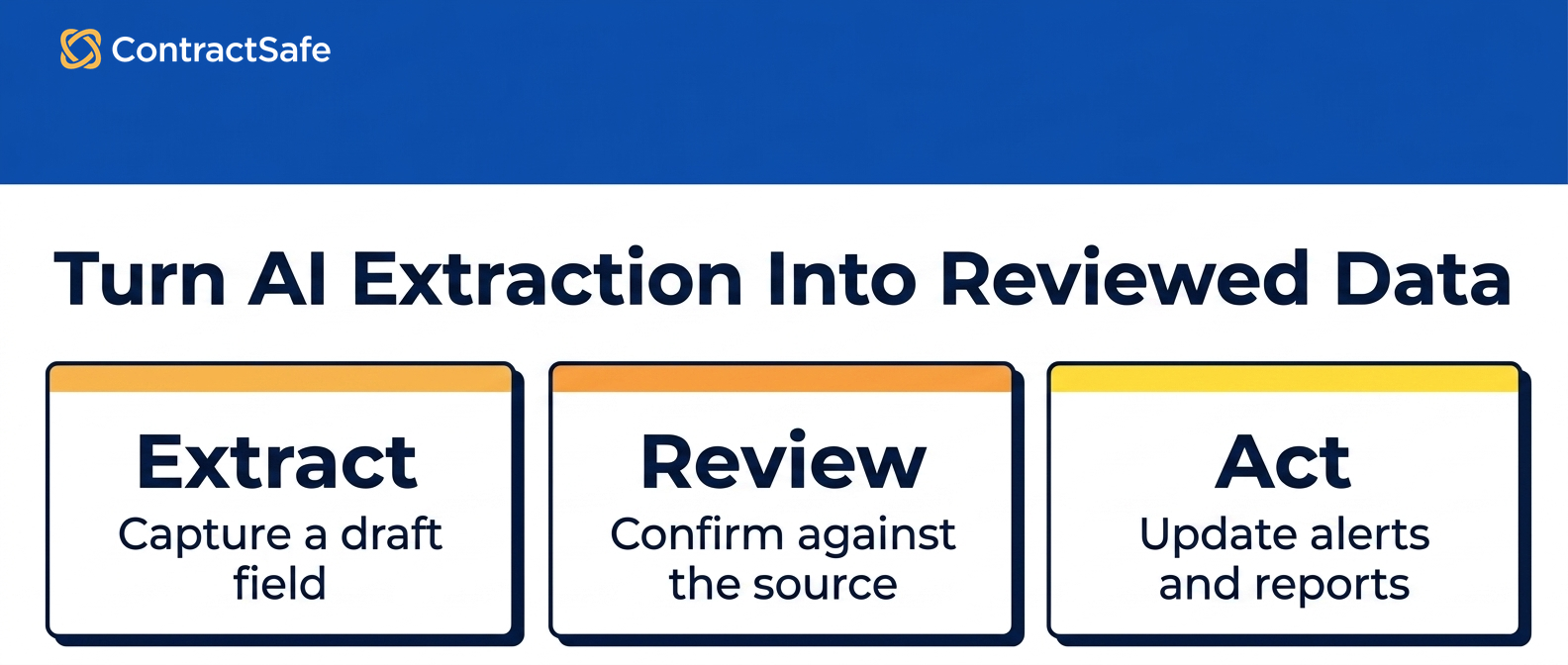
3. Review status for AI-suggested fields.
AI-suggested fields shouldn't become business data just because they appear in the system.
For example, if AI extracts renewal dates from 300 vendor agreements, legal should be able to mark each field as suggested, reviewed, corrected, rejected, or final.
That status matters because dates drive alerts, reports, renewal decisions, and sometimes money.
Before scaling, ask whether a corrected field updates downstream reports and leaves correction history.
No review status means legal is scaling guesses.
4. Permissions that follow records, reports, and answers.
AI permissions need to scale with users, not just documents.
For example, finance may need vendor value and renewal timing, while HR agreements, settlement terms, privileged notes, and restricted customer terms stay hidden.
Ask the same AI question as legal, finance, procurement, sales, HR, and a restricted user.
The answer should change by role. If a user can't open a restricted agreement, they shouldn't be able to get the restricted answer through AI search, reports, exports, or summaries.
5. Reports that become work queues.
Reports should help legal decide what to do next, not only show contract counts.
For example, a useful AI contract management system can show active vendor agreements with upcoming notice deadlines, missing owners, unreviewed AI fields, high contract value, or restricted-access flags.
That report becomes useful when each row shows the record, reason, owner, source, field status, and next action.
The WorldCC research library is useful context because strong contract work depends on ownership, records, and follow-through.
AI should make those basics easier to manage.
6. Business self-service with safe answers.
Business users can help themselves only when answers are source-linked and permission-safe.
For example, finance may ask which vendor agreements renew next quarter. Procurement may ask which suppliers have assignment limits. Sales may ask where the current customer order form lives.
Those are fair questions, and the system should answer them without making legal the search bar for the whole company. But self-service can't mean uncontrolled access.
ContractSafe's sharing and roles help teams manage who can see which records and answers.
7. Audit history for the actions that matter.
Audit history matters because AI output may influence deadlines, obligations, access, and reports.
For example, legal should be able to see who asked an AI question, who viewed the answer, who corrected a field, who exported a report, who changed permissions, and who approved reviewed data.
Don't ask for noise. Ask for the actions legal may need to defend later. If the system can't show what happened to a field before it became a report row, don't scale that workflow.
8. Integrations with clear data boundaries.
Integrations can make contract work faster, but they can also move AI output into systems with different controls.
For example, a renewal value may move from the contract repository into CRM, ERP, e-signature, Slack, email, a ticketing tool, or a data warehouse.
Ask which fields can sync, who can trigger the sync, what gets logged, and whether restricted data can appear in downstream systems.
ContractSafe's integrations help contract data connect with the business, but legal still needs clear rules for what moves and why.
9. A rollout order that starts with low-risk proof.
Legal should scale AI in an order that proves trust before broad access.
Start with searchable signed agreements, then add required metadata, reviewed renewal fields, missing-owner cleanup, reports, alerts, obligation review, and business self-service.
For example, renewal review is often a better first workflow than broad contract Q&A because legal can check the source clause, reviewed date, owner, alert, and report.
Use our guide to ContractSafe demo to test that workflow before rollout.
10. A stop rule for bad AI output.
A scale-ready system needs a stop rule when AI is wrong.
For example, if AI extracts the wrong notice deadline, legal should be able to correct the field, update the report, preserve history, and block the wrong value from driving an alert.
Write down which errors pause rollout: wrong dates, wrong owners, permission leaks, unsupported answers, and unlogged exports should all stop the workflow until the control is fixed.
That rule protects the team from scaling a problem just because the demo looked fast.
A Readiness Scorecard for Your AI Contract Management System
An AI contract management system readiness scorecard helps legal decide whether the system is ready to scale or still needs cleanup.
Score each item as ready, not ready, or not shown.
| Readiness item | Ready looks like | Not ready looks like |
|---|---|---|
| Source record | Current agreement and amendments are searchable | AI reads stale or incomplete records |
| Metadata | Required fields are reviewed before reporting | Reports mix reviewed and unreviewed fields |
| Permissions | Answers change by user role | Restricted answers leak through AI or reports |
| Workflow | AI output creates owner queues, alerts, or report tasks | AI output stays in a chat window |
| Audit | Views, corrections, exports, and approvals are logged | Legal can't reconstruct what happened |
Use the scorecard before adding departments, workflows, or contract volume. Scaling should be earned by proof, not assumed from the feature list.
How to Scale an AI Contract Management System in Stages
Legal teams should scale an AI contract management system in stages so every new workflow inherits the controls already proven.
Use this order unless your risk profile points somewhere more urgent.
-
Search signed agreements and amendments.
-
Extract required metadata into draft fields.
-
Review renewal dates, notice windows, owners, values, and access flags.
-
Create reports for missing owners, upcoming renewals, and unreviewed fields.
-
Turn reports into owner queues and alerts.
-
Add obligation review and non-standard clause review.
-
Expand business self-service after permissions pass role testing.
This sequence keeps the system grounded. Legal proves the record, the fields, the permissions, and the workflow before opening the door wider.
It also gives leadership a cleaner story: the team isn't slowing AI down, it's proving which contract workflows are ready for more automation.
Failure Patterns to Watch as You Scale
AI contract management system failures usually show up when AI output spreads faster than legal can verify the record.
Watch for these patterns during the first rollout.
-
Answer sprawl: Users paste AI answers into spreadsheets, Slack threads, or CRM notes because the system doesn't turn the answer into a reviewed field or report row.
-
Permission drift: A user can't open a restricted contract but can still see its value, summary, renewal date, or obligation in a dashboard or export.
-
Field confusion: Reports mix AI-suggested values with reviewed values, so nobody knows which dates are safe to use for renewal decisions.
-
Owner gaps: AI identifies a deadline or obligation, but no business owner is assigned to act on it.
Those aren't abstract AI risks. They're operating failures legal can see, name, and fix before expanding access.
What Legal Should Do This Week
Legal teams can test AI contract management system readiness this week with a small contract set and a few known answers.
-
Pick ten active vendor agreements, including at least one amendment and one scanned contract.
-
List the fields AI should extract: counterparty, owner, expiration date, notice deadline, value, status, and access level.
-
Mark which fields must be reviewed before they drive alerts or reports.
-
Ask the same AI questions as legal, finance, procurement, and a restricted user.
-
Build one report from reviewed data and assign the next owner action.
That test is small enough to run quickly and concrete enough to expose whether the system is ready for more scale.
If the test fails, the failure should point to a specific repair: missing source record, missing owner, unreviewed field, weak permission rule, or a report that doesn't create action.
Related Reading
-
AI Contract Management Software: A Practical Evaluation Framework
- To turn AI into repeatable work, map the process with AI contract workflows.
How ContractSafe Helps Legal Teams Scale AI Contract Management
ContractSafe helps legal teams scale an AI contract management system by keeping AI connected to the contract repository, reviewed fields, permissions, alerts, reports, and audit history.
That matters because legal teams don't need more AI output floating outside the system.
They need contract answers tied to the signed agreement, the user's access, the reviewed field, and the next action.
ContractSafe's AI contract management features help teams find contract information, extract key terms, and ask questions inside the same system that stores the agreements.
The repository gives AI a controlled source record. Alerts help teams act before renewal and notice dates become urgent. Reports help turn reviewed fields into work someone owns.
The FAQ below covers the questions legal teams usually ask before they scale an AI contract management system.
If your team wants to test AI against real agreements, fields, and permissions, request a ContractSafe demo and bring the workflow you want to scale first.







.svg)







.svg)




