


AI contract management software is a system that uses AI to search, extract, review, summarize, protect, and report on contract information.
You should test it with your own contracts, your own users, your access rules, and the reports your team actually runs.
Think of it like test-driving a car. A smooth loop around the dealership tells you something, but not enough. You need the road you actually drive: the pothole near the school, the tight turn into the parking garage, the stoplight that always backs up at 5:15.
Contract AI works the same way. A vendor sample file shows you how the product behaves on a clean road, but your contracts show you how it behaves on yours: scanned PDFs, amendments, restricted agreements, known renewal dates, bad metadata, and the reports your team actually needs after the demo ends.
Key Takeaways
- Evaluate AI contract management software with real contracts, not vendor sample files.
- The core criteria are source proof, permission-aware AI, human review, workflow connection, reporting, adoption, and implementation effort.
- AI answers should become verified fields, alerts, reports, tasks, or decisions. Standalone summaries aren't enough for legal operations.
- Use one demo packet for every vendor so each platform faces the same messy contracts and the same buyer tests.
- ContractSafe AI is a strong fit for teams that need practical AI tied to signed agreements, metadata, renewals, permissions, and reports.
Choose your next step:
If you're still building the evaluation plan, start with the work your team needs AI to improve.
Jump to the evaluation standard, nine evaluation tests, demo packet, or scorecard.
| If the team needs to know... | Use this section | What it proves |
|---|---|---|
| What counts as a real AI evaluation? | Evaluation standard | The demo is judged by workflow proof, not sales language. |
| Which tests should every vendor pass? | Nine tests | Source proof, permissions, review, workflow, reports, adoption, repository quality, implementation, and vendor category fit. |
| What should we bring to the demo? | Demo packet | The same messy contract packet goes to every vendor. |
| How do we compare results? | Scorecard | Every claim gets marked shown, partly shown, not shown, or workaround. |
What Is AI Contract Management Software?
AI contract management software uses artificial intelligence to search contracts, extract fields, answer contract questions, review terms, summarize records, and turn contract data into follow-up work.
That last part matters.
An AI answer is only useful if the team can trust it, review it, protect it, and act on it.
If a tool summarizes a contract but the signed copy still lives in a folder nobody trusts, the contract problem isn't solved.
If it extracts a renewal date but no one reviews the field or turns it into an alert, the deadline is still at risk.
If it answers a restricted question for the wrong user, the AI layer has created a new access problem.
So the evaluation has to be practical.
Ask what the AI does with real contracts, who can see the answer, where the answer came from, whether legal can review it, and what work happens next.
For autonomous task execution, see agentic AI contract management.
The Evaluation Standard
AI contract management software should be evaluated by whether it improves contract work your team already needs to do.
Start with the workflow, not the feature list.
Can legal find the current agreement? Can finance see renewal timing? Can procurement find vendor terms? Can a restricted user be blocked from sensitive answers? Can leadership see reviewed contract data without a manual spreadsheet?
Those questions are more useful than "does it have AI?"
If a vendor can't prove the workflow with your documents, the capability isn't proven.
For a repository-first team, that means upload, search, extraction, alerts, permissions, and reporting have to work on signed agreements.
For a pre-signature team, that means intake, drafting, review, approval, negotiation, and signature workflow have to work before the record lands in storage.
Don't mix those two scorecards.
That's the standard for the rest of this article.
Quick Gut Check Before the Demo
A quick gut check keeps the buying team from treating a clean AI summary as proof of a working contract system.
Before the demo, write down the five contract decisions your team needs the software to improve.
- Which contract controls?
- What renews soon?
- Who owns the next action?
- Which terms are restricted?
- Which fields are reviewed and report-ready?
Then assign each question to a real user.
Legal may own review status. Finance may own renewal timing. Procurement may own vendor terms. A department owner may only need an allowed answer and the next date.
If no one owns the question, the software can't fix the follow-up.
If the demo doesn't answer those questions with your documents, keep testing.
Nine Tests for AI Contract Management Software
Use these nine tests to compare AI contract management vendors with the same contract packet, the same users, and the same pass conditions.
The goal isn't to make the vendor look good.
The goal is to find out whether the software will work when your contracts are messy, restricted, amended, duplicated, or missing fields.
1. Make the Answer Show Its Work
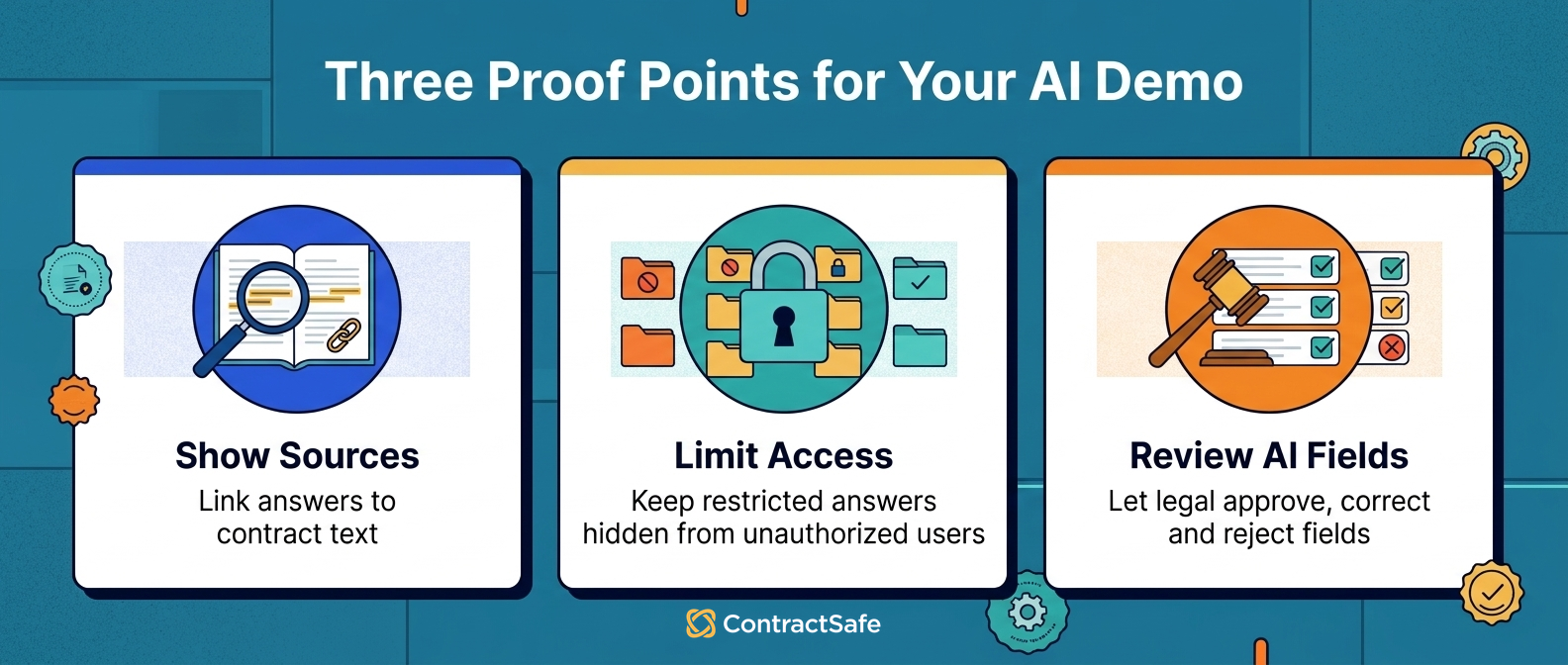
Every important AI answer should point to a contract, clause, page, amendment, extracted field, or reviewed record.
Ask known-answer questions, then ask where each answer came from.
If the answer is correct but unsourced, legal still has to redo the work.
If the answer is sourced, legal can review it quickly and decide what happens next.
Use a contract where you already know the answer.
Ask for the renewal date, assignment clause, governing law, termination right, or notice address.
Then make the vendor show the exact support behind each answer.
ContractSafe should be tested the same way: the useful answer is the answer tied back to the governed contract record.
Pass condition: the vendor shows the source for each answer and lets the user open the supporting contract text.
2. Respect Permissions Across Answers, Fields, and Reports
Permission-aware AI should protect documents, fields, summaries, reports, exports, and AI answers.
Ask the same question as legal, finance, procurement, and a restricted business user.
The answers should change based on role.
If a user can't open a contract, that user should not be able to get restricted terms through AI.
Use the secure AI contract management software checklist when testing this.
Run this test with a real restricted agreement.
Ask legal to search for the restricted term, then ask a business user the same question.
If the business user gets the sensitive answer through a summary, report, export, or chat response, the permission model failed.
Also test partial access.
A finance user may need renewal date, vendor name, and contract value without seeing restricted HR language or security terms.
The best systems let access open the useful fields without opening the whole file to everyone.
Pass condition: restricted terms stay restricted everywhere, including AI answers and reports.
3. Keep Human Review in the System
AI-extracted contract fields should have review status before they drive contract decisions.
That includes renewal dates, notice windows, values, owners, assignment language, termination rights, and restricted-access flags.
Legal should be able to approve, correct, reject, and audit important fields.
The system should clearly separate draft AI output from reviewed contract data.
That's how AI contract analysis software becomes operational instead of just interesting.
Pass condition: the demo shows a field moving from AI-drafted to reviewed, corrected, and report-ready.
4. Connect Answers to Workflow
AI contract management software should turn reviewed contract data into work the team can own.
A renewal date should feed an alert and a report.
A missing owner should create cleanup work.
A restricted record should trigger access review.
A non-standard clause should become a legal review item.
If the AI answer stays in a chat window, the workflow is still manual.
Pass condition: the vendor turns an AI answer into an owner, alert, report, or task during the demo.
5. Test the Repository Before Testing the AI
AI contract management depends on the contract repository underneath it.
If the repository is messy, the AI has a messy source of truth.
Upload scanned PDFs, amendments, duplicate vendor names, order forms, and contracts with bad file names.
Then test search, OCR, related documents, fields, and ownership.
- Can the system find the agreement when the file name is useless?
- Can it connect the amendment to the original contract?
- Can it show which version controls the renewal date?
- Can a business user find the right contract without seeing restricted records?
This is where a repository-first system matters.
AI is more useful when the contract record is searchable, organized, permissioned, and reportable.
The ContractSafe repository is designed around that foundation: get signed agreements into one searchable place before asking AI to answer questions across them.
That matters because the AI output is only as useful as the record underneath it.
Do this test before the vendor shows a polished AI chat answer.
If users can't find the signed agreement, identify the controlling amendment, or tell which version is current, the AI layer is sitting on unstable ground.
Here is the practical example.
Your procurement lead searches for "Acme renewal" and finds three records: a master services agreement, a pricing addendum, and an unsigned redline from last year.
The AI says the contract renews soon.
That answer is not useful until the system shows which document controls, whether the addendum changed the notice window, and whether the unsigned redline was excluded.
Ask the vendor to show that exact chain.
If the demo skips straight to the answer, stop and bring it back to the record.
Pass condition: the system can find and structure messy signed agreements without a long cleanup project first.
6. Measure Reporting, Not Just Summaries
A summary can help, but reports drive the work.
Ask each vendor to build a report from reviewed AI fields.
The report should show upcoming renewals, missing owners, restricted records needing review, high-value contracts with unreviewed fields, and contracts with unusual terms.
Each row should make the next action obvious.
Use Thomson Reuters' guidance on contract management systems as a reminder to test the operating system, not just the AI answer.
The practical question is simple: can the team open a report on Monday morning and know which contracts need attention?
If the answer is no, the AI summary isn't doing enough work.
Make the vendor show the report in the demo.
Pick one contract with a reviewed renewal date, one with a missing owner, and one with restricted access.
Then ask the system to show all three in a report that explains what the team should do next.
Pass condition: the report points to contracts, owners, source fields, review status, and next steps.
7. Check Adoption for Non-Legal Users
Legal is not the only team that needs contract answers.
Finance may need renewal timing. Procurement may need vendor terms. Sales may need customer agreement status. Operations may need notice windows. Leadership may need a report without another spreadsheet.
If the interface only works for legal power users, adoption will suffer.
Ask a non-legal user to search, answer a question, open an allowed contract, and run a simple report.
Pass condition: a normal business user can get allowed contract answers without asking legal to drive.
8. Measure Implementation Effort
Implementation effort should be part of the AI contract management software evaluation, not an afterthought.
Ask what must happen before the first useful report exists.
Who imports contracts? Which fields are required? Who reviews low-confidence extraction? How are owners assigned? What does support include?
Also ask whether users, OCR, AI extraction, alerts, reporting, and migration are included.
The best product on paper can still fail if the rollout is too heavy for the team.
Ask who does the boring work.
Someone has to import contracts, map fields, set access groups, review extracted data, train users, and clean up old folder habits.
If the vendor hand-waves that part, the AI story isn't finished.
Make the vendor walk through a week-one plan.
- First, import a starter set of signed agreements.
- Next, confirm owners, renewal fields, values, and restricted records.
- Then review AI-extracted fields and fix low-confidence records.
- After that, turn reviewed fields into alerts and reports.
- Finally, let non-legal users search for allowed answers.
That plan doesn't have to match the vendor's exact onboarding process.
It tells you whether the vendor understands the operational work between purchase and value.
ContractSafe is usually strongest when the goal is to get signed agreements imported, searchable, permissioned, and reportable without turning implementation into a separate transformation project.
Pass condition: the vendor can explain the path from import to first useful report in plain English.
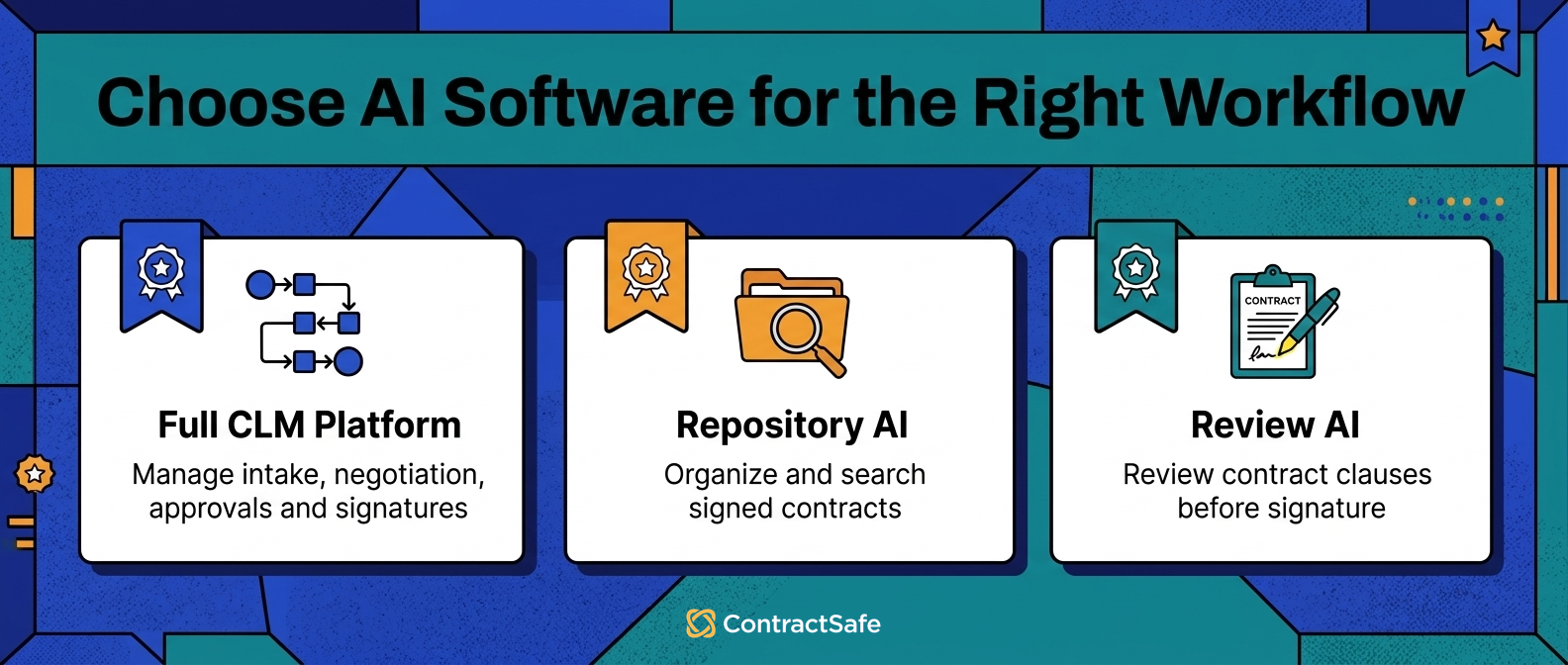
9. Compare Vendor Category Fit
The last test is whether the vendor belongs in the right category for your problem.
A full CLM platform may be right when legal needs intake, drafting, redlines, approvals, negotiation, and signature workflow.
A repository-first AI platform may be better when the team needs signed contracts organized, searchable, permissioned, and reportable.
An AI review tool may be right when the pain is narrowly pre-signature clause review.
Those are different buying lanes.
Use the AI contract software comparison guide after you finish the workflow tests so the shortlist matches the job.
Put the problem in one sentence before you score vendors.
- "We can't find signed contracts fast enough."
- "We miss renewals because metadata is incomplete."
- "Business users keep asking legal for basic contract answers."
- "We need a heavier pre-signature approval process."
- "We need AI review against a clause playbook before signature."
Those sentences point to different tools.
If the real pain is finding and acting on signed contracts, don't let a drafting demo dominate the buying process.
If the real pain is intake and negotiation, don't buy a repository and expect it to replace a full CLM workflow.
Use the category decision to protect the team from buying the most impressive demo instead of the most useful system.
For a broader buying checklist, use the CLM software checklist and weight only the parts that match your workflow.
Pass condition: the vendor category matches the workflow the team needs to improve first.
Build One Demo Packet Per Vendor
Use one AI contract management software demo packet for every vendor you're seriously comparing.
Don't let each vendor choose the road.
Give each one the same documents and the same test sequence.
| Demo document | Why it belongs in the packet | What to ask |
|---|---|---|
| Clean agreement | Shows the baseline experience. | Can the system extract core fields and show source text? |
| Scanned PDF | Tests OCR and search on real-world files. | Can users find dates and terms without a perfect file name? |
| Amendment | Tests whether the tool understands related records. | Which term controls after the amendment? |
| Unusual renewal language | Tests source proof and review judgment. | What is the notice window, and where did the answer come from? |
| Restricted agreement | Tests permissions across AI answers. | Can a restricted user get sensitive terms through AI? |
| Record with bad metadata | Tests cleanup and correction workflow. | Can legal correct fields and preserve review history? |
Ask the vendor to search, extract, correct, restrict, report, and create a next action from that packet.
Use the AI contract management software demo guide for the detailed sequence.
AI Contract Management Software Comparison by Category
After the demo, compare vendors by category so the team does not treat unlike products as interchangeable.
A repository-first scorecard should weight search, OCR, extraction, alerts, permissions, reporting, and broad access heavily.
A full CLM scorecard should weight intake, drafting, redlines, approvals, integrations, signature workflow, and admin effort.
An AI review scorecard should weight source-linked clause review, playbook fit, fallback language, and human review history.
| Category | Weight these scores most | Don't over-weight |
|---|---|---|
| Repository-first AI | Search, OCR, reviewed fields, alerts, permissions, reporting, adoption. | Complex pre-signature workflow the team may not need yet. |
| Full CLM AI | Intake, drafting, review, approvals, redlines, signature, integrations. | A flashy AI answer that doesn't improve the workflow. |
| AI review tool | Clause source proof, playbook comparison, fallback language, review trail. | Post-signature reporting if the tool isn't built for it. |
This is where ContractSafe usually fits: full-lifecycle CLM that manages contracts from signature through renewals, with reporting and deadline alerts that help teams stay ahead of every obligation, and it's simple enough for the whole organization to adopt.
Scorecard
Use a simple AI contract management software scorecard during the demo so every claim gets the same test.
Score each item as shown, partly shown, not shown, or manual workaround.
Don't give full credit for a verbal promise.
| Criterion | Pass condition | Score |
|---|---|---|
| Show-your-work answers | Answers link to contract text or reviewed fields. | Shown / partly shown / not shown / workaround |
| Permissions | Restricted users can't see restricted answers. | Shown / partly shown / not shown / workaround |
| Human review | Legal can approve, correct, reject, and audit AI fields. | Shown / partly shown / not shown / workaround |
| Workflow connection | Reviewed fields feed alerts, reports, owners, or tasks. | Shown / partly shown / not shown / workaround |
| Implementation | Vendor shows migration, cleanup, ownership, and first useful report. | Shown / partly shown / not shown / workaround |
Three Demo Scenarios That Expose Weak AI
Strong AI contract management software should handle ordinary contract messes without hiding behind a polished sample file.
Example 1. The Auto-Renewal With an Amendment
Give the vendor an agreement with a renewal clause and an amendment that changes the notice window.
Ask which date controls, where the answer came from, who owns the next step, and whether the report uses the reviewed value.
This shows whether the tool can connect source proof, human review, alerts, and reports.
Example 2. The Restricted Agreement
Give the vendor a contract that legal can see but a business user should not see.
Ask the same question as both users.
The restricted user should not get the sensitive answer through AI, metadata, summary, export, or report.
Use a real access scenario.
For example, legal may need to see a settlement agreement, while finance only needs the payment date and the responsible owner.
The AI shouldn't become a back door around permissions.
Ask the vendor to show the answer as legal, then sign in as finance and ask the same question again.
Then export the report and check whether restricted fields leak through columns, summaries, or downloaded files.
This isn't a theoretical security test.
It tells you whether the AI layer respects the same access rules the repository is supposed to enforce.
- Legal user sees the record and source proof.
- Finance user sees only allowed fields.
- AI answer follows the user's permission level.
- Reports and exports do not reveal restricted content.
Example 3. The Messy Legacy Folder
Give the vendor a scanned PDF, a duplicate vendor name, a vague file name, and a missing owner.
Ask the system to make the record findable, assign fields, flag gaps, and produce a cleanup report.
This shows whether the software can handle the contracts you already have, not just the contracts you create next.
Turn the Demo Into a Buying Decision
The scorecard should turn each AI contract management demo into a clear buying decision, not a pile of notes.
After each demo, write down what the vendor actually proved and what it only described.
Separate shown work from promised work.
That keeps the team from remembering the cleanest demo as the strongest product.
| If the vendor proved this | It probably means | Next question |
|---|---|---|
| Search, OCR, fields, alerts, and reports worked on your signed contracts. | The system may fit a repository-first AI use case. | How quickly can we import the first useful contract set? |
| Intake, drafting, approvals, redlines, and signature routing worked end to end. | The system may fit a full CLM use case. | Which teams will actually use the pre-signature workflow? |
| Clause review worked, but post-signature records stayed separate. | The system may fit a narrow AI review use case. | Where will signed contracts live after review? |
Don't let the vendor move past gaps too quickly.
If source proof failed, ask for a second run with the same file.
If permissions failed, ask whether the problem is configuration or product behavior.
If reporting failed, ask what the team would have to build manually.
The best buying process isn't adversarial. It's specific.
A serious vendor should be able to show what works, explain what needs setup, and tell you where the product isn't the right fit.
Evaluate the Workflow, Not the Label
AI contract management software should make contract work easier to trust before the team changes its workflow.
That means legal can find the contract, verify the answer, protect access, review the data, and act before the next deadline.
If the demo doesn't prove that workflow with your documents, keep testing.
Bring the scorecard back to the work.
Which vendor gave legal a source-linked answer? Which one blocked restricted answers correctly? Which one turned reviewed data into a report? Which one made implementation feel realistic for your team?
Those answers matter more than the label on the product category.
For vendor-by-vendor fit, use the best AI contract management software guide after you finish the workflow evaluation.
WorldCC points to the same practical lesson: contract work gets better when ownership, records, and follow-through get better.
Related Reading
- CLM Software Checklist
- For job-by-job tool selection, use AI contract management tools.
- Before a vendor call, test claims with AI contract management demo checklist.
- For clause extraction and limits, read AI contract analysis software.
- For market context, track AI in contract management trends.
- For permissions and data handling, check secure AI contract management software.
- Before scaling AI, confirm AI contract management system requirements.
How ContractSafe Helps Teams Evaluate AI Contract Management Software
ContractSafe fits when legal wants practical AI contract management around signed agreements, not a disconnected AI side tool.
The repository gives AI the governed contract record it needs.
That makes ContractSafe a fit for teams that need useful AI around search, extraction, metadata, renewals, permissions, alerts, and reporting without starting with a heavy CLM rollout.
If your team needs pre-signature workflow alongside post-signature control, ContractSafe covers both in the same system, so there is no separate comparison to run.
If your team needs to make signed agreements findable, reportable, and easier to act on, ContractSafe should be on the shortlist.






.svg)







.svg)




