


AI contract management trends are the practical shifts in how legal teams use AI to find contract evidence, extract key terms, protect access, review data, and turn signed agreements into work someone actually owns.
Think of AI like a power tool on a legal operations workbench. It can save you real time, and it can just as easily make a mess faster when the workbench isn't set up.
That's why the trend that matters isn't "AI is everywhere." The trend that matters is whether AI makes contract work easier to find, review, restrict, correct, and turn into action. If an AI tool just becomes another place to stash answers nobody checks, legal hasn't gained much.
You need a practical test for every trend: can you verify the answer, restrict it, correct it, and turn it into work someone owns?
Key Takeaways
- The useful AI contract management trends are source-linked answers, reviewed metadata, permission-safe search, review queues, and workflow-connected reports.
- Legal teams should be careful with standalone AI chat features that don't show sources, respect permissions, or support human review.
- The first priority is usually signed contract data: searchable records, key fields, owners, alerts, permissions, and reports.
- Every AI trend should be tested against a real workflow, such as renewal review, owner cleanup, restricted access, or obligation reporting.
- ContractSafe helps teams use AI inside the contract repository, where records, fields, alerts, permissions, and reports already live.
Choose Your Next Step
Use this AI in contract management trends guide based on the decision your legal team needs to make next.
-
If you need the big picture first, start with what these trends mean.
-
If you need the action list, jump to the twelve trends to act on.
If you're comparing tools, use the proof checklist.
What AI Contract Management Trends Mean in 2026
AI in contract management trends matter only when they make a contract workflow easier to verify, control, and act on.
That means the trend has to survive contact with real contracts.
A vendor can talk about AI summaries, chat, insights, automation, and agents.
Legal still has to ask what changes in the contract system after the answer appears.
If AI finds a renewal date, does the system show the source clause? Does the date become a reviewed field? Does an alert fire? Does the owner know what to do?
If AI finds a restricted term, does the answer stay hidden from people who should not see it?
If AI produces a portfolio summary, can the report link back to the records behind it?
| Trend claim | Useful version | Weak version |
|---|---|---|
| AI answers | Source-linked answers users can check | Confident chat with no source |
| AI extraction | Reviewed fields that drive alerts and reports | Bulk fields nobody checks |
| AI search | Search that respects contract access, reports, and answers | Search that leaks restricted terms |
| AI reporting | Reports linked to real contracts and owners | Slides with unverifiable summaries |
The NIST AI Risk Management Framework is useful background because it keeps the discussion focused on trustworthy systems, not just impressive outputs.
Best-Fit Shortlist: Which AI Contract Management Tools Deserve Attention
The best AI contract management tools deserve attention when they solve a real contract workflow instead of adding a disconnected AI answer layer.
Shortlist tools by the work they can prove.
If your contracts are hard to find, prioritize repository search, OCR, metadata, and permissions.
If renewal dates are unreliable, prioritize extraction, review status, alerts, and owner reports.
If business users keep asking legal routine questions, prioritize permission-safe contract Q&A with source links.
If legal is buried in draft review, look at AI contract review and playbook support.
Don't treat every AI feature as equal.
A trend is useful only when it improves a workflow your team already needs to run.
ContractSafe belongs on the shortlist for teams that want practical AI connected to signed agreements, key terms, alerts, reports, and permissions.
How AI Contract Management Differs From Older Automation
AI contract management trends are different from older automation because they can read contract language, but they still need the same control structure around the answer.
Older automation usually followed rules the team wrote in advance.
For example, a renewal alert fired because a reviewed expiration date already existed in the system.
AI can help find the date in the contract first.
That's useful, but it also creates a new checkpoint: someone has to confirm the AI found the right language before the workflow depends on it.
| Old automation | AI trend | Control legal still needs |
|---|---|---|
| Manual search | Plain-English contract questions | Source link and permission check |
| Static fields | AI-suggested metadata | Human review and correction history |
| Date-based reminders | AI-extracted renewal dates | Reviewed field before alerting |
| Saved reports | AI-assisted portfolio summaries | Links back to records behind the report |
The comparison matters because it keeps the buyer conversation grounded.
AI should reduce manual search and cleanup, not replace the source record, field review, permission model, or owner workflow.
AI Contract Management Trends Legal Teams Should Act On
Legal teams should act on AI contract management trends by testing each trend against a source document, reviewed data, permissions, and a next action.
Trend 1. Source-linked answers beat standalone chat.
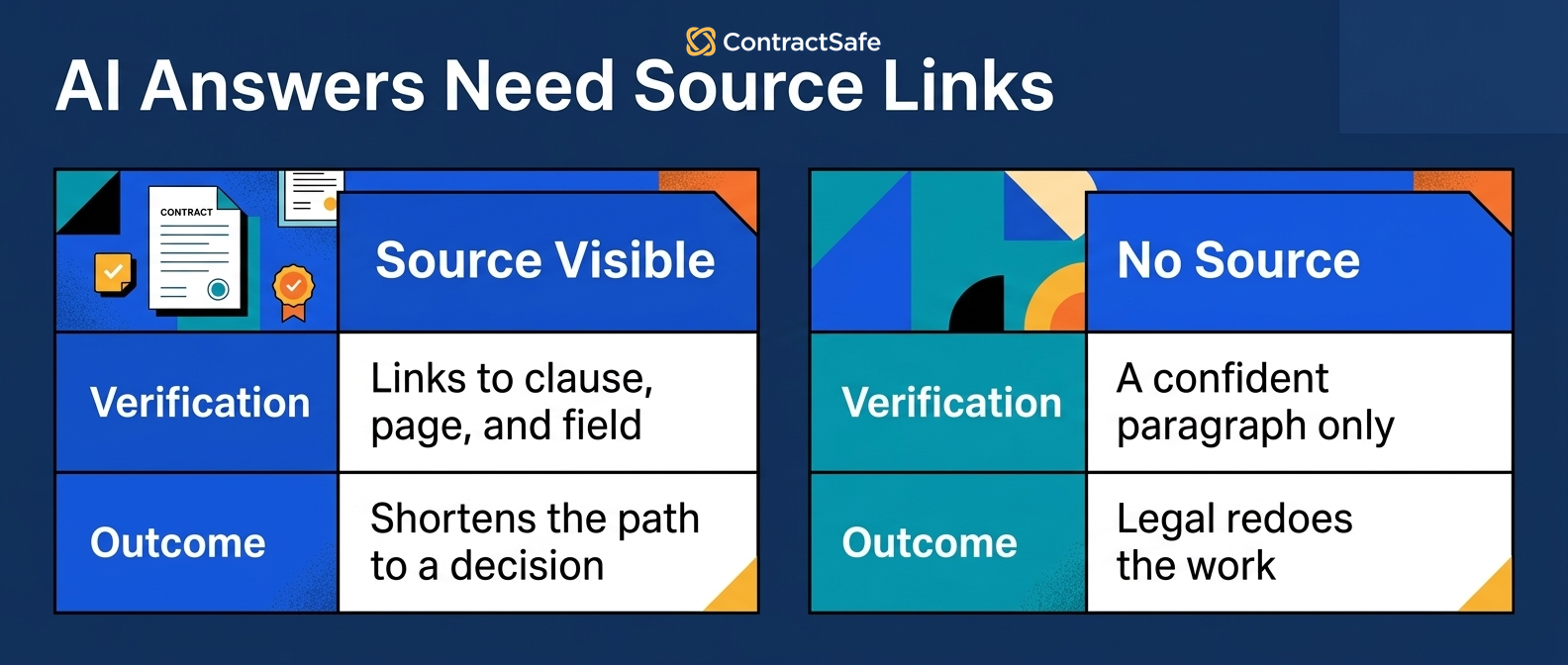
The strongest AI trend isn't chat. It's answers users can verify.
For example, ask the system which vendor agreements renew next quarter and require the answer to show the contract, clause, notice window, and owner.
If the answer has no source, legal has to redo the work.
If the answer links to the source, legal can check it and move faster.
Act on this trend by refusing to score AI answers as a pass unless the source is visible.
Trend 2. Metadata extraction is becoming the workhorse.
Metadata extraction is useful because dates, values, owners, contract types, and restricted-access flags drive the work after signature.
For example, ask AI to extract expiration dates and notice deadlines from a set of active vendor agreements.
Then review the fields before they feed alerts or reports.
Extracted isn't approved.
ContractSafe makes this practical when extracted terms live with the contract record instead of in a separate spreadsheet.
Trend 3. AI search has to respect permissions.
AI search is useful only when it respects the same permissions as the contract repository.
For example, ask the same contract question as a legal admin, finance user, procurement user, and restricted business user.
The answer should change based on the user's access.
Contract access, summaries, exports, reports, and AI answers all need the same discipline.
The NIST AI Risk Management Framework is a useful reminder that giving AI easier access to your data still needs careful access control.
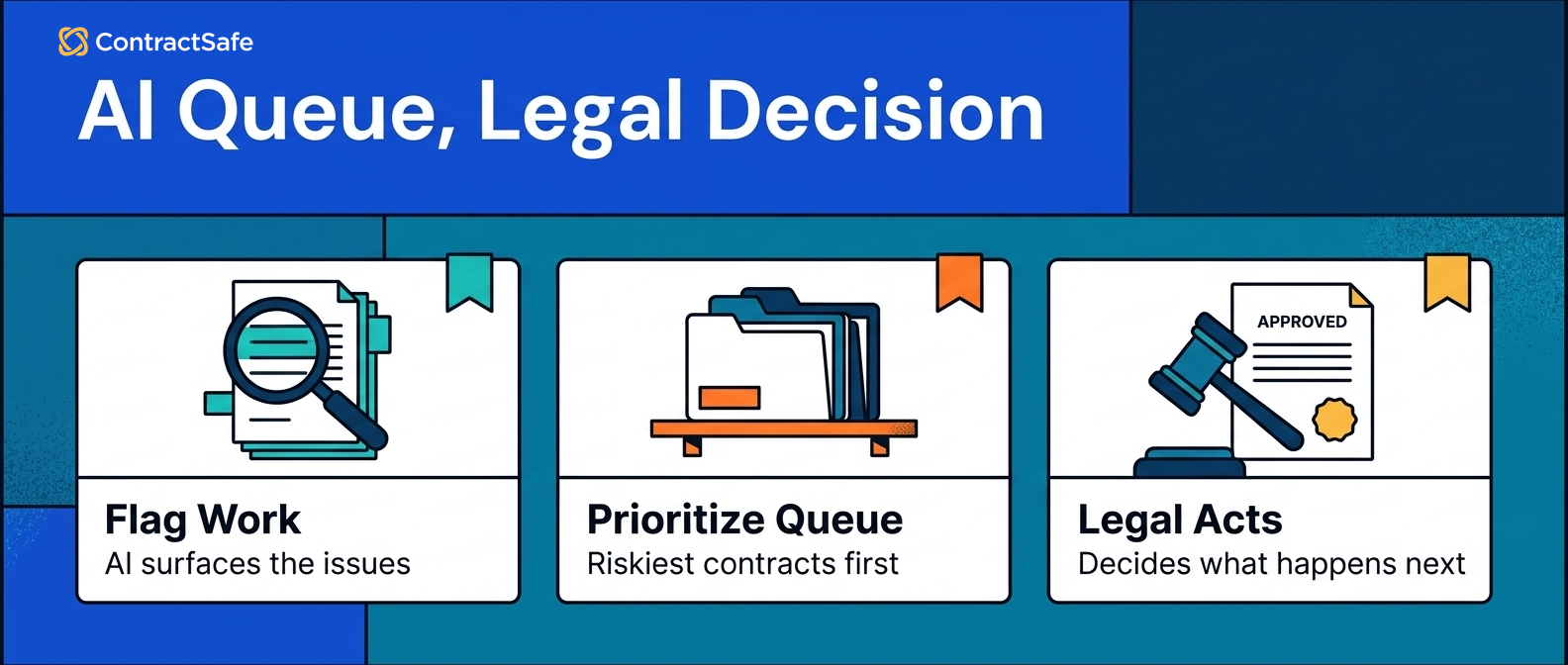
Trend 4. Review queues beat raw AI output.
Review queues matter because legal should supervise AI output before it changes a report, alert, or business decision.
For example, build a queue for high-value agreements, upcoming renewals, missing owners, restricted records, low-confidence fields, and non-standard terms.
That queue gives legal a focused way to review the records that matter first.
Raw output asks legal to hunt for what matters.
A queue turns AI into a worklist.
| Queue | First action | Proof of progress |
|---|---|---|
| Upcoming renewals | Review source dates and owners | Reviewed renewal report |
| Missing owners | Assign business owner | Owner cleanup list shrinks |
| Restricted records | Check access and AI answers | No restricted answers leak |
| Low-confidence fields | Approve, correct, or reject | Reviewed metadata replaces guesses |
Trend 5. Post-signature AI is getting more important.
Post-signature AI matters because many legal teams already have a signed-contract problem.
For example, contracts may be scattered across inboxes, shared drives, old systems, and department folders.
Pre-signature AI can look dramatic in a demo.
Post-signature AI often fixes the quieter work legal feels every week: find the contract, verify the date, assign the owner, protect access, and report the next decision.
If signed contracts are the problem, start there.
Trend 6. Demo proof is replacing feature claims.
Demo proof matters because every AI vendor can describe a strong future state.
For example, bring your own messy contracts and ask the vendor to answer known questions, show sources, respect permissions, correct a field, and build a report from reviewed data.
Use the same packet across vendors.
If a vendor can't show the workflow with your documents, they haven't shown that capability.
Our guide to ContractSafe demo gives a more detailed demo plan.
Trend 7. Repository architecture is becoming the AI foundation.
AI needs reliable contract records before it can help much with contract management.
For example, an AI answer about renewal risk is only as good as the signed agreement, amendment, extracted field, owner, permission rule, and alert behind it.
That means a searchable repository, reviewed metadata, owners, alerts, reports, and audit history matter more, not less.
ContractSafe's repository gives AI a controlled source record instead of a disconnected answer layer.
Without that base, AI becomes another place to ask questions.
Trend 8. Reporting is moving from traffic-light dashboards to action queues.
AI reporting should help legal decide what to do this week.
For example, a useful report might show vendor agreements renewing soon that are missing an owner, have unreviewed notice dates, or include restricted terms.
That is better than a dashboard that simply counts contracts by type.
The WorldCC research library is helpful context because strong contract work depends on ownership, records, and follow-through.
AI should make those basics easier to manage.
Trend 9. Agentic AI is pushing legal teams to define guardrails first.
Agentic AI sounds exciting because it promises to move work forward instead of only answering questions.
For example, an agent might find a renewal clause, draft a notice task, suggest an owner, and update a report.
That can help only if the guardrails are clear.
Legal needs to define which actions AI can suggest, which actions require approval, and which actions it can't take at all.
Act on this trend by writing the approval rule before testing the agent.
Trend 10. Obligation discovery is becoming more useful than broad summaries.
Broad summaries are easy to demo, but obligation discovery is where legal can create more practical value.
For example, ask AI to find reporting duties, insurance requirements, audit rights, security notices, termination steps, or customer support commitments.
The useful output is not just a summary.
The useful output is a source-linked obligation with an owner, due date, review status, and report.
ContractSafe helps when those obligations stay tied to the contract record legal already manages.
Trend 11. Buyers are asking harder questions about AI pricing and implementation.
AI features can change the real cost of contract management software.
For example, ask whether AI extraction, OCR, storage, users, implementation, support, reporting, and renewal increases are included in the quote.
Also ask who cleans old contracts before AI can work well.
A cheap-looking AI add-on can become expensive if the team has to buy services, upgrade support, or clean a large repository manually.
Act on this trend by making pricing and cleanup part of the AI evaluation, not a procurement afterthought.
Trend 12. Adoption depends on business users getting safe answers.
AI contract management only spreads when business users can get safe answers without creating more legal cleanup.
For example, finance may need renewal value, procurement may need vendor terms, and sales may need customer contract status.
Those users should get answers they are allowed to see, with source links and clear limits.
If every answer still requires an email to legal, adoption will stall.
If answers are permission-safe and source-linked, legal can reserve its time for decisions that actually need judgment.
How to Verify AI Contract Management Vendor Claims
A proof checklist keeps AI contract management trends from becoming abstract feature talk instead of useful legal work.
Use this checklist before you treat any AI trend as ready for rollout.
-
Can the AI answer link to the exact source contract and clause?
-
Can legal see whether extracted data is AI-suggested, reviewed, corrected, or final?
-
Can permissions restrict contracts, summaries, reports, exports, and AI answers?
-
Can a user correct a field and see the report or alert update?
-
Can the answer become an owner queue, alert, report, or review task?
-
Can the vendor explain implementation, cleanup, pricing, support, and renewal changes before you sign?
If the answer is no, the trend may still be promising. It just hasn't earned trust for that workflow yet.
Architecture to Evaluate Before You Buy AI Contract Tools
AI contract management tools should be evaluated as part of a contract architecture, not as isolated features.
The architecture starts with the signed contract record.
Then it needs searchable text, reviewed metadata, permissions, alerts, reports, owners, and audit history.
If AI finds an answer, the system needs a place to store, review, restrict, and act on that answer.
| Layer | What to test | Why it matters |
|---|---|---|
| Repository | Contracts, amendments, OCR, search, naming | AI needs a trustworthy source record |
| Metadata | Fields, review status, correction history | Reports and alerts should use reviewed data |
| Permissions | Access for records, answers, reports, and exports | Sensitive terms should not leak through AI |
| Workflow | Alerts, reports, owner queues, review steps | Answers need to become work |
Turn Trend Language Into Vendor Requirements
AI trend decks are easy to read and hard to buy from. Every vendor will say they do "AI-powered clause analysis" or "intelligent obligation tracking." That's marketing, not a requirement. Your job is to translate each buzzword into a specific thing the tool has to do with your contracts, then make the vendor prove it on a real document you bring to the demo.
Bring five of your own contracts to every demo: a messy scanned PDF, a signed amendment, a renewal with an auto-renew clause, and two you know cold. Don't let the vendor drive with a clean sample they picked. Then ask the questions that separate a slide from a workflow:
- Where does an AI-extracted answer get stored, and who reviews it before it drives an alert or report?
- Can I see the source language the AI pulled the answer from, on the page, in one click?
- What happens when the AI is wrong, how do I correct it, and does the correction stick?
- Which of these features are live for customers today, and which are still on the roadmap?
- Do AI answers respect the same permissions as the underlying contract?
That last question matters because there are three very different things a vendor might be showing you, and they're easy to confuse:
- Roadmap promise: "That's coming next quarter." Good to know, worth nothing today. Never buy on it.
- Demo proof: the feature works on the vendor's curated sample. Better, but it doesn't mean it survives your messy scans and edge cases.
- Production-ready workflow: it works on your contracts, stores reviewed answers, respects permissions, and turns into an alert or report someone actually owns.
Only the third one is worth paying for. Ask which bucket every feature falls into, and make the vendor show it, not tell it. If they can only demo it or promise it, price it as a maybe, not a capability you have today.
ContractSafe's AI contract management features sit inside this architecture: repository, search, key terms, alerts, reports, and permissions.
Rollout Sequence for AI in Contract Management
An AI contract management rollout should start with a narrow workflow, prove the source record, then expand only after the team trusts the data.
Use a sequence that gives legal useful evidence quickly without pretending the whole contract program is ready on day one.
Step 1. Pick one workflow with a visible deadline.
Start with a workflow where a missed answer creates real pressure.
Renewal review is usually a good first test because it connects source clauses, dates, owners, alerts, and reports.
Don't start with every contract question the business might ask.
Start with a question legal can check and improve this week.
Step 2. Build a known-answer sample.
Choose contracts where legal already knows the right answer.
For example, pick a vendor agreement with an amendment, a scanned agreement, a restricted agreement, and a record with a known metadata error.
That sample lets you separate good AI behavior from lucky output.
If the tool can't pass the known-answer set, it isn't ready for broader rollout.
Step 3. Review the fields before workflow depends on them.
AI-suggested data should not immediately drive alerts, reports, or business decisions.
Legal needs a review step for fields that affect money, deadlines, obligations, access, or risk.
That includes renewal dates, notice windows, contract value, restricted-access flags, owner fields, and obligation categories.
After review, the field can become part of the operating record.
Step 4. Turn answers into visible work.
The rollout is working when AI output becomes an alert, report, owner queue, or review task.
For example, a renewal answer should become a reviewed date, a responsible owner, an alert, and a report row that links back to the contract.
If the answer stays in a chat window, legal still has to rebuild the workflow manually.
Step 5. Write down the rule for expansion.
Before adding more users or workflows, define what a pass looks like.
A practical rule might be: the system shows the source, respects permissions, supports correction, updates the report, and creates the next action.
When a workflow passes that rule, expand it.
When it doesn't, fix the repository, fields, permissions, or review process first.
What Legal Should Do This Week
Legal teams should turn AI contract management trends into one small workflow test this week.
Start with renewal review if you don't know where to begin.
-
Pick a narrow contract set, such as active vendor agreements.
-
Ask AI to extract renewal dates, notice windows, owners, and restricted-access flags.
-
Review the source clauses before the fields drive reports.
-
Assign missing owners and correct wrong dates.
-
Build a renewal report from reviewed fields.
-
Set alerts for the next action.
That test is small enough to run quickly and concrete enough to expose real gaps.
Then repeat the same pattern for missing owners, restricted records, high-value agreements, or non-standard terms.
Don't start by asking for every possible AI feature.
Start by proving one workflow from source document to reviewed field to business action.
If the first workflow fails, treat the failure as useful evidence. It tells legal whether the next investment is better metadata, cleaner permissions, training, or a different tool.
Related Reading
-
AI Contract Management Software: A Practical Evaluation Framework
-
AI contract workflows
-
AI contract data accuracy
How ContractSafe Helps Legal Teams Act on AI Trends
ContractSafe helps legal teams act on AI contract management trends by keeping AI connected to the contract record, reviewed fields, alerts, reports, permissions, and audit history.
That matters because the trend is not AI for its own sake.
The trend is better contract work: find the agreement, check the source, review the data, protect access, assign the owner, and act before the date passes.
ContractSafe's AI contract management features help teams extract key terms, improve search, and ask contract questions inside the same system that stores signed agreements.
The repository gives AI a reliable source record. Alerts help teams act before renewal and notice dates become urgent. Permissions keep AI answers practical without opening every record to every user.
The FAQ below covers the questions legal teams usually ask before they act on AI contract management trends.
If your team wants to test AI against real signed agreements, request a ContractSafe demo and bring the workflow you want to improve first.






.svg)







.svg)




