


An AI contract management demo is a controlled test of whether the product can answer real contract questions, prove its sources, respect permissions, support human review, and turn AI output into the next action your team actually needs.
Think of it like a courtroom exhibit. The answer isn’t enough unless the evidence comes with it.
A vendor opens a polished sample repository. The AI finds a renewal date in three seconds. A summary appears. Everyone nods.
Then the call ends and your team still doesn't know whether the product can handle the contract mess you live with.
That mess includes scanned PDFs, amendments, restricted records, missing owners, old templates, unusual renewal language, and business users who ask legal the same questions every week.
The answer isn't enough. You need the contract, the source language, the user permission, the review status, and the action that follows.
If the vendor can't show those pieces in the demo, don't treat the claim as proven.
Key Takeaways
- Bring your own demo packet. Vendor sample files are usually too clean to expose real AI contract management problems.
- Score AI answers by source proof, permission behavior, human review, workflow value, implementation effort, and pricing clarity.
- Make the vendor test amendments, scanned files, restricted contracts, missing owners, and known metadata errors.
- Don't accept a polished AI answer unless the system can show where it came from and what action it creates.
- End the demo with launch facts: migration work, required fields, cleanup ownership, support model, AI limits, and all-in first-year cost.
Choose Your Next Step
Use this AI contract management software demo guide based on where your team is in the buying process.
If the demo is coming up this week, start with the demo packet.
If you need the evaluation structure, jump to the nine demo tests.
If leadership wants a clean decision, use the demo scorecard.
What an AI Contract Management Demo Has to Prove
An AI contract management demo has to prove that the product can turn signed contracts into usable, controlled work.
That means the AI answer needs to stay connected to the contract record.
If the system says a vendor agreement renews soon, it should show the agreement, the clause, the amendment path, the owner, the alert, the review status, and who is allowed to see it.
If the system says a contract includes a termination right, it should show the language and the context.
If the system says ten agreements are missing owners, it should show the report and the records behind it.
The demo isn't a feature tour. It's a trust test.
Use that standard even if the vendor wants to stay at the level of summaries, chat prompts, and dashboards.
| Demo claim | What proof looks like | What isn’t enough |
|---|---|---|
| AI can answer contract questions | Answer links to the source contract, clause, field, and amendment | A paragraph summary with no source |
| AI can protect sensitive data | Different users get different answers based on permissions | Document permissions that don’t apply to AI answers |
| AI can extract fields | Legal can approve, correct, and track important fields | Bulk extraction with no review workflow |
| AI can improve contract operations | Output becomes an alert, owner queue, report, or task | A one-time answer that legal has to copy somewhere else |
The NIST AI Risk Management Framework is helpful background because it keeps the conversation focused on trustworthy AI behavior, not just impressive output.
That's the right mindset for contract demos. A confident answer isn’t the same as a controlled answer.
Build the AI Contract Management Demo Packet First
An AI contract management demo packet is the small set of real contracts, known answers, and user roles every vendor has to test.
Build a demo packet with contracts that look like your actual repository.
Don't rely on vendor samples. They are usually organized, current, searchable, complete, and designed to make the product look smooth.
Your repository probably isn't that tidy.
That's the point of the test.
Five to eight files are usually enough to expose whether the system can handle real contract work.
| File to include | Why it belongs in the packet | What you should know before the demo |
|---|---|---|
| Clean vendor agreement | Establishes the easy baseline | Renewal date, owner, value, and contract type |
| Scanned PDF | Tests OCR and search quality | One exact clause the system should find |
| Original agreement plus amendment | Tests whether related documents stay connected | Which document controls the current term |
| Contract with odd renewal language | Tests deadline interpretation | Correct renewal date and notice window |
| Restricted contract | Tests sensitive access | Which users should not see it |
| Record with a known metadata error | Tests correction and review history | The wrong field and the correct value |
Write the expected answers down before the demo.
That protects your team from accepting an AI answer because it sounds plausible.
It also makes the vendor comparison cleaner. Every vendor gets the same files, the same questions, and the same scoring rules.
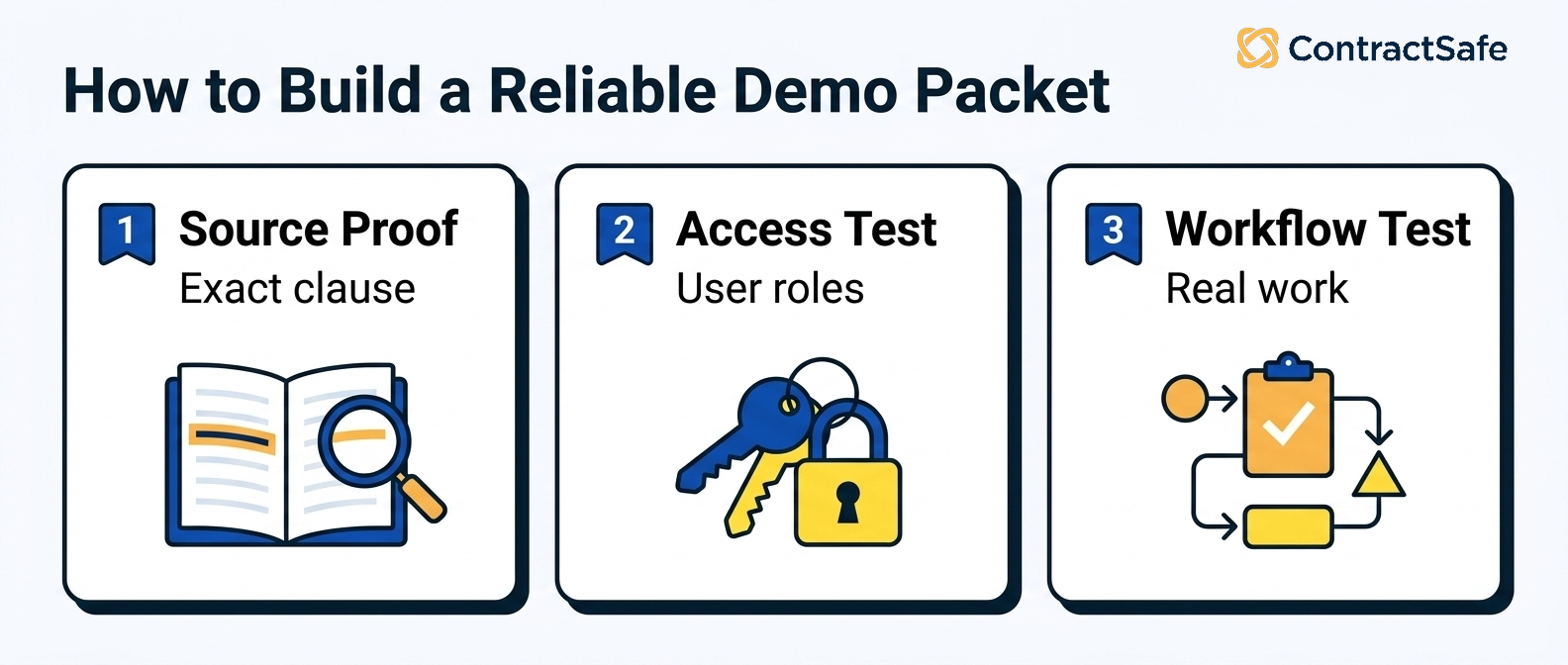
Buyer checklist: before you sit through another AI contract management demo, decide what would actually make you believe the product. Write down the contracts you will bring, the questions you have already answered by hand, and the moment a slick summary stops counting as proof. The point is simple. Make every vendor pass the same test with your files, your permissions, and your reporting needs, so the demo measures the product instead of the presenter.
- Packet setup: send five to eight of your real contracts before the call, including a scanned file, an original plus amendment, and a restricted record. If the vendor insists on running their own tidy sample library, treat that as not shown.
- Known-answer tests: ask questions you already answered yourself. If the AI matches your known renewal date, notice window, and controlling document, count it as shown. If it sounds right but you cannot verify it, count it as not shown.
- Source proof: every answer should open the contract, the clause, and the extracted field behind it. A confident paragraph with nothing to click into is a claim, not proof, so mark it not shown.
- Permissions: run the same question as an admin and as a restricted user. The restricted user should not see the record or the answer. Any leak through summaries, exports, or reports counts as not shown.
- Reporting: push one answer into an alert, owner queue, or report your team would actually use. A one-time chat reply that legal has to copy somewhere else is shown for search, not for workflow.
- Implementation effort: make the vendor name the migration work, the required fields, the cleanup owner, and the first-week launch plan. Vague answers like configurable or later stay not shown until you see it working.
- Shown versus not shown: score each test as shown, partly shown, or not shown while it happens. A promise, a roadmap, or a paid services engagement is not shown. Only real behavior on your files earns full credit.
Use this as your scoring sheet, not your notes. Give every vendor the same packet, ask the same questions, and mark each answer shown, partly shown, or not shown before the demo moves on. When the calls are done, add up the not-shown marks. The product with the fewest gaps on the tests you actually care about is the one that can handle your real contract mess, not just a clean sample repository.
AI Contract Management Demo Tests: 9 Things to Ask Vendors to Show
AI contract management demo tests should force each vendor to show source proof, user access, review control, and a practical next action.
Each test should end with visible proof.
If the vendor says "we can do that later" or "that's configurable," mark it as partly shown or not shown. Don't give full credit for a promise.
1. Ask a Source-Linked Contract Question
Start with a plain-English question that has a known answer.
For example: "Which vendor agreements renew next quarter, and what notice dates matter?"
A useful answer should show the agreement, the renewal clause, the notice language, the extracted date, and whether the field has been reviewed.
Then ask the follow-up question: "Why did this agreement appear in the list, and why did this other agreement not appear?"
That follow-up matters because real users don't stop at the first answer. They investigate.
A system that can't explain the result will create work for legal instead of reducing it.
2. Test an Amendment Against the Original Agreement
Amendments are where many contract systems start to wobble.
Ask the vendor to upload or open an original agreement and an amendment that changes a renewal term, termination right, price, scope, or notice address.
Then ask which document controls the current answer.
A strong system should connect the documents, show the source language, and avoid treating the original agreement as final when the amendment changed it.
For example, use a master services agreement with an amendment that shortens the notice window. The answer should come from the amendment, not the older language.
If the AI answers from the wrong document, the demo has exposed a real risk.
That risk isn’t theoretical. A missed notice window, wrong renewal date, or outdated obligation can cost money.
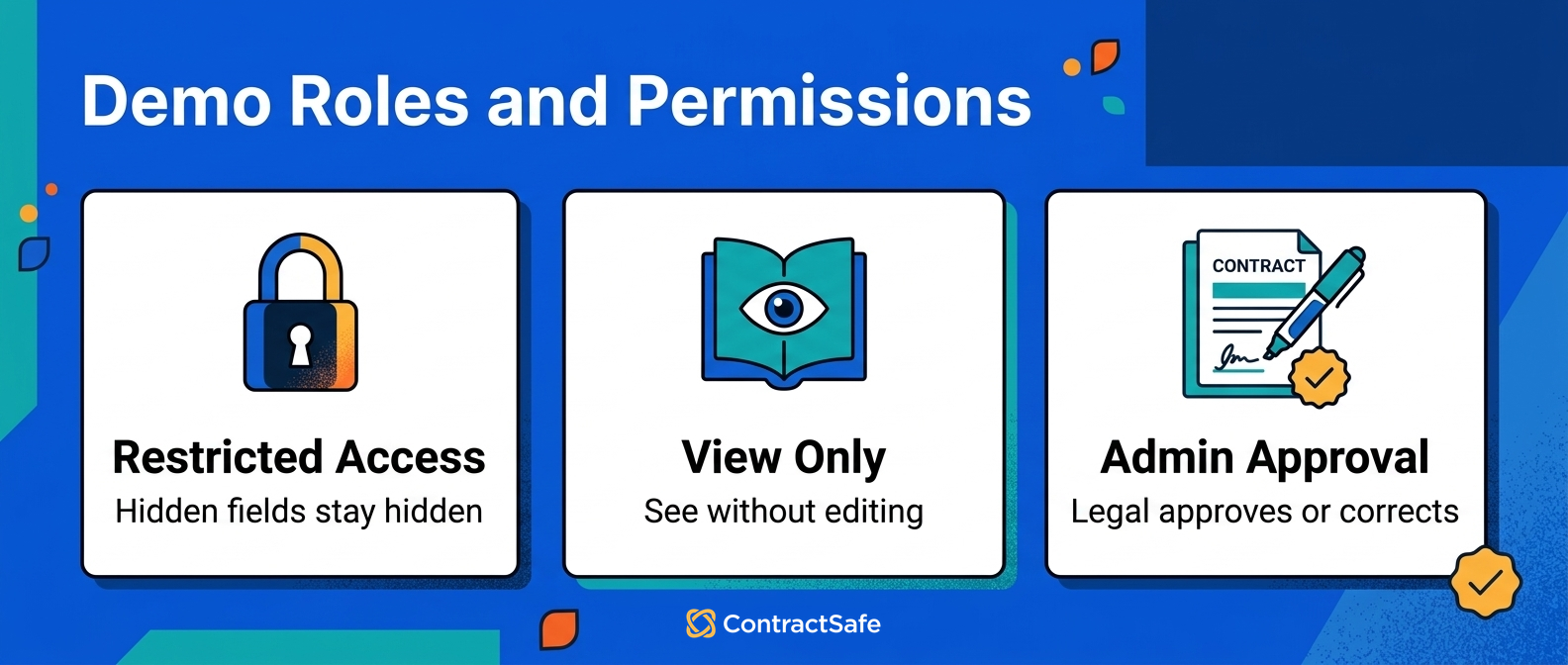
3. Run the Same Question as Different Users
Permissions need to apply to AI answers, not only to documents.
Ask the vendor to show the same AI question as a legal admin, finance user, business owner, and restricted user.
Use a contract that includes sensitive pricing, employee information, or another restricted field.
A strong system should hide the contract and the answer from people who should not see it.
It should also avoid leaking restricted information through summaries, reports, exports, or AI-generated answers. The same test applies to any AI response generator connected to contract data: restricted fields should stay hidden no matter which tool produces the answer.
The FTC guidance on protecting personal information is a useful reminder that access control still matters when information becomes easier to find.
4. Correct a Bad Extracted Field
AI extraction is useful only if legal can review and correct the fields that drive work.
Bring one contract with a known metadata error.
Ask the vendor to show the extracted field, the source text, the confidence level if one exists, and the correction path.
Then ask what changes after the correction.
Does the alert update? Does the report update? Is the old value retained in history? Can legal tell who made the correction?
For example, change a renewal notice date that was extracted from the wrong paragraph. Then make the vendor show whether the renewal report updates immediately.
If the system extracts fields but can't support review, it may create a faster way to spread bad data.
That's why contract metadata matters. The field isn't just an answer. It becomes part of the operating record.
5. Turn an AI Answer Into an Alert or Report
AI contract management software should not strand useful information in a chat window.
Ask the vendor to turn a renewal answer into an alert, owner queue, or report.
For example: "Show all vendor agreements renewing next quarter that are missing an owner or notice review."
A strong system should show the list, the source records, the owners, the missing fields, and the next action.
If the vendor exports the result to a spreadsheet, score that honestly.
An export may help, but it isn’t the same as governed workflow inside the contract system.
Our guide to contract management implementation is useful here because the demo should show what your team actually has to do after selection.
Proof to Ask For Before the Demo Moves On
A proof checklist keeps the AI contract management demo from moving past a claim before the vendor has shown the source, control, and next step.
Use the same checklist after each major demo moment.
Can we see the exact contract record behind the answer?
Can we see the clause, page, field, or amendment that changed the answer?
Can we see whether the field is AI-suggested, human-reviewed, or corrected?
Can we see how permissions change the answer for another user?
Can we turn the answer into an alert, report, task, or owner review without rebuilding it somewhere else?
Can we explain the remaining gap to leadership in one sentence?
If the answer is no, mark the claim as partly shown or not shown. Don't let the demo keep its momentum by skipping the proof.
6. Search a Messy Scanned Contract
Older contracts often arrive as scans, image-heavy PDFs, or files with inconsistent names.
Ask the vendor to search one of those files.
Don't make the test easy. Use a contract with ordinary scan quality, not a perfect sample.
Ask the system to find a clause, extract a date, and show the source language.
If OCR fails, ask what cleanup is required and who does it.
That answer affects implementation scope. It also affects how quickly the AI will be useful after launch.
7. Build a Missing-Owner Cleanup List
Missing owners create contract risk because nobody knows who should act before a date or obligation matters.
Ask the vendor to identify agreements with no owner, no department, or no renewal reviewer.
Then ask how those records are assigned, corrected, and reported.
A good product should make cleanup visible instead of hiding it behind the promise of AI.
For a lean legal team, this is one of the most practical demo tests. It shows whether the product helps manage the repository you actually have.
8. Compare Review AI and Management AI
Some demos blur AI contract review and AI contract management.
Make the vendor separate them.
Ask what happens before signature, what happens after signature, and which source record each AI feature uses.
Review AI usually works on drafts, clauses, redlines, and playbooks. Management AI works on signed agreements, metadata, alerts, owners, permissions, and reports.
Our guide to AI contract review versus AI contract management walks through that split in more detail.
The short version: don't buy a review answer when your problem is post-signature control.
9. Force the First-Week Launch Plan
End with the first week after purchase.
Ask exactly what happens after the contract is signed.
Who imports the files? Who cleans the names? Which fields are required? Which fields are optional? Who reviews low-confidence extraction? How long until alerts are live? What support is included? What costs extra?
This is where demo excitement turns into project reality.
The best vendor for your team isn’t always the one with the flashiest AI moment.
It's the one that can show the shortest path from your messy contract set to a repository your team can trust.
Score the Demo While It Happens
An AI contract management demo scorecard should record which vendor claims were shown, partly shown, not shown, or solved with manual workarounds.
Use four labels: shown, partly shown, not shown, and manual workaround.
That last label matters. A manual workaround may still be acceptable, but it should not be confused with product capability.
| Scorecard category | Evidence required | How to score it |
|---|---|---|
| Source accuracy | Answer links to contract text, field, or amendment | Shown only if the source is visible |
| Permission behavior | Different roles receive appropriate access | Shown only if tested with roles |
| Human review | Users can approve, correct, reject, and audit AI fields | Shown only if correction is performed live |
| Workflow value | Output becomes an alert, report, owner queue, or task | Manual workaround if users copy data elsewhere |
| Implementation effort | Vendor shows migration, cleanup, support, and launch scope | Partly shown if details are deferred |
| Cost clarity | AI, OCR, users, support, implementation, and renewals are priced | Not shown if pricing waits until procurement |
Take notes during the call, not later.
For each test, write down the document used, the question asked, the answer shown, the source proof, the user role, and the gap.
That gives you a decision record leadership can understand.
Leadership doesn't need every demo detail. It needs to know which claims were proven, which ones were not, and what risk remains.
For a broader buying process, pair this demo scorecard with our guide on how to evaluate contract management software.
Red Flags During an AI Contract Management Software Demo
AI contract management demo red flags appear when the product can't leave the happy path.
Watch for these problems closely:
The AI answer has no source link.
The source link opens the wrong document or ignores an amendment.
Permissions protect documents but not AI answers, summaries, reports, or exports.
Legal can't approve or correct extracted fields before alerts and reports use them.
Low-confidence extraction is hidden instead of routed for review.
The vendor avoids scanned files, old agreements, restricted records, or messy metadata.
Reports can't be filtered by owner, date, value, department, status, or missing fields.
The implementation plan is vague until after you sign.
AI, OCR, users, support, migration, or reporting are priced as later surprises.
One red flag doesn't always disqualify a product.
But it should change your rollout plan.
If source proof is weak, don't let AI answers drive decisions. If permissions are weak, don't roll out broad access. If extraction review is weak, start with cleanup before alerts.
The WorldCC research library is useful context here because contract work gets better when owners, records, and follow-through are clear. AI doesn't replace those basics. It makes weak basics easier to expose.
Questions to Ask Before the Demo Ends
Before an AI contract management software demo ends, force the vendor to explain launch work, support, ownership, limits, and cost.
Ask these questions while everyone is still on the call:
Which fields are required before launch?
Who cleans old contract names, folders, owners, and metadata?
How are scanned contracts handled?
What happens when AI confidence is low?
Can legal approve or reject extracted fields before reports use them?
How do permissions apply to AI answers, summaries, reports, and exports?
Which alerts are included, and which require setup work?
What support is included in the plan?
Are AI features, OCR, users, storage, integrations, reporting, and implementation included in the quoted price?
What changes at renewal?
Those questions aren’t procurement busywork.
They tell you whether the demo is connected to the launch your team will actually have to run.
If the vendor can't answer them clearly, don't assume the details will get easier after you sign.
How to Run the Same Test Across Vendors
Run the same AI contract management demo test across every vendor you’re seriously considering.
Don't let each vendor define the test.
That creates a comparison problem. One vendor shows a clean sample repository. Another uses your contracts. A third stays in screenshots. By the end, every product has proved something different.
Instead, set the rules before the calls start.
Use the same demo packet.
Ask the same core questions.
Use the same user roles.
Require the same source proof.
Score the same categories.
Record the same gaps.
This is especially important when comparing simple repositories, full CLM platforms, and newer AI tools.
Our guide to AI contract management software explains the broader category. The guide to AI contract management tools breaks down the jobs legal teams should test. The guide to AI contract lifecycle management separates before-signature and after-signature work.
Use those distinctions in the demo.
If your pain is signed contracts, renewal dates, owners, permissions, and reporting, don't let the vendor spend the whole call on draft review.
If your pain is pre-signature clause work, don't let the vendor spend the whole call on repository search.
The right demo keeps the product accountable to your actual contract problem.
Related Reading
AI Contract Management Software: A Practical Evaluation Framework
AI Contract Management Tools for Legal Team Jobs to Be Done
Where AI Contract Lifecycle Management Helps Before and After Signature
AI Contract Review vs AI Contract Management for Legal Teams
Contract Management Implementation: How to Roll Out Without Creating a Mess
How ContractSafe Helps Teams Evaluate AI Contract Management Software
ContractSafe helps teams evaluate AI contract management software with the part of the demo that matters most: signed contracts, searchable records, key terms, renewal alerts, permissions, and reports.
That makes the test practical.
You can ask whether a real contract is searchable. You can check whether the answer points back to the source language.
You can see whether key fields support reports and alerts. You can test whether the right people can see the right records.
ContractSafe's AI contract management features help teams extract key terms, improve search, and ask contract questions inside the same system that stores signed agreements.
The repository gives legal one controlled place for the record. Alerts help teams act before renewal and notice dates become emergencies. Permissions keep contract answers useful without opening every record to every user.
The FAQ below covers the demo questions legal and operations teams usually ask before they choose what to test first.
If you're preparing for AI contract management demos, request a ContractSafe demo and bring the messy contracts you want the system to handle.






.svg)







.svg)




