


Quick answer: To evaluate contract management software, also called CLM (contract lifecycle management) software, check how each vendor handles search and OCR, metadata and reporting, renewal alerts, permissions and audit trail, security, integrations, signature workflow, AI, and cost and exit terms. For each one, write down the proof you'll ask for and whether a failure rules the vendor out. Then score finalists only on what they show using your own contracts, because a demo on the vendor's tidy sample files can't tell you how the system will handle yours.
In the vendor's demo, search finds every agreement, renewal dates fill themselves in, and the report builds in seconds. Then your team uploads one of its own files: a scanned amendment nobody's been assigned to, with a 60-day notice window buried in the boilerplate. Search can't find the notice clause, the renewal field stays blank, and no reminder goes to anyone.
The checklist below puts files like that one into every demo, so you see how a vendor handles them before you sign.
Choose your next step:
If you're starting from scratch, skim the stages of the contract lifecycle, follow the six-step selection process, then open the full checklist table.
If you're building the scorecard for legal and ops, turn each of the CLM product features you need into a row, then work through the checks below.
If you're comparing finalists, jump to the vendor decision step, then check them against our guide to the best contract management software.
Key Takeaways
- Choose in six steps: name the contract job, agree on must-haves across legal, finance, procurement, sales, and IT, split table stakes from differentiators, send a short RFP, test three finalists on your own files, then compare three-year cost.
- Give every checklist row the proof required, an owner, and a blocker test, and score it only on what the vendor shows with your contracts.
- Test AI on incoming counterparty paper as well as signed contracts, and fail any answer or flag you can't trace to its source clause or your own rule.
- IT signs off on written security, SSO, and pricing answers before the shortlist forms, then on a current SOC 2 Type II report, one live integration path, and a full data export before the final pick.
- Pick on proof, three-year cost with a capped renewal, and exit terms, and name which vendor risk you'll accept and which one blocks the purchase.
How to Choose a Contract Lifecycle Management System
To choose a contract lifecycle management system, decide which contract job it has to do first, get every team that touches contracts to agree on must-haves, and make a short list of vendors prove those must-haves on your own contracts before you compare three-year cost. Here's the order.
Name the job. Decide whether you're buying a repository, a legal workflow, or full lifecycle coverage.
Agree on must-haves. Get legal, finance, procurement, sales, and IT together, plus whoever owns AI governance. CLOC's 2026 State of the Industry Report found that 85% of legal departments now have dedicated AI oversight or resources, so odds are yours has someone in that role. Bring them in now, because they'll decide what the AI rows on your scorecard have to prove.
Split table stakes from differentiators. Score the basics pass/fail and let the differentiators decide the pick.
Send a one-page RFP and shortlist three vendors. Analyst reports and roundups are fine for finding names, but don't let them do your scoring.
Make finalists prove it. Each finalist runs the must-haves live on your messy contracts: scans, amendments, and contracts nobody's been assigned to.
Compare three-year cost and the rollout plan, then pick.
The sections below take the checks one at a time.
What Is a CLM Software Checklist?
A CLM software checklist is your team's contract management system requirements checklist, written as proofs a vendor has to show you on your own contracts. Each row names the requirement, the proof that counts, the person on your team who checks it, and the failure that blocks the purchase.
Send it to vendors before the demo, then keep it as your team's record of why you chose what you chose. Score every row Proven, Unproven, Failed, or Not needed. Not needed is for a real feature that sits outside the job you're buying for first, such as drafting and signing when all you need right now is a repository. If you want a longer requirements list to start from, download our CLM checklist.
| Checklist criterion | Proof required | Owner | Blocker test |
|---|---|---|---|
| Search and OCR | Find messy PDFs, scans, amendments, and third-party paper live, including one combined search | Legal ops | Blocks if users still need filenames |
| Metadata and reporting | Correct a field, then run the report that depends on it | Legal and finance | Blocks if reports need spreadsheet cleanup |
| Alerts and ownership | Route a notice-window reminder to the right owner and backup | Legal and owner | Blocks if reminders lack owners |
| Permissions and audit trail | Show legal, finance, procurement, and restricted roles | IT and legal | Blocks if records are exposed or unusable |
| Security and compliance | Current SOC 2 Type II report, ISO 27001, GDPR or HIPAA posture, encryption, data residency; report scope covers the AI features you'll use, and written notice of material AI or subprocessor changes | IT | Blocks if the vendor can't hand over a current report |
| Integrations | Live sync with your CRM (Salesforce or HubSpot), ERP or procurement system (NetSuite or SAP), SSO, and eSignature | IT and ops | Blocks if a must-have connector is an unbudgeted add-on |
| Drafting and signing | Templates, approval routing, and eSignature valid under ESIGN, UETA, or eIDAS | Legal | Score Not needed if buying repository-first |
| Scale | Search speed and bulk upload at ten times your current volume | Legal ops | Blocks if performance drops at projected volume |
| Implementation and migration | Name first contract set, migration help, training path, and first report | Project owner | Blocks if launch work is undefined |
| Pricing and access | Show platform, users, implementation, support, AI, integrations, renewal cap, and overages | Finance and procurement | Blocks if three-year cost is unknowable |
| AI and source traceability | Extract terms, show source language, review status, and correction history | Legal | Blocks if answers lack source proof |
| AI contract review | Flags on counterparty paper traced to your own playbook rule, with a suggested fix | Legal | Blocks if a flag can't be traced to your rule; Not needed if buying repository-first |
| Exit | Full export of files plus metadata with field names intact | IT and procurement | Blocks if data can't leave cleanly |
Decide What Kind of Contract System You Are Buying
Before anyone scores a row, decide which job the system has to do first. Some teams need a searchable repository for signed contracts. Some need legal workflow: intake, drafting, approvals, and redlining. Some need the full lifecycle, with both from day one. One tool can cover all of it, so asking whether a vendor does won't separate your finalists. Even a full-lifecycle rollout goes live in phases, which means every team has a first job, and how well that job works is what to test hardest.
| Buying path | Use it when | Proof to ask for |
|---|---|---|
| Repository first | Contracts are scattered across folders and inboxes | Search, OCR, fields, owners, permissions, alerts, and reports |
| Legal workflow | Legal needs request intake, review paths, approvals, or templates | A real request moving from intake to approved contract work |
| Full lifecycle | Multiple teams need intake-to-renewal process control | A phased rollout plan that doesn't bury the first value moment |
Write the buying path at the top of the scorecard before the first demo, in one blunt sentence: we need a repository-first system, or legal workflow first, or the full lifecycle from day one. That sentence keeps the team from grading every shiny feature as if it mattered equally, and it tells you which rows to score Not needed. If the team can't agree on it, the checklist isn't ready yet.
Separate Table Stakes From Differentiators and Write a One-Page RFP
Search, OCR, date alerts, permissions, and AI extraction are table stakes now, so score them pass/fail rather than ranking vendors on them. What decides the pick is how fast non-legal users adopt the tool, how deep the integrations go, how pricing is structured (including whether AI comes bundled or billed separately), and how heavy implementation is.
Adoption deserves more weight than most feature grids give it. Samantha, Director of Data Feed Licensing at Metro MLS, described what mattered when her team chose a system: "I knew that ease of use would be critical, and if the system wasn't simple to navigate, it wouldn't see regular use."
Put both lists in a one-page RFP so every vendor answers the same questions in the same order. Ask for written answers on security, SSO, deployment, and pricing, and have IT sign off on those answers before the shortlist forms. The three vendors whose answers hold up are the ones you'll ask to prove the checks below live.
Test Search and OCR With Real Contract Files
Search is the first row finalists should prove, because a contract system fails quickly if people still need filenames, folders, and memory to find the current agreement.
Bring real files to the demo. Use a scanned vendor agreement, a customer contract on the customer's own paper, an amendment, and one file with a bad name. Ask the vendor to search inside the documents, filter by contract type, and find the current version.
Then have the vendor run one combined search live, such as every contract that has both an auto-renewal clause and a termination-for-convenience clause, and ask the same thing as a plain-English question. Score it Failed if either result needs manual cross-referencing.
Proof to ask for:
Full-text search across PDFs and scans.
Filters for party, type, owner, date, and status.
A clear way to connect amendments to the governing agreement.
Search results normal users can understand without legal translating them.
A pass covers both halves of the combined test. The ContractSafe repository, for example, runs OCR on every file, including scans, so the scanned vendor agreement is as searchable as a clean PDF, and it pairs account-wide keyword search with natural-language smart search for the plain-English question.
Write down every search that fails. Each miss is a question legal will still be answering by hand every week.
Check Metadata Fields Before You Trust Reports
Once a contract can be found, its metadata fields are what make it usable in reports and alerts: party, owner, renewal date, value, status, department, and contract type.
A demo can look strong while the fields behind it are a mess. If dates, owners, values, departments, and statuses are missing or hard to maintain, every report turns back into spreadsheet cleanup. Good fields are what let Carrie McClain, Procurement Specialist at Vitality Living, say: "Instead of rebuilding information from SharePoint, I can pull the contract report I need and keep the process moving."
Use a simple field test. Start with an ugly record: a contract with an amendment, an unclear owner, and a renewal date that depends on notice language. Upload it, extract the fields, correct one field, then run a report that depends on the corrected value. If the report works only after the vendor cleans the record by hand, score it Failed.
| Field | Why it matters | What to test |
|---|---|---|
| Counterparty | Users need to know who the agreement is with | Search by party and related agreements |
| Owner | Every contract action needs a person | Assign and change the business owner |
| Renewal date | Missed notice windows create avoidable risk | Build an upcoming-renewal report |
| Status | Teams need the current record | Separate active, expired, amended, and superseded files |
Risk flags, obligation tracking and compliance reports all sit on these fields, so if the fields are wrong, so is everything built on them. Ask who can edit fields and who approves corrections before you trust any dashboard.
Score Renewal Alerts Against Real Deadlines
Contract renewal alerts matter only if they reach the person who can make the decision. Score whether the notice date in the contract becomes a reminder that reaches an owner who acts on it, rather than whether an alert feature exists.
Use a contract with a notice window and ask:
Can the notice date be captured from the contract record?
Can the alert go to legal, the business owner, and a backup?
Can ownership change without rebuilding the alert?
Can a report show which deadlines still need decisions?
Then read the alert itself. A useful reminder names the contract, the owner, the date, the decision due and the next step. ContractSafe date tracking, for instance, can track the deadline to non-renew as its own date, not just the end date, and attaches the relevant contract to each reminder email.
If the alert depends on a separate spreadsheet, the software has only decorated the problem.
Test Permissions With Legal, Finance, and Procurement
Permissions decide whether the system becomes useful across the business or stays trapped inside legal, so test what legal, finance, and procurement each see as separate roles.
| Role | What they should see | What should stay controlled |
|---|---|---|
| Legal | Source documents, amendments, permissions, audit history | Nothing relevant to legal control |
| Finance | Renewal dates, values, owners, exports | Sensitive notes and privileged records |
| Procurement | Vendor terms, notice periods, owner fields | HR records, privileged material, unrelated customer files |
Ask the vendor to show the same contract from each role, and score a promise to configure it later as Unproven. Check audit history too: you should know who opened, changed, or corrected a record. And watch seat limits, because teams that ration seats tend to rebuild the old email-and-spreadsheet habit outside the system. ContractSafe includes unlimited users and an activity audit trail on every plan.
Then find out how fine-grained the controls are. Some systems hide individual fields; others control access contract by contract. ContractSafe works the second way, with custom roles and folder and tag permissions, so it can keep privileged records, HR files, and unrelated customer contracts away from finance and procurement, but it won't hide a field such as a sensitive note from someone who can open the contract. If your finance row depends on hiding notes inside contracts finance otherwise needs, test that exact case with every finalist.
Check Security, Integrations, and Exit Terms Before IT Signs Off
IT signs off twice: once on the written RFP answers before the shortlist forms, and again on live proof from each finalist. Both times it's checking the same three things: security controls, live integrations with the systems a contract has to touch, and a clean way to get your data out if you ever leave.
Start with security. Ask for the vendor's current SOC 2 Type II report itself, since a trust-page badge says nothing about scope or date. Confirm ISO 27001, HIPAA and GDPR posture, encryption at rest and in transit, hosting and data-residency options, penetration testing, and whether SSO is on your plan.
Then read the report's system description, as the Cloud Security Alliance advises, to see whether the AI features and AI subprocessors you'll use were in scope. The report only covers a past period, and as Ncontracts points out, vendors keep adding AI features between reviews. So get the definition of a material change, and the vendor's duty to notify you of one, written into the contract.
A pass means the report is in IT's hands, not on a web page. In the ContractSafe Vanta Trust Center, for example, you sign an NDA and download the full SOC 2 Type II report. Plan-level answers belong in writing too: ContractSafe's SSO through Okta or any SAML 2.0 system starts on the Finalize plan.
With security settled, list the systems a signed contract must touch: your CRM (Salesforce or HubSpot), ERP or procurement system (NetSuite or SAP), identity provider, and eSignature. If you sign with EU counterparties, ask in writing whether that eSignature flow will accept the wallet-based qualified eSignatures coming with eIDAS 2, which requires Member States to provide EU Digital Identity Wallets by the end of 2026. Then have the vendor run one path live, such as a deal closing in Salesforce, the signed agreement landing in the repository, and its renewal alert reaching the owner. Score native connectors Proven, paid add-ons as a cost line, and "we have an API" as Unproven.
Finish with scale and exit. Ask how search and bulk upload perform at ten times your current volume, then export every file plus its metadata and check that field names, owners, and statuses survive. An export that drops owners or hides status fails this row.
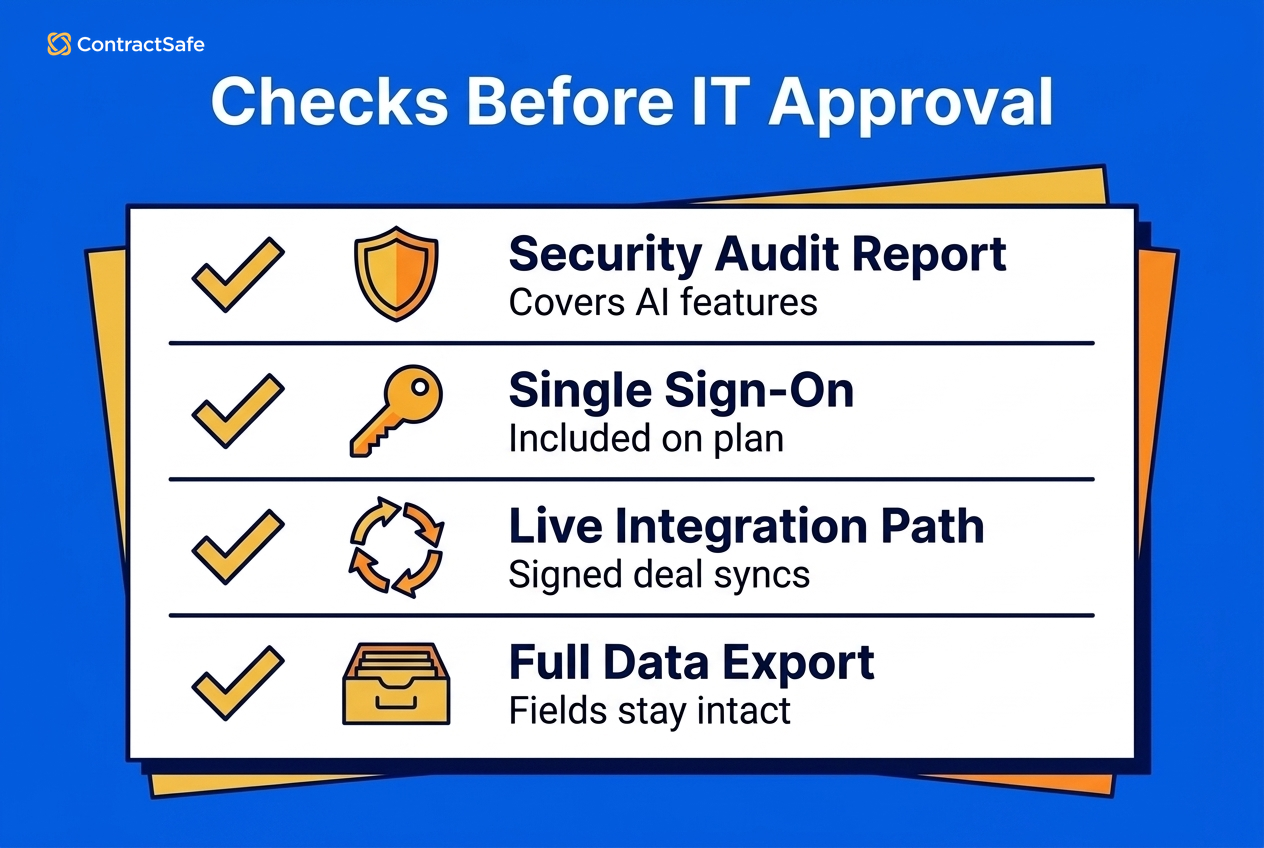
Before any finalist moves on to the implementation, cost, AI, and workflow checks, make sure each of these is a yes:
Every row scored Not needed traces back to the buying path you wrote down.
IT holds a current SOC 2 Type II report whose scope covers the AI features you'll use.
The material-change notice is in the contract draft.
One integration path ran live from end to end.
A test export kept field names, owners, and statuses.
Every failed table stake is logged as a blocker with a named owner.
Any no means you're still gathering proof, so hold the decision.
Ask What Implementation Support Actually Includes
Implementation support should cover field mapping, migration, training, and the first working report, and the vendor should put that scope in writing.
Ask vendors to answer these questions in writing:
Which contract types should migrate first?
Who cleans duplicate records and missing owners?
What onboarding help is included?
What support is available after launch?
Which report should work first, and by what date?
A contract management rollout changes how legal, finance and procurement work every week, and the written answers show how much of that change lands on your team. Sort them into a responsibility map: work the vendor does, cleanup your team does, IT tasks, and post-launch support. If nobody owns duplicate cleanup, missing owners, or first-report setup, the risk is still hiding in the quote.
For comparison, ContractSafe charges no implementation fee on any plan, includes migration, onboarding, training, and a dedicated customer success manager, and gets most customers fully onboarded in under 60 days.
Build a Three-Year Cost Comparison for Your Finalists
Pricing belongs on your checklist because you're choosing a cost you'll carry for years after launch, implementation included. Collect every vendor's cost inputs in the RFP, before the shortlist forms: license, user access, implementation and services, migration, AI modules, integrations, training, and renewal escalation. Then compare the three-year totals for your finalists at the decision step.
Year one misleads because renewal is where prices move. A June 2026 Zylo post on SaaS pricing trends, citing its 2026 SaaS Management Index, reports that 79% of IT leaders ran into price increases at renewal in the past year. And the increases can be steep: Vertice's SaaS Inflation Index, updated in July 2026, put June 2026 at 16.4%, the highest monthly rate it has recorded. A tool that's cheapest in year one can cost the most by year three if the renewal isn't capped.
To see what a cap is worth, take a hypothetical quote with round numbers picked for the arithmetic, not drawn from either index. A $30,000 first-year license with an uncapped 10% annual uplift costs $30,000, then $33,000, then $36,300, or $99,300 over three years. The same license with a 4% cap written into the contract costs $93,648. That's $5,652 from one clause, before anyone adds users from finance and procurement or finds migration help in a separate services line.
To catch those lines early, use this price checklist:
What is included in the platform fee?
Are users unlimited or seat-based?
Is implementation included or separately scoped?
Is migration support included?
Is AI included, sold as a module, or metered with credits?
What changes at renewal, and is the cap in writing?
Use a published price sheet as your baseline before you treat any quote as comparable. ContractSafe pricing starts at $450/month (Organize plan, billed annually; $540 month-to-month), with unlimited users on every plan.
Keep the totals open until the decision step, though. The AI, workflow, and reporting tests that follow can still turn up a module or services line you'll need to add.
Check AI Extraction Against Source Language
Most people in contracting already use AI, just not inside their CLM. World Commerce & Contracting and Icertis, a CLM vendor, surveyed more than 500 practitioners for their AI in Contracting study, and their February 26, 2026 press release reports that only one in four access AI through their CLM, while 47% use AI tools daily. Your team can already ask a general AI tool to read a contract. What a CLM's AI can offer that those tools can't is an answer tied to the source clause in your own contract record.
That's the bar for a pass. Every answer has to trace to the clause it came from, show whether a person has reviewed it, accept a correction, carry that correction into reports and alerts, and show each user only the contracts they're allowed to see. How a vendor charges for AI is a separate question for the cost comparison, since some sell it as a module or meter it with credits.
A practical AI test covers every part of that bar:
Upload a messy contract.
Ask for the renewal term and notice deadline.
Open the source clause behind the answer and check its review status.
Correct a field.
Confirm the correction carries into reports and alerts.
Ask the same question signed in as a restricted role, and confirm it can't see contracts that role isn't allowed to open.
If a system can't show the source clause, treat its answer as a draft note rather than contract data. In ContractSafe's AI, users accept, correct, or skip suggested values before they're saved, and AI search returns only contracts the user is allowed to see.
Test AI Contract Review on Counterparty Paper During Negotiation
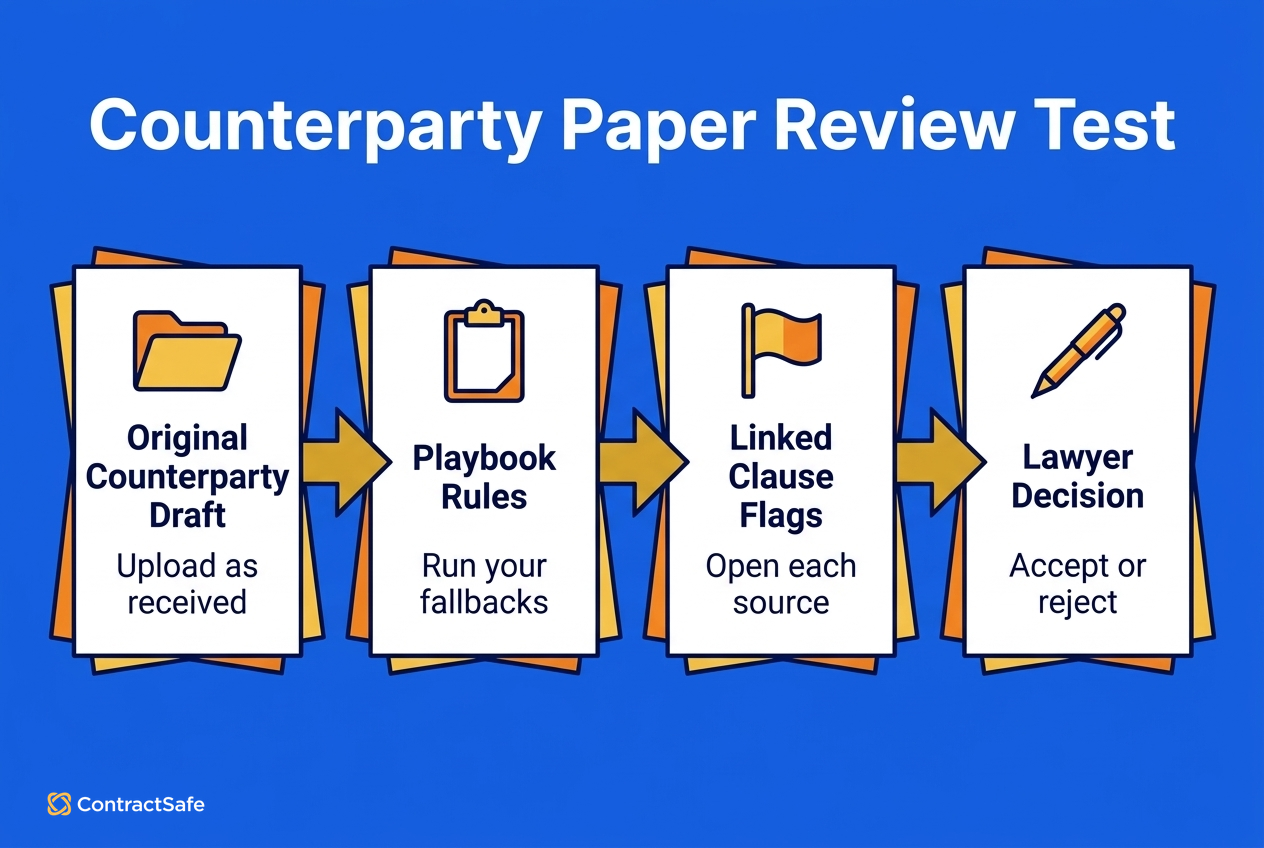
AI contract review passes the checklist when it checks incoming counterparty paper against your own rules, links every flag to the clause behind it, and leaves the decision with a lawyer. Where extraction reads contracts you've already signed, this test runs on a contract a counterparty actually sent you.
Upload a counterparty's paper exactly as it arrived.
Run it against a playbook built from your own fallback positions.
Open each flag and check that it links to the clause and suggests a fix.
Accept or reject each suggestion yourself.
A pass looks like ContractSafe's AI Contract Review, on the Maximize plan: it checks incoming contracts against your team's playbook, reports each pass and failure, links to the relevant clause, and can suggest wording. It never edits the contract itself, and rules the AI drafts need human review before they count.
Score the row Failed if any flag can't be traced to one of your rules, and Not needed if your buying path is repository-first.
Separate Repository Needs From Full CLM Workflow
If the buying path at the top of your scorecard includes pre-signature work, test those rows as hard as the repository rows. Repository work starts after signature; workflow starts earlier, with intake, drafting, approvals, redlines, and signature.
Before you push the workflow rows, check that the pain driving the purchase really starts before signature. Lost contracts and missed renewals are repository problems, while slow requests and approval confusion are workflow problems:
| If the pain is... | Start with... | Why |
|---|---|---|
| Lost signed contracts | Repository | Search and fields solve the weekly question |
| Missed renewals | Repository plus alerts | Dates and owners need control first |
| Slow legal requests | Intake workflow | The problem begins before drafting |
| Approval confusion | Workflow rules | Authority and handoffs need structure |
If workflow belongs on your path, run one contract through all of it. Draft an NDA from a template, route it for one approval, send it for signature, and confirm the signed copy lands back in the repository with its dates pulled. If the handoff needs an export and re-upload, score it Failed. On ContractSafe, the signed copy replaces the draft automatically, with the draft and the signature audit trail filed alongside it. Starting from a template needs the Maximize plan; approvals, redlining, and e-signature on drafts you upload start on Finalize.
Between the approval and the signature, add one negotiation round, because that's where a draft goes back and forth with the other side. Send the draft out, upload the counterparty's redline, compare the two versions, swap in a fallback clause from the clause library, and confirm the version history shows who changed what. If the redline lives only in email, score it Failed.
Any workflow row outside your agreed path stays Not needed, however well it demos.
Test Reporting With the Questions Leadership Asks
Whichever path you're buying, reports should answer the contract questions leadership already asks legal, finance, and procurement every month.
A dashboard full of file counts doesn't help much if the real question is which vendor contracts renew soon, which agreements are missing owners, or which high-value records need cleanup. During the demo, ask for one report built from the sample contracts you provided.
The report should show:
Upcoming renewals or notice windows.
Contracts missing owners.
Restricted records that need review.
High-value agreements with incomplete fields.
Next action and owner for each row.
If the report still needs manual spreadsheet cleanup, put that risk in the scorecard. Also ask who can build the report after the consultant leaves or the admin changes roles. A report that only one person can maintain becomes another private spreadsheet with a nicer interface.
Decide Whether a Lighter Full-Lifecycle CLM Fits Your First Rollout
Your buying path also tells you how heavy a system to buy. A lighter full-lifecycle CLM fits when your first job is searchable agreements and standard signing, and a heavier one fits when custom workflow has to exist before day one.
| Choose a lighter CLM when... | Choose a heavier CLM when... |
|---|---|
| Your first job is finding signed agreements, keeping their dates and fields right, and giving every team access at a price you can read. | The first rollout must build custom multi-department workflow logic before anyone uses the system. |
| The connectors you need, such as DocuSign, SSO, Salesforce or Zapier, work out of the box. | Integrations are the center of deployment and require custom systems work before users see value. |
Carry that fit into the one-sentence verdict you'll write for each finalist at the decision step.
Turn the CLM Software Checklist Into a Vendor Decision
The final checklist should produce a decision the team can defend in one meeting, with each requirement scored and every failure marked as a blocker or an acceptable risk.
Collect each finalist's scores in one place, then decide which failures block the purchase and which ones can be handled with rollout scope.
| Score | Meaning | Next action |
|---|---|---|
| Proven | The vendor showed the work with your sample contracts | Keep it in the recommendation |
| Unproven | The vendor described it but didn't show it | Require a follow-up demo or mark the risk |
| Failed | The vendor couldn't support the task | Decide whether the failure blocks the purchase |
| Not needed | The feature is real but not part of the first buying job | Keep it out of the decision unless scope changes |
Use one finalist rule: a vendor with a Failed blocker drops out, whatever its price. For every vendor still standing, put three numbers beside its name: days to the first working report, three-year total with the renewal cap in writing, and the effort to export every file and field if you leave.
Then write one sentence for each finalist: choose this vendor if we prioritize this kind of contract work and accept this kind of risk.
The final page lists the finalists, their proven strengths, unproven risks, failed requirements, and those three numbers. Pick the vendor with the most Proven rows on your must-haves at a three-year cost and exit effort the team can live with.
Related Reading
How ContractSafe Helps With CLM Software Selection
ContractSafe lets you run this whole checklist against a working system, with unlimited users so every team on the buying committee can test search, alerts, permissions, signing, and AI review for itself.
Match the plan to the integration path you plan to test live. The Finalize plan connects DocuSign, Word, and Zapier among the ContractSafe integrations. If your test is a deal closing in Salesforce, you'll need the Maximize plan, which adds Salesforce, API access, and lifecycle tracking.
Hold ContractSafe to the same rule as every other finalist: score each row on your own messy contracts and let the scorecard make the call.









.svg)







.svg)




