


Quick answer: SB 574 contract review means following California's new attorney AI law whenever a lawyer uses generative AI to read, extract or draft contract terms. Under the enacted text of SB 574, an attorney can't delegate the practice of law to AI. Confidential or personal data can only go into an AI system whose access is restricted to the attorney and authorized people, and AI output has to be verified and corrected. Governor Newsom signed the law on September 30, 2026, and it takes effect January 1, 2027.
Your contract manager drops a vendor's master services agreement into a free AI chatbot to pull the renewal terms, and the payment exhibit with the supplier's bank details goes in too. The chatbot reports a sixty-day non-renewal window and the team calendars it, but a signed amendment pushed the window to ninety. Starting next year in California, that shortcut touches two attorney duties at once, and your name is on the policy that allowed it.
Choose your next step:
For legal teams comparing tools: AI contract review software shows how ContractSafe's AI Contract Review, on the Maximize plan, checks contracts against your playbook while a lawyer decides every edit.
For contract managers refreshing the basics: Elements of a contract walks through what a reviewer should check in every agreement.
Key Takeaways
- Treat January 1, 2027 as a hard deadline, since Governor Newsom signed SB 574 on September 30, 2026, which leaves about three months to update your AI review workflow.
- Apply the rules to your in-house lawyers, because Morgan Lewis notes the law doesn't distinguish law firms from corporate legal departments.
- Keep confidential and personal data out of any AI tool unless access is restricted to the attorney and the people the attorney authorizes under confidentiality duties.
- Have a named reviewer verify and correct AI-extracted renewal dates, clause summaries and drafted language before anyone relies on them.
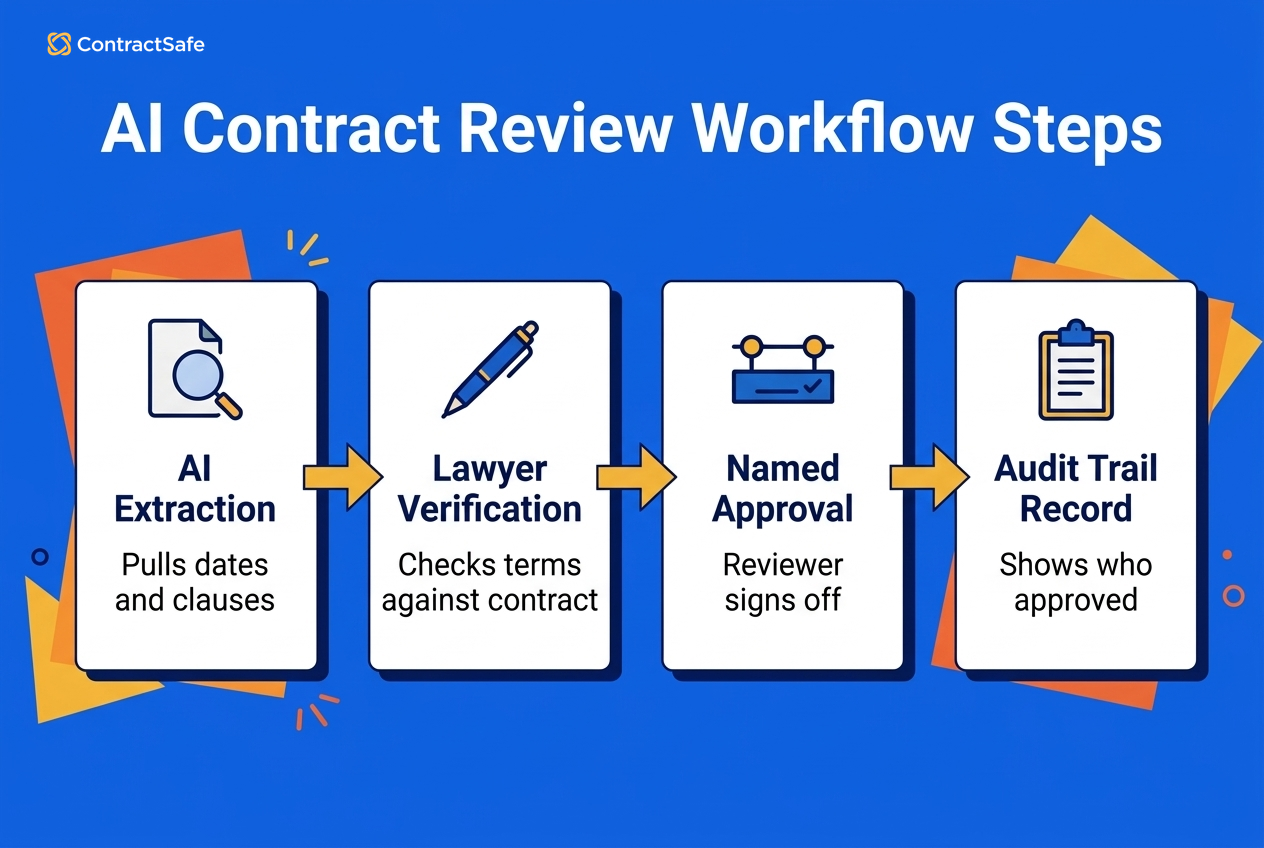
- Run a workflow where AI suggests, a named lawyer approves and an audit trail records who approved what.
What SB 574 Means for Contract Review and Why It Matters to In-House Teams
SB 574 contract review is the set of California rules that apply whenever an attorney uses generative AI to read, summarize, extract or draft contract language. In-house lawyers are covered on the same terms as law-firm lawyers, so the law lands on legal departments as squarely as on outside counsel.
Governor Newsom approved Senator Thomas Umberg's bill on September 30, 2026, as the governor's signing announcement records. Chaptered as Chapter 858 of the Statutes of 2026, the law adds section 6068.1 to the Business and Professions Code and takes effect January 1, 2027, which leaves legal departments roughly three months to prepare.
The statute speaks to "an attorney" with no carve-out for corporate counsel. In its guidance for legal departments, Morgan Lewis says "SB 574 does not distinguish between attorneys who work at law firms and those in corporate legal departments." Holland & Knight's summary of the enacted law calls California "one of the first states to expressly regulate attorneys' use of generative artificial intelligence," so there isn't much precedent to lean on yet.
Contract review sits right in the path of the law's four duties: no delegating the practice of law to AI, no confidential data in AI systems without restricted access, verifying and correcting AI output, and disclosing AI use to courts. Contracts carry personal and nonpublic data, AI-extracted dates become the calendar the business trusts without reopening the PDF, and deciding whether to accept an uncapped indemnity is the practice of law, whoever (or whatever) wrote the first pass.
Put two names on the calendar now. The deputy GC or legal operations lead owns the written AI policy and the approved-tool list, and each contract owner owns the verified dates on their agreements. Aim to finish both before the end of December so January starts clean. One caveat: this article explains the law for planning purposes and isn't legal advice, so check your setup with ethics counsel who knows your facts.
The Difference Between AI-Assisted Review and Delegating to AI
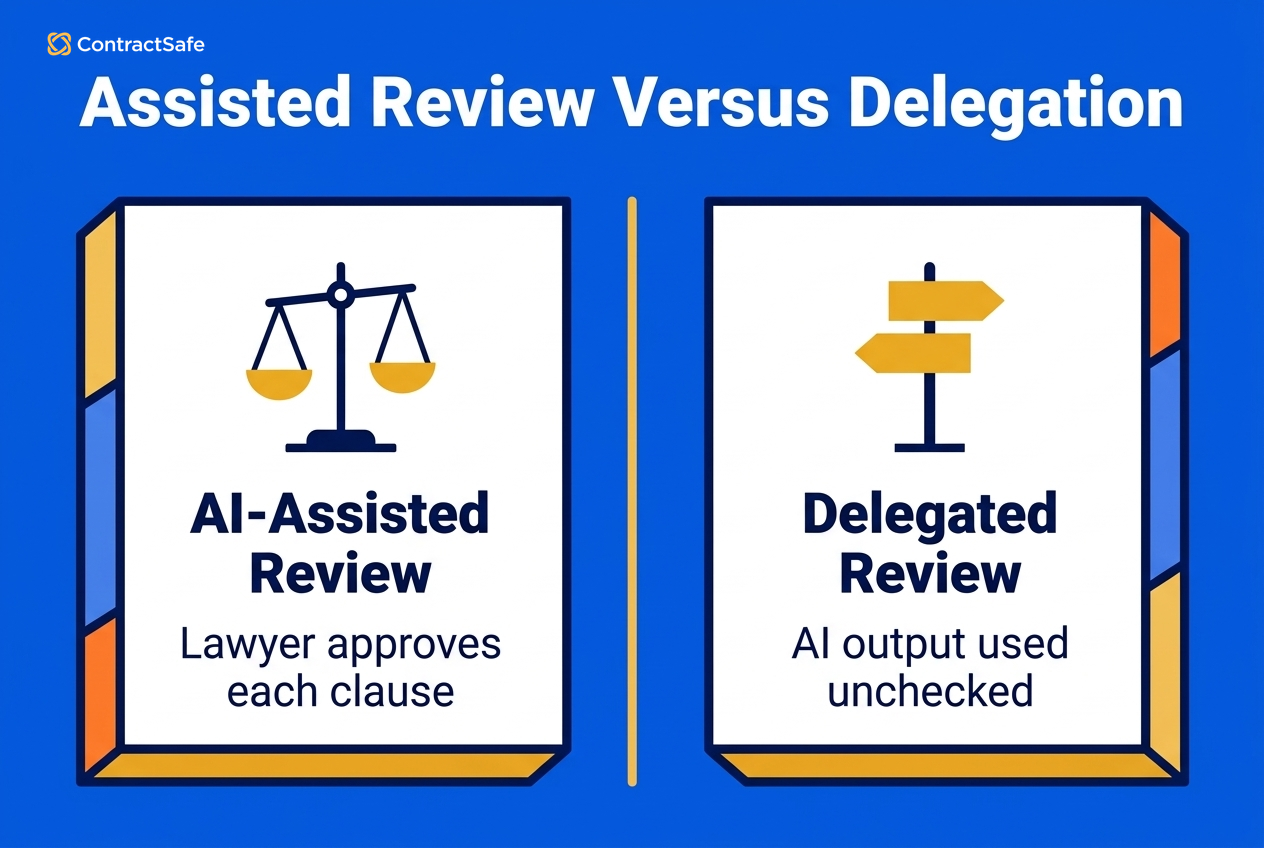
The difference between AI-assisted contract review and delegating to AI is who makes the decision. SB 574 bars an attorney from delegating the practice of law to generative AI, so in assisted review a named lawyer decides every position, while in delegation AI output gets accepted, sent or relied on with no lawyer judgment applied.
The statute leaves the boundary undefined, and Morgan Lewis flags contract review as one of the areas where the gap matters. Until a sharper line arrives, the State Bar of California's 2026 practical guidance is the best compass you've got. The guidance treats a lawyer's professional judgment as something AI can't take over, keeps lawyers responsible for reviewing and approving every output, and expects meaningful lawyer supervision before agentic tools make any substantive legal determination. That's guidance, which is persuasive, sitting next to a statute, which is binding.
Here's a comparison of the two modes on decisions that come up in a normal week:
| Decision point | AI-assisted review | Delegated review |
|---|---|---|
| Position on a clause | A named lawyer decides after reading the AI's flag | The AI's suggestion stands as written |
| Extracted renewal dates | Checked against the signed contract and amendments | Calendared straight from the AI's output |
| Standard inbound NDA | AI checks the NDA against the playbook and a lawyer approves | AI auto-approves and the NDA goes out for signature |
| Redline suggestions | A lawyer accepts, edits or rejects each one | Sent to the counterparty unchanged |
| The record afterward | Shows who reviewed and approved | Shows only that the tool ran |
For example, say a mutual NDA comes back on your own paper with one change: a perpetual confidentiality term. If a tool compares the NDA to your playbook and approves it automatically, the tool has made the legal call, which lands on the delegation side of the table. If the tool flags the change and a lawyer decides to accept it, that's assisted review.
Use these lines to decide how much review each agreement needs:
A lighter check is defensible for agreements on your approved template where the AI reports no deviations, as long as a lawyer approved the playbook and signs off on the result.
A full lawyer read is the right call for third-party paper, any change to indemnity, liability or data protection, and any agreement the AI marks as a playbook failure.
Auto-approve and agentic features stay off for anything that binds the company until a lawyer has reviewed the output.
ContractSafe's AI Contract Review, on the Maximize plan, sits on the assisted side: the tool evaluates incoming contracts against your team's playbook rules, reports passes and failures, links to the relevant clauses and can suggest wording. AI Contract Review doesn't edit the document automatically. A person decides whether and how to edit it.
The Four Duties SB 574 Puts on Lawyers Who Use AI
SB 574 gives every attorney who uses generative AI on contracts four duties: don't delegate legal judgment, keep confidential data out of AI systems without restricted access, verify and correct AI output, and disclose AI use in court filings.
Never Delegate the Practice of Law
The no-delegation rule is one sentence in the new statute: "An attorney shall not delegate the practice of law to generative artificial intelligence." The comparison above covers where assistance ends and delegation begins. For instance, AI can flag an uncapped indemnity in a supplier agreement, but a named lawyer owns the decision to accept, reject or counter it.
Keep Confidential Data in Access-Restricted Systems
The confidentiality duty bars entering "confidential, personal identifying, and other nonpublic information" into a generative AI system unless access to that system is restricted to the attorney and the people the attorney authorizes who are bound to protect the information's confidentiality. The statute's list of personal identifying information reads like a tour of a typical contract file:
Dates of birth and Social Security numbers
Account numbers and financial information
Medical information
Parties' addresses and phone numbers
For example, a vendor agreement's payment exhibit usually lists the supplier's bank account details, and a consulting agreement often carries the consultant's home address. Paste either one into a consumer chatbot whose provider can reach your inputs, and the duty is in play.
Verify and Correct the AI's Output
The statute requires lawyers to "verify the accuracy of generative artificial intelligence outputs" and "correct any erroneous or hallucinated output in any material used by the attorney." Citations are named, but the wording reaches any material the attorney uses: extracted renewal dates, notice windows, liability caps, clause summaries and AI-suggested redlines. A wrong date the AI pulled is erroneous output, and once that date drives a renewal decision, someone needs to have checked it.
Disclose AI Use to Courts and Verify Citations
Attorneys must disclose generative AI use in documents submitted to a court and consider whether to disclose it for content provided to the public. The law also amends Code of Civil Procedure section 128.7, so a filing can't contain any citation the responsible attorney hasn't personally verified, and Holland & Knight's walkthrough covers the separate arbitrator rules under section 1282.1. For a transactional team, the court duties mostly matter when a contract dispute turns into litigation.
What to Look For in AI Contract Review Software Under SB 574
AI contract review software clears the SB 574 confidentiality test only when access to contract inputs and outputs is restricted to the attorney and the people the attorney authorizes, so access controls belong at the top of the buying checklist.
Morgan Lewis's legal-department analysis makes the point that the test turns on restricted access, so an "enterprise" label on a sales sheet settles nothing by itself. The State Bar's COPRAC practical guidance says a lawyer "should take reasonable steps to understand how a generative AI product collects, uses, stores, and discloses information provided by the user," and adds that "Reasonable efforts require more than reliance on generalized marketing assurances." So ask for the terms of use, privacy policies and vendor documentation, and read them.
Questions to Ask Every AI Contract Review Vendor
Ask every vendor these questions before anyone uploads a live contract:
Who can reach inputs and outputs, including the vendor's own staff and any AI model provider?
Which permission controls limit each person to the contracts they need?
Can you read current security reports, such as a SOC 2 report or an ISO 27001 certificate?
Does every audit trail entry and saved version tie to a named login?
Does approval routing record a lawyer's sign-off?
Does the vendor state in writing whether your contracts train its models?
For example, if the answer to the first question includes the vendor's support staff, ask how that access is logged and who grants it. Have the deputy GC sign off on the written answers before the January deadline, and file them with the AI policy.
ContractSafe's permissions work at the contract level on every plan, through user-level, team-level and folder or tag access, so a person either sees a whole contract or doesn't. AI search is permission-aware, ContractSafe states that it does not use customer data to train AI models, and each account is assigned to one data-residency region: United States, Canada, European Union or Australia.
ContractSafe pricing starts at $450/month (Organize plan, billed annually; $540 month-to-month), with unlimited users on every plan. The pricing page also lists SOC 2 audit certification and ISO 27001 certification on every plan, though you should still ask for the current reports. Single sign-on comes with Finalize and Maximize, IP whitelisting needs Maximize, approval sequences need Finalize or Maximize, and AI Contract Review needs Maximize.
A general-purpose chatbot fails the access test when you can't confirm who at the provider can reach your files, or when your company doesn't control the account. A permissioned contract platform passes when its access controls, audit trail and documentation check out on paper and in the demo.
Five Steps to Run an AI Contract Review Workflow That Satisfies SB 574
An AI contract review workflow that satisfies SB 574 has five steps: classify the contract's data, run AI extraction, verify each extracted field, route the agreement for lawyer approval, and keep an audit record of who approved what.
Classify the data before upload. Decide which contracts carry personal identifying or nonpublic information, and confirm the tool's access is restricted to your lawyers and the people they authorize.
Run AI extraction for human review. Let the AI pull parties, key dates, renewal and non-renewal deadlines and major clauses. ContractSafe's meta-data extraction runs on every plan, and a reviewer can accept, correct or skip each suggested value before the value is added.
Verify every field against the signed contract. A named reviewer checks each extracted value against the signature copy and any amendments, then corrects whatever's wrong. That's the statute's verify-and-correct duty, done one field at a time.
Route for lawyer approval. ContractSafe's approval sequences, on the Finalize and Maximize plans, send pending approvers email reminders, and a rejection stops the process and notifies the requester.
Keep the record. On every ContractSafe plan, version tracking keeps each draft and the general activity audit trail records contract views, downloads and changes, so you can show who verified and approved what.
Your Readiness Checklist Before the Effective Date
The deputy GC or legal ops lead owns these checks, with a target of the end of December:
Inventory every AI tool your lawyers and contract managers use, including browser chatbots, and record who can access inputs and outputs.
Write a one-page AI policy that names the approved contract review tool and bans the rest for contract work.
Assign a named verifier for each contract type and put that name on the approval route.
Re-check AI-extracted renewal and notice dates for every agreement that renews in the first quarter of next year.
Turn off auto-approve and agentic actions for anything that binds the company.
Set a court-filing rule so litigation counsel confirms AI disclosure and personally verifies every citation.
Say you've got a software subscription that auto-renews unless you give notice. The AI read the original agreement and calendared a sixty-day notice window, but the second amendment changed the notice period to ninety. If nobody checks, the alert fires a month too late and the renewal locks in. The verification step on that checklist catches the mistake first.
Common Mistakes In-House Teams Make Before SB 574 Takes Effect
Most SB 574 mistakes in contract review come from treating AI output as finished work or treating any AI tool as safe for client data. Each mistake below comes with a fix, an owner and a way to keep tracking the fix after January.
1. Pasting Contracts With Personal Data Into an Open AI Tool
Pasting a supplier agreement with bank details into a consumer chatbot is the fastest way to trip the confidentiality duty. For example, a facilities contract's payment exhibit carries the vendor's account number, which the statute lists as personal identifying information.
The fix is one approved, access-restricted tool for contract work, written into the AI policy. Before anyone uploads, confirm who can reach the tool's inputs and outputs. ContractSafe's user, team and folder or tag permissions on every plan keep each contract to the people who need it. The deputy GC owns the policy, tracks the approved-tool list as a standing obligation and reviews it every quarter.
2. Treating AI-Extracted Renewal Dates as Final
An AI-extracted renewal date that nobody checked is erroneous output waiting to lock you into a renewal. Verify each date against the signed copy and every amendment before alerts go live, and make each contract owner responsible for that check. ContractSafe's automated reminders for custom dates cover renewals, expirations and deadline-to-nonrenew dates on every plan, and each notification arrives with the contract attached, so the alert points back to the source you verified.
3. Letting Contract Managers or Agentic Tools Approve Terms
Contract managers and agentic tools can prepare a contract for approval, but the approval belongs to a lawyer. Require a lawyer's sign-off in the approval route and turn off auto-approve for anything that binds the company. ContractSafe's approval sequences, on the Finalize and Maximize plans, put that lawyer in the route and email reminders until they act. The legal ops lead owns the route and confirms after each policy change that a lawyer still sits on it.
4. Sharing Logins Across the Team
Shared logins erase the record of who reviewed and approved what. For instance, if two contract managers share one account, the audit trail can't show which of them accepted the indemnity change. Give every reviewer a named account, since ContractSafe includes unlimited users on every plan, and have the legal ops lead spot-check the audit trail on a sample of approved contracts.
5. Quoting Pre-Signing Summaries as Law
Summaries written before the September signing describe a bill that was still moving, and some earlier draft duties fell away. The enacted text frames the confidentiality test around restricted access, with no "public generative AI system" label. Write the policy from the chaptered text of SB 574, not from a summary, and have the policy owner recheck the wording whenever the State Bar updates its guidance. For example, a policy that only bans public AI tools misses the point of the enacted test, which asks who can access the system.
6. Skipping AI Disclosure When a Contract Dispute Reaches Court
A contract dispute that turns into litigation brings the court duties into play, even for a transactional team. Add a disclosure and citation check to litigation intake so counsel confirms AI use and personally verifies every citation before filing. For instance, a brief over a missed renewal notice that cites the auto-renewal statute needs every citation checked by the attorney who signs it. Track the check as an obligation on the litigation checklist, with litigation counsel as the owner and the deputy GC confirming it happened for each filing.
Related Reading
Contract templates shows how Maximize teams lock approved wording and required fields in standard agreements.
Contract editing covers editing in Word and saving the new version to ContractSafe on Finalize and Maximize.
Contract signing software explains how Finalize and Maximize file the signed copy with its signature audit trail attached.
How ContractSafe Helps In-House Teams Review Contracts Under SB 574
ContractSafe's AI suggests contract data and wording, and a person decides what goes into the record. On every plan, AI features are optional, so your team can use some or none, and a reviewer accepts, corrects or skips each extracted value before the value is added. AI search returns only the contracts each person is allowed to see, and on the Maximize plan, AI Contract Review checks agreements against your playbook and suggests wording while a person decides every edit.
On the Finalize and Maximize plans, approval sequences route each agreement to the reviewers you choose, email pending approvers reminders and stop the process when someone rejects. On every plan, the activity audit trail records contract views, downloads and changes, and folder and tag permissions with unlimited users give every reviewer a named login, so your record shows who verified and approved each contract.









.svg)







.svg)




