



The measures you take to keep your contract information private and accurate are always important, but for human resource departments, contract management security is even more important. Employment agreements carry salary details, equity grants, performance reviews, and termination terms that should never be accessible by other departments. Good contract security for HR departments can be the difference between business as usual and a public lawsuit.
You’re 30 days away from an important deadline and the contractor you planned for still isn’t onboarded. The initial statement of work didn’t get signoff from the project lead for 10 days. Then finance had some things to say about the rate. Your executive was just about to countersign, but he didn’t have access to the document and he’s out the door on a vacation. The clock is ticking, the work is piling up, and your team is still struggling to keep the whole project on track.
Because HR contracts contain sensitive information, the instinct many companies have is to keep them out of a shared system entirely: a separate folder, a locked drive, a completely different tool. While that does limit exposure, it also makes them invisible for the reporting, alerts, and audit trails the rest of the company relies on.
Think of a company-wide contract system as a bank. It’s a secure building, but everyone uses the same lobby, the same tellers, the same general infrastructure. Some things don’t belong on the open counter. They belong in a safe-deposit box: same building but with a separate key and log of who opened it when. HR contract management software allows everyone in an organization into the same bank branch, but keeps protected information locked away on a need-to-know basis.
Learn more about why HR contracts need special handling, what a private workspace inside a shared system actually looks like, and how the right permission model lets HR benefit from centralization without sacrificing confidentiality.
Key Takeaways
- A breach involving internal employment documents can carry massive financial consequences, with IBM's 2026 Cost of a Data Breach Report placing the global average cost of a data breach at $4.99 million.
- Keeping HR files in isolated, standalone systems creates bottlenecks and leaves them without centralized tracking, automated alerts, and unified audit trails across a broader organization.
- Regulatory guidelines from organizations like SHRM explicitly require medical accommodation details and FMLA records to be stored separately and securely from standard personnel files.
- Role-based permissions plus folder- and tag-based sharing enable organizations to restrict HR agreements while still allowing departments like finance to access the separate contracts relevant to their work.
Why HR Contracts Carry a Different Risk Profile
HR contracts control your people, a company resource that is hard to replace and impossible to work without. They house many details that open the door to breach of information issues. Employment agreements contain compensation figures, equity terms, and benefits details that create reputational exposure if the wrong person inside the company sees them, not to mention lawsuits if they fall into the wrong hands.
Severance agreements and documentation tied to a performance-related termination often include confidential settlement language that was never meant to circulate past the people who negotiated it. Background check authorizations, medical accommodation requests, and leave documents can carry their own privacy obligations depending on what’s attached to the personnel file.
While lawsuits or complaints as a result of contractual breaches can often be settled quietly, some companies have faced public pressure and consequences:
A former employee filed a lawsuit against Panera in 2024 claiming the company failed to secure personal employee information like social security numbers.
Employees filed a $5 million lawsuit against medical technology manufacturer Stryker after their information was compromised in a data breach.
Employees filed suit against Gas Express, a major Circle K franchisee, for failing to protect personal data.
But it’s not just employment agreements. HR also manages vendor contracts for payroll processing, agreements with recruiters and staffing agencies, and benefits provider contracts, each of which can carry its own pricing terms or data-handling obligations that shouldn’t be visible outside HR either.
Companies tend to fall into one of two traps here. Some keep HR contracts in a separate, disconnected system that solves the exposure problem but loses the benefits of centralized tracking. This means no shared alerts, no unified audit trail, no single place to search when a question comes up. Others put everything in one shared system with access controls too loose to actually protect anything. Neither is a real solution. The safe-deposit box only works if it’s in the same bank as everything else, not unsecured in a different building.
Department-by-Department: Who Needs to See What
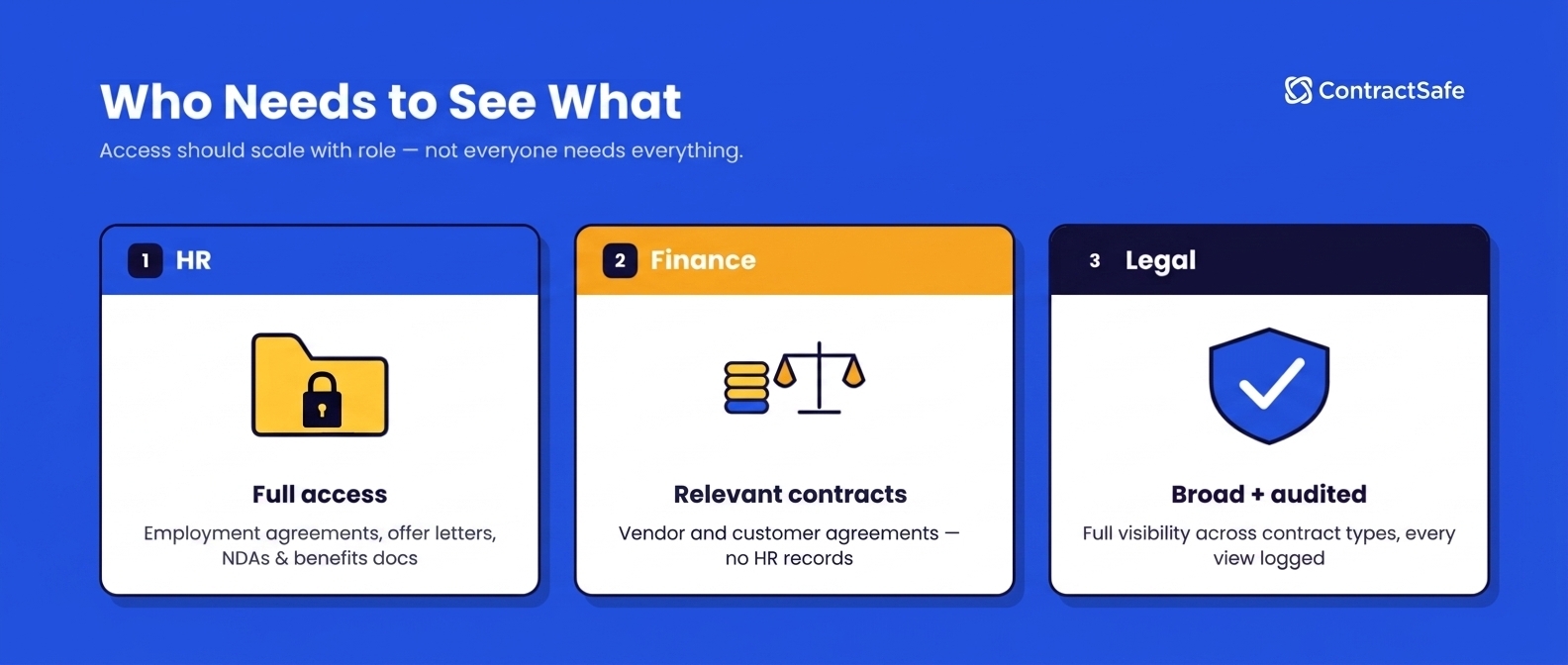
Good permission design starts with mapping out what each department actually needs before assigning access, not after. This table is a starting framework companies can adapt to their own structure.
| Department | What They Typically Need | What Should Stay Restricted |
|---|---|---|
| HR | Full access to employment agreements, offer letters, NDAs, benefits documentation, and personnel-related contracts. | Unrelated external vendor or sales agreements. |
| Finance | Access to sales, procurement, and contractor contracts, but not documents focused on internal employees. | HR or benefits documents outside of what’s necessary for payroll and financial reporting. |
| Sales | Customer agreements, order forms, and vendor agreements relevant to their accounts. | Internal HR documents and vendor contracts outside their scope |
| Procurement | Vendor and supplier agreements. | Customer contracts, HR records, and unrelated departmental agreements. |
| Legal | Broad visibility across contract types along with full audit history for compliance and risk review. | Nothing by default, though even legal access should be logged and reviewed periodically. |
As mentioned, this is a starting framework, not a rigid rule. The right permission structure depends on company size and org structure. But the underlying principle holds across every organization: not everyone needs every document, and not everyone needs to edit every contract.
What a Private Workspace for HR Actually Requires
The Society for Human Resource Management (SHRM) has kept the same point about physical and digital personnel files for years: employees aren’t entitled to see personnel records belonging to a coworker and that boundary doesn't disappear just because the records moved into a shared platform.
In particular, SHRM advises that medical information tied to a disability accommodation or FMLA request has to be kept confidential and stored separately from the rest of an employee’s personal file. A well-structured contract repository has to enforce the same boundary the locked filing cabinet used to.
Tight Permission Controls
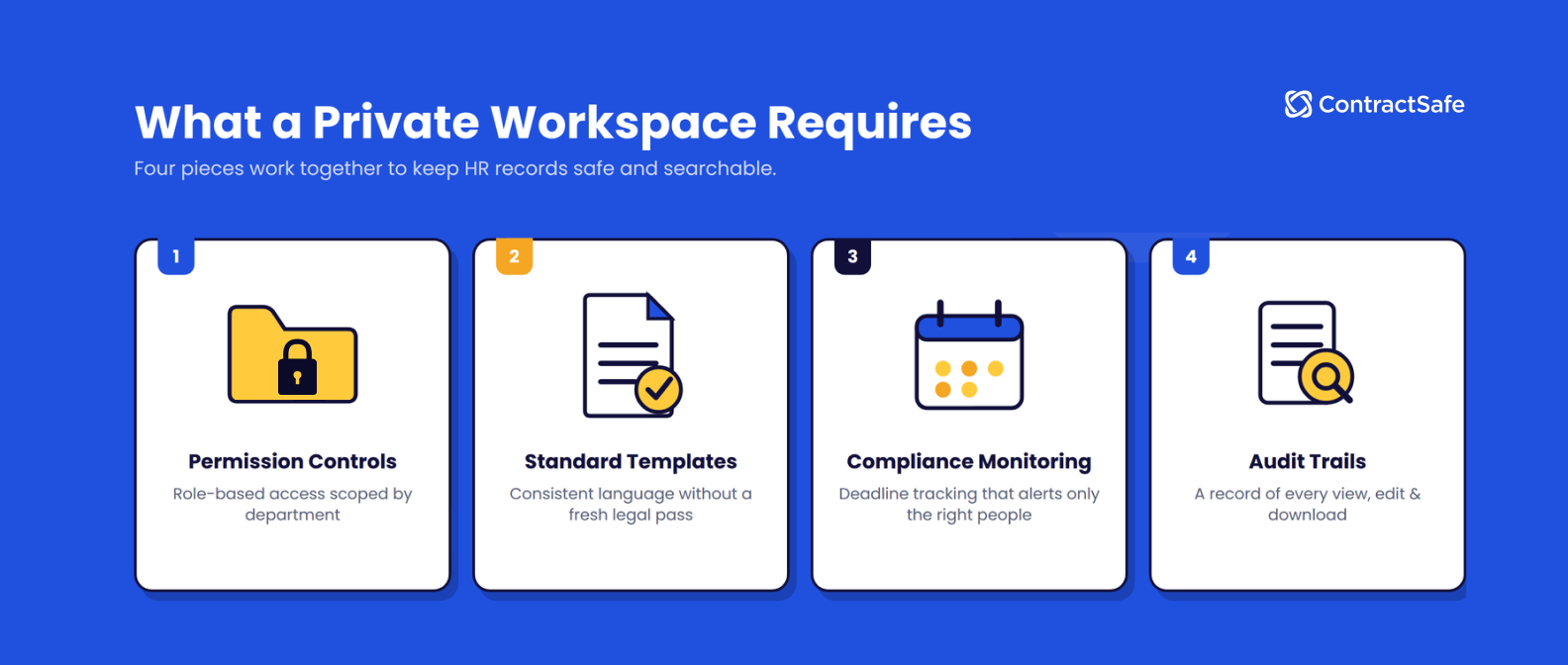
The foundation of a private HR workspace is role-based permissions that scope access by department, not an all-or-nothing admin-and-user toggle. HR should be its own access group, distinct from finance, sales, and procurement, with permissions that reflect what the role actually requires rather than defaulting to broad visibility for convenience.
Tag- or folder-level sharing permissions can keep HR contracts out of view for everyone outside that group by default, so a new hire in sales never accidentally lands on a page listing severance terms.
The reason this matters isn’t hypothetical: IBM’s 2026 Cost of a Data Breach Report puts the global average cost of a data breach at $4.99 million, and breaches involving internal records tend to be the hardest to trace precisely because they don’t require anyone to break in, the access was already there.
Contract Review for Standard Templates
HR moves fast, often processing offer letters, NDAs, and vendor renewals at high volume without the luxury of a slow legal review on every document.
Standard templates keep language consistent across offer letters and agreements without requiring a fresh legal pass each time or requiring sensitive data inside a form WH-380 for Family and Medical Leave to cross someone else’s desk. Structured intake forms cut down on the back-and-forth that happens when drafting from scratch. AI contract review can flag non-standard language, so HR only has to slow down for the agreements that actually deviate from the template instead of reading every line of every routine document.
Monitoring and Compliance Capabilities
HR contracts create ongoing obligations that go well beyond the signature date. Insurance certificates for benefits providers come due quarterly. Certifications from staffing agencies or background check vendors have to be renewed annually. Compensation reviews and equity vesting milestones land on their own schedules tied to hire dates, not the calendar year. Custom deadline tracking and reporting turn these into alerts that reach only selected people. Tracking on your calendar opens the risk of a public event that says “Jane S. Fully Vested” or “Bob’s Performance Improvement Plan Expiration.”
Audit Trails That Show Who Accessed What
A private workspace has to do more than block the wrong people from getting in. It has to prove who got in, when, and what they touched. A full contract compliance audit trail covering views, edits, downloads, and permission changes gives HR and IT a record they can point to during a compliance review or an internal investigation, rather than reconstructing events from memory or a scattered email thread. That’s the safe-deposit box’s log book: not just a locked door, but a record of every time it was opened.
How ContractSafe Gives HR a Secure Home Inside a Shared System
ContractSafe’s permission architecture lets HR operate its own secure workspace within the same system the rest of the company already uses. Role-based permissions scope HR’s contracts to HR and designated leadership by default. Folder- and tag-based sharing lets HR control exactly which records are visible to which teams, down to individual agreements when needed. Complex permissions structures allow a single user to hold different access levels across departments at once. A finance manager, for example, might see vendor contract value while having no access to HR records at all.
Plus, a full audit trail that covers every view, edit, and download across the platform, not just inside HR’s workspace.
ContractSafe is SOC 2 and ISO 27001 certified, with 256-bit AES encryption, giving HR the enterprise-grade security assurance that sensitive employment records require. That’s the same permission philosophy that runs across ContractSafe’s broader approach to digital contract repositories: every department gets a searchable, trackable home in the same system, scoped to exactly what that department should see.
Give HR the Privacy It Needs Without Losing the System Everyone Else Relies On
HR shouldn’t have to choose between keeping employment records confidential and being part of the company’s centralized contract system. The right permission architecture makes both possible at once. HR gets its own safe-deposit box, and the rest of the organization keeps the searchable, trackable bank it depends on. ContractSafe is built to support exactly that balance.
Request a demo or start a free trial to see how it works for your team.








.svg)







.svg)




