


Contract management software for legal departments brings executed agreements, search, intake, review, approval, signing, ownership, alerts, and reporting into a governed contract record. It moves contract work from request through post-signature action. For in-house teams, the practical test is simple: can a user find the right clause, verify its source, and act on it?
Quick answer: Evaluate contract management software for legal departments by the work it helps legal, finance, procurement, and operations complete: finding the right contract, verifying the source language, assigning an owner, and turning contract data into the next action.
Think about a sales teammate asking late on a Friday whether a customer agreement auto-renews. The answer exists, but the signed file is buried in an inbox or a departed employee’s folder.
Legal has to reconstruct a fact that should already be part of a usable contract record. ContractSafe is a full-lifecycle contract management platform built for that gap: intake, approvals, signing, a central repository with search, human-reviewed AI extraction, tracking, alerts, and reporting.
Key Takeaways
- Legal departments should score contract management software on search quality and source traceability first, because every other feature depends on finding the right language and proving it.
- Access in a legal contract management system should be practical: control by contract, folder, tag, role, and sharing, so the business gets what it needs without seeing what it shouldn’t.
- Workflow is where teams overbuy. Buy intake and approval routing you’ll actually configure, not a rules engine that needs a consultant every quarter.
- Treat AI extraction as an assistant. Human review of the source language is required before legal relies on a result.
- Pricing shape matters more than sticker price. ContractSafe pricing starts at $450 per month billed annually or $540 month-to-month, with unlimited users.
Choose your next step:
If you’re still building the shortlist, use the rubric below before watching another vendor demo.
If you already have vendors in mind, jump to the evidence checklist and score what each vendor actually shows.
If your team needs a lighter path, compare pricing, setup effort, and user access.
How the Leading Options Compare on a Shortlist
The contract management software for legal departments checklist should compare the work the system must support: clean records, trusted answers, clear ownership, and next actions the team can actually take.
| Decision factor | What to compare | Why it matters |
|---|---|---|
| Buyer fit | Match the platform to team size, contract volume, and implementation bandwidth | The best product on paper can fail if the operating model is wrong |
| Source traceability | Require answers, fields, and AI summaries to point back to the contract record | Legal teams need evidence before acting on AI output |
| Workflow actionability | Check whether extracted data drives alerts, reports, owners, and follow-up tasks | Search alone doesn’t create operational control |
| Security and permissions | Test access controls for contracts, folders, tags, roles, and sharing | Useful access shouldn’t expose sensitive agreements |
| Launch effort | Ask what the team must clean up before the first useful report | Hidden implementation work is part of the buying decision |
Decision Check
Can the vendor prove the workflow with messy real contracts, not demo-perfect files?
Can a user trace an AI answer, extracted date, or report field back to the source agreement?
Can legal, finance, and business owners act from the same record without opening access too broadly?
Evidence Checklist
| Vendor claim | Evidence to request |
|---|---|
| AI can answer contract questions | Show the source clause, confidence, permissions behavior, and correction path |
| Setup is fast | Show the migration steps, required fields, owner model, and first useful report |
| Reporting is included | Build a renewal or obligation report from extracted fields during the demo |
Before scoring the vendors, name the person who will own the pilot and define what evidence counts as a pass. A pilot without an owner or pass conditions tends to reward the most polished demonstration instead of the system that best handles the legal team’s actual work.
What Legal Teams Actually Need From Contract Management Software
Legal departments need contract management software to make four jobs dependable: retrieval, source verification, controlled access, and follow-through after signature.
A repository that holds everything, search that returns the exact language with a link back to the signed document, controlled access that lets the business self-serve safely, and enough workflow to route requests without a consulting engagement. Everything else is a preference. Most in-house teams begin an evaluation with workflow pain, but retrieval is often the first problem to solve. A contract set is a library, and many legal departments are operating without a dependable catalog.
Source traceability is the test: when the system shows a renewal date or extracted term, the user should be able to open the relevant language in the executed agreement and verify it.
What Actually Sits Under “Legal Needs”
Break the requirement into pieces you can score, because “we need contract management for in-house counsel” isn’t a spec.
| Requirement | What good looks like | Failure mode to watch for |
|---|---|---|
| Repository | Every executed agreement in one place, including scanned paper, with OCR so the text is searchable | A system that only holds contracts created inside it, leaving your legacy set stranded |
| Search | Full-text and plain-English search that returns the clause, not just the document name | Metadata-only search that finds nothing unless someone tagged it correctly two years ago |
| Source traceability | Every extracted value links back to the signed language | Fields with no provenance, so counsel re-reads the PDF to verify anything important |
| Ownership | A clear internal owner per contract and per renewal | “Legal owns everything,” which means nobody owns anything |
| Access | Control by contract, folder, tag, role, and sharing | Vague promises about granular control that don’t survive a real org chart |
| Intake | A structured request form the business can actually complete | Intake that’s just a shared inbox with a nicer name |
| Approvals | Routing you can configure yourself and change next quarter | A rules engine that needs professional services for every edit |
| Signing | E-signature connected to the same record | Signature living in a separate tool with a separate audit trail |
| Renewals | Alerts with enough lead time to act, sent to a named human | Alerts that go to a shared address nobody reads |
| Reporting | Exports and reports on what you actually track | Dashboards that look great and answer no real question |
| Adoption | The business uses it without training sessions | A tool only legal logs into, which reproduces the original problem |
| Pricing shape | Predictable, with unlimited users so adoption isn’t taxed | Per-seat pricing that punishes exactly the behavior you want |
ContractSafe controls access through contracts, folders, tags, roles, and sharing. Test that model with your org chart: keep employment agreements with HR and legal, open a vendor folder to procurement, and share one agreement with a finance user who needs it for an audit.
Proof to Ask For
Before you get to a scorecard, get three artifacts from every vendor on your list. Slides don’t count.
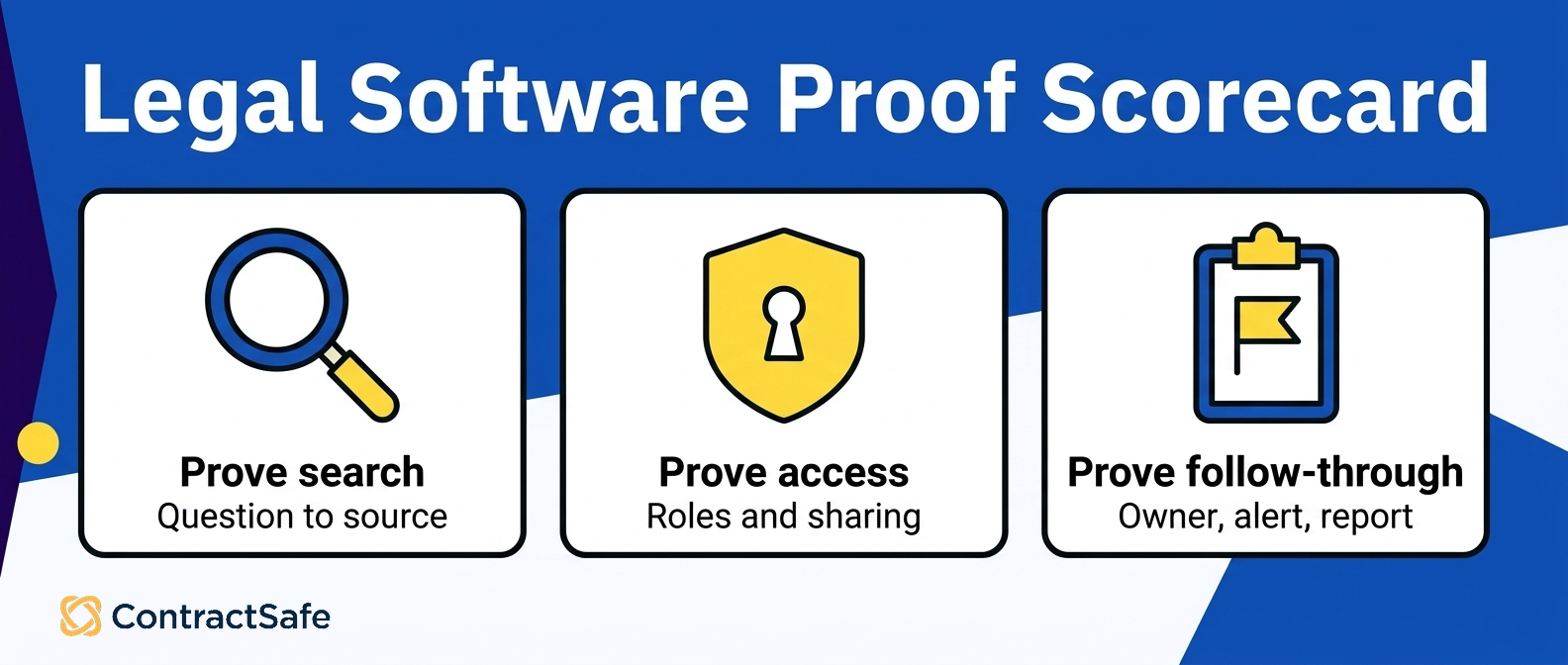
Live search on your documents. For example, give the vendor a small set of real contracts, including scans. Ask a plain-English question such as “Which agreements auto-renew?” and watch the search from query to source.
A click-through from a field to its source. Pick an extracted value and ask the vendor to open the exact language in the executed document without leaving the tool.
An approval-rule change. Ask an administrator to change an approval route on screen without a support ticket or services engagement.
If a proof request turns into “we can set that up later,” record it as implementation effort rather than demonstrated capability.
Workflow Features Legal Teams Usually Overbuy
Workflow is where legal departments spend money on capability they never turn on. The rule: buy intake and approval routing that your own admin can configure and change, plus signing attached to the same record.
Defer multi-branch rules engines, negotiation scoring, and clause-level automation until the simple version is stable and adopted. Back to the library: start with a desk, a form, and clear ownership before buying the equivalent of an automated sorting system. Advanced routing can come later if real volume and process complexity justify it.
The Three Pieces Worth Buying
Intake. A structured request form collects the counterparty, contract type, value, term, paper source, and redline status before work starts. ContractSafe contract intake gives business users a defined path that doesn’t depend on an email exchange.
Approvals. Write down the few routes your company actually uses, then ask each vendor to build and change them during the demo. ContractSafe contract approval workflow supports routing; the proof is whether your administrator can maintain it as responsibilities change.
Signing. E-signature should connect the request, approval history, and executed file to the same record so a user can answer who signed and when in one place.
What to Defer
Complex conditional branching. If a route needs many nested conditions, confirm that the underlying process is clear before encoding it in software.
Automated clause scoring and playbook enforcement. Useful at high volume with a mature playbook. Distracting before that.
Deep integrations you haven’t scoped. Every integration is an implementation project. Get retrieval and routing working first.
Negotiation workspaces. Most in-house teams still negotiate in Word with tracked changes, and that’s fine.
On AI, Specifically
AI extraction is worth having and worth constraining. Treat it as an assistant that drafts the metadata and speeds the first pass, not as the source of truth. AI-supported extraction and search require human review of the source language before a legal team relies on the result.
That’s why the click-through-to-source test matters. Guidance on managing this risk is available in the NIST AI Risk Management Framework. For a legal department, the rule is short: a human confirms anything that drives a decision, obligation, or deadline.
The overbuy trap is trusting outputs that can’t be verified. Let AI assist with extraction, then have people confirm the fields that drive decisions, obligations, and deadlines.
What to Expect From the Repository, Search, and Permissions
The repository is where contract management software for legal departments either earns its keep or quietly becomes a shared drive with a login screen.
In-house teams should compare four things: how documents get in, how the software finds text inside them, how extracted data gets verified, and how access is scoped for people outside legal. The rest matters less than those four. Start with the backlog. Ask how the system handles mixed-quality files, scans, amendments, and incomplete metadata. A clean demo upload doesn’t prove that the legal team can migrate its existing contract set.
Test OCR, bulk handling, and the state of a record before anyone has manually cleaned it. Then test the questions legal actually receives. Full-text and plain-English search should find language inside the agreement, including scanned pages, rather than depend on a perfect tag created years earlier.
Bring one hard question from recent work and watch the vendor answer it from query to source. Source traceability turns a database answer into a defensible contract record. When software shows a renewal date, payment term, or assignment clause, the user should be able to open the exact source language.
A person still needs to review an extracted value before it drives a report, deadline, or legal decision. Finally, test exit. The team should be able to export its documents and useful data in bulk. That proof protects reporting, future migration, and ownership of the contract record.
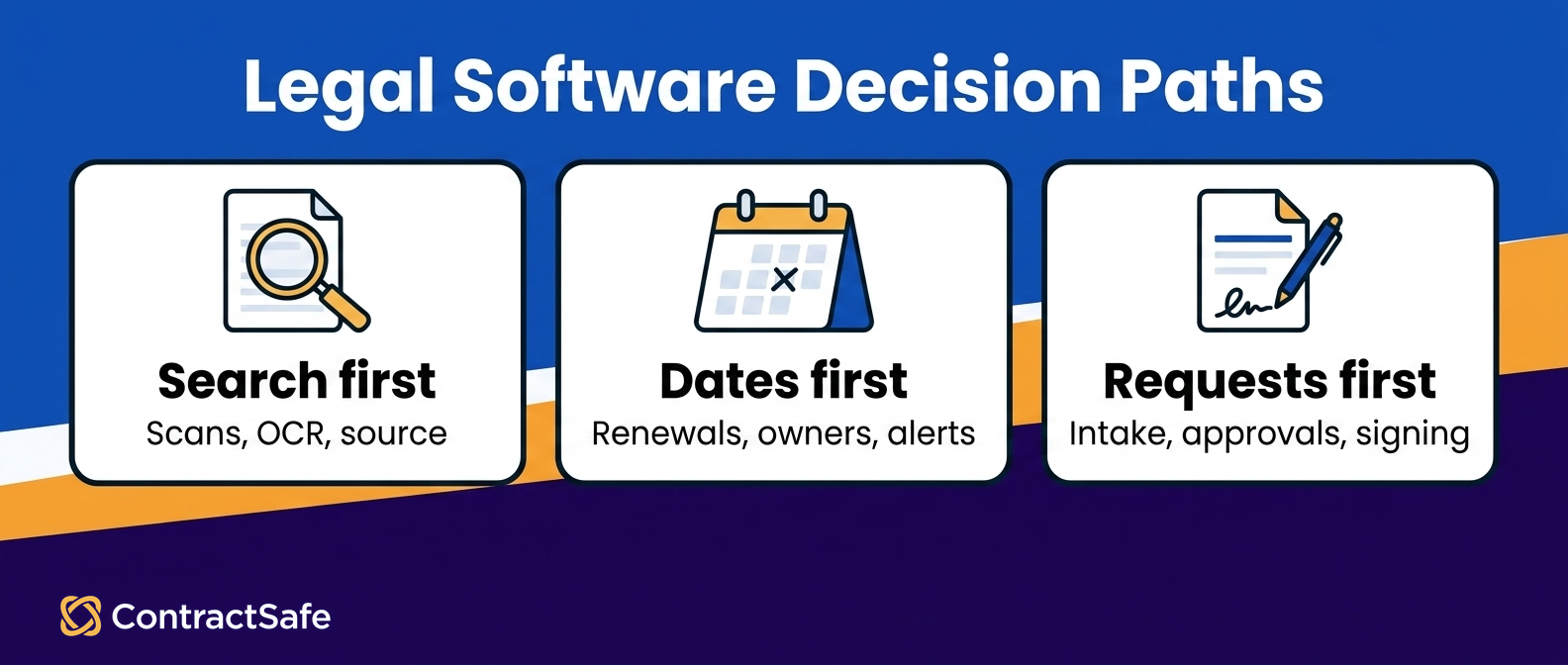
Your backlog is mostly scanned paper and mixed-quality PDFs. Prioritize automatic OCR, bulk upload, and search that reads document bodies rather than only metadata fields.
Your pain is renewals and dates, not review volume. Prioritize extraction with source traceability, alerting to more than one person, and reporting you can export.
Your pain is intake chaos from the business. Prioritize request forms and approval routing so work arrives structured, and worry about advanced clause tooling later.
Legal is a team of one or two. Prioritize adoption and self-service, because anything requiring a dedicated admin won’t survive your next busy quarter.
You’re facing a real audit or diligence event. Prioritize search, permissions you can explain, and clean exports over anything on the roadmap.
Evaluation Checklist For Legal Departments
An evaluation checklist should turn each legal requirement into a demonstration using the buyer’s contracts and colleagues. Score what happens during the trial, not what appears on a feature grid.
Run these as tests, not feature-grid questions:
| Criterion | Proof to request |
|---|---|
| Search | Answer recent legal questions against the buyer’s own agreements and open the source language |
| Source traceability | Trace sampled AI-extracted values to the executed text and show the correction path |
| Ownership | Assign an owner, change the owner, and show the change in a report |
| Access | Remove a departing user, add a replacement, and share one agreement with outside counsel |
| Intake | Have a business user submit a realistic request without training |
| Approvals | Build and change common approval routes during the demonstration |
| Signing | Send, sign, and return an executed agreement to the same contract record |
| Renewals | Configure a notice window, named owner, and backup recipient |
| Reporting | Build an expiring-agreements report grouped by owner and export it |
| Adoption | Let a business user find an allowed agreement without asking legal |
| Implementation | Show the buyer’s responsibilities, migration sequence, and first useful report |
| Pricing | Model the cost as users, documents, storage, workflows, and AI usage change |
CLOC describes legal operations as a discipline that brings people, processes, and technology together to help a legal department run effectively. Use that frame to decide who owns the system, how requests move, and which records support decisions. Before final scoring, assign an owner to intake, legal review, business approval, signature, renewal follow-up, and reporting. Then run a contract through those owners during the pilot.
Record where the request stalls, who can find the executed copy, whether the source terms can be verified, and which person receives the renewal alert. This turns “full lifecycle” from a product label into a testable operating model. It also shows whether legal can stay the backstop for exceptions while routine work moves through business teams. Record the result in the scorecard so implementation risk appears beside feature fit.
How To Build The Business Case
Building the business case means translating legal’s pain into observable cost, time, and risk. Use your own contract set rather than an industry benchmark.
Document renewal exposure. Identify an unwanted renewal or a contract whose notice window is difficult to monitor. Record the annual value, owner, notice date, and current tracking method.
Measure retrieval work. Log requests to find agreements or terms, including who asked and how long the answer took. Separate work that requires legal judgment from work a permitted business user could handle.
Rehearse diligence. Run a realistic diligence request against current folders. Record who searches, which agreements are missing, and where outside help is needed.
Normalize cost. Compare quotes over several years using realistic growth in users and usage. Use the contract management price comparison to identify cost variables rather than relying on the first-year headline.
Write a one-page proposal. Name the current failure, the proof test that demonstrates an improvement, the multiyear cost, the rollout owner, and the manual work legal expects to stop doing. Attach the scorecard as evidence.
Turn those five inputs into a decision record that finance, legal, procurement, security, and the eventual system owner can challenge. The record should distinguish demonstrated capability from a vendor promise, identify evidence that still needs to be collected, and name who accepts each implementation risk. That discipline keeps the purchase from becoming a feature contest and gives the project owner a usable starting point after the contract is signed.
Start with the operating baseline. Pick a recent month and document how contract requests arrived, where signed agreements were stored, how often people asked legal to retrieve a document or term, and how renewal dates were monitored. Keep judgment-heavy legal work separate from administrative retrieval and routing. The business case becomes more credible when it shows which work software can remove, which work it can shorten, and which work still requires counsel.
Build the pilot set to reflect the portfolio you actually have. Include a scanned legacy agreement, an amendment that changes an earlier term, a contract with restricted access, a routine vendor agreement, and an agreement with a near-term notice date. Write the known answers before the pilot begins. A vendor should then show the search result, source language, owner, alert, and report generated from those records without substituting cleaner demonstration files.
Define pass conditions before anyone sees the interface. For search, name the agreements and clauses that must appear. For extraction, identify the fields a person must verify and the source page that should support each value. For access, specify what a legal administrator, business owner, and restricted user may see. For follow-through, require one verified date to reach a named owner, an alert, and a report. Record failures by cause instead of averaging them into one score.
Separate migration scope from product capability. Count the agreements that can move in bulk, the records that need manual cleanup, the contract families that must be linked, and the restricted material that requires a separate access plan. Ask who performs each task, what the buyer must prepare, and what the system can do before metadata cleanup is finished. This exposes the difference between a fast software setup and the work required to produce trustworthy contract records.
Model total operating cost, not only the subscription. Include migration assistance, internal cleanup time, administrator ownership, required integrations, training, and any usage-based AI or workflow charges in the comparison. Then test the pricing model against the adoption plan. If procurement, finance, sales operations, and business owners need access, a quote that rises sharply with every user can work against the self-service behavior the legal team is trying to create.
Finish with a launch decision that names the first useful outcome and its owner. It might be a reliable renewal report, a searchable vendor portfolio, or structured intake for one agreement type. Set a review date after launch and rerun the pilot evidence against the migrated records. The business case should fund an operating change the team can verify, not just the purchase of software with an impressive feature list.
A real auto-renewal or difficult notice window, with its annual value written down
A period of logged contract retrieval requests, with time per request
Your own search questions, answered live in the trial and timed
Sampled AI-extracted fields traced back to their source pages by a human
A request-through-follow-up run: request submitted, approved, signed, filed, and alerted
A multiyear cost model per vendor, including user growth
A business user who found an allowed contract without legal’s help
Related Reading
Legal contract management software overview for how the pieces fit together across intake, repository, and tracking
Choosing a legal contract management system for a deeper look at system-level requirements
How ContractSafe Helps With Legal Department Software Evaluations
ContractSafe is built for the specific problem this article describes: a legal team that needs one place where every executed agreement lives, where new requests arrive in a usable shape, and where the rest of the company can answer its own questions.
ContractSafe supports the full lifecycle with intake and request forms, approval routing, e-signature, a central repository with OCR, full-text and plain-English search, human-reviewed AI data extraction, tracking, alerts, reports, and exports. It handles both sides of that work rather than bolting one onto the other.
On the repository and search criteria, the combination that matters is OCR plus search that reads document bodies. Your scanned amendments from 2015 become findable text, and your hard questions get answered against what the contracts actually say rather than against whatever someone typed into a metadata field three years ago.
AI extraction pulls key dates and terms, and a person reviews them against the source before they’re relied on, which is the workflow you want when a number ends up in a board report. ContractSafe contract search is the piece to test with your own questions during a trial.
On access, ContractSafe scopes permission through contracts, folders, tags, roles, and sharing. For example, executive agreements go in a restricted folder. Sales ops gets a role limited to customer contracts. Outside counsel gets a single contract shared for a defined purpose. When someone changes jobs, you change their role instead of auditing a matrix, and you can explain the whole model to a security reviewer in a short meeting.
Pricing shape matters when you model several years. ContractSafe includes unlimited users, so the team can evaluate adoption without adding a per-seat assumption. If you’re partway through a scorecard, load a handful of your own messy contracts and run your own questions in a ContractSafe demo.








.svg)







.svg)




