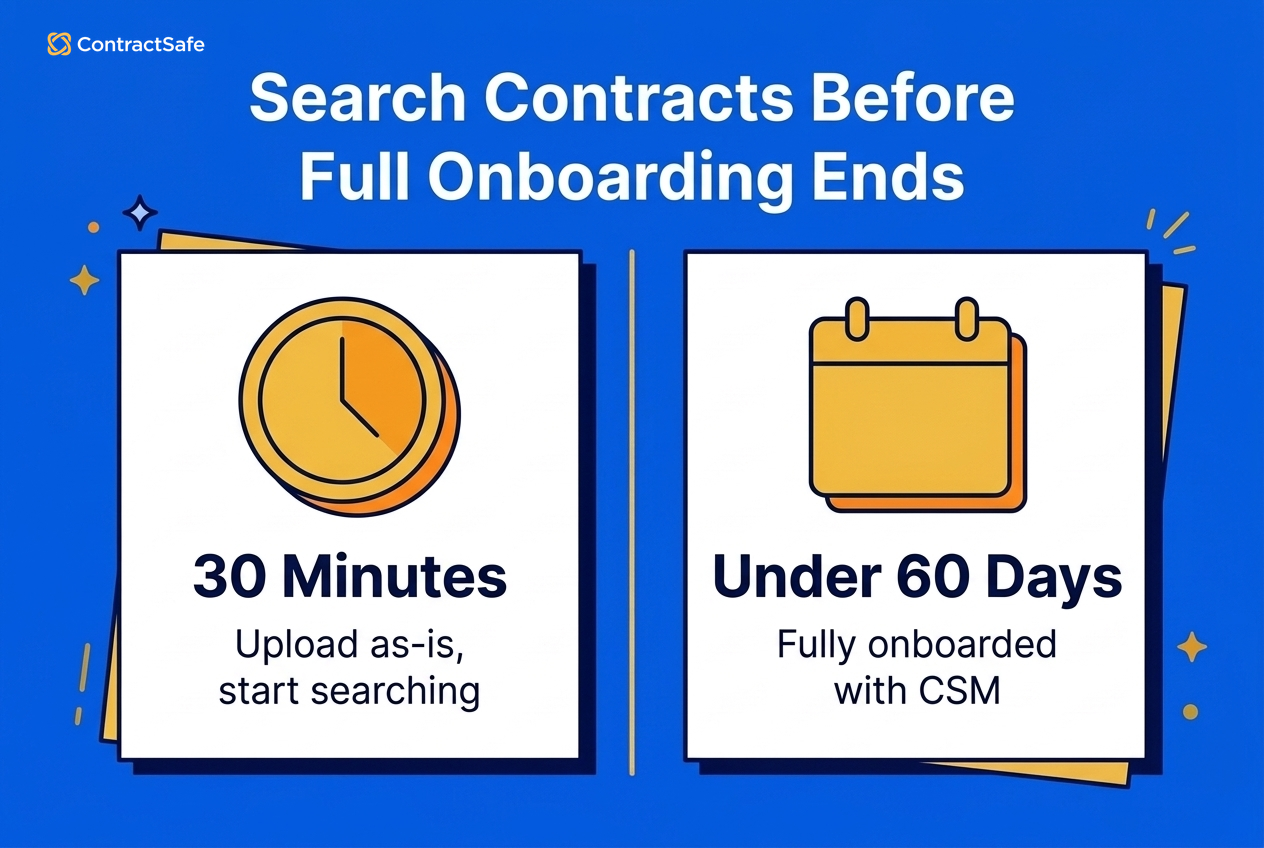
Quick answer: Implementing contract management software means moving your contract work into one system: new contracts start running through it, your existing contracts and their key dates come in, and your team learns to use it. ContractSafe is a full-lifecycle CLM, so from day one new contracts can go through approval and e-signature on the Finalize and Maximize plans while setup brings in the contracts you already have. You can sign in, upload contracts as they are and search them in about 30 minutes. Most customers are fully onboarded in under 60 days, and every customer gets a dedicated Customer Success Manager.
Picture a finance lead with 400 contracts in a shared drive. Some are signed PDFs, some are scans, and a few sit in folders nobody has opened since the last audit. On day one, the next vendor agreement her team needs is approved and signed in ContractSafe. That same afternoon she drags the whole shared-drive folder in as it is. Now she can search a vendor's name and pull up every agreement with it, scans included, while AI suggests renewal dates for her to confirm.
What's left is everything behind that folder: the rest of the backlog, the other departments and their training. That's what the 60 days cover, and the backlog is usually the quickest part. When she hands it to us for a bulk upload, we quote five to ten business days, so that's the figure that goes in her plan. The upload itself typically takes one or two.
Choose your next step:
For teams planning a rollout across departments: work through CLM made easy, from evaluation to implementation.
For buyers comparing vendors on speed: see ContractSafe's Summer 2026 G2 badges, including Fastest Implementation (Mid-Market).
Key Takeaways
- About 30 minutes gets you signed in, uploading contracts as they are and searching them.
- Our bulk upload of a backlog is quoted at five to ten business days and typically takes one or two.
If you'd rather see it than read about it, this short video shows the first steps of setup, from upload to search.
How Long Does It Take to Set Up ContractSafe?
You don't wait for full onboarding to start using ContractSafe. Each stage gives your team something it can use, and once you've confirmed a contract's dates, it's searchable and sending reminders while the rest of setup carries on.
- Before you buy: your trial. You can load real contracts during the free trial, so you're testing on your own files rather than samples.
- About 30 minutes: your first search. This is the finance lead's afternoon: one folder in, searchable straight away. As one customer told us, “I couldn't believe we were already up and running with ContractSafe in just 30 mins.”
- Days: your full backlog. The bulk upload runs alongside everything else. Plan on the quoted turnaround while your team keeps working with what's already in.
- Under 60 days: fully onboarded. You and your Customer Success Manager finish migration, training and each team's setup.
What Happens When You Upload Contracts As-Is?
You can upload messy folders exactly as they are, with no cleanup first. ContractSafe makes scanned PDFs searchable as soon as they're in, so you can find contracts whether or not you use AI.
AI is optional. You can switch on all of it, pick only the features you want, or leave it off. If you use it, AI reads each contract on upload and suggests key dates (renewals, terminations, notice periods, expirations), parties and renewal terms. It also tells you whether a contract is fully or partially executed and whether it's an amendment. And it detects the kind of term: fixed-term, evergreen, terminable at will or auto-renewing.
Nothing it suggests gets added until you've reviewed it. You accept, correct or skip each value, and you can review suggestions across many contracts at once.
Organize contracts in folders that match how your team thinks about them, and add your own fields beyond what AI extracts. Then filter by tags, folders or contract type to find what you need. Your Customer Success Manager works through older, harder-to-read files with you as part of the migration.
Then invite your team. Every plan includes unlimited users, so you don't have to ration seats, and simple permission controls decide who can see and do what.
“Our main goal was to find a contract management system that was easy to configure and implement, easy to use across all departments with little training, and allow us to confidently manage our contracts without the need for additional resources—and ContractSafe provided exactly that.”
Joe C., VP of Finance, Biotechnology Industry
How Should You Roll Out ContractSafe?
Run new contracts through ContractSafe straight away and bring the old ones in behind them. This order keeps the rollout moving:
- Route every new contract through ContractSafe from day one. Approvals and e-signatures happen on the platform from the start, so the old process stops growing right away. Approval sequences and e-signature come with Finalize and Maximize, and Maximize adds request forms and templates.
- Bring in your department's existing contracts. Upload your own team's contracts as they are, the way the finance lead drags in her folder, and start searching them.
- Hand us the backlog for a bulk upload. Give us the rest of your existing contracts, whether active, pending or recently signed, starting with the ones that matter most.
- Add other departments as they're ready. Don't try to launch everywhere at once. Bring each team in once your own setup is running.
Do You Need Consultants or IT to Switch?
No. Whether you're coming from spreadsheets, shared drives or a legacy system, our support and implementation team handles setup and migration with you. You don't need outside consultants or IT tickets. You'll get:
- Guided implementation. Your dedicated Customer Success Manager walks you through each step so nothing gets missed.
- Migration help. We bulk import your existing contracts, messy or complex, so you don't start from scratch.
- Training that fits. A quick walkthrough or a deeper session, depending on what your team needs.
“ContractSafe was incredibly quick and easy to learn how to use, get all of our data uploaded, and begin relying on the tool. It doesn’t over-complicate the process and was very easy to get our team up and running.”
Emily Daley, Director of Commercialization
What Do Customers and G2 Say About ContractSafe Onboarding?
Customers say onboarding is easy, and G2's rankings back that up. G2 named ContractSafe Fastest Implementation (Mid-Market) in its Summer 2026 Contract Lifecycle Management reports, after awarding the same badge in Spring 2025.
The G2 Learn listing puts ContractSafe at 4.7 out of 5, based on data pulled in July 2026.
Every customer has a dedicated Customer Success Manager, and most finish onboarding inside 60 days.
“Their onboarding process was easy, and I had all the support I needed.”
Tracy Ward, Senior Director, Sondor Research X
Related Reading
How ContractSafe Helps You Get Set Up Fast
With ContractSafe, implementation doesn't put your contract work on hold. On the Finalize and Maximize plans, new contracts go from approval to e-signature on the platform from the day you start, and setup brings in the contracts you already have at the same time. Once you've confirmed an existing contract's dates, its renewal reminders come from the same system that handles everything you sign next.
ContractSafe pricing starts at $450/month (Organize plan, billed annually; $540 month-to-month), with unlimited users on every plan. With no seats to count, you can bring in everyone who requests, approves or tracks contracts from the first day of your rollout.