Quick answer: CLM (contract lifecycle management) software is a system where teams request, approve, sign and track contracts, and the best CLM software is the one built for your kind of buyer. We make ContractSafe, mid-market contract management software: a full-lifecycle CLM for organizations of 50 to 1,000 people, where one person owns the contracts and everyone else uses them. You'll find it in the sections for that buyer: small business, mid-market, unlimited users and fast implementation, plus the Docusign section, since you can keep your Docusign account. The other sections name products built for other buyers.
This guide to the best CLM software names three products for each of twelve kinds of buyer: by company size, by the team that owns contracts, by the tools already in place, and by requirements such as HIPAA, security reviews, per-seat fees and speed. The three in each section are listed alphabetically, not ranked, and each one comes with the buyer it suits.
We've also costed three pricing models at 25, 100 and 500 users. Our prices are published, and competitor prices are reported ranges as of July 2026.
Choose your next step:
-
For contract owners following a contract from request to signature: see how requests and approvals move in ContractSafe.
-
For legal and finance leads deciding how far to trust AI review: read how ContractSafe approaches practical AI.
- For full reviews of sixteen platforms, see our guide to the best contract management software.
Key Takeaways
- Best for mid-market organizations: Concord, ContractSafe, LinkSquares
- Best for small businesses: Concord, ContractSafe, PandaDoc
- Best for teams already using Docusign: Agiloft, ContractSafe, Docusign CLM
- Best for in-house legal teams: Ironclad, LinkSquares, SpotDraft
- Best for teams that work in Microsoft Word: Agiloft, Gatekeeper, Ironclad
- Best for hospitals and large health systems: CobbleStone, Icertis, Ironclad
- Best for procurement and vendor contracts: Agiloft, CobbleStone, Gatekeeper
- Best for security and compliance reviews: Ironclad, LinkSquares, SpotDraft
- Best for unlimited users with no per-seat fees: ContractSafe, ContractWorks, Gatekeeper
- Best for enterprises: Agiloft, Icertis, Ironclad
- Best for Salesforce users: Conga, Docusign CLM, Juro
- Best for fast implementation: Concord, ContractSafe, ContractWorks
Best Contract Management Software for Mid-Market Organizations (50 to 1,000 Employees)
For organizations of 50 to 1,000 people, the three to look at are Concord, ContractSafe and LinkSquares. This is the buyer we build ContractSafe for. Mid-market contract management software has to fit whoever needs the system: the whole company, the legal team, or a handful of people. That's what separates the three.
Concord: best for mid-sized teams where five or so people do most of the contract work
Concord fits a team where a small group drafts, edits and signs most agreements. Editing happens in the browser and e-signature is built in. Pricing is published too, starting with a platform fee that includes five users.
Pricing: $5,988 to $15,588 per year in published base fees, with five users included. See ContractSafe vs. Concord.
Watch for: Each seat beyond the included five costs extra.
Choose another pick when: many occasional users need access (ContractSafe), since Concord charges per seat above five users.
ContractSafe: best for mid-sized organizations where one person owns contracts and everyone else needs to request, approve, sign and track them
We built ContractSafe for organizations where one person owns hundreds to a few thousand contracts and everyone else needs to request, approve, sign and track them from day one. Three in four of our customers have 50 to 1,000 employees, and the median has about 250. Every plan includes unlimited users, onboarding and migration from shared drives and spreadsheets, with no implementation fee.
Fewer than 1 in 4 of our customers' primary account admins have a legal job title. Across all users with a known job title, finance (23%), operations (21%) and executives (20%) each outnumber legal (17%). Every stage from request to renewal is built in, with the complete set on the Maximize plan. Intake forms and templates are on the Maximize plan, approval sequences and native e-signature are on the Finalize and Maximize plans, and searchable storage, date alerts and reporting are on every plan.
Pricing: ContractSafe pricing starts at $450/month (Organize plan, billed annually; $540 month-to-month), with unlimited users on every plan. The complete request-to-renewal set, including intake forms and templates, is on the Maximize plan, and approvals and e-signature come with the Finalize plan or above.
Watch for: ContractSafe can't hide individual fields from someone who can open a contract. Access is set by folder, tag, user and group.
Choose another pick when: contract data has to connect across many systems and business units (Icertis), or an administrator will own branching custom data models (Agiloft).
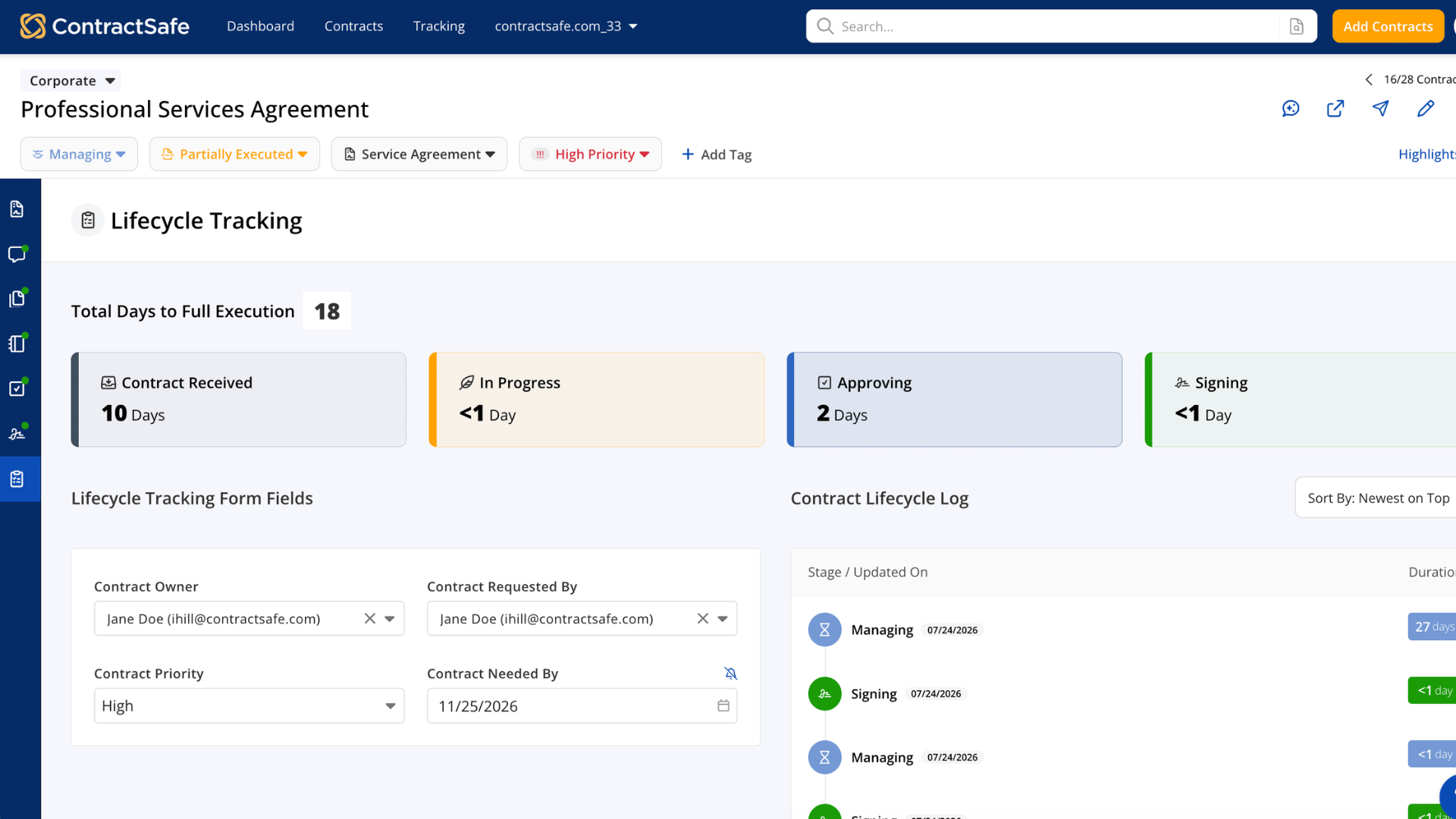
Lifecycle Tracking in ContractSafe, on the Maximize plan, shows how long a contract spent in each stage.
LinkSquares: best for mid-sized legal teams with a large legacy contract backlog to analyze
LinkSquares suits a legal team that inherits years of signed agreements and needs to know what's in them. Its AI pulls more than a hundred fields from each contract and links every value to the source document. It can also build reports from a prompt and send them by scheduled email.
Pricing: $6,000 to $79,000 per year (reported range). See ContractSafe vs. LinkSquares.
Watch for: LinkSquares sells its analysis, drafting and signing modules separately.
Choose another pick when: staff outside legal need to self-serve (ContractSafe).
Best for Small Businesses
For small businesses, the three to look at are Concord, ContractSafe and PandaDoc. The split is whether your contracts run the whole lifecycle, are mostly sales proposals, or are handled by a few regular users.
Concord: best for small teams of up to five regular users
Concord includes five users on every tier and publishes its pricing. In-browser editing and built-in e-signature keep drafting and signing in one place. That suits a small team that already knows who'll be doing that work.
Pricing: Concord publishes base fees of $5,988 to $15,588 per year, with five users included.
Watch for: On auto-renewing contracts, reminders stop until someone updates the term by hand.
Choose another pick when: more than a handful of people need access (ContractSafe).
ContractSafe: best for small businesses that want a full CLM at a published price, with no seat math and no annual lock-in
No annual commitment is required, and the 7-day free trial includes every feature except SSO, which is on the Finalize and Maximize plans. Nearly 1 in 5 of our accounts hold fewer than 200 contracts. The median holds about 700, and nearly 1 in 10 hold 5,000 or more. The median new customer has a first contract in the system within a week of buying, and about 4 in 10 start loading contracts during the trial.
Upgrades from the Organize plan mid-term are prorated, so a small team can add approvals and e-signature on the Finalize plan later. The small business page explains how that works.
Pricing: ContractSafe starts at $450/month on the Organize plan, billed annually, or $540 month to month, with unlimited users on every plan. The Organize plan already covers storage, search, date alerts and reporting, and approvals and e-signature come with the Finalize plan or above.
Watch for: The Organize plan doesn't include approvals or e-signature, which come with the Finalize plan or above, and the free trial leaves out SSO, which is on the Finalize and Maximize plans.
Choose another pick when: sales proposals and quotes are most of the contract work (PandaDoc).
PandaDoc: best for small sales-led teams whose main contract work is proposals and quotes
PandaDoc built its business on proposals, quotes and e-signature for sales teams. It publishes its per-seat pricing, so a team whose contracts start life as a quote can see the bill before the first sales call.
Pricing: $228 to $588 per user per year (published, billed annually). See ContractSafe vs. PandaDoc.
Watch for: Renewal alerts allow one renewal date per document.
Choose another pick when: renewals and post-signature tracking matter (ContractSafe), since PandaDoc allows one renewal date per document.
Best for Teams Already Using Docusign
If you already sign with Docusign, the three to look at are Agiloft, ContractSafe and Docusign CLM. Docusign CLM suits organizations that want one vendor for signing and contracts. Agiloft suits teams with custom workflows that sign through Docusign. ContractSafe, ours, suits teams that want signing and contract tracking in one system, with or without their Docusign account.
The vendor you sign with doesn't decide whether the signature is valid. Under the ESIGN Act at 15 U.S.C. 7001, a signature, contract or record in interstate commerce "may not be denied legal effect, validity, or enforceability solely because it is in electronic form." The Act makes exceptions for laws that require specific written records. So a contract signed with a CLM's built-in e-signature is as legally valid as one signed through Docusign, and the choice comes down to workflow.
Agiloft: best for organizations with custom workflows that sign through Docusign
Agiloft pairs contract generation from clause libraries with configurable approval workflows and a Docusign integration. A team with unusual approval paths can build each one out and keep signing where it already does.
Pricing: $6,000 to $80,000 per year (reported range). See ContractSafe vs. Agiloft.
Watch for: You'll need a dedicated administrator to own the configuration and keep changing it.
Choose another pick when: there's no dedicated administrator to own the configuration.
ContractSafe: best for teams that want to keep their Docusign account or switch to unlimited built-in signing
On the Finalize and Maximize plans, you can send through your own Docusign account and bring the signed copies back, or use unlimited built-in e-signature with no per-user charge or envelope limit. With built-in e-signature on those Finalize and Maximize plans, signers don't need a ContractSafe account. Built-in requests are fully signed a median of about six hours after they're sent, and 65% are signed within a day. On the Finalize and Maximize plans, the signed copy replaces the draft, with the audit trail attached, in the same system that tracks dates and renewals.
Pricing: ContractSafe starts at $450/month (the Organize plan, billed annually; $540 paid month to month), and every plan includes unlimited users. Built-in signing and the Docusign integration come with the Finalize plan or above.
Watch for: The Docusign integration and built-in e-signature aren't on the Organize plan. Both come with the Finalize plan or above.
Choose another pick when: standardizing on a single vendor matters more than having signing and CLM in one system, which points to Docusign CLM.
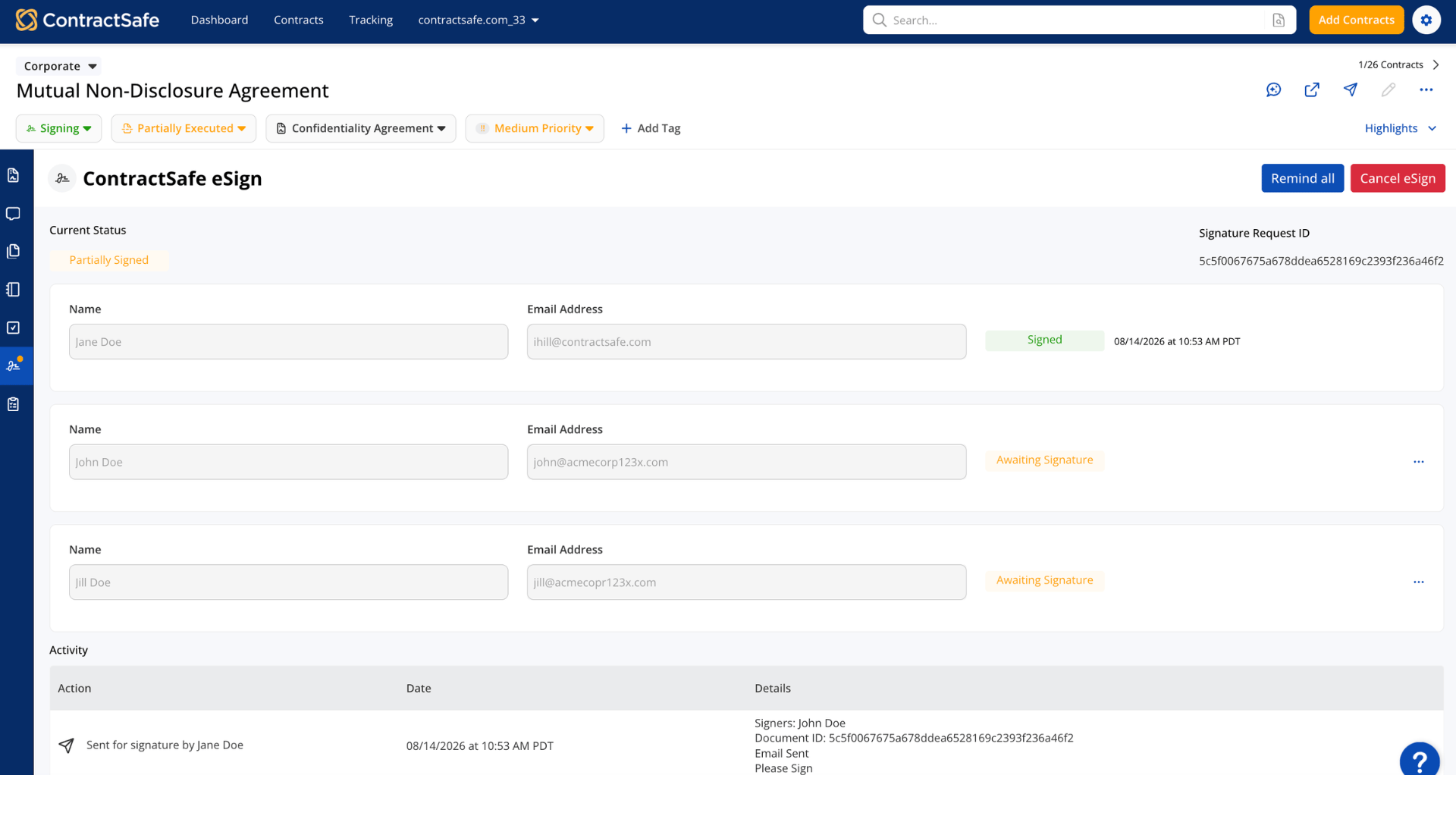
ContractSafe eSign, on the Finalize and Maximize plans, shows who has signed and who hasn't.
Docusign CLM: best for large organizations standardized on Docusign that want one vendor
Docusign CLM gives organizations already on Docusign an advanced workflow designer, with multi-step approvals, routing rules and conditional logic. Iris AI sits inside the same enterprise agreement platform, so procurement deals with one vendor for signing and contracts.
Pricing: $20,000 to $500,000 per year (reported range). See ContractSafe vs. Docusign.
Watch for: Docusign eSignature and Docusign CLM are separate products, and connecting them takes configuration.
Choose another pick when: you don't want e-signature and CLM as separate products (ContractSafe, where built-in e-signature comes with the Finalize plan or above).
Best for In-House Legal Teams
For in-house legal teams, the three to look at are Ironclad, LinkSquares and SpotDraft. Which one fits depends on the team's main job: running complex workflows, drafting with AI, or finding out what's in the contracts already signed.
AI review is now part of the decision. The ACC and Everlaw 2025 GenAI survey of 657 legal professionals found that use of generative AI for legal work more than doubled to 52% among US respondents. It named contract management as one of the core tasks.
Ironclad: best for enterprise legal teams with complex, multi-step workflows and an implementation budget
Ironclad's workflow builder handles multi-step processes with approvals, conditions and exception routing. Structured redlining keeps negotiations organized across internal teams and outside parties, which suits a legal-ops team that wants to model every exception.
Pricing: $30,000 to $250,000 per year (reported range). See ContractSafe vs. Ironclad.
Watch for: Implementations typically run three to six months.
Choose another pick when: nobody can own a three- to six-month implementation.
LinkSquares: best for legal teams that need answers from contracts already signed
LinkSquares suits a legal team that gets asked what the company has agreed to. Its AI extracts more than a hundred fields per contract, each linked back to the source document. Lawyers can also ask plain-English questions of a contract and get answers that cite the source.
Pricing: LinkSquares' reported range is $6,000 to $79,000 per year.
Watch for: The analysis, drafting and signing modules are sold separately.
Choose another pick when: drafting and reviewing new contracts with AI is the main job (SpotDraft).
SpotDraft: best for fast-growing legal teams focused on AI drafting
SpotDraft is aimed at fast-growing legal teams, with AI-driven drafting and a modern interface. Its AI also covers review, playbooks and metadata capture, so a team that drafts from scratch gets help at the first step.
Pricing: $7,600 to $120,000 per year (reported range). See ContractSafe vs. SpotDraft.
Watch for: SpotDraft's own team manages the templates, so customers can't edit them. There's no native e-signature either, and signing runs through an integration.
Choose another pick when: you need to edit your own templates or want signing built in.
Best for Teams That Work in Microsoft Word
For teams that work in Microsoft Word, the three to look at are Agiloft, Gatekeeper and Ironclad. Ironclad suits legal teams that want AI review inside Word. Agiloft suits teams building templates and clause libraries there. Gatekeeper suits procurement teams that keep redlining in Word.
Agiloft: best for organizations building templates and clause libraries in Word
The Agiloft Contract Assistant for Microsoft Word builds automated document templates and a library of standard and fallback clauses. Clause positions get set once in Word and reused in every first draft.
Pricing: Agiloft's reported range is $6,000 to $80,000 per year.
Watch for: Agiloft is built to be configured by a dedicated administrator, and it lacks HubSpot, Zapier and Slack integrations.
Choose another pick when: nobody on your team will act as a dedicated administrator.
Gatekeeper: best for procurement teams that negotiate in Word and file contracts by supplier
Gatekeeper offers contract templates and a clause library, and it relies on Microsoft Word for redlining and editing. A procurement team that already negotiates in Word can keep doing that, with each agreement attached to the right supplier in Gatekeeper's repository.
Pricing: Gatekeeper's reported range is $14,900 to $63,500 per year. See ContractSafe vs. Gatekeeper.
Watch for: Drafting and negotiation aren't native, so people move between Word and Gatekeeper to get a contract to signature.
Choose another pick when: you want Word changes saved back to the contract system in one click (Ironclad).
Ironclad: best for legal teams that want AI redlining inside Word
Ironclad's Word add-in saves the latest changes back to Ironclad in one click, with no manual uploads. Ironclad Jurist brings AI contract review straight into Microsoft Word, so lawyers can review without leaving the document.
Pricing: Ironclad's reported range is $30,000 to $250,000 per year.
Watch for: Rollouts typically take three to six months.
Choose another pick when: building templates and clause libraries inside Word matters more than review (Agiloft).
Best for Hospitals and Large Health Systems
For hospitals and large health systems, the three to look at are CobbleStone, Icertis and Ironclad. CobbleStone suits hospitals and payers that need EHR and ERP connections. Icertis suits large health enterprises that want an industry package. Ironclad suits health systems with an enterprise legal team.
HIPAA is why the choice of CLM matters here. Under HHS guidance on business associates, a covered entity may share PHI with a business associate only after getting satisfactory assurances in a contract or other written arrangement, the business associate agreement (BAA). A business associate must also sign a BAA with each subcontractor before sharing PHI with it. So BAAs multiply down the vendor chain, and the system that holds them has to work under HIPAA too. Each BAA also has its own renewal and notice dates for someone to track.
CobbleStone: best for hospitals and payers that want EHR and ERP connections and deep configuration
CobbleStone describes itself as HIPAA and HITECH ready, with Stark Law support and connections to EHR and ERP systems. That suits a hospital or payer that wants contract data flowing into its clinical and finance systems.
Pricing: Reviewers report $6,000 to $18,000 a year. See ContractSafe vs. CobbleStone.
Watch for: Deep configuration means a long runway before go-live.
Choose another pick when: you can't staff a long configuration runway.
Icertis: best for large healthcare enterprises that need an industry package
Icertis sells industry packages, including one for healthcare and life sciences, with domain-specific workflows, obligations and insight models. A large health system starts from a configuration already shaped for its industry.
Pricing: $150,000 to $500,000 per year (reported range). See ContractSafe vs. Icertis.
Watch for: Implementations take six to twelve months.
Choose another pick when: you can't run a six- to twelve-month implementation.
Ironclad: best for health systems with an enterprise legal team
Ironclad says it complies with HIPAA to keep PII and PHI safe, and it goes through routine audits for SOC 1 and SOC 2 Type II reports. Its workflow builder handles multi-step processes with approvals, conditions and exception routing, which suits a health system whose legal team tracks many contract types, each with its own owner and renewal dates.
Pricing: Ironclad is reported at $30,000 to $250,000 per year.
Watch for: Plan on a three- to six-month implementation.
Choose another pick when: EHR and ERP connections are a requirement (CobbleStone), or you want workflows already shaped for healthcare (Icertis).
Best for Procurement and Vendor Contracts
For procurement and vendor contracts, the three to look at are Agiloft, CobbleStone and Gatekeeper. Gatekeeper suits teams that manage suppliers as much as contracts. CobbleStone suits procurement offices that want deep configuration. Agiloft suits teams that want vendor and purchase-order modules they configure themselves.
Agiloft: best for procurement teams that want vendor and purchase-order modules they configure themselves
Agiloft's vendor and purchase-order modules take it beyond legal contracting. Its automation engine triggers notifications, tasks and approvals from contract data or status, so a procurement team can build the process it already runs.
Pricing: Agiloft is reported at $6,000 to $80,000 per year.
Watch for: You'll need a dedicated administrator to own the configuration.
Choose another pick when: supplier onboarding, performance and compliance are the main job (Gatekeeper).
CobbleStone: best for procurement-heavy mid-market and enterprise organizations that want deep configuration
CobbleStone ties procurement to the contract lifecycle and keeps vendor contracts, sourcing and obligations connected. Its workflow customization can mirror complex approval paths and multi-step processes, for a procurement office with rules it won't bend to fit the software.
Pricing: Reviewers put CobbleStone at $6,000 to $18,000 a year.
Watch for: Native e-signature is only available on the Enterprise tier.
Choose another pick when: nobody has time to staff a long configuration project.
Gatekeeper: best for procurement teams that manage suppliers as much as contracts
Gatekeeper manages the vendor and supplier lifecycle, keeping onboarding, performance and compliance in one place. Its repository keeps every agreement attached to the right supplier. That suits a procurement team that thinks about the vendor first and the contract second.
Pricing: $14,900 to $63,500 per year (reported range).
Watch for: Drafting and negotiation aren't native.
Choose another pick when: drafting and negotiation have to happen inside the contract system (CobbleStone).
Best for Security and Compliance Reviews
For security and compliance reviews, the three to look at are Ironclad, LinkSquares and SpotDraft. LinkSquares adds ISO 27701 and ISO 42001 certification and a single-tenant option. Ironclad adds SOC 1 reports. SpotDraft keeps personal data within set regions. The right one depends on what your IT or security review asks for.
A stalled security review delays go-live, so ask every finalist for the same evidence in the first week:
-
The current SOC 2 report and the period it covers.
-
The ISO 27001 certificate and its scope.
-
The data region your account would live in, in writing.
-
The policy on whether customer contracts are used to train AI.
-
The plan that includes SSO, so the quote matches what IT approves.
Ironclad: best for enterprises that need SOC 1 as well as SOC 2 Type II reports
Ironclad goes through routine audits to receive certified third-party SOC 1 and SOC 2 Type II reports. It also says it complies with HIPAA and GDPR, so a finance or audit team that asks for SOC 1 gets both reports from one vendor.
Pricing: Reported at $30,000 to $250,000 per year.
Watch for: Plan for a typical implementation of three to six months.
Choose another pick when: there's no budget for a three- to six-month implementation.
LinkSquares: best for legal teams whose IT review asks for ISO certifications or a single-tenant deployment
LinkSquares holds SOC 2 Type II along with ISO 27001, ISO 27701 for privacy information and ISO 42001 for AI management. It also offers a single-tenant option alongside multi-tenant architecture, which covers the stricter questionnaires some IT teams send out.
Pricing: LinkSquares is reported at $6,000 to $79,000 per year.
Watch for: Modules are sold separately, so confirm which ones the review covers.
Choose another pick when: the audit team also asks for a SOC 1 report (Ironclad).
SpotDraft: best for multi-entity teams that need regional data storage and access limits by entity
SpotDraft says personal data is stored within selected regions (US, EU, India or the Middle East) and isn't sent outside them, and that data at rest is encrypted with AES-256. It supports SAML single sign-on with Okta or Active Directory, and its roles can limit access by contract type, entity and department.
Pricing: SpotDraft's reported range is $7,600 to $120,000 per year.
Watch for: Ask for the current SOC 2 report and ISO 27001 certificate. There's no native e-signature, so signing runs through an integration.
Choose another pick when: the review requires ISO 27701 or ISO 42001 certification or a single-tenant deployment (LinkSquares).
Best for Unlimited Users With No Per-Seat Fees
ContractSafe, ContractWorks and Gatekeeper all include unlimited users. Ours is the only one of the three with a published price. The cost table in the pricing-models section shows what seat counts do to the alternative.
Buying five seats for legal leaves the people who sign and renew contracts outside the system, and they keep emailing you instead.
ContractSafe: best for buyers who need a price they can approve without counting seats
We publish pricing by contract volume, with unlimited users on every plan and no annual commitment. The median customer has invited 15 people, a third have invited 25 or more, and no plan charges per user. Once regional VPs and department heads can log in, the one person who owns contracts stops being the bottleneck.
Pricing: The Organize plan starts at $450/month billed annually, or $540 month to month, and every plan, up to the Maximize plan, includes unlimited users with no per-seat charge. Prices move with contract volume.
Watch for: Unlimited users doesn't mean every feature. Approvals and e-signature come with the Finalize plan or above, and the price also moves with contract volume.
Choose another pick when: supplier and vendor management is the main job (Gatekeeper).
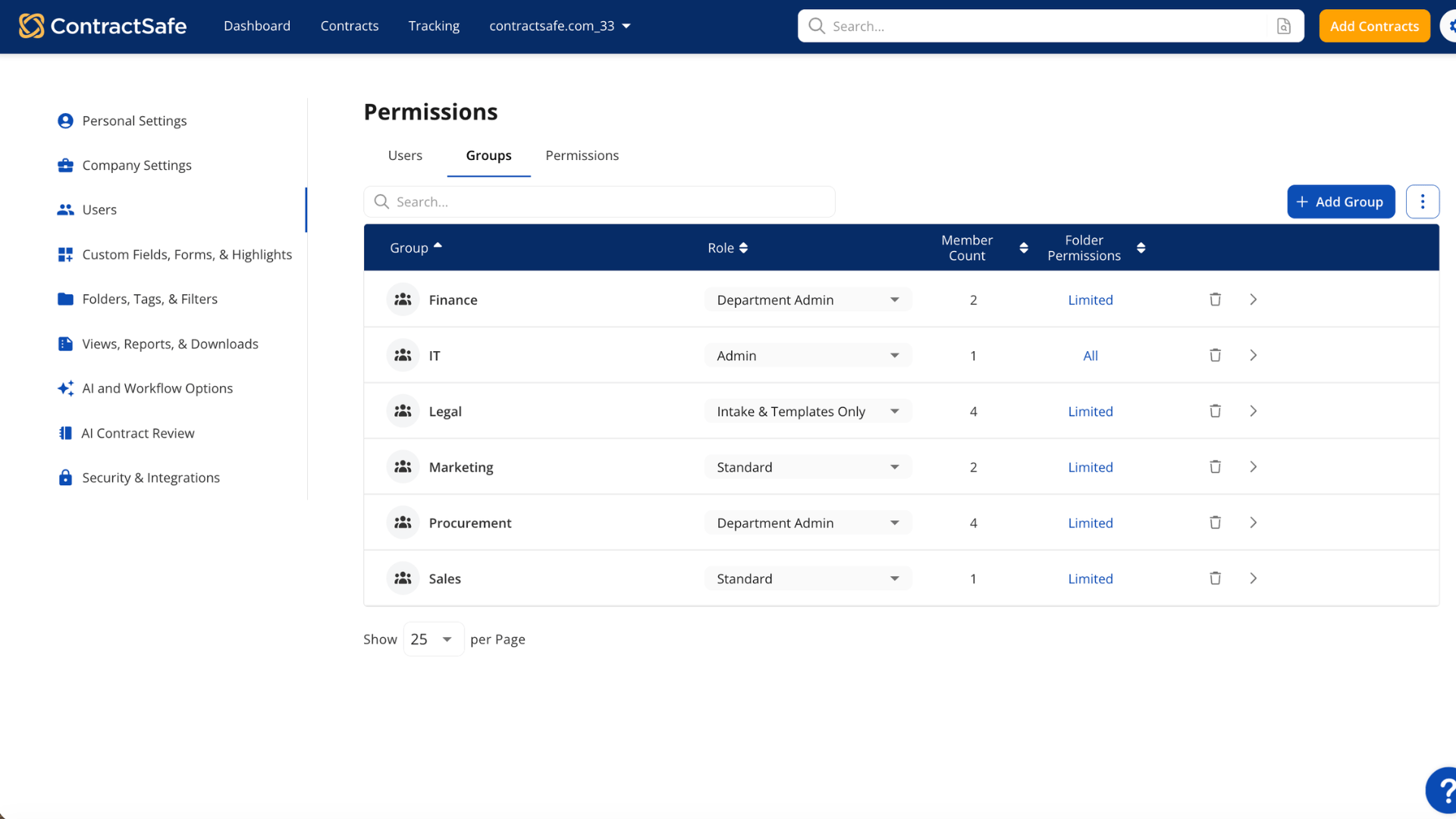
Permission groups in ContractSafe, on every plan, give each department its own role and folder access.
ContractWorks: best for teams that want unlimited users and mainly need storage and tracking
ContractWorks includes unlimited users and sets up quickly, so a team can centralize contracts and start tracking dates without a long IT project. It fits a buyer whose main job is getting signed agreements into one place.
Pricing: $8,400 to $24,000 per year (reported range). See ContractSafe vs. ContractWorks.
Watch for: Prices are no longer published, and e-signature licenses are capped by package.
Choose another pick when: you want a published price and e-signature that isn't capped by package, which we build into ContractSafe's Finalize and Maximize plans.
Gatekeeper: best for procurement-led teams that want unlimited users on contract-volume tiers
Gatekeeper prices by contract-volume tiers with unlimited users, billed annually. It no longer publishes dollar prices, so you get the figure from a sales conversation. The model still suits a procurement team that wants every requester inside the system.
Pricing: Gatekeeper is reported at $14,900 to $63,500 per year.
Watch for: Gatekeeper doesn't draft or negotiate contracts natively.
Choose another pick when: you need the price published before the first sales call (ContractSafe).
Best for Enterprises
For enterprises, the three to look at are Agiloft, Icertis and Ironclad. Which one fits depends on whether you need cross-system contract data, complex legal workflow, or configuration owned by an administrator.
This isn't the buyer we build ContractSafe for. We don't build it to connect contract data across many enterprise systems, to hide individual fields inside a contract or to span several data regions in one account. So above 1,000 people with those needs, start with these three.
Agiloft: best for enterprises needing deep no-code customization owned by an administrator
Agiloft is a no-code CLM for teams that want to configure every workflow from scratch. Its automation engine triggers notifications, tasks and approvals based on contract data or status. A dedicated administrator can shape it around almost any process.
Pricing: Reported at $6,000 to $80,000 per year.
Watch for: Agiloft lacks HubSpot, Zapier and Slack integrations.
Choose another pick when: no administrator will own ongoing configuration, which points to Icertis or Ironclad.
Icertis: best for Fortune 500-scale enterprises connecting contract data across many systems
Icertis is built for enterprise contract intelligence at Fortune 500 scale. It connects contract data to the other enterprise systems through integrations configured during implementation.
Pricing: Icertis' reported range is $150,000 to $500,000 per year.
Watch for: Expect six to twelve months of implementation.
Choose another pick when: complex legal workflows matter more than cross-system contract data (Ironclad).
Ironclad: best for enterprise legal teams with complex workflows
Ironclad's workflow builder runs multi-step processes with approvals, conditions and exception routing. Its redlining keeps negotiations organized across internal teams and outside parties, so a large legal team with many contract types and exceptions can model all of them.
Pricing: Between $30,000 and $250,000 per year, as reported.
Watch for: Implementation usually takes three to six months.
Choose another pick when: contract data has to connect across enterprise systems at Fortune 500 scale (Icertis).
If your organization isn't an enterprise and nobody will own a months-long implementation, these three bring cost and staffing you don't need. The mid-market section is the place to start.
Best for Salesforce Users
For Salesforce users, the three to look at are Conga, Docusign CLM and Juro. Conga suits teams where contracts are one module of Salesforce quote-to-cash. Juro suits sales-led teams drafting from deal data. Docusign CLM suits large organizations that route approvals through Salesforce.
Conga: best for Salesforce-native revenue teams where contracts are one part of quote-to-cash
Conga CLM is built on Salesforce and sits inside a broader revenue lifecycle suite. For a revenue team already quoting in Salesforce, contracts become one more step in the same quote-to-cash process.
Pricing: $6,000 to $300,000 per year (reported range). See ContractSafe vs. Conga.
Watch for: Reviewers say the templates need HTML knowledge to design.
Choose another pick when: sales wants a browser-based editor that drafts from deal data (Juro).
Docusign CLM: best for large organizations that route approvals through Salesforce
Docusign CLM routes approvals through an organization's existing Salesforce processes. Its workflow designer handles multi-step approvals, routing rules and conditional logic, which suits heavy cross-functional contract volume.
Pricing: Docusign CLM's reported range is $20,000 to $500,000 per year.
Watch for: Implementations typically run three to six months, and eSignature and CLM are separate products.
Choose another pick when: you want the contract system built on Salesforce itself (Conga).
Juro: best for sales-led teams drafting contracts from CRM data
Juro offers a browser-native contract editor with a modern interface and CRM integrations, including Salesforce. Its Salesforce integration helps sales generate and manage contracts, which suits teams where most agreements start with a deal.
Pricing: $18,000 to $120,000 per year (reported range). See ContractSafe vs. Juro.
Watch for: Juro doesn't publish its pricing.
Choose another pick when: contracts are one module of Salesforce CPQ (Conga).
Best for Fast Implementation
For fast implementation, the three to look at are Concord, ContractSafe and ContractWorks. Two things separate them: how fast contracts get into the system and how many people need access afterward.
Concord: best for small teams that want configuration done in a day
In a September 2025 report, Concord said initial setup and configuration can be finished in a single day. It added that full adoption across an organization typically takes 2 to 3 weeks.
Pricing: Concord's published base fee runs $5,988 to $15,588 per year and includes five users.
Watch for: Reminders stop on an auto-renewing contract unless someone updates its term by hand.
Choose another pick when: many occasional users need access without per-seat charges (ContractSafe).
ContractSafe: best for teams that need to be working this week, not next quarter
The median new customer has a first contract in the system within a week of buying, and about 4 in 10 start loading contracts during the free trial. Of new customers who hold an onboarding meeting, 70% need just one in their first 90 days and 95% need two or fewer. Our support team gets a happy rating on 97% of rated support chats. Onboarding, training, migration and a dedicated customer success manager come with no implementation fee.
Pricing: With an annual term, ContractSafe starts at $450/month on the Organize plan, or $540 month to month, with unlimited users on every plan. Onboarding and migration come on every plan, from the Organize plan up.
Watch for: The within-a-week figure is a first contract in the system, not every contract migrated.
Choose another pick when: about five regular users need in-browser editing configured in a day (Concord).
ContractWorks: best for teams that mainly need storage and tracking set up quickly
ContractWorks lets a team centralize contracts and start tracking dates without a long IT project. For a buyer who mostly needs signed agreements in one searchable place, that quick start is the main appeal, and every user is included.
Pricing: ContractWorks' reported range is $8,400 to $24,000 per year.
Watch for: Reviews describe ContractWorks as primarily a document storage tool.
Choose another pick when: you need pricing you can see before the first call and signing with no package cap, which comes with ContractSafe's built-in e-signature on the Finalize and Maximize plans.
Every Pick Compared
The table has one row per kind of buyer. The three products in each row aren't ranked.
| Type of buyer | Three to look at |
|---|---|
| Mid-market organizations | Concord, ContractSafe, LinkSquares |
| Small businesses | Concord, ContractSafe, PandaDoc |
| Teams already using Docusign | Agiloft, ContractSafe, Docusign CLM |
| In-house legal teams | Ironclad, LinkSquares, SpotDraft |
| Teams that work in Microsoft Word | Agiloft, Gatekeeper, Ironclad |
| Hospitals and large health systems | CobbleStone, Icertis, Ironclad |
| Procurement and vendor contracts | Agiloft, CobbleStone, Gatekeeper |
| Security and compliance reviews | Ironclad, LinkSquares, SpotDraft |
| Unlimited users with no per-seat fees | ContractSafe, ContractWorks, Gatekeeper |
| Enterprises | Agiloft, Icertis, Ironclad |
| Salesforce users | Conga, Docusign CLM, Juro |
| Fast implementation | Concord, ContractSafe, ContractWorks |
Find the row that matches your size and main job. Then check each product's cost at your real headcount, and ask about its lifecycle coverage, using the next two sections.
What Three Common Pricing Models Cost at 25, 100 and 500 Users
Contract management software is usually priced in one of three ways: flat by contract volume (ContractSafe), per seat (PandaDoc), or by quote only. The table shows annual list prices in US dollars at three headcounts.
| Users | ContractSafe, flat by contract volume (100 to 500 contracts; Organize / Finalize / Maximize plans) | PandaDoc, per seat (Starter / Business) | Quote-only CLMs |
|---|---|---|---|
| 25 | $7,020 / $9,900 / $11,520 | $5,700 / $14,700 | Contact the vendor for pricing |
| 100 | $7,020 / $9,900 / $11,520 | $22,800 / $58,800 | Contact the vendor for pricing |
| 500 | $7,020 / $9,900 / $11,520 | $114,000 / $294,000 | Contact the vendor for pricing |
-
PandaDoc is $19 or $49 per seat per month on annual billing, excluding add-ons and document overages.
-
ContractSafe's price moves with contract volume and plan, never with users.
-
Concord includes 5 users in each plan and charges for seats above that; contact the vendor for the seat price.
At our median account's 15 invited users, a per-seat tool can look cheaper on the first invoice. But a third of accounts on our unlimited-user plans reach 25 or more users. At one hundred users, the per-seat bill is four times the twenty-five-seat figure, and the flat plan doesn't move.
Which Lifecycle Stages Each Product Builds In
A full-lifecycle CLM lets teams request, approve, sign and track contracts in one system. Here's where each stage sits in ContractSafe, by plan.
| Stage | In ContractSafe | Plan |
|---|---|---|
| Intake | Built in | Maximize |
| Drafting and templates | Built in | In-app editing on every plan; templates on Maximize |
| Approvals | Built in | Finalize and Maximize |
| E-signature | Built in | Finalize and Maximize |
| Repository and search | Built in | Every plan |
| Renewals and alerts | Built in | Every plan |
| Reporting | Built in | Every plan |
| AI extraction and review | Built in | Extraction on every plan; AI review on Maximize |
On the Maximize plan, intake forms and templates start the work. On the Finalize and Maximize plans, approval sequences and built-in e-signature carry it to signature.
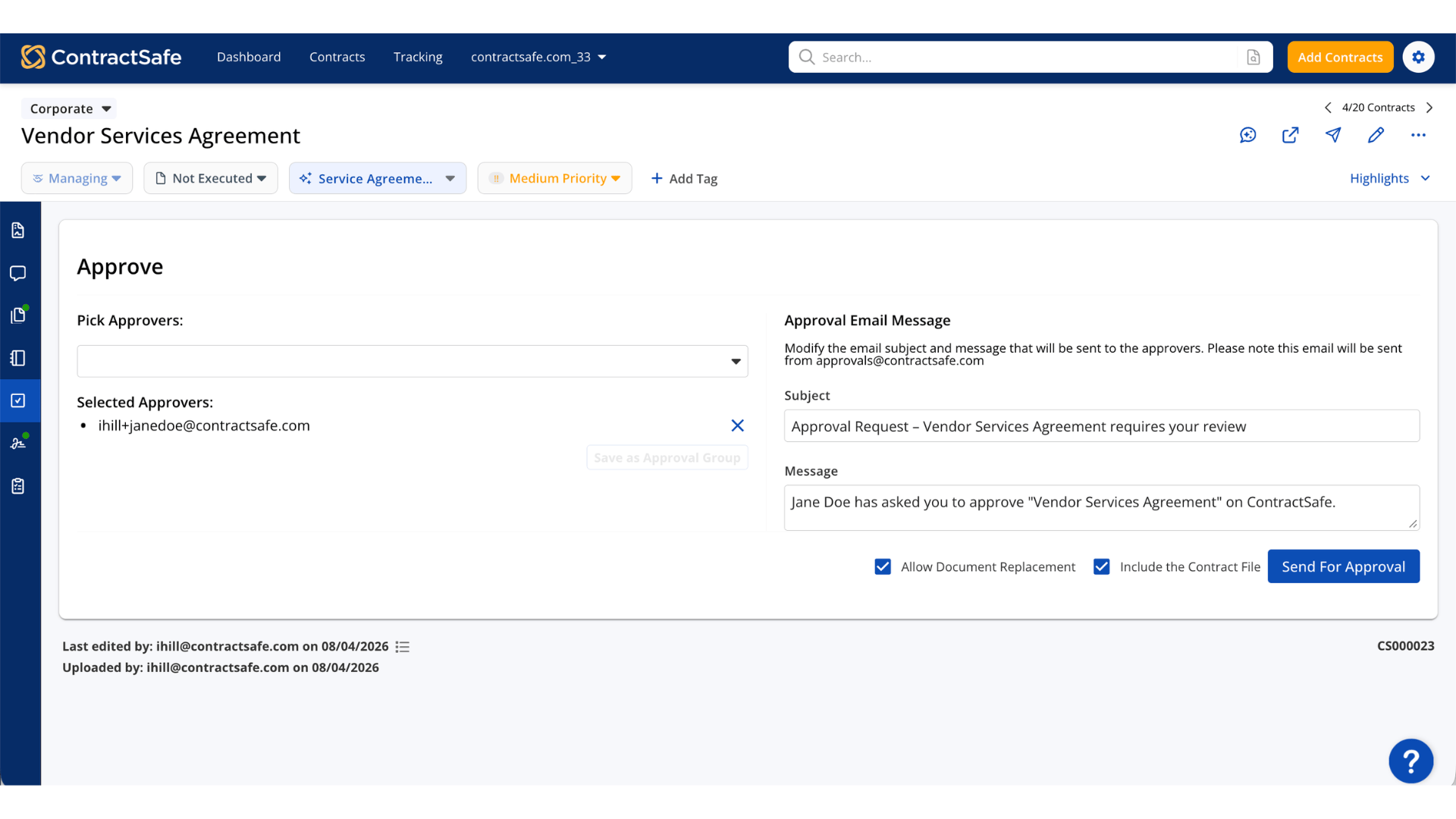
Sending a contract for approval in ContractSafe, on the Finalize and Maximize plans.
Ask every other vendor on your shortlist the same question, stage by stage and plan by plan. These are the places to look closely:
-
Docusign CLM: e-signature is a separate product, Docusign eSignature.
-
Agiloft and SpotDraft: signing runs through an integration.
-
Gatekeeper: templates are built in, and drafting and negotiation aren't native.
-
LinkSquares: drafting, signing and analysis are separate modules.
-
CobbleStone: native e-signature is only on the Enterprise tier.
-
ContractWorks: e-signature licenses are capped by package.
After signature, renewals are where missed deadlines are won or lost. ContractSafe's date reminders belong to the contract, so they keep firing when someone changes roles, and they reach people who aren't users.
How to Choose by Company Size
Company size changes which contract management features you can't do without, so match the checks below to your headcount before the first demo. We build ContractSafe for the first two bands, and the third points to other vendors.
-
50 to 200 people: Start on a published plan such as ContractSafe's Organize plan. Upgrade mid-term to the Finalize plan, with prorated billing, when you need approvals or e-signature, and check every vendor's user limits before the demo.
-
200 to 1,000 people: Require unlimited users, approval sequences and SSO, which we include on ContractSafe's Finalize and Maximize plans. Also require date reminders that reach people who aren't users, so renewals don't depend on one person.
-
Over 1,000 people with contract data across many systems: Look at Agiloft, Icertis or Ironclad.
Five Questions to Hold Every Vendor To
Ask each finalist these questions in the demo, and don't accept a vague answer to any of them:
-
What does it cost at our user count? Get a figure for today's headcount and another for when every department has a login.
-
What's live on day thirty? A vendor that can't answer is quoting a project, and you're the one who pays for the delay.
-
Who can request a contract without a seat? The answer should include department heads and occasional users.
-
Which stages are built in, and on which plan? Get the plan name next to each stage.
-
Is AI extraction reviewable? In ContractSafe, pending AI suggestions stay out of reports until someone accepts them.
Related Reading
-
The best contract management software, reviewed, for full reviews of sixteen platforms.
-
Contract management software for small businesses, for small teams starting on the Organize plan.
-
ContractSafe vs. SharePoint, for teams moving contracts out of SharePoint folders.
How ContractSafe Helps With the Whole Contract Lifecycle
ContractSafe covers the whole contract lifecycle, from request and approval through signature, renewal and reporting. On the Maximize plan, anyone can start a contract from a custom intake form or from a template with locked wording. On the Finalize and Maximize plans, approval sequences route the contract to reviewers, and built-in e-signature lets outside signers sign without a ContractSafe account.
After signature, every plan keeps the dates working. On every plan, AI extraction reads each upload and pulls out up to 29 fields, including key dates, for a person to confirm, and the repository uses OCR to make even scanned files searchable. On every plan, renewal reminders can go to any email address, and search and reporting show what's due. The AI features are optional, with extraction on every plan and AI review against your playbooks on the Maximize plan, and ContractSafe doesn't use customer data to train AI models.
ContractSafe starts at $450/month on the Organize plan, billed annually, or $540 month to month, and prices every plan by contract volume, with unlimited users and no per-seat charge. Teams can start on the Organize plan and move to the Finalize plan when approval sequences and built-in e-signature come into play.