html

ContractSafe vs SharePoint

Contract management that’s ready the day you upload, with nothing to build in Microsoft 365. See why teams choose ContractSafe.

ContractSafe 186 reviews
SharePoint 5,469 reviews
Overall
4.8
4.4
Ease of Use
4.9
4.1
Support
4.9
4.1
Value
4.8
4.2
Functionality
4.6
4.3
Source: Capterra.com; October 1, 2026
throughline-grey

Rated Higher on Ease and Support. Ready on Day One. Priced in the Open

SharePoint gives you a framework, not a contract system. Building one is your job: Microsoft’s own documentation has you train a model on sample contracts, build approval flows in Power Automate and set up Azure billing for AI, OCR and e-signature.

ContractSafe is contract management that’s already built. Upload your contracts and AI pulls the key dates, every scan is searchable, and renewal reminders go out on their own, with unlimited users on every plan. Capterra reviewers rate ContractSafe 4.9 for ease of use and SharePoint 4.1.

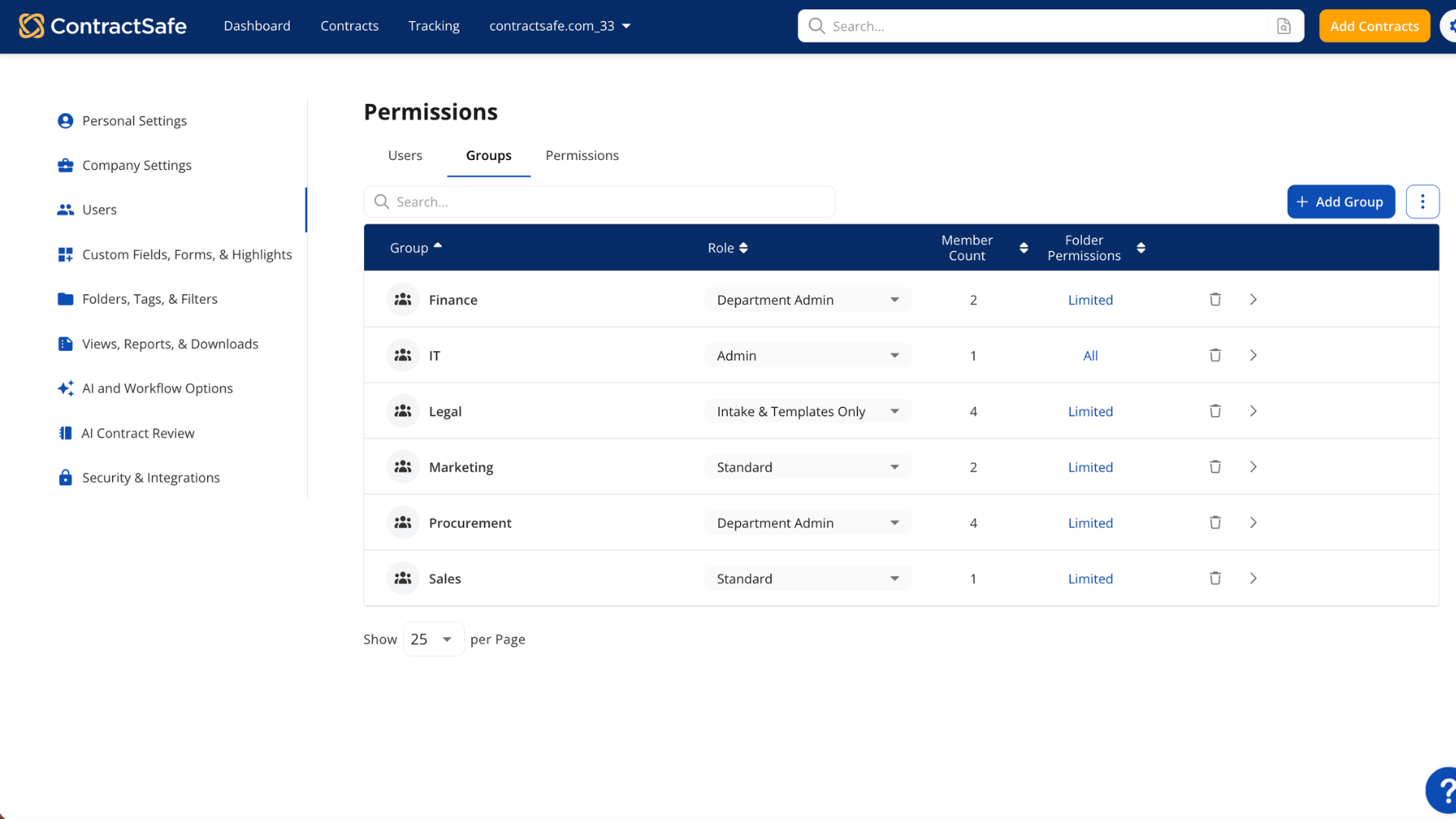
ContractSafe permission groups

A Published Price vs a Running Meter

ContractSafe publishes every price. Plans start at $450/month, billed annually, with unlimited users, a dedicated Customer Success Manager and no implementation fee. AI extraction and OCR search are included on every plan.

Microsoft 365 charges by the meter. The Microsoft 365 you already own doesn’t include its contract services, and Microsoft no longer sells per-user licenses for them. The AI that reads contracts, OCR for scans, document generation and e-signature are pay-as-you-go, billed through an Azure subscription per page and per request. OCR runs, and bills, again every time a file is edited, and e-signature is $2.00 a request. Capterra reviewers rate ContractSafe 4.8 for value and SharePoint 4.2.

What ContractSafe users say

I chose ContractSafe because it offered the best balance of simplicity, functionality, and value.

Ready to Use, Not a Build Project

ContractSafe includes implementation, migration of your existing contracts and data, and training on every plan, at no charge. AI reads each contract on upload and fills in the key dates for you to confirm. You’re typically operational in hours, with no IT project.

SharePoint gives you a framework and leaves the build to you. Microsoft’s contract solution guide starts with training a model on at least five sample contracts, then has you build the approval flow in Power Automate, JSON included. Someone on your team has to own that build, and keep owning it.

What ContractSafe users say

Getting up and running with ContractSafe happened in days, not weeks or months like some systems.
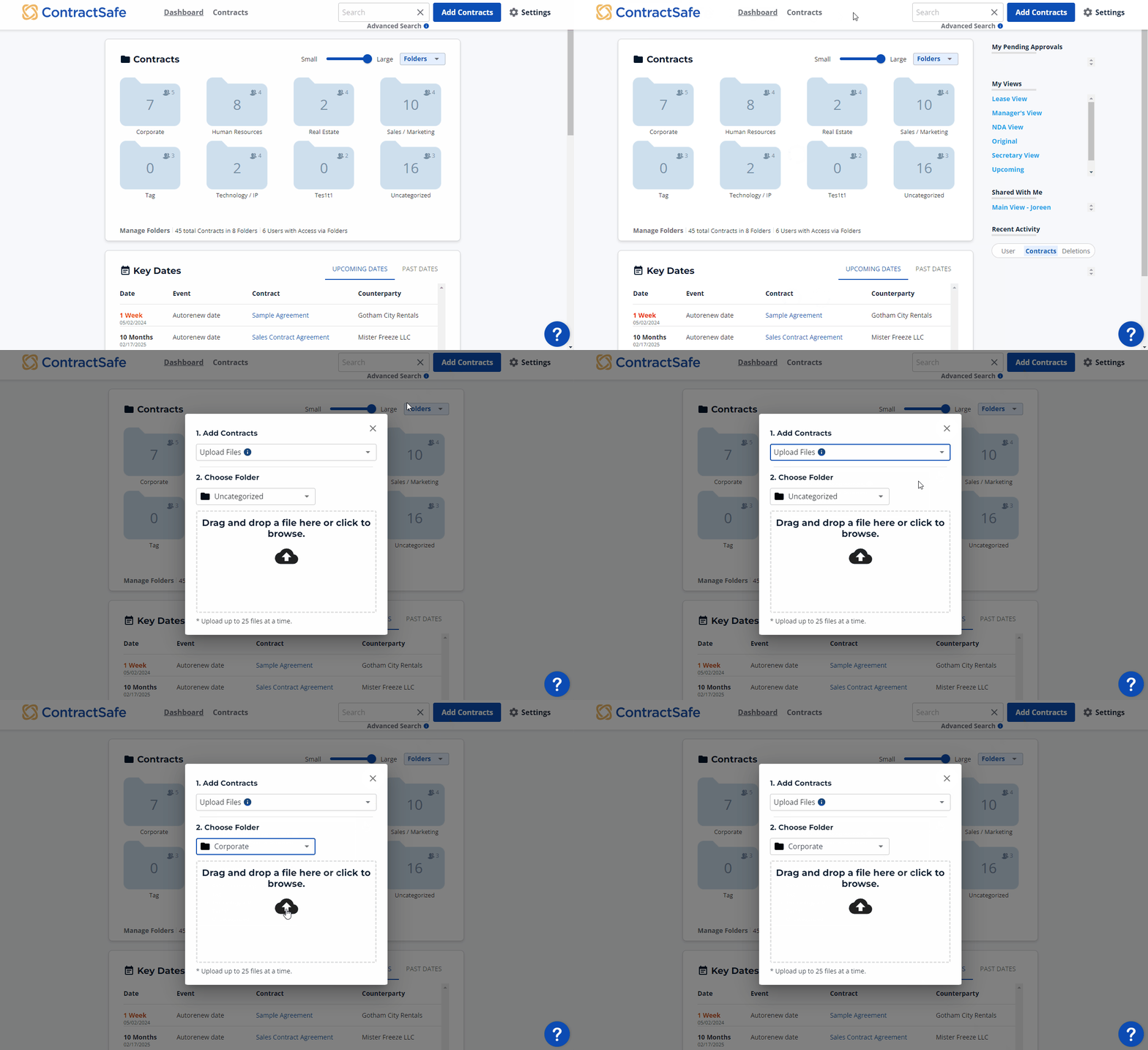
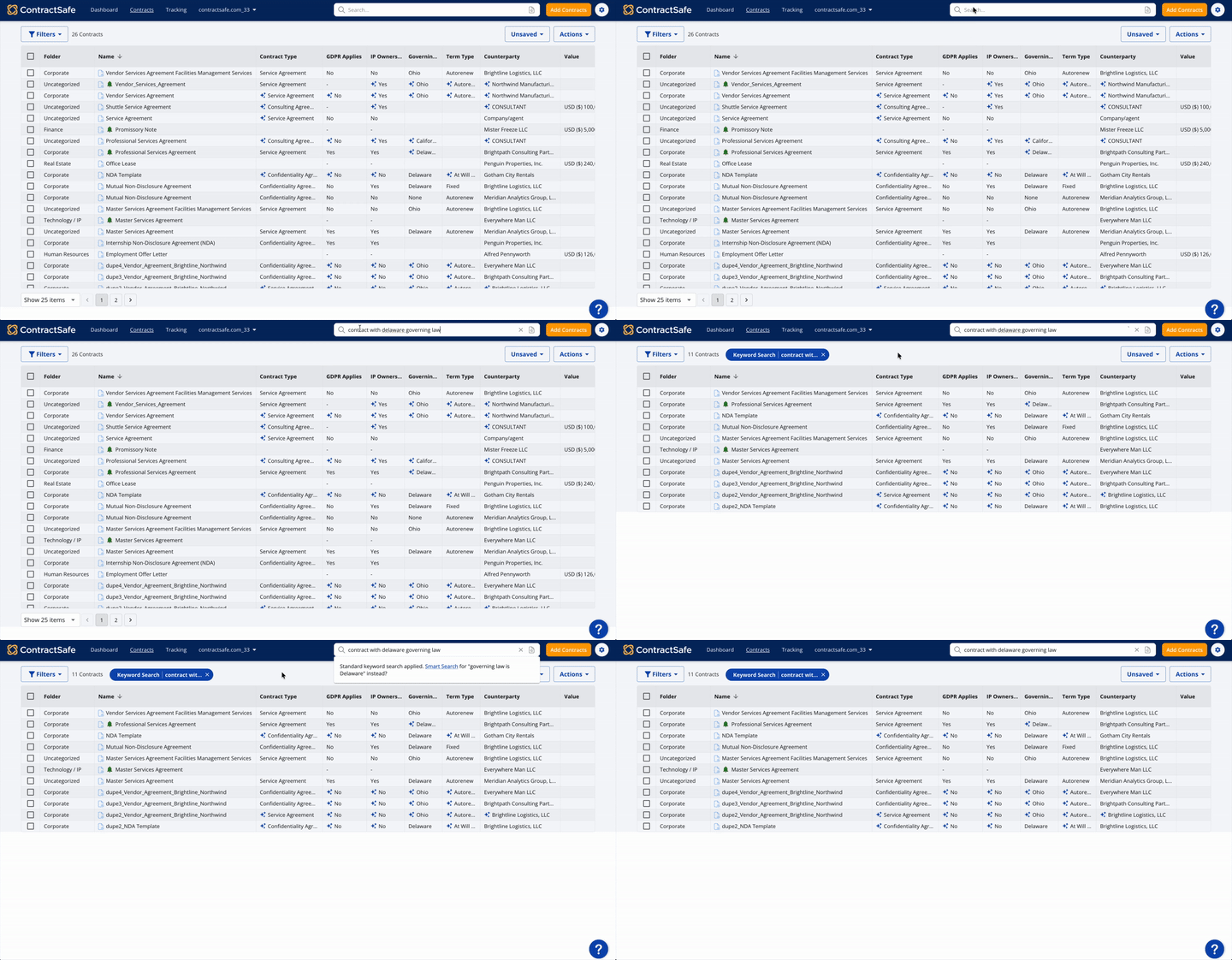
Uploading contracts to ContractSafe
ContractSafe full-text contract search

Search and AI Included on Every Plan

ContractSafe runs OCR on every document you upload, so a scanned amendment is as searchable as a Word file. Search every word, ask a question in plain English, and review AI-extracted terms before you accept them, on every plan.

SharePoint treats OCR as a metered add-on, and it only scans images uploaded after it’s switched on. For AI extraction, Microsoft recommends no more than 10 extracted columns per library and files no longer than 65 pages, and a changed document has to be reprocessed by hand.

What real users are saying
favicon-blue
ContractSafe

ContractSafe’s OCR recognition coupled with full text search is a top feature.

SharePoint

SharePoint can become difficult to navigate when there are many sites, folders, documents, and permissions involved.
— Capterra review of SharePoint, September 2026

Unlimited E-Signatures, Built In

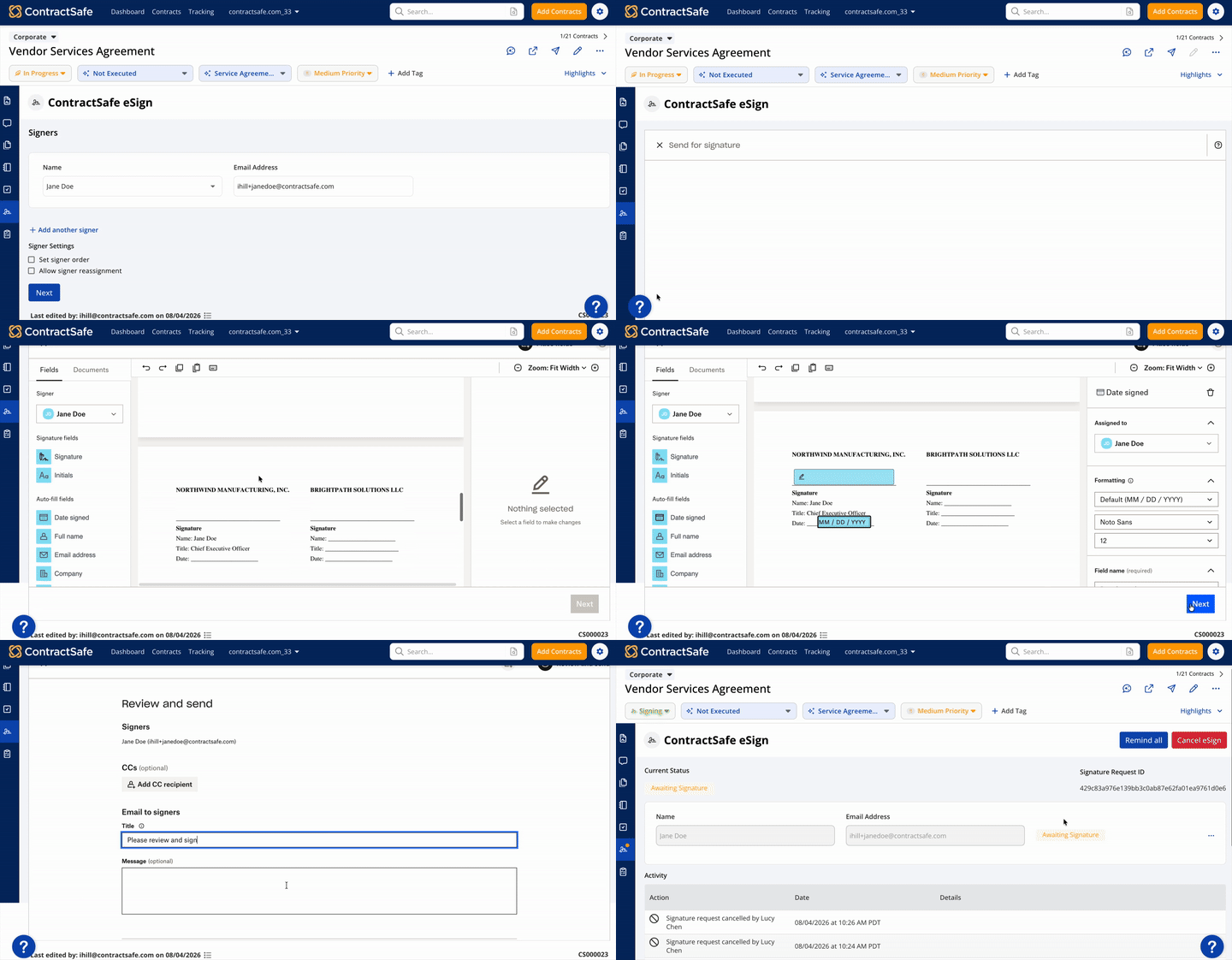
ContractSafe moves a fully approved contract to signature in one step. Signatures are unlimited from the Finalize plan, with no envelope limit to track, and signers open an email and sign without creating an account. The signed copy is filed with the original, audit trail included.

With SharePoint, every signature request costs $2.00 and is capped at 10 recipients. Outside signers are treated as guests in your Microsoft tenant, so you have to enable guest sharing and Microsoft Entra B2B integration before a new counterparty can sign.

Requesting an e-signature in ContractSafe
What real users are saying
favicon-blue
ContractSafe

ContractSafe has become our one stop shop for contract lifecycle management, from initial review through redlines, signatures, building a company contract playbook to use in drafting, and easily scheduling reporting and automated reminder alerts.

SharePoint

Documentation is terrible. Microsoft is constantly making changes which adds to confusion. Things like setting permissions can be difficult.

— Capterra review of SharePoint, September 2026

Renewal Alerts That Don’t Depend on a Flow

ContractSafe tracks any date that matters: renewals, notice deadlines, payments and audit checkpoints. Reminders go by email to anyone you choose, even people without a login, with the contract attached. Auto-renewal dates roll forward on their own.

SharePoint leaves renewal alerts to you. They aren’t part of Microsoft’s contracts template or its contract solution guide, so you build them as Power Automate flows. Microsoft switches a flow off after 14 days of repeated errors. If nobody’s watching the flow, nobody’s watching your renewals.

What ContractSafe users say

ContractSafe’s reminders for expiration & renewal are particularly valuable for risk management. We can edit contracts or tie our addendums to the contract folder for future reference. Customer support is responsive, friendly and very helpful.

A CSM You Know by Name

ContractSafe includes a dedicated Customer Success Manager on every plan at no extra cost. Not a premium tier, not a paid add-on. A named person who knows your account, plus chat, email and phone support, and we actually pick up the phone.

What ContractSafe users say: “ContractSafe developers were highly skilled, responsive, and reliable throughout our startup process.”
— Capterra Verified Review

What SharePoint users say: “Microsoft SharePoint is not a very user-friendly interface. It is difficult to use and learn, the employee management section is difficult, and guidance from the customer support team does little to help.”
— Capterra review of SharePoint, September 2026

Capterra reviewers rate ContractSafe’s customer service 4.9, against 4.1 for SharePoint.

Quote Block_3 Quotes on Support

  • gold star gold star gold star gold star gold star
    "I've explored other solutions and found them to be expensive and cumbersome. We were so happy when we found ContractSafe."
    Elizabeth Kruis
    Associate General Counsel, Corporate, California Pizza Kitchen
  • gold star gold star gold star gold star gold star
    "We did demos with several different companies before deciding to go with ContractSafe. For the functionality that is provided, the price is great. Plus, you get unlimited users, while most of the other platforms charge per user...They've been great to work with."
    Trent M., General Counsel

ContractSafe vs SharePoint: Feature Comparison

Features ContractSafe SharePoint
How pricing works Plans start at $450/month with unlimited users on every tier AI, OCR, document generation and e-signature billed by use through an Azure subscription
Setup No implementation fee; migration, onboarding and training included You build it: train a model, then build approval flows in Power Automate
Renewal alerts Email alerts on any date field, sent to anyone, contract attached Not in the contracts template; you build them as Power Automate flows
Search on scanned contracts OCR on every upload, on every plan Metered OCR that only scans images uploaded after it’s switched on
E-signature Unlimited built-in e-signatures from Finalize $2.00 per request; outside signers become guests in your tenant
Permissions Roles from admin to read-only, with no-delete users and a full audit trail Microsoft sells a separate add-on to prevent oversharing
Customer support Named CSM on every plan, picks up when you call Rated 0.8 below ContractSafe for customer service on Capterra (4.1 vs 4.9)
AI assistance AI chat, Smart Search and reviewable extraction on every plan Charged per page; a changed file has to be reprocessed by hand
icon_line_dots person_testimonial

“I couldn't believe we were already up and running in just 30 mins

icon_yellow_quotes
  • sirius-xm-logo
  • Dollar-Shave-Club-logo
  • TED-logo
  • United-Express-logo
  • The-University-of-Arizona-logo
  • j2Global-logo
  • payscale-logo
  • Living-Spaces-logo
  • Jam-City-logo
  • McClatchy-logo
  • SFMOMA-logo
  • Sacred-Heart-logo
  • california-pizza-kitchen-logo
icon-line-dots

Contract relief is waiting.

Gain control of your contracts today. Take the first steps in just a few minutes.

Request a Demo

See how ContractSafe compares

Shopping contract lifecycle management software? Here's an honest side-by-side look at ContractSafe next to the tools you're probably weighing.

See all comparisons