


Every organization has contracts. Most don't have a contract repository — they have a folder structure, a shared drive, an inbox with eight years of attachments, and a spreadsheet someone updates when they remember. For a concrete example of the purpose-built alternative, see ContractSafe's contract repository software. That works until someone needs to find the indemnification clause in the 2022 vendor MSA on a Tuesday at 4pm, and suddenly nobody knows where it is or whether it's been amended since. A contract repository fixes that specific kind of pain, and a lot of others.
This guide explains exactly what a contract repository is, what belongs in one, how it differs from a generic document storage system, the nine features that distinguish a useful repository from a digital filing cabinet, and how to implement one without making the mistakes most teams make on the first try.
Key Takeaways
- What it is: A contract repository is a centralized, secure digital system that stores, organizes, searches, and actively manages all of an organization's contracts — replacing shared drives, email, and spreadsheets with a single source of truth.
- What makes one useful: Full-text search with OCR, AI-powered metadata extraction, automated date alerts, role-based permissions, audit trails, and tight integration with the tools your team already uses.
- How it differs from a DMS: A document management system stores any document; a contract repository understands contracts. It extracts contract-specific data, tracks obligations, and sends renewal alerts the way a generic DMS cannot.
- What goes wrong: The biggest cause of failure is non-adoption — usually triggered by per-seat pricing, over-restrictive permissions, or messy initial uploads. Pick a repository that supports unlimited users and OCR every scanned document on the way in.
What Is a Contract Repository?
A contract repository is a centralized, secure digital system where an organization stores, organizes, searches, and manages all of its contracts in one place. It replaces scattered file shares, email attachments, physical folders, and tracking spreadsheets with a single source of truth — typically with full-text search across the document body, structured metadata extraction (parties, dates, values, renewal terms), automated alerts for upcoming dates, and role-based access controls that let the right people see the right contracts.
The shift from "we store contracts in a folder" to "we have a contract repository" is the shift from passive storage to active management. A folder structure doesn't notice when a contract is 30 days from auto-renewal. A repository does, and it tells the right person before the window closes.
Modern repositories also layer AI on top of the basics. AI extracts contract metadata on upload, so users don't have to tag fields manually. AI-powered search lets users ask plain-English questions ("which vendor contracts auto-renew before year-end?") and get answers cited to specific clauses. The repository becomes less of a filing system and more of an intelligence layer on top of every contract the organization has ever signed.
What's Stored in a Contract Repository
The short answer: every executed agreement and the documents that prove and modify it. The longer answer covers four categories.
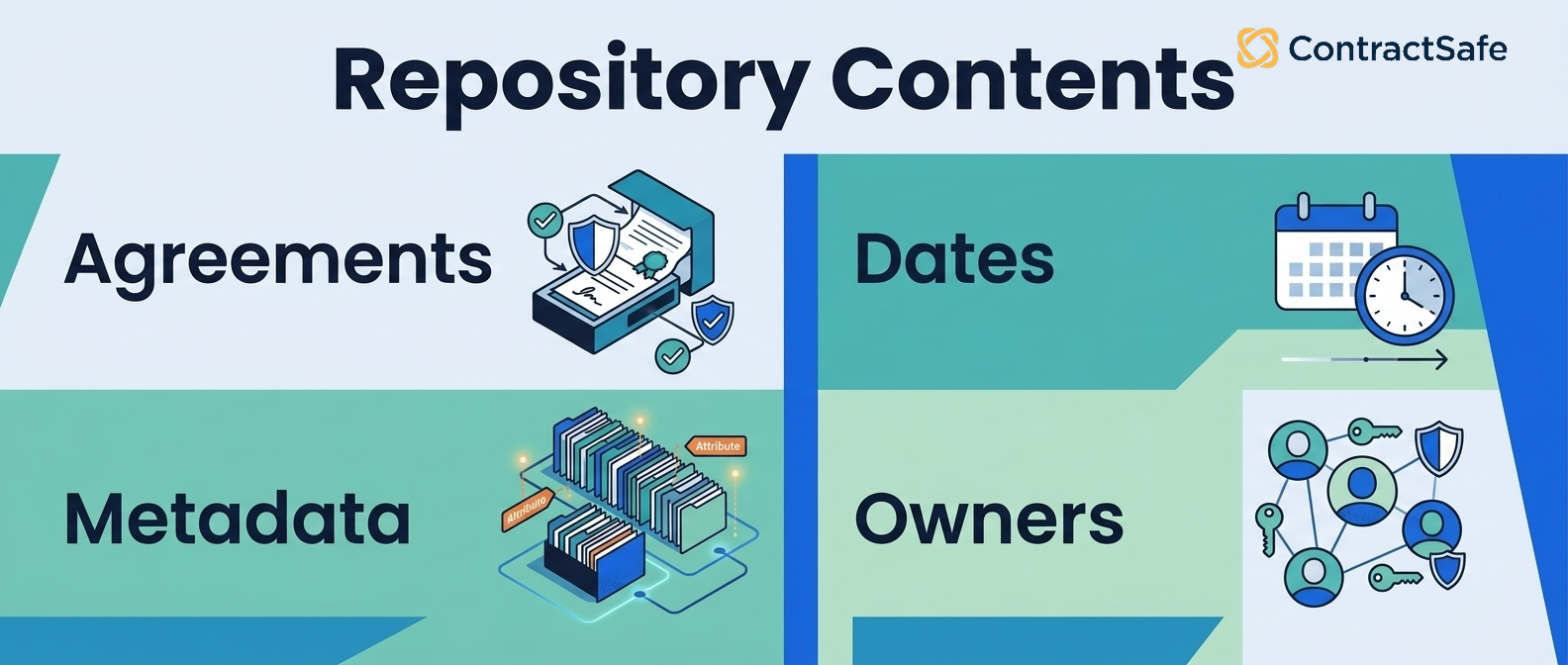
Core agreements
- Vendor and supplier contracts: MSAs, SOWs, service agreements, purchase orders, and vendor NDAs.
- Customer agreements: Sales contracts, subscription agreements, order forms, and reseller agreements.
- Employment and contractor agreements: Offer letters, employment contracts, independent contractor agreements, severance agreements, and equity grants.
- Real estate: Office and warehouse leases, sublease agreements, license agreements for space.
- Intellectual property: Licensing deals, technology transfer agreements, joint development agreements, trademark assignments.
- Confidentiality: Mutual and one-way NDAs, confidentiality clauses in larger agreements.
- Corporate: Investor agreements, board consents, founder agreements, M&A documents.
Supporting documents
- Amendments and addendums: Every change to a core agreement should be linked back to the original contract.
- Exhibits and schedules: Statements of work, fee schedules, service level agreements, data processing addenda.
- Side letters and assignments: Documents that modify how an agreement is interpreted or transferred.
Proof-of-execution materials
- Signed signature pages: The PDF showing the final signed version.
- eSignature audit trails: DocuSign or Adobe Sign certificates showing who signed, when, and from which IP address.
- Witness and notary records: Where applicable for high-value or jurisdiction-specific agreements.
Compliance and risk evidence
- Insurance certificates: COIs for vendors with the right coverage and named-insured status.
- Tax and identity documents: W-9s, W-8s, beneficial ownership disclosures.
- Security and compliance attestations: SOC 2 reports, ISO certifications, HIPAA BAAs, GDPR DPAs.
- Regulatory filings: Documents tied to a specific contract that needed to be filed with a regulator.
Types of Contract Repositories
Not all contract repositories are built the same. There are three broad categories, distinguished by what they can do beyond storage.
Type 1: Shared drive or file system (the default)
This isn't really a repository, but it's where most contracts live by default. SharePoint, Google Drive, Dropbox, a local file server. Files in folders, possibly named with some convention, possibly not. Search works on filenames, sometimes on document body if indexed. Metadata is whatever someone typed into the filename. Renewal tracking happens in someone's head or in a spreadsheet. This works for fewer than fifty contracts and breaks badly above that.
Type 2: Document management system (DMS)
General-purpose document management software — iManage, NetDocuments, M-Files, Box. Built for any business document, with folder structures, versioning, permissions, and full-text search. Better than a shared drive, but still generic: a DMS doesn't know that a contract has a "termination notice period" field or that a renewal date 90 days out should trigger an alert. You can store contracts in a DMS, but you can't manage them as contracts.
Type 3: Purpose-built contract repository
Software designed specifically for contracts. Examples include ContractSafe, ContractWorks, Nomio, and the repository layer inside full CLMs like Ironclad, DocuSign, or Concord. These platforms automatically extract contract-specific metadata (parties, value, term, governing law, renewal dates), send proactive alerts on key dates, support role-based permissions tuned to contract sensitivity, and increasingly use AI to make every clause searchable and queryable in plain English. This is the category that pays back the investment quickly for any team with more than a hundred contracts under management.
Why a Contract Repository Matters
The cost of not having one is rarely a single dramatic failure. It's a slow drip of expensive small problems.
- Missed renewals and auto-renewals: A contract auto-renews because nobody saw the notice window in time. The organization is locked in for another year on terms it wanted to renegotiate. This is the most common contract repository ROI story, and it pays for the software in a single avoided renewal.
- Unfindable terms during a deal: A customer asks for the indemnification language from their existing contract. It takes legal four hours to find the right version, fielded across three amendments. The deal slows, the customer notices.
- Compliance exposure: An auditor asks for every contract with a specific data-processing clause. Without a searchable repository, this becomes a multi-week project.
- Departed-employee risk: Someone leaves the company and takes their email — and the version history of every contract they negotiated — with them.
- Forgotten obligations: A contract requires quarterly reporting to a partner. Two years in, nobody is doing it. The partner notices.
- Duplicate work: Sales redrafts an NDA from scratch because nobody can find the standard template. Procurement signs a vendor agreement that conflicts with one finance signed six months earlier.
- Slow due diligence: M&A or funding rounds require producing the full contract inventory. Without a repository, this is the project that delays the deal.
A well-implemented contract repository doesn't eliminate any of these risks. It makes them visible and addressable, which is the difference between a missed renewal that costs $40,000 and one that's flagged 90 days out and renegotiated.
Contract Repository vs. Document Management System
This is the disambiguation that comes up in almost every buying conversation. The short answer: a document management system can store contracts; only a contract repository can actively manage them. The longer answer breaks down across five dimensions.
| Dimension | Document management system | Contract repository |
|---|---|---|
| What it stores | Any business document — invoices, policies, marketing assets, contracts | Contracts and contract-adjacent documents (amendments, COIs, attestations) |
| Metadata | Generic file metadata (name, date, owner, tags) | Contract-specific fields auto-extracted (parties, value, renewal date, governing law, term length) |
| Date awareness | None — a renewal date is just a value in a field | Proactive alerts on renewal, termination, and notice periods |
| Search | Full-text search across documents | Full-text + structured metadata search + AI-powered Q&A on contract content |
| Permissions | Folder-based access control | Role-based access tuned to contract sensitivity, often with field-level visibility |
If your organization already has a DMS for general documents, you don't replace it — you complement it. The repository becomes the system of record for contracts specifically; the DMS continues to handle everything else.
Contract Repository vs. Full CLM
The other common disambiguation. A contract repository is the post-signature side of contract management — storage, search, retrieval, obligation tracking, and renewal alerts. A full contract lifecycle management (CLM) platform extends this across the whole lifecycle: drafting, redlining, negotiation, approval workflows, eSignature, and analytics.
Every CLM has a repository underneath it. But a standalone repository is a perfectly valid option — and often the right one — for teams whose primary pain is finding and tracking signed contracts, not drafting new ones. If your contracts mostly originate from counterparties (third-party paper), a strong repository may be all you need. If you draft the majority of your contracts and have multi-step internal approvals, a full CLM tends to pay back faster.
A practical rule: start with the repository, add CLM features as your team's authoring volume grows. Going repository-first means a faster implementation, lower cost, and higher adoption — and the day you outgrow it, the repository data migrates cleanly into a CLM with the same vendor or a different one.
9 Must-Have Features in a Contract Repository
Not every repository ships every feature on this list, and not every team needs every one. But these are the nine capabilities that separate a useful contract repository from a digital filing cabinet.
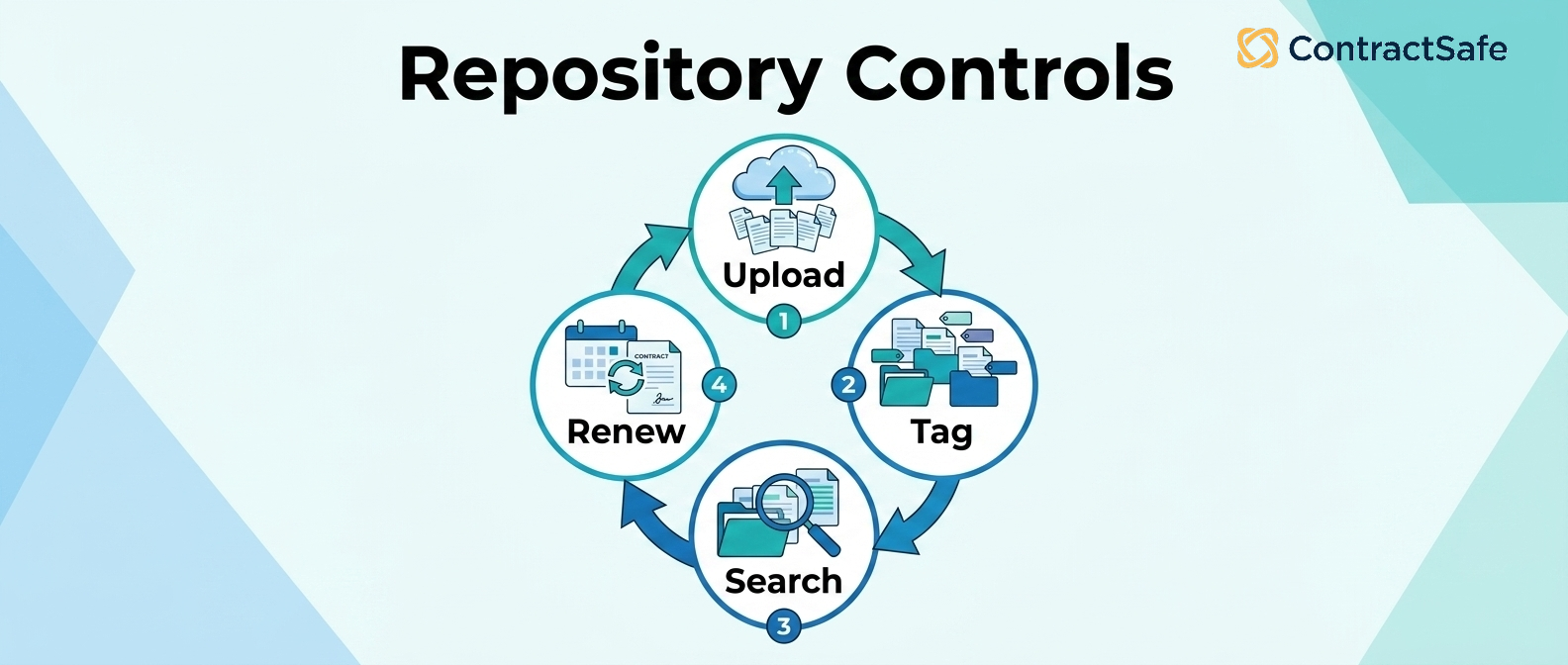
1. Advanced search with OCR
Full-text search across every contract is non-negotiable. Equally important: optical character recognition (OCR) that converts scanned PDFs into searchable text on upload. Without OCR, a scanned-and-rescanned contract is an unsearchable image, and the repository can't find anything in it. Look for vendors who OCR every document automatically, not as a paid add-on.
2. AI-powered metadata extraction
The system should automatically pull key fields from every uploaded contract — parties, effective date, expiration date, contract value, renewal terms, governing law, notice periods — without manual tagging. Modern repositories extract 30+ fields with 90%+ accuracy on standard contract types. Manual entry doesn't scale past a few hundred contracts, and it's where errors creep in.
3. Automated renewal and date reminders
Configurable alerts for renewal dates, termination dates, notice periods, milestones, and obligation due dates. The right repository emails the right stakeholder a set number of days before each event — not after. This is the single feature that typically pays for the repository, by surfacing renewals in time to renegotiate or exit.
4. Integrations with the tools you already use
At minimum: eSignature platforms (DocuSign, Adobe Sign), CRM (Salesforce, HubSpot), storage (SharePoint, Google Drive), identity (Okta, Azure AD via SSO), and communication (Slack, Microsoft Teams). Native integrations beat Zapier-and-hope, especially for SSO and CRM. Ask each vendor which integrations are native versus add-on, before signing.
5. Role-based access controls
Different teams need different views. Legal should see everything. Finance should see payment terms and value but maybe not redacted personnel matters. Sales should see customer agreements but not vendor contracts. Look for granular, role-based permissions — ideally with field-level visibility (a user can see the contract but not its dollar value) for sensitive use cases.
6. Complete audit trails
Every action on every contract should be logged: who viewed it, who downloaded it, who edited the metadata, when each event occurred. Audit trails are essential for compliance (SOC 2, HIPAA, internal IP protection) and for the inevitable "who changed this?" moment six months after a critical edit.
7. Version control and amendment tracking
Every contract evolves — amendments, addendums, side letters, restatements. The repository should keep a clear version history, link every amendment back to its parent contract, and surface the current effective terms (which may be a composite of the original plus three amendments). Manual versioning in filenames is where most repositories fail in practice.
8. Reporting and dashboards
Pre-built and customizable dashboards covering upcoming renewals, contracts by counterparty, contracts by value, contracts by status, and key clause distributions (e.g., "how many of our customer contracts have auto-renewal?"). Reporting is what turns a repository from a search tool into a decision-support system.
9. Enterprise-grade security and compliance
SOC 2 Type II at minimum. Encryption at rest and in transit. Role-based access with audit logging. Data residency options (US, EU, Canada, Australia) for compliance-sensitive teams. For regulated industries, look for HIPAA, FedRAMP, or GDPR posture. The security story should be explicit in the vendor's documentation, not something you have to ask twice for.
Contract Repository Use Cases by Department
The repository serves different teams in different ways. Cross-functional adoption is what drives ROI; legal-only adoption typically doesn't.
Legal
Fast contract retrieval during deal cycles and reviews. Standardized clause libraries pulled from prior agreements. Visibility into deviation patterns ("which counterparties most often push back on our indemnification language?"). Faster response to audit and discovery requests.
Procurement
Centralized vendor agreement tracking with linked COIs, W-9s, and security attestations. Renewal alerts in time to renegotiate. Visibility into supplier obligations and SLAs. Consolidated view of total vendor spend by contract.
Finance
Payment-term visibility for cash-flow forecasting. Revenue-recognition support tied to executed customer contracts. Cost forecasting for vendor commitments. Audit-ready evidence trails for revenue and expense recognition.
Sales
Quick access to executed customer agreements during account reviews. Visibility into expansion opportunities and renewal pipelines. Self-serve retrieval of NDAs and standard agreements during the deal cycle, without filing a legal ticket.
HR
Centralized storage of offer letters, employment agreements, contractor agreements, severance documents, and equity grants. Audit trails for compliance reviews. Permission controls to protect sensitive personnel records.
Operations
Visibility into the contracts that govern day-to-day business processes — vendor SLAs, customer commitments, regulatory obligations. Obligation tracking that turns contract terms into operational tasks.
IT and Security
SaaS contract inventory with renewal dates and data-processing terms. Vendor security attestation tracking (SOC 2, ISO, GDPR). Identity governance via SSO integration. Audit logs for compliance with internal access policies.
Executive and corporate development
M&A and due-diligence readiness — a clean, searchable contract inventory cuts diligence response time from weeks to days. Investor reporting on contract-driven obligations and revenue.
Best Practices for Setting Up a Contract Repository
The implementation patterns that distinguish successful repository rollouts from ones that quietly stall in month four.
Standardize metadata before bulk upload
Decide on your standard fields and naming conventions before uploading thousands of legacy contracts. Common required fields: counterparty, contract type, effective date, expiration date, value, renewal terms, contract owner. Inconsistent tagging at upload is the single biggest cause of "I can't find anything in this thing."
OCR everything on the way in
Run OCR on every scanned or image-based PDF during bulk import. Scanned contracts that aren't OCR'd are unsearchable, which means they may as well not be in the repository. Most modern repositories OCR automatically; confirm yours does.
Validate extracted metadata on a representative sample
Before trusting AI extraction at scale, spot-check a sample of 50–100 contracts. Confirm that parties, dates, values, and key terms were extracted correctly. This catches systematic accuracy issues early — and it's where teams decide whether to trust the system at scale.
Roll out with unlimited users from day one
The biggest ROI multiplier is cross-functional adoption. Pick a repository with unlimited-user pricing or near it, and onboard finance, procurement, sales, and HR alongside legal. Per-seat pricing kills adoption — teams ration licenses, and the repository becomes a legal-only tool that misses 80% of its potential value.
Configure alerts before you need them
Set up renewal and termination reminders at 90, 60, and 30 days before each event. Route them to the contract owner, not a shared inbox. Test that the alerts actually fire by setting up a fake contract with a renewal in two weeks during the rollout phase.
Link amendments to parent contracts at upload
When importing legacy contracts, link every amendment, addendum, and side letter back to the parent agreement. This is tedious during migration but invaluable forever after — the "current effective terms" of a contract are rarely just the original document.
Train casual users separately from power users
30 minutes for casual users (finance, sales, ops): how to search, how to find a renewal date, how to download an executed agreement. One hour for power users (legal, contract managers): how to upload, tag, configure alerts, and use reporting. Most projects fail not because of bad software but because nobody outside legal ever logged in.
Common Pitfalls to Avoid
The mistakes that show up over and over in repository implementations.
Treating the repository as a passive archive
The repository only delivers value if people use it daily. Teams that treat it as a "place to put signed contracts" miss the search, alert, and reporting value that drives ROI. The repository should be the first place anyone looks for a contract — not the last.
Skipping OCR on scanned PDFs
Scanned contracts without OCR are unsearchable images. Skipping OCR creates a two-tier repository where some contracts are findable and others aren't, which destroys user trust quickly. OCR everything on the way in.
Over-restrictive permissions
Locking down access too tightly is as bad as having no controls. If sales can't see customer agreements without filing a ticket, they'll keep contracts on their desktops. Design permissions for the common case (most contracts visible to most internal users) with exceptions for genuinely sensitive material.
Inconsistent metadata tagging
Five different people tagging contracts five different ways means search returns five different sets of results. Lock down a small number of standardized fields with required values, and lean on AI extraction for the rest. Free-text tags become a forest you can't see through within a year.
Per-seat pricing that blocks adoption
If finance, procurement, and ops need a license to use the repository — and licenses cost money — they'll be rationed. The repository becomes a legal-only tool and never delivers cross-functional value. Unlimited-user pricing isn't a nice-to-have; it's an adoption prerequisite.
No process for ongoing additions
Bulk-uploading the legacy archive is the start, not the finish. Without a process for adding new executed contracts on the day they're signed, the repository drifts out of date within months. Tie repository upload to the eSignature workflow so new contracts land automatically.
Forgetting amendments
The original contract isn't the current contract. If amendments live in someone's email and not the repository, the repository tells lies. Every amendment must be uploaded and linked to its parent, every time.
How AI Elevates the Modern Contract Repository
The repository category changed substantially between 2023 and 2026 as foundation models (the LLMs behind ChatGPT, Claude, and Gemini) got good enough to handle legal language reliably. The four ways AI now makes a repository materially better:
- Automatic metadata extraction: AI reads every uploaded contract and pulls out parties, dates, values, renewal terms, governing law, and custom fields with 90%+ accuracy on standard agreements. Manual tagging at scale is gone.
- Natural-language search and Q&A: Ask questions in plain English — "which vendor contracts have a 90-day notice period and renew in Q3?" — and get answers cited back to the specific clause in the source contract.
- Anomaly and risk flagging: AI surfaces unusual clauses, deviations from your standard terms, and missing protections (no liability cap, no governing law, no notice period). Catches risk that would otherwise slip through.
- Proactive briefings: The newest generation of repositories ships AI-generated weekly summaries — upcoming renewals, obligations due, contracts of note — delivered to email or Slack so users don't have to log in to discover what needs attention.
AI doesn't replace the repository fundamentals. Search, alerts, permissions, audit, and integrations still matter. What AI does is reduce the manual work that previously kept repositories from delivering on their promise, and it does it without trading off the security or governance controls that enterprise teams require.
Frequently Asked Questions About Contract Repositories
What is a contract repository?
A contract repository is a centralized, secure digital system where an organization stores, organizes, searches, and manages all of its contracts in one place. It replaces scattered file shares, email attachments, and physical folders with a single source of truth — typically with full-text search, metadata extraction, automated date alerts, and role-based access controls.
What's the difference between a contract repository and a document management system?
A document management system (DMS) stores any kind of business document — invoices, policies, marketing collateral, contracts — with general-purpose folder structures and versioning. A contract repository is purpose-built for contracts: it extracts contract-specific metadata (parties, value, renewal dates, governing law), tracks obligations, sends renewal alerts, and enforces contract-specific permissions. A DMS can store contracts; only a contract repository can actively manage them.
What documents are typically stored in a contract repository?
A contract repository typically stores executed contracts and agreements (NDAs, MSAs, SOWs, vendor agreements, customer contracts, employment agreements, leases, licensing deals), supporting documents (amendments, addendums, exhibits, schedules), proof-of-execution materials (signed signature pages, eSignature audit trails), and related evidence (insurance certificates, W-9s, SOC 2 reports, regulatory attestations).
Is a contract repository the same as a CLM?
No. A contract repository handles the post-signature side of the lifecycle: storage, search, retrieval, obligation tracking, and renewal alerts. A full contract lifecycle management (CLM) platform extends this across the entire lifecycle — drafting, negotiation, redlining, approval workflows, eSignature, and analytics. The repository is the foundation of every CLM, but a standalone repository is a lighter, faster-to-implement option for teams whose primary pain is finding and tracking signed contracts.
How long does it take to implement a contract repository?
A modern cloud-based contract repository can typically be implemented in days to a few weeks. The biggest variable is the volume and condition of your existing contracts. Bulk-uploading a clean digital archive is fast; OCR'ing thousands of scanned PDFs and validating extracted metadata takes longer. Enterprise repositories with deep integrations (Salesforce, ERP, SSO) can take one to three months.
Is a contract repository secure enough for sensitive contracts?
Yes, provided the vendor meets enterprise security standards. Look for SOC 2 Type II certification, encryption at rest and in transit, role-based access controls, complete audit logging of every action, and explicit data-residency options (US, EU, Canada, Australia). Regulated industries should also confirm HIPAA, FedRAMP, or GDPR posture as needed. A well-configured contract repository is more secure than email attachments or shared drives, where most contracts live by default.
Can a contract repository find contracts using full-text or AI search?
Yes. Modern contract repositories combine full-text search across the document body, structured search across extracted metadata fields (parties, value, dates), and increasingly, AI-powered natural-language search that lets users ask plain-English questions and receive answers cited to specific clauses. OCR is essential — without it, scanned PDFs become unsearchable images.
Do I need a contract repository if I already use SharePoint or Google Drive?
SharePoint and Google Drive store files but don't manage contracts. They lack contract-specific metadata extraction, renewal-date tracking, automated obligation reminders, and audit-grade access logging. Most teams using SharePoint or Drive for contracts eventually discover the same problems: missed renewals, scattered amendments, unfindable clauses, and no audit trail. A purpose-built repository solves all four.
Which departments benefit most from a contract repository?
Legal gets faster review and stronger compliance visibility. Procurement gains vendor agreement tracking, renewal alerts, and supplier obligation management. Finance gets payment-term visibility and revenue/cost forecasting. HR organizes employment contracts, NDAs, and contractor agreements. Sales tracks customer agreements and renewal opportunities. Operations maintains visibility into the contracts that govern day-to-day business processes. Every team that touches contracts benefits.
What are the most common contract repository implementation mistakes?
The most common mistakes are inconsistent metadata tagging at upload, skipping OCR on scanned PDFs (making them unsearchable), over-restrictive permissions that block adoption, treating the repository as a passive archive rather than a working system, and per-seat pricing that prevents finance, ops, and procurement from getting access. The biggest cause of repository project failure is non-adoption, not feature gaps.
Additional Resources
- 16 Best Contract Management Software of 2026: Buyer's Guide
- AI Contract Lifecycle Management: 2026 Buyer's Guide
- What is contract management software? A complete guide
- How to choose the right CLM software: the ultimate checklist
- Contract management best practices for 2026
- How to build a rock-solid business case for CLM software
- Contract repository vs. CLM: when to choose which
- How to organize digital contracts securely when you move off shared drives
Sources: ContractSafe primary research, public vendor documentation, and aggregated guidance from industry analysts (2024–2026).







.svg)







.svg)




