Home breadcrumb back arrow Back to All Blog


By Ken Button |

Best Higher Education Contract Management Software in 2026

Best Contract Management Software for Higher Education in 2026 | Top 5 Compared - ContractSafe

Higher education contract software is a searchable, access-controlled system that helps colleges and universities store agreements, find contracts quickly, and track renewal dates.

It should also answer contract questions across legal, procurement, finance, IT, research, athletics, HR, facilities, and academic departments.

Think of it as a campus map for the small city of agreements living across departments.

That sounds tidy. A campus isn't tidy.

A campus is a small city with a mascot, a parking problem, and more vendor agreements than anyone wants to admit.

The library has database subscriptions. Athletics has sponsorship agreements. Research has grant terms. Facilities has maintenance contracts. IT has software licenses. HR has employment forms. Finance has the invoices nobody wants to explain twice.

Somewhere, someone is still saving signed PDFs in a folder called “final final,” which is never final.

That’s the higher education contract problem.

The issue usually isn’t that nobody cares about contracts. Plenty of people care. They just care from different buildings, different systems, and different moments in the contract’s life.

Legal cares about risk.

Procurement cares about process.

Finance cares about spend.

Research cares about obligations.

The department chair cares because the software needs to work before classes start.

Good higher education contract management software gives that whole city a map.

It shows where agreements live, who owns them, which dates matter, what’s restricted, and who can safely act without turning legal into the campus search desk.


Key Takeaways

  • Higher education contract management software has to serve more than legal. It needs to work for procurement, finance, IT, HR, research, athletics, facilities, and academic departments.
  • The first buying question is which full-lifecycle CLM the whole campus will actually adopt: one system for search, permissions, renewals, reporting, intake, approvals, and signature.
  • ContractSafe pricing starts at $450/month, every plan includes unlimited users, and the system is built for people outside legal.
  • FERPA, FOIA requests, audits, grants, procurement reviews, and department-owned vendor agreements make permission controls and clean records especially important.

Choose your next step:

If you’re here because a committee asked for “CLM options,” pause for a second.

That phrase can hide three very different projects.

Jump to repository needs, vendor comparison, or campus demo tests.

If the real problem is... Start here What to look for
Contracts are scattered across departments Repository needs Search, OCR, permissions, custom fields, reporting, and renewal alerts.
Legal wants more control before signature Vendor comparison Drafting, intake, approvals, redlining, and signature workflow.
Everyone wants AI, but the archive is messy Campus demo test Source links, permission behavior, messy-document search, and report-ready metadata.
The budget committee needs a recommendation ContractSafe fit Clear pricing, unlimited users, fast launch, and enough control without a heavy enterprise rollout.

That’s the thread running through the whole article.

You’re not choosing the platform with the longest feature list. You’re choosing the platform that removes the most contract work from the wrong people.


What Is Higher Education Contract Management Software?

Higher education contract management software is a system colleges and universities use to organize signed agreements, control access, track deadlines, report on contract data, and help people across campus find the contract answers they need.

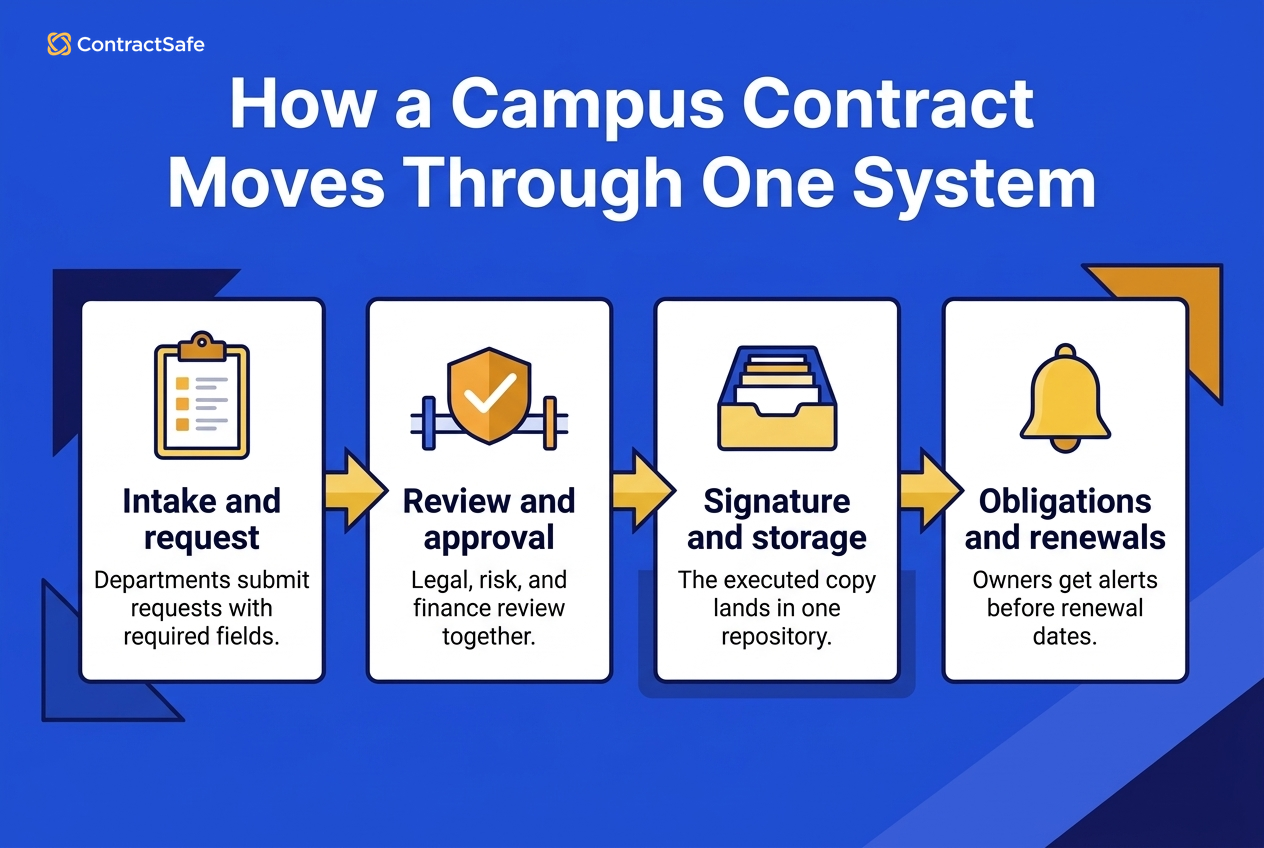
It can include pre-signature work, like intake, drafting, approval, negotiation, and signature.

But for many campuses, the first problem is post-signature.

The contracts already exist. The signed copies are just scattered.

That’s why a system that nails the signed-agreement basics and grows into drafting, approvals, and signature often makes more sense as the first project.

Before the university rebuilds every legal workflow, it needs to know where the active agreements are, which departments own them, what renews soon, which agreements include sensitive data, and who should be allowed to see each record.

Once that foundation is in place, workflow, AI, reporting, and renewal planning have something trustworthy to work from.


What Higher Education Teams Need from Contract Management Software

Higher education contract management software should help a campus find agreements, control access, track dates, answer questions, and prepare for audits without making every department learn a complicated legal workflow.

That sounds simple until you picture the actual campus.

Procurement knows where the copier agreement lives. IT knows where the learning-management-system terms live. Research administration knows the grant file. Legal knows the clauses that make everyone nervous.

Nobody’s wrong.

They’re all guarding their own corner of the city.

The problem is that contracts don’t respect those corners.

A software agreement can involve IT, procurement, finance, accessibility, security, data privacy, and the department that just wants the tool before the semester starts.

A facilities agreement can look routine until there’s a renewal notice, insurance requirement, or service-level issue buried in the signed copy.

A research agreement can live in one office while the budget, reporting, and compliance questions show up somewhere else entirely.

That’s why higher-ed contract software has to cover five jobs.

1. Search that works on messy campus documents

People need to find agreements by vendor, department, owner, date, value, contract type, and plain-language question.

The system also needs optical character recognition (OCR) because real campuses have scanned PDFs, old amendments, signature pages, order forms, and files with names that made sense to one person three years ago.

If search only works when the file name is perfect, it’s not a contract system. It’s a shared drive wearing a nicer jacket.

Use the demo to test this with documents that behave badly.

Upload a scanned renewal, an amendment with a different vendor name, and an order form that changes the notice period. Then search the way a real user would search: by vendor, department, owner, renewal date, and plain-language question.

If the answer only appears when the vendor knows the exact file name, the system won’t survive normal campus use.

That’s the first reason a repository matters more than a fancy workflow demo.

The ContractSafe repository is built around this problem: signed documents, scanned documents, and oddball campus files need to become searchable without a months-long cleanup project first.

2. Permissions that match how campuses actually work

The biology department shouldn’t see every HR agreement.

Facilities shouldn’t need legal to retrieve a routine vendor document every week.

Finance may need spend and renewal information without full access to sensitive language.

That’s the tricky part.

A contract repository has to open access without throwing open the doors.

That means the system needs role-based permissions that make sense to non-admins.

A department user might need the vendor agreement and renewal date. Finance might need contract value and payment terms. Legal might need the whole record, including restricted language and amendments.

If the permission model is too blunt, the campus will either hide too much or expose too much.

Neither outcome is good.

So don’t ask only whether the system “has permissions.”

Ask whether it can give facilities access to facilities agreements, give finance the fields it needs, and give legal full access to restricted records without forcing everyone into the same view.

This is where a broad-access system like ContractSafe has to prove the permission model in the demo, not just promise it in the sales deck.


Buyer checklist for campus legal and procurement teams: before you shortlist anything, run each candidate against the six questions your campus will actually get asked the day a contract goes sideways. Do it with a real agreement in front of you, not a slide deck. If a vendor can only answer in theory, that's your answer. Score each line pass or fail, and note who on your side owns the follow up.

  • Contract location: Can you find the signed copy by vendor, department, owner, and renewal date, even when the file name is a mess? If it only surfaces when you already know the exact file name, it won't survive normal campus use.
  • Permissions: Can facilities see facilities agreements, finance see value and payment terms, and legal see restricted language, without dropping everyone into the same shared view or routing every request back through legal?
  • Renewals: Do the notice window, internal owner, and escalation contact live on the contract record, so the first alert fires early and still reaches someone if that person leaves the university?
  • Audit readiness: Can you pull a clean, report ready list for an audit, records request, or grant review in minutes, with amendments and key fields attached to each record?
  • Student data sensitivity: Can you flag agreements that touch student records, tighten who opens them, and still let the right offices do their jobs?
  • Next action owner: For every gap above, name the person who owns the fix, not the department. "Someone in procurement" is exactly how a renewal gets missed.

Use this as a scorecard, not a wish list. Walk one messy, real agreement through all six lines during the demo, mark each pass or fail, and write the owner beside every weak spot. The tool that clears the most lines with the least hand holding from legal is the one that removes contract work from the wrong people. That's the whole point.


3. Deadline control before the deadline becomes expensive

Renewal dates, notice windows, expirations, grant obligations, and vendor review dates need to surface early enough for someone to do something useful.

“We found the contract” isn't enough if the notice window closed last Thursday.

Higher education budgets move through cycles. A missed renewal can create real pain because the team may not be able to fix the spend quickly.

That’s why renewal tracking has to include more than an end date.

The system should capture the notice window, internal owner, escalation contact, department, contract value, and whether the agreement should be reviewed before renewal.

A long notice requirement isn't useful if the first alert arrives after the campus needed to act.

In the demo, build a sample renewal with a real notice window and ask the vendor to show exactly when the first reminder fires, who receives it, and what happens if that person leaves the university.

ContractSafe alerts are useful here because dates can belong to the contract record instead of one person’s calendar.

4. Audit and records readiness

Public institutions may need records for open-records requests. Private institutions still have audits, grant documentation, board reporting, accreditation work, and internal reviews.

When someone asks for the signed agreement, the latest amendment, the owner, and the relevant dates, the answer should not depend on who happens to be on vacation.

A good system should make the record explain itself.

Who uploaded it? Which version is current? Which department owns it? What changed in the amendment? Who has access? Which fields were reviewed?

That trail matters when the question comes from an auditor, a sponsor, a board packet, or a budget meeting.

This is also where reporting has to be boring in the best possible way.

Ask for a report of active vendor agreements by department, owner, renewal date, contract value, and data-sensitivity field. If that report requires custom services, the campus will probably go back to spreadsheets.

5. Data protection and sensitive agreement handling

Some campus contracts touch student data, employee information, research terms, health data, payment terms, security language, or donor relationships.

That’s why FERPA belongs in the buying conversation even when the contract doesn’t look dramatic at first glance.

Permissions and metadata aren't decoration here.

They’re how the system keeps broad access from becoming broad exposure.

The practical test is simple: tag a contract as student-data-related, restrict the attachment, and see whether a department user can still find the non-sensitive fields they need.

If the permission model can’t separate access from sensitive document exposure, it will push the campus toward either overexposure or underuse.

In the ContractSafe repository, the risk management goal is practical: keep the contract findable, but keep restricted attachments restricted.

Use that as a pass-fail test before the committee gets distracted by AI features or workflow diagrams.

The point isn't to lock everything down. The point is to let the right people find the right contract data without exposing the wrong documents.

Search Permissions and Deadline Control


Who Actually Uses Higher Education Contract Software?

The easiest way to overbuy contract software is to picture only legal using it.

Legal matters, obviously.

But campus contracts don’t stay inside legal.

They show up wherever the work is happening.

That’s why the buyer’s committee should name the real users before comparing demos.

Campus group What they need from the system What goes wrong without it
Legal The signed agreement, amendments, approvals, risk language, and a clean record of who can access what. Legal becomes the only doorway for routine contract questions.
Procurement Vendor history, renewal timing, contract value, owner, and easy reporting before sourcing decisions. Teams renegotiate without knowing what the current contract says.
Finance Spend reporting, renewal dates, termination windows, and department-level ownership. Renewals turn into budget surprises instead of planned decisions.
IT and security Software terms, data language, security obligations, and vendor agreements tied to systems people actually use. The contract gets separated from the operational risk.
Research administration Grant terms, reporting obligations, sponsor agreements, and dates that need to survive staff turnover. Important obligations live in someone’s inbox instead of the record.
Departments A fast way to find the agreement they own, check dates, and answer routine vendor questions. People keep side copies because the official system feels too far away.

This is where unlimited users becomes more than a pricing feature.

It becomes an operating model.

If the system punishes broad access, the campus will ration access.

If the campus rations access, the contract system becomes one more place people have to ask permission before doing ordinary work.

That’s how side files come back.

Not because people are reckless.

Because the official path is too narrow for the way campus work actually happens.


The 5 Best Contract Management Software Options for Higher Education

The right choice depends on the contract mess your campus is trying to clean up.

Everyone needing access is one problem.

Legal needing tighter review steps is another.

Years of signed PDFs sitting in too many places is another.

Price and rollout burden belong in the comparison because they change the decision.

Platform Best campus fit Pricing signal Implementation signal Main tradeoff
ContractSafe Colleges and universities that need searchable storage, alerts, permissions, AI search, reporting, and broad access. Published pricing starts at $450/month and is based on contract volume, not per-user seat expansion. Same-day setup once files, fields, folders, users, permissions, and alerts are defined. Not built for teams looking for a long, heavily customized enterprise implementation.
Juro Legal teams drafting and reviewing standardized contracts in a browser-based workflow. Quote-based; ask whether pricing changes by contract volume, AI features, integrations, modules, or campus-wide access. Use 30 days as a planning benchmark and ask what happens to templates, Word edits, repository import, and reporting. Good for pre-signature legal work, weaker for campus-wide cleanup of old signed agreements.
DocuSign CLM Large institutions already using DocuSign and formal approval routing. Custom quote. ContractSafe’s DocuSign CLM comparison summarizes Capterra pricing data showing SMB buyers reporting about $150 per user per month. Treat 3-6 months as the initial rollout assumption unless the proposal proves a smaller scope. Useful when legal or procurement owns the process, but often too much system for occasional campus users.
Ironclad Legal-led teams that want intake, review, negotiation, approval, and signature work in one controlled flow. ContractSafe’s Ironclad comparison cites Vendr data showing a median buyer price around $39,700 per year. Assume 3-6 months when workflows and implementation services are part of the project. Strong for centralized legal operations, weaker when the problem is broad campus adoption by non-specialists.
Icertis Very large organizations with mature contract operations, complex rules, and dedicated administration. ContractSafe’s Icertis comparison summarizes G2 pricing data showing Icertis 31% above the category average. Use 6+ months as the planning benchmark when configuration, integrations, and admin ownership are real requirements. Usually more system than a college needs for storage, renewals, and everyday access.

Notice what’s not in that table: a generic “best overall” badge with confetti.

Higher education buying doesn’t work that way.

The best system is the one that matches the work your campus needs to do next.

1. ContractSafe for Higher Education Contract Management

ContractSafe is contract management software for colleges and universities that need one searchable contract home without turning implementation into a semester-long group project.

It starts with what many campuses already have: signed agreements scattered across shared drives, inboxes, procurement folders, research files, department archives, and legal systems.

The ContractSafe repository gives those documents one place to live. OCR makes old scans searchable. Custom fields make vendor, owner, department, value, renewal date, notice window, and data sensitivity reportable. ContractSafe alerts keep dates from hiding until the week after they mattered.

ContractSafe also covers the work before signature: templated intake forms, approval workflows, AI contract review, integrated e-signatures, redlining, versioning, template libraries, dashboards, and reporting.

“This does everything I wanted; and more.”

“Contract management is only one of the tasks I am responsible for, and we grew out of my Excel spreadsheet long ago.”

“I need a product that's simple to use, that I can share, that will easily remind me when contracts are due.”

Karen K., Director of Business Services, Education Management

That testimonial matters because it describes the real higher-ed adoption problem. Contract software can't just impress legal. It has to help the person who owns contracts as one responsibility among many.

ContractSafe pricing starts at $450/month and is based on contract volume, not users, so adding departments doesn't turn into a separate seat-license fight.

The unlimited-user model matters in higher education because contracts touch a lot of people.

If every new user changes the bill, access gets rationed.

Rationed access turns the repository back into a locked office.

That's not a small problem. It's the whole adoption problem in miniature.

A university can buy a contract system, train legal, and still leave everyone else emailing “Can you send me the agreement?”

  • Transparent pricing and unlimited users, so legal, procurement, finance, IT, HR, research, athletics, and facilities can work from the same contract record.
  • Fast setup for bulk importing contracts, organizing folders, inviting users, and setting custom alerts.
  • AI features for field extraction, natural-language search, contract Q&A, and contract review against playbooks.
  • Automatic OCR so old PDF contracts imported during setup are searchable.
  • Templated intake forms so IT, admissions, athletics, and facilities can capture consistent data.
  • In-platform e-signatures, automated renewal reminders, dashboards, reporting, and template libraries.
  • Teams can edit in the platform or in Microsoft Word, then keep versions tied to the same record.

We’re not trying to be the biggest enterprise contract management system out there.

For higher education, that’s often a benefit.

The goal isn't to impress a committee with every possible workflow shape.

The goal is to make the signed contract findable before someone misses the date, renews the wrong thing, or asks legal for the same document again.

2. Juro for Higher Education Contract Drafting

Juro makes the most sense when the university is mainly trying to draft, review, and approve new contracts before anyone signs them.

Think adjunct agreements, standard vendor forms, simple services agreements, or department templates legal uses often.

If legal wants to create and negotiate those documents inside one online system, Juro is worth a look.

The tradeoff is that Juro is browser-first. That can be useful when everyone agrees to work inside the platform.

It's less helpful when the contract process still depends on Word edits, older files, or departments that only need to find signed agreements after the fact.

Juro’s pricing is quote-based, so the committee should ask whether pricing changes by contract volume, AI features, integrations, modules, or campus-wide access.

  • Stronger for browser-based drafting, commenting, redlining, and template-driven contract creation.
  • Useful when legal owns most contract creation and the university uses repeatable templates.
  • Weaker when the immediate question is, “Where’s the signed contract, and who owns the renewal?”

A beautiful pre-signature workflow can still leave the university with old agreements in inboxes, renewal dates in spreadsheets, and department-owned PDFs nobody can find.

3. DocuSign CLM for Large Higher Education Teams

DocuSign CLM makes more sense for larger schools already running contracts through DocuSign and formal approval paths.

For a centralized legal or procurement team, that can be useful.

DocuSign CLM can support intake, approval steps, integrations, and document movement when the team has the time and ownership to run that machinery.

But DocuSign CLM isn't the same thing as the familiar e-signature tool. It's a separate enterprise CLM product, and that distinction matters for higher education teams that may only need reliable access to signed agreements.

ContractSafe’s DocuSign CLM comparison summarizes Capterra pricing data showing SMB buyers reporting an average cost around $150 per user per month. Use 3-6 months as the enterprise implementation benchmark unless the vendor proves a narrower rollout path.

That pricing and timeline information should be part of the buying conversation because a university committee needs to know whether the real project is a light repository rollout or a full enterprise workflow deployment.

  • Strong for structured approval workflows, metadata management, and enterprise integrations.
  • Potentially useful when legal or procurement owns the process and has people to administer it.
  • Less useful when the main challenge is helping people outside legal find routine contract records without asking legal to retrieve them.

A facilities manager looking for the elevator maintenance contract doesn’t want a tour of the contracting architecture.

They want the document, the renewal date, the owner, and the next action.

Ironclad is strongest when legal wants every new request, review, negotiation, approval, and signature to move through one controlled process.

That’s a real need.

Some universities do have legal-led contracting programs where the problem is less “Where’s the PDF?” and more “How do we route this correctly from the beginning?”

The tradeoff is adoption outside legal. ContractSafe’s Ironclad comparison cites Vendr data showing a median buyer price around $39,700 per year and a typical 3-6 month implementation window.

That critique matters because universities continue to face shrinking budgets. A heavyweight CLM can be justified, but the committee should be clear about who will administer it and who will actually use it.

  • Strong for legal intake, structured approvals, redlining, negotiation, and controlled workflows.
  • More difficult to justify if most users only need search, dates, owners, and access.
  • Riskier for campus-wide adoption if occasional users find the interface too hard to learn.

For many campuses, the daily problem is plainer.

Who owns the catering contract?

When does the student-services vendor renew?

Did the lab software agreement include data-processing terms?

Why is the signed copy attached to an email from 2021?

If lots of non-contract experts need the system, it has to be easy enough for them to use without legal sitting next to them.

5. Icertis for Complex Higher Education Contract Operations

Icertis is built for very large organizations with contracts spread across countries, departments, systems, and approval rules.

Some universities may get there.

Most aren’t starting there.

Icertis is powerful, but the higher-ed risk is cost, configuration burden, and months of setup.

ContractSafe’s Icertis comparison summarizes G2 pricing data showing Icertis 31% above the category average and notes that users report implementation taking six months or more.

That matters because it changes the recommendation. Icertis can be a serious enterprise system and still be the wrong first move for a college that mainly needs searchable signed agreements, renewal control, and broad access.

  • Strong for advanced AI-driven contract intelligence, ERP integrations, complex approval rules, and mature contract operations.
  • Usually requires dedicated technical or contract-operations ownership to set up and maintain.
  • Can be overwhelming if the first higher-ed problem is simply finding contracts, tracking renewals, and giving departments safe access.

Use Icertis as the benchmark for complexity, not as the default answer.

If the committee can’t name the rules, integrations, and administrative owners that justify that complexity, the safer first move is usually a searchable repository that people across campus will actually use.

That’s the gap ContractSafe is trying to fill for higher education teams that need adoption before orchestration.

Higher Education CLM Feature Comparison

For higher education, the best feature is the one people across campus will actually use.

The software has to work for legal and for the person in facilities who only logs in twice a month.

That’s a strange test.

It’s also the right one.

Higher-ed requirement Why it matters Strongest fit
Searchable repository Old agreements, scanned PDFs, and department folders need one home. ContractSafe repository
Broad access Campus contracts touch many departments, not only legal. ContractSafe
Renewal alerts Missed notice windows create budget surprises and rushed committee decisions. ContractSafe alerts
Permission control Student data, HR files, research terms, and sensitive vendor language can’t be open to everyone. ContractSafe, DocuSign CLM, Ironclad, Icertis
Drafting workflow Legal may need intake, review, approvals, redlining, and signature before contracts are signed. ContractSafe, Juro, DocuSign CLM, Ironclad
Enterprise configuration Some institutions have unusually detailed rules and teams assigned to administer them. DocuSign CLM, Ironclad, Icertis
Public pricing Budget conversations are easier when the committee can see what the system will actually cost. ContractSafe pricing

The Campus Demo Test

A higher-ed demo should not be a vendor walking through a perfect sample agreement.

Perfect sample agreements are polite little actors.

They don’t show you what happens when the archive is real.

Bring the vendor five things instead.

Demo test What to ask the vendor to show Why it matters
Messy search Upload a scanned vendor agreement, a renamed PDF, and an amendment. Search by vendor, department, date, and a plain-language question. Campus contracts rarely arrive as clean demo files.
Permission behavior Show what legal sees, what finance sees, and what a department user sees for the same contract. Access has to be broad and controlled at the same time.
Renewal control Set a renewal date, notice window, owner, and escalation path. Then show the alert workflow. A reminder that arrives after the notice window is just a postmortem.
Reporting Build a report by vendor, department, owner, renewal date, contract value, and data sensitivity. Finance and procurement need answers without becoming contract librarians.
AI answer proof Ask a question about a clause and require the system to show the source contract language. AI is only useful if the team can trace the answer back to the record.

The demo should feel slightly inconvenient.

That’s how you know it’s honest.

If the system can handle the campus files you bring, the committee has learned something useful.

If the system only shines when the vendor controls every input, you’ve learned something useful too.


Three Campus Examples to Use in Evaluation

Three campus examples give the buying committee a practical way to test whether higher education contract software handles the work that actually breaks down.

Abstract requirements are easy to agree with.

Real examples make the buying decision sharper.

Use scenarios like these when the committee is comparing platforms.

Example 1. The Student Data Software Renewal

An academic department bought a student-facing software tool two years ago.

The renewal is coming up soon.

IT wants to review security language. Finance wants to know the annual spend. Legal wants to confirm data handling. The department wants to know whether it can keep using the tool next semester.

A useful contract system should find the agreement, show the owner, expose the renewal date, surface the data terms, and let the right people see the record without forwarding PDFs around campus.

Example 2. The Facilities Vendor Nobody Owns Anymore

A facilities vendor has been servicing equipment for years.

The employee who managed the relationship left.

The vendor sends a price increase notice, but nobody is sure whether the contract allows it.

This is where repository quality matters more than fancy workflow.

The team needs the signed agreement, amendments, notice language, owner history, renewal terms, and a way to assign follow-up.

For example, ask the vendor to find that agreement by old vendor name, pull the notice language, show who owns the record now, and create an alert before the next renewal window.

If the system can do that without legal rebuilding the record by hand, it's solving a real campus problem.

Example 3. The Research Agreement with a Reporting Obligation

A research agreement includes reporting obligations tied to a sponsor deadline.

The agreement lives in one office. The reporting work lives somewhere else. The finance question arrives later.

A useful system should make the obligation visible, tie it to the contract record, restrict access if needed, and preserve the context after staff changes.

These examples aren't edge cases.

They’re normal campus life.

If a vendor can’t handle them in a demo, that tells you more than a feature checklist does.


A lot of higher-ed teams get stuck because they use “contract management software” and “CLM” as if they mean the same thing.

They overlap, but the starting point matters.

A post-signature project starts with control of what the university has already signed.

It asks: Where are our signed agreements? Who owns them? What renews soon? What can each department see? Which fields do we need for reporting?

A pre-signature project starts with how new contracts get made.

It asks: How does a request come in? Who reviews it? Who approves it? Where does redlining happen? How does the contract move to signature?

Both matter, and a campus should not have to buy two systems to get them.

A full-lifecycle CLM covers signed-agreement control on day one and adds intake, approvals, and signature as the campus is ready.

Before and After Signature comparison for higher education contract software

Here’s the practical difference.

If your first problem is... You probably need... Why
Nobody knows where signed contracts live A full-lifecycle CLM with strong search and permissions Search, OCR, permissions, metadata, and alerts solve the immediate pain.
Renewals keep surprising the budget team A full-lifecycle CLM with strong search and permissions You need dates, owners, and notice windows before you need a custom intake workflow.
Legal is drowning in new contract requests Legal-led CLM Intake, review, approvals, negotiation, and signature workflow may matter most.
Every department needs routine access A full-lifecycle CLM with strong search and permissions Broad adoption is easier when occasional users can find what they need quickly.
The institution already has a mature legal ops team Legal-led CLM or enterprise CLM A heavier system can make sense when people exist to run it.

There’s no prize for buying the more complicated system first.

There’s only the question of whether the system fixes the contract problem people are actually feeling.


How to Choose Higher Education Contract Management Software

Choosing higher education contract management software starts with the campus failure you’re trying to prevent.

For one university, that failure is a missed renewal.

For another, it’s a records request scramble.

For another, it’s buying a beautiful workflow tool that nobody outside legal opens after training.

Let those potential failures guide the buying process.

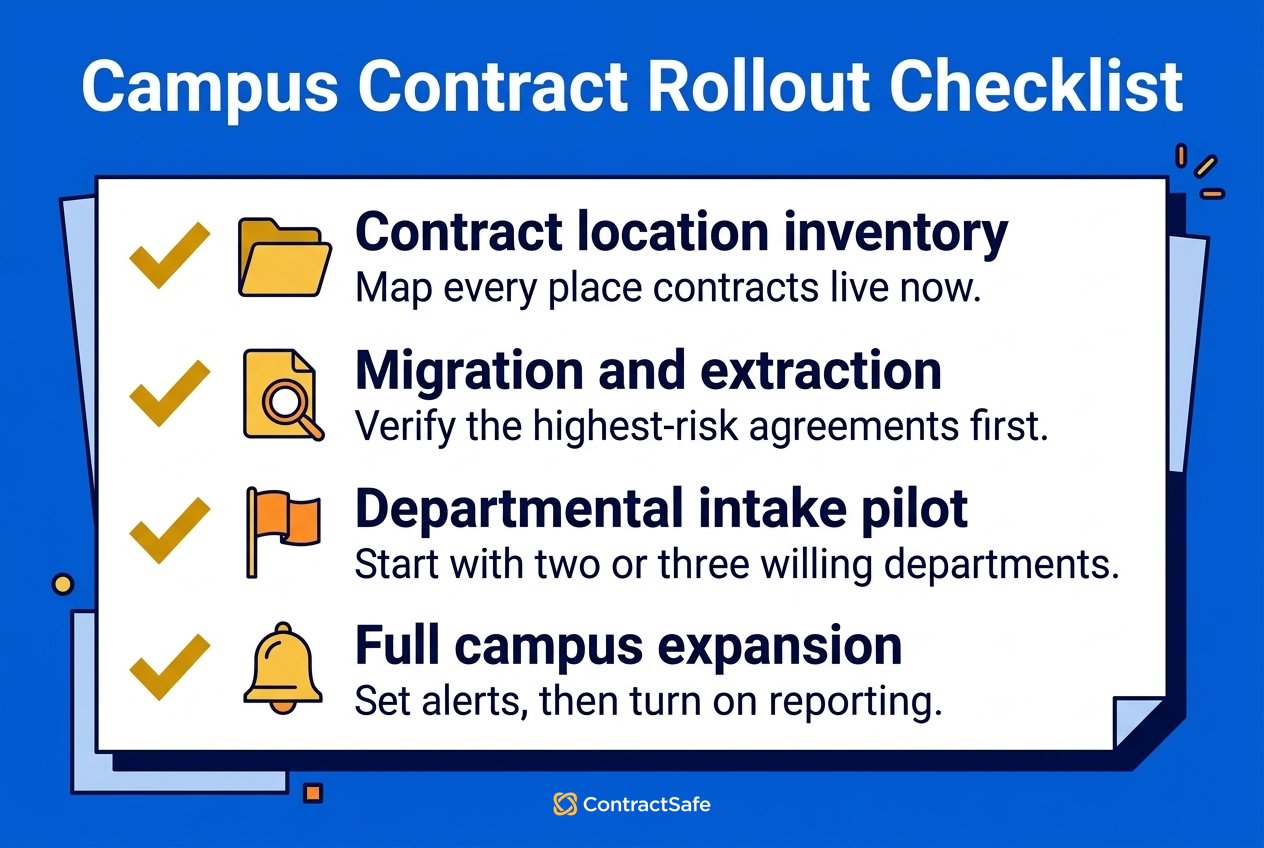
  • Map the contract city. List where contracts live now: shared drives, inboxes, procurement folders, research systems, legal files, and department archives.
  • Name the users who need access. Include legal, procurement, finance, IT, research administration, athletics, HR, facilities, and academic departments.
  • Define the must-track fields. Start with vendor, department, owner, contract type, value, effective date, renewal date, notice window, and data sensitivity.
  • Test search with real messy documents. Upload scanned PDFs, old vendor agreements, amendments, and oddly named files. Polished demo documents don’t count.
  • Ask who can act without legal. A good repository cuts down on document hunting. It shouldn’t make legal the campus search desk.
  • Check the budget model. If access is priced per person, ask what happens when every department that touches contracts needs a seat.
  • Ask about launch work. Who migrates files? Who sets fields? Who trains users? Who fixes the first messy upload?
  • Ask what happens after adoption grows. A tool can look inexpensive when only legal uses it. Higher education needs the cost model to survive broader access.

The buying conversation gets clearer when the team stops asking “Which platform has the most?” and starts asking “Which platform removes the most contract work from the wrong people?”


Questions the Buying Committee Should Ask

Higher education software buying usually has a committee because the contract problem touches a lot of people.

That’s good.

It’s also how buying conversations drift.

One person asks about AI. Another asks about implementation. Someone else asks whether procurement can run reports. Then the meeting ends with a feature spreadsheet and no clear sense of what the campus actually needs first.

Use these questions to pull the conversation back to the work.

  • Whose contract problem are we solving first? Legal intake, signed agreement search, renewal control, reporting, or campus access?
  • What would a successful launch look like? One department onboarded, all vendor contracts imported, renewal alerts live, or legal intake rebuilt?
  • Who needs access on day one? If the answer is more than legal, the pricing model and permission model matter immediately.
  • What data fields have to be trustworthy? Vendor, owner, department, renewal date, notice window, value, contract type, data sensitivity, and status are common starting points.
  • What will we stop doing manually? If the system doesn’t remove spreadsheet tracking, email hunting, or recurring legal requests, adoption will be hard to defend.
  • Who owns cleanup after launch? A repository is only useful if someone owns fields, naming, duplicates, permissions, and old records that don’t fit neatly.
  • How will we know people are using it? Search activity, renewal reports, department access, and fewer “Can you send me the contract?” emails are better signals than training attendance.

That last point matters.

A campus can complete implementation and still fail adoption.

Adoption isn't “we trained everyone.”

Adoption is “people stopped working around the system.”


If you’re still sorting out the buying path, these are the next useful reads:


How ContractSafe Helps Higher Education Teams

ContractSafe is the best fit for most higher education teams because it gives the campus a searchable, access-controlled contract system people can use without a heavy enterprise rollout.

That may not sound flashy.

It’s also the difference between a contract system people use and a contract system people work around.

Most colleges and universities don’t need their first contract project to become a year-long transformation program.

They need one place for signed agreements, dates they can trust, alerts that arrive early, and access that doesn’t require a help ticket.

ContractSafe gives legal control without making legal the only doorway.

It gives departments access without giving everyone the keys to everything.

It gives finance and procurement reports without asking them to become contract librarians.

It gives the committee a simpler cost conversation because pricing starts at $450/month and every plan includes unlimited users.

It also gives teams the features higher-ed teams usually need beyond storage: AI-powered search, OCR, custom alerts, dashboards, reporting, audit trails, intake forms, workflows, e-signatures, Word redlining, and template libraries.

No magic.

Just a clearer campus map.

It’s like putting up signs after years of telling everyone to “just ask around.”


Hassle-free contract management


FAQs

What is the best contract management software for higher education?

For most colleges and universities, the best fit is the system people across campus will actually use: searchable contracts, renewal alerts, permissions, reporting, AI search, unlimited users, and pricing that doesn’t turn every new user into a budget conversation.

That’s where ContractSafe usually fits best.

Should higher education teams choose a full CLM or a contract repository first?

Start with the problem you’re trying to fix.

If the pain is signed agreements, renewals, permissions, audit records, and campus-wide access, start with the repository. If the pain is drafting, negotiation, approval routing, and legal intake before signature, a heavier CLM may be worth comparing.

Why do unlimited users matter for campus contract management?

Contracts touch legal, procurement, finance, IT, HR, athletics, facilities, research, and academic departments.

If every user adds cost, access gets rationed. Then people go back to side copies, email threads, and asking legal for routine documents.

What should a university test before choosing contract management software?

Use real campus documents: scanned vendor agreements, renewal clauses, restricted HR files, research agreements, and department-owned contracts.

Ask each vendor to show search, permissions, renewal alerts, reporting, and what a non-legal user can do without help.

When should a university choose a heavier enterprise CLM?

Choose a heavier CLM when legal owns a detailed intake, review, approval, negotiation, and signature process, and the institution has the team to administer it.

If the main problem is finding signed contracts and tracking renewals, that may be more system than you need at the start.

Ready to see it in action?

See how ContractSafe keeps contracts searchable, trackable, and easy for the whole team to use.

Book a Demo

Searching for Contract Sanity?

Gain control of your contracts today. Take the first steps in just a few minutes

Book a Demo
recent blog post separator

Recent Blog Posts

Folders flowing into a highlighted renewal calendar for payer contract management Payer Contract Management and What Healthcare Teams Should Track Before Renewal

Learn what payer contract management should include, what to look for, and how legal teams use it to find, track, and act on contracts.

featured ai contract review playbook clean ai review AI Contract Review Playbook for Legal Teams

AI contract review software can extract contract data, flag risks, and keep human review in control. Use this practical playbook before you choose a tool.

Contract packet, calculator, and price tag showing Ironclad pricing variables Ironclad Pricing for Legal Teams in 2026 and What to Budget Before Buying

Ironclad pricing is quote-only and enterprise-priced. See expected platform costs, implementation fees, first-year budget risk, and alternatives.

icon_line_dots person_testimonial

“I couldn't believe we were already up and running in just 30 mins

icon_yellow_quotes
  • sirius-xm-logo
  • Dollar-Shave-Club-logo
  • TED-logo
  • United-Express-logo
  • The-University-of-Arizona-logo
  • j2Global-logo
  • payscale-logo
  • Living-Spaces-logo
  • Jam-City-logo
  • McClatchy-logo
  • SFMOMA-logo
  • Sacred-Heart-logo
  • california-pizza-kitchen-logo
icon-line-dots

Contract relief is waiting.

Gain control of your contracts today. Take the first steps in just a few minutes.

Request a Demo