


A contract repository is a searchable home for signed agreements, their owners, key dates, and a short list of reviewed fields. This ultimate contract repository guide shows how to build that operating model, test it with real documents, set automation boundaries, and measure practical ROI without borrowing a savings number.
The project usually starts with an ordinary question: finance asks which vendor agreements renew soon, and the answer is scattered across shared drives, inboxes, and old spreadsheets. Everything is stored. Nobody can trust the route to an answer. Think of it like a warehouse that has shelves but no receiving rules, labels, owners, or scheduled checks. The boxes are indoors, yet every request still becomes a search. A useful repository needs the same operating discipline as a useful warehouse.
That’s why repository work is broader than moving PDFs. The useful record connects the executed agreement, amendments, ownership, dates, and reviewed data without confusing a draft for the governing paper. The setup must also survive turnover. If only one person understands the folders, fields, or date definitions, the organization has centralized files without centralizing knowledge.
Key Takeaways
- A contract repository has to prove four things: people can find language fast, every record has an owner, key dates get reviewed, and fields stay accurate enough to trust.
- Do the setup work before you sit through demos. Inventory your files, list your owners, list your dates, and cut your field list down to what legal and finance actually use.
- Automation has a boundary. Reminders and AI-assisted extraction move work along, but a person still confirms what a field says and where that answer came from in the document.
- ROI here is a scorecard, not a borrowed percentage. Track faster finding, fewer missed dates, and cleaner renewal review instead of inventing a savings number.
Choose your next step:
Start with the setup steps.
Use the repository proof tests.
Build the business case from the ROI scorecard.
What Legal Teams Should Expect From a Contract Repository
A contract repository proves itself when people can find the right agreement and source language, trust the owner and dates attached to it, and know what action comes next. Storage isn’t the achievement. Shared drives already store files.
That distinction matters whether a team is testing the limits of SharePoint contract management or replacing a collection of folders. The buyer question isn’t just “Where will the files live?” It’s “What can we prove about the files after they arrive?”
The National Archives treats its electronic-records requirements as a starting point that agencies tailor into system requirements, not a finished commercial standard. The useful analogy is simple: define your repository requirements first, then test software against them.
Version trust belongs in the proof standard too. The repository should make it clear which document was signed, which amendment changed it, and which stray drafts should not drive a business answer. Search that returns every version without helping the reader identify the governing record simply moves the hunt into a new interface.
The same applies to adoption. A repository isn’t useful only because legal can operate it. Finance, procurement, and business owners should be able to find the records and answers appropriate to their roles without turning legal into a permanent search desk. The buyer should test that work directly instead of inferring it from a feature list.
| Decision area | Good setup | Red flag |
|---|---|---|
| Search/OCR | Search finds language inside scans and third-party PDFs | Search works only on clean files or filenames |
| Owners | Every important record has a business owner and legal fallback | Dates exist without an accountable owner |
| Dates | Renewals, expirations, notice windows, and payment dates have follow-up owners | Dates are stored but not reviewed |
| Fields | Legal and finance maintain a short field list they use | Imported fields sit half-complete |
| Source language | Extracted values can be checked against contract text | Tidy output is treated as final |
| ROI | The team measures finding, date review, and owner questions | The business case promises savings without a model |
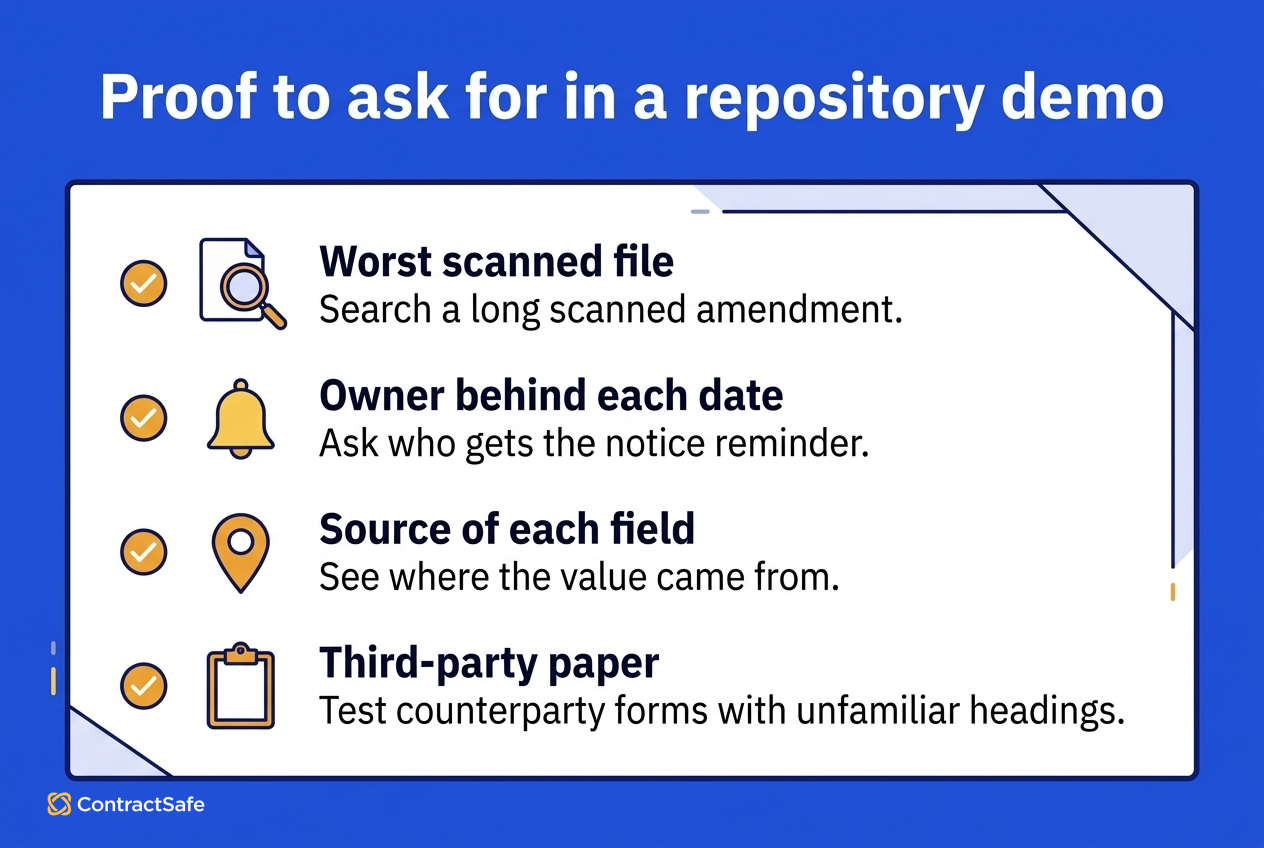
Proof to Ask For
Search the worst file. Use a long scanned amendment with awkward formatting, not the vendor’s clean template.
Attach a person to a date. Ask who receives a notice-window reminder and who becomes the fallback when that owner changes roles.
Trace a field to its source. Have the system show where a notice-period or term-end value came from in the agreement.
Use third-party paper. Counterparty forms with unfamiliar headings reveal more than documents your own team drafted.
Set Up a Contract Repository Before Choosing Software
Contract repository setup should happen before vendor selection. The team needs to know where signed agreements live, which records matter, who owns them, which fields deserve maintenance, and how dates will be named and reviewed.
Inventory the real sources. List the shared drives, inboxes, e-signature accounts, filing cabinets, and spreadsheets that actually hold signed paper. Use the real locations, not the places the policy says people should use. That list defines the cleanup scope.
Treat this like opening boxes before a move. A newer system doesn’t make a duplicate agreement, detached amendment, or uncertain signature status disappear. Inventory work exposes which collections can move as a group and which records need a person to decide what governs.
Prioritize by consequence. A live customer agreement, major vendor contract, or renewal-heavy lease deserves more care than an expired NDA with an inactive counterparty. Start with active agreements, near-term dates, and records multiple teams need.
A phased import protects the launch from the archive. Put high-consequence records and upcoming decisions in the first wave, then move the long tail after the team has tested its fields and ownership rules. Otherwise, historical cleanup can delay the exact contracts the business needs to manage now.
Name the record owner. The uploader is the person who moved the file. The owner is the person accountable when a notice window opens. Give every important record a business owner and a legal fallback before import.
Write an owner-change rule at the same time. People change roles, teams reorganize, and vendor relationships move. A repository should have a routine for finding orphaned records and assigning them again instead of waiting for the next reminder to reveal the gap.
Limit the field list. Counterparty, contract type, effective date, term end, renewal or notice window, owner, and a value field when finance uses it will cover much of the work. NARA’s metadata guidance, last reviewed in 2025, is federal archival context, but it reinforces the operating principle: metadata earns trust through consistent definition and review.
Define date vocabulary. “Renewal date,” “term end,” and “notice deadline” can’t mean different things to different teams. Write one definition for each maintained date and decide who reviews it.
Decide how the repository will handle conflicting dates as well. An amendment may change the term, a side letter may create another deadline, or an old spreadsheet may disagree with the signed text. The operating rule should identify the governing source and route uncertainty to a person.
Assign the cleanup work. Moving from folders is different from consolidating several systems. Decide who resolves duplicates, missing owners, detached amendments, and uncertain dates. Software can make the result easier to use, but it can’t make those decisions for the team.
Before the full import, define what an accepted record looks like. It might require the executed agreement, connected amendments, an owner, the next maintained date, and a completed source check for any field people will rely on. Then sample each migration batch against that definition. A batch count can tell you that files moved; a record-level check tells you whether the repository is ready for business questions.
Sampling also keeps cleanup decisions visible. Record why a duplicate was excluded, why an amendment was connected to a base agreement, or why a date stayed unresolved. That short decision trail gives the next reviewer context and prevents the same uncertainty from being rediscovered after launch.
This setup also clarifies scope. Contract lifecycle management software features may address work before signature, while a repository centers on signed agreements and post-signature answers.
Use the contract repository requirements guide to turn the six steps above into a vendor test.
Decide Who Owns the Repository and What You Will Automate
The contract repository operating model is the set of rules that keeps records useful after launch. It names record owners, maintained dates and fields, review cadence, and the point where automation hands a decision back to a person.
The warehouse metaphor still fits. Receiving, labeling, and cycle counts work because somebody owns each task on a schedule. Five operating decisions carry most of the weight:
Assign a business owner and legal fallback for every important record.
Select dates that deserve reminders, including notice windows that arrive before a renewal or term-end date.
Maintain only fields people use for legal, finance, procurement, or operational decisions.
Set a review cadence that’s tighter for renewal-heavy categories and lighter for the long tail.
Write the automation boundary so users know what a system may suggest and what a person must confirm.
The NIST human-centered AI taxonomy centers human goals and outcomes when describing human-AI tasks. Applied here, AI assistance can narrow search or propose an extracted value while a named person stays responsible for checking the source and acting on it.
Practical boundaries look like this:
Reasonable to automate: surfacing candidate clauses, proposing field values, sending reminders to named owners, and flagging records missing required data.
Keep with people: interpreting a clause, choosing whether to renew or renegotiate, and approving a change to a legal position.
Always preserve: a path from an extracted value back to the contract language that supports it.
The cadence needs exception handling, not just a calendar. If a review finds a missing owner, uncertain date, or field that conflicts with the contract, decide where that record waits, who resolves it, and how the correction is documented. Otherwise, every review creates a side list that slowly becomes another ungoverned source of truth.
Owner accountability should also be visible to the teams using the repository. Legal may define the rule, but finance or procurement often knows when a vendor relationship has moved. Give those teams a clear route to flag stale ownership or date information without silently changing a legal record.
Review the operating model after the first real renewal cycle. The team will learn which reminders were too early or late, which fields nobody used, and which source checks prevented a bad answer. Adjust the model from that evidence rather than adding more fields because they sound useful.
Put decision rights beside the tasks. A repository administrator can maintain configuration and coordinate imports, but that doesn’t make the administrator the owner of every commercial choice. Business owners decide what to do about the relationship, legal reviewers handle uncertain language, and finance or procurement can verify the details their work depends on. The operating model should say who can correct a record, who approves the correction, and who only needs to be notified.
Keep a small exception queue for records that fail the normal path. Give every exception a reason, an owner, and a next review date. That queue is more useful than forcing uncertain data into a clean-looking field, and it gives the team a concrete way to measure whether cleanup is actually finishing.
Those boundaries become part of the demo script. They keep the evaluation centered on the team’s operating model instead of a feature tour.
Test Search and OCR Before You Trust the Contract Data
Contract repository testing should use the team’s own scans, third-party forms, amendments, dates, and owner changes. A polished demonstration with clean sample documents can’t prove the repository will handle the paper people struggle with every week.
Test Search and OCR
Choose scanned agreements that contain distinctive language, upload them, and search for that language. Either the right records return or they don’t. ContractSafe provides a central contract repository with document search and OCR for scanned files, so the buyer should test those capabilities with real paper.
Vary the documents on purpose. Include a native PDF, a scan, an amendment, and third-party paper with unfamiliar headings. Search by party, clause language, and a phrase that appears only inside the document. Record which queries returned the governing agreement and which returned an incomplete or noisy result.
Search testing should include false confidence. Finding a document isn’t enough if the result is an unsigned draft or an amendment without its base agreement. Ask how the user can tell which version controls and how related documents stay connected.
Test Dates and Owners Together
Load an agreement with a renewal, expiration, notice window, or payment date. Confirm that the reminder arrives early enough to support action, reaches a named owner, and has a fallback when that owner changes. ContractSafe reminders can support renewal and other key-date follow-up, but the operating model still has to supply the right date and person.
Then sample imported records and ask who owns each one. Uncertain answers expose an operating gap while it’s still cheap to fix.
Test the handoff as a scenario, not a field display. Change the owner on a sample record and see whether future follow-up moves with the responsibility. Ask what happens to open reminders and whether the legal fallback can still see the work that needs a decision.
Test Source Language and Human Review
Ask the system to extract a term-end date or answer a question about contract language. The real proof isn’t a confidence score; it’s the path back to the supporting sentence. ContractSafe AI can support AI-assisted search and extracted data with human review. Extraction proposes; a person confirms.
Use an agreement with a straightforward term and another with amendment language that changes it. The second document shows whether the workflow helps the reviewer find uncertainty or hides it behind a neat field. Keep the reviewer’s role explicit: confirm, correct, and record the dependable value.
Test Sensitive-Access Questions
Use a document whose audience should be limited and ask the vendor to demonstrate how the proposed setup handles it. Treat the answer as a buyer question, not as an assumption about a feature that has not been approved or tested.
Capture the session in a simple evidence table:
| Test | Evidence observed | Open question | Owner |
|---|---|---|---|
| Search/OCR | Which real files and phrases returned | Which file types or queries failed | Repository lead |
| Dates | Which reminder and owner handoff worked | Which exception needs another rule | Business owner |
| Source language | Which answer traced back to text | Which amended language stayed uncertain | Legal reviewer |
| Access | Which sample audience was demonstrated | Which sensitive category needs follow-up | Legal and IT |
A useful test session should leave the team with evidence, open questions, and named owners for each follow-up. It should not end with a longer feature wish list.
Set acceptance criteria before the session. For example: the selected scan must be findable from an internal phrase; the owner handoff must route the next reminder correctly; and the extracted date must point back to the clause a reviewer used. Write down failures as gaps to resolve, not as demo-day exceptions to forget. Then rerun the failed scenario after the vendor or internal team changes the setup.
Finally, test with the people who will use the answer. A legal reviewer may understand why a search result is incomplete, while a business owner may reasonably assume the first result is final. Watching both roles work through the same scenario exposes training needs, naming problems, and ambiguous handoffs before those problems show up during a live renewal.
Measure Contract Repository ROI Without Inventing a Number
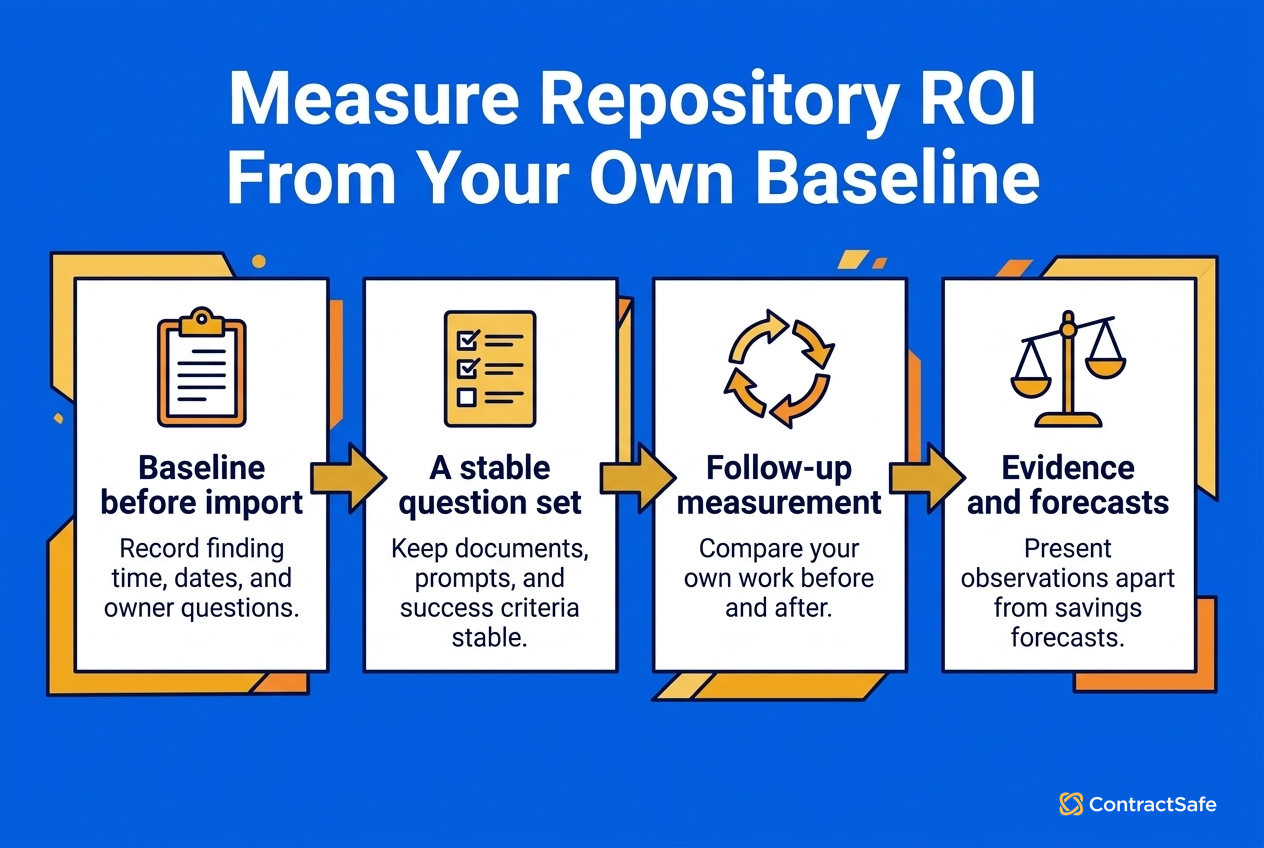
Contract repository ROI can be measured with an operating baseline instead of an industry percentage. Track finding time, dates reviewed before their notice windows, recurring owner questions sent to legal, and the amount of renewal review completed without a scramble.
| Measure | Baseline question | Follow-up question |
|---|---|---|
| Finding | How long does a real clause lookup take now? | Can the same question be answered faster from the repository? |
| Dates | Which upcoming dates have an owner and review point? | Did the share with assigned follow-up improve? |
| Owner questions | How often does legal have to identify the record owner? | Are business owners finding more answers themselves? |
| Renewal review | How much work begins after the notice window is already close? | Is review starting earlier with cleaner records? |
Collect the baseline before import, then repeat the same questions after the repository is in regular use. The point isn’t to manufacture a universal financial result. It’s to compare the team’s own work before and after the operating change.
Use the same question set in both measurements. If the baseline uses difficult clause searches and the follow-up uses easy filenames, the comparison says nothing. Keep the documents, prompts, and success criteria stable enough that the team can explain what changed.
Add adoption evidence without turning usage into a vanity metric. A login count doesn’t show whether someone found the right agreement or acted on a date. A better signal is whether recurring contract questions reach the repository first and whether the answer still points back to source language.
World Commerce & Contracting’s discussion of unlocking financial potential identifies improvement steps and lifecycle areas where change may improve return. That supports a scorecard approach, not a claim that repository software causes a specific outcome.
The business case should also name costs honestly: software, internal cleanup time, owner training, and any work required to maintain the new process. A separate contract management ROI calculator can help organize company-specific inputs, but its structure isn’t a substitute for observed baselines.
Separate one-time effort from ongoing work. Initial inventory and cleanup may be concentrated around launch, while owner review, date maintenance, and exception handling continue. That distinction helps the sponsor understand what the repository changes and what discipline the organization still has to fund.
The scorecard can include qualitative evidence too. Earlier renewal conversations, fewer emergency searches, and clearer ownership are meaningful when the team records concrete examples and ties them to a maintained process. They shouldn’t be converted into dollars unless the organization has a defensible model for doing so.
Choose a review window that matches the work. Finding-time tests can be repeated soon after launch, but renewal evidence needs enough time for real notice windows and owner decisions to occur. Record who collects each measure and where the evidence lives. Otherwise, the ROI scorecard becomes another spreadsheet that nobody updates.
When presenting the result, separate evidence from expectation. “We answered these ten recurring questions with fewer handoffs” is an observation. “The repository will save a fixed amount every year” is a forecast that needs its own assumptions. Separating those categories lets the owner defend the business case and revise it when contract volume or the review process changes.
Once the team knows which repository problems it’s solving, it can review ContractSafe pricing in that context. ContractSafe publishes pricing options for businesses of different sizes; no exact price or payback claim is needed to compare the option with the buyer’s scorecard.
Related Reading
How ContractSafe Helps With the Repository Decision
A practical ContractSafe evaluation should ask whether finance, procurement, and business owners can safely answer routine contract questions without sending every request back to legal.
ContractSafe fits when a team needs signed agreements to become searchable records with dependable follow-up, without pretending software can replace owners, clean source documents, or human judgment.
The fit should be judged against the operating scorecard, not against the longest feature list. A team focused on post-signature search, dates, ownership, and reviewed data has a different buying job from an organization rebuilding intake, negotiation, approval, and signature workflows at the same time. Name that scope before the demo so the evaluation stays tied to the problem being funded.
ContractSafe provides a central repository with document search and OCR for scanned files. That supports the first proof test: can someone find the right agreement and language even when the file is messy?
ContractSafe reminders support renewal, expiration, payment, and other key-date follow-up. They work best when each maintained date has a named owner and review rule.
ContractSafe AI supports smarter search and extracted data with human review. The reviewer should still check the supporting contract language before relying on an extracted field or answer.
When that’s the scope, ContractSafe helps teams test the repository job against their own documents, dates, and owner questions. That test should still end with the source agreement and a named reviewer, not an extracted answer by itself.
Bring real contracts to a ContractSafe demo. Test search, dates, owner handoffs, and source-language checks against the scorecard above.







.svg)







.svg)




