


The contract repository shared drive question is really one question wearing a suit: are your folders still doing the job, or do your contracts need a system built for contracts? A shared drive stores files by name and location, which is a perfectly honorable thing for software to do.
A contract repository stores contracts so you can search inside them, find the ones expiring next quarter, and know who owns each one without wandering the hallway asking people who might remember.
Quick answer: The contract repository shared drive decision is best judged by the work it helps legal, finance, procurement, and operations teams finish: finding the right contract, trusting the data attached to it, and turning that data into the next action.
Think about a hardware store versus a toolbox. A hardware store works when you know the aisle. A toolbox is smaller because it’s organized around the job you keep doing. Shared drives are hardware stores: they hold almost anything, but require you to know where it was filed. That stops working when someone asks which vendor agreements auto-renew in October, because folders don’t have an aisle for renewal dates.
Key Takeaways
- A shared drive is a legitimate answer when contract volume is low, one person handles filing, and nobody depends on date-driven follow-up.
- Folder systems break on questions, not on storage. The trouble starts when someone needs to find contracts by term, date, party, or owner instead of by filename.
- Five proof tests reveal whether you’ve outgrown folders: search, dates, owners, sensitive files, and reporting questions.
- ContractSafe supports a central contract repository with document search, including OCR for scanned files, plus reminders for renewal, expiration, payment, and other key dates.
Choose your next step:
-
If you’re deciding whether folders still fit, start with when a shared drive is still enough.
-
If the team is stuck in shared drives, run the five proof tests.
-
Before evaluating options, use the questions to ask before moving contracts.
When a Shared Drive Is Still Enough
A shared drive is genuinely enough when contract volume is small, one person does the filing, and no critical dates are buried inside the documents. That’s not a consolation prize, it’s a real answer.
Legal teams sometimes jump straight to software before folders have actually failed, and that’s a waste of money and attention. Give the shared drive a fair standard before you go replacing it. Here’s the narrow-fit standard. If all of these are true, keep the folders and spend your budget on something else:
-
Volume is low enough to hold in your head. The filing owner can name most active agreements and answer routine questions without launching a portfolio review.
-
One person owns filing. Naming conventions survive when one person applies them. They decay the moment three people file with three different ideas about where the year goes in the filename.
-
Everything is a native PDF or Word file. No scans, no photographed signature pages, no faxed amendments. Your drive’s search can read the text.
-
No date depends on someone remembering. Either the contracts have no renewal or notice dates, or those dates live somewhere reliable, like a calendar a specific human actually maintains.
-
Nobody asks portfolio questions. No one’s walking up and saying “pull every agreement with a liability cap over X” or “which contracts have that indemnity language.”
If you’re nodding along to all five, your shared drive is doing exactly what it was built to do: store files and hand them back by name. It’s inexpensive, it’s familiar, and it’s appropriate for a storage-sized problem. Not every problem needs a platform. The catch is that teams outgrow that fit quietly. Contract count creeps up, more people start filing, scans arrive, and one day a renewal date nobody saw slides right past.
At that point, renaming folders won’t answer the contract questions the system was never built to handle. The proof tests below are how you catch the change.
The First Contract Problems Folders Hide
Folders hide four problems before anyone notices: an agreement renews without a decision, a term can’t be located on demand, one person alone knows where the file lives, or two similar-looking versions quietly disagree with each other.
They tend to surface as a surprise invoice, a stalled deal, or an afternoon you spend opening PDFs one at a time. Renewal by silence is the first warning. A clause doesn’t send an alert.
Its notice window can close before the date somebody vaguely remembers, and in a folder system the backstop is usually a personal calendar maintained by a person who may well have changed roles since they set it up. Search is the second warning. Sales asks whether an executed agreement contains a particular clause, and the signed version turns out to be a scan.
Your drive returns nothing, even though those exact words are sitting on page fourteen, because it’s looking at an image and not at searchable text. No result and no such thing look identical from the outside. The third warning is concentrated knowledge. One person knows that some contracts are in the drive, some are in email, and a few live in an oddly named archive nobody else has opened.
Their skill keeps everything moving, which is lovely right up until they’re on vacation. The fourth warning is version drift: two similarly named files hold different terms, and “modified date” doesn’t prove which one governs anything.
None of these are storage failures. The drive stored exactly what people handed it, faithfully, without complaint. They’re contract-control failures, and they show up precisely when the question is time-sensitive and the answer depends on meaning rather than a filename.
The Five Proof Tests: Search, Dates, Owners, Sensitive Files, and Reporting Questions
Five proof tests separate a shared drive that’s still working from one that’s quietly failing. Run each one on your actual drive, with your actual documents, not on a hypothetical version of your team that names files correctly.
Each test takes a few minutes and gives you a yes or a no, and the pattern of failures tells you what a contract repository would actually have to fix.
Test 1: Search
Pick a term you know exists inside at least one contract. Not a filename, a term. Something like a specific vendor’s legal entity name, or a phrase from a clause you negotiated hard enough to still resent. Now search your drive for it and start a timer.
You pass if you find every contract containing that term quickly and reliably. You fail if the search returns filenames only, misses documents you know contain the phrase, or turns up nothing because the relevant file is a scan. This is the test most drives lose, and they lose it quietly, because a search that returns nothing looks exactly like a search where nothing exists.
Test 2: Dates
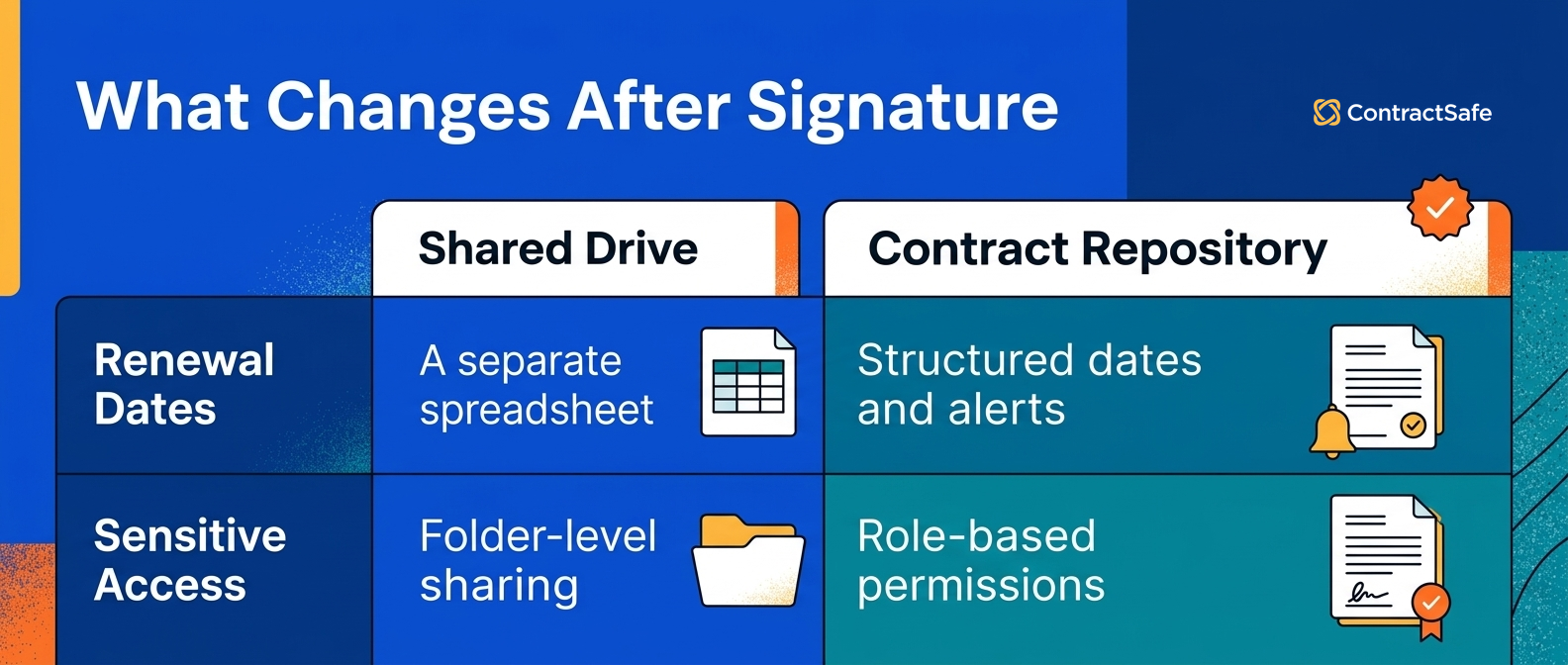
Ask this out loud: which contracts expire or auto-renew soon? Then try to answer it from the drive alone, without opening a spreadsheet somebody maintains on the side.
You pass if the answer comes from the system that’s holding the contracts. You fail if the answer lives in a parallel spreadsheet, a personal calendar, or someone’s memory. That side spreadsheet is the tell, by the way. It exists because the drive can’t answer date questions, and it’s only as current as the last time a human remembered to update it, which is a sentence that should make anyone nervous.
If that side spreadsheet sounds uncomfortably familiar, our spreadsheet contract management webinar recap walks through moving away from it.
Test 3: Owners
Pick five contracts at random. For each one, name the business owner, the person who signed, and who to call if there’s a dispute. Do all of that without opening the document.
You pass if the drive itself carries that information in a form someone new could read. You fail if the answer requires opening the PDF, or requires you specifically, because you happened to be in the room when it was signed. Owner knowledge that lives only in one person’s head is a single point of failure, and it announces itself the first day that person isn’t available.
Test 4: Sensitive files
Look at where your most sensitive agreements sit. Executive agreements, settlement terms, anything you’d rather not see forwarded around. Now think about who can currently open that folder. You pass if the answer is a short, deliberate list you could recite from memory.
You fail if the answer is “everyone with drive access” or “I’d have to check.” Shared drives lean toward openness because openness is what makes them useful in the first place. And that instinct works directly against contracts that need a smaller circle.
Test 5: Reporting questions
Someone from finance or the executive team asks a portfolio question. Not about one contract, about the whole set. How many active vendor agreements do we have? What are we committed to next year? Which agreements renew automatically? You pass if you can answer without opening files one at a time. You fail if answering turns into a manual review project with its own unofficial deadline.
This is the test that promotes a filing annoyance into a business problem, because portfolio questions don’t stop arriving just because they’re hard to answer.
Proof-Test Scorecard
| Decision area | Buyer question | Shared drive passes when | Repository is needed when | Next step |
|---|---|---|---|---|
| Volume | How many active contracts need daily answers? | Volume is low and ownership is obvious. | Contracts are spread across teams, vendors, and renewal dates. | Use the requirements guide. |
| Search | Can users find scanned files and third-party agreements by language? | File names are consistent and scans are rare. | Users need OCR and full-text search across messy files. | Test repository search. |
| Dates | Can the team trust renewal and notice-date follow-up? | Dates are few and manually owned. | Missed renewals or notice windows create business risk. | Test alerts with a renewal-heavy contract. |
| Ownership | Who owns each contract record after upload? | A single team manages every folder and naming rule. | Ownership varies by department, vendor, or contract type. | Define required owners before buying. |
| Sensitive files | Can the business self-serve without exposing restricted agreements? | Access needs are simple. | Legal needs contract-specific access boundaries. | Turn this into a demo question, not an unsupported product claim. |
| Reporting questions | Can legal or finance answer basic contract questions without cleanup? | Spreadsheet cleanup is rare and low risk. | Reports depend on fields, dates, owners, and searchable records. | Use the requirements guide. |
Use the contract repository requirements guide before you turn folder problems into a software shortlist.
Proof to Ask For
If you’re evaluating any repository, don’t accept a scripted demo running on suspiciously tidy sample data. Ask for these three things instead:
-
Run the search test on your own files. Bring a scanned contract and a native PDF, search a phrase that appears in the body of both, and write down what comes back.
-
Set a real reminder on a real date. Use a contract with an actual renewal date and configure the follow-up right there in front of you, including who receives it.
-
Ask a portfolio question live. Try something like “show me everything expiring in Q1,” then note the steps and the data required to get an answer.
A single failure might just point to a process fix. Failures across several areas are telling you that the folder structure itself can’t answer the questions your team keeps asking.
What Legal Should Verify Before Choosing a Contract Repository
A contract repository has to prove four things before it earns the switch.
It can search the words inside your documents including scans, it can tell you what’s coming due without being asked, it can be used by someone who didn’t build it. And it can hold every contract in one place instead of most of them. Anything short of that’s a folder with a nicer login screen.
Start with search, because it’s the test most systems fail quietly. The bar isn’t “has a search bar.” A search bar alone proves nothing. The real test is whether a phrase from the body of a signed, scanned agreement returns that agreement.
That’s what OCR is for, and it’s the whole difference between a repository and a filing cabinet with a directory taped to the front.
So take five of your ugliest documents. The faxed ones, the phone-photo ones, the one with a coffee ring in the corner that you’ve made peace with. Search for a phrase buried in the middle of each. If they come back, the search is real, and you can move on to the next thing.
Second, dates that surface themselves. A repository should know a renewal is coming and say so, in advance, to a named human, without anyone remembering to go look. This is the flip from pull to push, and it’s the entire reason renewal-by-silence stops happening to you. The detail that matters most is who gets told.
A reminder landing in a shared inbox nobody owns is decoration, and a reminder landing with the person responsible for the decision, early enough to actually decide, is the feature.
Third, usability by the uninitiated. Here’s my favorite version of this test. Hand the system to the newest person on the team and ask them to find the current signed agreement with a specific vendor and tell you when it expires. Then say nothing. No folder tour, no naming-convention briefing, no helpful hovering. If they can do it unaided, the structure lives in the system.
If they need you, the structure lives in your head, and you’ve just confirmed the single-point-of-knowledge problem followed you into the new tool. Fourth, completeness. An incomplete repository can be worse than an incomplete folder, because it hands you the confident feeling that you’ve looked everywhere when you haven’t.
The value of central storage comes from that word central: one place you can point to, without hedging, and say it contains everything executed. If contracts still live elsewhere after the switch, you didn’t consolidate anything. You added another place, which is the opposite of the goal.
Notice what isn’t on this list. I’m not telling you to demand every feature that exists. The point of writing down your contract repository requirements before you shop is that it keeps you from being sold on the things that dazzle in a demo and sit untouched by March.
Search that works on scans, dates that come find you, a structure a stranger can navigate, and everything in one place. Get those four and the rest is preference.
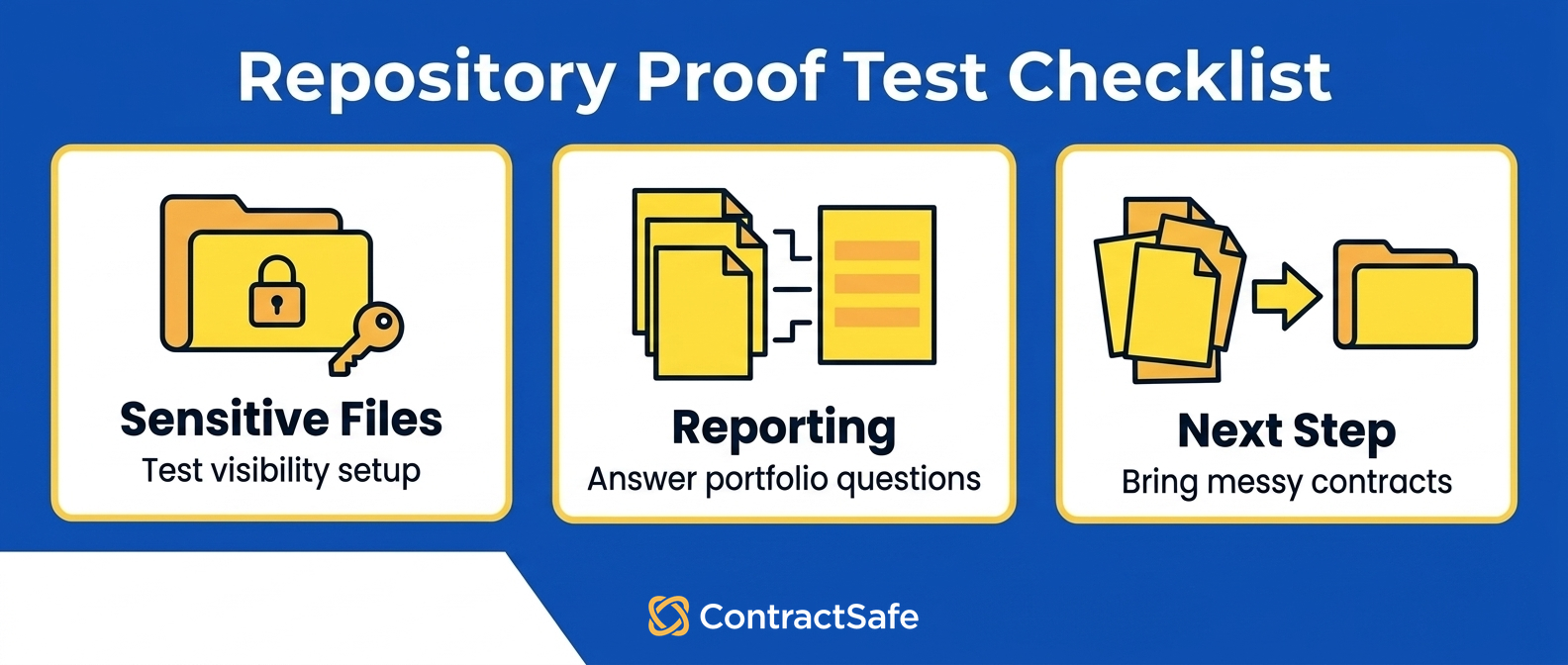
When you’re ready to put those four to the test, our contract repository feature checklist helps you pin down what to verify in a demonstration.
Questions to Ask Before Moving Contracts Out of Folders
Before you move anything, answer five questions: how many agreements actually exist, how often people need answers from inside them, what a missed renewal costs, who knows where everything lives, and how many signed files are scans.
The pattern in those answers tells you whether the move is urgent or premature. Start by counting beyond the drive. Include agreements sitting in inboxes, finance folders, e-signature accounts, and regional collections that someone set up years ago for perfectly good reasons. Then measure demand.
Occasional quick lookups might not justify a new system, but frequent searches followed by a second check to confirm you used the right version are a recurring operating cost wearing a disguise. Put consequences next to frequency, because they aren’t the same measurement. A low-cost monthly subscription and a year-long unwanted renewal carry very different stakes. Then name the person who knows where the contracts are.
If exactly one name springs to mind, your current process depends on that person’s recall. Finally, take a sample of executed agreements and count the image-only files. No folder structure, however lovingly organized, can make their body text searchable.
Write your desired outcomes in plain language, things like “nobody is surprised by a renewal” and “anyone can find the executed contract without asking me.” A short CLM checklist keeps vendor conversations anchored to those outcomes instead of drifting into a vendor’s full feature catalog.
Related Reading
-
The CLM checklist to write down your own outcomes before comparing tools
-
ContractSafe pricing to see the options published for businesses of different sizes
-
ContractSafe alerts for renewal, expiration, payment, and other key-date reminder context
Where ContractSafe Fits Into the Repository Decision
ContractSafe supports a central contract repository and document search, including OCR for scanned contract files.
That combination targets the two failures folders cause most often: contracts scattered across different places, and signed documents your current search simply can’t read.
The scan problem is the one worth sitting with, because it’s where a shared drive fails hardest and says the least about it. If your executed agreements were printed, signed, and scanned back in, a folder search treats those pages as pictures.
OCR changes that. The words on page fourteen become findable words, which means “does this one have an MFN clause” gets answered by searching instead of by opening documents one at a time until you lose the afternoon. You can see how that works on the ContractSafe repository features page.
For the renewal-by-silence problem, ContractSafe alerts handle renewal dates, expiration dates, payment dates, and other key dates by sending reminders ahead of time. That’s the push-instead-of-pull shift described above, made concrete. Instead of counting on someone to remember to review the drive, the date comes and finds the person who needs to act on it, with enough runway left to actually make the call.
On cost, ContractSafe publishes pricing options for businesses of different sizes, so you can see what fits before you book anything.
And if you’d rather test the proof questions from this article against real documents, bring a messy contract set to a ContractSafe demo and try search, dates, and owner questions directly. Those checks will tell you more than a feature list will.








.svg)







.svg)




