


The ContractSafe AI webinar recap is a plain summary of how ContractSafe uses AI to pull key terms from your contracts, keep every result reviewable, and help teams search, ask questions, and check agreements against a playbook without giving up admin control.
Picture a legal operations lead who inherits a large stack of signed agreements with renewal dates buried in scattered clauses. She needs to know which contracts auto-renew next quarter, who owns each one, and where the notice periods sit before a deadline slips past unnoticed.
This recap turns the webinar into a decision guide. You will see what each AI feature does, where it saves review time, and which questions to ask about accuracy, security, and control before you trust it with your contract records.
Key Takeaways
- ContractSafe AI extracts contract terms into usable fields, so dates, owners, and renewal clauses become searchable records instead of buried text.
- Every AI result stays reviewable, with a sparkle icon and a link to the source clause so an owner can confirm each value.
- Pending AI lets you review extracted fields in bulk before they enter your live contract records.
- Smart Search and Ask AI help you find the right contracts and answer questions inside a single agreement.
- AI Contract Review checks agreements against your playbook, while admin permissions keep control with the right people.
Choose Your Next Step
Pick the path that matches where you're in evaluating AI for contract work.
- Want the full session? Watch the AI Unlocked webinar.
- Comparing tools? Explore ContractSafe AI and our contract repository software.
- Worried about accuracy? Read AI Contract Data Accuracy.
- Ready to see it live? Book a demo.
What Makes ContractSafe AI Different?
ContractSafe AI is designed to help with real contract work while keeping humans in charge of the final answer.
That matters because contracts are not casual notes. They contain pricing, renewal rights, termination dates, vendor terms, customer information, and compliance language.
So ContractSafe built its AI around a few practical rules that keep contract data trustworthy:
-
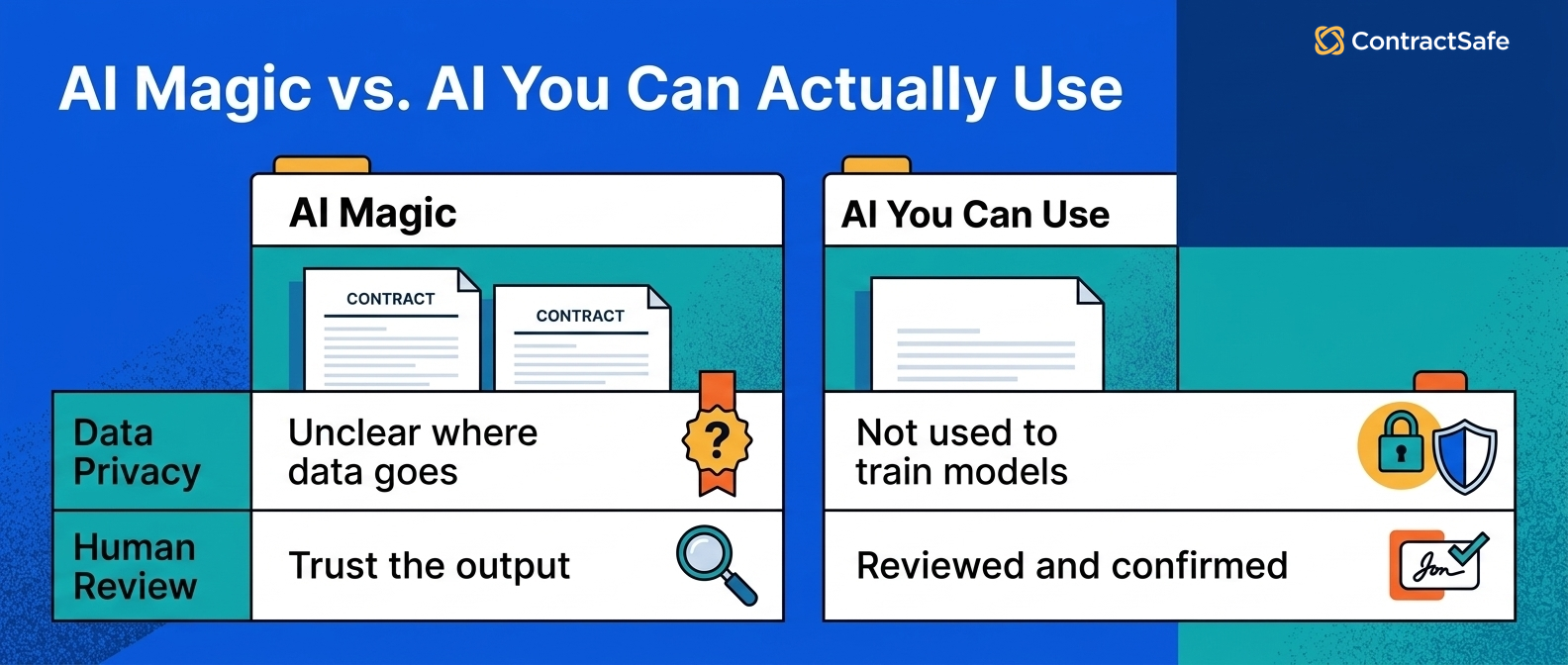
Customer data isn't used to train AI models.
-
AI results are meant to be reviewed and confirmed.
-
Admins can decide which AI features are active.
-
Admins can choose which fields should be extracted.
In other words, ContractSafe AI isn't here to run off and make big decisions while everyone watches from the sidelines.
It's here to do the repetitive first pass, show its work, and let your team confirm what belongs in the system.
That's the difference between "AI magic" and AI you can actually use at work.
1. AI Extraction Turns Documents Into Usable Data
AI extraction helps turn contract language into fields your team can search, filter, report on, and review.
Think of it like unpacking after a move. The contract is the box. The important terms are inside the box. AI extraction helps put everything where it belongs.
ContractSafe has offered AI extraction for a while, and the webinar detailed a major upgrade that now reads your clauses with a large language model.
That helps ContractSafe identify common contract details such as:
-
Contract name
-
Your company and the counterparty
-
Contract type
-
Execution status
-
Effective date
-
Termination date
-
Auto-renewal status
-
Auto-renewal period
-
Deadline to non-renew
-
Governing law
-
Whether the agreement is an amendment
ContractSafe has also expanded AI extraction into more compliance-style and financial fields.
The team discussed new yes/no fields for areas like confidentiality, PCI DSS, and personal data processing. They also covered contract value fields, including Total Contract Value and Year 1 value.
That matters because contract repository software only becomes useful when the data inside it's clean enough to search and report on.
And yes, anyone who has updated hundreds of contract records by hand is allowed to take a deep breath here.
2. AI Results Stay Reviewable
Reviewable AI results make it easier to trust extracted contract data without accepting every answer automatically.
ContractSafe marks AI-extracted values with a sparkle icon. When a field shows the AI badge, an owner should read the underlying clause and confirm the value before it becomes part of the official record.
Selecting that badge opens the source clause in the contract, so a reviewer can verify each extracted field against the actual language before approval.
That source view matters. Your team doesn't have to accept an answer just because AI sounded confident. You can see the clause, confirm the value, and move on.
Once a user confirms the field, the sparkle disappears. That shows the value has been reviewed by a person.
This is a small workflow detail, but it changes the feel of the whole process.
AI is easier to trust when it points back to the contract.
3. Pending AI Helps You Review Contracts in Bulk
Pending AI helps teams confirm extracted fields across many contracts without opening every record one by one.
One contract is easy enough to review. A thousand contracts? That starts to feel like a very specific form of office cardio.
ContractSafe's Pending AI workflow is built for that problem.
Users can filter the contract list to show records with pending AI results. From there, they can select multiple contracts and accept or reject specific extracted fields in bulk.
For example, you might accept contract type and effective date across a batch of agreements, while rejecting a compliance flag that needs another look.
This is especially useful during onboarding, imports, or cleanup projects.
The goal isn't to remove humans from the process. The goal is to make the human review process less painful.
4. Smart Search Helps You Find the Contracts You Actually Need
Smart Search helps users find contracts through natural language-style search, filters, metadata, and keyword search inside contract text.
Most teams don't just need to find one word inside one agreement. They need answers to business questions:
-
Which contracts expire next year and are worth more than a certain amount?
-
Which agreements involve GDPR?
-
Which vendor contracts are up for renewal soon?
-
Which contracts match a folder, department, or status?
Smart Search isn't limited to AI fields.
It can use AI-extracted fields, manually entered fields, folders, and keywords inside the contract text.
That makes it easier to build useful views and reports without wrestling with complicated query logic.
People don't want to construct an advanced Boolean search. They want to find the right contracts before their coffee gets cold.
Quick Gut Check: Where AI Helps Most
Use this quick gut check before you decide where AI belongs in your contract process.
| Contract task | Good AI fit? | Why it helps |
|---|---|---|
| Pulling standard dates and parties | Yes | AI can do the first pass quickly. |
| Confirming unusual legal risk | Maybe | AI can flag issues, but people still decide. |
| Finding contracts by business question | Yes | Search can combine fields, filters, and text. |
| Sending final legal advice | No | That still belongs with your legal team. |
If the task is repetitive, document-heavy, and easy to review, AI is probably a good fit.
If the task requires judgment, negotiation strategy, or legal advice, AI should support the work instead of replacing the person doing it.
5. Ask AI Answers Questions Inside a Contract
Ask AI gives users a side-panel chat experience for understanding one contract at a time.
Sometimes you don't need a full report. You just need to understand the contract in front of you.
Ask AI lets users ask questions like:
-
"Summarize this contract."
-
"What are the renewal and termination terms?"
-
"List the key obligations."
-
"Are there any clauses that seem risky?"
This can help sales, procurement, operations, finance, and leadership get answers faster without sending every question back to legal.
Legal teams are busy enough. They don't need to become the human search bar for every contract in the company.
With unlimited users and permission controls, ContractSafe helps organizations give people self-service access while still controlling who can see what.
6. AI Contract Review Uses Your Playbook
AI Contract Review uses your playbook rules to check contract language against the standards your team chooses.
Contract review is where consistency matters.
One reviewer might flag a clause as risky. Another might let it pass. A third might rewrite the whole thing because that's just how Tuesdays go.
AI Contract Review helps teams standardize that process with playbooks.
A playbook can include:
-
Required clauses
-
Acceptable and nonstandard language
-
High, medium, and low risk conditions
-
Suggested fixes
-
Preferred fallback language
After a playbook runs, ContractSafe shows which rules passed or failed, sorts issues by priority, and provides suggested edits.
Playbooks can be created from scratch, from ContractSafe sample templates, or from a "gold standard" contract your team already likes.
That answers a common AI review question: what is the AI comparing the contract against?
In ContractSafe, the answer is your playbook. Your preferred language. Your rules for what good looks like.
For more on this kind of review workflow, read Why Pre-Signature Contract Review Breaks at Scale.
What to Ask About AI Risk and Control
Before you trust AI with contract data, borrow the discipline of published risk guidance. The NIST AI Risk Management Framework gives you a practical checklist for governing AI risk, testing accuracy, and keeping an audit trail on every extracted contract field.
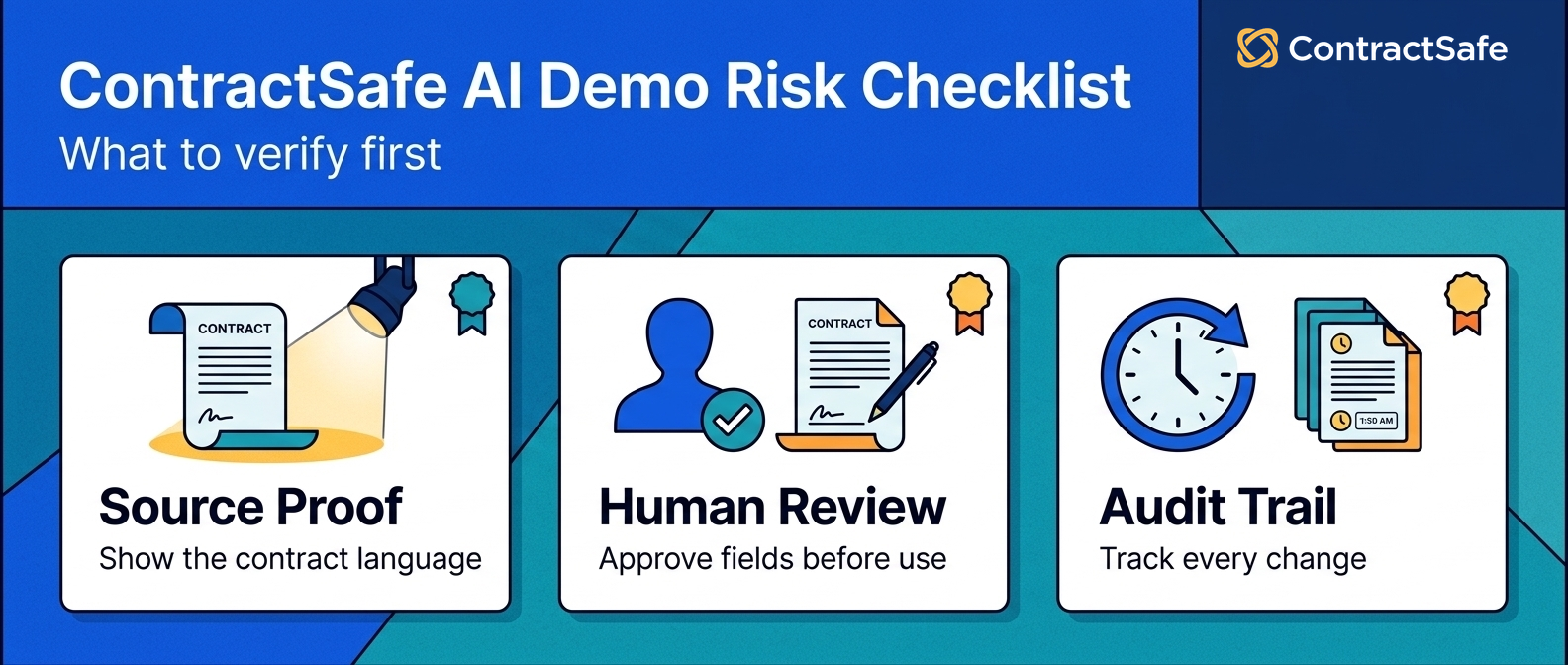
For example, when the AI flags an upcoming renewal date, ask whether it links back to the source clause it read, whether the assigned owner review must confirm that finding before anything moves forward, and whether every step leaves an audit record you can open later and trust.
- Ask how the vendor measures extraction accuracy and error rates on your contract fields. The NIST AI Risk Management Framework frames trustworthy AI as something you measure, so request the error rate on key fields and the review step that catches a wrong renewal date before it becomes a missed obligation.
- Ask who governs the model and how it changes over your contracts. That framework treats governance as a named control, so confirm which admin role approves model updates, who owns the audit record when an extracted clause is wrong, and how a change gets reviewed before it touches live records.
- Catalog AI risk on your paper before rollout, not after an incident. The NIST Artificial Intelligence resources push teams to map AI risk to real harm, so list every contract field where a wrong value could trigger a missed renewal, a broken obligation, or a failed compliance audit.
- Demand evidence of control, not adjectives. Ask the vendor to show the source clause behind each extracted field, an audit log of every AI edit, and the permission model that limits who can change a contract record or an alert.
- Plan for the human review that good AI never removes. Assign a contract owner to approve pending fields, set an alert on every renewal date, and keep a record of who accepted each AI value so you hold evidence for the next audit.
- Ask how the tool handles data privacy and record access without weakening control. Confirm that your contract records stay under your permissions, that an admin can revoke access, and that an audit log records every export so sensitive clause data never leaves without evidence.
- Turn every answer into a record you can reuse. Write the vendor responses next to your own risk list, note which contract fields need a manual review, and set alerts so no accepted AI value ages into a stale record before the next renewal.
- Ask for a written record of how the vendor tests the model before release. A mature answer describes a review of extraction accuracy on sample contracts, a risk rating for each field type, and an audit of edge cases like scanned records and unusual renewal clauses.
- Decide upfront which AI outputs need a second review before they drive an alert. Route high risk fields like an auto renewal date or a termination deadline through a human owner, and keep the source clause and audit record attached as evidence.
- Ask what happens when the AI is unsure about a field. A safe tool leaves the field pending for human review rather than guessing, keeps the source clause visible, and logs the low confidence value so an owner can audit the record later.
Security and Admin Control Are Part of the Product
ContractSafe AI gives admins control over which AI features are enabled and how AI extraction is used.
AI features are exciting until someone from security asks where the data goes.
And honestly, they should ask.
During the webinar, the team emphasized that customer data isn't used to train AI models.
They also covered regional cloud storage options, including the US, Canada, EU, and Australia.
For organizations with strict policies, the ability to turn AI features on or off matters.
The same goes for choosing which extraction fields are active.
Rather than one blanket setting, admins keep full control over how contract records and AI review are managed, so legal, security, and operations teams each stay accountable for the records they own.
If your team is focused on validation and oversight, read AI Contract Data Accuracy next.
How to Evaluate AI After Watching the Webinar
Evaluate ContractSafe AI the way you would test a new hire on your contract team. Check its extraction accuracy on your own agreements, confirm every result links to a source clause, and map who holds admin control over each record before you trust it with a renewal or deadline.
1. Confirm Extraction Accuracy On Your Own Contracts
Ask for a trial that loads your own contracts, not a polished demo set. Run extraction across messy agreements with scanned pages, odd formatting, and handwritten notes, then review each field against the source clause it came from. Track how often the effective date, the renewal term, and the owner match the record. Accuracy on your own paper is the only review that predicts daily use.
Don't judge AI on clean contracts alone, since your hardest records are where errors hide. Pull a batch of your worst amendments and confirm the tool still finds the right clause, field, and date without inventing a value.
2. Check That Every Result Links To Its Source
A trustworthy tool shows its work on every field. Confirm that each extracted value carries an indicator that links to the exact contract clause it came from. During review, click through a sample of values and verify the source language truly supports the field. If a value has no source you can open, treat that field as an unverified risk rather than evidence you can act on.
Check the reverse case too, where AI missed a clause entirely. Confirm you can add the field by hand, tag its source, and keep that record consistent with the AI extracted fields around it.
3. Test Bulk Review With Pending AI
High volume is where contract teams tend to drown. Use Pending AI to stage extracted fields for a bulk review before they enter your live records. Approve the clean values, correct the outliers, and reject anything the source clause doesn't support. Watch how a full review of one contract batch feels in practice, because that effort sets your real workload for every future upload of records.
4. Put Smart Search And Ask AI To Work On Contracts
Search only earns trust if it finds the contract you actually need. Run Smart Search for a precise obligation, like a liability cap or an assignment clause, and check whether it surfaces the right records instead of noise. Then open one agreement and use Ask AI to pull the notice deadline or the indemnity owner. Judge both tools by whether they cite the clause and source behind each answer.
Also test contract search on vague requests, not just exact terms. Ask for every contract with an unusual indemnity or a short renewal window, and confirm the results point to a real clause and source you can open.
5. Pressure Test AI Contract Review Against Your Playbook
AI Contract Review should apply your standards, not a generic checklist. Load your playbook rules, then run review on a draft you already know is flawed, such as one missing a limitation of liability clause or a lopsided renewal term. Confirm the tool flags each gap, cites the source language, and lets you assign an owner to fix it. A review that misses a known risk isn't ready for your contracts.
Then run the same review on a strong contract to check for false alarms. A tool that flags a healthy clause as a risk will bury your team in noise and slow every real review.
6. Map Permissions And Admin Control
Control over records decides who can trust the output. Before rollout, map which roles may edit an extracted field, approve a pending record, or change an admin setting. Confirm an audit log captures every AI edit so you can trace a wrong value back to its source clause. Set alerts on high risk fields like renewal dates so no deadline shifts without a review by the right owner.
Test the limits by trying an edit as a low permission user. Confirm the record stays locked, the audit log notes the attempt, and only an admin can approve the change to a sensitive field.
7. Score Team Fit And Real Review Workload
Great extraction still fails if your contract team will not use it. During the trial, ask each contract owner whether the review flow fits how they already handle renewals, alerts, and obligations. Count the manual steps saved on a typical record, then weigh that against the admin work of correcting fields the AI got wrong. A tool that adds review friction will quietly lose to the old spreadsheet of contracts.
Also include IT and security in the contract review test, not just legal. Their questions about permissions, audit logs, and data risk often surface a control gap that a contract owner alone would miss.
8. Record Your Buy Or Wait Decision
Turn the contract trial into a written verdict, not a vague feeling. Record the extraction accuracy rate, the review time per contract, and the gaps you found in source links, alerts, or permissions. List which risks block a purchase now and which you can accept with a manual review or an alert on the field. A clear record keeps the decision honest after the demo glow fades.
Share the written record with every approver so the buy decision rests on evidence. A short summary of accuracy, risk, and open permission questions keeps the contract decision defensible months after the review ends.
What Is Coming Next for ContractSafe AI?
ContractSafe is exploring more automation for repetitive setup, cleanup, and onboarding work while keeping people in the loop.
The webinar closed with a preview of where ContractSafe AI is headed next.
The big theme is more automation, still with human review.
That includes agent-like help for repetitive setup work, such as reminders and cleanup tasks that usually take contract-by-contract effort.
It also includes pre-onboarding help for messy repositories.
Many organizations start with shared drives, scattered PDFs, duplicate files, old versions, and amendments that may or may not be attached to the right parent agreement.
ContractSafe is exploring ways to help before import by detecting duplicates, relating amendments to parent agreements, and improving organization from day one.
The team also discussed AI extraction for custom fields.
That matters because every organization tracks different details.
One team might care about HIPAA. Another might care about PCI DSS. Another might track insurance requirements, renewal notice windows, or service levels.
The more AI can adapt to the fields your team actually uses, the more useful it becomes.
Related Reading
Keep going from here if you want more context on contract AI and contract operations:
How ContractSafe Helps You Use AI Without Losing Control
ContractSafe helps teams use AI for repetitive contract work while keeping review, permissions, and final decisions with people.
That's the practical promise of ContractSafe AI.
It helps your team:
-
Extract the right data from contracts.
-
Confirm where that data came from.
-
Review large batches without opening every file manually.
-
Search contracts using real business questions.
-
Answer contract-specific questions faster.
-
Standardize review with playbooks your team controls.
It's not here to replace your judgment.
It's here to reduce repetitive work, improve access to contract answers, and help your team move through contracts with more confidence.
Because AI only matters if people trust it enough to keep using it.
And in contract management, trust starts with control.






.svg)







.svg)




