


Quick answer: Contract data extraction is the process of pulling structured values out of contract text so your team can search them, report on them and set alerts from them. Typical values include parties, effective, end, notice and renewal dates, payment terms, obligations and custom fields. AI suggests the values, and a person should accept, correct or skip each one before it's saved.
Your IT services agreement renews for another three years unless someone sends written notice ninety days before the end date. That notice clause sits on page eleven of a scanned PDF nobody has opened since the CFO signed it. To find the date, someone has to read the whole agreement, then the next few hundred in the shared drive.
Choose your next step:
If you're ready to see how suggested values get checked before they're saved, start with ContractSafe's AI contract management features.
If you're the person who has to vouch for the data before a rollout, read our guide to AI contract data accuracy.
Key Takeaways
- Contract data extraction turns contract text, including scanned pages, into structured fields such as parties, key dates, payment terms, obligations and custom fields.
- Have a reviewer accept, correct or skip every AI-suggested value before it's saved, because published studies show legal AI tools still produce confident errors.
- Check money amounts, renewal and notice terms, payment frequency and execution dates by hand every time.
- For a backlog, treat each upload batch as a lot, sample it, and move to full review of any batch that fails.
- Run ten tests on one of your own scanned contracts in a demo before you compare prices.
What Is Contract Data Extraction and What Does AI Pull Out
Contract data extraction is the process of pulling structured values out of contract text so a team can search them, report on them and hang alerts on them. AI reads each page, including scanned pages after OCR, and proposes values for fields such as parties, key dates, payment terms and custom fields.
Extraction takes the few facts that matter in a long agreement and puts them in labelled fields, so the next person who needs the renewal date reads a field instead of forty pages. Here are the six field groups that usually come out, one at a time.
1. Parties
Parties are the legal names of each side and, often, the people who signed. Extracted party names tell you who owes what to whom and let you pull every agreement with one supplier. For example, check that a supplier's full legal entity name didn't get saved as its trading name, or your vendor report will split one supplier in two.
2. Key Dates
Key dates cover the effective, end, notice and renewal dates in each agreement, and every renewal or expiration alert depends on them. For example, say you upload a scanned vendor MSA that's sat in a drive for years. OCR reads the pages, the AI suggests an end date and a notice date, and a reviewer confirms both. The notice date then feeds ContractSafe's automated reminders for renewals and deadline-to-nonrenew dates, which come with every plan.
3. Money and Payment Terms
Money fields hold payment terms, amounts and currency, and budgets and spend reports start there. Give these fields extra suspicion. A 2026 benchmark called A Few Good Clauses found currency fields were the weakest category for every model tested, and renewal terms gave the models trouble too. For example, compare the extracted amount and currency against the signed pricing schedule, not the proposal that often sits behind it in the same PDF.
4. Obligations
Obligations are the duties each party takes on, such as deliverables, reporting duties and insurance requirements. Once extracted, each duty can get a named owner and a due date. For instance, a supplier's duty to send an updated insurance certificate every year becomes a recurring reminder assigned to the person who manages that vendor. Set the due date when you confirm the value, so the duty never exists without someone watching it.
5. Clause Presence
Clause presence records whether a contract contains a given term, such as an auto-renewal or termination-for-convenience clause. Tagging presence lets you find risky terms across the whole portfolio without opening files. Say you want every agreement that auto-renews: a filter on that field gives legal the list in one search. Review the clause text before you confirm the flag, because a termination right added by an amendment still counts.
6. Custom Fields
Custom fields are anything your team defines, such as business unit or region, so the data matches how your business actually runs. ContractSafe includes meta-data extraction on every plan. Automatic categorization assigns each contract a type, and category-based fields make chosen fields mandatory for that type. Your NDAs might need parties and an end date, while your vendor MSAs also need a notice date and payment terms. Define each custom field before the first batch runs and give it an owner, so someone has already decided what a correct value looks like.
Why Contract Data Extraction Matters and How It Compares With Manual Abstraction
Contract data extraction matters because terms you can't search are terms you can't manage. Renewal windows, price escalators and insurance requirements stay buried in PDFs until someone reads every page. Extraction with human review turns a reading job into a checking job, and checking is work a small team can actually keep up with.
Once values are confirmed, they start doing work for you:
Renewal and notice dates trigger reminders while there's still time to act.
Finance can pull every contract with a given payment term or currency into one report.
Legal can find every agreement that has (or lacks) an auto-renewal clause without opening files one by one.
The comparison below shows where the effort lands in the three usual approaches.
| Manual abstraction | Template-based extraction | AI extraction with human review | |
|---|---|---|---|
| Setup | A spreadsheet and a trained reader | Someone builds a template for each contract layout | Define the fields you want, and the AI proposes values |
| Scans and odd layouts | A person reads whatever is in front of them | Breaks when the layout doesn't match the template | OCR first, then suggestions on any layout |
| Who checks the output | Usually nobody, because the reader typed it | Someone spot-checks when a template misfires | A reviewer accepts, corrects or skips every value |
| Where the effort goes | Reading and typing every field | Building and maintaining templates | Checking values and handling exceptions |
Manual reading is slow. In the Better Call GPT study, Onit researchers timed reviewers on ten procurement contracts. Junior lawyers averaged about 56 minutes per contract and legal process outsourcers averaged 201, while large language models finished in 0.73 to 4.7 minutes. That task was spotting legal issues rather than filling in fields, so treat those numbers as a rough marker of manual effort.
Review works best when the people who know each contract type do the checking, so the pricing model matters. ContractSafe pricing starts at $450/month (Organize plan, billed annually; $540 month-to-month), with unlimited users on every plan. Your paralegal, vendor-contracts owner and finance analyst can all work the review queue without anyone counting seats, and the full breakdown is on ContractSafe's pricing page.
The Five Stages of AI Extraction, Including Human Review
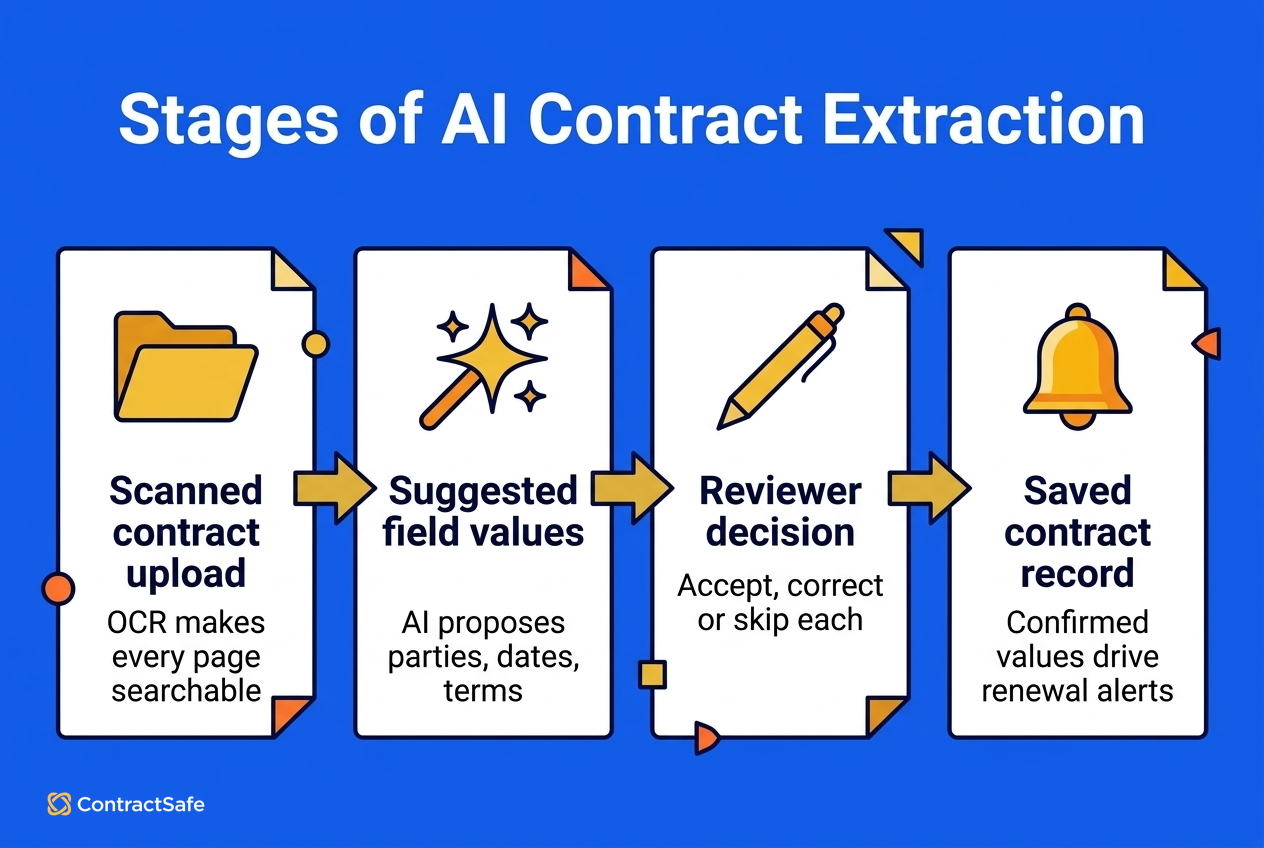
AI contract extraction runs in five stages. OCR makes the file readable, AI suggests field values, a reviewer decides on each value, confirmed values drive alerts, and AI search returns only what each person may see. The third stage, human review, decides whether anyone should trust the data.
OCR turns the scan into text. ContractSafe's OCR makes any file keyword-searchable, even scans, on every plan, and our explainer on what OCR is covers the basics.
AI suggests field values. The AI proposes values for parties, dates, payment terms and the other fields you've defined for that contract type.
A reviewer accepts, corrects or skips each value. Nothing lands in the record until a person decides, and ContractSafe builds human review of extracted values into extraction on every plan, including review across many contracts at once.
Confirmed values start working. Dates feed reminders, and ContractSafe's date notifications arrive with the contract attached, so whoever gets the alert doesn't have to go hunting.
AI search respects permissions. ContractSafe's permission-aware AI search returns only contracts a person is allowed to see.
Stage three exists because AI makes confident mistakes, even AI built for lawyers. A preregistered Stanford RegLab evaluation found leading legal AI research tools hallucinated between 17% and 33% of the time, even though some had been marketed as hallucination-free. Those tools were answering research questions, but a model that invents a case citation can invent a notice period too.
NIST's Generative AI Profile, AI 600-1, defines confabulation as "the production of confidently stated but erroneous or false content" by which users may be misled. A wrong renewal date stated with confidence fits that definition, and the only defense that doesn't depend on the model is a person checking the value before it's saved.
Shayne Hussain, Sr. Operations Manager at Covalent, described the review step in practice: "The AI pulls in fields like term dates and company names, so I can review and confirm instead of entering everything manually."
How to Automate Extraction Across a Backlog of Thousands of Contracts
Automating extraction across a backlog of contracts works as a sequence. Get every file into one place, let the software sort and flag the set, and set the fields each contract type must have. Then review suggestions in batches, with a named owner for every exception.
Here's the order that keeps a big backlog manageable:
Move everything in. ContractSafe includes data and document migration with no implementation fee on every plan, and bulk uploads and email upload handle the files your team finds later.
Let the software sort. Duplicate contract flagging catches the three copies of the same NDA, and automatic categorization assigns each file a contract type.
Set mandatory fields by type. Category-based fields make sure every vendor MSA gets a notice date before anyone calls the record done.
Work the queue. Give batch review to people who know what normal looks like for each contract type.
Route exceptions to a named owner. Unreadable scans, missing signature pages and amendments that conflict with the base agreement go to one person with a deadline.
Sample Each Batch Instead of Guessing
Manufacturing inspectors worked out how much to check decades ago, and their method carries over to contracts. ISO 2859-1, the international standard for sampling inspection by attributes, sets out sampling schemes indexed by an acceptance quality limit (AQL) for lot-by-lot inspection. Treat each upload batch as a lot, pick the error rate you'll accept, inspect a sample sized to the lot from the standard's tables, and accept or reject the batch on what the sample shows.
When a batch fails, move the batches that follow to tightened inspection. After a run of clean batches, you can relax to reduced inspection and spend the saved time on exceptions.
Say you have twelve hundred contracts. Split them into twelve batches of about a hundred, grouped by contract type. Your first batch of vendor MSAs gets a sample check on the always-check fields, and two money amounts come back wrong, so every contract in that batch gets full review and the next batch starts under tightened inspection. Once several batches come through clean, you move to reduced inspection, and reviewers spend their time on exceptions instead of rereading correct dates.
Metro MLS moved 600-plus contracts over from a prior contract system, according to its ContractSafe case study, and AI extraction captured key terms during upload so the reviewer checked values instead of typing them. Samantha, Director of Data Feed Licensing at Metro MLS, described the payoff: "Our COO routinely needs a list of every WIREX data feed contract we have on file. With ContractSafe, we simply search the term, filter down, and run the report. It's very easy!"
Decision Check
Before you call any batch finished, run the checklist below with the person who owns the backlog.
A named owner has signed off on the batch.
The sample came back clean on money amounts, renewal and notice terms, payment frequency and execution date.
Every exception, from an unreadable scan to a missing signature page, has an owner and a due date.
Any contract whose notice window closes within the next quarter got full review, whatever the sample said.
Reminders are switched on for every confirmed notice and renewal date.
For instance, say the facilities batch holds three leases with notice windows closing before quarter-end. Read those three line by line today, because a sampling plan protects the batch on average and does nothing for the one lease that quietly rolls over.
Common Mistakes When Checking Extracted Fields and How to Fix Them
The common mistakes in checking extracted contract fields come down to four habits. Teams trust every field equally, sample too little, treat a rejected value as noise, and skip re-checks after an amendment. Each habit has a straightforward fix you can put in place before the next batch.
Trusting Every Field Equally
The first mistake is treating a party name and a contract value as equally safe. The A Few Good Clauses benchmark used 24 contracts from SEC EDGAR, each labelled by at least two lawyers. Currency fields were the weakest category for every model tested: Annual Contract Value scored an F1 of 0.333 and Total Contract Value 0.700, while Executed Date (0.632) trailed End Date (0.720).
Durations were uneven too. The same study of structured contract extraction put Renewal Term at 0.571 and Payment Period Frequency at 0.457, and traced the trouble to ambiguous source text. The authors are affiliated with a commercial extraction vendor, so rely on the per-field difficulty, which held across models, and set any ranking aside. The fix is an always-check list:
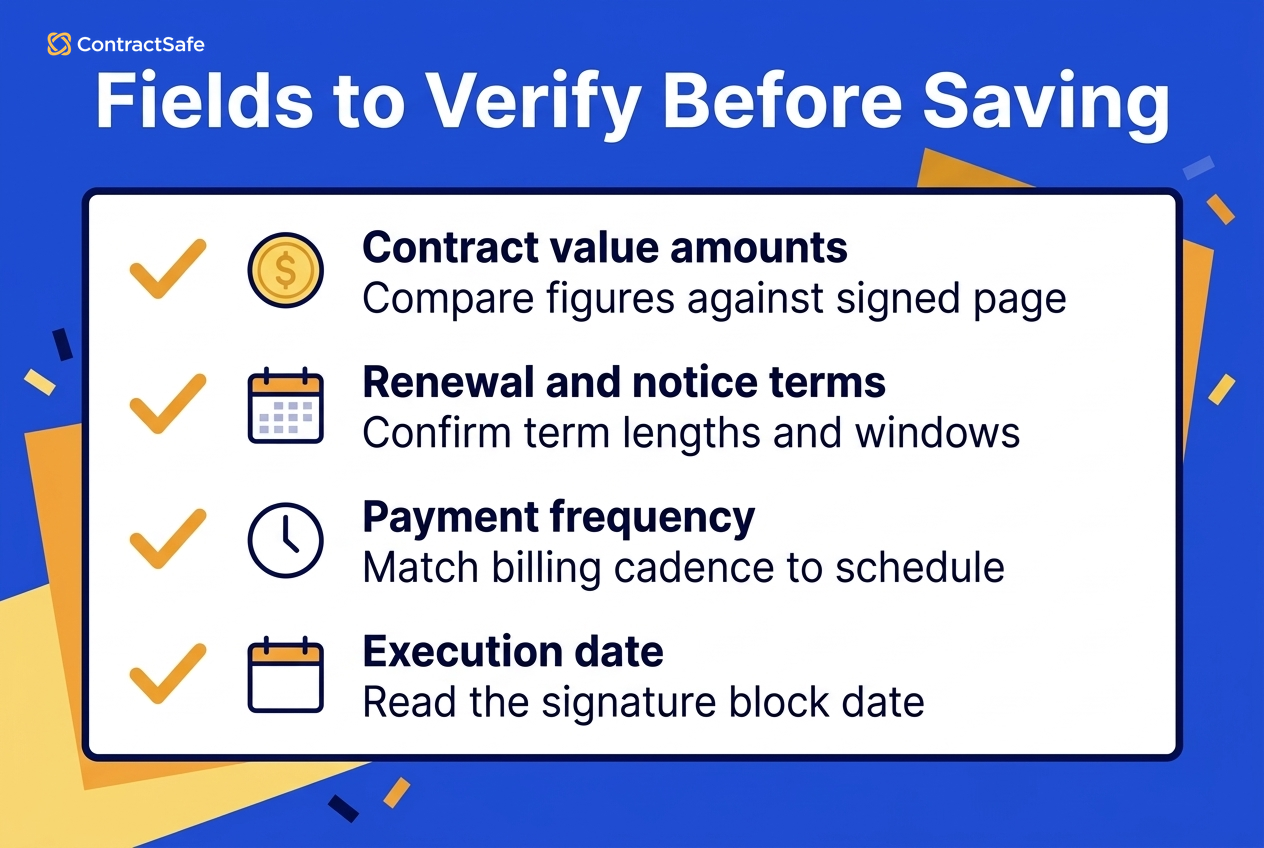
Money amounts, including contract value and currency
Renewal and notice terms
Payment frequency
Execution date
Our AI contract data accuracy guide covers what an accuracy score does and doesn't tell you.
Sampling Too Little
Sampling too little happens when a team checks five contracts out of a thousand and calls the batch good. Your sample size should come from the lot size and your error limit, which is what the ISO 2859-1 sampling tables are for. A backlog of a few dozen contracts is often small enough to review in full.
Treating a Rejection as Noise
A rejected suggestion is information about the batch, because it shows you where the AI struggled. When a reviewer corrects one renewal term, check that field across the whole batch and move the next batch to tightened inspection. For example, say your base agreement has a sixty-day notice window and a later amendment changed it to ninety days. If the reviewer accepts sixty, the reminder fires on schedule for the wrong date, and the agreement renews at a price you meant to renegotiate.
Skipping Re-checks After Amendments
Amendments quietly change fields you already confirmed, so every new amendment should trigger a fresh look at the dates and amounts it touches. ContractSafe's amendment tracking and connected related documents keep each amendment filed with its base agreement on every plan, and new document notifications send an alert every time a document is created. Once the data is clean, our guide to forecasting with contract data shows how to turn confirmed dates and amounts into renewal reports.
Ten Tests to Run in a Demo When Choosing Contract Data Extraction Software
Choosing contract data extraction software comes down to one practical move: bring one of your own scanned contracts to every demo and run the same ten tests with each vendor. Pick a faded scan with an amendment, so the demo shows how each tool handles your real files.
Here are the tests, in an order that tends to surface problems early:
Upload a poor-quality scan and search for a phrase from page three.
Check that both parties' legal names come out correctly.
Look for all four date types: effective, end, notice and renewal.
Confirm the payment terms and amount, including currency.
Ask for a custom field your team relies on, such as business unit.
Watch for an accept, correct or skip step before anything is saved.
Bulk upload a folder and work a batch review across several contracts.
Log in as a restricted colleague and confirm AI search hides contracts that person can't see.
Ask whether the vendor trains its AI on your contracts, and get the answer in writing.
Get the total price with everyone who needs access included, and compare it with ContractSafe's published pricing with unlimited users.
The criteria that matter most sit in tests six and eight. A tool that fails test six saves unchecked values straight into your records, and one that fails test eight shows people contracts they shouldn't see, so drop either from your shortlist.
Which Option Fits When
Count your contracts first, then check whether your team mostly stores signed paper or negotiates new paper every week.
A few dozen contracts: Manual abstraction into a spreadsheet is fine, as long as someone other than the typist reviews it.
Hundreds or thousands of contracts: Use AI extraction with human review, batch sampling and renewal alerts. ContractSafe's extraction and review step and date reminders come with every plan.
Contracts you negotiate often: On ContractSafe's Maximize plan, AI Contract Review checks incoming paper against your own playbook rules and can suggest wording, and any AI-created rule needs a person's acceptance. Our post on AI contract review software covers when that step earns its place.
Related Reading
How ContractSafe Helps With Contract Data Extraction
Meta-data extraction runs on every plan, and human review of extracted values lets your team accept, correct or skip each suggestion before anything is saved, one contract at a time or across many. The AI features are optional, so a team can start with some of them or none, and ContractSafe states that it doesn't use customer data to train AI models.
Confirmed values go to work right away. Renewal and notice dates drive automated reminders with the contract attached, smart search finds contracts using natural language, and chat-based Q&A answers questions about any contract, all on every plan. A general activity audit trail records contract views, downloads and changes on every plan. For teams that negotiate often, AI Contract Review against custom playbooks is available on the Maximize plan.






.svg)







.svg)




