


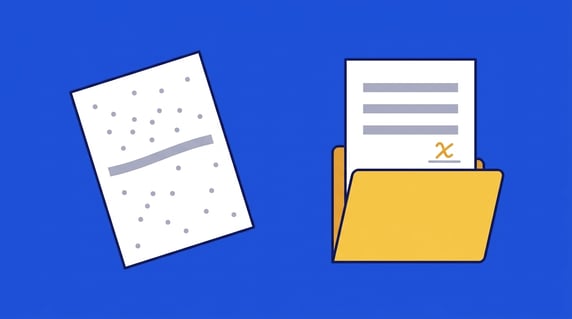
Quick answer: OCR (optical character recognition) technology is software that reads the text in an image, such as a scan, phone photo or image-only PDF, and turns it into machine-readable text you can search, copy and edit. It reads characters only; working out which date is the renewal date is a separate AI step.
When you scan a signed contract, your computer saves a picture of each page, so the word “indemnification” is just a pattern of dark and light pixels and Ctrl+F finds nothing. How far you can trust OCR to read that page back, and which tool fits one file or a whole archive of scans, both depend on what the technology actually recognizes.
Choose your next step:
If you're only making one file searchable, the free steps below will do it. Once it's a whole archive of scans, ContractSafe's contract repository makes every upload searchable, scans included.
If you're the person who has to vouch for scanned data before a rollout, read our guide to AI contract data accuracy.
Key Takeaways
- OCR turns scans, phone photos and image-only PDFs into searchable text, but it doesn't understand what that text means.
- Accuracy depends on scan quality, so low-confidence words, dates and dollar amounts still need a human check.
- OCR can help in contract management by extracting text from scanned contracts. AI extraction, date reminders and reports all work from that text.
What Is OCR Technology?
OCR technology recognizes the letters, numbers and symbols in a scanned contract, a phone photo or an image-only PDF, whether typed, printed or (within limits) handwritten, and rebuilds them as text you can search, copy and edit. Knowing which date is the renewal date, or who the counterparty is, takes AI extraction layered on top.
You can see the difference OCR makes by comparing two PDFs of the same contract. An image-only PDF looks fine on screen, but press Ctrl+F and nothing comes back. A searchable PDF has an invisible layer of OCR text sitting behind the picture of the page, so search, copy and paste all work.
That example happens to be a contract, but contracts are one use among many, and you've almost certainly run into OCR somewhere else first.
Where Is OCR Used Beyond Contracts?
OCR is used far beyond contracts. Phones use it to copy text out of photos, banks use it to read deposited checks, postal services use it to sort mail by address, insurers use it to read photos of medical bills, and shippers use it to read package labels. Any time a machine turns a picture of words into usable text, that's OCR.
So you've probably used it this week without noticing. Your phone can lift the Wi-Fi password off the sticker taped to a router, and the check you deposited from your couch got read before a person ever saw it. Checks and mail were among OCR's first commercial jobs, back in the 1950s, and they still run on it today.
A scanned, signed agreement is one more image waiting to be read. Before your contract software can search it, OCR has to take it through the same four stages as a check or a shipping label.
How OCR Works, Step by Step
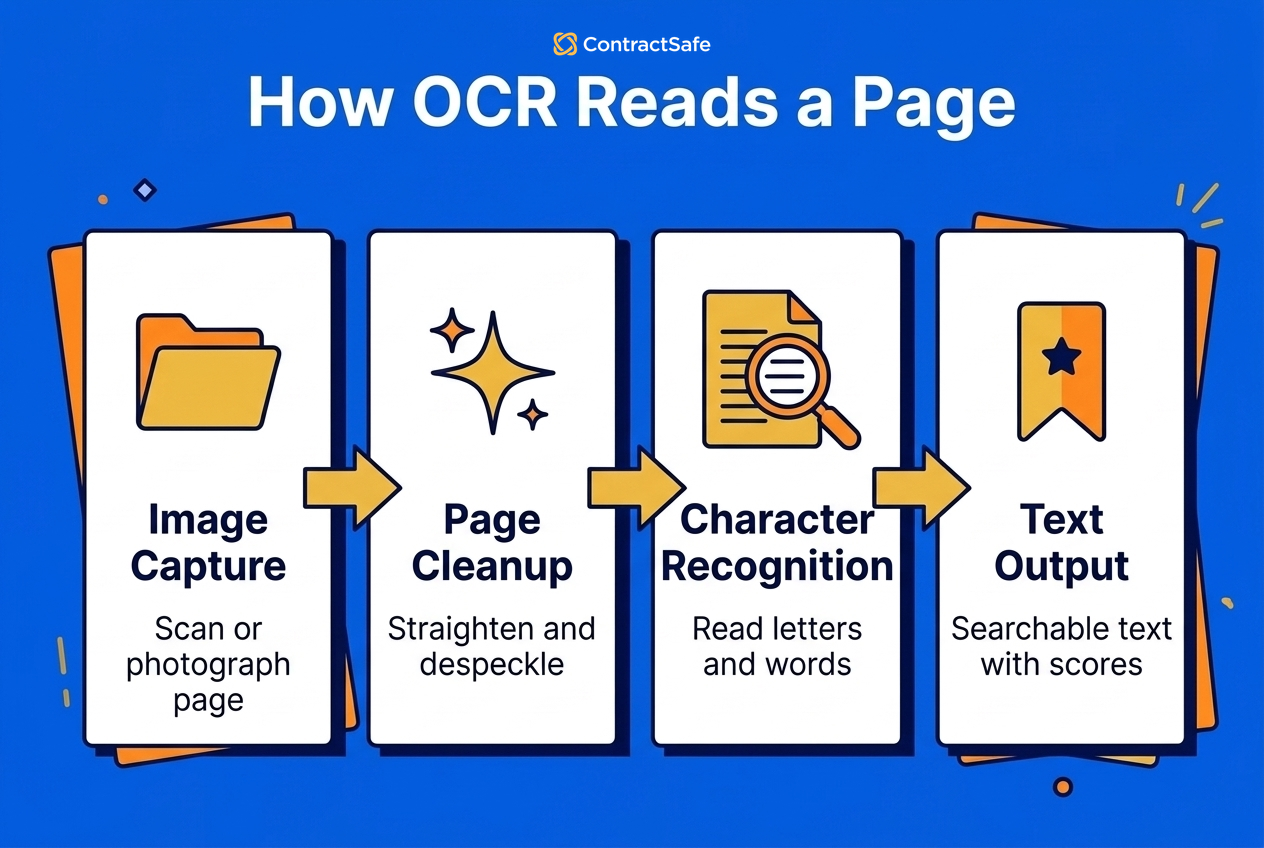
OCR works in four stages, as Amazon's OCR explainer lays out: capture the page as an image, clean the image up, recognize the characters, then turn the result into usable text. Scan quality affects every stage, so a crooked fax gives the software a harder job than a clean, straight scan.
-
Capture: The first step is to provide OCR with a document that needs to be scanned or converted into machine-readable form. This can be either paper documents or digital files, like image-only PDFs and screenshots. A scanner, copier or phone camera turns any paper page into an image. Scan at 200 dots per inch (dpi) at the very least, and at 300 if you can, because small print starts to break apart below that.
-
Cleanup: The software straightens tilted pages, removes specks and converts the page to clean black and white, which makes it easier to interpret the dark and light portions of scanned text. It also maps the layout (columns, tables, paragraphs) and works out which script the text is in.
-
Character recognition: Classic engines either compare each character's shape, called a glyph, with stored glyphs of a similar font and scale, or look for features such as lines, loops and intersections. Modern engines use neural networks that read whole lines at once. Whole-page vision language models arrived in 2025 with Mistral OCR and the Allen Institute's olmOCR, published in February 2025, which read entire pages, tables included. Current models such as Mistral OCR 4, now on version 4.1, also return a confidence score for each word.
-
Output: After OCR has identified each character, it converts them into machine-readable text, usually plain text or a searchable PDF, with a confidence score attached to each word. A high score means the engine is fairly sure; a low score means someone should look at that word.
That confidence score is the part most people never see, and it's the most useful one for contract work. Good systems use it to decide what gets accepted automatically and what goes to a person for review, which matters when the word in question is a dollar amount or a notice deadline. It's also where any honest answer about accuracy starts.
How Accurate Is OCR on Scanned Contracts?
OCR is very accurate on typed contract text from a clean, straight, well-lit scan. It's least accurate on handwriting, faxes, low-resolution phone photos, stamps over text, dense tables and multi-column layouts, so check dates, dollar amounts and signature pages on those scans yourself before anyone relies on them.
Of those, handwriting is the big variable. Neat block capitals often come through fine, and Mistral says its OCR 3 model, released in December 2025, reads cursive and handwritten notes layered over printed forms. That's the vendor's own claim, though, and published accuracy scores deserve the same caution.
Vendors quote scores of about 93 out of 100 on OmniDocBench, now at version 1.6; Mistral reports 93.07 for OCR 4. Those are scores on benchmark pages, not on your faxed amendments, so treat any accuracy figure as a claim about someone else's documents.
Newer AI models also bring a new kind of mistake that no score captures well. In a 2025 study of multimodal models, He and colleagues found that when a model can't make out a blurred or partly hidden word, it often produces “hallucinatory content”: plausible text that isn't on the page. An older engine garbles a smudged word into nonsense you'd notice. A model that writes a clean, believable number that doesn't match the scan is the kind of error that slips past a quick read.
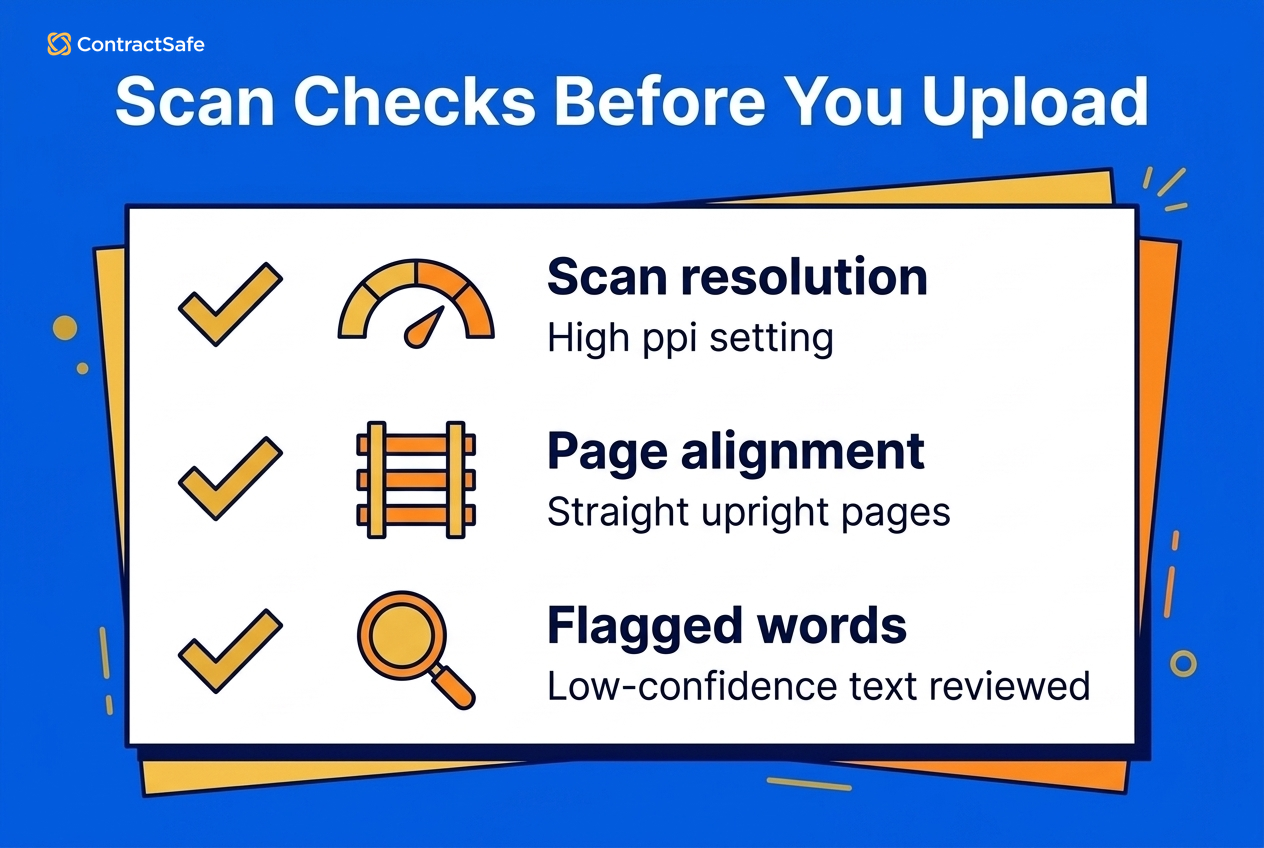
Most of that risk starts with the scan, and the scan is the part you control. Before you upload a box of scanned agreements, run these checks:
- Scan at 300 ppi or higher. NARA's rule for digitizing permanent federal records, in effect since June 5, 2023, sets 300 ppi (and no lower than 294) for textual paper, so 300 is a safe floor for contracts too.
- Keep pages straight and right-side up, because tilted and rotated pages cause misreads.
- Spot-check low-confidence words, signature pages, dates and dollar amounts.
ContractSafe's own guidance says the same thing: scanned documents processed through OCR may produce lower accuracy results than machine-readable files, and complex layouts, tables and unusual structures can affect results too, so when your team reviews AI suggestions, start with the scans. How well a given page reads also depends on which kind of OCR is reading it.
How Simple OCR, ICR, IWR and OMR Differ
There are four main types of OCR: simple OCR, intelligent character recognition (ICR), intelligent word recognition (IWR) and optical mark recognition (OMR). Each one handles a different kind of mark on the page, which is part of why handwriting and checkboxes behave so differently from typed text.
- Simple OCR: compares each character with stored fonts and text patterns, which AWS's overview of the technology describes as templates. It's fast on typed pages in common fonts and weak on almost everything else.
- Intelligent character recognition (ICR): uses neural networks to read handwriting and messy scans, analyzing the features of each letter the way a person would.
- Intelligent word recognition (IWR): works like ICR but reads whole words at once, which AWS describes as processing whole-word images instead of characters, and that helps with connected cursive.
- Optical mark recognition (OMR): usually means detecting checkboxes, bubbles and marks, like the boxes ticked on a signed order form. AWS uses the term differently, for logos, watermarks and other symbols in a document.
For contracts, simple OCR and modern recognition cover the typed body of the agreement. ICR matters for the handwritten parts: initials, dates written next to signatures and notes in the margins.
A Short History of OCR
Those types arrived one at a time, and OCR is older than most people guess. AWS traces it back to Emanuel Goldberg's work in the 1920s, with commercial use in the 1950s for bank check processing and mail sorting, and credits neural networks in the 2000s with making handwriting workable. Early machines could only read a few typefaces, which is why the OCR-A and OCR-B fonts were designed in the 1960s, with characters shaped so machines could tell them apart.
The next shift came in 2025, when vision language models such as Mistral's first OCR model started reading whole pages at once, and those whole-page models are now in their third or fourth generation. They read better than ever, but reading still isn't understanding.
OCR vs. AI Data Extraction
OCR reads the characters on a scanned contract, and AI data extraction works out what the text means. OCR can report that a page says “Governing law: Delaware.” AI extraction reads that text and fills in fields for the parties, the effective and renewal dates, dollar amounts and governing law. Modern OCR uses machine learning to read, but reading and understanding are separate jobs.
That's why “Is OCR considered AI?” has a two-part answer. OCR is a technology that predates modern AI, and when combined with AI algorithms, it becomes more powerful; today's engines run on neural networks themselves. What OCR still doesn't do is interpret. It might read every character of an auto-renewal clause perfectly and still have no idea the clause sets a notice window. That interpreting step is usually called intelligent document processing, or AI extraction.
The big cloud vendors build their products the same way: Microsoft describes Azure Document Intelligence in Foundry Tools as “a machine-learning based OCR and intelligent document processing service to automate extraction of key data from forms and documents,” so the reading and the pulling out of data sit in one service but remain two jobs.
ContractSafe keeps the two jobs apart too. OCR makes every file searchable, then the AI Assistant suggests fields such as Counterparty, Effective Date, Renewal Term and Deadline to Nonrenew. Those are 4 of the 29 contract fields it looks for, which also include:
- Total Contract Value
- Governing Law
- Payment Terms
- PHI Involved and BAA Required
Your team accepts, corrects or skips each suggestion, and nothing is final until a person confirms it. You can also choose to use some AI features or none. Our guide to artificial intelligence in contract management covers where AI fits. If all you need today is the text out of one scan, though, you don't need any of that.
How to OCR a Single File Right Now
You can OCR a single file for free with Google Docs, Adobe Acrobat's Recognize Text or Apple Live Text, which most people already have. Use a straight page scanned at 200 to 300 dpi, then check the dates, dollar amounts and table rows in the OCR output against the original scan.
Here are the steps for each:
- Google Drive: Upload the PDF or image, right-click it, choose Open with, then Google Docs. Drive turns it into an editable doc. It works on files up to 2 MB with text at least 10 pixels high, and the page has to be right side up. Tables, columns and footnotes usually don't survive.
- Adobe Acrobat: Open the PDF, choose the Scan & OCR tool, then Recognize Text. You get a searchable PDF that still looks like the original scan.
- Apple Live Text: On an iPhone, iPad or Mac, open a photo or screenshot, select the text in it and copy it wherever you need it.
Whichever tool you use, look hardest at the numbers when you check the output. That's where a misread does real damage, and tables are where columns get shuffled.
That kind of checking works for one file. One-off tools stop being enough when you've got hundreds of files, or when you'll need to find a file again next year. Converting scans one at a time doesn't give you a single place to search them, and nobody's checking the output. That's when it's worth comparing the other kinds of OCR tools and what they cost.
Types of OCR Tools and What They Cost
OCR tools come in four kinds: free tools built into apps you already use, open-source engines, cloud OCR APIs that charge by the page, and OCR built into business software such as a contract management system. The right pick depends on whether you're converting one file, building an app or running a contract archive.
| Option | Examples | Cost | What you handle |
|---|---|---|---|
| Single-file tools | Opening a PDF in Google Docs, Adobe Acrobat's Recognize Text, Apple Live Text | Free or bundled with software you already have | Checking each file by eye; tables and columns often come out scrambled |
| Open-source engine | Tesseract, olmOCR | Free to download; you pay for the hardware | Installation, image cleanup, layout handling and everything built around it |
| Cloud OCR API | Amazon Textract, Google Cloud Vision, Azure Document Intelligence, Mistral OCR 4.1 | A free tier, then per page. Textract gives 1,000 pages a month free for three months, then $0.0015 a page for its basic text API. Google Cloud Vision gives 1,000 units a month free, then $1.50 per 1,000. Azure gives 500 pages a month free. Mistral OCR 4.1 is $4 per 1,000 pages, or $2 through its Batch API. | Engineering: storage, search, field extraction and security |
| OCR inside a CLM | ContractSafe | Included on every ContractSafe plan | Uploading files and reviewing AI suggestions |
The per-page prices look tiny, so here's the math for a typical backlog. Say you have 2,000 contracts averaging 10 pages each, or 20,000 pages. At Amazon Textract's rate of $0.0015 per page, the OCR alone costs about $30. Google Cloud Vision comes to about $28.50 once the first 1,000 free units are used. Mistral OCR 4.1, which replaced version 4.0 at the same price on Sept. 30, 2026, comes to about $80, or $40 through the Batch API.
The API fee is pocket change. The real cost is the engineering around it: storing the files, building search, extracting fields and sending reminders.
Running an open model yourself doesn't dodge that. The olmOCR paper puts its cost at about $176 per million pages, and that figure leaves out the people who set it up and keep it running. If your security team wants files to stay in-house, an open-weight engine such as olmOCR, or Mistral's single-container option for enterprise customers, lets you run OCR on your own servers. You'd be the one running it, though, which is the same engineering bill in a different form.
That's the argument for OCR built into your contract software. ContractSafe's OCR makes any file fully keyword searchable, scans included, and it's part of every plan. ContractSafe pricing starts at $450/month (Organize plan, billed annually; $540 month-to-month), with unlimited users on every plan.
Match the tool to the job you actually have:
- If you're converting a handful of files, the free tools you already have will do.
- If developers are building OCR into your own app, a cloud API or Tesseract fits.
- If you need a searchable contract archive with dates, reminders and reports, look for OCR built into contract management software.
- Whatever you pick, ask the vendor how it flags low-confidence text for human review.
What OCR Does for a Scanned Contract Repository
In contract management, OCR is what makes a scanned agreement usable, which is why it matters so much once you're running an archive. It turns the scan into text the system can index, search and hand to AI for extraction. Without it, every paper contract in your repository is a picture with a file name attached.
That's how an indemnity clause meant to sit alongside an old MSA goes missing for years, and it's why OCR belongs near the top of any list of contract management tools. Once the text is there, the rest of the work gets easier.
Benefits of Using OCR in Contract Management
Searchable text pays off across nearly every part of contract management, starting with the most familiar one. If you've ever spent an afternoon in a storage closet flipping through folders to find which vendor agreement has a nonrenewal deadline coming up, you already know the first benefit of OCR.
Find Documents Quickly
Maybe you've named a file something like "main_contract_amz(1).docx" to save time, then forgotten about it until the legal team asked about the force majeure clause inside it. It's one of the most common challenges contract managers face, and it gets worse when the file is a lease someone scanned sideways and saved as scan_0032.pdf. The file name tells you nothing and, without OCR, search can't see a word inside it.
But if you've got a contract management system that uses OCR, all you need to do is type "force majeure" and you can find the contract and the clause with the click of a button. It makes all contracts fully searchable without having to remember a file name or folder.
That shift lands with the whole team. As Rebecca Dockum, Trade Contract Manager, put it: “People’s minds were blown the first time I showed them they could search every contract at once. That moment alone has saved me from being the answer key every time someone has a question about an agreement.”
Take a look for yourself:
Reduce Manual Data Entry to Improve Efficiency
Finding a contract is half the job; the other half is getting its details into a spreadsheet or system, and there are a lot of pitfalls that come with manual data entry. It's error-prone, time-consuming and, well, boring. But OCR can help.
Instead of having a team manually enter information from contracts into a spreadsheet or database, your company can use OCR technology to quickly scan every contract, then let AI suggest the key data and organize it for you. Your team's job shrinks from typing every field to checking the ones the software suggests.
On a backlog of hundreds of contracts, that adds up to weeks of typing nobody has to do. ContractSafe also includes data and document migration support on every plan, so you aren't loading the backlog alone, and your people get that time back for work that actually needs them.
Easily Identify Changes and Updates
Contracts rarely stay in one version, either. Juggling multiple versions of a contract between multiple people can lead to lost signatures, legal risks, and even disagreements between parties.
OCR's part is making the text readable, so a scanned redline or a signed-and-scanned copy can be checked without anyone manually retyping it. Tracking what changed is ContractSafe's job: it keeps versions and amendments on every plan, and redlining on the Finalize and Maximize plans highlights the differences between documents.
Stay Compliant With Regulatory Guidelines
Changes aren't the only thing you have to keep up with. Privacy is a big deal, and regulators take it seriously. Breaking HIPAA or GDPR laws can carry some steep penalties. And constant changes in the legal landscape can make compliance hard to keep up with.
While OCR can't solve all your compliance concerns, it can make life a little bit easier for contract managers. Using OCR, contract managers and compliance officers can quickly pull any relevant text from a contract, scans included, such as data processing terms or business associate language. On top of that text, ContractSafe's AI suggests fields such as PHI Involved and BAA Required for someone to confirm.
It's also useful for performing regular audits. Instead of opening files one at a time, you can pull every agreement that mentions a term and review that set, though a person still decides whether each contract complies. That matters most if you're handling healthcare contracts.
Flag Important Dates and Filter Contracts
Audits come around once in a while, but deadlines never stop. When you've got a mountain of contracts to manage, it can be difficult to keep track of all the important dates. OCR's part is giving the AI text to read. The AI Assistant's date fields, such as Effective Date, Termination Date, Renewal Term and Deadline to Nonrenew, then come back as suggestions for someone to confirm.
Once they're confirmed, ContractSafe sends alerts and reminders as key dates approach, with the relevant contract attached to the email. You can also filter by tags, folders or contract type, which makes it easier to quickly locate contracts and their associated information, such as parties involved, dates, and other important details.
Manage Vendors
All of this comes together with vendors, whose agreements tend to be the messiest. When it comes to vendor management, vendor paperwork arrives in every format: signed PDFs, faxed amendments, photographed certificates of insurance. OCR makes all of it searchable in one place, and ContractSafe keeps SOWs, insurance certificates and amendments attached to the right agreement. Checking a vendor's identity or credentials is still a job for your onboarding process.
Related Reading
- What Is OCR and Why Is It Important in Contract Management? goes further into how contract teams put OCR to use.
- OCR contract management software explains how OCR works inside a contract system.
- The stages of contract management shows where searchable contracts help at each step.
How ContractSafe Helps Teams Put OCR to Work
ContractSafe makes every file you upload fully keyword searchable, scans included, on every plan. AI then suggests key fields for your team to confirm, and reminders and reports work from that confirmed data. AI search only returns the contracts each user is allowed to see.
That searchable text earns its keep in nearly every stage of the contract management process, whether you're finding an old agreement or keeping its renewal on the calendar. As Carrie McClain, Procurement Specialist at Vitality Living, said: “ContractSafe helps us stay ahead of renewals and saves me at least a few hours every week. Instead of rebuilding information from SharePoint, I can pull the contract report I need and keep the process moving.”







.svg)







.svg)




