



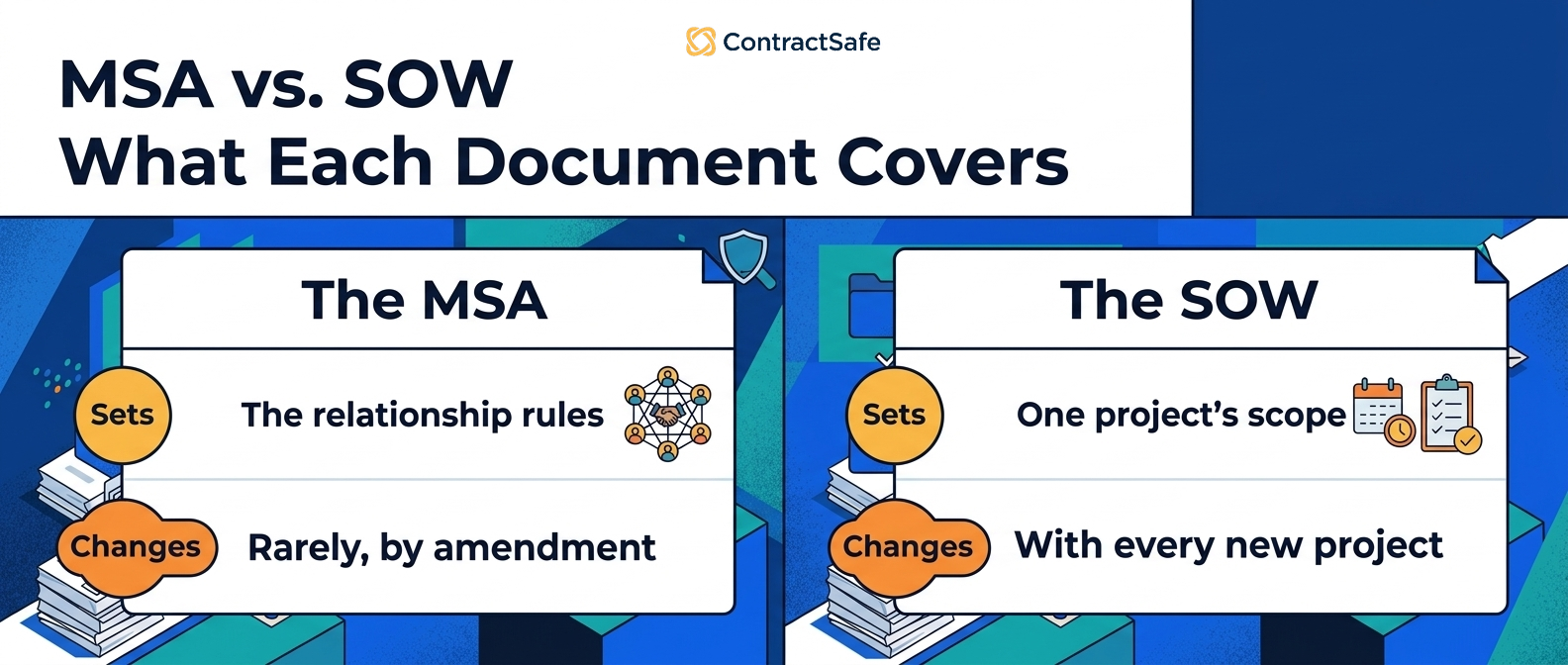
MSA vs SOW is the difference between a master service agreement, which sets the rules for the relationship, and a statement of work, which defines a specific project.
Think of the MSA like the house. Think of the SOW like the room you’re renovating right now.
The house needs walls, plumbing, wiring, and a front door before anyone argues about where the couch should go.
That’s the MSA.
The SOW is where you decide this room gets new cabinets, the work starts next month, the price is fixed, and someone needs to approve the final punch list.
Both documents matter. They just solve different problems.
- An MSA sets the standing legal terms for the vendor relationship, including payment rules, confidentiality, IP ownership, liability, dispute resolution, and termination.
- A SOW sets the project terms, including deliverables, timeline, milestones, pricing, acceptance criteria, and the people responsible for the work.
- The MSA should usually come first because it gives every future SOW a stable legal foundation.
- The SOW should not quietly rewrite the MSA unless the parties intentionally agree to that change in plain language.
- After signature, the biggest risk is usually not misunderstanding the legal theory. It’s losing track of which SOW belongs to which MSA, which dates matter, and who owns the next step.
Choose Your Next Step
If you’re here because you need the basic definition, start with what an MSA controls.
If you’re deciding what belongs in the project document, skip to what a SOW controls.
If you’re worried about conflicts, go to which document wins when they disagree.
If the documents are already signed and scattered across email, jump to how to manage MSAs and SOWs after signature.
What an MSA Controls
A master service agreement is the “we’re going to work together more than once” contract.
That’s the plain-English version.
The more formal version is that an MSA sets the baseline terms that govern the ongoing relationship between two parties. It’s the document you negotiate once so you don’t have to renegotiate the same legal plumbing every time a new project begins.
If you’ve ever remodeled a house, this will feel familiar.
You don’t want to renegotiate whether the contractor is allowed to enter the property every time they install one cabinet. You settle the standing rules up front. Access, insurance, payment mechanics, cleanup, change orders, who carries what risk.
The same logic applies to vendor work.
An MSA usually covers:
Payment terms, including invoice timing, late payment language, taxes, and reimbursable expenses.
Confidentiality, including what counts as confidential information and how long the duty lasts.
Intellectual property, including ownership of deliverables and pre-existing vendor materials.
Liability and indemnification, including caps, exclusions, and insurance requirements.
Dispute resolution, including venue, governing law, escalation, mediation, or arbitration.
Termination rights, including notice periods and what happens to work already in progress.
Data security or privacy terms, if the vendor touches sensitive information.
Order-of-precedence language, which tells everyone what happens if a future SOW contradicts the MSA.
That last one sounds like lawyer trivia until you need it.
Imagine the MSA says invoices follow your standard payment schedule. Six months later, a rushed SOW uses the vendor’s shorter schedule because someone copied the vendor’s template without reading the payment section.
Which term wins?
If the MSA has clear order-of-precedence language, you have an answer. If it doesn’t, you have a fight dressed up as a contract interpretation question.
For a deeper look at this document type, ContractSafe’s guide to the master service agreement walks through the parts of the agreement in more detail.
What a SOW Controls
A statement of work is the project contract record that controls work under the MSA. It should tell the team what will be delivered, when it is due, what it costs, and who decides whether the work is accepted.
It’s the “what are we actually doing this time?” document.
The MSA says the vendor relationship exists. The SOW says the first project starts next month, has a fixed fee, includes a defined workshop schedule, and ends with a signed-off migration plan.
That difference is the whole point.
The SOW should be more practical, more specific, and more tied to a real-world project than the MSA. If the MSA is the house, the SOW is the room-by-room work order.
A good SOW usually answers:
What work will the vendor perform?
What deliverables will the customer receive?
What does “done” mean?
Who needs to approve the work?
What is the project timeline?
What milestones trigger payment?
What assumptions is the price based on?
What happens if scope changes?
This is where a lot of teams get a little too casual.
They think, “Legal already approved the MSA, so this SOW is just project paperwork.”
Sometimes it is.
Sometimes it quietly changes the deal.
A SOW can create operational risk if it adds a new data feed, a new subcontractor, a new system integration, or a new deliverable that creates IP questions the MSA didn’t anticipate.
That doesn’t mean every SOW needs a full legal negotiation. It means every SOW needs enough review to catch the places where project detail becomes legal detail.
The distinction is similar to the difference between a recipe and tonight’s dinner plan.
The recipe says how the dish works. Tonight’s dinner plan says you’re doubling it, skipping the mushrooms, feeding twelve people, and serving it at 7:00.
Those details matter if anyone is shopping, cooking, or trying to figure out why the oven is full.
MSA vs SOW Side-by-Side
An MSA vs SOW comparison works best when each contract document answers a different question. The MSA answers, “What rules govern this relationship?” The SOW answers, “What work is happening now?”
| Question | MSA | SOW |
|---|---|---|
| What does it govern? | The overall vendor relationship | One specific project or workstream |
| How long does it last? | Usually months or years | Usually the length of the project |
| What terms belong there? | Payment rules, confidentiality, IP, liability, termination, dispute rules | Deliverables, milestones, timeline, pricing, acceptance criteria |
| Who usually owns it? | Legal, procurement, finance, or the business owner | Project owner, vendor manager, legal if risk is high |
| How many do you need? | Usually one active MSA per vendor relationship | One SOW per project, phase, or scoped engagement |
| What’s the main risk? | Weak foundation that affects every project | Vague scope that causes delivery fights |
| What should be tracked after signature? | Renewal dates, notice windows, governing terms, relationship owner | Milestones, deliverables, acceptance dates, project owner |
The MSA is where you settle the relationship rules.
The SOW is where you stop everyone from arguing later about what “implementation support” was supposed to mean.
That might sound small, but vague SOW language is where a lot of vendor frustration begins.
Nobody wakes up excited to argue about whether “support” included training, documentation, data cleanup, or two extra calls with the finance team.
But if the SOW doesn’t say, someone eventually has to guess.
The 5 Records You Need to Keep Together
The MSA and SOW are not a tidy two-document set for very long.
That’s the annoying part.
A growing vendor relationship starts simple. One MSA. One SOW. Everyone remembers what happened because everyone was on the email thread.
Then the relationship becomes useful.
Project two gets approved. Project three is smaller but urgent. Someone signs a change order. A renewal comes up. The vendor updates its security exhibit. Finance asks whether the discount applies to the new work.
Suddenly “MSA vs SOW” is no longer a vocabulary question.
It’s a filing problem.
Here are the five records that need to stay connected.
1. The parent MSA
The parent MSA is the source of truth for the relationship.
It should be easy to find by vendor name, department, owner, effective date, renewal date, notice period, and contract type.
It should also be easy to find by old names.
That sounds silly until a vendor changes names, gets acquired, or your team keeps calling the company by the product name instead of the legal entity.
The MSA should not live in one attorney’s inbox. It should not live in a folder called “Final final vendor contracts 2024.” It should not be findable only by the person who negotiated it.
For example, if finance asks whether the vendor can increase rates at renewal, the parent MSA should be the record that answers the question.
Track the agreement owner, the vendor name, the effective date, the renewal date, and the notice window on this record.
If the MSA is the foundation, the foundation needs an address.
2. The first SOW
The first SOW is where the relationship becomes real.
It should be linked directly to the MSA, not stored nearby because “nearby” turns into “somewhere else” faster than anyone expects.
The first SOW should make clear what the vendor is doing, when they’re doing it, what the customer owes, and who accepts the work.
If it references exhibits, proposals, rate cards, or project plans, those files need to sit with the SOW too.
For example, if the SOW says the vendor will “support implementation,” the acceptance criteria should explain what support means.
Store the SOW with the parent MSA and assign the project owner before anyone treats the project record as complete. Signing inside the repository, with contract eSignature that files the executed copy automatically, removes the never-filed problem.
Otherwise the SOW becomes a treasure map with half the clues missing.
3. Later SOWs
Later SOWs are where drift starts.
The first SOW usually gets plenty of attention because the relationship is new. The fourth SOW often gets signed because everyone already likes the vendor and wants the work to start.
That’s when terms start changing quietly.
A different payment schedule shows up. A different acceptance period appears. A new business unit asks for access. A project owner agrees to language that doesn’t match the MSA.
None of that is automatically bad.
It’s bad when nobody notices.
For example, the fourth SOW might be the first one that gives the vendor access to a new system or a new department.
Review later SOWs against earlier SOWs so legal and finance can spot drift before the work starts.
Each SOW should be linked back to the parent MSA and visible alongside the earlier SOWs, so reviewers can see what changed from project to project.
4. Amendments and change orders
Change orders are the junk drawer of vendor contracting.
They’re not supposed to be mysterious. They’re supposed to show how the work changed after the original SOW.
But in practice, change orders often get treated like loose receipts.
One gets attached to an email. Another gets uploaded to a procurement system. A third gets signed through an e-signature tool and never filed with the parent agreement.
That’s how a project that started as a simple fixed-fee engagement becomes much more expensive, and nobody can explain the path.
For example, a change order might extend the project, change the fee structure, or add a deliverable that affects acceptance.
Attach the change order to the SOW it changes, then make sure the relationship owner can see the updated commitment.
In ContractSafe, this is where linked documents matter. The amendment should not sit beside the contract family as a mystery file. It should be attached to the SOW and visible from the parent MSA.
Every amendment or change order should point to the SOW it changed and the MSA that governs both.
5. Renewal, notice, and obligation records
MSAs and SOWs create work after signature.
Sometimes that work is obvious, like a project milestone. Sometimes it hides in contract language, like a notice window, insurance certificate, data deletion requirement, or support obligation.
That’s why the record can’t stop at “file uploaded.”
For each MSA and SOW, the team should know:
Who owns the relationship?
Who owns the project?
What date requires action?
What has to happen before that date?
What document proves the obligation?
Where should the team look if the vendor asks for more work?
For example, a notice window might sit in the MSA while the project milestone sits in the SOW.
Track both dates together so the team does not manage the relationship in one place and the project in another.
This is where obligation tracking becomes the practical half of contract storage.
The agreement isn’t just something you signed. It’s something your team has to live with.
Which Document Wins When They Disagree?
An MSA/SOW contract conflict should start with the order-of-precedence clause. The clause should tell you whether the MSA controls, whether the SOW can override the MSA, and how specific the override needs to be.
It tells the reader which document controls if two provisions don’t match.
Often, the MSA controls unless the SOW clearly says it is overriding a specific MSA term.
But don’t treat that as a universal law. Treat it as a contract question.
The answer depends on the language your team signed.
Here’s the practical way to review it:
Find the order-of-precedence clause in the MSA.
Find any language in the SOW that says it overrides, modifies, or supersedes the MSA.
Identify the exact conflict, not the general topic.
Decide whether the SOW conflict was intentional or accidental.
If it was intentional, make sure the changed term is visible in the contract record.
If it was accidental, fix it before the SOW is signed.
That fourth step matters.
Sometimes the SOW should override the MSA. A high-risk data project might need stricter security obligations than the standing master agreement. A one-time project might need a different payment schedule.
The problem is not that a SOW can change the MSA.
The problem is a SOW changing the MSA accidentally because someone treated the project document like harmless paperwork.
A Simple Example: One Vendor, Three Projects
A practical MSA/SOW contract example shows why this is not just legal housekeeping. Once one vendor relationship turns into several projects, the real risk is losing the map between the parent agreement and the work documents.
Let’s make this less abstract.
Say your company hires a consulting firm called Brightline Systems.
The first project is a contract database cleanup. Brightline will organize old vendor agreements, normalize file names, and build a basic reporting spreadsheet.
You negotiate the MSA first.
The MSA says Brightline must keep your data confidential, carry insurance, assign deliverable IP to your company, invoice monthly, and provide thirty days’ notice before terminating the relationship.
Then you sign SOW 1.
SOW 1 says the cleanup project starts in the spring, has a fixed project fee, and ends when your team accepts the final spreadsheet.
So far, clean enough.
Three months later, Brightline helps procurement review a set of renewal agreements.
That becomes SOW 2.
The MSA stays the same. The project scope changes. The owner changes. The dates change. The acceptance criteria change.
Then the finance team asks Brightline to add dashboard support.
That becomes SOW 3.
Now you have one vendor, one governing MSA, three SOWs, two business owners, three sets of deliverables, and at least one date someone will forget if it only lives in a PDF.
This is exactly where teams get into trouble.
They don’t lose the MSA on day one. They lose the relationship map by month nine.
That’s why MSA vs SOW management is really about connection.
Can you open the MSA and see every SOW under it?
Can you open SOW 3 and see the parent MSA?
Can finance see which payment terms apply?
Can legal see whether SOW 2 changed confidentiality, IP, or data handling?
Can the project owner see the acceptance deadline without reading thirty pages?
If the answer is no, the documents may be signed, but the record is not useful yet.
What Goes Wrong Without Both Documents
MSA/SOW contract failures usually come from missing structure, not bad intentions. The documents either do not exist in the right order, do not say enough, or are not connected after signature.
Use these patterns to spot contract risk before the team signs, renews, or expands the vendor relationship.
There are four common failure patterns.
None of them is dramatic at first. That’s why they survive.
The SOW-only trap
The team skips the MSA and signs a standalone SOW for every project.
At first, this feels faster.
Then legal starts reviewing the same baseline terms again and again. Payment language changes from one project to the next. IP language gets copied from vendor templates. Liability language drifts because each project starts from a different file.
For example, a low-risk pilot can turn into a standing vendor relationship before anyone creates the master terms.
The team saved a week up front and bought itself months of inconsistency.
What to do instead: create the MSA first when the vendor relationship is likely to continue beyond one project.
The MSA-only trap
The team signs a master agreement and assumes the project details are “understood.”
They are not understood.
The vendor thinks “implementation support” means four calls and a project plan. The customer thinks it means configuration, training, testing, and weekly status meetings.
Both sides may be acting in good faith.
For example, the MSA might say “professional services,” but nobody can tell which tasks are included in this project.
That doesn’t help much when the document never said what the work actually included.
What to do instead: require a SOW whenever the project has deliverables, dates, or acceptance criteria that business users will need later.
The buried-change trap
The SOW intentionally changes something important, but nobody marks it as important.
Maybe SOW 4 gives the vendor access to a new system. Maybe SOW 5 changes the acceptance process. Maybe a change order extends the project past a renewal date.
The term exists. The problem is that nobody marks it for the people who will need it later.
For example, a project owner may agree to a new acceptance period without realizing finance depends on the old milestone schedule.
If the change is buried in the project document, the only person who knows about it is the person who read that PDF carefully.
And that person, naturally, is on vacation when the question comes up.
What to do instead: flag intentional overrides in the contract record so reviewers do not have to rediscover them later.
The orphaned-SOW trap
The SOW references a parent MSA, but the parent MSA is not attached, linked, or searchable from the same place.
This creates the contract version of a label falling off the file.
For example, a business owner may find the signed SOW but not the MSA that explains the confidentiality, payment, or liability terms.
You know they belong together. You just can’t prove it right now.
When that happens, business users stop looking. They email legal instead. Legal becomes the help desk for documents that should have been connected in the first place.
What to do instead: link every SOW, exhibit, amendment, and change order to the governing MSA before the project is treated as ready.
MSA vs SOW Gut Check
An MSA/SOW contract checklist belongs before signature, not after a dispute. The checklist turns the MSA/SOW distinction into a practical review step instead of a vocabulary lesson everyone nods through and forgets.
| Check | What to ask | Why it matters |
|---|---|---|
| Parent agreement | Does this SOW name the correct MSA? | Prevents orphaned project documents |
| Scope | Are deliverables specific enough to accept or reject? | Prevents “that’s not what we meant” fights |
| Dates | Are start, milestone, acceptance, and end dates clear? | Makes reminders and reporting possible |
| Price | Is pricing tied to the right milestone or billing method? | Keeps finance from reconstructing the deal later |
| Overrides | Does the SOW change any MSA term? | Flags terms that need legal review |
| Attachments | Are exhibits, proposals, and rate cards stored with the SOW? | Keeps the record complete |
| Owner | Does one person own the project after signature? | Prevents post-signature drift |
If one of those answers is missing, the SOW is not ready just because the signature block is ready.
That’s the little trap in contract work.
The document can be signable before the record is usable.
You want both.
How to Manage MSAs and SOWs After Signature
After signature, manage MSAs and SOWs as connected contract records. A useful contract system is not a folder full of PDFs. It is a relationship map with documents, metadata, owners, dates, and next actions.
Once the documents are signed, stop thinking of them as files.
Think of them as a relationship map.
That map needs three layers.
The first layer is the document family. The parent MSA, each SOW, each amendment, each change order, and each exhibit should be connected.
The second layer is the metadata. Vendor name, legal entity, department, owner, effective date, renewal date, notice date, contract type, project status, and contract value should be searchable.
The third layer is the action layer. Someone needs reminders, reports, and proof that the right person saw the right date before it mattered.
If you skip the document family, people can’t find the source language.
If you skip the metadata, people can’t report on the relationship.
If you skip the action layer, people can know the renewal date and still miss it.
That last point is worth sitting with for a second.
A contract repository that only stores files is better than a shared drive, but it still leaves a lot of work on the humans around it.
The question is not, “Can we upload the MSA?”
The question is, “Can a project owner understand what has to happen next without asking legal to translate the folder?”
ContractSafe’s contract repository helps with the first layer.
AI contract management helps extract key terms so the record is easier to use.
For an MSA/SOW workflow, that means the record can surface effective dates, renewal dates, notice windows, contract type, governing vendor, and other fields your team would otherwise hunt for manually.
Alerts and reporting help those dates turn into action.
If you’re building the surrounding process, start with the guides to service agreements and elements of a contract.
Then use the stages of contract management guide to place the MSA/SOW work inside the broader lifecycle.
For outside background on contract management practice, World Commerce & Contracting and the National Contract Management Association both publish useful contract-management resources.
Related Reading
How ContractSafe Helps With MSAs and SOWs
ContractSafe helps teams keep MSAs, SOWs, amendments, and change orders connected after signature.
That’s the job here.
Not “store the PDF and hope.” Not “ask the attorney who handled it last year.” Not “search Slack for the vendor name and pray the thread survived.”
ContractSafe gives your team one searchable place for the parent agreement, the project documents, the extracted dates, the owner, and the reminders attached to the relationship.
That means legal can open the MSA and see the SOW family. Finance can check the payment terms. Procurement can see renewal and notice dates. The project owner can find the current scope without digging through email.
ContractSafe includes unlimited users on every plan, which matters here because MSA/SOW relationships usually touch more than legal.
The attorney may own the terms. The business owner owns the project. Finance owns the invoice questions. Procurement owns vendor coordination. Leadership wants the report when something gets expensive.
If only two people can access the contract system, everyone else recreates the shared-drive problem outside the system.
ContractSafe is built for the less glamorous, more useful part of contract management: making sure the right agreement, related document, date, and owner are easy to find when the question comes up.
That’s what keeps the MSA from becoming a forgotten foundation and the SOW from becoming one more loose piece of project paperwork.









.svg)







.svg)




