


Government contract management is the process of storing, tracking, searching, and managing public-sector agreements after approval.
Think of it like a public filing room with a clock. The file only helps if the agency can find it in time.
A records request should not depend on one employee remembering a folder path.
Key Takeaways
- Government agencies face a pressure no private company does: every contract is potentially producible on demand under public records laws. If contracts are scattered across departments, responding becomes a multi-day search instead of a five-minute query.
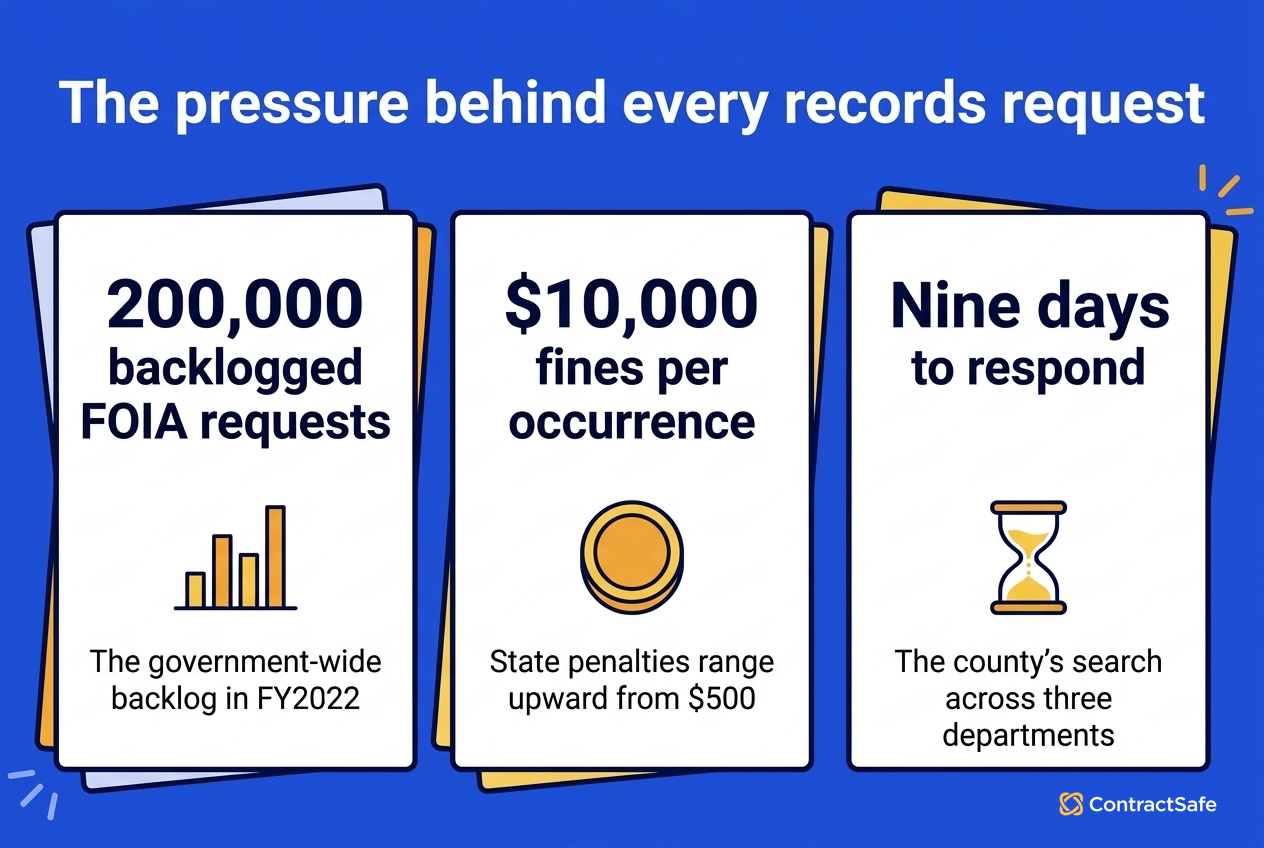
- The GAO reported that the government-wide FOIA backlog surpassed 200,000 requests in FY2022. State-level non-compliance fines reach $10,000 per occurrence.
- NASPO ranked modernizing procurement as the #1 priority for state procurement offices in both 2024 and 2025, including digitizing contracts and record-keeping.
- The records request problem is a symptom. The underlying cause is that procurement handles buying, and nobody handles managing what’s already signed.
- ContractSafe is TX-RAMP Level 2 certified, offers unlimited users on every plan, and most teams go live in under 30 minutes.
Choose Your Next Step
Government contract management fixes go faster when you start from the failure that scares your agency most: the records request, the audit, or the renewal nobody chose. Jump to the section that matches.
- Records requests taking days? Start with the Monday-morning request story and run the timing drill on one real agreement.
- Wondering why no system exists? Read the pre-award/post-award gap.
- Budget pressure? Check the hidden budget impacts, starting with duplicate vendor spending.
- Evaluating software? Use the government requirements table.
- Whichever it is, check one thing today: choose your agency’s largest vendor and confirm someone can produce every active agreement with that vendor, amendments included, in under ten minutes.
- Building the foundation? Our contract repository software guide covers the buying tests underneath.
A Records Request Arrives on Monday Morning
A records request is the fastest public test of government contract management: the open records law starts a clock, and the agency’s filing reality decides whether the response takes minutes or days.
A county procurement officer opens her email to find a public records request from a local journalist. The request: all contracts with a specific IT vendor over the past five years.
She knows the county has contracts with this vendor. IT signed a software license three years ago. Facilities signed a maintenance agreement last year. The county manager’s office signed a consulting contract two years ago.
But each department manages its own files. There is no central repository.
She spends three days emailing department heads. They spend two more searching shared drives and asking former employees where the files might be.
By day seven, they’ve found two of the three contracts. The third was signed by someone who retired. IT eventually locates a scan on a backup drive, but it’s got no metadata and nobody is sure it’s the final version.
They respond on day nine. The journalist follows up: “Is this everything?”
The procurement officer isn’t sure.
This is not a story about a disorganized county. This is how most state and local government agencies operate.
The pressure is only increasing. The GAO reported that the government-wide FOIA request backlog surpassed 200,000 for the first time in FY2022.
Complex requests more than doubled over the previous decade, while the proportion processed on time decreased, and requests surged again in FY2024.
At the state and local level, the deadlines are tighter. Every state has its own open records law: FOIA, Sunshine Law, Right to Know, Open Records Act. The names differ. The obligation doesn’t.
Non-compliance fines range from $500 to $10,000 per occurrence depending on where you are.
Check your own agency against the story: time one cross-department contract search this week, and count the people the answer depended on. That number is the records-readiness baseline worth reporting.
Why Most Government Agencies Have No Central Contract System
Most agencies lack a central contract system because procurement covers the buying and nothing covers what happens after signature.
(A note before we go further: this article is about state and local government. Cities, counties, state agencies, school districts, special districts. Not federal contracting. If you’re looking for FAR compliance or DCAA audit prep, that’s a different world.)
The records request problem isn’t a technology failure. It’s a gap in the workflow.
Most government agencies have a procurement system. It handles solicitations, bids, evaluations, and awards. The buying process is covered. What happens after the contract is signed is a different story.
| Pre-Award: Procurement System | Post-Award: No System | |
|---|---|---|
| What it covers | Solicitations, bids, evaluations, awards | Tracking, renewals, compliance, retrieval |
| Who owns it | Central procurement office | Whichever department signed it |
| Where documents live | Procurement platform | Department shared drives, email, filing cabinets |
| Clear view | Centralized | Nobody has a cross-department view |
Post-award, the agreement goes to the department that requested it. It lives in their files, on their shared drive, managed (or not) by their staff.
Multiply that by every department in the agency. Parks has its vendor contracts. Public works has its equipment leases. IT has its software licenses. The police department’s body camera vendor agreement is in a folder that three people have access to.
Nobody has a view across all of them. Not the city attorney, not the budget office, not the procurement officer who has to respond to records requests about agreements she didn’t sign.
The National Association of State Procurement Officials has been tracking this. In their 2025 priorities survey, state Chief Procurement Officers put “Modernizing the Procurement Process” at #1. The ranking held for the second straight year.
The specific focus: automating processes including “digitizing solicitations, bids, contracts, and record-keeping.” That priority jumped from fifth place in 2023 to first in 2024 and has stayed there.
The procurement offices know. They just haven’t had a tool that fits.
Map your own gap the same way: list where executed contracts physically go after award, department by department. The list is usually the whole diagnosis.
The Records Request Is Visible. The Budget Impact Is Hidden.
The hidden costs of scattered government contracts land on the budget, the audit, and the emergency response, not just the records desk.
Eight failures repeat across agencies, and each failure below carries a structural fix any agency can adopt on the contract records this quarter.
Check your agency against all eight before prioritizing. The ones that already happened last fiscal year outrank the hypotheticals, and the fix order falls out of the damage order on the contract records.
A private company that can’t find a contract has an internal headache. A government agency that can’t find an agreement has a transparency failure.
The failures below are how that difference reaches the budget, the audit findings, and the next council meeting agenda.
1. Duplicate Spending Hiding in Plain Sight
Three departments contract with the same IT services vendor. Each negotiated separately. Without a cross-department vendor view, nobody knows what the others are paying or whether the county could consolidate the agreements for better terms.
For example, three separately negotiated agreements with one IT vendor usually means three prices for similar service, and the highest contract price is funding the vendor’s flexibility on the other two negotiations. The vendor knows the full picture; the county should too.
Check the top ten vendors by spend across all departments once, against the contract records. The consolidation candidates announce themselves, and the first consolidated agreement usually funds the whole centralization effort with savings to spare.
- Watch for: the same vendor under three name variants across department records.
2. The Renewal Nobody Chose
A facilities maintenance contract auto-renews at last year’s rates because the responsible department didn’t flag the 90-day notice window. The budget office finds out after the money is committed.
Require a notice-window alert with a named owner on every auto-renewing agreement, and check the renewal queue with the budget office monthly, before the committed-money surprises reach the council agenda.
The renewal decision belongs before the notice window closes, when the agency still has choices instead of a committed line item.
For example, the notice window on a maintenance agreement is a negotiation period, not a formality, and treating the window that way changes the price.
- Watch for: notice windows measured from the term end, not the renewal date the calendar shows.
3. The Audit You’re Not Ready For
An auditor asks to see the original terms of a three-year-old vendor agreement, including all amendments and the current pricing exhibit. The signed agreement is in one place. The first amendment is in another folder entirely.
The second amendment was emailed to someone who’s in a different role now. Link amendments to their parent contracts at intake, and check the linkage in the quarterly sweep. The audit answer becomes one record, and the audit itself gets shorter.
For example, the auditor’s question “show me the current terms” has exactly one right answer, and a scattered amendment trail means the agency genuinely doesn’t know what the current agreement says.
- Watch for: change orders approved in meeting minutes that never became filed amendments.
4. The Agreement Nobody Can Find in an Emergency
The mutual aid agreement with the neighboring county was signed by someone who’s since been elected to the school board.
When an emergency triggers the agreement’s terms, nobody can locate the document, and the response runs on memory and goodwill instead of the negotiated terms.
For example, a flood response that depends on the neighboring county’s equipment goes smoother when someone can read the cost-sharing terms tonight, not after the water recedes.
Tag the emergency-relevant agreements now, while nothing is on fire, and confirm the people who’d need them at 2 AM have access. Mutual aid, emergency vendors, and backup facilities deserve their own tag and an annual review on the calendar.
- Watch for: mutual aid and emergency vendor agreements that expired without anyone deciding to let them.
5. The Insurance Certificate That Expired Quietly
A contractor is on county property with an expired certificate of insurance, because the certificate lived in an email and not on the contract record with the agreement’s other dates.
If an incident happens in that window, the agency’s risk position is exactly what the missing certificate says it is, and the public nature of the claim makes the gap a headline instead of a memo.
Attach certificates to the agreement record and alert on their expirations the same way as renewals, with the owner being whoever manages the vendor.
For example, a roofing contractor’s certificate that lapsed mid-project is invisible in a folder system and a dashboard line in a managed one.
- Watch for: certificates collected at signing and never refreshed across multi-year terms.
6. The Grant Term Nobody Re-Read
A grant-funded project drifts from the grant agreement’s allowable-cost terms, and the clawback letter arrives a year later, addressed to a budget that already spent the money on something else entirely.
Grant agreements are contracts with reporting duties attached. Treat the reporting dates like renewal dates: extracted onto the contract record, owned by a named person, and alerted with enough runway to act before the deadline.
Check the active grant agreements this quarter: confirm each has its reporting calendar on the contract record and an owner who still works at the agency.
- Watch for: subrecipient agreements that inherit grant terms nobody passed along.
7. The Vendor History Nobody Remembers
A department renews with a vendor that another department dropped for poor performance two years ago, because nothing connects the two contract records across the department line.
Vendor memory is institutional memory, and turnover erodes both. Keep performance notes and termination reasons on the vendor’s contract records, where the next negotiator will actually look before signing the renewal or the new agreement.
Check before every significant renewal: search the vendor across all departments, read the contract history first, and ask the prior department why the relationship ended before signing the new agreement.
- Watch for: terminated-for-cause vendors returning through a different department’s small purchase.
8. The Agreement Nobody Knew Existed
A department signs a software subscription under its purchase-card limit, and the agreement never enters any contract system. The first anyone hears of the agreement is the records request, or the data incident.
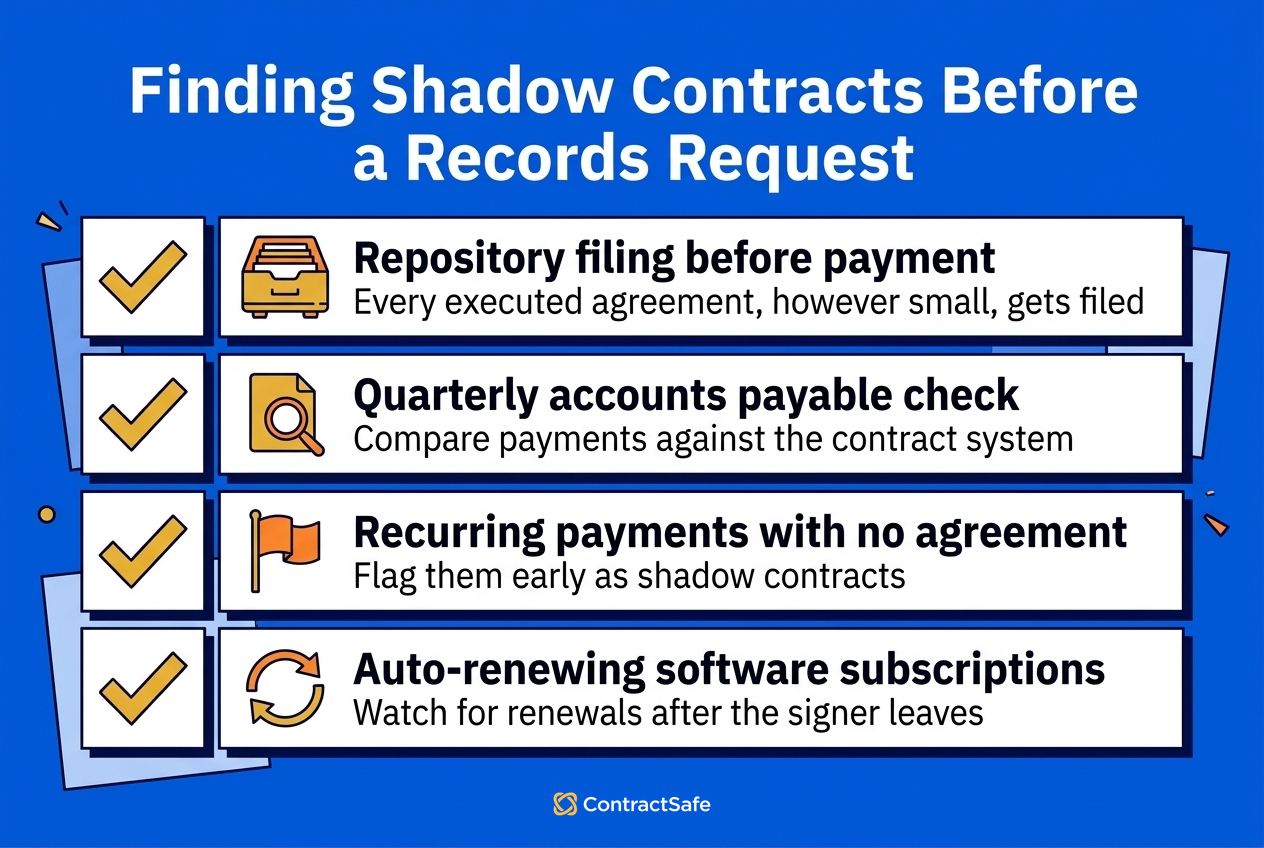
Require every executed agreement, however small, to land in the repository as a condition of payment. The rule is unpopular for a month and invisible afterward, and the records officer stops discovering contracts from journalists.
Check accounts payable against the contract system quarterly: recurring payments with no underlying agreement on file are the shadow contracts, and each one found early is a records-request surprise prevented.
- Watch for: auto-renewing subscriptions surviving the employee who signed up.
Check the four scenarios against your last fiscal year, honestly, and put a number beside each one that happened. The total is the budget case.
What Government Contract Management Means After the Award
Post-award government contract management means four working answers per agreement: where the contract is, who owns it, when its dates fire, and who may see it.
The definition is testable on any agreement in the portfolio. Choose a contract at random and ask the four questions. A managed record answers in one screen; a stored record starts an email thread.
Run the test monthly on a small sample, and log the results. The pass rate is the metric leadership can actually read.
The standard is portfolio-wide, because records requests and audits don’t limit themselves to the departments with good filing habits.
Pre-Award vs Post-Award: The Difference That Creates the Gap
The difference between pre-award and post-award is the difference between a process with an owner and a document without one.
Pre-award has structure because the law requires it: solicitations, evaluation criteria, award documentation. Compared with that, post-award has whatever each department improvised when the executed agreement arrived.
Check where your last five awarded contracts physically went after signature, and the improvisation becomes visible.
The fix is not another procurement module. The fix is giving the post-award side its own system of record, with the same seriousness the buying side already gets.
Why Centralizing Pays for a Public Agency
The benefits land in public, measurable places: records responses in minutes, renewals decided before the notice window closes, audits answered from one screen, and a stronger negotiating position on duplicate vendors.
The Olympia result below is the pattern: search becomes self-service, and the records officer stops being a human index.
Count the benefit in your own numbers: requests per year times days saved per request, plus the first consolidated vendor contract, usually covers the software many times over.
How One City Made Contract Search Self-Service
Self-service contract search means every department finds its own agreements, and the records officer answers requests from one screen instead of a week of email archaeology.
Think of it like the old filing cabinet in the lobby of every government office. The one where a clerk could pull out any document when someone walked in and asked.
Contract management software is the digital version of that cabinet. The difference is that it also tells you when things expire, who’s allowed to see what, and whether anyone has opened the file since last year.
The City of Olympia adopted this approach. Their result: “No one is asking us to look for contracts anymore. Search is now easy enough that it’s become self-service for the entire City.”
That’s the shift. Instead of one person fielding requests and hunting through files, every department can find its own agreements. Legal can search across all departments at once. The public records officer can respond to requests in minutes instead of days.
Quick gut check before you evaluate anything. Ask your records officer one question: which request from the last year took the longest, and which departments made it slow? That answer is your rollout order.
What Government Teams Need From Contract Management Software
Government contract software requirements differ from private-sector ones in degree: more scans, stricter security review, tighter budgets, and broader access needs. Check each row of the table against your own agency before any demo.
| What You Need | Why It Matters for Government |
|---|---|
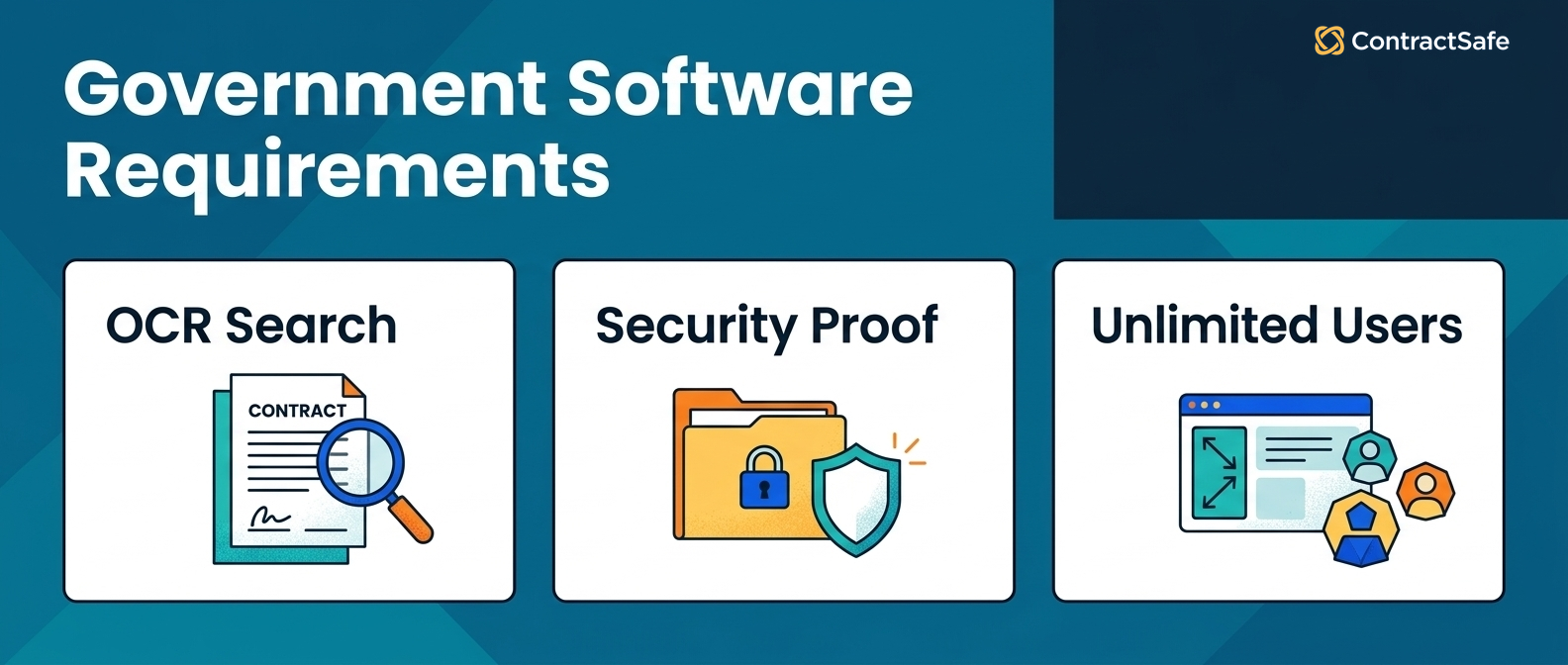
| OCR for scanned documents | Government files include decades of scans, faxes, and photographed pages. Without OCR, you’re searching file names, not contents. |
| Government-grade security (TX-RAMP, SOC 2) | Your IT department will ask for certifications before approving any new software. No credentials, no conversation. |
| Unlimited users | Twelve departments and fifty employees who touch contracts. Per-seat licensing on a public budget either costs tens of thousands or restricts access so tightly the system doesn’t get used. |
| Date alerts across departments | Renewals, insurance expirations, and compliance deadlines don’t align with any single department’s calendar. |
| Role-based permissions | The city attorney sees everything. Parks sees its own contracts. The public records officer searches without edit access. |
| Fast implementation | Government technology deployments are slow. If a CLM takes six months to implement, it takes eighteen after procurement. A platform live in under 30 minutes changes the math. |
Score candidates on your documents, not the vendor’s: bring a decades-old scanned agreement, a multi-amendment vendor contract, and your security questionnaire to the evaluation.
The First Month for a Government Contract Team
A public agency’s contract layer becomes useful within a month when the rollout follows the records-request risk.
- Week one: upload the contracts of your three most-requested departments, scans included, and let OCR make them searchable.
- Week two: verify extracted dates, parties, and owners on the high-value agreements by hand.
- Week three: set renewal and insurance-expiration alerts with owners, and configure role-based permissions per department.
- Week four: run a practice records request against the system, timed, and brief the records officer on self-service search.
Check the month-end result honestly: if the practice request resolves in minutes and the alerts have owners, expand department by department on a schedule.
Related Reading
- Choosing contract repository software, for the buying tests under any public-sector CLM decision.
- Contract obligation management, for turning renewal windows and compliance duties into tracked work.
- Contract metadata mistakes, for keeping the fields trustworthy once the records are centralized.
How ContractSafe Helps With Government Contract Management
ContractSafe is the CLM built for teams who want power without the pain. You get everything you need to manage contracts from intake to renewal, with no steep learning curve.
ContractSafe holds TX-RAMP Level 2 certification and SOC 2 compliance. Most teams can start quickly. AI extracts key terms and identifies execution status automatically.
Custom dashboards and reports come standard. Every plan includes unlimited users, which is what makes twelve departments and fifty contract-touching employees workable on a public budget. Support comes from real humans.
The honest test is your own worst record: bring the scanned, amended, owner-departed agreement to a free demo and run the records-request drill on it.








.svg)







.svg)




