


The best contract management software for a legal team is the system that handles its highest-volume work reliably: finding agreements, controlling access, tracking renewals, reporting on obligations, and moving contracts forward without creating a second administrative job.
Picture your contracts as a junk drawer everyone in the company keeps reaching into. Sales wants the signed MSA, finance wants the renewal date, an auditor wants the whole history, and they all want it now. Good software is the drawer organizer that makes every one of those grabs take seconds instead of an afternoon.
So let’s be specific. When legal buyers say "best," they usually mean a system that does four things well: it keeps every executed agreement and its history in one findable place, it warns you before renewals and obligations come due, it moves contracts through drafting and approval without email chaos, and it does all of that without a six-month rollout and a consultant on retainer. That’s the standard every tool on your shortlist should have to meet, and it’s the one we’ll use here.
Key Takeaways
- Start with your own contract work. List the agreements you handle, the dates you track, and the people who need answers from legal before you rank any vendor; the CLOC Core 12 is a useful neutral reference for legal-team process questions.
- Start from the legal team’s job, not the feature grid. Identify the tasks that consume the most time, such as finding agreements, catching renewals, or moving redlines, then score every tool against those priorities first.
- Proof beats feature count. Make each vendor upload a messy contract, set a renewal alert, and produce a live report before you give a demo feature any credit.
- Watch the pricing model, not just the sticker. Per-user pricing punishes you for adding business owners. ContractSafe includes unlimited users on every plan, starting at $450/month, so the whole legal and business team can be in the system without a per-seat penalty.
How To Use This Legal Software Shortlist
Use this legal software shortlist by picking the route that matches your next buying task: understand legal CLM fit, compare categories, check pricing, or test ContractSafe with real contracts.
Choose your next step:
-
See how a legal-first CLM is built → ContractSafe’s legal contract management software walks through repository, alerts, and AI review in one place.
-
Compare the field → Our best contract management software breakdown covers the tradeoffs across the major categories.
-
Check what it costs → The contract management price comparison shows how pricing models differ and where hidden per-user fees hide.
-
Try it on your own contracts → Book a free ContractSafe demo and search your own agreements in the first session.
Buyer Snapshot
This snapshot matches your team’s biggest pain to the feature that fixes it. If you lose hours hunting for signed contracts, prioritize search. If a missed auto-renewal has burned you, prioritize alerts. If redline email chains eat your week, prioritize built-in approvals. Start your shortlist from the row that stings most.
| If your legal team… | Prioritize on your shortlist | Why it matters |
|---|---|---|
| Loses hours hunting for executed contracts | A strong AI-powered repository with full-text and field search | Findability is the daily win; everything else builds on it |
| Has been burned by a missed auto-renewal | Automated, ownable renewal and obligation alerts | A single missed deadline can cost more than a year of the software |
| Drowns in redline email chains | Built-in approvals and workflow, not just storage | Cuts cycle time and keeps a clean audit trail |
| Keeps adding business owners | Unlimited-user pricing | Per-seat models quietly punish adoption and collaboration |
| Needs contract data flowing elsewhere | Native integrations with your CRM, storage, and e-sign | Contracts don’t live in a vacuum; the data has to move |
The Shortlist Starts With The Legal Team’s Actual Job
Most software shortlists go wrong the same way: someone opens a comparison grid, checks off dozens of features, and picks the tool with the most green boxes. Months later, many of those features are still switched off, the team is back to a shared drive and a spreadsheet, and nobody can find the amended MSA that finance is asking about.
The fix is to build the shortlist backward, from your team’s job, not the feature list. So before you look at a single vendor, write down what your legal team actually spends its time on. For most in-house teams, it collapses to a short list:
For example, use the same messy agreement, renewal question, and access-control scenario in every demo. That gives the team a controlled comparison instead of a collection of polished vendor tours. ContractSafe’s searchable repository provides one practical baseline for that test.
Finding Things
Someone asks, "What did we agree to on liability caps with this vendor?" and the answer shouldn’t take twenty minutes and a Slack thread. If your team burns real hours locating executed agreements and their amendments, findability is your number-one filter. That means a searchable repository where AI reads the documents and pulls out key terms, not a folder tree with clever naming conventions that only one person understands.
Not Getting Surprised
Auto-renewals, expirations, insurance certificates, obligation deadlines, the dates that hurt when you miss them. The best legal contract software makes these deadlines impossible to forget, with alerts that go to named owners well before the date, not a calendar reminder someone has to remember to set.
Moving Contracts Forward
Drafting, redlining, routing for approval, getting signatures. If your NDAs and vendor agreements crawl through email with no clear view into who’s sitting on what, workflow and approvals matter more to you than another AI summary feature.
Answering To Everyone Else
Auditors, the board, procurement, the business units. A legal team is a service function, and the right system lets you answer those questions in seconds and hand out controlled access without emailing PDFs around. Ask each vendor to create a report and a restricted view during the demo; the test exposes both audit risk and day-to-day admin burden. ContractSafe’s deadline and renewal alerts are one concrete point of comparison.
Now rank those. Not all four weigh the same for every team. A lean legal team drowning in renewals has a different top priority than a high-volume enterprise team fighting cycle time. Write down your top two, and treat everything else as a tiebreaker.
Here’s why this ordering matters more than it looks: nearly every contract management tool claims to do all four. The differences show up in how well they do the one or two that matter most to you.
A tool that’s brilliant at AI extraction but takes a quarter to implement is a bad fit for a team whose real pain is a renewal they missed last month. Once your top jobs are written down, the shortlist gets short fast, and the vendor demos stop feeling like a blur of identical claims.
Best Contract Management Software For Legal Teams By Buying Scenario
Here’s the uncomfortable truth about a "best software" list: there’s no single winner. The right tool for a lean legal team drowning in renewal dates looks nothing like the right tool for a large legal operations group standardizing playbooks. So let’s rank scenarios instead of vendors, and match the category to the job you need done this quarter.
The fastest way to build a shortlist is to name your dominant pain first, then work backward to the category that solves it. If your team loses more time to "where’s the signed version?" than to drafting, a full-lifecycle system with strong search and alerts beats a drafting-heavy platform every time. If you’re standardizing clause libraries and approval routing across a big org, the opposite is true.
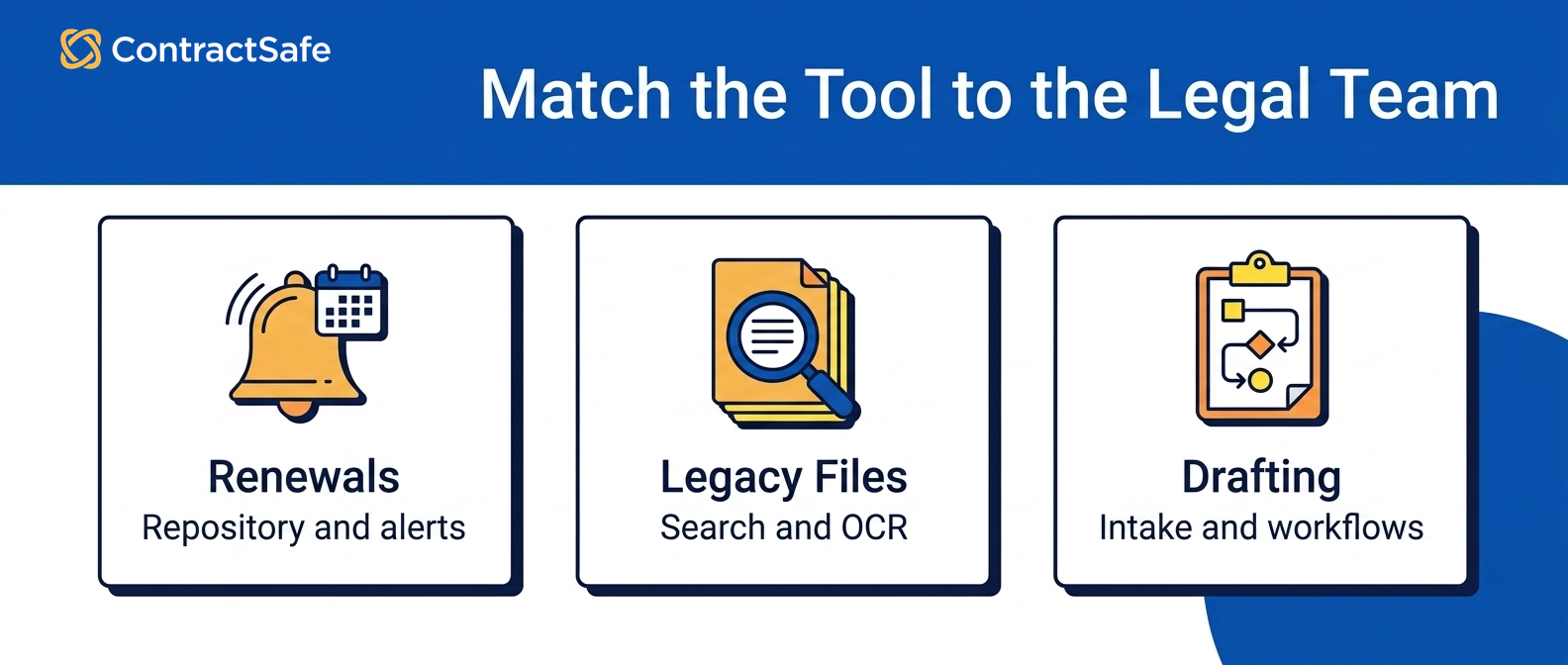
Use the matrix below as a first-pass named shortlist. The products are examples to test, not universal winners; the proof-test column is what to verify in a demo instead of taking a sales rep’s word for it.
| Category | Shortlist when | Avoid when | Proof test | Next read |
|---|---|---|---|---|
| ContractSafe (practical full-lifecycle CLM) | You need intake, approvals, e-signature, search, alerts, reporting, and ongoing contract control without a long enterprise rollout | You need deeply customized workflow engineering as the primary requirement on day one | Use a batch of messy contracts to test intake, extraction, clause search, permissions, approvals, and a renewal alert | Best contract management software overview |
| Highly configurable enterprise CLM: Icertis and Agiloft | You’re standardizing playbooks, clause libraries, and multi-stage approvals across many business units and have IT and admin resources to run the platform | You’re a lean team that needs value in weeks and cannot staff a dedicated administrator | Ask for the realistic time-to-live and internal staffing requirement for your organization, not the demo sandbox | ContractSafe vs Icertis and ContractSafe vs Agiloft |
| Enterprise contract intelligence: Workday CLM and LinkSquares | Your main job is extracting and reporting on structured dates, values, terms, and obligations across a large signed-contract portfolio | The implementation and ongoing data-governance work outweigh the depth your team will actually use | Give each platform a representative sample of your own signed files and verify every extracted field against its source | ContractSafe vs Workday CLM and ContractSafe vs LinkSquares |
| Drafting and workflow-led CLM: Juro and SpotDraft | Your bottleneck is generating and negotiating new agreements, template assembly, redlining, and version control during negotiation | Your dominant problem is a large legacy archive that nobody can find or track after signature | Ask how the tool imports, extracts, reports on, and alerts against a contract that was never drafted in its system | ContractSafe vs Juro and ContractSafe vs SpotDraft |
| E-signature-connected CLM: DocuSign CLM | Your organization already relies on DocuSign and wants contract workflow connected to that e-signature ecosystem | The rollout and administration required for the wider platform exceed your team’s capacity | Run one agreement from intake through signature, search, renewal alert, and report | ContractSafe vs DocuSign CLM |
| Document management platform: SharePoint | You mainly need familiar Microsoft 365 storage, metadata, permissions, and collaboration | You need purpose-built lifecycle workflows, renewal alerts, obligation tracking, and contract reporting without maintaining a custom build | Trace how a notice date becomes an owned alert and how contract status becomes a portfolio report | SharePoint contract repository guide |
| Lightweight post-signature CLM: ContractWorks | You prioritize straightforward storage, search, alerts, and reporting over broader pre-signature workflow | You need one system to manage intake, approvals, negotiation, signature, and post-signature work | Test both a new request and a legacy agreement from upload through alert and report | ContractSafe vs ContractWorks |
Notice the pattern: no category is "bad." They’re built for different first problems. The mistake legal teams make is buying the category that impressed them in a demo rather than the one that fixes their loudest daily headache. Run the proof tests above with your own contracts, and the shortlist narrows itself.
When ContractSafe Belongs On The Shortlist
ContractSafe earns a demo slot when your problem is control and a clear view over the contracts you already have, plus the deadlines attached to them, and you want that handled in weeks, not after a long implementation.
It’s a good fit if any of these sound like your Monday morning: you can’t quickly find the current signed version of an agreement, renewals sneak up and auto-renew before anyone reviews them, or your "system" is a shared drive plus a spreadsheet that only one person understands.
ContractSafe is full-lifecycle CLM. It covers the contract from intake through storage, search, reporting, and renewal, so it’s not just a fancier folder. The central repository gives every contract a home with searchable metadata, and automated alerts keep renewal dates from depending on someone’s memory.
For teams evaluating legal contract software specifically, the AI contract management layer matters: it pulls key terms, dates, and parties out of uploaded documents so you’re not hand-keying a large legacy archive. Its integrations connect the contract lifecycle to the tools your business already uses instead of forcing you to rebuild the surrounding stack.
The other reason it lands on shortlists is pricing that doesn’t punish you for adding people. Plans start at $450 per month, and every plan includes unlimited users, so legal and the business owners who need access can all work in the system without a per-seat penalty.
You can see the tiers on the pricing page, read the deeper legal contract management breakdown, or book a demo and run the proof test with your messiest contracts.
Where ContractSafe is not the obvious pick: if your first demo test is a deeply customized approval path or a heavy template-drafting workflow, compare those tools first and come back to ContractSafe for the signed-contract control test.
When A Heavier Enterprise CLM Platform Is The Right Call
Use heavier enterprise CLM software only when you can name the clause library, approval branches, admin owner, and systems it must connect on day one. If those requirements are real, test those tools. If they are vague, test search, alerts, reporting, and adoption first.
The tradeoff is real, and it’s mostly about time and staffing. Enterprise platforms typically ask for a longer implementation, a dedicated administrator, and a change-management effort to get adoption across the org. That’s a fair price if you have the resources and the complexity to justify it. It’s a poor trade if you’re a lean team that needs contracts under control this quarter.
If you’re weighing bigger platforms, compare the tradeoffs before the demo script takes over. Use the ContractSafe vs DocuSign CLM and ContractSafe vs LinkSquares pages to check workflow depth, admin burden, and implementation scope. Then use the price comparison hub to pressure-test the quote.
A useful gut check: if you can’t name the approval path you’d configure on day one, run the signed-contract tests first. Buy what your team will use immediately, and leave room to grow.
When Workflow Or Drafting Tools Deserve The Demo Slot
There’s a whole class of tools built primarily for the front of the contract lifecycle, generating agreements from templates, assembling clauses, redlining, and managing versions during negotiation. If your team’s real bottleneck is producing and negotiating new contracts at volume, these deserve a serious look, and they’ll often out-perform a lifecycle system on that specific job.
The scenario where drafting-first tools win is high-throughput contracting where sales agreements, NDAs, and vendor paper flow constantly and faster creation and negotiation directly move the business. Standardized templates and guided assembly can compress a multi-day drafting task into a same-day workflow.
The trap is assuming a drafting tool also solves post-signature life. Ask the hard question in the demo: what happens to a contract after it’s signed, and what happens to the large legacy archive that was never drafted in this system at all? A workflow-led platform can be the right choice when drafting drives most of the pain and the wrong choice when post-signature control is the dominant problem.
To pressure-test whether your bottleneck is really drafting, look outside vendor marketing. The CLOC Core 12 and the World Commerce & Contracting knowledge library offer neutral frameworks for mapping process, ownership, and contracting work before you commit to a software category.
The honest answer for a lot of legal teams: they need less drafting automation than they think and far more clarity over what’s already signed. If that’s you, start the shortlist at the repository-and-alerts end and add drafting horsepower only where the volume proves you need it.
Questions Every Vendor Should Prove In The Demo
Every CLM vendor sounds capable in a pitch deck. The gap between sounding capable and actually working on your contracts only shows up when the demo runs on your reality instead of theirs. So skip the scripted tour. Hand the vendor your own messy example and watch what happens. The questions below separate software your team adopts from software that gathers dust.
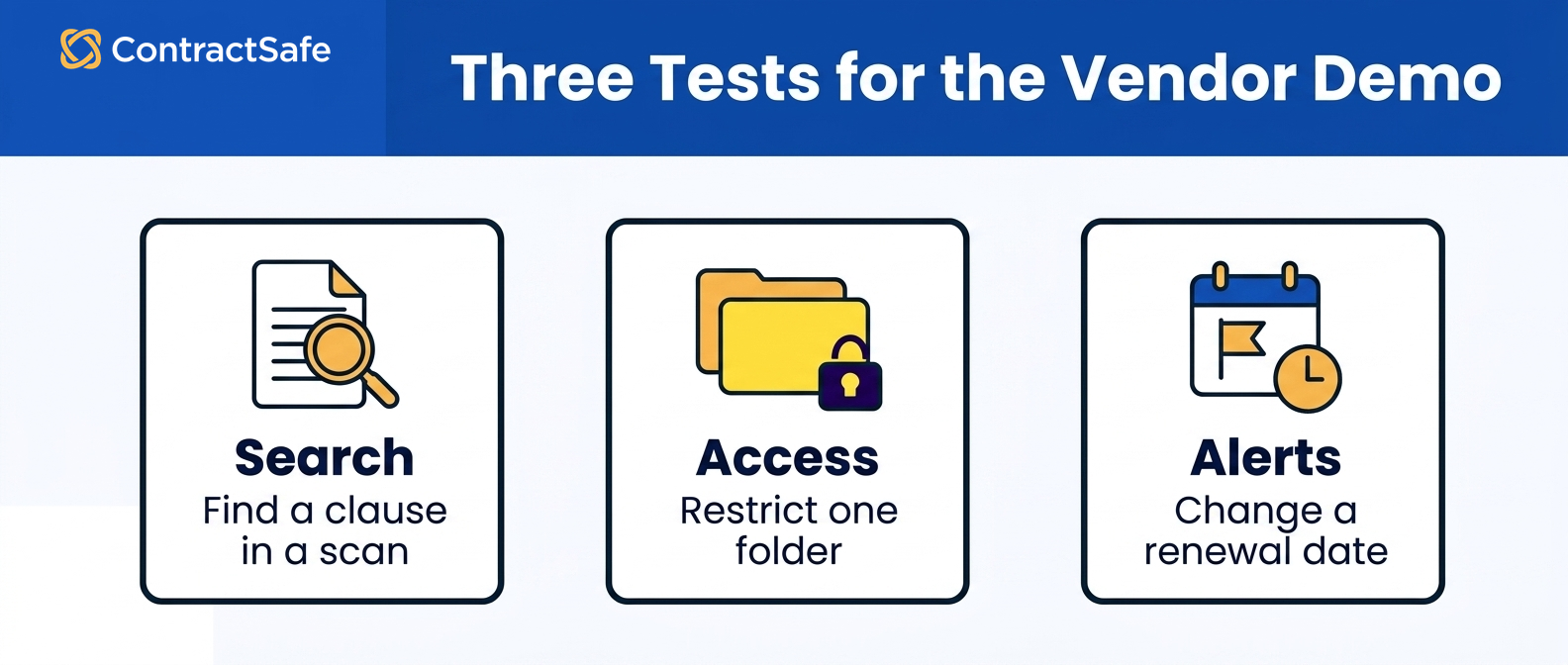
Messy Scanned Search
Bring a scanned PDF, ideally one that started life as a fax, got signed in blue ink, and was photocopied twice. Ask the vendor to upload it live and then find a specific clause inside it by searching a phrase you know is in the body text. If the tool can’t OCR a scan and surface that clause in seconds, your keyword search across the archive won’t work either, and that’s the whole reason most legal teams buy this software. Watch whether they reach for "we’d need to process that offline first." That’s a no.
For example, compare the result with ContractSafe’s AI contract analysis and OCR workflow, and record whether each tool finds the clause, its amendment, and the controlling version. A missed result is a real retrieval risk, not a cosmetic demo flaw.
Permissions And Access
Ask them to show you, in the live environment, how an outside counsel or a finance user gets access to one folder of contracts without seeing everything else. Have them create a restricted user on the spot and log in as that person. You want to see role-based and folder-level access working, not a slide describing it.
Be precise about what you’re testing: many tools control which contracts or folders a user can open, which is what matters for keeping sensitive matters walled off. Don’t accept a vague "yes, we have permissions", make them demonstrate the scope.
Use ContractSafe’s security and permissions controls as a comparison point, then ask every vendor to repeat the same restricted-user scenario. The evidence should show who can view, edit, export, and administer the record.
Renewal Alerts
Ask the vendor to set up an alert on a sample contract with a renewal date and two advance reminders, and show you exactly who gets notified and how. Then ask the harder question: what happens when the person who owns that contract leaves the company? If alerts live in one person’s inbox or calendar, you’re one resignation away from an auto-renewal you didn’t want. You want reminders tied to the contract record and assigned to the right owner, not trapped in a single personal calendar.
Reporting
Give them a real question your GC actually asks, something like "show me every contract with an auto-renewal coming up soon and a liability cap below our policy threshold." Ask them to build that view live and export it. If pulling a basic report requires a professional-services ticket or a custom-fields consultant, your team won’t run reports, and the archive becomes a filing cabinet with a search bar. Reporting your paralegals can build themselves is the difference between a tool that answers questions and one that just stores documents.
Workflow And Admin Burden
Ask who administers the system day to day after go-live. Then ask them to add a new custom field and a new contract type while you watch. The real question is whether a paralegal or contracts manager can configure the tool, or whether every change routes back through the vendor. Heavy configuration platforms promise everything and then bill you for a consultant every time you want to add a field. For most legal teams, low admin burden beats infinite configurability.
Pricing Assumptions
Get the number in writing, and get the assumptions behind it. Ask directly: is pricing per user, per contract, or per record? Are e-signatures included or metered? What happens to the price when you add the sales team or finance as viewers next year? A quote built around a small pilot group can fall apart the moment the rest of the company needs access.
For example, compare that quote with ContractSafe’s published pricing and unlimited users on every plan. Whatever vendor you evaluate, force the per-seat-versus-flat question into the open before you sign.
Implementation
Ask how your existing contracts get into the system. Who does the data entry and abstraction, you, them, or a partner, and how long does it take? A tool that’s perfect in the demo but demands months of manual uploading before it’s useful has a real cost your team pays in time. Ask for a specific migration timeline, whether they’ll bulk-import and OCR your existing archive, and what "day one useful" actually looks like.
How To Choose The Tool Without Letting The Demo Choose For You
A good demo is designed to make you feel confident. That’s the trap. The vendor controls the data, the workflow, and the pacing, so of course everything works. Your job is to reclaim the frame and evaluate against your own criteria, not theirs.
Start by writing down a fixed set of must-haves before you see a single demo: the scanned-search test, the renewal-alert ownership question, the reporting example, and whatever else matters most for your team. Score every vendor against that same list. If you let each demo introduce new "wow" features, you’ll end up comparing a search tool to a workflow engine to an AI abstraction platform, and the comparison becomes meaningless.
Then pressure-test the total cost of the decision, not just the license. Implementation time, admin burden, training, and the price of adding users later are all real. Assign an owner and a testable assumption to each cost instead of borrowing an ROI figure from a vendor’s sales deck.
Finally, insist on a trial or a pilot with your own contracts. A demo shows you the vendor’s best case. A pilot shows you your team’s actual case, whether people log in, whether search finds what they need, whether the alerts fire. If a vendor won’t let you test on real documents, that reluctance is data too.
Related Reading
-
The best contract management software, compared, a broader look at the market beyond legal-specific needs.
-
Contract management price comparison, how per-user, per-contract, and flat pricing models actually add up.
-
ContractSafe vs. ContractWorks, a head-to-head for teams weighing focused, easy-to-adopt CLM tools.
-
ContractSafe vs. LinkSquares, comparing AI-forward platforms on admin burden and cost.
-
ContractSafe vs. DocuSign CLM, where a workflow-heavy platform fits and where it’s overkill.
How ContractSafe Helps Legal Teams Choose A Practical Shortlist
Here’s where ContractSafe fits the tests above. It’s full-lifecycle CLM built to be useful to a legal team on day one, not months into implementation. The repository runs OCR on scanned documents automatically, so the messy-fax test passes. You can search the body text of a signed scan, not just the filename. Most teams underestimate that until they’ve lived without it.
On renewals, automated alerts attach to the contract record and can notify the right owners before deadlines, so renewal follow-up does not depend on one person’s memory or inbox. For teams drowning in abstraction work, AI contract management pulls key dates and terms out of your documents so your paralegals aren’t retyping them by hand. And integrations connect the archive to the tools your business already runs on.
On the pricing question you’re supposed to force into the open, ContractSafe starts at $450 per month on the Organize plan when billed annually, or $540 month to month, and every plan includes unlimited users. That’s the point: adding finance, sales, or outside viewers doesn’t reprice your contract, so the demo math still holds a year later. The legal contract management software overview walks through how the platform maps to a legal team’s day.
The honest recommendation: don’t take our word for it any more than anyone else’s. Run the proof tests. Book a demo, bring your ugliest scanned contract, and make us find a clause inside it while you watch.







.svg)







.svg)




