



Microsoft 365 contract management is the practice of storing, organizing, and tracking your signed agreements inside the tools you already pay for, including SharePoint, Teams, and the document processing features built into Microsoft 365. Boil it down and it’s really about where a signed file lives, who owns it, who’s allowed to open it, when it renews, and how fast someone gets a straight answer to a contract question.
Full disclosure, ContractSafe is contract management software, so we have skin in this game, but the honest starting point is figuring out whether the Microsoft tools you already pay for can answer these questions on their own.
Quick answer: Microsoft 365 contract management is best evaluated by the work it helps legal, finance, procurement, and operations teams complete: finding the right contract, trusting the data attached to it, and turning that data into the next action.
When it’s set up well, anyone with the right permission can find an agreement, confirm its owner, and read its dates without emailing three people and waiting a day. Picture Dana, an operations lead at a mid-size company. Legal asked her to pull every vendor agreement that renews before year end, name each owner, and flag the two that auto-renew. Simple enough on paper.
Except her signed contracts sit across a shared drive, a Teams channel, and a handful of inboxes. Most are clean PDFs, one’s a phone photo of a signature page that’s tilted about fifteen degrees, and nobody agrees on which folder holds the real versions.
Dana already owns Microsoft 365, so the question isn’t what to buy. It’s whether her setup answers that request without turning into a scavenger hunt. So we’ll walk through three real paths inside Microsoft 365, from lightest to heaviest lift: the built-in template pattern, a governed SharePoint or Teams site, and a dedicated contract repository.
You’ll get a plain decision table, proof tests you can run against your own messy agreements, and a cleanup checklist for whichever path you pick. The aim is a setup that answers owner, date, access, and reporting questions on the first try instead of the fifth.
Key Takeaways
- Microsoft 365 is a credible home for contracts when you can prove ownership, metadata, permissions, dates, reporting, and cleanup on your real files.
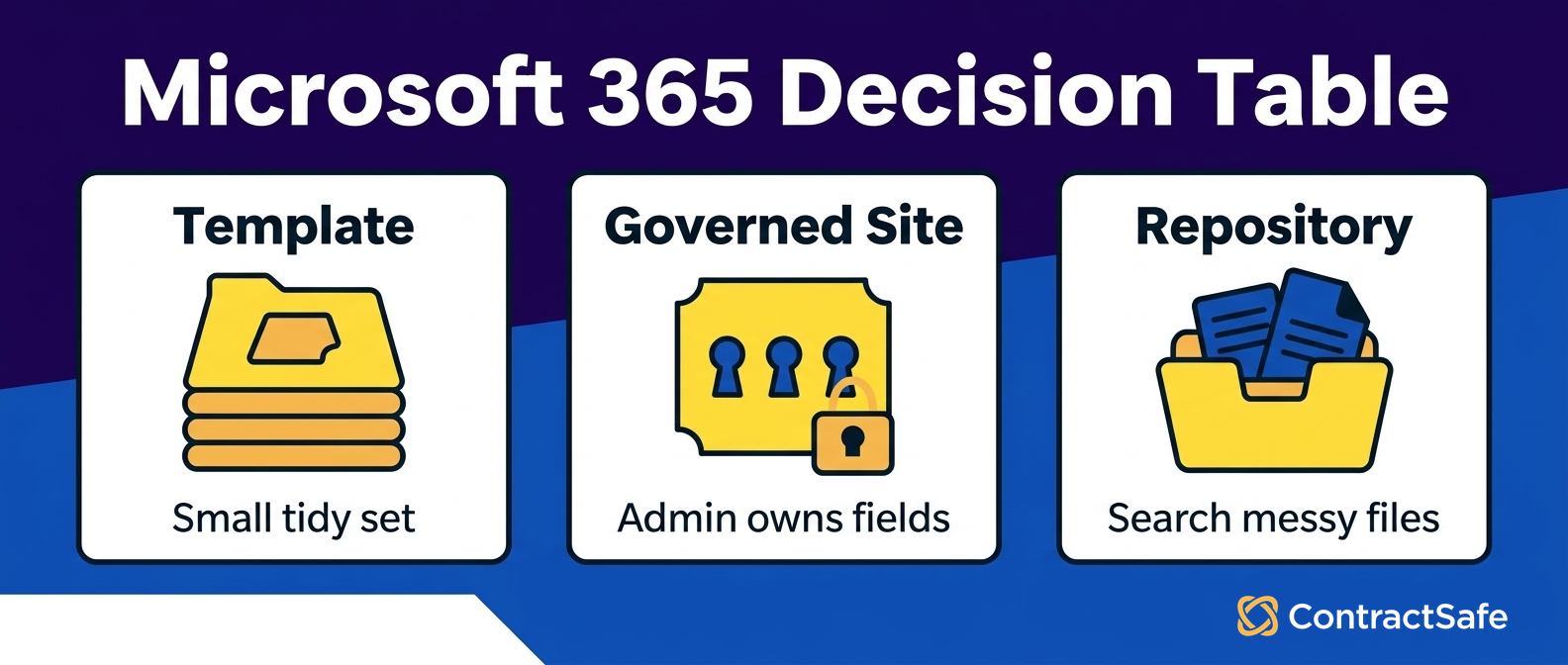
- The template pattern fits a small, tidy set of agreements with one clear owner and low access sensitivity.
- A governed SharePoint or Teams site fits mid-size teams that have admin support and will keep metadata and permissions current.
- A dedicated repository fits when many people ask contract questions and manual hunting keeps failing.
- Run proof tests on your messiest real contracts before you commit, not on a tidy sample folder.
Choose your next step:
If you need the Microsoft mechanics first, read Microsoft’s contract management solution guidance.
If you’re scoping what a good contract home needs, use the contract repository requirements checklist.
If you’re ready to test fit on your own files, run the proof tests against your messiest agreements and compare the results.
Buyer Snapshot for Microsoft 365 Contract Management
The Microsoft 365 contract management checklist should compare the work the system must support: clean records, trusted answers, clear ownership, and next actions the team can actually take.
| Reader question | Short answer | What to do next |
|---|---|---|
| What is it? | Microsoft 365 contract management should create a searchable, governed contract record | Confirm the system stores documents plus metadata, owners, dates, and permissions |
| Who needs it? | Legal, finance, procurement, and operations teams that act on signed agreements | Map which teams need access and which fields they can see |
| What matters most? | Findability, metadata, alerts, reports, permissions, and audit history | Use those capabilities as the core buying checklist |
| Where does AI fit? | AI helps when it extracts and validates contract data inside the governed record | Require source traceability and human review |
| What is the first step? | Inventory contracts and define the minimum metadata model | Start with active and high-risk agreements before historical cleanup |
Decision Check
Can the team find a signed agreement by party, date, owner, and clause?
Can the system show what needs action this month?
Can non-legal users answer basic contract questions without creating a new access problem?
Evidence Checklist
| Planning claim | Evidence to request |
|---|---|
| Contracts are searchable | Find a scanned agreement by party, clause, date, and business owner |
| Metadata is usable | Show required fields, review status, reporting, and cleanup ownership |
| The rollout is realistic | Show launch-critical work separately from historical cleanup |
What Your Microsoft 365 Contract Setup Has to Answer
Your Microsoft 365 setup has exactly one job when it comes to contracts: answer six questions reliably.
Where does the signed file live, who owns it, who can open it, when does it renew, what does a report show, and how do you clear out the duplicates. Pick the lightest path that answers all six on your real contracts, then stop shopping. Microsoft’s guidance is useful context for teams that want to build the first version inside Microsoft 365.
The mistake most teams make is starting with the tool instead of the questions, and Microsoft 365 can genuinely handle contracts, so it’s an easy trap to fall into.
Microsoft’s document processing solution lays out how SharePoint lists hold key fields, how Teams gives people a place to work together, and how Power Automate routes an agreement for sign-off and records the outcome. Those parts are real and they work. The open question is whether your team will keep them fed once the volume and the number of people asking questions both climb.
Each of the six questions maps to a mechanism you can actually test, which is handy, because it means you don’t have to take anyone’s word for it:
Where the file lives depends on one authoritative location, not four folders that each look official.
Who owns it depends on an owner field someone actually fills in, not a name people happen to remember.
Who can open it depends on permissions set at the right level, so an executive agreement isn’t sitting in a library everyone can browse.
When it renews depends on reading a date from a structured field, so you can filter and report on it.
What a report shows depends on those fields staying consistent enough to group and count.
How you clean up depends on telling a signed final from a draft and a duplicate.
If your team already runs on SharePoint and you want the architecture context before you commit to anything, our guide to SharePoint contract management covers how libraries, columns, and permissions fit together for agreements specifically.
Decision check: before you commit to a path, put this buyer checklist in front of a colleague and work one real agreement you signed last quarter, out loud.
Treat each line as proof to ask for, not a box you tick from memory, because memory is exactly the thing that fails you at renewal time.
Name the single accountable owner without guessing.
Open the agreement under the right permission, then confirm the wrong people can’t.
Read its renewal or end date from a field, not from the body text.
Pull every contract that renews next quarter into one list.
Show that the file you found is the final signed version, not a draft.
Clear all five on a genuinely messy contract and your current path is closer to good enough than you feared. Stumble on even one that matters to your business, and that’s your cue to add some structure.
Why This Choice Matters
Picking among the three paths isn’t about taste. Each one sends you a different bill later.
Go with the template pattern and you move fast, but you inherit hand-typed metadata and no real guard against duplicates. That holds while the set is small. Let volume climb or scanned files show up, and the reports you trust for renewal dates start lying to you without a warning.
Go with a governed SharePoint or Teams site and you get real structure, consistent columns, and permissions that actually hold. The cost is upkeep. Someone has to own the columns, keep them filled, and manage access as people join and leave. Skip that for a quarter and the site slides back toward the shared drive you were escaping.
Go with a dedicated repository and you take on a tool to run and pay for, but you stop paying the hidden tax of people hunting for files and guessing at renewal dates. Here is a simple way to decide:
If nobody will own columns and dates every week, skip the governed site.
If search speed and clean renewal reports matter most, pick the repository.
If the set is tiny and static, the template is fine for now.
Pick the option whose ongoing cost your team will actually cover, not the one that looks cheapest on setup day.
Option 1 The Microsoft 365 Template Pattern
The template pattern uses Microsoft’s contracts management team site template to stand up a ready-made SharePoint site with lists, key fields, and simple approval routing.
It fits a small, tidy set of agreements with one clear owner and low access sensitivity, and it starts to strain the moment volume, scanned files, duplicates, or a crowd of different askers show up. This is the lightest lift you can make to go from a shared drive to something that resembles a system.
Microsoft’s contracts management team site template is useful context for the template path because it shows the SharePoint site starting point.
The Microsoft contracts management team site template gives you a starting structure, so you’re not building columns from scratch. You get a list to track agreements, fields for attributes like party, effective date, and status, and a place for the documents themselves. Layered on top, Power Automate can route a new agreement to the right person for sign-off and record whether it was approved or sent back.
For a small team that just wants a light record of who signed off on what, that’s genuinely useful.
Here’s where the template pattern earns its keep. If you manage a modest set of agreements, most of them are clean digital files, one person owns the process, and nobody needs airtight access control, this pattern answers the six questions well enough. You can find a contract, see its owner, read its date, and produce a short list without much fuss.
And here’s where it starts to crack:
Scanned agreements. The template tracks metadata you enter by hand. If a signed contract exists only as a photo or a scan, search reads the filename and the columns you typed, not the words printed inside the document.
Duplicates and versions. Nothing in the pattern forces one authoritative copy. If three people upload three near-identical files, the template happily holds all three and trusts you to know which one is real.
Volume and many askers. The fields only stay useful if they stay filled. When a dozen people load agreements and half of them skip the owner field, your reports quietly go wrong, and quietly is the dangerous part.
So think of the template pattern as a reasonable first step, not a finish line. It’s a way to prove whether structured fields and light routing actually solve your problem before you invest in anything heavier. If the proof tests later in this article pass on the template, you may not need to go any further, and that’s a perfectly good outcome.
The template pattern is worth running precisely because it is cheap to test. Point it at your messiest contracts, the scanned ones and the near-duplicates, and see whether you can still name the owner, read the renewal date from a field, and prove you found the signed version.
If the template clears every proof test on your real files, you have your answer and you can stop. If it stumbles on the ones that matter to your business, the same tests tell you what a purpose-built repository has to handle.
Option 2 A Governed SharePoint or Teams Site
A governed contract site is a SharePoint library or Teams-backed site you configure and maintain on purpose: consistent metadata columns, enforced permissions, versioning, and clear ownership. It fits mid-size teams that have admin support and the discipline to keep columns filled.
Without that upkeep, it drifts right back into a messy shared drive wearing a nicer name.
Governance is the word that separates this option from the template. A governed site isn’t just a place to drop files, it’s a set of rules that hold even when everyone’s busy and nobody has time to be tidy. In practice that usually means a few things working together:
You define the metadata columns every agreement must carry: counterparty, contract type, owner, effective date, renewal or end date, and status.
You use content types so a vendor agreement and an NDA can carry different fields where it matters.
You set permission levels deliberately, so sensitive agreements live in libraries only the right groups can reach.
You turn on versioning so you can tell the signed final from the drafts that came before it.
Permission groups can lock a settlement or executive agreement to a named set of people. Versioning can finally settle the which-copy-is-real argument that eats twenty minutes every time it comes up. This is a credible contract home, and it deserves to be treated as one rather than waved off.
Be honest about what governance costs and where it needs a hand, though:
Someone has to own the upkeep. Columns only stay reliable if a real person enforces that they get filled. A governed site is a standing commitment, not a one-time build you forget about.
Search still favors typed metadata. Out of the box, finding a clause buried in a scanned agreement is hard unless you’ve added optical character recognition so the text inside images becomes searchable.
Business users need it to be obvious. People outside legal won’t learn a complicated column scheme. If finding a contract takes a training session, they’ll go right back to asking a human, and your governed site becomes a filing cabinet nobody opens.
A governed site holds up only as long as someone keeps feeding it. The columns, the permissions, the versioning, all of it depends on steady discipline that gets harder as volume and headcount climb. If that upkeep is the thing you quietly doubt your team will sustain, compare the governed-site path against a dedicated repository before you commit.
Option 3 A Dedicated Contract Repository
A dedicated contract repository is software shaped around agreements: central storage, full-text and OCR search, status tracking, linked amendments, permission controls, reporting, and backups.
It fits when contract questions come from many people and the Microsoft 365 path keeps sending them on manual hunts. A general document library assumes you are storing files. A repository assumes each file is a contract with an owner, dates, counterparties, related documents, and a status. That assumption changes the work.
Use this row when your tests show:
Search fails on scans. People need to find a clause or counterparty inside a PDF, not just a filename.
Ownership is unclear. Renewal reminders have no place to land because the owner field is missing or unreliable.
Related files drift apart. Amendments, exhibits, and side letters do not stay attached to the signed agreement.
Reports require hand assembly. Leadership asks for renewals, active agreements, or restricted contracts and the answer takes hours.
ContractSafe is built for this repository row, so use it as a proof target: the product should find scanned agreements, show ownership and status, keep attachments with the parent contract, and lock sensitive records without a custom SharePoint build.
Decision Table for Template, Site, or Repository
Read across the row that describes your contract reality, run the listed proof test, and take the next step if it passes. If your best-fit row fails its proof test on a real agreement, move down a row toward more structure.
If the dedicated-repository row is where you land, ContractSafe should be tested against that row rather than compared as a generic file-storage tool. The table’s meant to be used, not admired, so run it against files you actually have, ideally the ugly ones.
| Path | Best fit | Proof test to run | Next step |
|---|---|---|---|
| Template pattern | Small, tidy set, one clear owner, low sensitivity | Upload a messy signed PDF and find it later by a party name | Stand up the Microsoft template and load a sample set |
| Governed site | Mid-size team with admin support and metadata discipline | Restrict a sensitive agreement, then confirm the wrong roles are blocked | Configure columns, permissions, and versioning, then pilot it |
| Dedicated repository | Many askers, scanned files, recurring reporting | Search inside a scanned agreement for a clause and get a real hit | Map your requirements and test a repository against your files |
If you already suspect the repository row is yours, the quickest way to know for sure is to put your own files in front of one. Test how a repository handles your agreements and check the proof tests below against it directly.
Proof Tests To Run Before You Choose
Don’t decide on a clean demo folder. Run these tests on your messiest real agreements, because each one maps to a question a colleague will ask you later. If a path passes all of them on your actual contracts, it’s good enough.
If it fails even one that matters to your business, that’s your cue to move toward more structure.
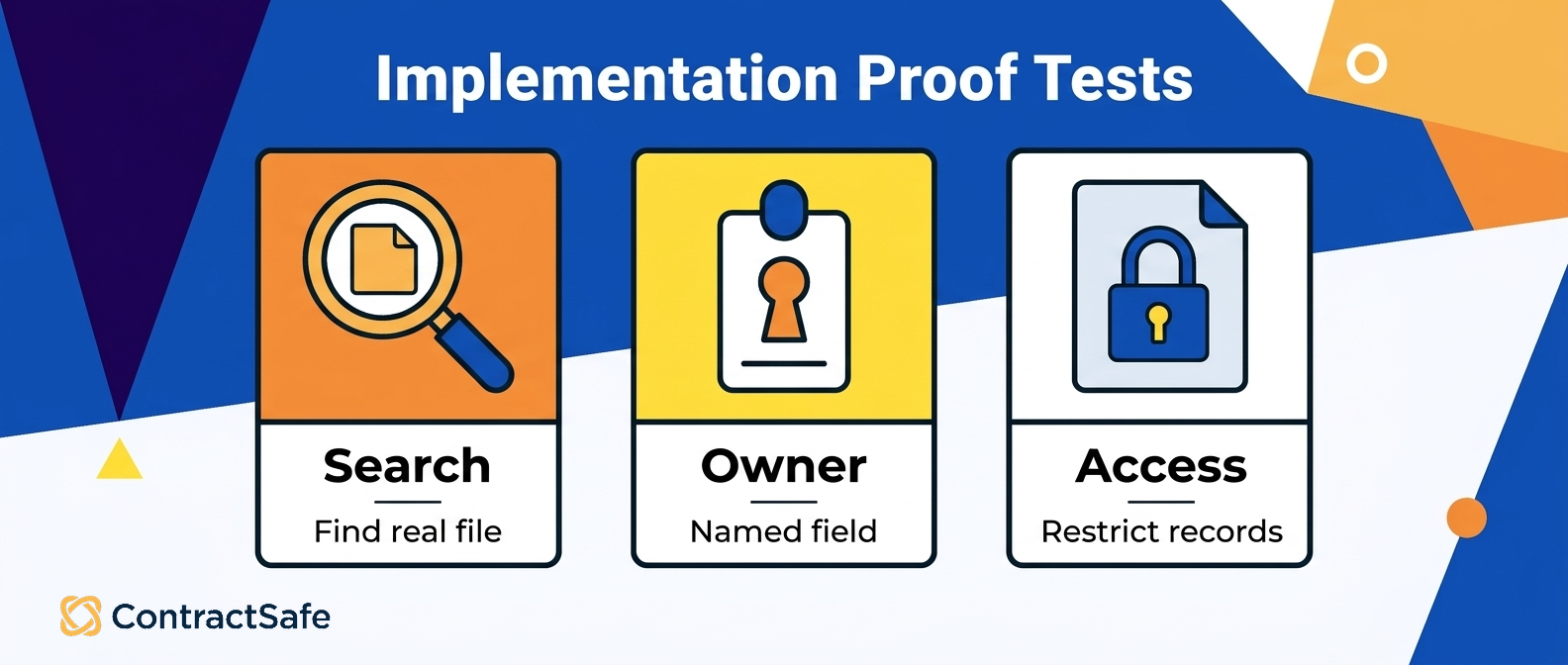
Search a real, messy file. Take a signed agreement with a vague or wrong filename and try to find it by a counterparty name or a clause. If search only reads filenames and typed columns, anything scanned stays invisible.
Locate a scanned page by its words. Pull up an agreement that exists only as a photo or scan, using text printed inside it rather than the name of the file. This single test is where optical character recognition either earns its place or exposes a gap.
Verify the owner from a field. Pick one contract and name its single accountable owner from structured data, not from memory or a hallway conversation. If you can’t, your renewal reminders have nowhere to land.
Check a renewal date and build a list. Open one agreement, read its renewal or end date from a field, then produce every contract that renews next quarter as one filtered list.
Restrict a sensitive agreement. Lock an executive or settlement document to a named group, then sign in as a normal user and confirm you can neither open it nor see it in search results.
Connect an amendment to its parent. Start from a signed master agreement and reach its amendment, exhibit, and side letter without hopping across folders or guessing which file goes with which.
Answer a report request cold. Reproduce Dana’s ask from the top of this article, every agreement renewing before year end with its owner and an auto-renew flag, and note whether you got a clean answer on the first attempt or the fourth.
These tests cut through vendor claims and internal optimism alike, because they use your reality instead of a curated sample. A path that clears every test on your worst files is a path you can trust. A path that clears them only on the clean examples will disappoint you the first time a scanned amendment lands in an inbox at 5pm.
If your setup trips on the proof tests, on the scanned signature page, the mystery owner field, the renewal date buried in the body text, that’s not really a failure so much as a spec.
It tells you exactly what a dedicated repository has to solve. The honest way to check is to bring your ugliest agreements to a repository demo and see whether the answers come back on the first try.
Migration And Governance Checklist
Whatever path wins, clean before you move. A migration that carries every duplicate, mystery scan, and half-named file along with it just relocates the mess into nicer software, and now the mess has a bigger budget.
Sort real signed versions from drafts, set owners and dates, agree on permissions, decide what gets archived, then move in small, checked batches so problems surface early while they’re still cheap to fix.
Inventory every place contracts live today, including shared drives, Teams channels, personal folders, and inboxes, and write the list down.
Separate final signed versions from drafts and duplicates, and mark one source as authoritative so future-you never has to guess.
Fill the fields that matter on each agreement: counterparty, owner, effective date, renewal or end date, and status.
Run optical character recognition on the scans so their contents become searchable, not just their filenames.
Agree on permission groups and lock sensitive agreements before migration, not after, so nothing sensitive is exposed in transit.
Link amendments, exhibits, and attachments to their signed parent agreement as you go.
Move in small batches, then run the proof tests on each batch before you load the next one.
Set a backup routine and a retention rule so the clean state you worked for stays clean.
Cleanup is the step teams love to skip, and it’s also the step that quietly decides whether the new home works. If you want a fuller walkthrough of sorting, tagging, and loading agreements without dragging the old mess forward, a contract repository implementation guide should cover the migration and cleanup sequence in more detail.
How to Compare Microsoft 365 Contract Management Tools
Compare the shortlist of tools by running the same tests against each option, not by comparing feature lists. Include the Microsoft template, a governed site, third-party SharePoint add-ons, and a dedicated repository.
| Tool path | Best fit | Proof to ask for |
|---|---|---|
| Microsoft template | Small, tidy agreement set | Show owner, date, and approval status on a clean file |
| Governed SharePoint or Teams site | Admin-supported team with maintained metadata | Restrict access and produce a renewal list |
| SharePoint add-on | Team staying inside Microsoft 365 but needing reminders or clause tools | Show the add-on working on your actual library |
| Dedicated repository | Many askers, scans, and recurring reports | Find a scan, show owner/date/status, and restrict access |
A ContractSafe demo belongs in this comparison when the repository row is the likely fit. If the template or governed site clears every proof test, the honest answer may be to keep Microsoft 365 governed. If the repository row wins, compare ContractSafe against the same proof tests instead of treating it as a generic document library.
Related Reading
SharePoint contract management for the architecture context behind libraries, columns, and permissions.
Contract repository implementation for the migration and cleanup sequence.
Third-party SharePoint contract management guide for another view on SharePoint-based agreement handling.
How ContractSafe Helps With Microsoft 365 Contract Management
ContractSafe helps when your proof tests fail inside Microsoft 365 and the contract questions keep stacking up on your desk.
The ContractSafe repository gives you one searchable home for every agreement, OCR search across scans, native status tracking, linked attachments and amendments, permission controls, and automatic backups, so business users find their own answers instead of pinging legal for every last request.
Map it back to the tests you just ran, and it clicks into place. The scanned signature page that vanished from filename search becomes findable because the repository reads the text inside the document.
The owner question gets a real answer because ownership is a tracked field, not a memory that fades. The renewal report you assembled by hand becomes a filter, because dates and statuses are structured data you can group and export.
Sensitive agreements stay locked to the right people because permission controls are built for contracts, not bolted onto a general document library. And the clean state survives because backups run without anyone having to remember to make them. Pricing is public and easy to check, which matters when you’re weighing a new tool against a setup you already own.
ContractSafe starts at $450 per month on the Organize plan billed annually, or $540 billed month to month, with unlimited users on every plan, so you never pay per seat. You can confirm the current tiers on the ContractSafe pricing page.
If Microsoft 365 answers your six questions on your real contracts, stay there and keep it governed. If it doesn’t, the honest move is to test a purpose-built option against your own files rather than argue about it in the abstract.
Book a demo and run the proof tests from this article against your messiest agreements to see whether the repository row is genuinely yours.








.svg)







.svg)




