


AI legal contract review is the use of artificial intelligence to read contracts, extract key terms and dates, flag risky clauses, and route the language that needs human judgment to a lawyer. The software handles the repetitive first pass so your team spends its hours on decisions instead of data entry.
Think of it as a whip-smart intern for your legal team. In practice that intern lives inside a tool like ContractSafe's AI review software for legal teams, which reads each agreement and hands back the flagged terms for a lawyer to rule on. It reviews contracts faster, keeps a growing portfolio organized, and helps you scale without adding headcount, all while you stay in charge of every call that matters.
Picture clocking in on a Tuesday with a stack of new contracts already waiting. If the employment agreements don't get your sign-off, Sales stays understaffed. If the contractor agreements aren't right, you lose your extra IT help. The rest are flagged urgent, and your whole day is shaping up to be one long slog of checking clause after clause against your boilerplate terms. The numbers don't justify another hire, but the grind is getting maddening.
AI legal assistants help your team move through documents smarter and faster, even on a tight budget and a tighter clock. Instead of reading dense agreements line by line, AI review can extract key clauses, spot anomalies, and turn hours of manual work into minutes of insight.
Key Takeaways
- AI is perfect for the repetitive tasks humans hate: scanning for data, reading a high volume of contracts, and organizing standardized information, and can get through first passes up to 80% faster than manual review.
- Storing contracts in one searchable system with automatic alerts prevents missed renewals and helps stop the revenue loss caused by poor organization.
- Giving other departments the tools to find their own answers lets the legal team handle a growing workload without needing a bigger budget or more people.
- Contract Management Software like ContractSafe incorporates AI to make your entire repository easier to navigate and your everyday processes in a contract lifecycle a little easier.
Choose Your Next Step
Use this guide based on the decision in front of you: shortlist AI tools, prepare a vendor demo, clean contract data, or decide whether your repository is ready for AI.
-
If you're building a shortlist, start with the demo scorecard below.
-
If your contracts are scattered, review the repository section before comparing AI features.
-
If your team needs product context, see ContractSafe AI contract management.
-
If search and source control are the bigger problem, review ContractSafe repository features.
-
If you need a buying framework, read How Legal Teams Should Evaluate AI Contract Management Software in 2026.
Why Legal Teams Are Turning to AI in 2026
The volume of paperwork crossing a legal desk keeps climbing. Every industry is generating more contracts, but most teams aren't getting more people or bigger budgets to match. Legal's expected to move faster while keeping up with shifting regulations, especially as new technology reshapes how business gets done.
That pressure is why so many departments are testing AI, and the trend is accelerating. In LegalOn's 2025 State of Contracting survey of 286 legal professionals, AI adoption for contract review surged 75% in a single year, and 79% of users pointed to time savings as the payoff.
Adoption is broad, not niche. A 2025 benchmarking report covered by LawNext found 38% of in-house legal teams already use AI tools, with another 50% exploring implementation. The same report flags the real hurdles, too: trust, data privacy, and measuring results, which are exactly the things to pin down before you buy.
The early tools were mostly conversational, handy for drafting a clause or summarizing a paragraph. The newer wave is different. Today's tools can read an entire agreement, pull out the terms that matter, and surface the clauses that carry real risk, all before a human opens the file.
The shift people talk about most is toward agentic AI, which can complete a task on its own instead of just answering a question. In practice, software can scan an agreement for red flags, track what your company owes and when, and hand your team a short list of items that actually need review.
For a lean department, that's the difference between reading every line by hand and spending your hours on the calls only a lawyer should make. If you want a plain-English primer, our overview of legal AI breaks down what these tools can and can't do.
AI Contract Review vs AI Contract Management
AI contract review helps Legal read and understand agreements. AI contract management turns that review into searchable records, reminders, reports, permissions, and assigned work.
For example, AI review can find a renewal clause. AI contract management makes sure the renewal date is stored, the owner is assigned, and the reminder fires before the notice window closes.
| Area | AI contract review | AI contract management |
|---|---|---|
| Main job | Read and analyze agreement language | Manage the contract record and follow-up work |
| Typical user | Legal reviewer or contract manager | Legal, Finance, Procurement, Sales, and operations |
| Useful output | Source-linked clause findings and extracted fields | Alerts, reports, workflows, permissions, and audit trail |
| Main risk | Confident answer with no source proof | Good data that never turns into action |
| Best test | Can the answer be verified in the document? | Can the answer become work someone owns? |
The best setup uses both. Review finds the contract fact. Management makes the fact useful after review ends.
Quick Gut Check: Is Your Team Ready for AI Contract Review?
Before you book demos, spend five minutes on a quick gut check. AI contract review pays off fastest for teams drowning in volume and repetition, not for teams with a handful of one-off agreements a year. Run through the questions below and count your yes answers.
- Volume: Are you reviewing more contracts each quarter than last year, with the same or fewer people?
- Repetition: Do most of your agreements follow familiar patterns, like NDAs, vendor terms, or employment templates, where you check the same clauses every time?
- Searchability: If your CFO asked which contracts auto-renew in October, could you answer in minutes instead of days?
- Deadlines: Have you ever missed a renewal or notice window because a key date was buried in someone's inbox?
- Bottleneck: Do Sales, Finance, or Procurement wait on Legal for simple questions that a good search could answer on its own?
- Records: Could you produce a clean record of who reviewed and approved a contract if a regulator asked tomorrow?
Add up your answers. If you said yes to most of these, the manual approach is already costing you time and risk, and your next move is to shortlist tools and pressure-test them against the requirements in the next section. If you said yes to only one or two, you may just need a solid contract repository first, then layer AI on once your files are centralized and searchable.
One more thing worth checking before you buy is how a tool proves its answers. The best AI review links every finding back to the exact clause in the document, so you can verify it in one click instead of trusting a confident summary. If a vendor can't show you the source text behind a result, treat it as a warning sign. For a deeper look, see our guide to AI contract review.
What to Require Before You Buy AI Contract Review Software
AI can save your team hours, but only if you buy the right tool for the way you work. Before your first demo, get clear on what the software must do, who owns your data, and how quickly your team will use it. The checklist below covers the questions that separate a tool you'll live in from one you'll abandon.
|
Requirement |
What to ask the vendor |
|
Scope |
Which contract types and clauses does it cover out of the box? A tool tuned for NDAs and vendor terms may stumble on your niche agreements, so match its scope to your real portfolio. |
|
Criteria and accuracy |
How accurate is extraction on documents like yours, and does every result cite the source clause? Ask for a test on your own contracts, not a canned demo. |
|
Adoption |
How long until a non-lawyer can use it without training? If Sales and Finance can't self-serve, the bottleneck stays stuck with Legal. |
|
Governance |
What controls exist for permissions, security, and human review before AI output becomes the record? You want role-based access and a step where a person confirms findings. |
|
Pricing |
What drives the price as you grow: contracts, users, or extractions? Pin down overage charges and renewal increases before you sign. |
|
Ownership |
Who owns your contracts and the data pulled from them, and can you export everything if you leave? Insist on a clean exit. |
Start with the data you already have. AI works best on with centralized contract repository, so take stock of where your contracts live now, across scanned PDFs, shared drives, and inboxes, then plan how they'll get into one place. Optical character recognition can turn scanned images into searchable text, which matters if much of your back catalog exists only on paper.
Insist on source proof. Every clause the AI flags and every date it extracts should link straight back to the underlying document, so a reviewer can confirm it in one click. A confident summary you can't trace is worse than no summary, because it invites mistakes you won't catch until they cost you.
Nail down governance and ownership in writing. Decide who's allowed to see sensitive terms, who signs off on AI findings, and how corrections get logged so you can show a clean record later. Confirm that your data stays yours, that it isn't used to train models you don't control, and that you can export everything on your way out.
Watch for pricing that punishes success. Some vendors charge by contract volume or by the number of AI extractions, so the busier you get, the more you pay, right when the tool is proving its worth. Ask for a model that scales predictably, and get renewal caps in writing so a low first-year price doesn't spike later.
Finally, don't try to automate everything at once. Pick one high-volume, repetitive workflow, like renewal tracking or first-pass NDA review, and prove the tool there. A narrow win builds trust with your team, surfaces gaps early, and gives you a clean before-and-after you can point to when you expand to the next use case.
How AI Helps Legal Teams Scale Without Adding Headcount
AI helps legal teams scale by taking over the slow, repetitive parts of review. It reads first-pass documents, extracts key terms, flags risky clauses, and opens contract data to other departments, so the same headcount can handle a growing pile of agreements without burning out.
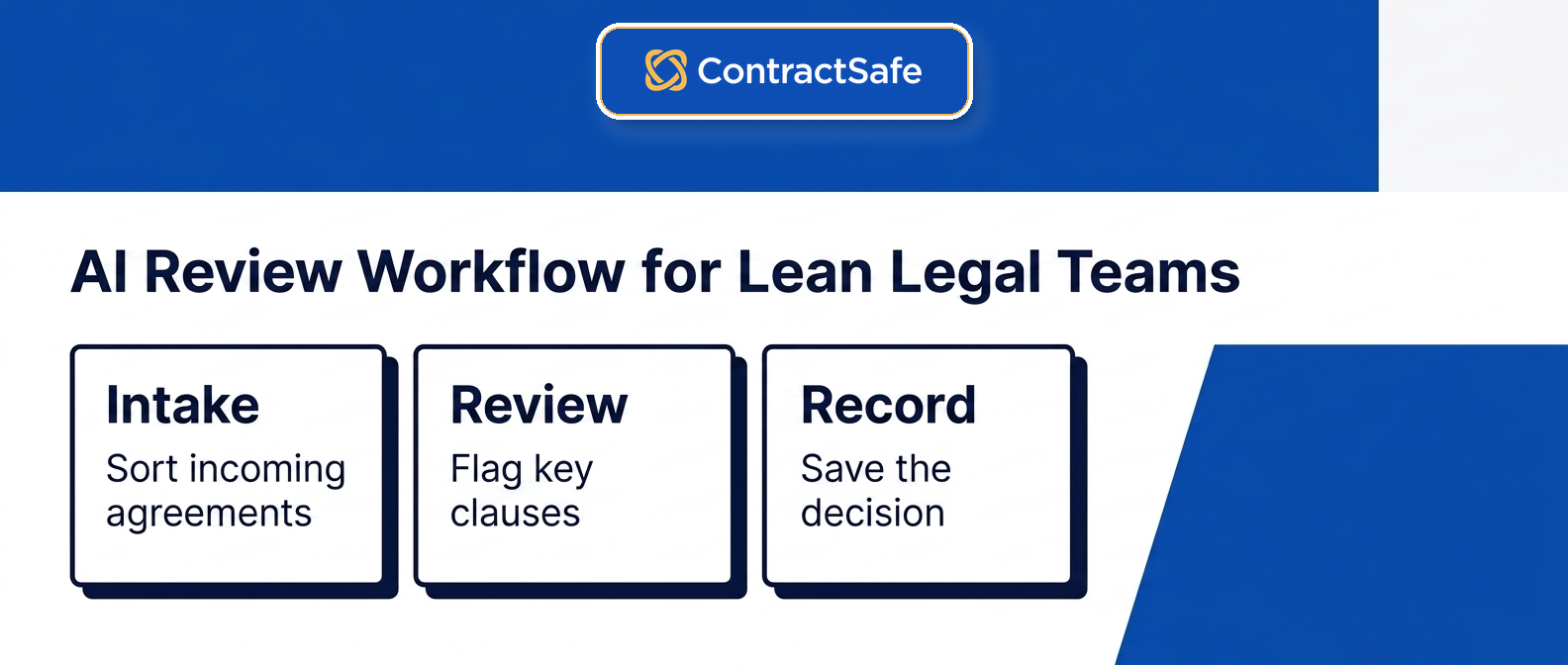
It's a classic chicken-and-egg problem. Organizations need to do more work to earn enough to hire more people, but that extra work can outpace the team you already have. AI is the bridge across that gap. It gets contracts reviewed sooner, keeps risks from slipping through, and lets the wider organization answer its own contract questions.
Faster Review Means More Contracts Reviewed
AI changes the math of a workday by subtracting hours of repetitive close reading and adding time for judgment calls. When software handles the first pass and the initial risk spotting, your reviewers start from a summary instead of a blank page. For a group juggling hundreds of agreements, that shift lets the same people clear far more work, which is what scaling without new salaries actually looks like. Our breakdown of AI contract review walks through where the time savings come from.
Better Organization Means Fewer Risks Slipping Through
Keeping contracts organized can feel like a losing battle. Files scatter across drives, inboxes, and spreadsheets, and a contract you can't find is a contract you can't enforce. That's how value quietly leaks out of agreements you already signed. When money you were owed goes uncollected or a bad clause goes unnoticed, the cost is real, and our piece on contract value shows how fast it adds up.
With optical character recognition, AI turns flat documents like scanned PDFs into searchable data, so even your old contracts become findable. AI-powered search understands what you mean, so a request like contracts terminating in October pulls the right files instead of forcing you to guess file names. From there, automated alerts can flag renewal and notice dates well before the deadline, so nothing sneaks up on you.
Accessible AI Means the Whole Team Benefits, Not Just Legal
The fastest way out of the legal review bottleneck is to let other teams answer their own questions. When contract software is genuinely easy to use, people in Sales, Finance, and Procurement can find their own documents, check a date, and fill in basics like party names instead of pinging Legal for one quick question.
To get the full benefit of your virtual intern, the whole organization should be able to reach the contract data, but not everyone needs full edit power. Role-based permissions make sure people only see the files they're cleared to view, which protects sensitive terms while still giving each team the facts it needs. If you want the bigger picture, our guide to AI contract management software covers how these pieces fit together.
How ContractSafe Helps Legal Teams Grow
ContractSafe helps legal teams grow by making contract data easy to find, extract, and act on. Instead of months of setup, you get natural language search, AI data extraction, deadline alerts, and permissions that let the whole company self-serve while Legal keeps control.
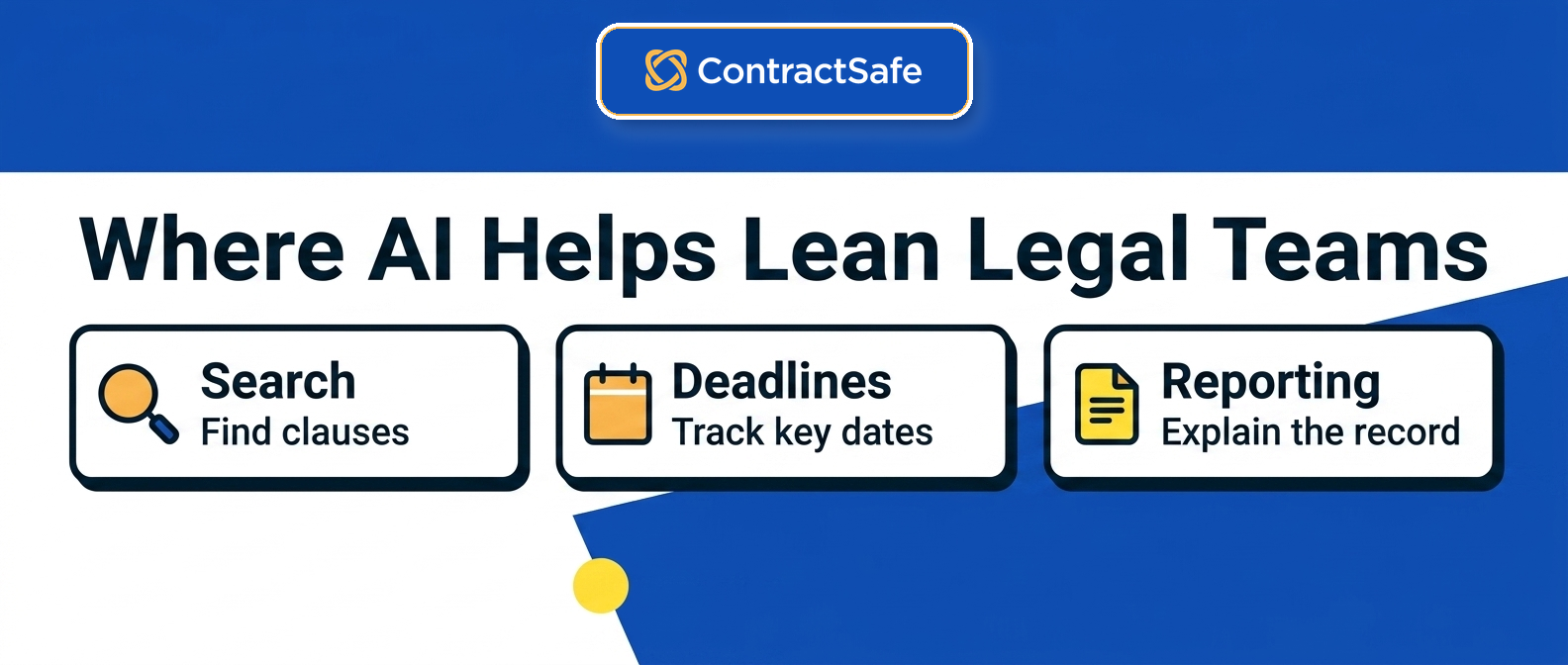
Most legal teams don't care about the science behind the software. They just want to get home on time, and ContractSafe's AI features are built to make that happen. Where some enterprise platforms need months of configuration and a dedicated IT team before they do anything useful, ContractSafe is designed to be powerful and practical from day one.
Our AI isn't trying to replace lawyers or reinvent contract law. It's built to fix bottlenecks and do what people hate doing and machines do well: finding, extracting, and organizing contract data in seconds. You stay in charge of every decision, and the software handles the busywork around it. For more on how these features come together, see our overview of AI contract management.
|
ContractSafe Feature |
Why It Matters for Legal Teams |
|
Natural Language Search |
Finds specific clauses or obligations in seconds, even if you don't remember the file name or exact wording used in the document. |
|
AI Data Extraction |
Automatically pulls party names, key dates, and renewal terms so you spend less time on manual data entry. |
|
Human-in-the-Loop Validation |
Lets you review and approve AI findings so your data stays accurate and you keep total control. |
|
Automated Deadline Alerts |
Flags upcoming renewals well in advance so your team is never surprised by an expiration. |
|
Approval Workflow Automation |
Moves contracts to the right person for signature automatically without needing manual follow-up emails. |
|
Role-Based Permissions |
Controls who can view or edit sensitive contract details based on their specific job and authorization. |
|
Change History Log |
Keeps a clear record of who reviewed and corrected data, so your team can prove compliance whenever a regulator asks. |
|
Fast Implementation |
Gets the platform live and useful in minutes rather than months. |
Put together, these features do more than speed up review. They give a lean team the reach of a much larger one, with a searchable contract repository at the center so every answer, alert, and approval traces straight back to the real document.
Twelve Demo Tests for AI Contract Review
Bring this checklist to any demo and score each item live. Ask the vendor to run your own contracts, not a polished sample. Watch what passes and what stalls. If a test fails, note it and move on so you can compare tools fairly and pick with confidence.
1. Upload Your Own Contract
Test whether you can drop in a real contract from your files and get results right away. A pass means the tool reads your document without special formatting or cleanup. For example, ask the vendor to upload a messy scanned agreement while you watch. This matters because a lean legal team can't stop to clean up files, and a tool that chokes on real paperwork becomes a hidden risk instead of help.
2. Find the Clauses That Matter
Check whether the tool can locate important clauses like indemnity, termination, and liability on its own. A pass looks like accurate highlights you can trust without rereading the whole document. For example, ask it to surface every renewal clause in a stack of vendor agreements. For a lean legal team, catching each obligation by hand is where things slip, so reliable clause detection lowers the risk of a missed term.
3. Ask a Plain Question
Test whether you can ask a plain question and get a straight answer pulled from the actual text. A pass means the answer points to the exact spot, not a vague guess. For example, ask when this agreement auto renews and see if it names the deadline. A lean legal team leans on quick answers, so an assistant that invents terms creates real risk rather than saving effort.
4. Compare Against Your Standard
Check whether the tool can compare an incoming draft against your own template or playbook. A pass flags where the other side changed your language and where it stayed put. For example, ask it to compare a redlined vendor draft with your approved version. For a lean legal team, spotting off standard terms fast protects your control over the deal and keeps a risky clause from sneaking into a signed contract.
5. Suggest Real Edits
Test whether the tool can propose edits that match your position, not generic boilerplate. A pass gives you language you would actually send, with a clear reason for each change. For example, ask it to soften a lopsided indemnity clause and review what it writes. A lean legal team can't draft every fix from scratch, so useful suggestions cut the risk of a weak obligation slipping through unedited.
6. Review Contracts in Bulk
Check whether the tool can review a batch of contracts together instead of forcing you through them separately. A pass sorts and summarizes the group so you see patterns across them. For example, ask it to pull the termination terms from a folder of supplier deals. For a lean legal team, bulk review is how a small group keeps up, and it means no renewal buried in the pile goes without an owner.
7. Show Where the Answer Came From
Test whether every answer points back to the clause it came from. A pass lets you click a finding and land on the exact sentence in the contract. For example, ask why it flagged a payment term and check that it shows the source. A lean legal team has to defend its calls, so an answer you can trace protects you in an audit and keeps a bad reading from spreading.
8. Respect Permissions and Access
Check whether the tool controls who can see which contracts. A pass lets you set access by person or group so sensitive deals stay locked down. For example, ask to hide a confidential acquisition file from most of the team and confirm it stays hidden. For a lean legal team, tight control matters because a loose setting turns a private contract into a compliance problem you did not see coming.
9. Track Dates and Reminders
Test whether the tool spots key dates and reminds you before they land. A pass pulls renewal and notice dates into a place you can watch. For example, ask it to flag every deadline in a new lease and assign a reminder. A lean legal team can't babysit a calendar, so automatic tracking keeps a renewal from lapsing and gives each obligation an owner before it bites.
10. Fit Your Workflow and Approvals
Check whether the tool matches how your team already routes work. A pass moves a contract through review and approval without forcing a new process on everyone. For example, ask it to send a signed vendor deal to finance for approval and watch the handoff. For a lean legal team, a tool that respects your approval steps saves rework and keeps every sign off under control.
11. Search Across Every Contract
Test whether you can search every contract at once and get the right hits. A pass finds a term wherever it hides, even in an old scanned file. For example, ask where a specific data privacy clause shows up across your library and review the list. A lean legal team can't open files by hand, so fast search cuts the risk of missing an obligation buried in the archive.
12. Keep Your Data Private
Check whether the vendor keeps your contracts private and doesn't train on them. A pass gives clear answers on where your data lives and who can reach it. For example, ask how they handle deletion and require it in writing before you buy. For a lean legal team, weak security is a real risk, and a clear answer protects you in a compliance audit later.
A Demo Scorecard for AI Contract Review
An AI contract review software scorecard should test source proof, OCR, field extraction, permissions, alerts, reporting, and workflow before the team commits budget.
| Demo test | What to ask | Pass condition |
|---|---|---|
| Source proof | Can I see the exact contract language behind the answer? | The answer links back to the source document or clause |
| OCR | Can the system read older PDFs and scans? | Search works on uploaded PDFs, not only clean text files |
| Field extraction | Can it pull parties, dates, renewal terms, and obligations? | Extracted fields appear in the contract record |
| Human correction | Can users correct AI findings? | Corrections are saved and visible |
| Permissions | Can different teams see different contract sets? | Access is controlled by role, folder, or permission level |
| Alerts | Can extracted dates become reminders? | Renewal and notice dates create thirty, sixty, or ninety day alerts |
| Reporting | Can we report on missing fields and upcoming deadlines? | Reports show what needs cleanup or action |
| Workflow | Can flagged issues move to the right reviewer? | Legal, Finance, IT, or business owners can be routed in |
If a vendor can't show these tests with your contracts, the demo is finished.
A First-Month Rollout Plan for AI Legal Contract Review
A lean legal team should prove one useful AI workflow before expanding access, features, and contract types.
The safer path is to pick one useful workflow, prove it, and expand from there.
| Phase | Focus | What to prove |
|---|---|---|
| First phase | Repository and file quality | The contracts are searchable, permissioned, and tied to the right owners |
| Second phase | Field extraction | AI can pull parties, dates, renewal terms, and contract types with human review |
| Third phase | Alerts and reports | Extracted dates create useful reminders and show up in reporting |
| Fourth phase | Team access and workflow | Sales, Finance, Procurement, and Legal can answer allowed questions without losing control |
By the end of the first month, Legal should know whether AI is making the contract process easier to operate.
If the answer is yes, expand to more contract types and more teams. If the answer is no, the team knows whether the issue is the AI, the repository, the data, the permissions, or the workflow.
That's a better buying conversation than asking whether a product "has AI."
It turns the decision into something specific: can this system help our team manage contract work this month?
Related Reading
-
AI Contract Review vs AI Contract Management for Legal Teams
-
How Legal Teams Should Evaluate AI Contract Management Software in 2026
-
What Is a Contract Repository? The 2026 Guide for Legal Teams
-
The Contract Management Metrics That Actually Tell You Something
How ContractSafe Helps Legal Teams Use AI Contract Review
ContractSafe is built for teams that need AI to make contract work easier, not heavier.
The goal is practical: help people find the right contract, see the important terms, act before deadlines pass, and keep control over who can access sensitive information.
| ContractSafe capability | What it helps legal teams do |
|---|---|
| Natural language search | Find clauses, obligations, and agreements even when the user doesn't remember the exact wording |
| AI data extraction | Pull parties, dates, and renewal terms into the contract record |
| Human-in-the-loop review | Let people verify and correct AI findings before the business relies on them |
| Automated alerts | Flag renewals, expirations, and notice windows before they become emergencies |
| Role-based permissions | Give Sales, Finance, Procurement, and Legal the right level of access |
| Reports | Show missing fields, upcoming deadlines, and contract work that needs attention |
| Fast implementation | Get useful contract control without a long enterprise rollout |
That combination is what makes AI useful for a lean legal team.
AI helps with the repetitive work. ContractSafe keeps the work tied to the contract record, the source document, the deadline, and the person responsible for the next step.






.svg)







.svg)




