


Quick answer: Contract compliance software is a system that stores your signed contracts, turns their obligations, notice dates and contracted rates into tracked fields, and alerts a named owner before something slips. It covers your own duties, the other party's duties, regulatory terms such as BAAs and DPAs, and spend against the rates you agreed to. It also keeps a record an auditor can check.
Your office-equipment lease just renewed for another three years at the new list price. The notice that could have stopped it was due sixty days before the end date, and the contract said so on page eleven. The person who negotiated the deal left in March, and now finance wants to know who approved the increase. Contract compliance software closes the gap between what a signed contract says and what anyone remembers.
Choose your next step:
For legal and ops teams comparing tools: see how ContractSafe's AI contract management features suggest dates and terms from signed contracts, which your team can accept or correct.
For anyone still tracking renewals in a spreadsheet: read the guide to contract compliance tracking first.
Key Takeaways
- Contract compliance software turns signed contracts into tracked obligations, notice dates and rates, and it alerts the owner before something slips.
- Track four things: your obligations, the other party's obligations, regulatory terms such as BAAs and DPAs, and spend against contracted rates.
- Buy features in the order of the failures they prevent, starting with an OCR-searchable repository, date fields and alerts that arrive with the contract attached.
- Measure compliance as four rates (obligations met on time, renewals caught, audit requests answered and spend at contract rates) and review them every quarter.
- A mid-size team can have a working baseline in about a month if each weekly stage has a named owner and a clear definition of done.
What Contract Compliance Software Is and Why It Matters
Contract compliance software is a system that keeps signed contracts in one searchable place, records each obligation, date and rate as a field, and warns the right person before a deadline passes. The value shows up after signature, where most contract money is quietly won or lost.
Some vendors call the category contract compliance management software, and the job is the same. When obligations and terms go untracked after signature, companies lose real money: in its ROI of Contracting Excellence research with Deloitte, covering 1,200-plus organizations, World Commerce & Contracting puts average value erosion at 8.6% of contract value. The best performers lose a little over 3%, and the worst lose more than 20%. Value erosion is the gap between what a contract promised and what the business actually collected or paid.
For example, say a software vendor's contract lets the vendor raise fees each year by an inflation index, capped at a fixed ceiling. Nobody records the cap, so the renewal invoice arrives above it and accounts payable pays it anyway. Repeat that across a few dozen vendors and you've found your share of erosion. Good compliance software records the cap as a field and tells the contract owner before the invoice lands.
Obligation tracking also reaches past vendor deals. Monarch's HUD program teams moved more than 320 lease and compliance agreements into ContractSafe, as the Monarch case study describes, with renewal reminders and custom fields for fair-market-value reporting.
What Contract Compliance Software Tracks on Both Sides of the Deal
Contract compliance software tracks four kinds of promises: the duties your company owes, the duties the other party owes, regulatory terms written into contracts, and spend measured against contracted rates. Each one needs a field, an owner and a date.
Your obligations. Reports you owe a customer, insurance you must carry, minimum purchase volumes, confidentiality periods and the notice you must give to cancel.
The other party's obligations. Service levels, delivery dates, security certifications a vendor promised to renew, and audit reports a vendor agreed to send you.
Regulatory terms. Business associate agreements (BAAs) under HIPAA, data processing agreements (DPAs) under GDPR, and the security clauses your auditors expect in vendor contracts.
Spend against contracted rates. Unit prices, discounts, rebates, price-escalation caps and payment terms, checked against what finance actually paid.
Most teams watch the first category and forget the second. A vendor who promised a fresh security certificate every year and quietly stopped sending one becomes your compliance problem, because your own auditor will ask for that certificate. Give the vendor's duty an owner and a date, the same as your own renewal.
The fourth category belongs to finance, and spreadsheets miss it most often, because the rate sits in the contract while the invoice sits in the accounts payable system. For instance, a rebate the vendor owes once you cross a volume threshold only gets paid if someone knows the threshold exists and asks for the money. Record the threshold and give it an owner.
How Contract Compliance Software Compares With CLM and Spreadsheets
Contract compliance software, a full CLM suite and a spreadsheet each catch different failures. The comparison below shows what each option catches, what each misses and when each is enough for a team managing a few hundred to a few thousand contracts.
| Option | What it catches | What it misses | When it's enough |
|---|---|---|---|
| Contract compliance software | Post-signature obligations, notice dates, rate drift and who changed what | Heavy drafting and negotiation work, unless the tool adds approvals and e-signature | Teams whose risk sits in signed contracts |
| Full CLM suite | Drafting, clause negotiation, approvals and signature | Little, but you pay for a whole suite and a lengthy rollout | Large legal teams negotiating heavy volumes of custom paper |
| Spreadsheet plus calendar | Dates someone typed in | Everything nobody entered, changes nobody logged, and any alert once the owner leaves | A few dozen contracts with one careful owner |
Most teams start in that bottom row, or in shared folders, and outgrow it quickly. Covalent, for instance, moved off OneDrive folders once volume grew and the team needed to track dates, tag agreements and route signatures.
How to Tell a Real Compliance Module From a CLM With a Compliance Badge
Plenty of CLM suites list compliance on the feature page, so run one test during the demo. Ask the vendor to open a real signed contract, create an obligation with a named owner and a due date, and show you the alert email with the contract attached. Then ask for that contract's activity log as a file you could hand an auditor.
If the demo stalls at any step, you're looking at a drafting tool with a compliance label. Pick compliance-focused software when your risk sits in contracts you've already signed, and pick a full suite when your bottleneck is negotiating new paper. The CLM software checklist and the roundup of the best contract management software go through vendors in detail.
The Features Contract Compliance Software Needs, Ranked by Priority
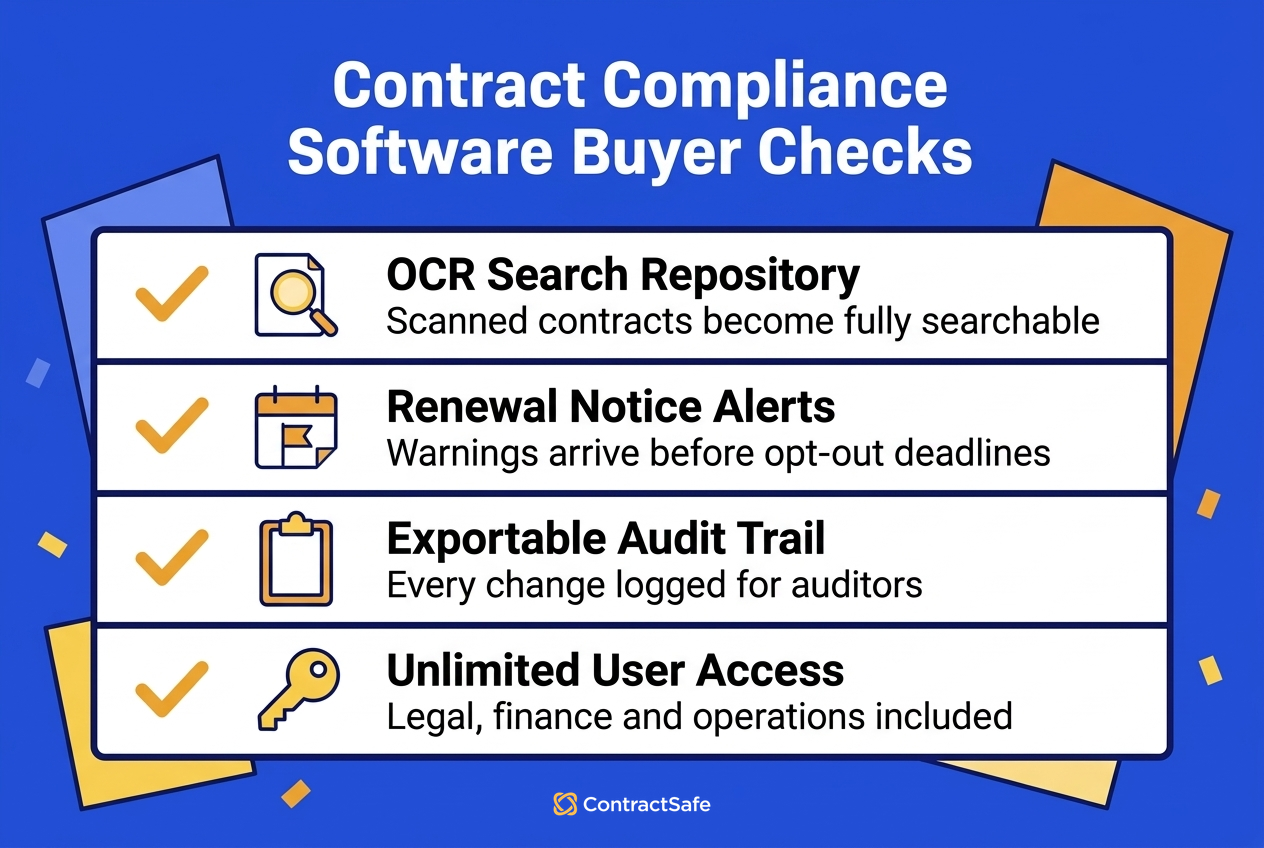
Contract compliance software should be bought in the order of the failures each feature prevents, starting with finding the contract at all and ending with proving what was signed. Seven features cover the list, and a demo should show each one on a real contract.
First, a repository with OCR search. OCR search prevents lost contracts and unsearchable scans. ContractSafe's OCR makes any file keyword searchable, scans included, on every plan.
Second, obligation and date fields. These fields prevent untracked duties. ContractSafe offers unlimited date fields and custom fields on every plan.
Third, alerts with the contract attached. These alerts prevent missed notice windows, because the owner reads the clause straight from the email. ContractSafe's date notifications attach the relevant contract on every plan.
Fourth, approval sequences. Approvals prevent unauthorized commitments. ContractSafe's approval workflow is on the Finalize and Maximize plans.
Fifth, permissions and an audit trail. Permissions and a log prevent changes nobody can prove. ContractSafe records views, downloads and changes in a contract activity audit trail on every plan, with user, team and folder access controls.
Sixth, reporting that exports. Exports prevent audit requests you can't answer. ContractSafe's .xls and .csv reports can also be emailed automatically on every plan.
Seventh, an e-signature audit trail. A signature trail prevents signed records nobody can reproduce.
Teams tend to forget the last item. The federal ESIGN Act at 15 U.S.C. 7001(d)(1) says an electronic record meets a retention rule only if it stays accessible, "in a form that is capable of being accurately reproduced for later reference," for the whole period the law requires. On the Finalize and Maximize plans, ContractSafe's e-signature files the signed copy with its audit trail attached and keeps the draft as an attachment.
The Benefits of Measuring Compliance as a Rate Instead of a Status
Contract compliance measured as a yes-or-no status hides drift. Four rates show whether your contracts are in good shape and which direction each one is moving: obligations met on time, renewals caught before the notice window, audit requests answered within a set number of business days, and spend inside contracted rates.
A status tells you nothing about direction. Say two business units both report "compliant." One met every obligation with a week to spare, and the other met half of them the night before the deadline. A rate separates the two and gives each owner something to improve. The spread in WorldCC's value erosion figures, from a little over 3% for the best performers to above 20% for the worst, is the kind of gap you can only close once you can see it.
A Worked Example With Illustrative Numbers
The portfolio below is invented to show the math. Say you manage six hundred contracts with twelve hundred tracked obligations. A quarter's numbers might look like this:
Obligations met on time: eleven hundred forty of twelve hundred, or ninety-five percent.
Renewals caught before the notice window: seventy-two of eighty, or ninety percent.
Audit requests answered within five business days: thirteen of fifteen, or about eighty-seven percent.
Spend at contracted rates: two point three three million dollars of two point four million invoiced, or about ninety-seven percent.
Finance will care most about the last line. Roughly seventy thousand dollars went out at rates the contracts don't allow, and you can recover it by pulling the invoices and the pricing clauses side by side. The renewal rate tells the GC which eight contracts rolled over without a decision, and each of those needs an owner and a note on what happens next.
How to Assign Owners, Alerts and a Quarterly Review to Each Compliance Rate
Each contract compliance rate needs one named owner, a data source and a quarterly review, or the numbers slide back into a status report nobody reads. Legal usually owns obligations and audit requests, contract operations owns renewals, and finance owns spend against contracted rates.
Pull the four rates each quarter and list every miss by contract and owner. Then decide whether each miss was a one-off or a gap in the process, such as a notice date nobody entered. The guide to managing contract compliance walks through the cadence in detail.
Owners stay engaged when the dates come to them. ContractSafe's email automated reports and user-specific alerts and dashboards, both on every plan, let each owner watch their own contracts without asking legal. Vitality Living's procurement team, per the Vitality Living case study, now pulls contract reports directly instead of rebuilding information from SharePoint.
Decision Check
Run the checklist below before you book any demos, because your answers decide whether you need compliance software this quarter or can wait.
Can you list every contract that auto-renews in the next two quarters, with its notice deadline?
Does each of those contracts have a named owner who still works here?
Could you show an auditor who last changed a renewal date, and when?
Do you know which vendors handling health or personal data lack a BAA or DPA on file?
Can finance compare invoices against contracted rates without emailing legal for the PDF?
If you answer no to two or more, the risk is a deadline you'll miss before your next review. For example, one unowned vendor contract with a notice window closing next month can roll over before anyone opens the file, so fix the owner field first.
Why Security Audits and HIPAA Rules Drive the Purchase
Security audits and health privacy rules both turn vendor contracts into evidence, which is why many teams finally buy contract compliance software. Auditors want the contract, the terms inside and proof that someone checks those terms.
Trust Services Criteria and Vendor Contracts
SOC 2 reports are tested against the AICPA's trust services criteria. Criterion CC9.2, in the 2022 revised points of focus, reads: "The entity assesses and manages risks associated with vendors and business partners." So your auditor asks for the vendor list, the signed contracts, the security and confidentiality terms in each, and evidence that you monitor them. If those contracts live in inboxes and shared drives, gathering the evidence can eat a week of someone's time. The ContractSafe guide to compliance audits covers what to pull together beforehand.
HIPAA Business Associate Agreements
Under the HIPAA Security Rule at 45 CFR 164.308(b)(1), a covered entity may let a business associate create, receive, maintain or transmit ePHI only after getting "satisfactory assurances" that the vendor will safeguard it. In practice, that means a signed BAA. Your software should hold every BAA, link it to the vendor's main agreement, and flag any vendor touching ePHI without one. ContractSafe lets you connect related documents on every plan, so the BAA sits next to the master agreement.
Radiologic Associates of Fredericksburg shows how healthcare teams handle the dates. According to the Radiologic Associates case study, their compliance coordinator handles HIPAA and HITECH alongside contracts, and the team replaced quarterly spreadsheet reviews with automated alerts.
How GDPR and State Vendor Rules Turn Contracts Into Recurring Tasks
GDPR and state cybersecurity rules write ongoing duties into vendor contracts. A data processing agreement or vendor security clause becomes a task with a date instead of a one-time signature, and both sides of the contract carry obligations.
Article 28(3) of the GDPR requires a contract between controller and processor covering the subject matter, duration, nature and purpose of processing, the types of personal data, and the controller's rights. Point (h) adds that the processor must give the controller the information it needs to show compliance with Article 28 and must allow for audits and inspections. So the processor owes you evidence, and you, as controller, need to be able to show your processors meet those terms. Track audit rights, sub-processor notices and deletion terms as dated fields.
New York's financial regulator applies the same idea on a repeating schedule. Section 500.11 of the DFS cybersecurity regulation requires covered entities to keep written third-party service provider policies, including periodic assessment of each provider's risk and of whether its cybersecurity practices are still adequate. That's one repeating review per vendor contract, and ContractSafe's recurring date reminders, on every plan, handle that kind of review.
Your contract system holds those same sensitive terms, so check its security too. ContractSafe's pricing page lists SOC2 audit certification, HIPAA and GDPR compliant status, and 256 bit AES encryption on every plan, with single sign-on on the Finalize and Maximize plans.
How to Choose Contract Compliance Software With a Ten-Point Checklist
Choose contract compliance software with a checklist you tick during each demo, run against one of your own signed contracts. Ten criteria cover what legal, finance and operations need, and a vendor that fails two or three of them is the wrong fit.
OCR search finds a clause inside a scanned PDF.
Date fields hold notice deadlines separately from end dates.
Alerts go to any email address with the contract attached.
Custom fields change by contract type, so a BAA asks for different data than a lease.
Every obligation carries a named owner and a due date.
Permissions work by user, team and folder.
The activity log shows views, downloads and changes, and it exports.
Reports export to .xls or .csv and can be emailed on a schedule.
Everyone in legal, finance and operations can log in without a seat fee.
You can download a full backup of contracts and data whenever you like.
Price is the last check, and the per-seat question matters most. ContractSafe pricing starts at $450/month (Organize plan, billed annually; $540 month-to-month), with unlimited users on every plan. The ContractSafe pricing page shows what each plan adds. Approvals and native e-signature, for instance, start at Finalize.
Contract Compliance Tools Compared, Including Their AI Features
Contract compliance tools fall into four types, and each fits a different team: compliance-focused repositories, full CLM suites, procurement suites and a spreadsheet paired with a calendar. The right type depends on where your contract risk actually sits.
Compliance-focused repository. You get searchable storage plus dates, owners, alerts, permissions and reports, suited to teams whose risk lies after signature. ContractSafe sits here, with approval sequences and native e-signature on Finalize and Maximize, and AI review against your own playbooks on Maximize.
Full CLM suite. Drafting, clause libraries, negotiation and approvals live in one system. The suite fits large legal teams negotiating custom paper, and it usually brings a lengthy rollout and per-seat pricing.
Procurement suite. Purchase orders, supplier onboarding and invoice matching come first. The suite fits finance teams worried about spend, though obligation and notice tracking are often thin.
Spreadsheet plus calendar. The setup is free and familiar, and it breaks when its one careful owner goes on leave.
AI helps compliance at two points. At setup, ContractSafe's AI suggests values such as parties and dates, and users accept, correct or skip each suggestion before it's saved, on every plan. After setup, smart search finds contracts from plain-language questions. For example, when a new hire searches for vendor contracts that auto-renew next quarter, the permission-aware AI search returns only the contracts that person is allowed to see.
Common Mistakes When Buying Contract Compliance Software
Four contract compliance buying mistakes show up again and again: paying for drafting features first, tracking end dates instead of notice dates, paying per seat, and signing before testing the export.
Buying pre-signature features first. Redlining and templates are nice to have. If your losses come from missed renewals, though, a drafting suite solves the wrong problem. Start with dates, owners and alerts.
Tracking end dates instead of notice dates. The end date is when the contract expires, and the notice date is the last day you can say no. For instance, a contract ending on the last day of December with a ninety-day notice clause needs its alert set weeks before early October.
Paying per seat. When logins cost money, finance and operations get left out, and nobody outside legal watches spend or vendor duties.
Skipping the export test. If you can't get contracts, fields and the activity log out in a usable format, you can't answer an auditor or switch vendors later. Ask for a sample export before you sign.
The export test is easy to run in a ContractSafe demo, because downloadable data backups and bulk extract come with every plan. Ask the rep to pull a full export of a test account, then open it yourself and confirm the dates, owners and custom fields came through intact. Run the same test with every vendor on your shortlist.
How to Set Up Contract Compliance Tracking in Four Weeks
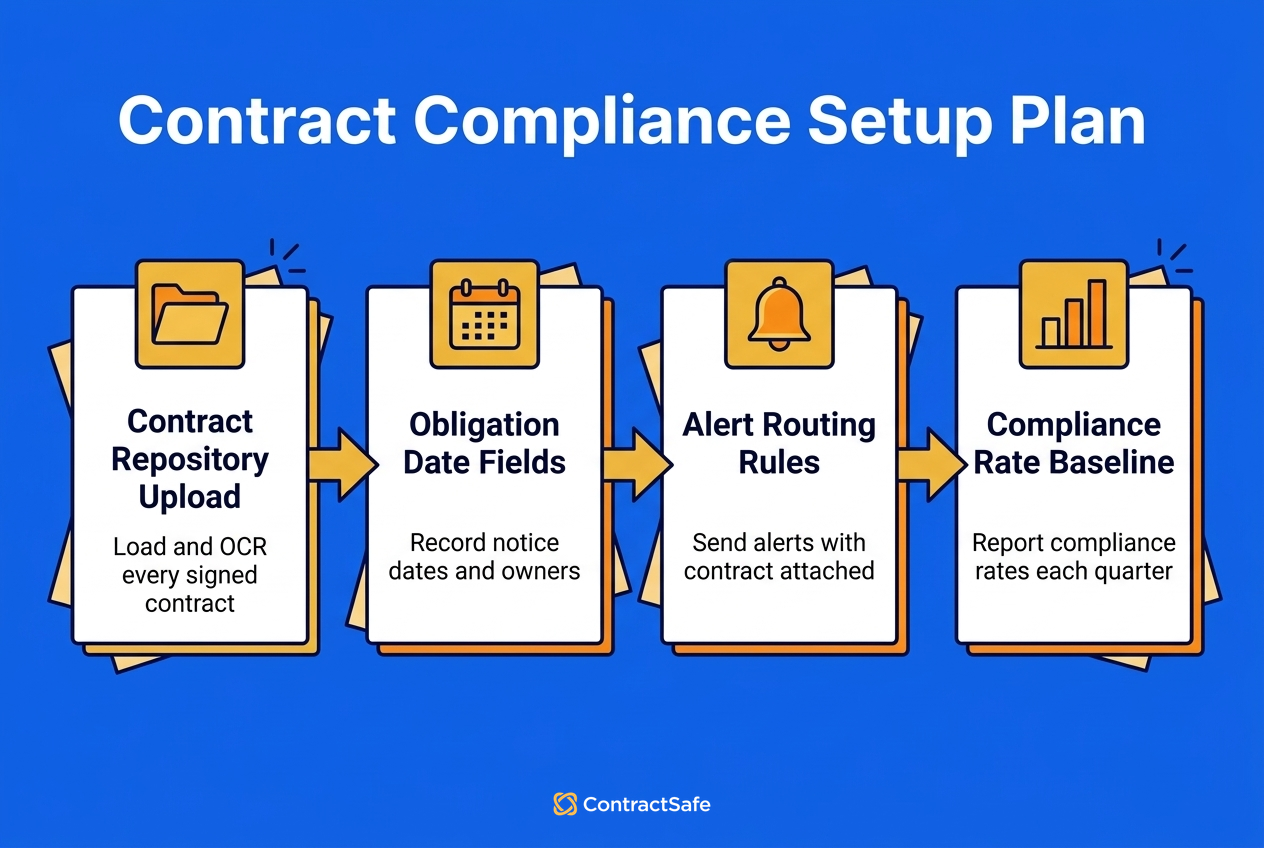
A contract compliance setup can reach a working baseline in four weeks when each weekly stage has one owner and a clear definition of done. The stages below run in order: load the contracts, record the terms, route the alerts and report the rates.
Stage one, week one (contract operations owner). Upload every signed contract. You're done when each one is OCR-searchable and duplicates are flagged. ContractSafe's bulk uploads, email upload and data and document migration support are on every plan.
Stage two, week two (legal). Fill in obligation, notice-date and regulatory-term fields for the highest-risk contracts, with a BAA and DPA flag. You're done when every high-risk contract has an owner.
Stage three, week three (finance). Record contracted rates and route alerts to named owners with the contract attached. You're done when a test alert reaches each owner.
Stage four, week four (GC or ops lead). Report baseline numbers for the four compliance rates. You're done when the first quarterly review is on the calendar.
Say you're in week three and the test alerts go out. One lands with a facilities manager for a janitorial contract whose notice deadline is eleven days away, a date that sat in a PDF nobody had opened since signing. She sends the non-renewal letter that afternoon, and your renewal rate records a catch instead of a miss.
Related Reading
Contract compliance basics, for teams defining obligations for the first time.
How to prepare for a compliance audit, for anyone facing auditor requests.
ContractSafe's contract approval workflow, for teams adding approvals.
How ContractSafe Helps With Contract Compliance
Every plan includes OCR search, unlimited date fields, alerts that arrive with the contract attached, and a contract activity audit trail that records views, downloads and changes. When AI suggests extracted values, your team can accept, correct or skip each one before it's saved.
When you need the steps before and after signature, the Finalize and Maximize plans add approval sequences with automatic reminders and native e-signature that files the signed copy with its audit trail. Maximize adds lifecycle dashboards and AI review against your own playbooks. Unlimited users come with every plan, so finance and operations can watch the contracts they own.







.svg)







.svg)




