


A document management system (DMS) is software that stores, organizes, and tracks digital files across an organization. But if you're searching "what is document management systems" because you're drowning in contracts, a DMS alone probably isn't the answer.
The distinction between document management and contract management matters more than most people realize.
Think about your kitchen junk drawer.
You know the one. Batteries, takeout menus, a screwdriver, some mystery keys, a birthday candle. Everything lands there because it technically fits.
A document management system is basically a better junk drawer. Bigger. Organized. Maybe with dividers. But still a drawer that holds everything without understanding any of it.
Contract management software is something else entirely. A platform like ContractSafe contract management software, built for teams that want power without the pain, doesn't just store agreements.
It reads them, tracks their deadlines, and nudges you before a renewal slips past.
That's the distinction this whole article is about.
- Document management system (DMS): Software that captures, stores, organizes, and retrieves any type of digital document. Your company's digital filing cabinet.
- Records management system: A governance layer focused on retention schedules, compliance, and legal disposition. More about policy than daily workflow.
- Contract management software: Purpose-built tools managing the full contract lifecycle, from intake and negotiation through execution, obligation tracking, and renewal.
- The bottom line: A DMS stores contracts. Contract management software actually manages them.
What Is a Document Management System (DMS)?
A document management system is software that digitizes, stores, indexes, and retrieves files across an organization. It replaces physical filing cabinets and scattered shared drives with a centralized, searchable repository.
A DMS handles any document type but doesn't understand what's inside those files.
Back to the junk drawer for a second.
The reason you built it was convenience. One place for everything. A DMS operates on that same logic, scaled up.
It captures documents by scanning paper, importing files, connecting to email. It tags them with metadata. It lets people search, retrieve, and share.
Here's what a document management system typically handles:
Capture and scanning: Turning paper into searchable digital files
Storage and organization: Centralized folders, tags, and metadata
Version control: Tracking changes so nobody works from an outdated copy
Access controls: Permissions determining who sees what
Search and retrieval: Finding files by name, tag, date, or content
Retention policies: Rules for how long documents live before archival
Understanding the stages of contract management makes this gap obvious. Contracts aren't static files. They're living obligations with deadlines, dependencies, and consequences.
Treating them like any other PDF is one of the most common mistakes organizations make.
(And if you're wondering how a DMS compares to a CRM, we've written about contract management vs CRM separately, because those tools overlap even less than you'd expect.)
What Is Contract Management Software, and How Is It Different?
Contract management software is a purpose-built platform that manages agreements through their entire lifecycle: creation, negotiation, approval, execution, compliance tracking, and renewal. Unlike a DMS, it understands contract-specific data like key dates, obligations, and party relationships.
The junk drawer holds everything. But imagine you're a woodworker.
You wouldn't toss your chisels in with the takeout menus. They need proper storage, regular sharpening, matching to specific projects.
That's what contract management software does for your agreements. It treats contracts as active business instruments, not passive files sitting in a folder somewhere.
According to Forrester's Marketing Survey, 2024, 69% of global B2C decision-makers increased their investment in content management technology. But as of 2026, more organizations are recognizing that general content management can't address the specialized demands of contract oversight.
Contract management software does things a DMS simply wasn't designed for:
AI-powered extraction of key terms, dates, and clauses
Automated alerts before renewals, expirations, or milestones
Obligation tracking so you know who owes what, and when
Approval workflows routing contracts through the right reviewers
Plain-English search ("show me all NDAs expiring this quarter")
e-signature integration to execute without leaving the platform
ContractSafe uses AI contract analysis to pull key dates and terms automatically, and its OCR technology makes even scanned legacy documents fully searchable.
Teams in legal, HR contract management, procurement, and operations use it because it was built for how contracts actually work.
The difference between CLM vs contract management solutions is worth understanding too. Even within the contract world, there's a spectrum from simple repositories to full lifecycle platforms.
Contract Management vs. Document Management: Side-by-Side Comparison
This is where the junk drawer metaphor finally breaks. This isn't about good versus bad. It's about right tool, right job. Some organizations need a DMS. Some need contract management software. Many genuinely need both.
But consider this: a WorldCC and Ironclad report found that organizations lose an average of 11% of contract value after signature. Not from bad negotiation. From poor post-signature management. That's a gap no DMS was built to close.
| Capability | Document Management System | Contract Management Software |
|---|---|---|
| Centralized file storage | ✅ Yes | ✅ Yes |
| Version control | ✅ Yes | ✅ Yes |
| Metadata tagging | ✅ Yes | ✅ Yes (auto-extracted) |
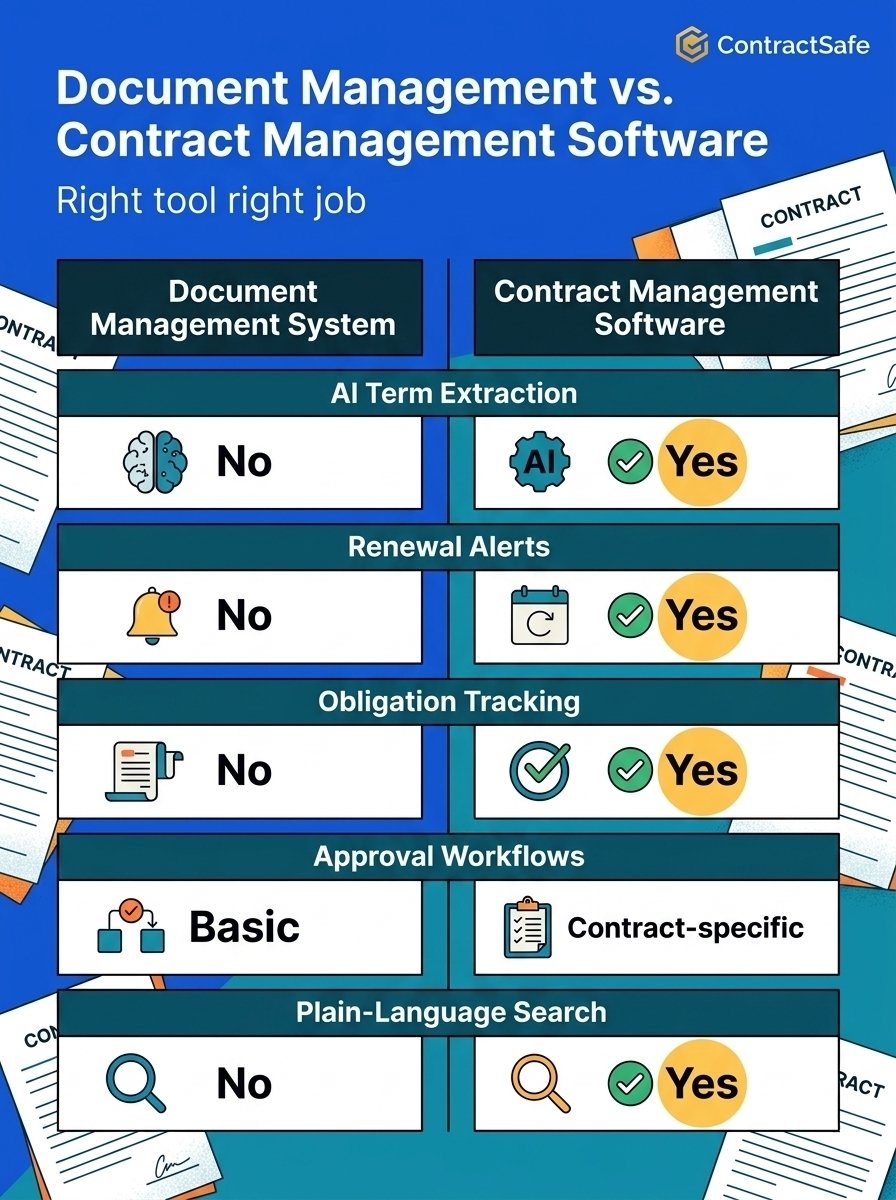
| AI term extraction | ❌ No | ✅ Yes |
| Renewal/expiration alerts | ❌ No | ✅ Yes |
| Obligation tracking | ❌ No | ✅ Yes |
| Approval workflows | ⚠️ Basic | ✅ Contract-specific |
| e-signature integration | ⚠️ Sometimes | ✅ Built-in |
| Compliance monitoring | ❌ No | ✅ Yes |
| Plain-language search | ❌ No | ✅ Yes |
| Handles all file types | ✅ Yes | ⚠️ Contract-focused |
The comparison is straightforward. A DMS is broader. Contract management software is deeper.
If your pain point is "we can't find anything," a DMS might be enough. If your pain point is "we missed a renewal and it cost us six figures," that's a contract administration problem.
And honestly? Many of the 6 contract management mistakes organizations make come from trying to use a DMS where they needed something contract-aware. It's like reorganizing the junk drawer when what you actually need is a proper tool chest.
According to M-Files data reported by Filecenter, 83% of workers lose time to document versioning issues every day. A DMS addresses versioning. But versioning is only one slice of the contract management problem.
Missed obligations, lapsed renewals, unsigned amendments sitting in someone's inbox for weeks? Those need a different kind of attention entirely.
How Does a Document Management System Work?
Think of a DMS like a really good librarian. Not the kind who shushes you. The kind who memorized where everything lives and built a card catalog that actually makes sense.
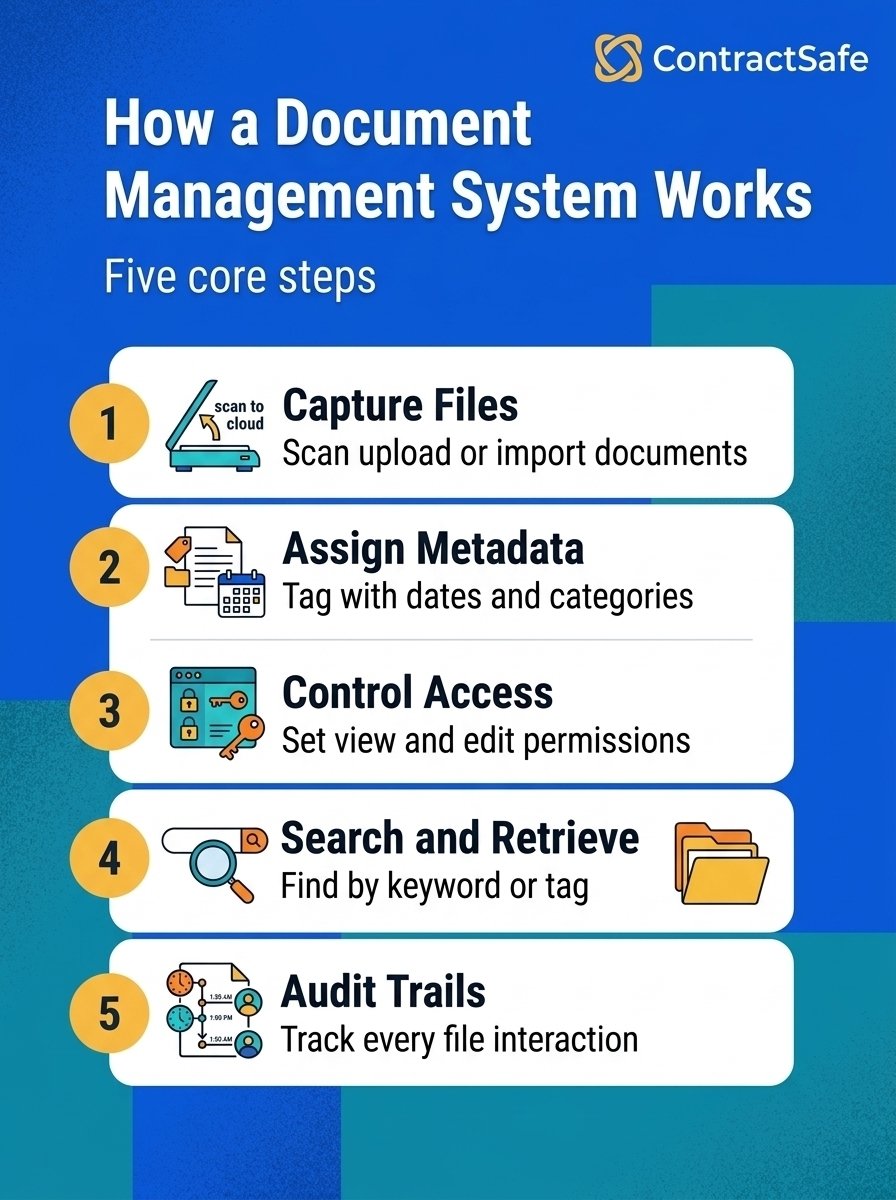
The workflow usually goes like this. A document enters the system, either scanned, uploaded, or created from a template. The DMS assigns metadata (tags, dates, categories) so the file becomes findable later.
Access controls determine who can view, edit, or share each file. Search functionality lets people find documents by keyword, tag, or content. And audit trails track every interaction for compliance purposes.
This is where the limitation shows, though. Most DMS platforms stop right there. They store. They organize. They retrieve. But they don't think about what's inside the documents.
Understanding contract administration means recognizing that storage is just the first chapter. The real story is what happens after the signature.
Document Management System Examples (Including Small Business Options)
So what does this look like in practice? The DMS market in 2026 runs the full spectrum, from free tools you can set up over lunch to enterprise platforms that require a dedicated implementation team and a months-long rollout.
Here are some common categories and examples worth knowing about.
Cloud-based platforms like Google Drive, Dropbox Business, and Box are where most small teams start. They handle basic storage, sharing, and collaboration. According to Fortune Business Insights, cloud-based document management systems are growing rapidly because they lower the barrier to entry.
No servers. No IT department required.
Mid-market DMS tools like M-Files, DocuWare, and PandaDoc add workflow automation, better metadata handling, and integrations with other business software. These are the "I've outgrown Google Drive but I'm not ready for SAP" options.
Enterprise DMS platforms like OpenText, Laserfiche, and Hyland serve large organizations with complex compliance needs. They're powerful. They're also the kind of software where "implementation timeline" is measured in quarters, not days.
For small businesses specifically, the calculation is different. You probably don't need enterprise document management. You need something that solves your actual problem.
The overlap between "document management" and "contract management" confuses a lot of buyers. (Understandably, the software industry isn't exactly known for clear terminology.) But the distinction matters. A DMS manages files. Contract management software manages relationships, obligations, and timelines that happen to live inside files.
Is SharePoint a Document Management System?
This question comes up constantly, and the answer is: sort of.
SharePoint started as a collaboration and intranet platform. Over the years, Microsoft added document libraries, version control, metadata tagging, and workflow capabilities. So yes, you can use SharePoint as a document management system. People do.
Many organizations already pay for it through their Microsoft 365 subscription.
But "can" and "should" are doing different jobs in that sentence.
SharePoint handles document storage and basic organization reasonably well. It integrates with the Microsoft ecosystem, which matters if your team lives in Outlook and Teams.
As Quickbase notes, there are several document management system examples worth considering, and SharePoint often appears on those lists.
You'll need custom libraries, metadata schemas, permission structures, and probably some Power Automate workflows to make it function like a dedicated DMS.
And if you're trying to manage contracts in SharePoint? That's where the metaphor of the librarian breaks down completely. SharePoint doesn't know what a renewal date is. It can't extract key terms from a contract.
It won't alert you when an agreement is about to auto-renew at unfavorable terms.
For teams using SharePoint as their default "place where contracts live," the jump to purpose-built contract management software isn't about replacing SharePoint. It's about acknowledging that contracts aren't just documents, they're commitments with consequences.
How ContractSafe Bridges the Gap Between Documents and Contracts
ContractSafe is contract management software built for teams that want power without the pain. Most teams are live in under 30 minutes.
Where a DMS stores your contracts in folders, ContractSafe's AI-powered extraction reads them. It pulls out key dates, parties, obligations, and renewal terms automatically, so nobody has to open each file and manually enter metadata.
Need to know which contracts auto-renew in the next 90 days? The search and reporting tools answer that in seconds. Set automated alerts for any date in any contract, at whatever interval you choose: 90 days, 60 days, 30 days.
Every contract lives in a centralized, searchable repository with full version history. Unlimited users on every plan means procurement, legal, finance, and operations all see the same data. No per-seat pricing. No gatekeeping.
A DMS stores your contracts. ContractSafe makes sure you actually know what's in them.






.svg)







.svg)




