


A contract management workflow is the defined path an agreement follows from request through drafting, review, approval, signature, storage, obligation tracking, and renewal. A workflow that actually works names the owner of each step, the trigger for each handoff, and the route for anything weird that falls outside the normal path.
Quick answer: A contract workflow is important because it assigns every agreement an owner, route, and deadline, preventing missed handoffs before and after signature.
Think about a restaurant kitchen during a dinner rush. Orders come through one printer, each station knows what it owns, and an unusual request goes to the chef instead of stalling at the grill. Nobody has to guess where the ticket belongs.
Now picture a contract request with no front door. Six people shout orders across the line, legal gets the same document twice, and finance never sees the value. You don’t need a maze of rules to fix that. You need one visible route, clear decisions, and enough data to see where the work stops.
Key Takeaways
- A workflow needs named owners and handoff triggers, not a loose sequence where everyone assumes legal has it. That's the job of a contract approval workflow tool: it names the approver, triggers the handoff, and shows where the contract is waiting.
- Intake is the front door. One request path prevents missing context and duplicate work.
- Approval routes should follow risk, value, and contract type. Exception paths should say who decides when standard terms change.
- Automation should move documents, send reminders, and record activity. People should still make judgment calls.
- Cycle time, stage time, volume, and exception rate tell you where to improve the workflow next.
Choose your next step:
-
If requests arrive through several channels, map the route and choose one front door.
-
If contracts stall in review, set ownership and exception paths before adding automation.
-
If the route already exists, measure its bottlenecks and fix one stage at a time.
Contract Workflow Implementation Checklist
A contract workflow implementation checklist helps teams compare the records, owners, controls, and next actions the workflow needs before rollout.
| Workstream | Owner question | Done when |
|---|---|---|
| Inventory | Where do contracts live today? | Every source has an owner |
| Metadata | Which fields are required for action? | Action fields are defined |
| Permissions | Who can see each record or field? | Access rules work before rollout |
| Alerts and reports | Which decisions should the system support? | Required reports are usable |
| Governance | Who keeps the system clean? | Access reviews are assigned |
Decision Check
-
Can the team name the first report or alert that will prove the system is working?
-
Are required fields and owners defined before upload starts?
-
Is historical cleanup separated from the launch-critical work?
What Is a Contract Management Workflow?
A contract management workflow is the repeatable sequence an agreement travels, with an accountable owner and a defined trigger attached to every single transition.
The workflow turns a policy in a shared drive into the route people use when a request lands or a reviewer is away. A process is what you write down.
A workflow is what happens when a sales rep needs an NDA on Friday afternoon and the usual reviewer is out. If the honest answer is “it depends,” you have preferences that hold up on a good day, not a resilient route.
WorldCC’s 2025 contract management benchmark found that 88% of executives understand the importance of commercial and contract management excellence, while connecting inconsistent intake, approval, and ownership rules with confusion, delay, discord, weak resilience, and a gap between recognition and action.
Why the Workflow Matters
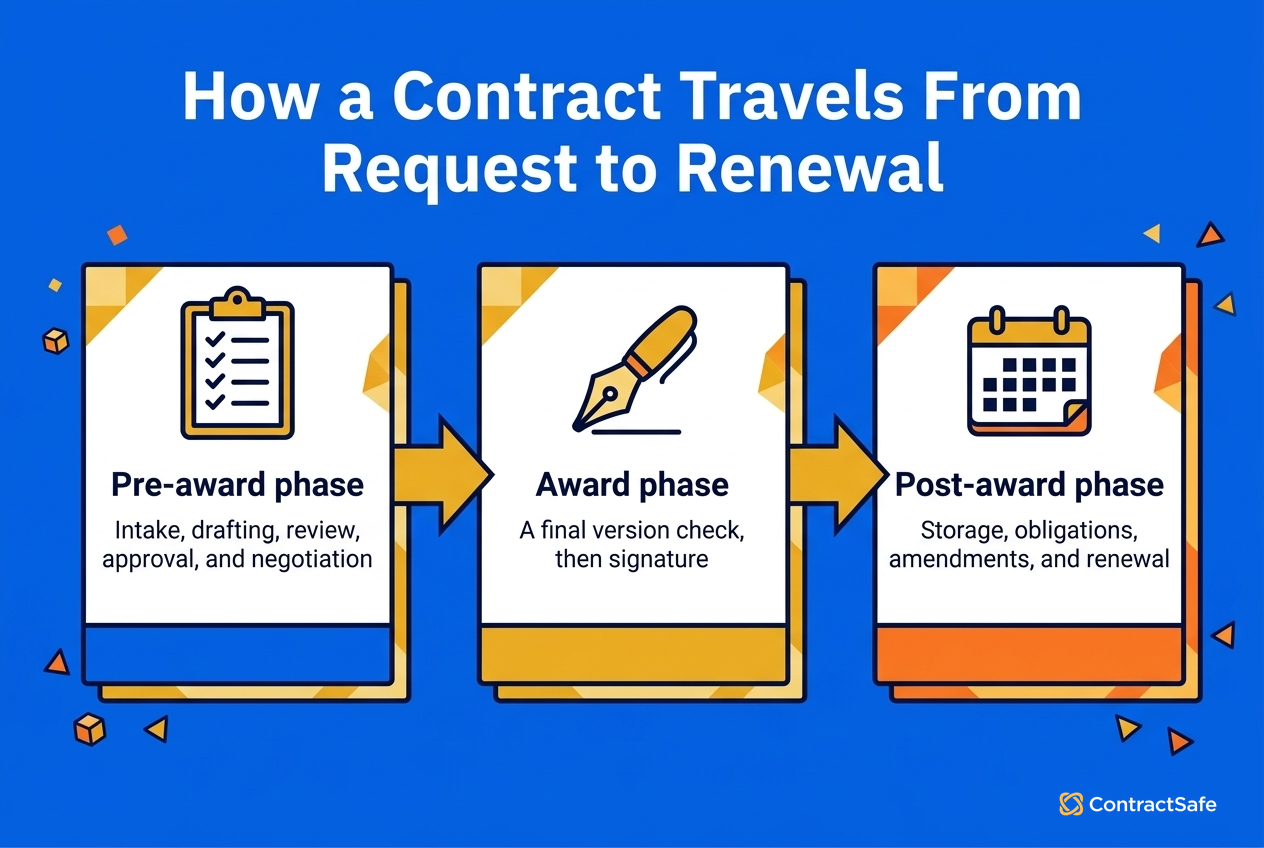
The benefits are practical: requesters know how to start, reviewers get the facts they need, and owners see the next decision before a deadline passes. The workflow also makes failure visible. Instead of blaming a slow contract on “legal,” you can tell whether it waited at intake, review, approval, signature, or filing. The lifecycle has three useful boundaries:
| Phase | Work in the workflow | Common breakdown |
|---|---|---|
| Pre-award | Intake, drafting, review, approval, and negotiation | Requests arrive without the facts reviewers need |
| Award | Final version check, signature, and countersignature | Nobody owns the signature chase |
| Post-award | Storage, obligations, amendments, reporting, and renewal | The signed file disappears into an inbox or folder |
That table keeps the map honest. Teams pour energy into review because that’s where the visible debate happens. Post-award work is quieter, but a missed notice window or unassigned obligation can keep costing money after negotiation ends.
Our guide to contract lifecycle management explains how the workflow fits into the broader discipline of policy, records, reporting, and renewal strategy.
Map the Contract Workflow from Intake to Renewal
Mapping the workflow means listing every stop between “we need an agreement” and “we renewed, renegotiated, or ended it,” then assigning the owner, required information, decision, and exit trigger at each stop.
Draw the real path people use today before you design the cleaner one. The messy version is the one carrying your actual contracts. Start with these eight steps:
-
Intake: Use one request path and require the counterparty, contract type, value, term, business owner, whose paper is being used, and the date the requester needs action.
-
Drafting: Separate your template from the counterparty’s paper. Those routes require different effort and shouldn’t enter the same review queue.
-
Review: Tell legal, finance, security, privacy, and procurement which terms each role owns. Sending the whole document to everyone creates a reading exercise, not a review route.
-
Approval: Route by the risk and value rules your team has already written. Record the decision and the version that earned it.
-
Signature: Confirm that the signing copy contains the approved language, name the authorized signer, and define a backup when that person is away.
-
Storage: Put the executed agreement and amendments in a searchable record with owners, dates, value, and renewal terms.
-
Obligations: Assign reports, certificates, service reviews, payments, and other commitments to people with due dates.
-
Renewal or exit: Alert the owner before the notice deadline and record the choice to renew, renegotiate, terminate, or let the agreement expire.
Intake deserves extra attention because it quietly controls everything downstream. If sales kicks things off with a direct message, procurement forwards a vendor PDF, and operations drops requests into a shared inbox, you don’t have one workflow with a few quirks. You have several side doors, each with its own unwritten rules. A practical contract intake workflow gives requesters one place to start and reviewers a predictable packet of information.
The final version check is easy to skip, and it’s the step that bites. Somebody should confirm that the signing copy is the version everyone approved, with accepted redlines incorporated and stray comments removed. After signature, contract lifecycle tracking carries the dates, duties, amendments, and renewal choice forward. Storage isn’t the finish line; it’s where the obligations start showing up.
Before you go shopping for software, test your map against a real agreement. Can you say who owns it right now, what sends it to the next person, where a nonstandard clause goes, who signs it, and when the post-signature owner has to act? Every answer that comes out as “usually” is pointing at a rule you still need to define.
Set Ownership, Approval Routes, and Exception Paths
Ownership gives each stage one accountable role. Approval routing sends the contract only to the people whose judgment the deal actually requires. Exception paths explain what happens when value, risk, or nonstandard language shoves the agreement outside its normal route.
Three ideas, and most stalled contracts are missing at least one of them.
The KPMG 2025 contract management survey found that 46% of surveyed executives said slow negotiations and approvals delay projects, 51% described moderate cross-department integration, 48% linked execution delays to missed revenue, and 54% said contract-management complexity increases administrative workload.
Those findings connect approval design to business speed and staff capacity, not just legal preference. Use three routing rules:
-
Route by risk, value, and contract type: A standard renewal doesn’t need the same route as a long-term master agreement with unusual liability language.
-
Keep the approver list short: Each approver should own a specific decision. People who only need awareness can receive the completed record instead of joining the queue.
-
Give every step a clock and fallback: Set the review period, name the backup, and define when a stalled request escalates.
Approval Thresholds That Route by Value
Most teams write the tiers as dollar bands. The bands themselves are yours to set, because a $50,000 commitment is routine for one company and a board matter for another. What transfers is the shape: tie each tier to the decision it exists to make, and give nonstandard terms their own route regardless of value.
| Tier | Typical route | What the tier is really deciding |
|---|---|---|
| Standard, low value | Business owner, then contract owner files it | Whether anything about this deal is non-routine at all |
| Standard, mid value | Business owner → finance → contract owner | Whether the money and the term are what the budget assumed |
| Standard, high value | Business owner → finance → legal → signing authority | Whether the commitment size justifies senior sign-off |
| Any value, nonstandard terms | Straight to the exception path, whatever the value | Which specific clause changed and who owns that risk |
| Renewal, no change | Contract owner confirms, finance is notified | Whether anything moved since the last signature |
Pick the numbers from your existing signature authority policy rather than inventing a second set. If finance already says who can commit what, the approval route should agree with it; two conflicting answers is worse than no rule.
Who Owns Which Terms in Review
Telling five departments to “review the contract” produces five people reading the whole document and nobody owning anything in it. Name the terms each role is accountable for and what they are expected to send back.
| Reviewer | Terms that role owns | What they hand back |
|---|---|---|
| Legal | Liability, indemnity, warranty, termination, governing law, dispute resolution | Accept, redline, or escalate, with the reason attached to the version |
| Finance | Value, payment terms, invoicing schedule, escalators, renewal cost | Confirmed value and the budget line the contract lands against |
| Security | Access to systems, subprocessors, incident notification, audit rights | A pass, or a named control the counterparty has to add |
| Privacy | Personal data scope, transfer basis, retention, deletion on exit | A data map entry, or the clause that has to change first |
| Procurement | Vendor status, competing agreements, insurance certificates, SLAs | Vendor record updated and duplicate agreements flagged |
| Business owner | Scope, deliverables, dates, who performs the work | Confirmation the agreement matches what was actually bought |
Then design the exception path. The standard route handles clean terms. The exception route handles a changed indemnity clause, a longer payment term, a new data obligation, or a governing-law change.
Name who evaluates each issue, what context that person gets handed, and who can approve it without convening a committee. This is exactly where a contract management requirements checklist earns its keep. Ask vendors to show you how the system records ownership, applies a route, preserves approval history, and sends a changed term to the right expert without losing track of the current version.
Automate Handoffs Without Losing Human Control
Contract workflow automation should handle the moving, notifying, and remembering while people keep doing the deciding. Automate repeatable lookups and handoffs.
Route the judgment-heavy questions to a person with the document, context, deadline, and history already attached, so they’re deciding instead of reconstructing.
Overlapping point tools and manual steps create gaps, and gaps are where teams copy data by hand, lose versions, or make a decision inside an email thread that never makes it back to the contract record. Centralizing the route removes those handoff gaps and keeps the document, the decision, and the activity history together in one place.
Good automation covers work such as:
-
Routing a standard contract to the right reviewer based on type, department, and the team’s value threshold.
-
Notifying a backup when an assigned reviewer misses the response window.
-
Sending the approved version for signature and recording when each party completes it.
-
Moving the executed agreement into the governed record and starting its alerts.
-
Reminding the owner before an obligation, renewal decision, or notice deadline.
| Step in the workflow | Automate it | Keep it with a person |
|---|---|---|
| Intake | Form validation, required fields, routing by contract type | Deciding an unusual request needs a conversation first |
| Drafting | Pulling the right template, filling known party and date fields | Choosing whether to lead with our paper or accept theirs |
| Review | Sending each reviewer only the terms they own, with the clock running | Judging whether a redline is acceptable risk |
| Approval | Applying the tier rule, nudging a late approver, escalating a stall | Approving anything that left the standard route |
| Signature | Routing the approved version, recording each party’s completion | Confirming the signing copy is the version that was approved |
| Storage | Filing the executed agreement and starting its alerts | Nothing, if the automation is working |
| Obligations | Assigning recurring duties and reminding owners before due dates | Deciding what to do when an obligation is about to be missed |
| Renewal | Firing the notice-window ladder to the named owner | Choosing to renew, renegotiate, or walk |
Human review still belongs on nonstandard risk, strategic concessions, unusual redlines, and fact patterns nobody’s seen before. Two guardrails keep the whole system trustworthy: every automated action should leave a record of what moved and why, and an authorized person should be able to override the route with that override logged.
Renewal and Notice Alert Windows
Renewal reminders fail for one boring reason: they fire against the expiration date instead of the notice deadline. If the agreement needs 90 days’ written notice, a 30-day warning is already too late. Set the ladder against the notice date and give each rung a different job.
120 days out: the owner confirms whether this is a renew, renegotiate, or exit conversation.
90 days out: finance and the business owner confirm the value and whether the scope still matches what is being used.
60 days out: if the answer is renegotiate or exit, the request goes back through intake as a new workflow.
30 days out: the notice letter is drafted and routed, or the renewal terms are agreed.
14 days out: escalation. Nobody should be learning about this deadline here, and if they are, that is a finding about the workflow rather than about the contract.
Shift the whole ladder by the notice period written in the agreement. A 30-day notice clause does not need a 120-day first rung, and a 180-day clause needs an earlier one.
Start with a route your team already understands. Contract workflow automation goes much smoother when you’re encoding decisions people have already made, rather than asking software to invent policy on your behalf. If a small team has one front door, one owner per contract type, and date reminders that actually fire, that’s a genuinely sound beginning. Add complexity later, when a real exception demands it.
Measure Workflow Performance and Fix Bottlenecks
Measure a workflow by tracking how long each stage takes, where requests wait, how often exceptions fire, and whether the resulting records hold up when renewals and obligations come due.
Compare like contract types, too, so one heavily negotiated master agreement doesn’t distort the picture for a stack of routine NDAs. The CLOC 2025 State of Industry Report found that 83% of legal departments expected rising demand and 63% named workload and resource bandwidth as their top challenge.
Together, those findings are a good argument for saving expert attention for high-risk terms and exceptions, and letting a dashboard surface the work the team can reroute or simplify. Track four measures:
| Measure | What it tells you | What to check next |
|---|---|---|
| Cycle time | Total time from intake to execution | Compare by contract type and route |
| Stage time | Where an agreement waits | Check owner, queue, deadline, and fallback |
| Volume | Which contract types consume the most work | Decide where templates or standard terms would help |
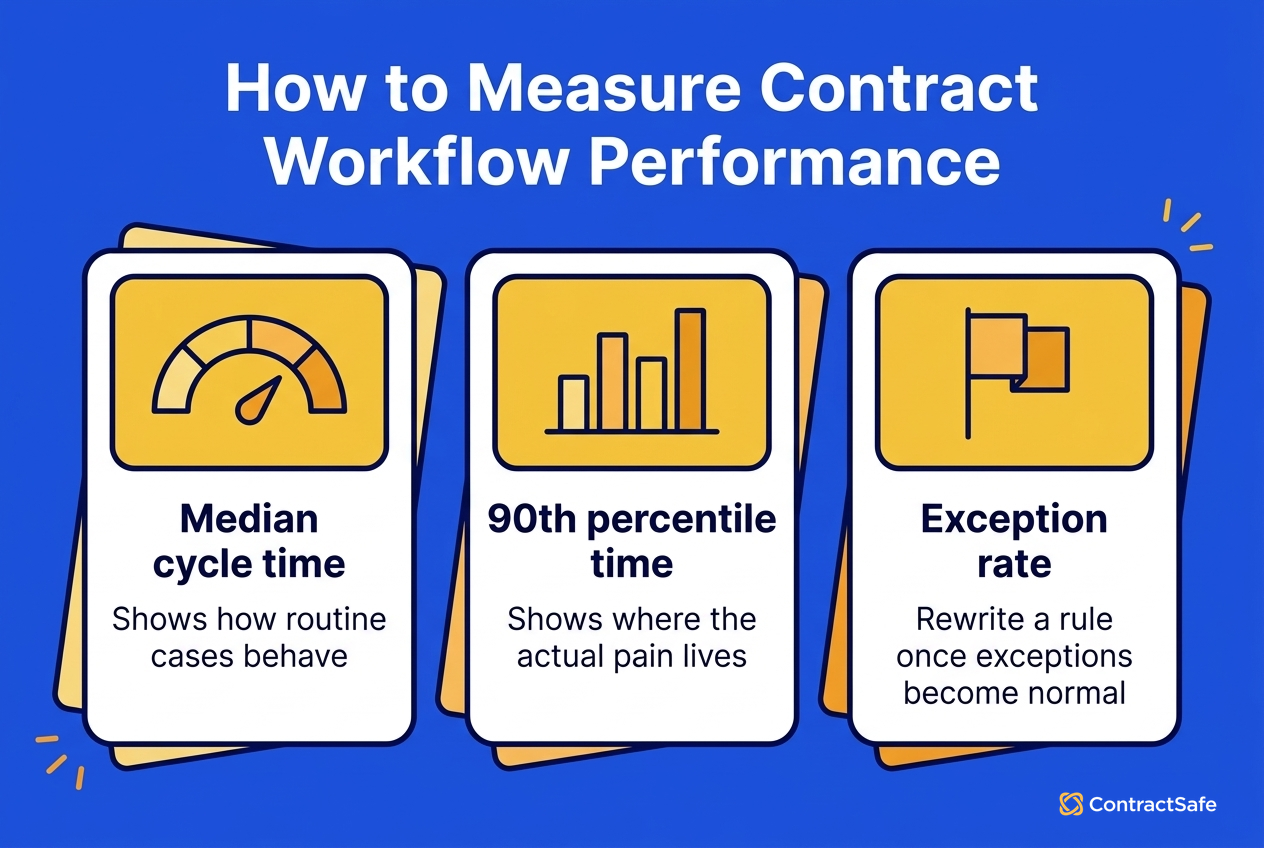
| Exception rate | Whether the standard route matches reality | Rewrite a rule when the exception has become normal |
Report each of those as a median and a 90th percentile, split by contract type, over a rolling 90 days. The median tells you how the routine case behaves; the 90th percentile is where the actual pain lives, and an average hides both. Set the target against your own trailing quarter rather than an industry figure, because the number that matters is whether this quarter beat last one on the same contract type.
Read those timestamps as a path, not a scoreboard. A complicated review can run long for perfectly good reasons, and punishing it teaches people to rush. But a routine agreement that sits still right after approval is usually telling you something specific: the signature handoff has no owner.
A signed file that never makes it into the contract repository can hide obligations and renewal dates even when the negotiation itself looked impressively fast.
Fix one bottleneck, then watch that same measure for a while. Remove an unnecessary approval from a low-risk route, require the intake field everyone keeps leaving blank, or add escalation to a review that keeps stalling.
Sales may care most about cycle time, finance about renewals, and legal about the split between standard and nonstandard work. The same underlying record supports all three views, as long as the route and metadata stay consistent.
Test the Workflow Before You Buy
Vendors demo the happy path. The workflow you are buying is the one that survives a reviewer on vacation, a counterparty’s paper, and a contract that needs to skip a step it is not allowed to skip. Run these eighteen tests during the demo, on your own agreement, and count how many the vendor drives versus how many you drive yourself.
| # | Test | Pass |
|---|---|---|
| 1 | A non-legal employee started a contract request without training | ☐ |
| 2 | You uploaded a third-party (counterparty) contract into the same workflow | ☐ |
| 3 | Key fields were captured automatically, not typed by hand | ☐ |
| 4 | You built a multi-step approval rule live, without the vendor’s engineers | ☐ |
| 5 | Conditional routing worked, so a value threshold added or skipped an approver | ☐ |
| 6 | An approver could act from an email, without logging into a portal | ☐ |
| 7 | You reassigned an approval from someone on vacation mid-flow | ☐ |
| 8 | A rejection sent the contract back with comments, not to a dead end | ☐ |
| 9 | You changed an approver on an in-progress contract | ☐ |
| 10 | Skipping a required approval was blocked or logged | ☐ |
| 11 | A stalled contract triggered an automatic reminder or escalation | ☐ |
| 12 | You set a reminder tied to a notice deadline, not just an expiration date | ☐ |
| 13 | The tool found key dates in an uploaded contract automatically | ☐ |
| 14 | The signed contract landed in a searchable home with no manual filing | ☐ |
| 15 | A plain-English search returned the right contract | ☐ |
| 16 | You built a report on your own data, yourself, in the demo | ☐ |
| 17 | Version history showed who changed what, when | ☐ |
| 18 | The audit log captured views, edits, and approvals automatically | ☐ |
The scoring is blunt. Anything the vendor had to do for you is something you will be filing a support ticket for later. Anything that needed a services engagement is a cost that did not appear on the quote.
Related Reading
How ContractSafe Supports the Contract Management Workflow
ContractSafe is full-lifecycle contract management software for teams that need a usable route from signature through renewal, not another folder structure that only legal understands. The platform combines approval workflows, searchable records, AI extraction, alerts, reporting, permissions, e-signature integrations, and audit history.
ContractSafe supports contract workflow management across intake, approval, signature, storage, obligation tracking, renewal, and reporting. It keeps the document, extracted data, owners, dates, and activity history connected, so the workflow doesn’t quietly fall apart the moment somebody signs.
ContractSafe extracts key terms, effective dates, expiration dates, renewal deadlines, party names, and key clauses for human review. OCR makes scanned agreements searchable, and plain-English search helps people find records without memorizing a folder path. On Finalize and Maximize, approval workflows, native e-signature, and the DocuSign integration support the route before execution.
Post-signature work stays active through alerts for renewals, milestones, and deadlines. Custom dashboards and reports let teams work from contract data instead of rebuilding spreadsheets, and version control plus audit history preserve what changed. Permissions support appropriate access across legal, finance, procurement, sales, IT, and operations.
Pricing starts at $450 per month on the Organize plan billed annually, or $540 month-to-month, and every plan includes unlimited users, so the whole approval route can be in the system without buying a seat for each approver. Implementation, migration, and customer-success support are included, and the integrations page covers how signed agreements and their data move between ContractSafe and the rest of your stack. Unlimited access reduces the pressure to ration seats and reopen the email side doors you just closed. See ContractSafe pricing for the current plan comparison.
ContractSafe helps legal and business teams work from the same contract data while keeping judgment with the right people. Book a ContractSafe demo and bring two things: one standard agreement and one messy exception. Then ask the team to show you both routes, from intake all the way through the next post-signature action.








.svg)







.svg)




