



The contract management statistics 2026 teams act on are the numbers that show how contracts move through the business, where work slows down, and where missed dates or incomplete records create risk.
Think of contract statistics like lab results. A number by itself isn't the treatment plan. It tells you where to look, what to test again, and whether the work is getting healthier.
The useful numbers don't exist to decorate a slide. They tell legal, finance, procurement, and operations what to fix next.
Key Takeaways
- Contract management statistics should connect to decisions about risk, value, ownership, and deadlines.
- The most useful numbers show you contracts about to renew, missing key details, who owns each contract, how long approvals take, what needs doing, and how many people actually use the system.
- Traffic-style vanity metrics don't prove the contract process is healthy.
- Leadership needs trend lines and action items, not a pile of unrelated numbers. For the trend lines themselves, start with our contract management trends for 2026.
- ContractSafe helps teams turn signed contracts into searchable records that can support reports and weekly work queues.
Choose Your Next Step
Contract statistics work goes faster when you start from the decision you owe someone this week. Jump to the part of this guide that matches it.
- Starting from nothing? Begin with the six statistics worth tracking first and skip the dashboard project.
- Reporting to leadership? Go to the numbers leadership actually uses.
- Report exists but changes nothing? Read how to build a report around a decision and why trends beat snapshots.
- Whichever you pick, assign an owner to every number, set the alert on every renewal and notice date you touch, and review the list weekly. A statistic without an owner is decoration.
- Need the data foundation first? Our contract repository requirements guide covers what the system underneath must do.
What Contract Management Statistics Should Tell You
Contract management statistics should answer a business question. If nobody changes work because of the number, the number is probably noise. The numbers land differently once you understand how contract management works day to day.
For legal teams, good statistics show where contracts are stuck, which records are incomplete, which deadlines are coming, and which obligations need owners.
For finance, the same data helps answer different questions. Which vendor agreements renew soon? Which contracts affect spend? Which records support audit and reporting?
If your team still asks legal to find every agreement, your contract repository isn't doing its job. Contract statistics can show you if your system is actually usable.
While WorldCC shares insights on contract management, for a lean team, the practical takeaway is simple: measure what helps you make better decisions.
So before you collect anything, write down the three questions your team answered slowly last month. Those questions choose your statistics, not the other way around.
What Goes Wrong Without Contract Statistics
Teams without contract statistics rarely notice the gap until a number they never tracked becomes a bill, an audit finding, or a missed quarter.
The renewal that nobody counted. For example, a vendor agreement auto-renews at the old price because no report counted renewals approaching without an owner. The contract was filed correctly. Nothing was watching it.
The audit scramble. An auditor asks how many active agreements include a data-processing addendum. Without metadata statistics, three people spend a week building a number that a healthy repository returns in a search.
The adoption illusion. Say the upload count climbs every month, so the system looks healthy. Meanwhile half the records have no owner and a quarter have no expiration date. The dashboard celebrated while the risk compounded.
The trust collapse. One statistic ships wrong once, a renewal count that missed a business unit, and leadership quietly stops believing the report. Rebuilding that trust costs more than building the report did.
Every one of these stories ends the same way. Start now: check which active agreements have no owner, require dates on the highest-value records, and watch the renewal window on a weekly report someone actually reads.
The Statistics Worth Tracking First
The best contract management statistics start with the problems that create real work. Don't start with a giant dashboard.
| Statistic | What it reveals | What to do next |
|---|---|---|
| Contracts missing owners | Accountability gaps | Assign business owners |
| Contracts missing key dates | Renewal and notice risk | Clean expiration, renewal, and notice fields |
| Contracts with upcoming renewals | Work due soon | Review, renegotiate, or terminate |
| Contracts missing required metadata | Reporting weakness | Fix fields that drive reports |
| Approval queues by department | Process bottlenecks | Remove handoff delays |
| Open obligations | Post-signature workload | Assign and track follow-up |
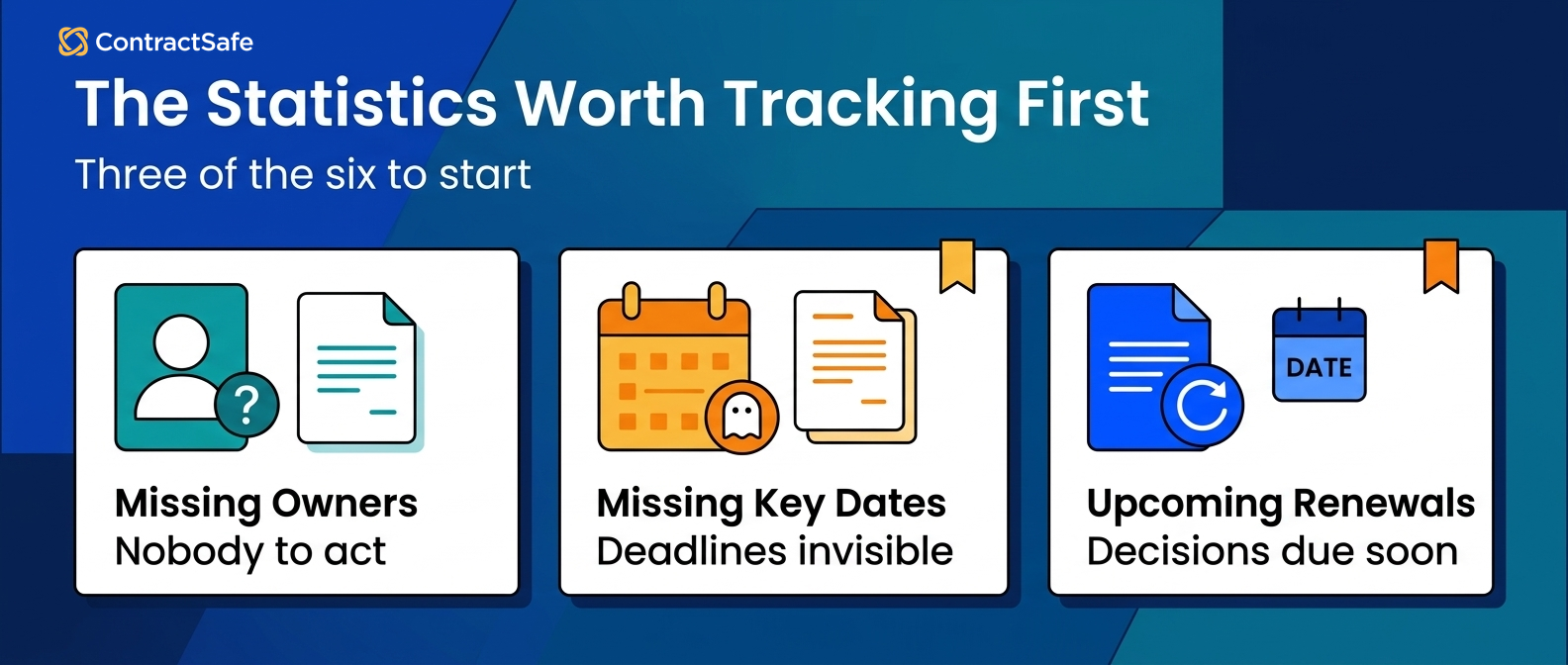
This is the difference between counting contracts and managing contracts.
The repository is the library. These statistics are the overdue notices, shelf labels, and checkout records that tell you whether people can actually use it. Pull each one this week, name the person who acts when it goes red, and check that the number ties back to a real record before anyone reports it upstream.
Here's each of the six in working detail: what it counts, what good looks like, and the action it should create.
1. Contracts Missing Owners
Contracts missing owners counts the active agreements with no named human accountable for renewals, obligations, and questions.
What good looks like: zero for material agreements, with reassignment inside a week when someone leaves. Before you trust the number, check that owner means a person, not a department.
For example, when a procurement manager departs, this number tells you the same week how many vendor agreements just became orphans. Before you report it, compare the orphan list against the org chart and check for owners who changed roles.
- Watch for: one person "owning" so many contracts that ownership means nothing. When one name sits on far too many records, nobody is really watching any of them. Cap what a single owner carries, and when the list runs long, split it by vendor or business unit so the next action always has a real person behind it.
- Watch for: ownership recorded in someone's memory instead of a field.
2. Contracts Missing Key Dates
Contracts missing key dates counts records without expiration, renewal, or notice dates, the fields every alert and report depends on.
What good looks like: required date fields complete on high-value agreements first, then the long tail on a cleanup schedule. Compare the field against the signed document on a sample before you trust it.
A wrong or missing effective date quietly poisons everything downstream: the renewal alert fires late, the exposure report understates next quarter, and trust in the numbers collapses. Catch it by opening the signed document next to the field and reading the two together. When they disagree, fix the record, then find every other contract that came from the same template or the same intake and check them too.
Fix it this week: pull the records with blank expiration dates, sort by contract value, and clean the top twenty before touching anything else.
- Watch for: dates entered as text that reports can't compute against.
- Watch for: amendments that changed a term without anyone updating the parent record's dates.
3. Contracts With Upcoming Renewals
Upcoming renewals counts the agreements entering their decision window, where review, renegotiation, or termination is still possible.
What good looks like: every agreement in the window has an owner and a decision date scheduled before the notice deadline.
For example, a renewal surfaced ninety days early is a negotiation with options. The same renewal surfaced after the notice window closes is a year of the old terms. So the buyer's job is to work backward from the notice deadline, not the renewal date, and put the reminder there. Give each one an owner who can actually say yes or no, and pull the usage and pricing before the meeting.
Fix it this week: schedule the decision meeting for every agreement inside the window, and attach the usage and pricing history to each record before the meeting.
- Watch for: auto-renew clauses with notice requirements that demand specific delivery methods.
- Watch for: renewals reviewed by legal alone when the spend decision belongs to finance or procurement.
4. Contracts Missing Required Metadata
Missing required metadata counts records that lack the fields your reports promise: counterparty, value, type, status, and the rest of your required set.
What good looks like: the required-field set is small and deliberate, complete on the records that drive money decisions. Choose the fields by asking which reports they feed; require nothing a report doesn't use.
Run extraction as the first pass and a human review as the second. For example, AI pulls the dates, parties, and values from a vendor MSA; your team verifies the top-spend agreements before anyone reports from them.
- Watch for: a twenty-field requirement nobody fills, which becomes a zero-field reality.
- Watch for: metadata copied into side spreadsheets that drift from the source records.
5. Approval Queues by Department
Approval queue statistics count where contracts wait and for how long, broken down by stage and department.
What good looks like: cycle time trends down without skipping review, and no single desk quietly holds most of the wait.
A common scenario: the average looks fine while one department's queue doubles. Without the by-stage breakdown, the bottleneck hides inside anecdotes and the fix never gets prioritized. So split the number by stage before you show it, name the desk that holds the most wait, and hand that desk an owner and a due date. An average with no stage behind it starts an argument, not a fix.
Fix it this week: break the average into stages, name the slowest desk, and ask it what it's waiting on. The answer is usually a missing input, not a slow person.
- Watch for: approvals that happen by email, invisible to any queue statistic.
- Watch for: fast averages built on contracts that skipped review entirely.
6. Open Obligations
Open obligations counts the post-signature commitments that exist as tracked work: reports owed, certificates due, milestones promised, payments to review.
What good looks like: important commitments live as tasks or alerts with owners, and completions save proof to the contract record.
This is the number that connects the repository to the real world after signature. A signed agreement is full of promises; this statistic says whether anyone is keeping them. Check it by opening your highest-value agreement and listing what each side owes and when. Every item needs an owner, a date, and a place proof lands when it's done. If the list lives only in your head, the number is already wrong.
Fix it this week: list the obligations on your ten highest-value agreements and give each one an owner and a date. That single afternoon usually finds something due.
- Watch for: obligations that exist only in contract text, with no task anywhere.
- Watch for: your own commitments going untracked while you watch the counterparty's.
Statistics, Metrics, and KPIs: What's the Difference?
The difference is commitment. Statistics are everything you can count; metrics are the statistics you watch on purpose; KPIs are the short list your team commits to act on weekly.
Compared side by side: contracts uploaded is a statistic, owner coverage tracked monthly is a metric, and renewal risk with a named owner and a weekly action is a KPI.
This guide covers the statistics layer: what's worth counting at all. When you're ready to commit to the working short list, the contract management KPIs guide covers how to run it week to week.
Use the ladder deliberately. Count broadly, watch selectively, and commit narrowly, because every KPI you declare creates a weekly obligation for someone.
Statistics That Leadership Actually Uses
Leadership cares about contract statistics when they explain risk, cost, speed, or accountability. They don't need every field in the repository.
A useful executive view might show:
- Track the total value of contracts under management.
- Upcoming renewal exposure.
- Identify high-risk contracts that don't have an owner.
- Look for approval delays that are holding up revenue or purchasing.
- Obligations due soon.
- How much data cleanup is needed for reliable reporting?
That kind of report creates a conversation about work. A weaker report creates a conversation about why the chart is confusing.
Bring the report with the asks attached: each red number arrives with an owner, a fix, and a date. Leadership meetings fund plans, not observations. Before the meeting, write the one decision you want for each red number, so the ask is a yes or no, not a discussion. A number with no owner attached will get admired, then forgotten by the next meeting.
If your team needs a weekly operating view, start with the guide to contract management metrics.
Vanity Metrics to Treat Carefully
Some contract statistics look impressive but don't prove much. Total upload count is the classic example.
A repository with many uploaded contracts can still be unhealthy if the records lack owners, dates, permissions, or searchable text.
Other vanity metrics include total searches, total users, total folders, and total reports created. Those numbers can provide context, but they don't prove that contract risk is lower. The test is simple: ask what someone would do differently if the number moved. If the honest answer is nothing, keep it off the slide. Save the leadership summary for the numbers that name a risk and a next action.
Use vanity metrics only when they support a real operating question. Otherwise, keep them out of the leadership summary.
How to Build a Better Contract Statistics Report
A better contract statistics report starts with the decision you need to make. Then it pulls only the data required for that decision.
Use this order:
- Define the question.
- First, identify which contracts are in scope.
- Then, pick the fields you need to answer your question.
- Always check whether your data is complete.
- Assign an owner for follow-up.
- You should review the same statistic over time.
That last step matters. One week of data is a snapshot. Trend lines show whether the process is getting better or worse.
Thomson Reuters frames CLM as a lifecycle, and that's a smart way to approach reporting. The numbers should follow the contract from request to renewal, not stop at signature.
Quick gut check before you build anything. Pick last week's most painful contract question and time how long the answer took.
That elapsed time is your baseline statistic. The proof to ask of any report is that it makes the same answer instant.
Trends Beat Snapshots
A contract statistic becomes useful the third time you measure it, because direction matters more than level.
Owner coverage at eighty percent means little by itself. Owner coverage falling from ninety to eighty over a quarter is a process breaking; rising from sixty is a cleanup working.
Review operational numbers weekly and leadership trends monthly. The weekly pass creates the work queue: assign the orphans, chase the missing dates, clear the stuck approvals. The monthly pass answers whether the system is getting healthier.
And keep the history. A statistics program that overwrites last month's numbers can never prove improvement, which is exactly the proof the budget conversation needs.
A practical cadence: snapshot the six core numbers every Friday, review the deltas Monday morning, and bring the quarter's trend lines to the leadership review. Three measurements make a line; a line makes a decision.
Industry and Team Views
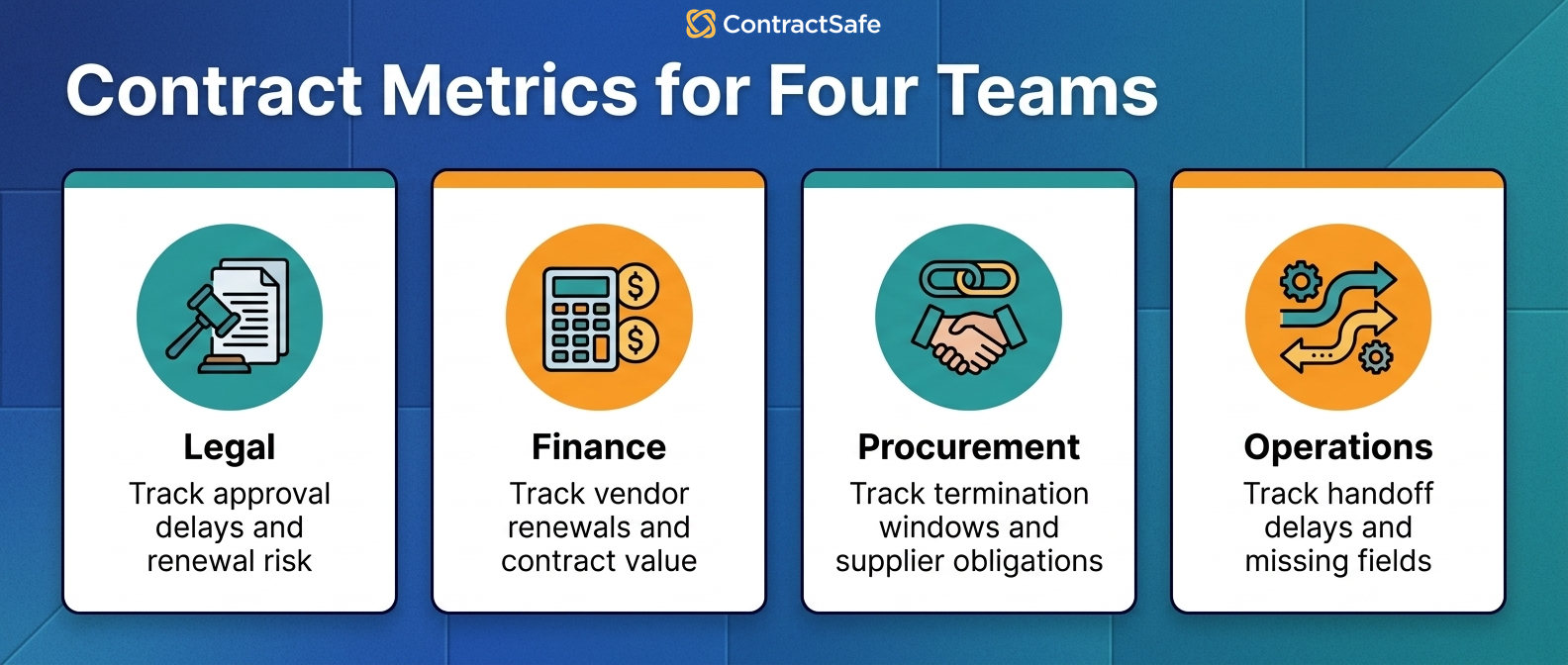
Different teams need different contract statistics. A single master dashboard usually becomes too crowded.
Legal should track approval delays, nonstandard terms, owner coverage, renewal risk, and obligation follow-through.
Finance should track vendor renewals, payment terms, contract value, audit support, and records missing values or owners.
Procurement should track vendor agreement status, termination windows, pricing terms, and supplier obligations.
Operations should track handoff delays, missing fields, user adoption, and records that require cleanup before reporting.
Need something specific for your industry? Check out ContractSafe's guides for healthcare, manufacturing, and construction contract management.
Where Each Number Comes From
Contract management statistics come from saved views over repository fields, not from a data-science project. Check the source field exists before you promise anyone the number.
- Owner gaps: filter active records where the owner field is empty. Requires the owner field to exist and be required at intake.
- Date gaps: filter records with blank expiration, renewal, or notice dates. Compare a sample against the signed documents before reporting.
- Renewal window: filter notice dates inside the next ninety days, joined with owner and value fields.
- Metadata completeness: count required fields filled versus required fields total, by record.
- Queue times: timestamps on stage transitions. If approvals happen by email, start by moving them somewhere that records time.
- Open obligations: tasks or alerts tagged to contract records, with due dates and owners.
If a number on your wishlist has no field underneath it, the field is the project. Decide whether it's worth creating before anyone promises the report. Building the field means adding it at intake, backfilling the records that already exist, and keeping someone honest about filling it. If no decision changes when the field is full, skip it and spend the time on a number people will act on.
Your First Thirty Days of Contract Statistics
A thirty-day contract statistics rollout beats a quarter-long dashboard project. Start small, prove the loop works, and resist additions until the weekly review is a habit.
- Week one: check owner and date coverage on your fifty highest-value agreements. Fix what you find before counting anything else.
- Week two: turn on the renewal-window report and assign an owner to every agreement inside it.
- Week three: stand up the weekly review. Fifteen minutes, six numbers, one assigned action per bad number.
- Week four: snapshot the baseline, compare it against week one, and bring the delta to leadership as proof the approach works.
Before you expand to more numbers, ask which decision the new number changes. If nobody can name one, the six you have are enough. A seventh number that nobody acts on just dilutes the six that work. When someone asks for a new one, make them name the owner and the action first. If they can't, the answer is no, at least for now.
Mistakes That Sink Statistics Programs
Most contract statistics programs die from setup mistakes, not math mistakes. Check your plan against the usual five before you launch.
- Counting everything. Six numbers with owners beat sixty without them. Start narrow.
- Reporting from a side spreadsheet. Copies drift from the contract records within a quarter; report from the source.
- Shipping unverified numbers. Compare a sample against the signed documents before the first report, not after the first challenge.
- Treating the report as the deliverable. The deliverable is the assigned action each bad number creates.
- Skipping the baseline. Snapshot before you clean up, or you'll never prove the cleanup worked.
Review the list quarterly. Programs drift toward these mistakes the same way repositories drift toward missing owners: quietly, then suddenly.
And when you catch one, treat it like any other contract defect. Find the root cause, check the other reports for the same class of problem, and fix the producer, not just the number that got noticed.
Related Reading
- Contract obligation management, for turning the open-obligations statistic into tracked work with owners.
- Contract renewal best practices, for what to do with the renewals your numbers surface.
- Contract effective date rules, for the date hygiene every statistic on this page depends on.
How ContractSafe Helps With Contract Management Statistics
ContractSafe helps teams create better contract management statistics by keeping signed agreements, metadata, dates, owners, alerts, permissions, and reports together.
ContractSafe's repository makes contract records searchable. ContractSafe's alerts help teams act before important dates pass.
That foundation matters because reports are only as good as the records underneath them.
If your records are scattered across inboxes and shared drives, the first reporting project is cleanup. If your records are centralized, the next project is choosing metrics that drive action.
The six statistics in this guide are all standard report views once the fields are in: orphaned records by owner, missing dates by value, renewals by window, queue times by stage, and open obligations by due date.
The fastest proof is your own portfolio. Bring a handful of real agreements to a free demo and watch the first report build itself from them.








.svg)







.svg)




