


Quick answer: AI contract review software is a tool that reads a draft agreement against your playbook and standards, flags risky, missing or nonstandard language before a person signs anything, and points the reviewer to the clause behind each flag. It doesn't decide what's acceptable; it narrows a long document down to the handful of spots that deserve a lawyer's attention, and a person makes every call.
Picture a vendor agreement with a missing security clause and a liability cap outside policy. A generic summary may describe the deal. AI contract review should point the reviewer to both issues, show the playbook rule, and leave the decision to a person.
Choose your next step:
If you're not sure review is the job you need, start with what review, analysis, extraction and search each do and our guide to how AI contract review works.
If you're already shortlisting, go to the nine platforms, then check ContractSafe pricing against the quotes.
If you're walking into a demo, take the demo test with you, or run it in a ContractSafe demo with a difficult agreement.
Key Takeaways
- AI contract review is pre-signature work: playbook checks, redline suggestions and risk flags on drafts your team is negotiating right now.
- Review, analysis, extraction and search are four different jobs, and buying the wrong one is a common mistake.
- A useful platform keeps a human in the loop: AI proposes, your legal team decides, edits and approves.
- The teams that benefit aren't only legal; sales, procurement, HR and risk all wait on contract review and all feel the queue.
- Compare tools against your real workflow, not a feature grid, because where your team edits contracts matters more than how many clause types a vendor advertises.
Quick Evaluation Matrix for AI Contract Review Tools
Use this matrix to test whether each platform can review a draft against your standards, explain its flags, and carry the agreement into the next lifecycle step.
| Decision factor | What to test, and what passes |
|---|---|
| Playbook fit | Review a draft against one of your actual playbooks. Pass: flags map to your positions and fallback language. |
| Missing-clause detection | Use a draft that omits a protection your playbook requires. Pass: the missing clause appears with a reason for the flag. |
| Source traceability | Open a risk flag and inspect its support. Pass: the reviewer can see the source clause and playbook rule. |
| Human control | Accept, edit and reject different suggestions. Pass: no document change happens without a person’s approval. |
| Lifecycle handoff | Move the reviewed agreement into approval and post-signature management. Pass: versions, approvals, key dates, alerts and reports stay connected. |
What Review, Analysis, Extraction and Search Each Do
Review checks one draft against your standards before anyone signs; analysis, extraction and search work across the contracts you already have. A review tool needs something to review against, usually a playbook that encodes your positions: acceptable liability caps, required data-security language, indemnity you will and won't accept, termination terms you never agree to. Without that reference point you get a summary, not a review. Buyers should separate four capabilities that vendors tend to blur together:
Review is the pre-signature comparison. Does this draft match our standards, and where does it deviate?
Analysis looks across a set of contracts to spot patterns, such as how often you concede a clause during negotiation.
Extraction pulls structured fields out of executed documents: parties, dates, renewal terms, payment schedules.
Search answers questions about contracts you already signed, often in plain language, so you can find every agreement with an auto-renewal in the coming months.
They overlap in marketing copy and rarely overlap in your workflow. A team drowning in inbound NDAs needs review. A team that can't find its own renewal dates needs extraction and search, which is where AI extraction and AI-powered search do their work across the whole repository; our guide to AI contract analysis software covers that side. Buying one when you need the other leaves the original bottleneck in place.
How AI Contract Review Works
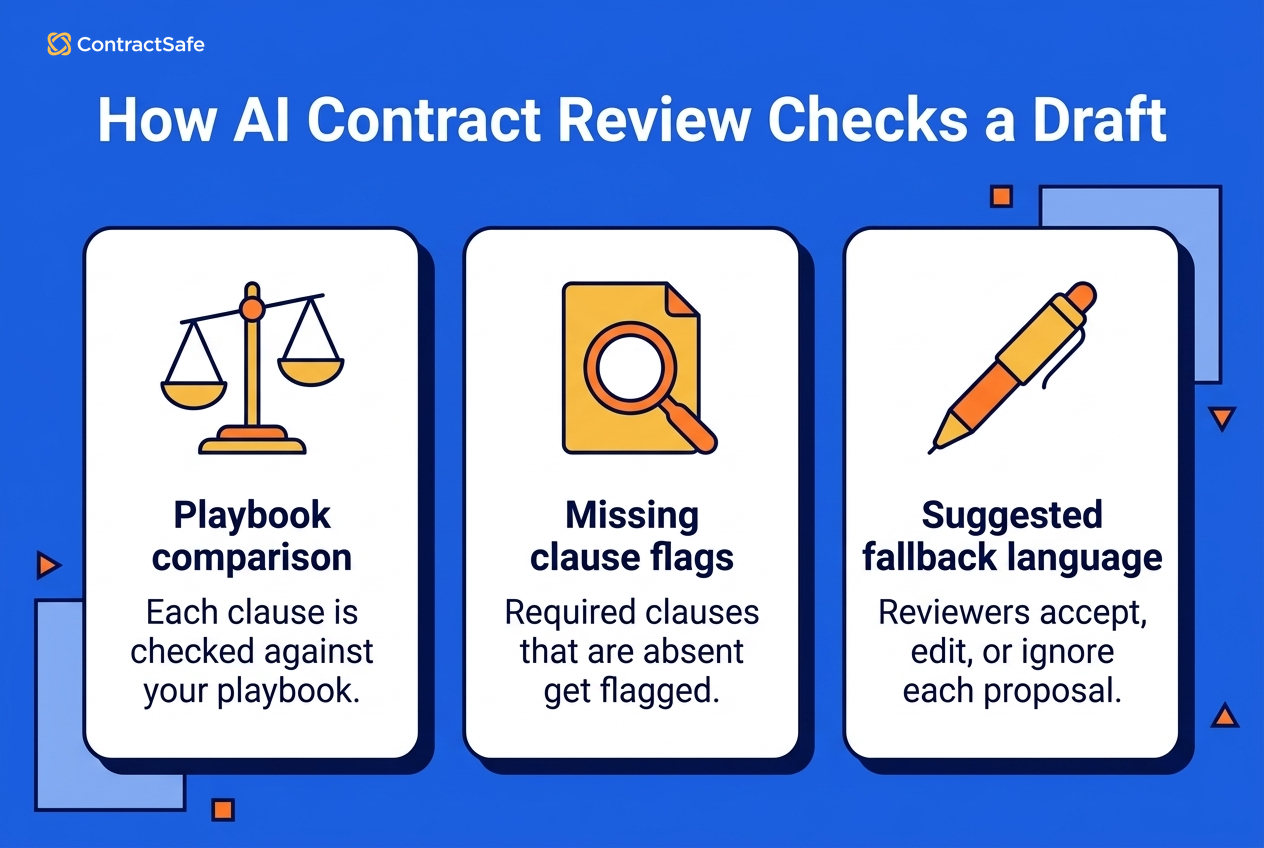
The software ingests the document, converts it into text it can parse, breaks that text into clauses, classifies each clause by type, and then compares what it found against your playbook or a standard template. Anything that deviates, or anything that should be there and isn't, gets flagged for a person.
That last part is where teams get value. A missing clause is harder for a human to catch than a bad one, because absence doesn't draw the eye, and software checking a required list doesn't lose focus deep into the document. Most platforms then propose something: a redline, a comment, a suggested fallback position drawn from your own approved language. The reviewer accepts, edits or ignores it. Nothing moves forward on its own, and nothing should. ContractSafe's AI contract review works this way, applying your playbooks to flag risks, gaps and nonstandard language so a human can make the call.
A Worked Playbook Example
Every vendor says "playbook." Here's what one rule looks like when it runs, so you know what to ask to see in a demo. The mechanics below are ContractSafe's: a review checks every page against every rule in one pass, returns pass or fail per rule with failures first, explains each failure, suggests replacement language, and records any override a reviewer makes.
The draft is a counterparty's services agreement, checked against one liability rule:
| Step | What the reviewer sees |
|---|---|
| Playbook rule | Each party's total liability is capped at the fees paid in the 12 months before the claim, with breaches of confidentiality carved out of the cap. Fallback: 24 months' fees. |
| Draft says | "Supplier's aggregate liability under this Agreement shall not exceed the fees paid in the twelve (12) months preceding the claim." No cap on the customer's side, and no carve-out for confidentiality. |
| Result | Fail. Two reasons shown: the cap is one-sided, and the confidentiality carve-out the rule requires is missing. |
| Suggested language | "Each party's aggregate liability under this Agreement shall not exceed the fees paid or payable in the twelve (12) months preceding the claim. This limitation does not apply to a breach of Section [Confidentiality]." |
| Who decided | The reviewer accepts the mutual cap, edits the carve-out to also cover data-protection breaches, and moves on. If the deal team had agreed to a one-sided cap for a strategic supplier, the reviewer toggles the fail to pass and the override is logged with their name and the time. |
Three things to notice. The flag points at the exact sentence, not the section. The explanation names the rule that failed, so a second reviewer can check it. And nothing changed in the document until a person chose the language. Run this same rule through every vendor you shortlist and compare what comes back.
What AI Contract Review Software Can and Can't Do
AI review is very good at speed, coverage and consistency, and limited at judgment, nuance and context. Both halves of that sentence matter when you're writing the business case. What it does well:
Speed on volume. Routine agreements, NDAs and standard vendor paper move through initial review much faster than they do by hand.
Consistency. The same playbook gets applied every time, even when a reviewer is tired or hurried.
Coverage. Missing clauses, unusual definitions and inconsistent defined terms get surfaced systematically rather than by luck.
Scale. Review software can prioritize routine contracts so legal attention stays focused on agreements that need judgment.
Where it falls short:
Nuance and intent. Software can tell you a clause is unusual. It can't tell you the clause is unusual because it reflects a special exception for a strategic partner.
Industry-specific language. Highly specialized terminology, regulated language and bespoke deal structures still need someone who knows the field.
Bias in training and playbooks. A model or a playbook built on historically lopsided terms will quietly treat those terms as normal. Someone has to review the standard itself, not only the output.
Adoption friction. Tools that don't fit where your team already works get abandoned. This risk is easy to underestimate.
Legal judgment. Complex negotiations, regulatory interpretation and understanding what a clause means for your business remain human work.
Anyone selling guaranteed accuracy or guaranteed compliance is selling something that doesn't exist. The realistic promise is a better first pass and fewer things slipping through, with a qualified person still signing off.
How Accurate Is AI Contract Review, and How to Test It
In an independent benchmark that graded AI tools and working lawyers on the same tasks, AI tools trailed lawyers on redlining (65.0% against 79.7%) and matched or beat them on data extraction. Vendors quote accuracy figures that were measured on their own documents with their own scoring. The benchmark is the Vals Legal AI Report (February 2025), which covered seven tasks, and its two contract-relevant results point in opposite directions:
Redlining: the lawyer control group scored 79.7% accuracy; the best AI tool in the test scored 65.0% and the weaker one 53.6%. On the task closest to playbook review, people still won by a wide margin.
Data extraction: two of the four AI tools beat the lawyers (75.1% and 73.2% against a 71.1% lawyer baseline), and the others landed within a few points of them.
The practical reading: expect AI to be as good as or better than your team at pulling structured facts out of contracts, and expect it to be a strong first pass but not a finished redline on judgment-heavy clauses. That's why the tool has to show its work and why a person owns the decision.
A 20-Contract Pilot You Can Run in a Week
Pick 20 contracts your team already reviewed, with the reviewer's notes or redlines still attached. Mix contract types (NDAs, vendor MSAs, sales agreements) and include at least three scanned PDFs.
Load your real playbook, not the vendor's sample. If you don't have one written down, write five rules for one contract type and use those.
Run every contract and score by clause type. For each rule, count true flags (the tool caught what your reviewer caught), misses (your reviewer caught it, the tool didn't), and false flags (the tool flagged clean language). Keep the tally in one sheet with a row per contract and a column per rule.
Weight the misses. A missed liability cap costs more than a missed notice address. Ask which clause types the tool missed and whether those are the ones you bought it for.
Time the review. Note how long a reviewer takes to clear the tool's flags versus reading the draft cold. If clearing false flags eats the time the tool saved, that's the number that matters at renewal.
Read the vendor's accuracy claim against your tally. A claim of "98% accurate" that doesn't say on which clause types, on whose documents, or scored how, isn't a number you can compare. Yours is.
Who Uses AI Contract Review Software?
Legal teams are the obvious answer, but they're rarely the only group waiting on a contract. Anyone whose work stalls in the review queue has a stake in how fast and how consistently that queue moves:
Legal teams use it for first-pass vetting, so attorneys spend their time on strategy, negotiation posture and the thorny agreements rather than rereading the same routine NDA.
Sales teams care because contract delays kill momentum. A faster, more predictable review cycle means fewer deals cooling off while paper sits with legal.
Procurement teams use review to catch policy conflicts, unusual terms and compliance risks in vendor paper, which helps them negotiate from a clearer position.
Risk and compliance groups use it to surface exposure hiding in ordinary places: unfavorable financial terms, IP ownership language, weak data-security commitments.
HR deals with employment agreements, contractor terms and NDAs at steady volume, most of it template-driven and well suited to playbook-based first passes.
Finance watches payment terms, escalation clauses and renewal mechanics, all of which are easy to miss in a draft and expensive to discover later.
The common thread isn't the department. It's whether contracts are a bottleneck, and for many growing companies they are. In the ACC and Everlaw survey of 657 in-house legal professionals across 30 countries, published in October 2025, 52% said they were actively using generative AI, up from 23% in 2024, and 71% saw an opportunity to bring contract management work in-house with it.
Use Cases by Contract Type
AI review earns its keep on four kinds of paper most teams see every week: inbound NDAs, vendor MSAs on the counterparty's paper, sales agreements on your paper, and employment and contractor paper. Departments tell you who waits on review; contract types tell you what the playbook has to catch.
Inbound NDAs at volume. Playbook rules: mutual obligations; a term of two to three years; no non-solicit or non-compete riders; residuals clause rejected; governing law from an approved list. The tool reliably catches one-sided confidentiality, a missing term, a non-solicit hidden in the definitions and an unapproved governing law; most NDAs pass or fail on five rules, which is why this is the first workflow most teams automate. A lawyer is still needed for almost nothing on a standard NDA; escalate only when the counterparty is a competitor or the NDA is tied to an M&A process.
Vendor MSAs on the counterparty's paper. Playbook rules: liability cap and carve-outs; indemnity for IP and data breach; data-security and subprocessor terms; termination for convenience; auto-renewal notice windows. The tool catches a missing security clause, a cap below your floor, uncapped indemnity running one way, an auto-renewal with a 90-day notice window and assignment without consent. A lawyer still decides whether a below-floor cap is acceptable for this vendor's risk profile and how a security exception interacts with your own customer commitments.
Sales agreements on your paper. Playbook rules: deviations from your template; discount and payment-term limits; SLA credits; non-standard termination rights; most-favored-customer language. The tool catches every place the customer's redline moved away from your template, ranked by the rule it breaks, so the reviewer opens the marked-up draft at the right five clauses. A lawyer still handles deal-level trade-offs (a bigger discount for a longer term), anything that sets a precedent other customers will find, and quarter-end concessions.
Employment and contractor paper. Playbook rules: required IP assignment; confidentiality; classification language for contractors; jurisdiction-specific restrictive covenants; required notices. The tool catches a missing IP assignment, a non-compete in a state that bars them, contractor language that reads like employment and an expired notice form. A lawyer still makes classification calls and handles executive agreements, separation terms and anything touching a regulated workforce.
The pattern across all four: the tool is strongest where the rules are explicit and the volume is high, and weakest where the right answer depends on the relationship. Write the playbook for each type before you evaluate anything, because the pilot above can't score a tool against rules that only exist in a lawyer's head.
The 9 Best AI Contract Review Software Platforms for 2026
The platforms that show up on buyer shortlists in 2026 are ContractSafe, SpotDraft VerifAI, Summize, LegalOn, Luminance, Spellbook, Thomson Reuters CoCounsel, DocJuris and Juro. Each one takes a different angle on the same problem, and the right pick depends less on feature counts than on where your team does its work.
1. ContractSafe
ContractSafe puts playbook-guided AI contract review in the same platform as editing, approvals, signatures, repository records, renewal alerts and reporting. You define your positions, your acceptable fallbacks and the clauses your organization won't accept, and the AI reads incoming paper against those standards. It flags risks, surfaces gaps where expected protections are missing, and calls out nonstandard language that deviates from what your team has approved. What comes back is a set of review flags, not a decision.
Where ContractSafe separates from the Word add-in crowd is what happens after the review ends. The agreement you just marked up doesn't vanish into a shared drive after signature. It flows into the same repository that handles your executed contracts, so the obligations you negotiated stay connected to the renewal dates, the alerts and the search layer your team already uses. Pre-signature review and post-signature management are the same system, not two systems joined by a folder. ContractSafe also states that customer data isn't used to train its AI models, and customers can opt out of AI features entirely if their risk posture requires it. Approvals and e-signature start on the Finalize plan, and AI Contract Review is part of the Maximize plan; pricing is published, starting at $450/month billed annually, with unlimited users on every plan. Best for teams that want review connected to approvals, signature and renewals in one system.
2. SpotDraft VerifAI
SpotDraft positions VerifAI as a Word add-in that reviews contracts against custom playbooks and suggests redlines and comments directly in the document, which makes the review surface familiar to teams that negotiate in Word. SpotDraft's own CLM handles approvals, signature and storage if you buy the platform. During evaluation, ask how the reviewed document moves into approvals, signature, storage and post-signature tracking if those jobs are also in scope. Pricing is by quote. Best for teams that negotiate in Word and want playbook flags and redlines there.
3. Summize
Summize describes AI-assisted contract review that happens in Word, with playbook checks, redlining and summaries built into the same drafting surface where the contract already lives, with extra emphasis on turning review output into readable summaries for business teams. That can help when legal needs to explain marked-up language to procurement, sales or finance. During evaluation, ask how much playbook logic your team can configure and whether reviewers can correct a summary before sharing it. Pricing isn't published. Best for legal teams that have to explain marked-up language to business users.
4. LegalOn
LegalOn describes Word-based contract review against attorney-written playbooks plus your own standards, with contract questions, summaries and drafting assistance. Pricing isn't published. During evaluation, ask what happens to the reviewed document after Word and how your own positions sit alongside the attorney-written guidance. Best for teams that want guidance bundled with the review rather than building every rule themselves.
5. Luminance
Luminance combines AI-assisted contract review and negotiation with analysis across enterprise contract sets, reviewing against vendor-built models and configurable standards. Pricing is by quote. During evaluation, ask how its review workflow, platform administration and post-signature analysis fit how your team works. Best for larger teams that want portfolio analysis alongside review.
6. Spellbook
Spellbook is a Microsoft Word add-in built around drafting and review. Its Review mode suggests redlines and risk flags in the open document, Playbooks apply a team's own positions, and it benchmarks clauses against a large library of contract types. Pricing isn't published; quotes are per user and vary with team size and usage. During evaluation, ask what happens to the reviewed document after Word, because storage, approvals and renewals aren't part of the product. Best for lawyers who live in Word and want drafting help alongside review.
7. Thomson Reuters CoCounsel
CoCounsel for Microsoft Word reviews a contract against a playbook, shows AI-assisted suggestions, and inserts revisions directly into the document. Teams can build a custom playbook from an existing contract and, as of mid-2026, import an existing playbook file so preferred clauses, fallback clauses and escalation guidance come in as-is. The surrounding CoCounsel Legal platform adds Practical Law content for drafting and a Tabular Analysis feature for asking questions across large document sets. Pricing is by quote. Best for firms and departments already inside the Thomson Reuters ecosystem.
8. DocJuris
DocJuris takes an uploaded Word or PDF contract, checks every position against your playbook, and returns a true tracked-changes redline in Word plus a screening report, with a plain-language explanation for each change. It handles NDAs, MSAs, order forms, licenses and DPAs on the same pattern, and offers one-click options to make a term more balanced, more favorable or simpler. Pricing isn't published. Best for legal and procurement teams that want a finished redline back rather than a list of flags.
9. Juro
Juro is a browser-native contract platform whose AI review agent compares an incoming contract to your playbook, proposes redlines with an explanation for each, and suggests alternative language from your approved positions, inside Juro's own editor or in Word. Because Juro also handles templates, approvals, e-signature and a repository, the reviewed contract stays in one system afterward. Pricing is by quote. Best for teams that want to leave Word behind entirely.
Platform Comparison
Where each platform runs its review and what it reviews against:
| Platform | Where review runs, and what it reviews against |
|---|---|
| ContractSafe | Full-lifecycle contract management platform. Reviews against: your playbooks, from a template or from scratch; pass or fail per rule with an explanation and suggested language; overrides logged. |
| SpotDraft VerifAI | Word add-in. Reviews against: custom playbooks; suggested redlines and comments in the document. |
| Summize | Word. Reviews against: playbook checks; redlines plus readable summaries for business users. |
| LegalOn | Word. Reviews against: attorney-written playbooks plus your own standards; drafting assistance, summaries and contract questions. |
| Luminance | Contract platform. Reviews against: vendor-built models and configurable standards; review and negotiation support. |
| Spellbook | Word add-in. Reviews against: custom playbooks and clause benchmarking; suggested redlines and risk flags in the document. |
| Thomson Reuters CoCounsel | Word add-in. Reviews against: custom playbooks built from a contract or imported from a file; suggestions inserted into the document. |
| DocJuris | Web upload, output in Word. Reviews against: your playbook; full tracked-changes redline plus a screening report. |
| Juro | Browser-native editor (also Word). Reviews against: your playbook; proposed redlines with explanations and alternative language. |
What happens after review, and how each one is priced:
| Platform | After review, and pricing |
|---|---|
| ContractSafe | Editing, approvals, e-signature, repository, alerts, reporting, AI extraction and search in the same system. Pricing: published, starting at $450/month billed annually, unlimited users on every plan; approvals and e-signature start on the Finalize plan, and AI Contract Review is part of the Maximize plan. |
| SpotDraft VerifAI | SpotDraft's CLM for approvals, signature and storage if you buy the platform. Pricing: quote-based. |
| Summize | Ask during evaluation. Pricing: not published. |
| LegalOn | Ask during evaluation. Pricing: not published. |
| Luminance | Enterprise portfolio analysis. Pricing: quote-based. |
| Spellbook | Nothing in-product; the document leaves Word to your storage. Pricing: not published; per-user quotes. |
| Thomson Reuters CoCounsel | CoCounsel Legal platform: drafting with Practical Law, Tabular Analysis across document sets. Pricing: quote-based. |
| DocJuris | Export the redline; playbook analytics. Pricing: not published. |
| Juro | Approvals, e-signature, repository and renewals in the same platform. Pricing: quote-based. |
How to Compare AI Contract Review Tools
Compare these tools using the contracts and workflow you have. Bring a difficult vendor agreement to the trial and watch how the system handles the clauses, comments, handoffs and people that create your real backlog.
Demo Test
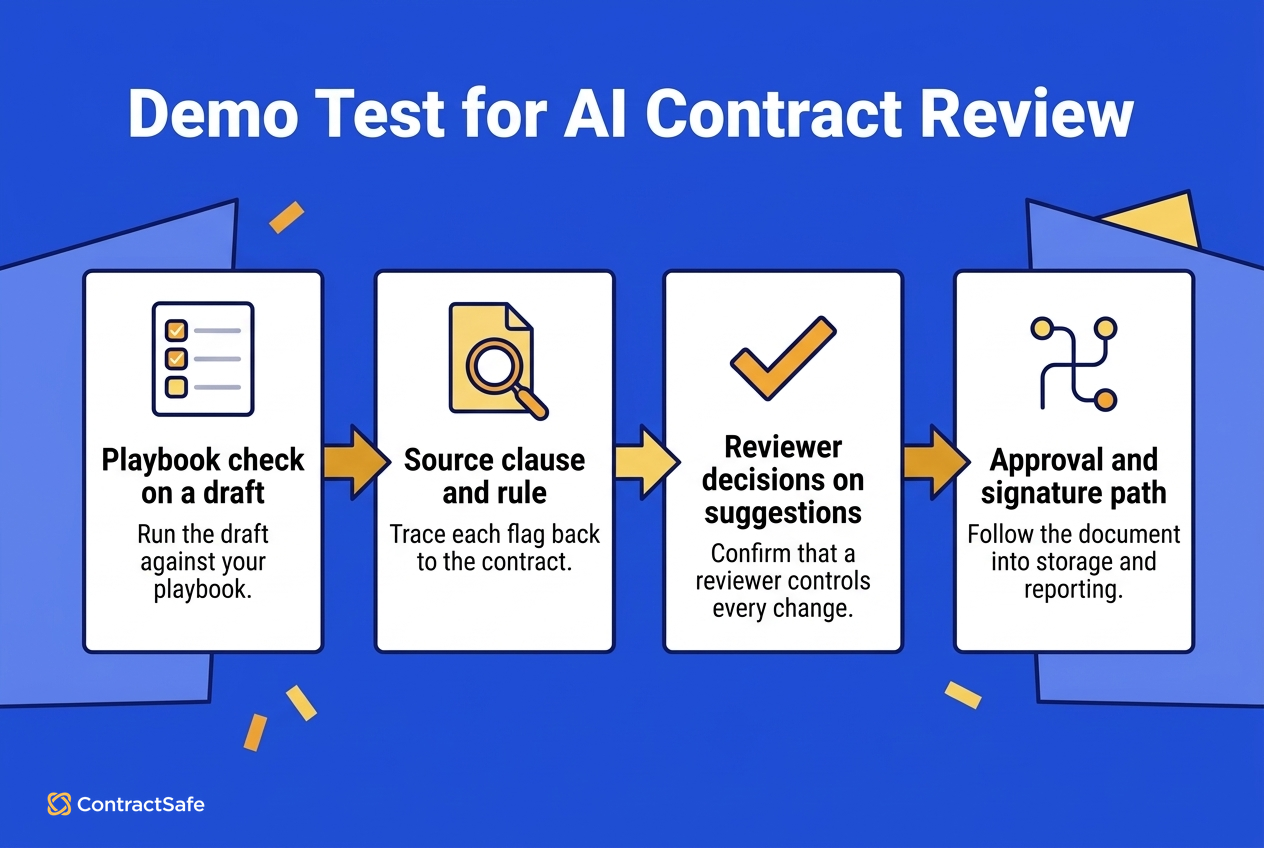
Bring a draft that contains your fallback liability language and omits a clause your playbook requires. Then make each vendor show the full review path:
Run the draft against your playbook and inspect every risk or gap the system flags.
Trace each flag to the source clause and the playbook rule behind it.
Accept, edit and reject suggestions to confirm that a person controls every change.
Follow the reviewed document through approvals, signature, repository storage, key-date tracking and reporting.
Use the evaluation matrix as the scorecard for every vendor, and fill it in while the same contract is still on screen. Record whether each flag showed its source clause and playbook rule, whether the suggested response was editable, how many clicks it took to move the document into approval, and what information survived the handoff. A yes-or-no feature grid misses these differences, because two products may both claim playbooks while only one lets your team maintain them without vendor help. Weight the criteria before the demonstrations begin so a polished presentation can't quietly change what matters, and the scorecard gives legal and procurement one sheet to argue from.
Then repeat the test with a document that fails differently: a scanned agreement, an unfamiliar clause label, or a version with comments from two reviewers. The goal is to learn how the product behaves when your real documents are messy and your reviewers disagree. Save the output from each trial, including the original clause, the playbook result, the reviewer's decision and the handoff status; those records show implementation effort, reviewer confidence and how the tool behaves outside a prepared demo.
What to Check
Playbooks. Ask who writes them and who maintains them. Can your team configure standards, fallback positions and acceptable alternatives without filing a support ticket? What happens when your position on a clause changes? A playbook you can't edit quickly becomes a playbook that quietly goes stale, and a stale playbook produces confident flags against standards you no longer use. If you haven't written yours down yet, that's the first project regardless of tooling, and our AI contract review playbook guide walks through how to build one.
Traceability and control in daily use. The demo test showed whether flags trace to a clause and a rule and whether a person controls every change. Check that both hold up afterward: a flag that says “unusual indemnity language” without pointing at the text sends a reviewer back to re-read the contract by hand, and the record of who accepted what has to survive after the document leaves review.
Workflow fit. Map where the tool sits in your actual sequence: who receives the contract first, who reviews, who approves, who signs, and where the executed copy lands. A review tool that speeds up step two while leaving steps four and five untouched moves the bottleneck rather than removing it.
Integrations. Check the connections you use daily: your document editor, your storage, your e-signature provider, your CRM if sales originates contracts. Ask what's native, what needs middleware, and what's on a roadmap. Roadmap items aren't features.
Security. Ask how your contract data is stored, who can access it, whether it's used to train models, and what certifications the vendor holds. ContractSafe's answers are in its security documentation; ask every vendor the same questions and compare the answers side by side.
Implementation fit. Ask what configuration, data migration and internal ownership each tool requires, and compare those demands with the time your team has.
Team adoption. Watch what reviewers do during the trial, not what they say in the debrief. During the first busy week, record whether legal reviewers keep using the tool for NDAs and vendor agreements or return to the old review process. Adoption failures rarely announce themselves; they show up as a renewal conversation where nobody can say what changed.
Pricing questions. Ask what's included in each tier, which AI capabilities live where, how users are counted, and what happens to cost as volume grows. Get it in writing before you sign, because the difference between a tool included in your plan and a tool that's an upgrade away is a conversation better had now than at renewal.
Related Reading
Contract editing and version control: how redlines, versions and comparison work once review moves from flagging language to changing it.
Contract approval workflows: routing, reminders and sign-off order, which is usually where a fast review stalls.
How ContractSafe Helps With AI Review Across the Contract Lifecycle
ContractSafe runs the AI review and every step after it in one system. When it surfaces a limitation-of-liability clause that drifts from your standard, the redline happens where versions are tracked, so nobody ends up negotiating against a copy that lost earlier changes in an email thread. ContractSafe's AI Contract Review is part of the Maximize plan; ContractSafe pricing starts at $450/month (Organize plan, billed annually; $540 month-to-month), with unlimited users on every plan.
From there, the marked-up draft moves into approval routing. Each approver is notified in the order your organization requires, which is how a quick review avoids turning into a long wait. Once the agreement is signed, it lands in the repository with its metadata intact rather than starting a second life as an untagged PDF in a shared drive.
That handoff is the part teams tend to underestimate. Reviewing well and then losing track of what you agreed to is a preventable failure, so post-signature the same document supports renewal reminders, obligation tracking and plain-language questions when somebody in finance needs to know which vendor agreements auto-renew in the coming months. Pre-signature review protects you from bad terms. Post-signature access protects you from forgetting the terms you accepted. Legal judgment stays with people, and the audit trail records who reviewed what and when.









.svg)







.svg)




