


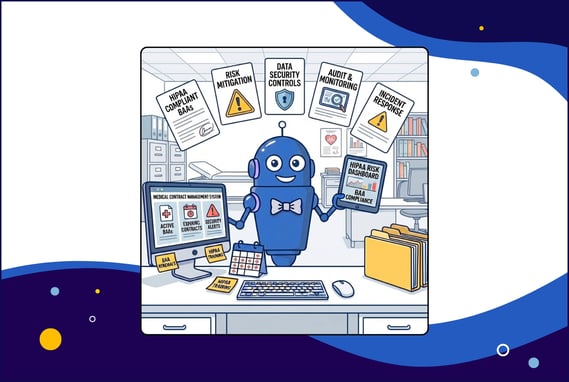
Outdated Business Associate Agreements (BAAs) are one of the most overlooked sources of HIPAA exposure for healthcare organizations. When BAAs go unreviewed for years, they often fail to reflect current regulatory requirements, vendor relationships, or data handling practices, leaving companies vulnerable to compliance gaps they don't even know exist.
It’s a problem that tends to surface at the worst possible time.
It’s late on a Friday afternoon, and you’re ready to close your laptop for the weekend when you get that email. You know the one, a friendly reminder that an audit is coming up, or maybe just a nagging question from compliance about a vendor you haven’t thought about in three years. You’re digging through old digital folders on the cloud when you realize the BAA you have on file for your cloud storage provider is from 2018, signed by a guy who retired before the pandemic. Yikes.
But fear not! You don’t need a law degree or a time machine to fix this; you just need to know the right recipe for HIPAA contract compliance and what systems to set up.
TL;DR
Outdated, missing, or copied-forward BAAs are one of the most common and most overlooked sources of HIPAA exposure.
Vendors may be handling PHI under outdated terms, missing required clauses, or auto-renewing agreements that no longer reflect current regulations.
Annual review cycles, centralized storage, and documented approvals are essential to maintaining audit-ready BAA governance.
Regulatory Foundations (Mini Glossary):
-
HIPAA (Health Insurance Portability and Accountability Act): U.S. federal law that establishes standards for protecting the privacy and security of patient health information and governs how covered entities and vendors must handle PHI.
-
Business Associate Agreement (BAA): A contract that legally requires vendors to safeguard protected health information (PHI) and comply with HIPAA when handling patient data on behalf of a healthcare organization.
-
Protected Health Information (PHI): Any individually identifiable health information, including medical records, billing data, or patient identifiers, that is created, received, or maintained by a covered entity or its vendors.
-
HIPAA Privacy Rule: Governs acceptable uses/disclosures of PHI.
-
HIPAA Security Rule: Establishes administrative, physical, and technical safeguards.
-
HITECH Act: Introduced enhanced breach-notification and strengthened BAA requirements.
-
OCR Enforcement Trends: Increased focus on missing/incorrect BAAs; significant civil penalties tied to vendor mismanagement.
-
Common PHI Categories: Medical records, billing info, patient identifiers, lab results, imaging, scheduling details — often mishandled when BAAs are outdated.
How Outdated BAAs Open the Door to HIPAA Risks
Outdated BAAs create HIPAA risk when they remain in place even as vendor services, data handling practices, and regulatory expectations change. Vendors that handle patient data on your behalf, known under HIPAA as business associates, change their services, regulators tighten requirements, and the contract that was compliant in 2020 is missing today's critical clauses. Nothing triggers an alert until an audit or breach forces the question.
Think of an outdated BAA like a carton of milk tucked in the back of the office fridge. It looks fine from the outside, and because it's there, you assume it's safe. But expiration dates don't wait for you to check them. These risks stay hidden because they don't set off alarms—they just sit there quietly voiding your compliance until someone opens the door and catches a whiff.
These risks usually build slowly, driven by everyday process gaps rather than a single obvious failure.
What is a business associate under HIPAA?
Under HIPAA, a business associate is any person or organization that creates, receives, maintains, or transmits Protected Health Information (PHI) on behalf of a covered entity, such as a healthcare provider or health plan.
In practice, this includes many everyday vendors healthcare organizations rely on, like cloud storage providers, billing and revenue cycle vendors, IT support firms, data analytics platforms, document shredding services, and claims processors. If a vendor touches PHI in the course of providing a service—even indirectly—they are considered a business associate.
Why does a BAA need to be in place before any PHI is shared?
HIPAA requires a signed Business Associate Agreement before any PHI is exchanged because a BAA is the only legal proof that a vendor is contractually obligated to protect patient data.
Without it, there’s no enforceable commitment to secure information, report breaches, or comply with HIPAA’s privacy and security rules. That’s why failing to execute a BAA before sharing PHI isn’t just a paperwork error—it’s one of the most frequent findings in Office for Civil Rights (OCR) enforcement actions, triggering significant fines even when no breach has occurred.
How have HIPAA/HITECH expectations evolved?
The regulatory landscape has shifted dramatically from the paper-pushing days of 1996, and if your BAA hasn’t kept up, it’s a liability. The HITECH Act and Omnibus Rule fundamentally changed the game by making business associates directly liable for compliance. This evolution introduced stricter, clearer reporting deadlines, replacing vague reporting timelines with hard deadlines for breach notifications, often 60 days or less. If your agreement doesn't reflect these statutory shifts, you are technically non-compliant before a single byte of data is even compromised.
Beyond just timelines, the scope of accountability has expanded deeper into the vendor ecosystem. Modern rules require subcontractor requirements (“flow-down" obligations), requiring your vendors to legally bind their subcontractors to the same strict HIPAA standards, ensuring no part of the data chain is left unguarded. Add modern encryption expectations, and a legacy BAA is simply not built for today’s threat landscape.
💡 The top takeaway: A BAA isn’t a one-time checkbox; it’s a living document that must evolve with the law. Make sure you have a sophisticated repository for your digital documents, not just a hard drive or cloud drive.
Why BAAs Become Outdated (and Why It Matters)
BAAs become outdated when vendor relationships evolve faster than contracts are reviewed. A BAA that was compliant five years ago may no longer reflect how PHI is actually handled today.
The core issue is simple: the relationship changes, but the contract doesn’t. Vendors expand services, new types of PHI are exchanged, subcontractors are added, and security practices evolve, often without triggering a formal contract review.
When the legal framework fails to keep pace with these changes, organizations are left legally exposed.
What causes BAAs to fall out of compliance?
It’s easy to assume outdated BAAs are caused only by new regulations, but the most common failures start internally. A vendor might quietly add a cloud storage subcontractor, or a project’s scope expands beyond what the original agreement contemplated. These operational shifts can render a previously compliant BAA obsolete overnight—even if no one realizes it.
Without documented review cycles or vendor oversight, these gaps compound silently. Contracts auto-renew, outdated language persists, and expectations drift further from current regulatory and enforcement standards.
How do vendor changes create compliance gaps?
Vendors rarely stay static; they roll out new features, pivot services, and expand capabilities. However, if a vendor shifts from simple document storage to complex data analytics without a corresponding BAA update, you create a dangerous gap between reality and your contract.
The risk compounds when vendors scale. As vendors scale their services, they often bring on new subcontractors to handle the increased workload. If your BAA isn't updated to capture these changes, you lack the critical flow-down clauses that legally bind these new third parties to HIPAA standards. You end up with a chain of custody that’s broken in the middle, leaving your data exposed to downstream vendors who never technically promised to protect it.
How do internal oversight gaps lead to outdated BAAs?
The silent killer of compliance is a lack of visibility. When you have no tracking of review cycles, no automated alerts for renewals, and inconsistent contract storage (hello, random shared drives!), it’s impossible to know which agreements are active and which are ancient history. This is where a Contract Lifecycle Management (CLM) system can come in handy. If you have everything organized, centralized, and automated for alerts, it’s a lot easier to catch issues before they slip through the cracks.
💡 The top takeaway: Vendor relationships are dynamic, but most organizations have systems that are static. Unless you have a process to catch these shifts, your BAA is likely defending a relationship that no longer exists.
Which BAA Gaps Lead to HIPAA Penalties?
The BAA gaps most likely to trigger HIPAA penalties are missing or non-compliant agreements, inadequate breach-notification clauses, incomplete security safeguards, an absent subcontractor flow-down requirement, and vague termination language. OCR enforcement actions consistently target these specific deficiencies, often before any breach occurs.
Missing or non-compliant BAAs
Handling PHI without a compliant BAA is one of the most common drivers of HIPAA enforcement actions. Without a signed agreement, there’s no legal proof that a vendor agreed to safeguard patient data. And that exposure becomes your liability.
In 2023, OCR resolved an action with MedEvolve after finding it had failed to conduct a risk assessment and had not entered a BAA with a subcontractor handling PHI. The result: a financial penalty and corrective action plan.
Inadequate Breach-Notification Clauses
Time is of the essence during a security incident. If your BAA lacks specific breach-notification timelines (e.g., "report within 10 days of discovery"), your vendor might drag their feet. This delays your ability to notify patients and the HHS, putting you in direct violation of the Breach Notification Rule requiring informing within 60 days.
Effective BAAs specify reporting timelines—typically 10 to 30 days from discovery—so you have adequate time to respond.
Incomplete security safeguards
The HIPAA Security Rule isn't a suggestion box; it is a strict mandate requiring three layers of defense. A robust BAA effectively translates these federal requirements into contractual obligations. The danger with outdated agreements is that they often rely on vague promises of confidentiality rather than legally binding the vendor to specific, measurable standards.
To be compliant, your BAA needs to verify that your vendor has locked down the following three layers:
- Administrative Safeguards: This covers the people side of security. Does the vendor have documented security management processes? Do they conduct mandatory workforce training and background checks? You need proof that they have policies in place to detect, contain, and correct security violations.
- Physical Safeguards: This protects the place where data lives. We’re talking about facility access controls (badges, locks, cameras) and workstation security. Your contract needs to ensure that unauthorized people can't physically walk off with a server or peek at a screen containing your patients' PHI.
- Technical Safeguards: This is digital armor. The most critical requirement here is encryption, both for data sitting on a server and data moving across the internet. It also includes unique user IDs, automatic log-offs, and audit controls to track exactly who is accessing what.
Missing subcontractor flow-down clauses
If your vendor hires a subcontractor to process your data, that subcontractor must be bound by the same HIPAA obligations. Missing flow-down clauses means those third parties are effectively operating in a regulatory wild west, handling your patient data without any direct contractual obligation to protect it. Your compliance chain breaks at the first link you didn’t document.
Vague or missing termination language
Without clear termination language, vendors can keep your PHI indefinitely after the contract ends, creating ongoing liability even after you’ve stopped working together.
HIPAA requires Business Associate Agreements to specify whether PHI must be returned or destroyed when the relationship terminates. If that language is missing or vague, you have no legal mechanism to force cleanup, leaving sensitive data on systems you no longer control.
💡 The top takeaway: The risks aren't just theoretical; they come with six-figure price tags attached. To avoid them, you need to know exactly what to look for. Here’s the good news: once you know what the gaps look like, you can spot them fast. Let’s walk through the must-have clauses.
Required HIPAA Clauses Many BAAs Still Lack
This is the practical part—the clauses that tend to be missing, vague, or outdated in older BAAs.
Use this section as your quick scan. When you pull those dusty contracts out of the digital drawer, these are the exact clauses you need to hunt for. If they’re missing, your BAA isn’t just old, it’s non-compliant.
What permissible uses/disclosures must be defined?
The BAA must clearly define what the vendor can and cannot do with your data. It’s not enough to say "for business purposes." It needs to be specific, like "for claims processing only."
What safeguard requirements must BAAs include under the Security Rule?
Older BAAs often miss the specific requirement to comply with the Security Rule. This clause obligates the vendor to implement technical protections (like encryption) and administrative safeguards (like training their staff).
What breach-notification requirements must be documented?
To ensure you aren't left in the dark, your agreement should spell out three things:
- Definitions: The agreement must clearly define what constitutes a reportable breach versus a minor security incident (like a deflected firewall ping), ensuring you are alerted to actual threats without being drowned in false alarms.
- Timelines: While federal law typically gives you 60 days to report a breach to the HHS, your vendor must report to you much faster, ideally within 24 to 72 hours, so you have ample time to investigate and mitigate before your own deadline hits.
- Reporting Processes: The contract should explicitly state who at your organization must be notified (e.g., the Privacy Officer), how (via certified mail or secure email), and what specific details must be included, such as the nature of the unauthorized access and the type of PHI compromised.
Without these specifics, you’re effectively waiting by the phone while your compliance deadline ticks away.
What subcontractor obligations must be flowed down?
All of them. Your Business Associate Agreement must require vendors to impose the same HIPAA obligations on their subcontractors that apply to them. If your vendor must encrypt PHI and report breaches within 24 hours, their subcontractors must be contractually bound to do the same.
What termination and PHI-destruction clauses are required?
The "exit strategy." The contract must state that upon termination, the vendor will return or destroy all PHI. If destruction isn't feasible, they must extend protections indefinitely.
Required BAA Clause Checklist
Think of this as your 2-minute scan to spot missing BAA clauses before an audit (or a breach) spots them for you.
|
Requirement |
Rule Reference |
Exists? |
Needs Review? |
|
Safeguards for PHI (Admin/Physical/Technical) |
Security Rule |
☐ |
☐ |
|
Incident & Breach Notification Timelines |
HITECH |
☐ |
☐ |
|
Subcontractor Flow-Down Obligations |
Security Rule §164.308(b) |
☐ |
☐ |
|
Data Return/Destruction |
45 CFR 164.504(e) |
☐ |
☐ |
|
Minimum Necessary Principle |
Privacy Rule |
☐ |
☐ |
Now, let’s talk auto-renewals.
RELATED READ: The Ultimate HIPAA Compliance Checklist
Auto-Renewed BAAs Create Compliance Risk
Auto-renew keeps vendors running. It can also keep outdated language running right alongside them.
And while auto-renewal features are great for subscriptions, they are terrible for compliance.
How do auto-renewals bypass regulatory updates?
When a BAA auto-renews, it extends existing terms by default unless someone proactively reviews and updates them. Over time, this allows legacy breach-notification and security language to persist—even as HIPAA and HITECH requirements evolve—creating compliance gaps that don’t surface until an audit or incident forces the question.
The most dangerous gaps usually appear in breach-notification timelines and security definitions. Legacy BAAs may rely on vague reporting standards or outdated safeguards that no longer meet current OCR expectations—leaving organizations out of compliance even though the agreement technically remains active.
How do expanding vendor services create new PHI risk without updated BAAs?
Vendors rarely stay static. A vendor originally approved for a limited service may expand into new offerings that involve additional types of PHI. If the BAA isn’t updated to reflect those changes, new data may be processed without the safeguards originally reviewed or approved.
What are the signals that your auto-renewed BAAs are non-compliant?
The clearest signal is the absence of review history. If you check a vendor file and find no record of review since the last major rule update, you aren’t just behind; you’re likely non-compliant. No documentation means no one has verified whether the security controls in your agreement still meet current standards.
Scope mismatch is another signal. If your vendor is now processing additional PHI categories, like genetic data or financial info, but your BAA still defines their scope as "document storage," you have a gap that auditors will find.
The same applies to subcontractor oversight. If you can’t produce documented due diligence on downstream vendors, you’ve lost visibility into your data’s chain of custody.
💡The top takeaway: Auto-renew should never mean auto-ignore. You need a trigger—an alert or a workflow—that forces a pause and a review before that BAA rolls over.
Speaking of triggers, let’s look at the internal process gaps that usually prevent this from happening.
Internal Process Gaps That Create BAA Exposure
Most BAA exposure stems from routine process breakdowns, not bad intent. In healthcare organizations, compliance risk usually shows up in a few predictable ways:
-
No vendor risk scoring
-
No audit trail or approval history
-
No centralized contract storage
-
No defined review cadence
Why do missing vendor risk assessments create PHI exposure?
If you don't risk-score your vendors, you are essentially flying blind. Without a proper evaluation process that tiers vendors based on the type and volume of PHI they access, you inevitably fall into the trap of a one-size-fits-all security strategy. You might be applying the same loose, low-level controls to a cloud provider hosting thousands of patient records that you apply to the landscaping company that never sets foot in the building. This lack of differentiation means your highest-risk partners, the ones most likely to cause a breach, often aren't getting the scrutiny they actually require.
Furthermore, missing assessments means you have no receipts to show an auditor. If you can't produce a record showing exactly which specific controls were applied to your high-risk vendors, you cannot prove that you did your due diligence.
In the event of a breach, the OCR won't just ask if you trusted your vendor; they will ask to see the documented risk analysis that justified that trust. If that document doesn't exist, neither does your defense.
Why do missing audit trails weaken HIPAA compliance?
HIPAA compliance isn't just about doing the right thing; it's about proving you did it. If an auditor asks who authorized a high-risk vendor and your best answer is a shrug, you’re in trouble. Missing audit trails deprive you of the evidence needed to show who accessed a file, who reviewed a BAA, and who gave the final thumbs up. Without this immutable proof, you can’t demonstrate due diligence, leaving your organization defenseless against claims that you were asleep at the wheel while critical data decisions were being made.
The risk deepens when you can't track the life of the document itself. Without a timestamped record of changes, you have no way of knowing if the BAA in your folder is the final signed version or a draft where a vendor quietly deleted a liability clause five minutes before signing.
A proper audit trail captures every edit, view, and download in real-time, locking down the chain of custody for your contracts and ensuring that the terms you are enforcing are actually the ones you agreed to.
How does fragmented contract storage create version confusion?
When BAAs are scattered across the organization, hidden in Procurement’s filing cabinet, buried in an IT manager’s inbox, or lost in a shared drive folder named "Old Contracts,” you lose the ability to maintain a single source of truth.
This fragmentation creates dangerous silos where different departments operate based on different information; your IT team might be deploying a new tool, assuming the BAA covers it, while Legal is holding a version that explicitly excludes that service.
Without a centralized system, you are forced to play version roulette, never quite sure if the PDF you’re looking at is the binding legal document or a redlined version from three years ago.
The result: you might enforce terms that no longer exist, or miss protections that were added in an amendment no one can locate.
💡The top takeaway: You can't manage what you can't measure (or find). Strengthening these internal controls is the only way to turn compliance from a guessing game into a guarantee. And good news, software can do most of this heavy lifting for you. Once you centralize contracts, standardize reviews, and keep proof of oversight, audits get a lot less dramatic.
Here’s what stronger controls look like.
RELATED READ: 8 Best Practices to Make Contract Audits Faster, Easier, and More Cost-Effective
How Stronger Contract Controls Reduce HIPAA Risk
You don’t need a compliance army. You need a system that remembers, tracks, and proves the work, even when people are busy.
Identifying the hidden risks in your BAA process is only half the battle; the other half is building a system that prevents them from returning. Transitioning from manual oversight to automated contract controls allows you to enforce consistency, ensure visibility, and maintain a perpetual state of audit readiness without overburdening your team.
How does centralized BAA visibility reduce compliance gaps?
The first step to fixing a compliance gap is knowing it exists, and that is impossible when your contracts are hiding in email inboxes or scattered across shared drives. By moving every Business Associate Agreement into a centralized digital repository, you create a single source of truth for your entire organization. This visibility means you no longer have to guess which vendors are under contract or hunt for a missing document during an audit; you have an immediate, comprehensive view of your active risk landscape at your fingertips.
How do automated reminders and review cycles ensure regulatory alignment?
Automated reminders can replace inconsistent human recall with reliable workflows, ensuring that critical dates, like expirations or renewal windows, never slip through the cracks. By setting up recurring alerts for annual or semiannual BAA audits, you force a periodic health check on every vendor agreement.
This proactive approach ensures regulatory alignment over time, rather than just at the moment of signing. Instead of letting a contract rot for five years, an automated review cycle prompts your team to re-evaluate the BAA against current HIPAA/HITECH rules regularly. This guarantees that your safeguards evolve alongside the law, catching outdated clauses before they become compliance violations.
How do audit trails and approval workflows support OCR audit readiness?
When an auditor walks through the door, their primary currency is proof. Digital audit trails provide the unshakeable evidence needed for both OCR investigations and internal audits, transforming your compliance from a he-said, she-said scenario into a verified fact. Instead of scrambling to find an email approval from three years ago, you can produce a precise log showing exactly when a BAA was reviewed, who authorized it, and what changes were made.
This system offers full visibility into your review and approval history, creating a chain of custody for every document in your repository. It ensures that no contract is signed without the proper sign-offs and that every modification is timestamped and tracked. This level of transparency is often the difference between a quick, successful audit and a prolonged, painful investigation.
How does AI-powered PHI clause detection uncover hidden risks?
Manually reviewing thousands of pages of legalese to find a missing sentence is a task designed to break the human spirit and leads to inevitable human error. AI-powered clause detection changes the game by instantly scanning your entire contract repository for critical keywords like "PHI," "breach notification," or "subcontractor." Instead of relying on tired eyes, the AI acts as an always-on digital auditor, quickly identifying which agreements are missing the mandatory clauses required by HIPAA and HITECH, so you know exactly where your gaps are without reading every single word.
This technology doesn't just find data; it prioritizes risk. By automatically surfacing high-risk BAAs, such as those that lack "flow-down" language or reference outdated security standards, it allows your compliance team to triage effectively. You can skip the healthy contracts and focus your limited time and energy on the specific agreements that pose a genuine threat to your organization, turning a potential month-long audit project into a manageable afternoon task.
How do standardized, compliant templates reduce variability and outdated language?
One of the biggest enemies of compliance is the "Save As" button. When teams are in a rush, the temptation to grab the last BAA signed, change the vendor name, and send it out is strong. This bad habit creates Frankenstein contracts that propagate outdated language, ensuring that mistakes from one contract live on forever in new contracts. Implementing a library of pre-approved, standardized templates stops this cycle cold. By starting every new vendor relationship with a gold standard document that is already aligned with the latest HIPAA/HITECH updates, you ensure that your baseline is always compliant, rather than a copy of a copy of a mistake.
Standardized templates also solve the headache of variability. Instead of having fifty different vendors operating under fifty slightly different sets of rules, templates ensure that every vendor receives consistent language regarding breach notification, insurance, and liability. This uniformity makes enforcing your contracts infinitely easier because you know exactly what everyone signed. It drastically reduces reliance on copied-forward clauses that might reference old security standards, ensuring that your organization is protected by today's rules, not the rules of the last vendor you hired.
Why is ContractSafe a strong fit for healthcare BAA compliance needs?
Healthcare compliance isn't a solo sport, and it requires more than just a digital file cabinet. ContractSafe gives you one place to manage BAAs with the controls healthcare teams need—a single, secure place to store BAAs, with clear controls over who can view or edit them.
We know that in healthcare, who saw what matters as much as what was signed, which is why we provide full audit trails and version control. This creates an unshakeable proof auditors accept, ensuring you can always prove exactly which BAA was active at any given moment and who authorized it.
But we don't just secure your documents; we make them work for you. Our AI extraction and AI Chat act as your 24/7 compliance analyst, instantly locating PHI-related clauses, summarizing terms, and surfacing hidden risks without you needing to read thousands of pages. We automate the tedious parts of governance with renewal tracking and automated review cycles, ensuring no contract ever expires unnoticed. Best of all, with standardized BAA templates to reduce variability and unlimited users included in every plan, you can finally bring your entire cross-functional team, Legal, IT, and Compliance, together in one seamless, audit-ready workflow.
How to Audit Your BAAs Today (10-Min Action Workflow)
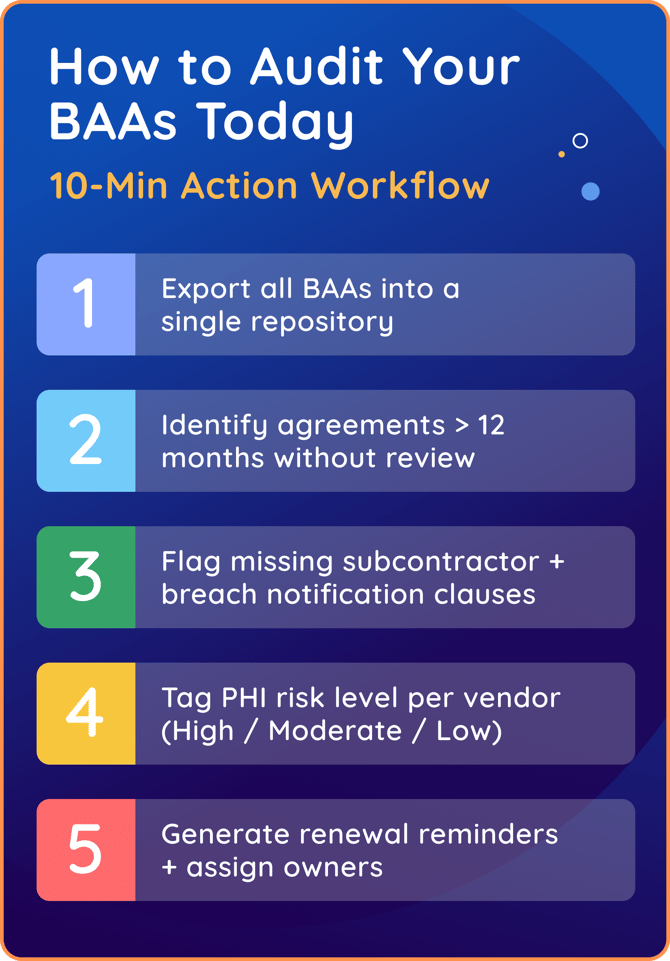
You don’t need to clear your calendar for a week to get a handle on your compliance risk. While a full legal review takes time, a triage audit can surface your highest-priority gaps in a single sitting. This workflow helps you identify which BAAs need immediate attention so you can prioritize effectively. Here is your rapid-response plan:
-
Risk Tagging: Start with vendors that have the most access to PHI. Tag vendors as High, Moderate, or Low Risk based on the type and volume of data they handle. This helps you focus first on cloud storage providers, billing services, data analytics platforms, and other high-impact vendors, rather than trying to audit everything at once.
-
Export to Centralize: Start by pulling BAAs for high-risk vendors (those with the most access to PHI, like cloud storage providers, billing services, and data analytics platforms) out of email attachments and shared drives and into a single list or repository. You can’t fix what you can’t see, but you don’t need to centralize everything on day one.
-
The "Stale Date" Check: Sort by "Last Review Date" or "Signature Date." Isolate any agreement that hasn't been touched in over 12 months. These are your prime suspects for outdated clauses.
-
Red Flag Review: For each flagged agreement, review whether it includes the following five required elements:
-
Breach notification timelines (specific timeframes, not “as soon as possible”)
-
Subcontractor flow-down requirements
-
Administrative, physical, and technical safeguard language
-
Termination and PHI return or destruction provisions
-
Scope that matches the vendor’s current services
-
-
Assign Ownership and Set the Alarm: For every high-risk vendor, generate an automated renewal reminder and assign a specific owner (e.g., "Mike in IT"). Now, the system remembers, so you don't have to.
-
Document Your Triage: Record what you review, when you reviewed it, and what you flagged. A simple spreadsheet creates the audit trail that proves you took action
The goal isn’t perfection. It’s defensibility: the ability to show what you did, when you did it, and why it mattered.
Key Takeaways
-
Outdated BAAs are one of the most common sources of HIPAA violations.
-
Missing required clauses, copied-forward language, and outdated terms create serious compliance risks.
-
Vendor oversight must include BAA review cycles, risk assessments, and documented approvals
-
Centralized contract management ensures accurate, compliant BAAs across the organization.
-
OCR penalties often stem from missing or outdated BAAs rather than a security breach itself.
RELATED READ: Contract Lifecycle Management Made Easy: For Healthcare Teams
Strengthening BAA Governance to Reduce HIPAA Risk
Managing BAAs isn’t a one-time task; it’s an ongoing compliance responsibility. Outdated, inconsistent, or missing BAAs leave organizations exposed to regulatory penalties and unmonitored PHI risks.
By strengthening contract controls and centralizing BAA oversight, healthcare organizations can ensure HIPAA contract compliance, protect patient data, and remain audit-ready.
ContractSafe provides the visibility, automation, and guardrails needed to maintain accurate BAAs and reduce compliance risk without overwhelming your team.
If you’re ready to strengthen BAA governance and eliminate hidden HIPAA risks, ContractSafe makes compliance simple and accessible.









.svg)







.svg)




