



Quick answer: Vendor contract management is how you run every supplier agreement from the first draft through negotiation, signing, performance tracking and the renew-or-exit decision. Done well, you always know what you signed, what each side owes, what it costs and when you have to act.
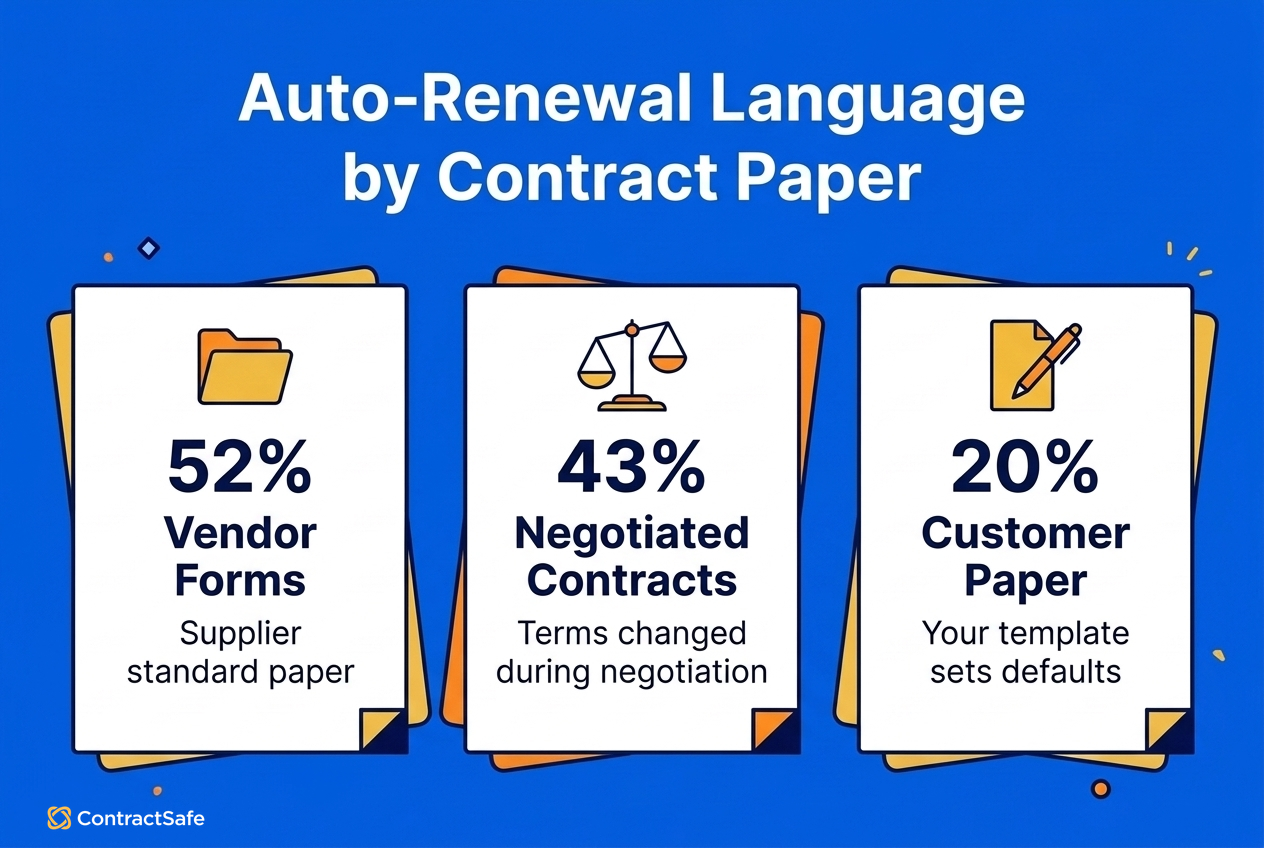
Picture the order form your team signed with a SaaS vendor two years ago, on the vendor's own paper. It renews for another 12 months at a 7% uplift unless someone gives 60 days' notice, and the only copy sits in the inbox of the manager who signed it. Nobody sees the deadline go by, and Finance finds out when the invoice lands. That clause is normal: TermScout's September 2026 study of more than 4,000 IT contracts found auto-renewal language in 52% of vendor forms.
Two things failed there. The vendor's paper set the terms, and once the contract was signed, nobody owned it. Vendor contract management fixes both by staying with each agreement through its whole lifecycle, not just the week it gets signed.
Choose your next step:
If you're comparing tools for your vendor book, start with ContractSafe pricing and what each plan includes.
If you'd rather see renewals and spend surfaced on real contracts, click through the ContractSafe demo.
Key Takeaways
- Vendor contract management runs every supplier agreement from your own first draft through signing, tracking and the renew-or-exit call.
- Vendor paper carries auto-renewal language more often than negotiated contracts, so start from your own template where you can.
- Before signing, check scope, SLAs with real remedies, pricing and escalators, data and security terms, and exit rights with a notice period you can hit.
- For contracts you've already signed, audit them, score each vendor the same way, then consolidate, renegotiate or terminate.
- Track the notice deadline, not the end date, and give each one a named owner.
What Is Vendor Contract Management?
Vendor contract management is the process of creating, negotiating, storing, monitoring, and renewing the contracts you have with third-party vendors.
Done well, it gives Procurement, Legal, Finance, and Operations a shared view of:
- What vendors you use and who approved them
- What terms you negotiated and what you're entitled to under the contract
- What you're paying, including hidden fees and escalators
- What risks or compliance obligations exist
- How vendors are performing against commitments
- When contracts renew and how to avoid surprise auto-renewals
Most organizations don't struggle because they have too many vendors. They struggle because there's no consistent process to review vendor contracts, so renewal dates go unnoticed until an unexpected invoice shows up.
Handing work to a vendor doesn't hand off the risk. If a vendor touches your customers, data, or operations, what it does is still your problem.
Vendor Contract Management vs. Vendor Management and Procurement
People use these terms interchangeably, but they cover different work. Vendor management is the whole relationship: choosing suppliers, building the partnership, and judging whether they're still the right fit. Vendor contract management is the part that lives in the agreements: what you signed, what each side owes, what it costs, and when it renews.
The difference matters because a relationship can feel healthy while the contract quietly works against you. A supplier your team likes can still auto-renew at a higher rate or keep billing for seats nobody uses. Good relationships don't replace a contract process. They depend on one.
Procurement sits one step earlier. It's the sourcing side: finding suppliers, running bids, and buying. Contract management takes over once the deal is being papered and stays with it until the contract ends. Procurement decides who you buy from, and contract management makes sure you get what you paid for.
The Vendor Contract Management Process at a Glance
Whichever team owns which part, most organizations take vendor contracts through the same lifecycle, even though the relationships themselves vary. Once you know the stages, it's easier to see where risk and unnecessary spend tend to hide.
The Vendor Contract Lifecycle
- Vendor due diligence & evaluation. Before drafting anything, check whether the vendor meets your requirements. That means security reviews, financial stability checks, data-handling capabilities, third-party risk management (TPRM), and certificates such as SOC 2, ISO, or industry-specific compliance.
- Drafting & negotiation. Start from your own template when you can, since your paper sets the defaults. In TermScout's analysis, the 52% auto-renewal rate on vendor forms falls to 43% on negotiated contracts and 20% on the customer's own paper. Settle scope, pricing, SLAs, liability caps, data terms, and exit rights before approval, and bring competing quotes to the table at this stage too, since it's when you have the most room to move.
- Legal & business review. Legal, Procurement, Finance, IT/Security, and the business owner review the terms to make sure the contract protects the company and meets operational needs.
- Approval workflows. Route contracts through the right approval chain based on contract value, risk level, and vendor type. Ideally that's an automated workflow, not 47 forwarded emails.
- Execution & Storage. Sign the contract (via e-signature or wet signature) and store it in a centralized, searchable repository, not in inboxes and departmental shared drives.
- Performance & obligation tracking. Monitor the vendor against its contractual commitments, including SLA compliance, delivery timelines, support response times, and any other obligations in the contract.
- Renewal, renegotiation, or termination. Before a contract renews, decide whether to continue as-is, renegotiate, rightsize the scope, or terminate and find an alternative.
The drafting stage is where most of the money gets decided, so it's worth knowing exactly which terms to read before anyone signs.
What Every Vendor Contract Should Include
Every vendor contract needs to say what's being delivered, how well, at what price, how data is protected, and how the deal renews or ends. Read these five terms before anyone signs:
- A clear scope of work that's specific enough for both sides to agree on whether it was delivered.
- SLAs with remedies that actually apply, such as service credits or a right to terminate. An SLA with no consequence is only a suggestion.
- Pricing and payment terms, including escalators and any usage-based or AI consumption charges. Watch for three red flags from a joint statement on core service providers by the Fed, FDIC and OCC that fit almost any vendor: billing you can't reconcile to the services you received, long "back billing" windows for retroactive charges, and exit or deconversion fees the contract doesn't define.
- Data and security obligations. If you share personal information with a service provider, California's CCPA requires the contract to limit its use to specified purposes and hold the provider to the same level of privacy protection. It also has to let you check compliance, require the provider to tell you if it can't comply, and let you stop and fix unauthorized use.
- Renewal and termination terms with a notice period you can realistically hit. This is where vendor paper costs you most, so strike or soften auto-renewal before you sign if you can.
You won't win every term, so push hardest where the risk is highest. The banking agencies' proposed third-party risk guidance is written for banks and isn't binding, but its advice here travels. It accepts that vendors usually hand you a standard contract, says riskier relationships can justify changes or addenda, and sets no list of terms every contract must have. So match the effort to the vendor's risk tier (Step 2 shows how to sort vendors into tiers), push on the highest-risk terms, then decide whether the risk that's left is acceptable.
These five terms are also fields you'll track after signing, listed in the Step 1 table under "What contract information should I track?" Getting them right at signing is half the job. The other half is keeping track of them once the contract is filed away.
Why Vendor Spend Is So Hard to Track
Vendor spend is hard to track because contracts belong to different departments and nobody reviews them together. So even a contract you negotiated well can drift after it's signed: seats go unused, prices step up and renewals roll over, and nobody who sees the whole book is there to notice.
What Are the Biggest Vendor Tracking Problems?
- Business units control 81% of SaaS spend while IT directly manages just 15%, according to Zylo's 2026 SaaS Management Index, released in January 2026. No single team sees every contract.
- The same Zylo research, drawn from 40 million licenses, found organizations leave an average of 36% of their SaaS licenses unused.
- BetterCloud's 2026 State of SaaS report, published in July 2026 from a survey of 525 IT and security professionals, found that "Only 56% of total apps in use today carry IT approval," and that the average number of apps per organization is up 11% year over year.
- Tail spend, the long list of small or off-contract purchases, adds up out of sight. Each one looks too minor to review, so it rarely gets checked against a contract.
The Risks of Poor Vendor Contract Management
When nobody sees the whole book, small issues build into financial and operational risk.
- Missed renewals and surprise auto renewals. Contracts renew automatically, often at higher rates or with locked-in terms.
- Overlapping tools or duplicate solutions. Marketing buys its own project management tool, IT buys another, and Operations picks a third. Nobody realizes all three do essentially the same thing.
- Unused or underused licenses. This is the silent killer of SaaS budgets. At Zylo's 36% average for unused licenses, a 100-seat contract at an illustrative $50 per seat per month carries about 36 idle seats, or roughly $21,600 a year.
- Non-compliant or outdated data-processing terms. A DPA that was signed years ago and never touched falls behind as privacy law changes. California has updated its CCPA regulations, and new state privacy laws keep taking effect, so an old DPA probably lacks the CCPA service-provider terms described above.
- No record of SLA performance. Without one, you can't hold vendors to the uptime, support quality, or service levels they promised.
- Unclear ownership. Nobody knows who "owns" the vendor relationship or who's supposed to review it before renewal. So nobody does.
- Hard-to-answer audit questions. "How much do we spend with this vendor?" shouldn't require a scavenger hunt through three years of invoices and departmental credit card statements.
You don't have to fix all of these at once. Start by finding out what you actually have.
Step 1. How to Audit Your Vendor Contracts
A vendor contract audit gathers every agreement, invoice, and renewal date into one place, so you can see whether you're overspending by comparing what you're contracted to pay with what you actually use. That comparison only works from what's really spread across the organization, not from what you think you have.
Centralize all vendor contracts
Vendor contracts rarely sit in one folder. They're spread across teams, inboxes, shared drives, and systems nobody remembers setting up. Edward Soyka, Head of Legal and Compliance at Rugiet Health, describes the before and after: "Before ContractSafe, one person had a contract in Google Drive and someone else had it in SharePoint. Now I know where every contract lives, who owns it, and every date that matters."
Finding everything takes some detective work. Here's where to look:
- Email inboxes for signed MSAs and SOWs (search for "signed," "executed," "final," attachment:pdf)
- Departmental shared drives where older versions or amendments may be buried
- Physical binders in office managers' filing cabinets (yes, it's still a thing)
- Accounts Payable records to reverse-engineer which vendors you're actively paying
- Department head interviews to confirm which tools, subscriptions, and services they're actually using today, and why they chose them
As you gather documents, put everything in one searchable repository:
| Document Type | Examples |
|---|---|
| Agreements | MSAs, SOWs, amendments, addendums |
| Licensing | Software licenses, usage reports, seat counts |
| Financial | Invoices, POs, payment schedules |
| Compliance | Insurance certificates, security documents, data-handling terms |
| Operational | Equipment leases, maintenance contracts, consulting agreements |
| Renewals | Renewal reminders, auto-renewal notices |
Identify Duplicate Vendors and Tools
With everything in one place, duplicate spending and redundant services are easy to see:
- Compare what you're paying for with what's actually being used. For software, check active users against contracted licenses. For service providers, compare hours worked with hours billed. For equipment or facilities vendors, look at usage logs, service activity, and maintenance records.
- Map your vendor relationships by category (legal services, facilities, technology, professional services, supplies, equipment) and by department (Marketing, IT, Operations, HR). The overlap shows up once everything is laid out.
- Categorize tools and services by function to find where several departments bought similar solutions independently.
What contract information should I track?
Spotting duplicates is the quick win. The lasting value comes from pulling the same fields out of every contract, and flagging the ones a contract leaves missing or unclear:
| Contract Field | Why It Matters |
|---|---|
| Scope of work | What counts as delivered |
| Renewal dates/ notice periods | 30, 60, or 90 days required to opt out? |
| Auto-renewal terms | Does silence mean automatic extension? |
| Termination | Early exit fees, wind-down requirements, data export costs |
| Total contract value | Include all fees, usage caps, and rate escalators |
| Payment terms | Monthly, milestone-based? |
| Security requirements | SOC2, ISO certificates, background checks, BAAs |
| SLA commitments | Response times, uptime guarantees, performance standards |
| Dependencies | What breaks if this vendor goes away |
| Data-privacy obligations | Retention rules, breach notification timelines, international transfers |
| Contract owner | Who's responsible for managing this relationship |
Audit reality check: If you're finding contracts where you can't identify the owner, the renewal date, or even the total annual cost, you're not alone. That's exactly why this audit matters. If you don't know when contracts renew, you can't plan for renegotiation. If you don't know termination fees, you can't accurately calculate whether switching vendors makes financial sense.
How do I centralize vendor agreements and track expirations?
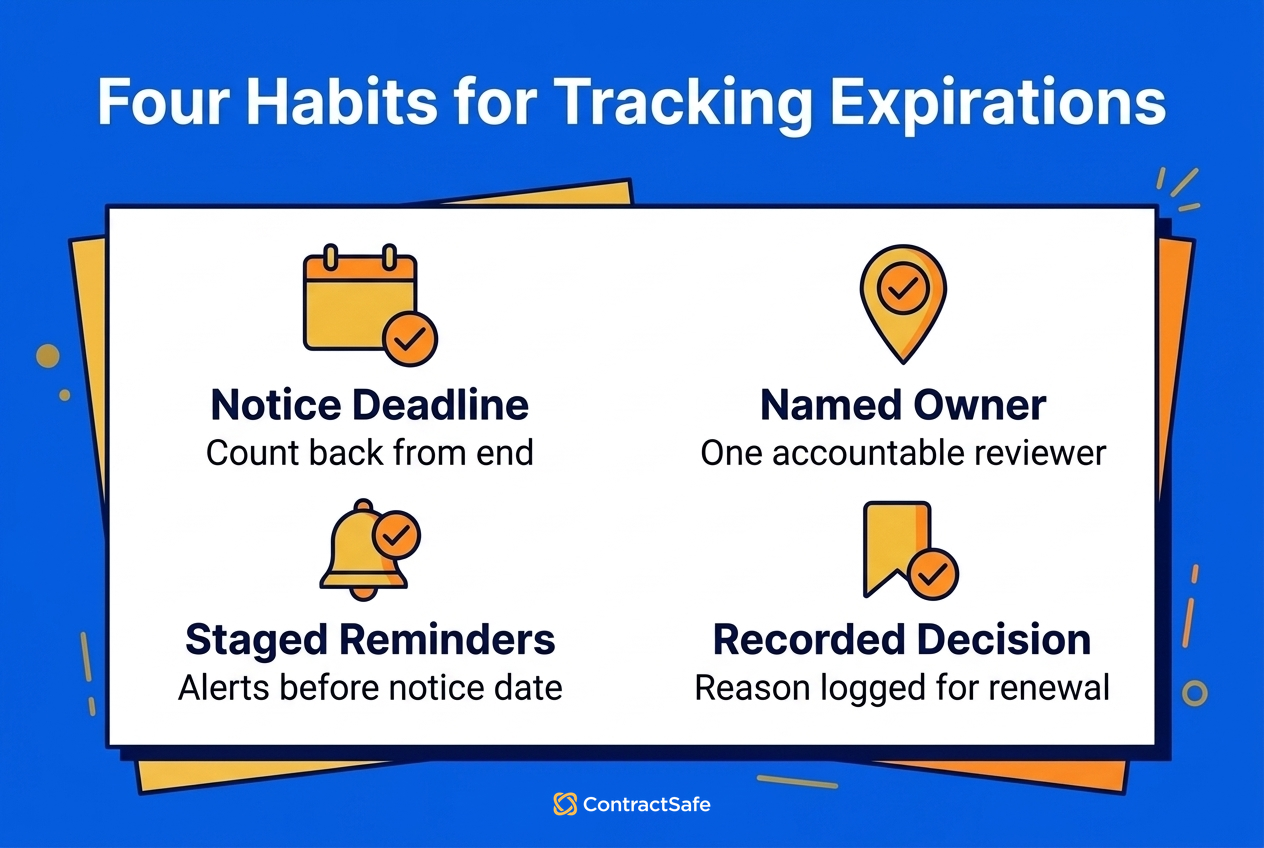
The audit fills those gaps once. Keeping them filled means reviewing your inventory on a schedule and acting when something changes. With every signed agreement, amendment, and SOW in one searchable repository, that comes down to four habits:
- Track the notice deadline, not the end date. If a contract ends December 31 and requires 90 days' notice to cancel, the date that matters is October 2. Don't count on the vendor to remind you. Only a few laws require a written warning, such as a New York law covering service, maintenance, and repair contracts. The date on your own calendar is what protects you.
- Give every contract a named owner. An alert that goes to a shared inbox usually goes to nobody.
- Set reminders at 90, 60, and 30 days before the notice deadline. That leaves time to pull usage and performance data before you have to decide.
- Record the decision. Note whether you renewed, renegotiated, or ended the contract and why, so next year's review starts from facts instead of memory.
Step 2. How to Evaluate Vendors With Clear, Repeatable Criteria
Once you know what you have and when each contract comes up, the next question is whether each vendor relationship is worth its cost and risk. That only works if you use the same criteria every time. Otherwise, you're going on gut feel.
Which vendors should I review first?
Sort everyone into tiers before you begin, and start with your strategic vendors: the ones your operations depend on or that handle sensitive data. Each of them gets scored on four dimensions: cost, risk, performance, and strategic fit. Transactional vendors supply low-risk, easy-to-replace goods and need only a lighter check on cost and renewal terms. That way you don't spend as much effort on an office-supply contract as on the platform that holds your customer data.
How to Score Cost
Cost goes well beyond the sticker price. Whether a vendor provides software, services, equipment, maintenance, or professional support, build up the total cost of the relationship in four layers, then weigh that total against what the vendor delivers.
Start with the direct costs the contract states: base fees for licenses, services, hourly billing, equipment rentals, or maintenance plans, plus add-on modules, premium features, support tiers, and any rate escalators. Run the escalators forward so you're scoring next year's price, not this year's.
Then add what it took to get the vendor running: training and ramp-up time, integration or setup work, and the internal hours your team put in. These are mostly one-time, but count them when you compare against a replacement, because switching means paying them again.
Next, check the invoices for costs the contract doesn't fix in advance. Usage-based fees for storage, transactions, or extra maintenance requests, along with rush fees and after-hours premiums, belong here. So do consumption-based and AI pricing, where Zylo found 78% of IT leaders had been hit with unexpected charges. Look for shadow spend too, where other teams pay the same vendor or buy extra services on their own.
Finally, estimate the indirect cost: staff time spent managing the relationship, and the delays or repeated work caused by performance problems. A vendor with a modest invoice can still score badly once that time is counted.
How to Score Risk
A vendor can be cheap and still be the most expensive mistake in your book if it mishandles your data. Scale the review to the vendor's work: the more critical or sensitive it is, the deeper you go. An onsite contractor and a platform holding customer data need different checks, but for each, look at the risk and compliance considerations that apply:
- Security: SOC 2, ISO 27001, HIPAA, physical security measures, and background checks for onsite vendors
- Data and privacy: data-access and data-handling terms, even for non-software vendors who see customer, patient, or employee information, plus confidentiality terms such as NDAs, data sharing limits, and incident or breach notification timelines
- Financial protection: insurance such as liability, E&O, and workers' comp for onsite contractors, along with indemnification clauses and liability caps
- Regulatory requirements: BAAs for healthcare, PCI for payment vendors, OSHA or safety standards for equipment and facilities vendors, or industry-specific certifications
- Oversight: audit rights and reporting that let you verify compliance, and any subcontractors who support the vendor's work and bring their own risk
How to Score Performance
Risk tells you what could go wrong. Performance tells you whether the vendor is delivering what it promised today. Service Level Agreements (SLAs) set out what a vendor has committed to: response times, uptime, delivery schedules, maintenance cycles, and support quality. Having SLAs in a contract doesn't mean they're being met, and compliance rarely shows up in one place, so cross-check the records you already have:
- Software and technology vendors: ticketing logs, uptime dashboards, and incident or outage reports. Verify any vendor-provided performance summary independently.
- Service and consulting vendors: delivery dates against promised dates, response times, deliverable quality against the contract, and internal user feedback.
- Equipment, maintenance, or facilities vendors: service completion rates, maintenance cycle adherence, downtime, and emergency response times.
How to Score Strategic Fit
Even a vendor that performs well can stop being the right choice. Priorities shift, new providers show up, and what felt good enough at 20 employees can become a bottleneck at 200. Ask these questions:
- Does this vendor still support the organization's current goals and priorities?
- Has the organization outgrown this vendor or solution?
- Is this vendor integrated into critical systems or processes (meaning high switching costs)?
- Does actual usage justify the ongoing cost?
- Could an existing internal capability replace this vendor?
- Are employees consistently using this service, or working around it?
- Is there a better alternative available now that didn't exist when we first signed?
Vendors that fall short on cost, risk, performance, or strategic fit are the candidates for Step 3.
Step 3. How to Consolidate, Renegotiate, or Terminate Vendors
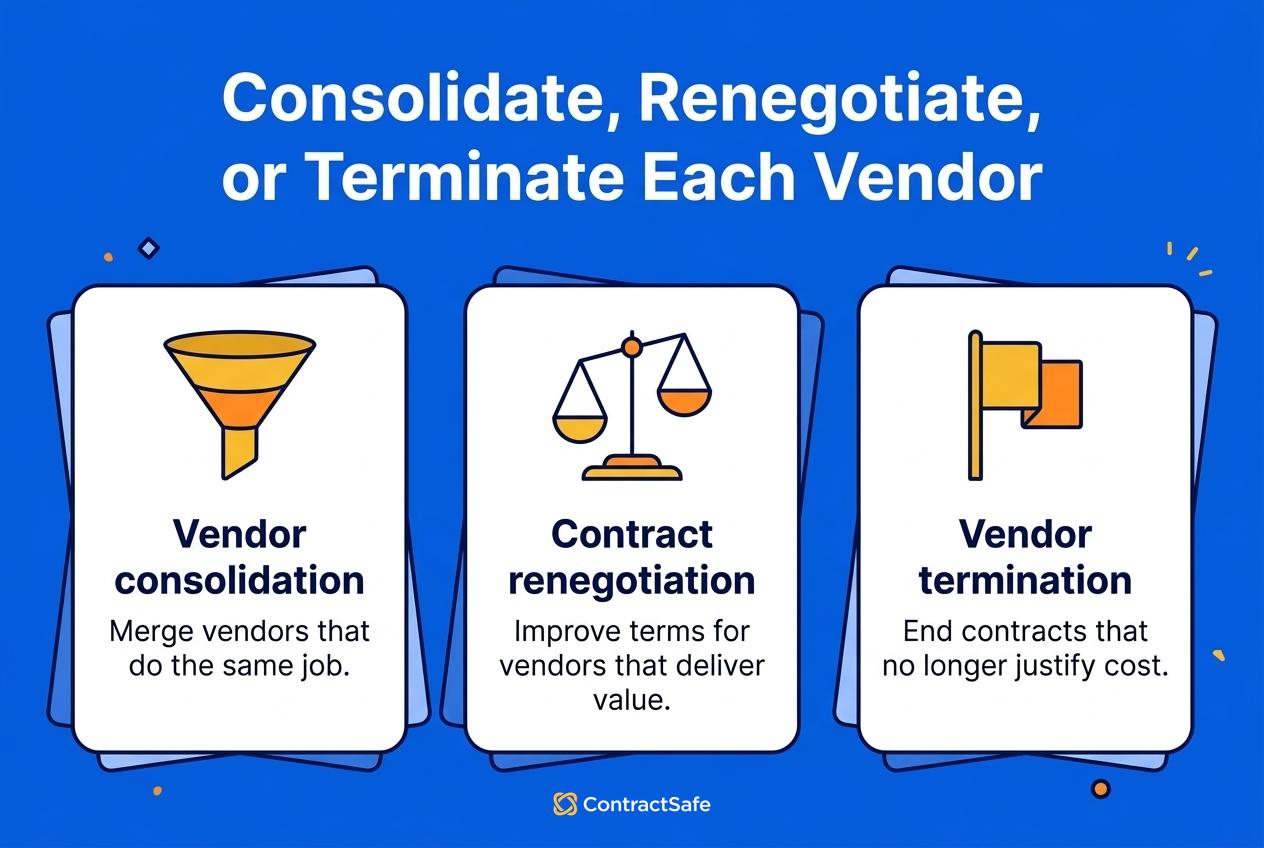
Step 3 turns the scores from Step 2 into a decision for each vendor: consolidate, renegotiate, or terminate. The goal is to match spend to performance and to what the business needs now, not to cut vendors blindly.
How do I compare vendor contracts side by side?
Group vendors by category, then compare them on the same audit fields: annual cost, seats or hours paid versus used, SLA record, risk tier, notice deadline, and exit fee. Some vendors clearly earn their cost and some clearly don't. For the rest, this rule of thumb points to the right move, and every timing in it runs off the notice deadline you're already tracking:
| Decision | When it fits | When to act |
|---|---|---|
| Renegotiate | The vendor performs well but the terms don't fit your usage or risk. | Open talks at the 90-day reminder before the notice deadline, with usage and performance data in hand. |
| Consolidate | Two or more vendors do the same job. Keep the one that scores best on cost and risk. | At the next notice deadline of the vendors you're dropping. |
| Terminate | Usage is low, performance keeps slipping, or the risk can't be fixed. | At the next notice deadline, unless the early-exit fee costs more than waiting out the term. |
3A. When should I consolidate vendors?
Consolidate when two or more vendors do the same job. When teams buy tools on their own, overlap is inevitable, and consolidating is one of the fastest ways to cut spend and simplify operations. Look for these signs:
- Multiple tools do the same job, even if different teams use them
- Similar modules or overlapping services exist across contracts
- Departments buy their own solutions without knowing what others already have
- The overhead of managing several vendors outweighs the value of having a choice
How Do I Manage the Transition When Consolidating Vendors?
Plan it carefully, because consolidation affects workflows, integrations, and institutional knowledge. Before making changes:
- Communicate early with teams that rely on the vendor
- Involve the affected teams in selecting the replacement provider
- Build a clear transition plan with timelines and milestones
- Provide training and onboarding support for the new system
- Give teams time to adapt, especially if integrations or processes will change
- Assign a transition owner who's responsible for the project
Done right, consolidation leaves you with fewer contracts to track, fewer invoices to process, and stronger partnerships with the vendors that remain. It can cut the bill, too. Rugiet Health's Edward Soyka put it this way: "Consolidating our team's multiple e-signature accounts into one ContractSafe account saved us 40% off the top."
3B. When should I renegotiate a vendor contract?
Some vendors don't overlap with anything and still cost too much. Renegotiate when a vendor delivers value but the contract doesn't match your actual needs:
- The vendor delivers necessary value but the terms need improvement
- Pricing is too high relative to actual usage
- SLAs are weak or don't match current needs
- The contract structure doesn't match usage patterns, such as paying for more seats than people use
- You have competitive alternatives you can put on the table
Real data on usage, performance, and spend gives you solid grounds to ask for:
- Lower per-seat or per-service pricing based on actual usage
- Rightsizing license counts or service hours to match reality
- Stronger SLAs or guaranteed response times with clear remedies for non-performance
- Bundled modules, added services, or upgraded features
- Volume discounts or multi-year incentives if you're committing longer
- Removal of unnecessary fees such as training, support tiers, and maintenance add-ons
- Better payment terms (net-30 instead of net-15 or post-pay vs pre-pay)
- Better termination terms (shorter notice periods, lower early exit fees)
Negotiation tip: Time the talks to the notice deadline, not the renewal date. On a contract that ends December 31 with 90 days' notice, the deadline is October 2, so open the conversation when your 90-day reminder fires in early July. That gives you three months to negotiate while you can still walk away, and the vendor knows it would rather keep you than lose you to a competitor. Vendors also tend to be more flexible when solid data shows you're informed and reasonable.
3C. When should I terminate a vendor relationship?
Sometimes no better deal will fix it. Terminate when a vendor no longer adds enough value to justify its cost or risk. It can feel daunting, especially if "we've always used them" or someone on the team loves the tool, but ending it protects both budget and team bandwidth. The signs:
- Usage is consistently low, even after reasonable adoption efforts
- Vendor performance is unreliable, or the tool often disrupts workflows
- The service is no longer strategically important to your business
- Internal tools or existing platforms can replace it with minimal disruption
- The cost no longer makes sense, especially if renewal terms escalate
- The vendor presents ongoing compliance or security risks you can't mitigate
What Do I Need to Check Before Terminating a Vendor?
Before canceling, review the contract for:
- Early termination fees that may affect timing. Sometimes it's cheaper to wait until renewal, and if the fee is the only thing keeping you, ask the replacement vendor whether it'll buy out the remaining term.
- Required notice periods (30, 60, 90 days or more)
- Migration or data export costs that could require additional budget
- Transition assistance commitments. Some vendors must provide support during the wind-down.
- Data retention and deletion policies. Find out how long they keep your data and how you'll confirm it's deleted.
Then map which workflows depend on the vendor today and who will own the transition, so the wind-down stays orderly.
Using the same rule for every vendor keeps decisions tied to data instead of to who likes which tool. Doing that across dozens or hundreds of contracts is where software earns its place.
How Software Supports Vendor Contract Management
Software gives Procurement, Legal, Finance, and Operations one shared record of every vendor contract, before and after signing. Most vendor portfolios change too fast to run on spreadsheets, inbox searches, or institutional memory.
What does vendor contract management software do?
It keeps every vendor contract in one secure, searchable system and carries each one through the procurement contract management lifecycle: drafting and approvals, storage, monitoring, and renewal. Each capability takes work off one of the steps above.
For the audit and tracking (Step 1):
- Centralizes every vendor contract, including MSAs, SOWs, DPAs, BAAs, amendments, and pricing schedules, so the repository the audit needs already exists
- Surfaces critical terms quickly, such as renewal dates, notice periods, SLAs, and pricing structures, which fills in the fields table without reading every page
- Automates alerts & reminders so the contract owner hears about each notice deadline in time, even when the notice period is buried in legalese
For scoring and deciding (Steps 2 and 3):
- Groups contracts by type, which makes overlapping services and consolidation candidates easier to spot
- Speeds up audits & reporting with fast answers to questions like "What SaaS contracts expire next quarter?"
For new contracts, before anyone signs:
- Templates put vendors on your paper, with consistent terms and risk controls
- Approval workflows route agreements to the right people without chasing them by email
- Integrated e-signatures cut out back-and-forth and reduce turnaround time
- Version control and comment trails show exactly what changed, why, and by whom
Related Reading
- Contract Lifecycle Management (CLM): Process, Roles & Best Practices
- Breach of Contract: Consequences and How To Avoid Them
- Contract Risk Management Matrix, Checklist, Best Practices
How ContractSafe Helps With Vendor Contract Management
ContractSafe gives you one place to run the vendor audit and keep it current afterward. Every vendor contract lives in one secure, searchable repository, and OCR makes even scanned agreements keyword searchable. AI meta-data extraction suggests key terms for you to accept, correct or skip, and chat-based Q&A answers questions about a contract in plain language. Duplicate contract flagging catches the same agreement filed twice.
Once the contracts are in, automated reminders cover renewals, expirations and deadlines to non-renew, and you can track as many custom dates as you need, with alerts sent to whichever email address owns the contract. Bulk uploads, data and document migration support and no implementation fee mean you can start without a long setup project. Edward Soyka at Rugiet Health found the same: "Within 10 minutes of signing with ContractSafe, I was loading contracts and automating some of our core business functions."
All of that comes on every plan. The Finalize plan adds approval sequences and built-in e-signature for new vendor agreements, and Maximize adds templates and AI contract review. ContractSafe pricing starts at $450/month (Organize plan, billed annually; $540 month-to-month), with unlimited users on every plan.







.svg)







.svg)




