Quick answer: Legal technology adoption challenges are the five problems that keep a tool you've bought from being used day to day: resistance to change, training, client trust and security, fitting the tool into existing workflows, and unclear goals. You get past them with the rollout plan more than the software: map the workflow, pilot with one group, train by role, build champions, measure, then expand. ContractSafe includes unlimited users on every plan, so bringing the whole company into one contract tool doesn't add per-seat costs.
Resistance is usually the one that bites first. ILTA's 2025 Technology Survey found that resistance to change is still the most significant barrier to adopting innovative tools like GenAI.
Here's how it tends to play out. A contracts manager buys a contract tool in the spring. By summer, legal is using it, but sales still emails redlines and finance still keeps renewal dates in a spreadsheet. Nothing's wrong with the software. The rollout never planned for the people outside legal who had to change how they work.
Choose your next step:
For finance leads: Check what a company-wide rollout costs on our pricing page. Every plan includes unlimited users.
For contracts managers: Read how a trade contract manager at Synergie stopped being the only person who could answer questions about an agreement.
Key Takeaways
- The five most common hurdles are embracing change, training teams, protecting client trust, integrating with existing workflows and setting clear goals.
- Resistance to change and security and risk concerns are the two barriers legal teams name most often.
- Roll out in order: map the workflow, pilot with one group, train by role, build champions, measure, then expand.
- Know when to say no to a tool that doesn't add value for your team.
Table of Contents
Types of Legal Tech
Legal teams adopt about ten kinds of tools, and the type you're bringing in changes which barrier comes first. Contract management touches every department, so resistance and integration hit it hardest. AI tools raise security and trust questions before anything else.
That's because sales, finance and operations all request, approve or sign contracts, so a contract tool only works if they change habits too. With AI, people first want to know what happens to the data and how they'd check the output. Here are the main types, each with the adoption barrier that usually comes first:
- Contract management software: Tools that centralize agreements, track obligations, route approvals and give searchable access to contract data. First barrier: other departments have to change how they request and approve.
- E-signature software: These platforms let individuals and organizations securely sign, send and manage documents online. First barrier: signers outside legal have to use it too.
- Legal research tools: These tools help legal professionals find legal resources such as case law, statutes and secondary sources. First barrier: training, since only legal uses them.
- E-discovery platforms: These tools help identify, collect and produce electronically stored information (ESI) for evidence in lawsuits and investigations. First barrier: security, because they hold sensitive case data.
- Legal analytics tools: These platforms provide data-driven insights to support legal decisions. First barrier: unclear goals, since someone has to decide what to measure.
- AI-powered legal assistance: AI tools like AI contract management software help lawyers with tasks such as contract review, predicting legal outcomes or drafting legal documents. First barrier: client trust, meaning where the data goes and who checks the output.
- Case management software: These platforms help legal professionals manage and track the progress of their cases and often include scheduling, document storage and client communication tools. First barrier: integration with the email and calendars people already use.
- Billing and time-tracking tools: This software helps lawyers track their work hours and generate invoices. First barrier: resistance, because it changes a daily habit.
- Dispute resolution: These digital platforms help resolve disputes between parties without litigation and might include online mediation or arbitration tools. First barrier: trust, since the other party has to agree to use it.
- Business development: These tools help legal professionals grow their client base, track leads and manage relationships. They can include CRM software, marketing automation or analytics tools built for legal firms. First barrier: integration with the systems that hold client records.
AI-powered legal tools are becoming more common, helping legal teams automate reviews, extract key terms and make decisions faster. They're also where the client trust questions covered below come up most often.
Why Legal Tech Adoption Is Harder Now
Legal tech adoption is harder now because use of new tools, AI above all, is climbing quickly while the barriers teams name haven't gone away.
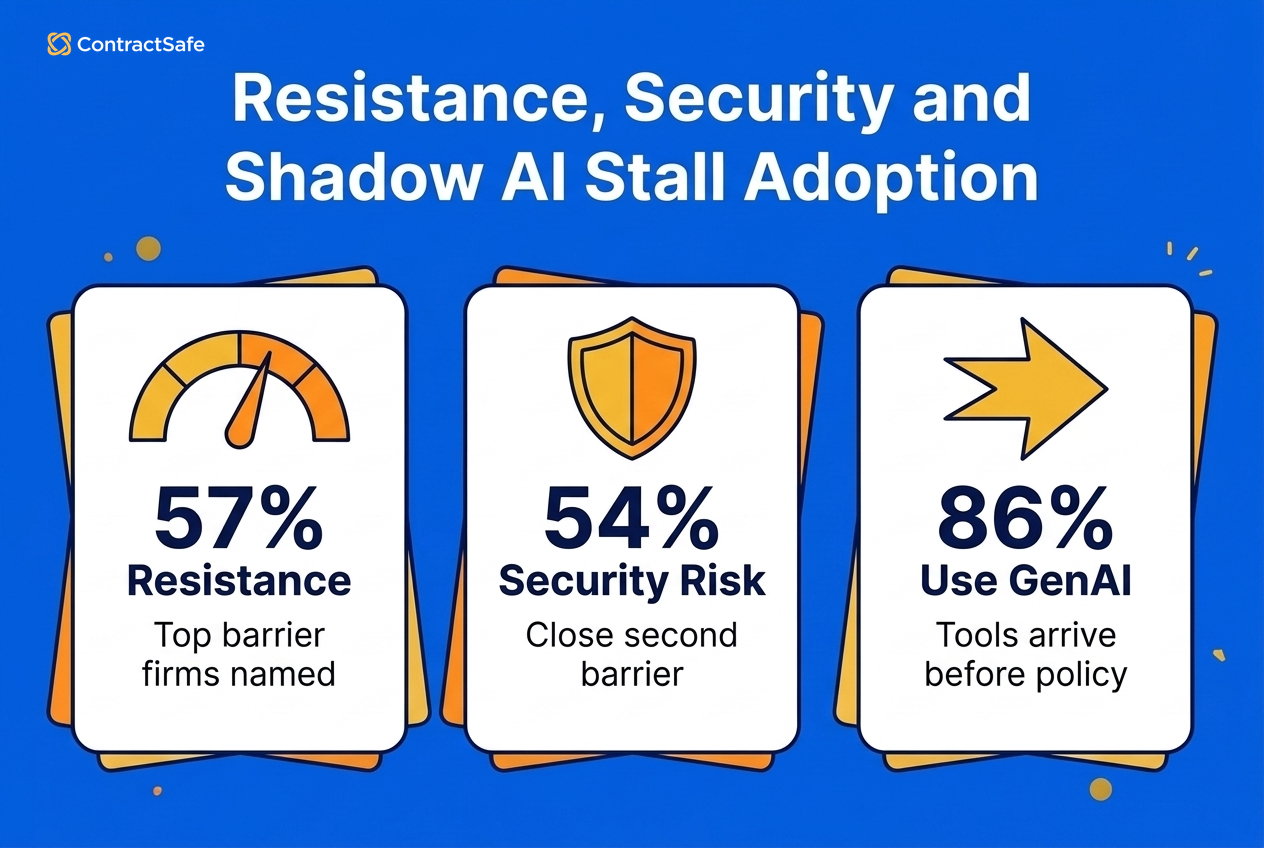
In ILTA's 2025 Technology Survey of 580 law firms, 57% of respondents named resistance to change as their top barrier to adopting innovative tools like GenAI, up from 54% in 2024. Another 54% named security and risk concerns.
Use keeps climbing anyway. Among U.S. respondents to the 2025 ACC and Everlaw GenAI survey, in-house use of generative AI rose from 23% in 2024 to 52% in 2025. The Everlaw and Wakefield In-House Innovation Report, reported in October 2026, found that 86% of 300 U.S. in-house legal professionals had adopted GenAI for legal work.
So the tools are already in people's hands, while most firms still name resistance and security as barriers. That gap is what makes adoption harder now: teams are using tools before the habits, training and safeguards around them are settled.
How to Overcome the 5 Biggest Challenges in Legal Tech Adoption
Each of the five challenges has a fix you can plan before launch, and most of the pushback behind them sounds the same. People worry about disrupting processes that have worked for years ("we've always done it this way"), or about the work of setting up something new ("I don't have time to start all this over"). Neither goes away when the software is installed. You get the benefits only when people across your organization use the tool as part of their daily work.
ContractSafe's Ken Button describes the tension this way: "lawyers tend to not be early adopters of technology," yet "there's a huge desire to drive down legal costs and improve efficiency."
If you're not sure which challenge you're up against, match it to what you're hearing from your team:
- "We've always done it this way": start with embracing change.
- "I don't know how to use it" or "Am I allowed to put this in there?": look at training.
- "Where does our data go?": go to client trust.
- "It doesn't work with our other systems": read integration.
- "What was this tool for again?": revisit goals.
1. Embracing Change in Legal Tech Adoption
Law runs on precedent and tradition, so it's slow to accept change, especially when a tool, AI in particular, promises to take over work people have always done. In ILTA's 2025 survey, resistance to change remained the most significant barrier to adopting innovative tools like GenAI.
The caution has a basis. In Mata v. Avianca, the 2023 sanctions case, two lawyers got into trouble after using ChatGPT in a case. The tool cited several cases that, unknown to the lawyers, didn't exist.
The benefits are real too, and they're what you're asking people to change for:
- Efficiency and speed: Technology, especially AI, can cut the time it takes to review documents or draft contracts, so lawyers can focus on more strategic work.
- Cost savings: Contract automation and simpler processes can save money over time.
- Better accuracy: Well-trained AI systems checked by a person can be very precise and reduce human error in repetitive tasks.
- Data-driven decisions: Analytics let legal professionals base decisions on historical data and predictive modeling.
To get those benefits while keeping the risks in check:
- Double-check everything: A person should check the tool's output, the step the lawyers in Mata v. Avianca skipped.
- Talk openly with tech vendors: Understand what their products can and can't do.
- Communicate and customize: Set the tool up for the needs and concerns of your legal work and your business.
- Test and adapt: Before full-scale adoption, trial the technology to find integration problems and spots that need human review.
Pairing human judgment with what the technology does well is what wins over the skeptics, so plan that pairing into the rollout as change management instead of leaving it to chance.
2. Training Teams on New Legal Technology
In legal work the stakes are high. Without proper training, a new tool can cause lost data or operational mistakes, and those can carry legal and financial consequences.
So training has to cover what the tool may be used for, not only which buttons to press. Before launch, write down which tasks and which kinds of data the tool is approved for and who checks its output, then teach that alongside the features. For the features themselves:
- Keep training sessions short: With packed schedules, short on-demand modules let legal professionals learn at their own pace and pick up the key features without being overwhelmed.
- Make sure support continues: Real-time tech support, user-level training, help centers and webinars from the software provider ease frustration and build confidence in the tool.
- Build a training library: Keep every class, software walkthrough and related document where team members can find it to look something up or catch up on a session they missed.
3. Protecting Client Trust in AI-Powered Tools
Security and risk concerns were the second most-named barrier in ILTA's 2025 Technology Survey, and with AI, that concern usually starts as a question about client data.
It's a fair question. Suppose your team adopts a new AI contract management tool and then learns the vendor is training its model on confidential client information. The damage to your reputation, and the legal action that could follow, can be serious. On top of that, clients and regulators expect your tools to meet their data protection rules.
The answer is to use technology carefully, not to avoid it:
- Run thorough security reviews: Before bringing in a new tool, check for strong encryption, multifactor authentication and other security measures.
- Choose certified tools: Look for tools with privacy compliance certifications that show they meet data protection standards.
- Don't forget cloud safeguards: Cloud solutions offer flexibility and scale, but they should come with strong encryption and regular backups.
- Work with your IT team: Review together how data is stored, transferred and accessed.
- Keep your data away from the wrong people: Make sure the software lets you set sharing permissions and user-based roles, and review them periodically to keep access current.
- Understand how AI is used: Find out what data the AI uses, how easily a person can verify its output and what role it plays behind the scenes.
When you can answer "where does our data go?" before anyone asks, people stop treating the tool as a risk.
4. Integrating New Technology Into Existing Workflows
"If it ain't broke, don't fix it." You've probably heard that before, maybe even while pitching a new tool.
There's something to it. Processes built up over years are the workflows a firm or legal department relies on every day, so disrupting them carries real risk. When a new tool supports workflow automation for legal teams instead of forcing new processes, adoption happens faster and with less resistance.
Whatever you pick, from an e-signature tool to contract management lifecycle software, the longest feature list isn't the goal. You want a tool that works with what's already working, matches your requirements, cuts out unneeded complexity and automates the tasks that cost real time. Focus on these steps:
- Map out your current processes: Get a clear picture of how work moves today, so you can see where and how the tool fits.
- Check for compatibility: Before full-scale rollout, make sure the new tool can integrate with existing systems. That might mean working with the vendor or bringing in IT for a compatibility review.
- Involve stakeholders: Bring in the people who built the current processes early, so they can show you where the tool has to fit the way work is done. Show them the benefits and the return on investment.
- Look for strong support: Choose tools that come with thorough support. Live help, regular webinars, a help center or training modules all make the move easier.
5. Setting Clear Legal Tech Adoption Goals
Adopting a tool without defined goals wastes resources, frustrates staff and creates the very inefficiencies the tool was meant to fix. Watch for these warning signs:
- Adoption without a purpose: With so many tools available, firms can end up buying one without a clear sense of the problem it's supposed to solve.
- No way to measure success: Without objectives and KPIs set in advance, a firm can spend months on a tool and have no metrics to show its impact or ROI.
- Misplaced resources: Without set objectives, teams spend training time on features they don't need and miss important ones nobody knew about.
Before you launch, decide what you want the tool to achieve and how you'll know it's working:
- Define what success looks like: Set concrete KPIs, such as "reduce contract review times by 30%" or "answer client contract questions within one business day."
- Set realistic milestones: The full benefits may take time, so interim goals keep momentum going and head off disappointment.
- Be flexible: As teams learn the tool, they may find new uses for it, so revisit and adjust goals as you go.
- Review regularly: Periodic check-ins show whether the tool is meeting its objectives and give you a chance to change course.
- Know when to say no: Other parts of the organization often push legal to adopt tools that don't add value. If a tool isn't helping your team, push back and put your adoption effort where it'll help.
A Six-Step Rollout Plan for Legal Tech Adoption
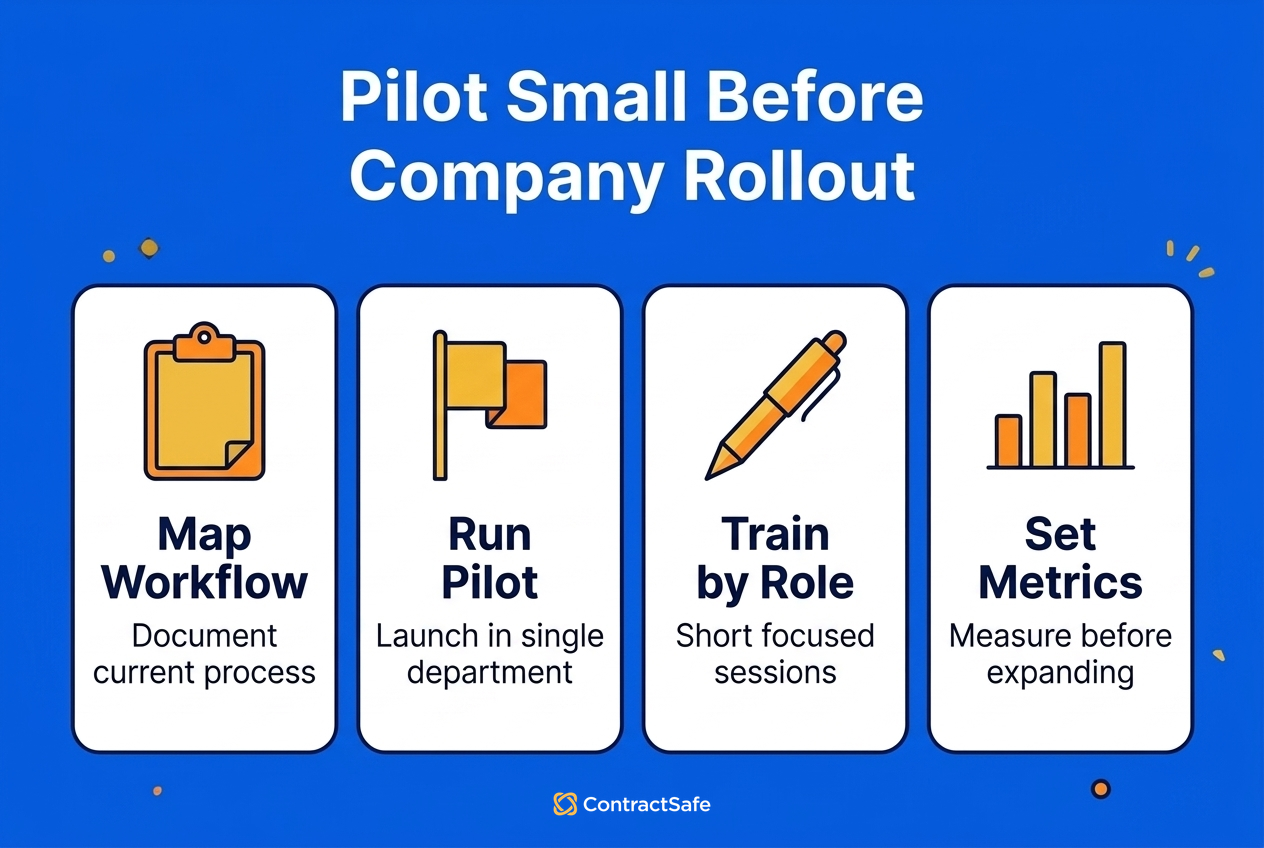
Roll out legal tech in a set order: map the workflow, pilot with one group, train by role, build internal champions, measure the pilot, then expand. Treat it as a change-management project rather than a software install.
1. Map How Work Gets Done Today
Write down how requests, approvals and signatures actually move now, including the emails and spreadsheets. That shows where the tool should support the process instead of disrupting it.
2. Pilot with One Group
Start with a smaller team or a single department and let them go first. As they learn the tool, they'll find problems you can fix before the wider rollout. Check in with them often, because their day-to-day experience tells you what to change.
3. Train by Role
Give each group short training on the tasks it'll actually do, such as requesting a contract, approving one or finding a renewal date. Pair it with searchable help content so people can look things up later instead of sitting through one long session.
4. Build Internal Champions
Pick a few people from the pilot who've mastered the tool and can help colleagues hands-on. Share their wins internally so others see what the tool does for people like them.
5. Measure the Pilot Before You Expand
Check the pilot against the targets you set when it began: shorter review times, faster approvals, fewer missed deadlines or better visibility into what's signed. If you didn't set any, set them now and run the pilot a little longer before you widen the rollout.
6. Expand When the Pilot Works
Widen the rollout one team at a time, starting with the group that works most closely with the pilot team. Before each new group starts, make sure people understand how any AI features work, what data they use and how permissions are controlled. If the pilot group keeps drifting back to email, the pilot isn't working yet. Go back to step 2 and find out which task sends them there before you add users.
Related Reading
- Contract management upgrade: what waiting costs, and why now's the time to move.
- AI contract management: how AI tools for contracts compare.
- Contract management software implementation: what a ContractSafe rollout involves, step by step.
- AI-powered search and data extraction: how ContractSafe's AI reads each contract and pulls key dates for a person to confirm.
How ContractSafe Helps Legal Teams Get New Tools Adopted
ContractSafe is a full-lifecycle contract management platform where your whole company requests, approves, signs and tracks contracts in one system, through renewals, deadline alerts and reporting.
ContractSafe pricing starts at $450/month (Organize plan, billed annually; $540 month-to-month), with unlimited users on every plan. So there's no per-seat cost to bringing sales, finance and HR into the rollout. The complete lifecycle feature set is on the Maximize plan.
Getting started takes a meeting, not a project: of new customers who have an onboarding meeting, 70% have just one in their first 90 days.
ContractSafe records contract views, downloads and changes, and general audit trails are included on every plan.
Adoption sticks when each person sees only what they need. Carrie McClain, Procurement Specialist at Vitality Living, described what her team was after: "We needed one system that could keep every community's contracts organized, give each user the right level of access, and help us get ahead of renewals instead of reacting to them."
AI reads each contract on upload and pulls out key dates such as renewals, terminations and notice periods, and a person confirms or edits each one. Signed agreements are stored in the contract repository. On what contract search changed for her, Rebecca Dockum, Trade Contract Manager, said: "People’s minds were blown the first time I showed them they could search every contract at once. That moment alone has saved me from being the answer key every time someone has a question about an agreement."